How AI Decision-Making is Improving Enterprise Outcomes
Blog
Share 
Tableau Version 2021.4: Bringing Automation to Data Management
 18 December 2021
  Rakesh Neelakandan
 Bringing automation to data management is one of Tableau’s big focuses for this release, to help users get insights faster.
Some key features that help with that are:
 Centralized Row-Level Security - Bring precision and agility to data protection
In general, Row-Level Security (RLS) refers to filtering out rows of data at query time based on the current user's identity. Due to this, different users can view the same table, viz, or report and see only data they are authorized to see. RLS allows scenarios like having a regional manager only see sales created within their team, but not sales from another manager's team.
Rather than implementing RLS individually on every Tableau workbook or data source accessing a sensitive table, virtual connections can be used to centrally define and manage data policies. These policies will be consistently applied across all connected Tableau Flows, Data Sources, or Workbooks that depend on that data. This gives granular control over data security while bringing flexibility to reuse data sources.
Centralized Row-Level Security - Bring precision and agility to data protection
In general, Row-Level Security (RLS) refers to filtering out rows of data at query time based on the current user's identity. Due to this, different users can view the same table, viz, or report and see only data they are authorized to see. RLS allows scenarios like having a regional manager only see sales created within their team, but not sales from another manager's team.
Rather than implementing RLS individually on every Tableau workbook or data source accessing a sensitive table, virtual connections can be used to centrally define and manage data policies. These policies will be consistently applied across all connected Tableau Flows, Data Sources, or Workbooks that depend on that data. This gives granular control over data security while bringing flexibility to reuse data sources.
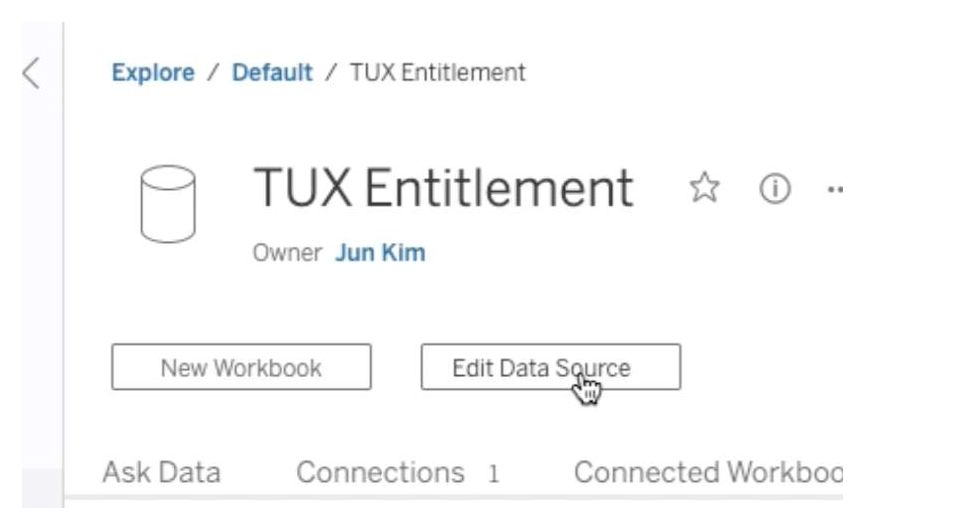
 Edit Published Data Source
This feature makes managing data sources very effortless. Now we can create, edit and rename data sources directly in Tableau Server and Tableau Online, test the changes, and publish—all without leaving the browser. This streamlines the governance and metadata management.
Edit Published Data Source
This feature makes managing data sources very effortless. Now we can create, edit and rename data sources directly in Tableau Server and Tableau Online, test the changes, and publish—all without leaving the browser. This streamlines the governance and metadata management.
 Parameters in Tableau Prep
 speed up and simplify tasks by enabling users to easily change data inputs, data outputs, and values used throughout a flow which makes reusing them much easier.
Supported step types in 2021.4:
Parameters in Tableau Prep
Parameters in Tableau Prep speed up and simplify tasks by enabling users to easily change data inputs, data outputs, and values used throughout a flow which makes reusing them much easier.
Supported step types in 2021.4:
 Tableau 2021.4 Highlights
- Virtual Connections
- Centralized Row-Level Security
- Edit Published Data Source
- Parameters in Tableau Prep
Centralized Row-Level Security - Bring precision and agility to data protection
In general, Row-Level Security (RLS) refers to filtering out rows of data at query time based on the current user's identity. Due to this, different users can view the same table, viz, or report and see only data they are authorized to see. RLS allows scenarios like having a regional manager only see sales created within their team, but not sales from another manager's team.
Rather than implementing RLS individually on every Tableau workbook or data source accessing a sensitive table, virtual connections can be used to centrally define and manage data policies. These policies will be consistently applied across all connected Tableau Flows, Data Sources, or Workbooks that depend on that data. This gives granular control over data security while bringing flexibility to reuse data sources.
Edit Published Data Source
This feature makes managing data sources very effortless. Now we can create, edit and rename data sources directly in Tableau Server and Tableau Online, test the changes, and publish—all without leaving the browser. This streamlines the governance and metadata management.
Parameters in Tableau Prep
Parameters in Tableau Prep speed up and simplify tasks by enabling users to easily change data inputs, data outputs, and values used throughout a flow which makes reusing them much easier.
Supported step types in 2021.4:
- Inputs /Outputs File path/File name
- Published data source name
- Calculated fields
- Filters
Tableau 2021.4 Highlights
- Data Management
- Virtual Connections
- Centralized Row-Level Security
- Tableau Catalog
- Inherited column descriptions
- Create flows from Catalog pages
- Tableau Prep Builder
- Tableau Prep Parameters
- Create Tiles
- Flow output Subscriptions
- Tableau Online
- Connected Apps
- Tableau Bridge Multi-Pool
- Analytics
- Metric Updates
- Show Metric status with colors
- Customize comparison period and data window
- Embed metrics
- Replay Animations
- Web authoring improvements
- Edit published data sources on Server and Online
- Copy/Paste Dashboard Zones
- Metric Updates
In the wake of the confluence of user and technology, the need to impart a seamless experience to both businesses and customers has forced us to reinvent the way we harness technologies.Thus, the latest refinements made to Tableau to ease the process of data management would surely blend into your mainstream working. So, why not take advantage of the improvisation and enjoy a hassle-free connection.
Related Articles

The AI Powered Surge in Corporate Performance Management
We need to do more than what corporate performance management has traditionally enabled to move from strategy to strategic actions while forecasting, monitoring, and managing performance.
What is Corporate Performance Management?
Undoubtedly not a new concept, corporate performance management is often referred to as business or enterprise performance management. Gartner defines corporate performance management or CPM as “an umbrella term that describes the methodologies, metrics, processes and systems used to monitor and manage the business performance of an enterprise”. And that is indeed a broad scope as business performance does touch several areas.
Corporate performance management isn't a matter of technologies or solutions or an isolated activity or strategy—the holistic perspective is crucial. Getting strategic, financial, analytical, and business knowledge is just one aspect of the equation that will help you make better business decisions.
The four crucial techniques linked to effective performance management are listed below:
- Analysis of the chance and choose the high-impact use cases to benefit from artificial intelligence
- Automation of tasks and establishing a long-term strategy to find quick wins for an all-encompassing change with automation
- Capturing of the value by streamlining jobs to manage organisational transformation and adopt an end-to-end process view.
- Integrating Artificial Intelligence (AI) into an operational model to make a transformational impact, analyse data to make wise decisions, and develop the capacity for ongoing improvement
- The past corporate performance management only partially made it possible to foresee the future. But the present AI advancements help in real-time analysis, predictions, and future-oriented decision-making.
- With the help of artificial intelligence, pattern recognition, statistical forecasting, the analysis of vast amounts of market intelligence, decision-making can be made outside the traditional realm of historical information. When AI tracks KPIs and makes more data-based decisions, performance management can improve significantly.
- Immediate feedback Intelligent dashboards built into performance management software offer all the quantifiable metrics a management team could need to make decisions. The benefit, though, is not in the variety. It lies in the capacity to interpret and use data as changes occur in real-time throughout the entire organisation.
- Data consolidation for easy management The tools have the intelligence to gather, group, and combine data from multiple sources, be it departments, spreadsheets, or even companies.
- Make risk management simple The incorporation of tools like what-if models is a crucial benefit of CPM. By simulating the best- and worst-case situations, for example, the model equips managers to reduce risks and make wise decisions.
- Offer primary data access and feedback Managers may easily access information through performance management systems, promoting accuracy and quality.
- Ease of collaboration CPM tools are locally integrated and cloud-connected for all users to keep in sync across all departments.
- Boost the standard of talent management Recruiters and business leaders are now concentrating on employing AI-driven performance management to enhance the caliber of their hiring. It assists them in finding the appropriate talent pool and selecting the best candidates.
- Effective data analytics for problem-solving AI is a real game-changer in performance management systems and helps leaders and stakeholders make data-driven decisions and solve current challenges.
- Developing a collaborative environment Finally, businesses succeed when they concentrate on developing a collaborative environment where there is no place for hierarchy, bias, or inconsistent behaviour. AI in performance management systems will enable executives to spend more time on their employees and provide brilliant ideas.
How has AI impacted CPM?
The face of corporate performance management is changing due to artificial intelligence, among other things, in monitoring, reporting, analysis, forecasting, and analytical intelligence (as provided by analytical applications).
Historically speaking, leveraging data has improved over time, opening more opportunities to learn from the past and present and, most importantly, to comprehend and plan using the proper KPIs. This is true within the broader context of strategy and planning in a corporate performance monitoring, reporting, and analysis environment.
To enable analysis, produce measurements, and changes, AI is integrated into the performance management process. Better performance management procedures can be sped up with artificial intelligence, increasing transparency and sustaining employee interest. Furthermore, corporate performance management enables better leverage of all data in the organisation’s ecosystem and helps to achieve its strategic objectives.
Advantages of a CPM Software
Corporations must adopt process automation in the age of business management intelligence. Here are a few advantages of using a CPM system.
What does Beinex offer?
STRACT by Beinex is an indisputably efficient tool that helps it deliver optimised business performance. It allows businesses to forecast, track, assess, and identify areas for improvement across all operations. Companies can thoroughly and comprehensively analyse all relevant financial and operational metrics across various levels of the business by consolidating data and performance metrics into one centralised database and then measuring this against their strategic goals.
STRACT is a comprehensive solution with features that allow you to create much more accurate and flexible budgets, enhancing your current business and resource planning and forecasting.

Automating Compliance Checks with AWS Systems Manager
The Need for Automating Compliance
As business environments today are rapidly changing and highly regulated, it is important to automate compliance to boost accuracy, efficiency, and scalability. The following aspects emphasize why automating compliance is highly significant. • Amplifies security by complying with data privacy and safety regulations. • Saving time and effort by automating recurring tasks like monitoring, reporting, and audits. • Deploying the required infrastructure faster and in a standardized format. • Boosting accuracy by reducing the risks of human error and consistently adhering to industry standards.
What is an AWS Systems Manager?
A unified management system, an AWS Systems Manager, streamlines infrastructure management by improving visibility and giving you control over your AWS infrastructure. It delivers a suite of tools for managing configurations, automating repetitive tasks, patching systems, maintaining consistent configurations, and securely managing secrets and configurations. The primary features of AWS Systems Manager associated with compliance are: • Compliance Dashboards: They offer a centralized visualization of your compliance status, emphasizing resources that are non-compliant to facilitate faster remediation. • Patch Manager: It automates the deployment and monitoring of patches across your instances. • State Manager: It ensures that your systems are configured to a specific desired state.
Compliance Made Effortless: Automation with AWS Systems Manager
A comprehensive management service, AWS Systems Manager, allows you to automatically accumulate and aggregate data from your AWS resources. It provides a unified view of your AWS environment, making managing and monitoring your resources easier. Compliance, an AWS Systems Manager capability, enables the scanning for inconsistencies in compliance and configuration and offers real-time compliance insights. This capability facilitates drilling down into certain non-compliant resources from the data aggregated from multiple AWS accounts. The additional features and benefits Compliance provides are as follows: • Utilizing AWS Config to see compliance history and monitor changes. • Exporting data to Amazon Athena and Amazon QuickSight to generate organization-wise reports. • Using Amazon EventBridge, State Manager or Run Command to fix issues. • Customizing compliance to develop compliance types to fit your business needs. • Employing AWS Systems Manager for seamless integration of third-party compliance tools and automation of configuration management and vulnerability scanning. AWS Systems Manager facilitates the automation of intricate and recurring tasks associated with configuration, patching, and software installation. It allows businesses to run these tasks across systems simultaneously while minimizing the time needed to effect the changes and ensuring consistency in the process. This execution enables software compliance, including maintaining antivirus definitions up to date, implementing firewall policies, and setting patch baselines. The automation capability of AWS Systems Manager entails streamlining the deployment, maintenance, and remediations of AWS services like Amazon EC2, Amazon S3, and more.
Let’s explore how AWS Systems Manager automates compliance checks:
• Centralizing compliance management: AWS Systems Manager offers a unified compliance dashboard that lets users see the compliance status across different AWS accounts and regions in real-time. The dashboard consolidates data from the state manager and patch manager to centralize compliance management, enabling easy detection and addressing of specific non-compliant resources. • Enforcing configuration: Users can define and implement preferred states for the resources with the State Manager. It ensures consistency in configurations and compliance in setting permissions, configuring firewall rules, or installing software. • Patch Management: It automates the processes of patching applications and operating systems on your instances, allowing users to select authorized patches and schedules for automatic deployment. It makes sure that your systems are up-to-date and stay compliant with the safety standards. • Automating Remediation: AWS Systems Manager allows the automated remediation of non-compliant resources. For example, if a system falls out of compliance due to a missing patch, Patch Manager can trigger an automatic patch deployment to resolve the issue. • Facilitating integration with AWS Config: AWS Systems Manager integrates seamlessly with AWS Config, which helps assess and monitor configuration modifications against compliance rules. This integration facilitates continuous monitoring and automated reporting, ensuring a robust compliance posture.Some of the benefits of using AWS Systems Manager for compliance include:
• Saving time and expediting remediation as automation of compliance processes checks reduces manual effort. • Streamlines the audit processes and ensures audit readiness through meticulous logging and documentation of compliance actions. • Fortifies security by detecting and addressing vulnerabilities on time and ensures your enterprise aligns with the standard security practices. • Leverages existing AWS infrastructure to reduce the requirement for reliable compliance tools, saving costs. • Offers real-time insights into the compliance status across your AWS environment, facilitating proactive management. AWS Systems Manager can be a game changer for businesses looking forward to ensuring compliance with complex regulations and industry standards across a dynamic IT environment. Automating compliance checks boosts accuracy, efficiency, and security, transforming compliance management into a streamlined workflow. Beinex is an AWS consulting partner that lets you navigate the AWS landscape and leverage it for unprecedented business benefits. Connect with us for a free demo: Beinex - Beinex - Your Reliable AWS Partner for Cloud Computing Services
Digital Twins: A Thin Line Between Reality and Virtuality
An actual representative and one fascinating example of digital transformation is the use of "digital twins," which are virtual reproductions of real-world things that have been given artificial intelligence and real-time data. The ‘thing’ can be anything under the moon, from a jet engine to a car. The physical asset's connected sensors gather data that can be transferred onto the virtual model. Now, anyone seeing the digital twin can see essential details regarding how the physical object is faring in the real world. They can, however, be interpreted in various ways, which tends to conceal their accurate, practical application.
A digital equivalent for a physical entity serves as the foundation for digital twins. Every business connection with its clients involves physical elements, from the automotive to the agricultural industries. With the help of digital twins, businesses will be able to extend the advantages of the software world to their physical assets, better meeting the needs of their digital customers.
How do digital twins get to know everything?
The digital data, twins gather from specialists with in-depth topic expertise from other similar assets, helps them learn on their own. After being created, the twins have sensors that enable it to take in any input from its physical twin. This can be used to identify potential problems, gain knowledge, gather feedback on a product, and more. Additionally, they include and use past data to polish their simulations.
The digital twin's architecture
Customarily, digital twins have three layers:
- A connectivity layer that uses SCADA, the Internet of Things, or historians
- A modelling and simulation layer may include a wide range of tools, including artificial intelligence (AI), industry simulators (thermodynamic, fluid-dynamic, chemical, and more), and AI.
- A layer for insight and visualisation that can be created online, with analytics software, or even with mixed reality
The final layer of these three is called "learning feedback," which enables the use of expert feedback and historical data to alter the behaviour of digital twins and the dependability of the physical twin.
Who stands to gain?
Digital twins can contribute to increased productivity in massive engines and intricate machinery. Like industrial settings with cooperative machine systems, digital twins are excellent in enhancing process efficiency. Those sectors that work on large-scale items or projects have the most success with digital twins. Digital twin technology has been used in Formula 1 racing to streamline the competition. Any racing or sports team could employ the digital twin to use a virtual twin in determining areas for strategy and progress.
Consider real estate as another example; a digital twin would link all systems and provide accurate insights and the capacity to evaluate the process. Managers would then be able to refine their plans, improving the structure's viability and effectiveness. Additionally, it would result in lower expenses.
Last but not least, the digital twin notion in healthcare refers to the development of computer models of diseases or even a virtual human body. Customised medications or therapies might be created using a medical twin for each patient. The following industries are going to reap the maximum benefits of digital twins:
- Engineering (systems)
- Automobile manufacturing
- Aircraft production
- Railcar design
- Building construction
- Manufacturing
- Power utilities
- Real estate
- Sports and Racing
- Healthcare
1.Enhance the user experience
Data is essential to comprehend the past, know the present, and anticipate the future. The foundation of any effective user experience programme is effective data management. Digital twins use IoT to collect real-time data from the physical environment. The information gathered is continually analysed, examined, and learned to provide valuable insights. With real-time analytics, businesses may successfully implement user-centric programs.
2.High-quality, innovative products
A competitive advantage that separates the leader from the followers is innovation. Physical asset innovation necessitates significant R&D expenditures. Design, testing, and operation require specialised knowledge due to the high cost of failures. These creative roadblocks can be solved with the help of digital twins. Enterprises can work with the user community to create high-quality offerings in a simulated environment that combines real-time information.
3.Enhance business processes
In terms of consumer annoyance, broken processes and bureaucracy would be at the top. The orchestration, knowledge management, and technological architecture are fragmented and siloed due to the complexity of modern business operations. The numerous systems and processes are brought together under one roof using digital twins, which act as a meta-layer. Digital twins are essential for knowledge management, training, and process optimisation in the complicated future. Additionally, simulations and visualisations support better process management and human learning.
4.Operative flexibility
Operational agility will affect an organisation’s top and bottom lines in a highly competitive marketplace. Black-box algorithms, the enormous amounts of information gathered, and the need for quicker judgments all work against human operators. Digital twins allow a range of diagnostic and prognostic capabilities by utilising enormous amounts of data, technology, and scenario. The human operators can re-enter the process and find strategies for being competitive and flexible.
5.Information security
Information security is a challenge that comes with all the data. Open source, collaborative learning, and knowledge sharing have never had a more compelling argument. We can't advance if data breaches are happening more frequently. Trusted stakeholders could collaborate on a platform provided by digital twins to share information and gain from it. Digital twins can also act as a layer of concealment to protect the confidentiality of the data.
6.Upgraded R&D
Utilising digital twins produces a wealth of data regarding expected performance results, facilitating more efficient product research and creation. Before beginning production, businesses can use this data to gain insights that will help them make the necessary product improvements.
7.Greater effectiveness
Digital twins can aid in monitoring and mirroring production systems even after a new product has entered production to reach and maintain peak efficiency throughout the manufacturing process.
8.Product life cycle
Digital twins can also assist producers in determining how to handle products that have reached the end of their useful lives and require final processing, such as recycling or other actions. They can decide which product materials can be gathered by utilising digital twins.
9.The Future Course
The market for digital twins is increasing, which suggests that even if they are already used in many different industries, demand will persist for a while. The need for digital twins was worth USD 3.1 billion in 2020. It may continue to snowball until at least 2026, rising to a projected USD 48.2 billion, according to specific industry observers.
According to IDC, global spending on products and services that facilitate digital transformation will amount to US$1.97 trillion in 2022, growing at a CAGR of 16.7%. Businesses are transforming the structure of their work to put the client first. Enterprises are taking more significant risks than ever in every aspect of business, from product design to marketing, sales, and even post-sales. Enterprises can use digital twins as a strategy to accomplish the goals of their initiatives for digital transformation.

Top 6 AMS Best Practices to Boost AWS Cloud Security in 2025
What is AWS Managed Services (AMS)?
AWS Managed Services (AMS) is a fully managed service that helps businesses run AWS environments at scale. It adheres to industry best practices for operational excellence, security, and compliance.
• Key Benefit of AWS: AMS enables your company to spend less time managing the complexities of cloud operations and more time focusing on business outcomes.
AMS handles:
• Infrastructure Management: Includes continuous monitoring, patching, and lifecycle management of your AWS resources.
• Security & Compliance: Generates automated compliance checks against NIST, PCI-DSS, GDPR, and HIPAA frameworks.
• Operational Support: 24×7 incident response, backup, disaster recovery, and governance.
• Automation & Optimization: Uses custom runbooks and built-in AWS features to reduce manual labor.
Why AMS Matters in 2025
Cloud adoption is growing, but so is the risk associated with it. Even though many businesses:
• Lack 24/7 monitoring.
• Struggle with regulatory audits.
• Depend on manual vulnerability patching.
AMS offers solutions to mitigate the risks associated with cloud adoption. It resolves the issue by utilizing automation, continuous monitoring, and best practices from AWS. You can implement AMS at scale, without overloading internal teams.
Top 6 AMS Cloud Security Best Practices
1. Prevention: Stop Threats Before They Happen
• Identity & Access Management (IAM): AMS provides real-time validation of modifications, enforces least-privilege policies, and automatically corrects deviations.
• Network Security: AMS configures AWS WAF, Firewall Manager, and Network Firewall to block malicious traffic.
• Patch & Vulnerability Management: AMS automates scanning and patching, including zero-day threats, with Systems Manager + Inspector.
• Backup & Disaster Recovery: With recovery testing and ransomware prevention, AMS fortifies AWS Backup & DRS.
2. Detection: Spot Threats in Real Time
• GuardDuty & Macie: Sensitive data is protected, and anomalous activity is detected.
• Security Hub: Assists with noise reduction, alert aggregation, and issue prioritization.
3. Monitoring & Incident Response
• 24×7 global monitoring with NIST-aligned runbooks.
• Automated incident response using Systems Manager + CloudWatch.
• Integrations with ServiceNow, Jira, Slack, and Teams for faster collaboration.
4. Compliance Made Simple
Adhering to compliance frameworks such as HIPAA, PCI-DSS, SOC, GDPR, and NIST is complex for all companies. AMS embeds compliance controls from day one.
• Continuous Compliance Monitoring: Automated checks via AWS Config rules.
• Audit Trails: CloudTrail & Athena queries for reporting.
• Certified Services: AMS itself is compliant with major frameworks.
5. Governance & Reporting
• Resource Tagging: For governance, cost allocation, and reporting.
• Self-Service Dashboards: Patch compliance, backup coverage, and incident stats.
• Monthly Business Reviews: Joint sessions with Beinex + AWS experts.
6. Security On-Demand: Flexibility When You Need It
AMS Operations on Demand (OOD) lets you scale support instantly for:
• Emergency vulnerability remediation.
• Legacy OS upgrades.
• Firewall operations.
Why You Should Opt for AMS Security?
AWS provides the platform. AMS provides the tools. It ensures:
• Faster ROI → measurable security improvements within 6–12 months.
• Local + Global Expertise → deep knowledge of GCC regulations + AWS global best practices.
• End-to-End Ownership → from planning to monitoring, audits, and response.
Secure Your AWS Cloud with Beinex
Beinex’s Cloud Engineering Services help organizations maximize their AWS investments through robust security frameworks and modernization strategies.
Our Core Offerings Include:
• Cloud Security
• Security Assessment
• Strategy & Implementation
• Well-Architected Review
• Migration & Modernization
• Cloud Migration
• Cloud Automation & DevOps
• Infrastructure Modernization
Whether you are in the early stages of cloud adoption or looking to optimize your existing AWS, we help you achieve your cloud goals.
Connect with us: https://beinex.com/cloud-engineering

AWS Systems Manager: Proven Best Use Cases and a Real-World Success Story
AWS Systems Manager seamlessly operates with both Windows and Linux OS and integrates with CloudWatch metrics, CloudWatch Dashboard, and AWS Config. Moreover, it enables the creation of resource groups spanning various AWS services, allowing for aggregated operational data viewing and facilitating monitoring, troubleshooting, and resource group-specific actions.
Common use cases and best practices for AWS Systems Manager capabilities are listed below:
Automation
Inventory
Maintenance Windows
Parameter Store
Patch Manager
Run Command
Session Manager
State Manager
Managed Nodes
Case Study: A Global Cloud Solutions and Services Company Enhances Scalability and Efficiency with AWS Systems Manager
Client: A Global Cloud Solutions and Services Company
A technology services company that specialises in helping organisations across 120 countries adopt modern technologies and manage them efficiently. They focus on creating solutions for hybrid and multi-cloud environments.
Requirement: Finding Scalability on AWS Systems Manager
The client faced a significant challenge in managing multi-cloud environments at scale reliably and cost-effectively. Manually handling activities across hundreds of thousands of different compute instances was resource-intensive and delayed issue resolution. They needed a solution that could run both on-premises and on the cloud and wanted a single tool for managing their suite of solutions.>
Challenges
Process: Supporting Automation, Staff Productivity, and Transparency on AWS
The client began using AWS Systems Manager in 2015 for various products and extended its use to other cloud environments in 2019. Since 2019, the client has utilised AWS Systems Manager to power patching activities across all major cloud providers they support. They perform mass patching at scale, covering over 62,000 VMs across all their managed services. VM Management automates traditionally manual tasks like patching, agent distribution, server diagnostics, and issue remediation. It significantly reduces labour, costs, and errors associated with manual tasks, enhancing security and efficiency.
SmartTickets, a component in VM Management, handled thousands of incidents and automated responses using AWS Systems Manager, saving time and reducing costs for the company. They also used Amazon CloudWatch for monitoring and observability and automated runbooks for real-time monitoring and alerts.
AWS Systems Manager provides a single-pane view of environments, improving customer visibility and decision-making.
Result: Taking Automation to the Next Level on AWS
The client plans to develop custom runbooks with customers and further automate responses and resolutions using AWS Systems Manager. They have successfully solved industry challenges by saving time, cutting costs, and reducing complexity for both their customers and themselves.
Key Takeaway
The client leveraged AWS Systems Manager to streamline and automate their operations, resulting in improved efficiency, cost reduction, and enhanced customer satisfaction. With automation, they can swiftly respond to and resolve issues, meeting customer expectations effectively.
How Beinex Can Help You
Beinex is an AWS consulting partner, and we empower customers to host their BI solutions and much more on the cloud. Our cloud migration experts bring in best-in-class stability and reliability by understanding your business strategy and working closely with you to deploy AWS infrastructure as a service.