How AI Decision-Making is Improving Enterprise Outcomes
Blog
Share 
تابلو 2021.2: ميزات جديدة
 8 July 2021
  Sanchit Katiyar
 لقد غيّر هذا الطريقة التي نفسر بها المعلومات من خلال إعطائنا نظرة على الرؤى السابقة، ولكن أيضًا للتنبؤ بالأحداث المستقبلية، مما يسمح لنا باتخاذ قرارات مستنيرة.
تابلو2021.2.2 يتضمن "طرح البيانات وشرحها" للمشاهدين، والسماح بأسطح المكتب المتصلة والمجموعات والعديد من الميزات الأكثر قيمة. بعض التحسينات الرئيسية مذكورة أدناه.
توفر المجموعات تنسيقًا جديدًا لتنظيم المحتوى عبر مواقعك على كل من تابلو أونلاين والخادم في مجلدات يمكن التحكم فيها. يمكنك تجميع العناصر معًا من مصنفات ومشاريع مختلفة ويمكنك إعادة استخدام المحتوى في سياقات متعددة بدون تخزين أو موارد إضافية. تعمل المجموعات أيضًا على تسهيل مشاركة المحتوى حول موضوع مركزي. على سبيل المثال، يمكنك إنشاء مجموعة "المبيعات اليومية" التي تتضمن لوحات المعلومات مع إحصاءات المبيعات اليومية وتدفق بيانات إي تي إل ومصادر البيانات وما إلى ذلك.
تساعدك المجموعات على تجميع بياناتك. يتم منحك حرية إنشاء واستكشاف وحفظ المحتوى الخاص بك بشكل خاص. الميزة الرئيسية الأخرى لـ "المجموعات" هي أنه يمكن للمستخدمين إنشاء مجموعات مخصصة تكون بشكل افتراضي خاصة. ومع ذلك، يتم منحك خيار مشاركة المجموعة مع أي مستخدمين معتمدين تختار توفير الوصول إليهم.
1) ) تحسين إدارة المستخدم


مع الإصدار 2021.2، سيتم حذف المنشئ المشترك تلقائيًا عندما يحذف المسؤول مستخدمًا إما عبر واجهة المستخدم أو واجهة برمجة تطبيقات REST، بدون الخطوة الإضافية لإعادة تعيين ملكية الاشتراك.
2) تحسينات بيانات آسك
آسك داتا لينسز
تم تقديم ميزة جديدة مع هذا التحديث وهي "Ask Data Lenses". آسك داتا لينسز يتيح سهولة معالجة البيانات باستخدام أعمدة محددة ومرادفات قيمة، كما يوفر أسئلة مقترحة للسماح ببيانات أكثر شمولاً من مجموعة متنوعة من المصادر.
يجلب التحديث نوع محتوى جديدًا هو آسك داتا لينسز، مما يجعل من السهل تنظيم البيانات مع تعريف مرادفات العمود والقيمة والأسئلة المقترحة حتى تتمكن من الاستفادة بشكل أفضل من مصادر البيانات المنشورة الحالية.)
يتم إنشاؤها جنبًا إلى جنب مع مصادر البيانات المنشورة حالة (حالات) استخدام آسك داتا مع الحفاظ على مصدر البيانات الأساسي ككيان خاص به.
هذه "العدسات" يمكن مقارنتها بـ "المشاهدات". بالنسبة لأولئك الذين يتمتعون بالبراعة في استخدام إس كيو إل، حيث يمكنك كتابة عبارات محددة خصيصًا لاستخراج الأعمدة المطلوبة، وإعطاء التعريفات، مع الحفاظ على تكامل مصدر البيانات. وبالمثل، بمجرد إنشائها، يمكن للمشاهدين الوصول إلى "العدسات"، مما يفتح "آسك داتا" لفئة جديدة من المستخدمين الذين يكافحون لخدمة احتياجاتهم بأنفسهم اليوم.
البحث عن الكيانات
يُظهر البحث عن الكيانات للمستخدمين نتائج بحث الكلمات الرئيسية، مثل محرك بحث جوجل. يمنحك آسك داتا نتائج البحث كلمة بكلمة، مما يمنحك ملاحظات فورية حول بياناتك وما يمكن أن يفعله آسك داتا. سيختار آسك داتا تلقائيًا التفسير الأكثر صلة ببحثك، وتساعدك نتائج البحث هذه في بناء هذا الإدخال بشكل أكثر فاعلية عن طريق تحديد الحقول والقيم الصحيحة في مجموعة البيانات. اطلب من البيانات التعلم من اختياراتك لاختيار إعدادات افتراضية أكثر ذكاءً لعمليات البحث المستقبلية.

يتيح أسلوب إم إف إيه MFA للمستخدمين إضافة طبقة أمان إضافية بسهولة إلى حساباتهم.
تفتح هذه الميزة القدرة لعملاء تابلو أونلاين الذين يستخدمون مصادقة معرف تابلو الأصلية لفرض المصادقة متعددة العوامل (MFA)عندما يقوم المستخدمون بتسجيل الدخول إلى مواقعهم. يمكن للمستخدمين النهائيين استخدام تطبيقات مثل سيلزفورس أوثينتيكيتورأو جوجل أوثينتيكيتورلإجراء تحقق إضافي من هويتهم عند تسجيل الدخول إلى تابلو.


يجعل أسلوب إم إف إيه MFA الأمر أكثر صعوبة بالنسبة للتهديدات الشائعة مثل هجمات التصيد الاحتيالي وعمليات الاستيلاء على الحسابات. تعد MFA واحدة من أسهل الطرق وأكثرها فعالية التي يمكن للعملاء من خلالها تعزيز أمان تسجيل الدخول وحماية أعمالهم وبياناتهم من التهديدات الخارجية.
قبل اصدار 2021.2 ، كان على المستخدمين تغيير كل اسم رأس يدويًا. على سبيل المثال، إذا أراد المستخدم تغيير "العميل" في بداية أسماء رؤوس متعددة، فسيلزمه النقر فوق اسم كل حقل وتغيير / إزالة "العميل" بشكل فردي في اسم الحقل. ليست مشكلة كبيرة عندما يكون هناك أقل من 10 أعمدة للتحديث. ومع ذلك، بالنسبة للعملاء الذين لديهم مجموعات بيانات تتكون من أكثر من 50 عمود، فمن الصعب تغيير اسم كل حقل بشكل فردي. تتيح هذه الميزة للعميل إضافة بادئة بسرعة أو إعادة تسمية أو إضافة لاحقة إلى حقول متعددة بشكل جماعي.

يعمل تابلو الإعدادي على توسيع إمكانياته في الإخراج لتشمل جوجل بيج كويري، مما يتيح لك إضافة أو تحديث البيانات في جوجل بيج كويري ببيانات نظيفة ومجهزة من التدفق الخاص بك في كل مرة يتم تشغيلها.
تابلو لسطح المكتب2020.2 - الميزات الرئيسية 1)الخرائط: دعم الملفات المكانيةتوفر ميزة علامات التحكم في الطبقات SP1 عنصر تحكم يسمح للمستخدمين بتبديل رؤية الطبقات على خريطة. يعمل عنصر التحكم مثل المرشح وللمستخدم الحرية في اختيار الطبقة (الطبقات) التي سيتم عرضها للإجابة على سؤاله. بالإضافة إلى ذلك، يمكن للمستخدم التحكم في تفاعل الخريطة عن طريق تمكين أو تعطيل التحديد على الطبقة المعنية بشكل انتقائي.

زر التبديل - يمكن لمستخدمينا الآن استخدام زر لإظهار / إخفاء أي منطقة لوحة تحكم، عائمة أو كطبقة. كانت هذه الوظيفة تقتصر في السابق على الحاويات العائمة الأفقية والعمودية فقط.
دعم URL للصور - يمكن للمستخدمين الآن إضافة الصور عبر عناوين URL الخارجية، والتي توفر أيضًا دعم GIF للصور على الإنترنت والمصنفات. تحميل هذه الصور سيكون في الوقت المناسب
بدأ تابلو 2021.1 مع اكتشاف أينشتاين وهو محرك آلي للتعلم الآلي يعيش داخل تابلو سي آر إم. سيكون متاحًا كملحق للوحة القيادة، في محرك الحساب وفي إعداد تابلو. ستتمكن الآن من استخدام القوة التنبؤية والتعليمية لاكتشاف أينشتاين للتحليل في تابلو. يمكن للمستخدمين التفاعل مع التوقعات؛ لذلك، يمكنك اكتشاف رؤى مخفية.
Related Articles

Business Intelligence Throws a Bash for Entrepreneurs
Businesses use BI for a multitude of purposes. Many people use it to assist with hiring, compliance, production, and marketing. When it comes to BI, it's impossible to find a department that doesn't benefit from more data to work with.
Faster and accurate reporting and data analysis, better data quality, improved employee satisfaction, lower expenses, increased revenue, and the ability to make insightful business decisions are just a few of the many benefits that businesses may gain by adopting BI into their business models. Many more benefits follow:
1.Rapid and precise reporting
Using templates or customised reports, employees can monitor KPIs using various data sources, including financial, operational, and sales. The pieces are created in real-time and use the most up-to-date data, allowing businesses to act quickly. Most reports include straightforward visualisations such as graphs, tables, and charts. Some BI software reports are dynamic, allowing users to experiment with various variables or quickly access data.
2.Data integration
Most businesses keep data in a variety of formats and across multiple solutions. Data processing and reporting become complicated and time-consuming as a result. Using a business intelligence solution, you can reduce data storage complications in various tools and spreadsheets.
BI tools connect all the data in your workplace in various forms with your existing software solution and use real-time data to create robust business decisions. Numbers do not deceive. A fully integrated BI solution can help you achieve total company success.
3.Making timely decisions
BI assists your company in growing. Businesses that use BI can quickly extract facts from massive amounts of disorganised data. With instant access to business data, you can analyse internal data and create better business decisions. BI teams ensure that the organisation receives real-time advanced business reports to better utilise the data.
Tasks like data collection, entry, analysis, control and use require substantial human time and effort. With the assistance of an automated BI tool, data can be collected, analysed, managed, and used more quickly and effectively. Reports can be generated soon because the data is already right behind the scenes.
4.Revenue growth
Revenue growth is an important goal for any business. Through comparisons across multiple dimensions and recognising sales weaknesses, data from BI tools can help companies to ask insightful questions about why things happened. Revenue is more likely to increase when enterprises listen to their customers, track their competitors, and enhance operations.
5.Recognising market trends
Discovering great possibilities and implementing the strategy with supporting data can provide organisations with a competitive advantage, long-term profitability, and a complete picture. Employees can combine external market data with internal data to identify new sales trends and business challenges by studying consumer data and market conditions.
6.Improving customer satisfaction
Business Intelligence tools can assist firms in better understanding customer behavioural patterns. Most organisations collect customer feedback in real-time, and this data can aid in client retention and acquisition. These techniques may also help identify buying patterns, allowing customer service representatives to anticipate demands and provide better assistance.
7.Improved operational efficiency
BI solutions consolidate disparate data sources, assisting with a company's overall organisation so that managers and employees can focus on delivering accurate and timely reports rather than hunting for information. Employees can focus on their short and long-term goals and examine the impact of their decisions when they have up to date and correct information.
8.Bigger profit margins
Most businesses are concerned about their profit margins. Fortunately, Business Intelligence technologies can identify inefficiencies and aid in margin expansion. Aggregated sales data assists firms in better understanding their clients and enables sales teams to establish more effective methods for allocating resources.
9.Reduce the risks
Business Intelligence solutions help you to reduce risks by inputting data into action. By tracking customer activity, you may quickly uncover fraudulent activities. You can also monitor employee behaviour to abide by industry regulations.
Using the data and knowledge about the current economic situation, you can examine credit portfolios and identify potential delinquency cases. Business Intelligence solutions offer a proactive approach to risk management in any financial industry.
10.Evaluate and improve inputs
Employees can improve the process of arriving at insights using fully integrated BI by implementing well-known accessible technologies. Individuals can successfully analyse and investigate information when data is received quickly. Personnel can engage with one another without barriers, and clever business plans can be developed.
11.Reduced training requirements
Business Intelligence can let employees access a variety of information. Implementing business tools that are widely available, common, and well-supported can considerably minimise an organisation's training costs.
12.Gain a competitive advantage
Personalisation is a hot topic in every industry, and the banking and finance sectors are no exception. As a result, having a competitive advantage is essential. You may quickly modify consumer experiences with business intelligence technology based on your data. Market trends can be used to strategise new investment opportunities, analytics can predict customer behaviour, and products can be tailored to each client's individual needs.
13.Employee authorisation
Suppose users are given direct access to simple data that can be comprehended and analysed quickly. In that case, performance may be considerably enhanced, and all company plans can be promoted if employees can process the data in various ways. Business Intelligence includes a variety of healthy, lively business score registering, investigation, and reporting equipment to assist quick and better decision making by practically every employee of the organisation.
Final Thoughts
To cite from Information Week, it is predicted that a third of large-scale organisations will adopt decision intelligence by 2023 (Source: Information Week). Business intelligence software has several advantages. It's a burgeoning sector with numerous demonstrated benefits when correctly handled. Users can obtain specific insight into your company's past, present, and future to make informed business decisions. BI software collects, organises, compiles, and visualises critical KPIs. It reduces waste and guesswork while also improving inventory management and sales intelligence. This potent combination of business intelligence software capabilities and benefits provides customers with a core competency that can make a huge difference.

Downturn or Not: Investments in Digital Transformation Should Continue
The world expects a financial meltdown soon, and everyone has rolled up their sleeves to face it. Recession impacts are like separating rice from its husk; it differentiates winners from losers. Even if it is going to be a rocky year, companies should take it as a wake-up call to adopt new strategies and invest in digitalisation to move ahead.
During the pandemic, digitally advanced companies won a massive market share compared to those lagging in adopting digital transformation. They managed their supply chain and managed to sell through online platforms. It shows that the winners were better equipped, and they invested in facing the future. The pandemic revealed to us a guideline on how to be prepared and how we should respond.
The 2023 Gartner CIO and Technology Executive Survey reports that EMEA CIO business priorities for the remainder of 2022 and next year are growth and digital transformation, with the top areas of increased spending in 2023 including cyber and information security (70%), business intelligence and data analytics (53%), and cloud platforms (48%). Approximately 34% are increasing investment in artificial intelligence (AI) and 24% in hyper-automation as well. https://www.cio.com/article/411566/
How does digital transformation aid during an economic meltdown?
Risks are a common scenario for all kinds of businesses, and minimising risks equals future-proofing your organisation from a significant fall. But how? Through digital transformation, companies enhance consumer experiences, expand digital products, and build brand equity. Companies’ technologies ready bounded on their digital journey by investing in robotic process automation or cloud-based information management technology is sure to reap benefits. Digital initiatives can help to:
- • Manage interactions with clients, projects, and engagements.
- • Cut down on labour-intensive tasks through automation
- • Automate client or customer services
- • To make faster decisions and increase operational efficiency
- • Create a stronghold for information security
- • Develop new products and services
- • Generate a competitive advantage
Major Goals of Digital Transformation
Enhancing Operational EfficiencyProduction, marketing, finance, accounting, and other processes are becoming more streamlined and trustworthy because of digital transformation. Digital marketing is becoming considerably more effective due to modern business technologies that enable it to get, analyse, and change crucial data for marketing and other uses.
Faster Decision MakingMost of the time, companies benefit from big data by placing data analysis methodologies at the core of their digital transformation strategy. To make the most of it, this data can be exploited by robust tools and turned into crucial business information. For targeted marketing campaigns and SEO plans, these outcomes can be utilised. With the help of a fully integrated digital transformation making decisions are simple.
Enabling Business TransparencyA company's potential to streamline business operations depends on effective transparency management. Since firms now use new communication channels to create transparency between higher authorities and employees, they can better disrupt the conventional working structure owing to digital transformation. Companies need digital platforms to assign responsibilities and assist them in running businesses. Examples of digital breakthroughs that help with effectively managing corporate transparency include analysed data, forecasting models, and online customer support services.
Driving Digital Transformation Amidst the Upcoming DownturnCIOs can adopt three effective tactics to move forward with digital initiatives: empowering the workforce, ensuring financial and sustainable growth, and by implementing a robust cybersecurity system.
Empowering the WorkforceRepetitive and time-consuming tasks can be automated to create a more engaged employee group. Tools and technologies using AI can unburden employees, increasing their productivity and capability. Companies can experiment by incorporating online and onsite working modes to stay ahead of the pack.IT and HR can go hand in hand together to provide an elevated employee experience, resulting in a high employee retention level.
Adopting Intelligent Connected InfrastructureAI, IoT, the cloud, analytics, and edge computing are all blended by Intelligent Connected Infrastructure (ICI) to share data among infrastructures, such as bridges, highways, and ports. Investing in ICI will boost commercial and societal progress while enhancing citizens’ quality of life. Implementing an Energy Management and Optimisation System (EMOS) to reduce energy usage can help to face future challenges and convert that into revenue sources. The strategy of blending finance and sustainability helps to win over customers, employees and investors.
Implementing a Robust Cybersecurity SystemCybersecurity is a rising concern for all enterprises, and not investing in it can invite risks. Developing threat intelligence platforms to prioritise and address cyber security threats is a measure to keep away from vulnerabilities. Continuous monitoring and comparing protection levels with other companies reduces the threat rates.
Summing UpThe future is unpredictable, and so are the risks, but businesses should be well-prepared to face it by taking strategic initiatives for technological developments. Past experiences proved that investments in technology wouldn’t go astray and can reap profits even at times of uncertainty. Recent research advises CIOs should not shy away from changes and be prepared with a roadmap to face macroeconomic uncertainty with digitalisation.
Beinex OfferingsBeinex Digital, a part of Beinex Holdings, is a digital transformation entity with a comprehensive suite of independent products focused on addressing specific business gaps, use cases, and needs. It incorporates a spectrum of solutions related to employee health and safety, enterprise product management, performance management, and audit & risk management.
To know more about us: https://beinex.com/beinex-digital/

The Strategic AI Deployment: Integrating Llama 3 in the Snowflake Ecosystem
Businesses are indulging in the continuous endeavour to leverage the full potential of their data, and they are constantly seeking innovative solutions for the same. A solution capable of gaining traction is the integration of Meta Llama 3 into the Snowflake ecosystem. Beinex has brought this to fruition by establishing an innovative work model that guarantees an application that functions within Snowpark Container Services and harnesses the capabilities of Llama 3.
 Figure 1: Screenshot from DocAI. Zaki Document Chatbot (DocAI) tapping into Llama 3 by Meta and running in the Snowflake ecosystem.
Beinex tested Llama 3 on its in-house DocAI, a solution that runs on Snowflake using Snowpark Container services. The DocAI chatbot solution offers the flexibility to chat with documents such as PPT, PDF, word files, and text files. It currently uses llama3. Llama 3 is a major leap forward, establishing new standards for large language models. Its extensive training data, improved quality, and increased context length make it a powerful choice for document-related tasks, including our DocAI chatbot solution. The article will explain how Beinex deployed Llama 3 in the Snowflake ecosystem in the upcoming sections.
Recently, notable advances have been made in large language models — sophisticated natural language processing (NLP) systems equipped with billions of parameters. These models have demonstrated remarkable abilities, including generating creative text, solving complex mathematical theorems, predicting protein structures, and more. They illustrate the immense potential benefits that AI can offer to billions of people on a global scale.
Meta’s Llama (Large Language Model Meta AI), a state-of-the-art foundational large language model, is designed to support researchers in advancing their work within AI. By providing access to smaller yet highly efficient models like Llama, Meta aimed to empower researchers who may not have access to extensive infrastructure to delve into the study of these models. This democratization of access is pivotal in fostering innovation and progress in this dynamic and crucial field.
Figure 1: Screenshot from DocAI. Zaki Document Chatbot (DocAI) tapping into Llama 3 by Meta and running in the Snowflake ecosystem.
Beinex tested Llama 3 on its in-house DocAI, a solution that runs on Snowflake using Snowpark Container services. The DocAI chatbot solution offers the flexibility to chat with documents such as PPT, PDF, word files, and text files. It currently uses llama3. Llama 3 is a major leap forward, establishing new standards for large language models. Its extensive training data, improved quality, and increased context length make it a powerful choice for document-related tasks, including our DocAI chatbot solution. The article will explain how Beinex deployed Llama 3 in the Snowflake ecosystem in the upcoming sections.
Recently, notable advances have been made in large language models — sophisticated natural language processing (NLP) systems equipped with billions of parameters. These models have demonstrated remarkable abilities, including generating creative text, solving complex mathematical theorems, predicting protein structures, and more. They illustrate the immense potential benefits that AI can offer to billions of people on a global scale.
Meta’s Llama (Large Language Model Meta AI), a state-of-the-art foundational large language model, is designed to support researchers in advancing their work within AI. By providing access to smaller yet highly efficient models like Llama, Meta aimed to empower researchers who may not have access to extensive infrastructure to delve into the study of these models. This democratization of access is pivotal in fostering innovation and progress in this dynamic and crucial field.
Users can benefit from enhanced text understanding and generation
Enables more efficient and accurate data processing, analysis, and decision-making
Empowers users to interact with their data more intuitively and naturally
Drives greater productivity and insights within the Snowflake environment
Traditionally, utilizing modern LLMs at scale has necessitated reliance on proprietary services, often requiring organizations to abandon control over their data to service providers. This compromise between data residency and accessing advanced AI capabilities has been a conflict for many.
However, a solution has emerged with Beinex's innovative approach and successful Proof of Concept (PoC). Beinex has devised a model ensuring that applications function seamlessly within Snowpark Container Services while harnessing the power of Llama 3. This integration means organizations can now deploy Llama 3 directly within the Snowflake ecosystem, eliminating the need for reliance on external proprietary services.
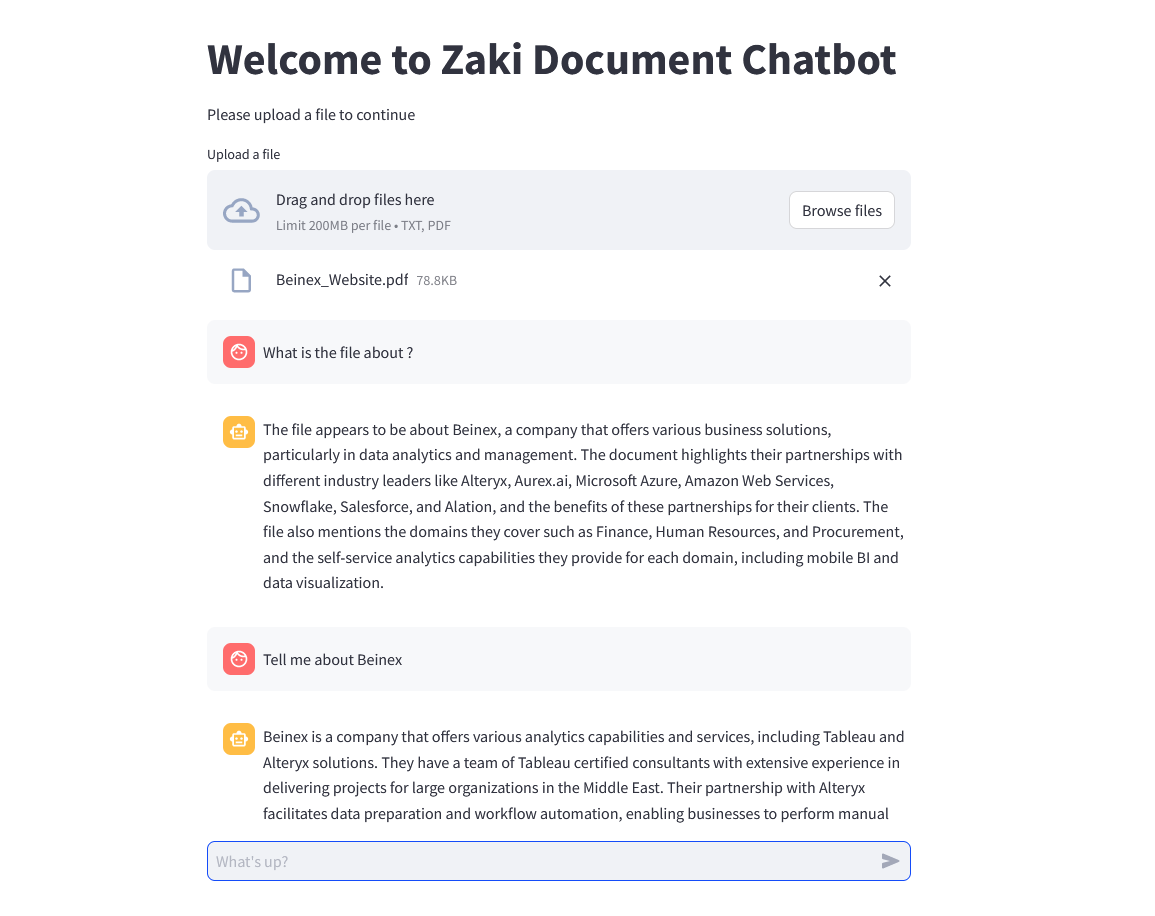 Figure 2: Zaki Document Chatbot (DocAI) in action!
Superior AI apps courtesy of Llama 3: Allows organizations to harness the full potential of this advanced LLM. Llama 3 offers avant-garde capabilities in natural language processing and generation, enabling the development of superior AI applications with enhanced performance, accuracy, and efficiency.
Data residency: Ensures that organizations maintain control over their data residency.
With Snowflake's robust data governance and compliance features and Llama 3's deployment within the same ecosystem, organizations can confidently adhere to data residency requirements and regulations, ensuring that sensitive data remains within specified jurisdictions or regions.
Scalability: Provides organizations with remarkable scalability for their AI applications.
This seamless scalability empowers organizations to handle large volumes of data and accommodate growing user demands without compromising performance.
Easy monitoring: Simplifies the monitoring and management of AI applications.
Snowflake's intuitive interface and comprehensive monitoring tools enable organizations to easily track the performance, usage, and health of their deployed Llama 3 models. It facilitates proactive identification of issues, optimization of resources, and overall better management of AI workloads, ensuring smooth and efficient operations.
By leveraging Llama 3 within Snowflake, organizations can alleviate data sovereignty and control concerns. They can rest assured that their precious and sensitive data remains within their realm of control while still being able to build and scale superior applications. This development marks a significant milestone in bridging the gap between data residency requirements and accessing the most effective LLM technology.
-Mebin Joy
Figure 1: Screenshot from DocAI. Zaki Document Chatbot (DocAI) tapping into Llama 3 by Meta and running in the Snowflake ecosystem.
Beinex tested Llama 3 on its in-house DocAI, a solution that runs on Snowflake using Snowpark Container services. The DocAI chatbot solution offers the flexibility to chat with documents such as PPT, PDF, word files, and text files. It currently uses llama3. Llama 3 is a major leap forward, establishing new standards for large language models. Its extensive training data, improved quality, and increased context length make it a powerful choice for document-related tasks, including our DocAI chatbot solution. The article will explain how Beinex deployed Llama 3 in the Snowflake ecosystem in the upcoming sections.
Recently, notable advances have been made in large language models — sophisticated natural language processing (NLP) systems equipped with billions of parameters. These models have demonstrated remarkable abilities, including generating creative text, solving complex mathematical theorems, predicting protein structures, and more. They illustrate the immense potential benefits that AI can offer to billions of people on a global scale.
Meta’s Llama (Large Language Model Meta AI), a state-of-the-art foundational large language model, is designed to support researchers in advancing their work within AI. By providing access to smaller yet highly efficient models like Llama, Meta aimed to empower researchers who may not have access to extensive infrastructure to delve into the study of these models. This democratization of access is pivotal in fostering innovation and progress in this dynamic and crucial field.
What is Llama 3?
Meta's latest advancement in the LLM (Large Language Model) series is Llama 3, the most sophisticated model with considerable advancements in performance and AI capabilities. Llama 3, built upon the architecture of Llama 2, is offered in 8B and 70B parameters, each featuring a base model and an instruction-tuned version tailored to enhance performance in specific tasks, particularly AI chatbot conversations. According to Meta, Llama 3 sets a new standard for open-source models, rivalling the performance of proprietary models available today. Llama 3 models will soon be accessible across various platforms, including AWS, Google Cloud, Hugging Face, Databricks, Kaggle, IBM Watson, Microsoft Azure, NVIDIA NIM, and Snowflake. Capabilities such as reasoning, code generation, and instruction following have seen substantial enhancements, rendering Llama 3 more adaptable and controllable. Meta plans to introduce additional capabilities, longer context windows, expanded model sizes, and enhanced performance. Utilizing Llama 3 technology, Meta AI emerges as one of the premier AI assistants globally, offering intelligence augmentation and support across various tasks, including learning, productivity, content creation, and connection facilitation.Llama 2 vs Llama 3
According to Meta, the newly introduced models, Llama 3 8B with 8 billion parameters and Llama 3 70B with 70 billion parameters, represent a significant advancement in performance compared to their predecessors, Llama 2 8B and Llama 2 70B. Meta describes these models as a ‘major leap’ in performance. Llama 2 serves research and commercial purposes, excluding the top consumer companies globally. Llama 2 boasts enhancements such as training on 40% more data, doubling the context length, and leveraging a vast dataset of human preferences to ensure safety and helpfulness, backed by over 1 million annotations. On the other hand, Llama 3 represents the next step in Meta AI's LLM evolution, catering to research and commercial applications, provided monthly active users are under 700 million. Positioned as the successor to Llama 2, Llama 3 showcases state-of-the-art performance on benchmarks and is lauded by Meta as the 'best open-source model of their class.'Ollama
There were times when accessing Large Language Models (LLMs) was restricted to cloud APIs offered by major providers like OpenAI and Anthropic. While these cloud API providers continue to dominate the market with user-friendly interfaces facilitating easy access for many users, it's important to recognize the trade-offs users make beyond the costs associated with pro plans or API usage. This trade-off involves granting providers full access to chat data. For those seeking to securely run LLMs on their hardware, the alternative has typically involved training their LLMs. Ollama, an open-source application, is designed to enable users to run, create, and share large language models locally through a command-line interface on MacOS and Linux. With Ollama, running LLMs on personal hardware requires minimal setup time. It caters to individuals seeking to run LLMs on their laptops, maintain control over their chat data without involving third-party services, and interact with models through a straightforward command-line interface. Additionally, Ollama offers various community integrations, including user interfaces and plugins for chat platforms.Deploying Llama 3 in the Snowflake Ecosystem: What Beinex Did?
Deploying Llama 3 in the Snowflake Ecosystem means integrating the advanced language capabilities of Llama 3, the latest version of Meta’s language model, into the Snowflake data platform. It represents a significant breakthrough for organizations seeking to maintain control over their data. It allows users to directly leverage Llama 3's powerful natural language processing capabilities within Snowflake for various tasks such as data analysis, querying, and generating insights.
Figure 2: Zaki Document Chatbot (DocAI) in action!
Deploying Llama 3 in the Snowflake Ecosystem: How Beinex Did it?
Here’s a detailed guide on deploying Llama 3 on Snowflake Container Services: Step 1: Create Necessary Objects -- Run by ACCOUNTADMIN to allow connecting to Hugging Face to download the model -- Stage to store LLM models CREATE STAGE <stagename> IF NOT EXISTS models DIRECTORY = (ENABLE = TRUE) ENCRYPTION = (TYPE='SNOWFLAKE_SSE'); -- Stage to store YAML specs CREATE STAGE <stagename> IF NOT EXISTS specs DIRECTORY = (ENABLE = TRUE) ENCRYPTION = (TYPE='SNOWFLAKE_SSE'); <br. -- Image repository CREATE OR REPLACE IMAGE REPOSITORY images; -- Compute pool to run containers CREATE COMPUTE POOL GPU_NV_S MIN_NODES = 1 MAX_NODES = 1 INSTANCE_FAMILY = GPU_NV_S; Step 2: Docker Image Code - ollama FROM ollama/ollama RUN $(ollama serve > output.log 2>&1 &) && sleep 10 && ollama pull llama3 && pkill ollama && rm output.log ENTRYPOINT ["ollama"] CMD ["serve"] Step 3: Tag and Push the Docker Image docker tag ollama .registry.snowflakecomputing.com/db/schema/image respository /ollama docker push .registry.snowflakecomputing.com db/schema/image repository /ollama Step 4: Docker Image - UDF FROM python:3.11 WORKDIR /app ADD ./requirements.txt /app/ RUN pip install --no-cache-dir -r requirements.txt ADD ./ /app EXPOSE 5000 ENV FLASK_APP=app CMD ["flask", "run", "--host=0.0.0.0"] App.py content is given below : from flask import Flask, request, Response, jsonify import logging import re import os from openai import OpenAI client = OpenAI( base_url='http://ollama:11434/v1', api_key="EMPTY", ) model = "llama3" app = Flask(__name__) app.logger.setLevel(logging.ERROR) def extract_json_from_string(s): logging.info(f"Extracting JSON from string: {s}") # Use a regular expression to find a JSON-like string matches = re.findall(r"\{[^{}]*\}", s) if matches: # Return the first match (assuming there's only one JSON object embedded) return matches[0] # Return the original string if no JSON object is found return s @app.route("/", methods=["POST"]) def udf(): try: request_data: dict = request.get_json(force=True) # type: ignore return_data = [] for index, col1 in request_data["data"]: completion = client.chat.completions.create( model=model, messages=[ { "role": "system", "content": "You are a bot to help extract data and should give professional responses", }, {"role": "user", "content": col1}, ], ) return_data.append( [index, extract_json_from_string(completion.choices[0].message.content)] ) return jsonify({"data": return_data}) except Exception as e: app.logger.exception(e) return jsonify(str(e)), 500 Step 6: YAML File spec: containers: - name: ollama image: <SNOW_ORG-SNOW_ACCOUNT>.registry.snowflakecomputing.com/ db/schema/image respository /llama3 resources: requests: nvidia.com/gpu: 1 limits: nvidia.com/gpu: 1 env: NUM_GPU: 1 MAX_GPU_MEMORY: 24Gib volumeMounts: - name: llm-workspace mountPath: /<stage name> - name: udf image: .registry.snowflakecomputing.com/ db/schema/image respository /ollama_udf endpoints: - name: chat port: 5000 public: false - name: llm port: 11434 public: false volumes: - name: llm-workspace source: "@<llm stage_name>" Step 7: Upload YAML File and Create Service Upload the YAML file to the created stage, where the stage name in the YAML file should match the stage created in Step 2. -- Create service create service llama3 IN COMPUTE POOL<name of compute pool created> FROM @dash_stage SPECIFICATION_FILE = '<name of yaml file uploaded>'; Step 8: Create Service Function Create a service function on the service (after it starts). create or replace function llama3(prompt text) returns text service=llama3 endpoint=chat; Check Service Status Use the following command to check the status of the service: SELECT v.value:containerName::varchar container_name, v.value:status::varchar status, v.value:message::varchar message FROM ( SELECT parse_json(system$get_service_status('<service name>')) ) t, LATERAL FLATTEN(input => t.$1) v;Benefits of Deploying Llama 3 in the Snowflake Ecosystem
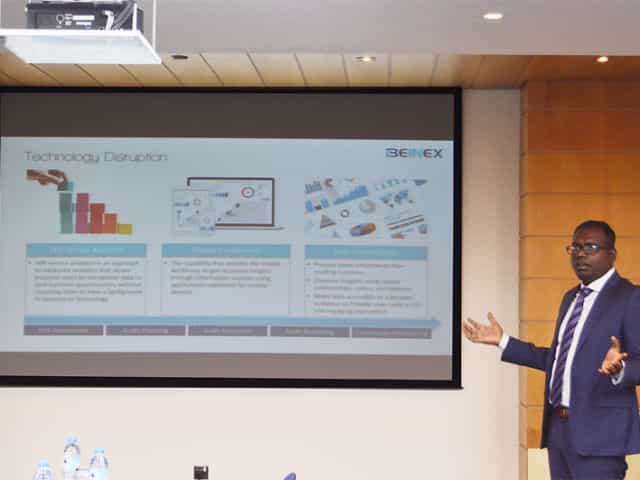
SELF SERVICE AUDIT ANALYTICS
TRANSFORM THE WAY YOU AND YOUR ORGANIZATION WORK WITH DATA –SELF SERVICE AUDIT ANALYTICS
Increasing complexities of risks and incessant emergence of disruptive technologies are demanding substantial change in internal audit processes. In today’s world of constant disruption, internal audit should evolve into a dynamic and future-oriented function. Businesses need broad-spectrum audit processes that extend beyond reviewing the obvious. Auditors should adopt forward-looking IA approaches, and should be able to provide deeper and valuable insights on strategy, execution, emerging risks, and hidden opportunities.
The 2016 Deloitte Global Chief Audit Executive Survey that polled more than 1200 CAEs from 29 countries and a diverse range of industries, reaffirms the growing need to conduct analytics-based auditing. More than a three quarter of the CAEs (79%) recommend the need for digital disruption and innovation to transform internal audit and enhance its value. The survey also cited the increasing relevance of cutting-edge technologies such as artificial intelligence, cognitive computing, and visual analytics.
Is skill-gap a concern?
More than half of CAEs (57%) who participated in the survey expressed their intense dissatisfaction about inadequate skills and insufficient expertise of audit teams.
When left unaddressed, these skill gaps will weaken auditors’ capabilities to deliver on changing stakeholder expectations. Stakeholders expect more forward-looking analysis to uncover risks and hidden opportunities. Or, gone are the days of static audit reports and analysis of sample data.
The Deloitte survey also cites risk anticipation (39%) and data analytics (34%) as the two groundbreaking innovations that are most likely to impact internal audit within the next five years. Changing business landscapes, technological advancements, and proliferation of data have brought forth the imminent need to leverage analytics and data visualization to increase the impact, influence, and effectiveness of internal
audit
Analytics Adoption Challenges
Even after 30 years of inception of data analytics, many auditors continue to adopt conventional internal audit methods and lag in technology adoption. Wondering why? Here are some of the reasons:
Can technology disruption be a savior?
Advancements in technology are fundamentally changing the nature of the audit and improving its effectiveness and relevance. Here are a few game-changing technology solutions that auditors can harness effectively to enhance the way they work with data:
1.Self-service analytics – Smart analytics for all
Self-service analytics is no more a buzzword. It’s the new norm. Self-service analytics empowers auditors to access data, perform queries, and create interactive reports that add richness and granularity to the insights derived. Anyone and everyone, with or without technical expertise, can harness the power of self-service analytics to work seamlessly with large data sets of any size or type, and discover savvy insights without having to write codes or learn programming languages.
Key advantages of using self-service analytics tools: Explore your data and create ad-hoc reports without IT skills
2.Mobile Analytics – Audit insights on the go
Regardless of the size of an organization or availability of data, it takes weeks to prepare and present comprehensive audit reports. The numbers are usually saved offline as large files or copied to multiple slides for boardroom meetings.
Mobile data analytics enables a concise and easily accessible digital avatar of audit reports and dynamic dashboards that can be accessed on mobile devices to interact and proactively monitor the business information on the go.
3.Data Visualization
When it comes to presenting audit data, reports and findings, one gets a single view of the entire raw data, all at once. This makes it difficult to decipher what is important and what isn’t, the reason why the point of sharing information gets defeated. Data visualization helps get a flexible and reliable way to identify and share pertinent information in a manner that everyone can easily understand.
There are many reasons why auditing is ripe for self-service analytics and visualization driven transformation. There is more data to examine within limited time span. Most financial and operational transactions are moving online, and the number of variables, outliers, trends, and patterns to identify and analyze continue to increase each day.
Visual analytics is the fastest way to analyze and understand structured or unstructured data of any size, without IT assistance. Visual technologies help speed up and improve decision making with heat maps, bubble charts, and interactive dashboards that are easy for C-suite executive, non-technical business users, and stakeholders to understand.
Everything gets better when you can do it yourself, right? Self-service audit analytics and visualization too are not different.
Benefits of self-service analytics in Internal Audit
Skills gap
Insufficient IT support
Difficulty to manage and manipulate data
Increasing requests for ad-hoc analysis and one-off reports
Difficulty in dealing with the basic aspects of data management and governance
Easy access to any source data
Guided analysis – Faster answers to complex questions
Intuitive drag-and-drop interface to create and share interactive reports.
Natural language processing to respond to complex queries
Interactive visualizations and personalized dashboards to identify patterns and trends
Fast to deploy and easy to manage
All-encompassing data analysis anywhere, at anytime
Process more information than reading numbers
Discover insights using spatial relationships, colors, and textures
Make data accessible to a broader audience and provide users with a rich and engaging experience
To Faster Insights and Beyond With Tableau 2021.1
Recognized as a leader in analytics and business intelligence platform for 9 consecutive years in Gartner Magic Quadrant, Tableau has a variety of options when it comes to analytics and visualizations and according to me, it keeps getting better and better with every update. The latest 2021.1 update comes packed with some impressive features and these are some of them that caught my eye:

 Quick LODs
LOD calculations are frequently used in Tableau to perform calculations on a fixed dimension. Where previously I had to mention the dimension to be fixed and the measures to be aggregated in a calculated field, now all I must do is select the dimension and measure in the data pane and right click to create an LOD calculation. Or even better, hold “Ctrl” to drag and drop the required measure field onto the dimension to be fixed. As simple as that.
I can modify the calculation with more dimensions or change the type of aggregation later, if required.
This feature is most beneficial as it reduces the chance of errors while creating complex LOD calculations, like misplacing a bracket, or adding any unnecessary characters by mistake.
Quick LODs
LOD calculations are frequently used in Tableau to perform calculations on a fixed dimension. Where previously I had to mention the dimension to be fixed and the measures to be aggregated in a calculated field, now all I must do is select the dimension and measure in the data pane and right click to create an LOD calculation. Or even better, hold “Ctrl” to drag and drop the required measure field onto the dimension to be fixed. As simple as that.
I can modify the calculation with more dimensions or change the type of aggregation later, if required.
This feature is most beneficial as it reduces the chance of errors while creating complex LOD calculations, like misplacing a bracket, or adding any unnecessary characters by mistake.
 More Data Connections
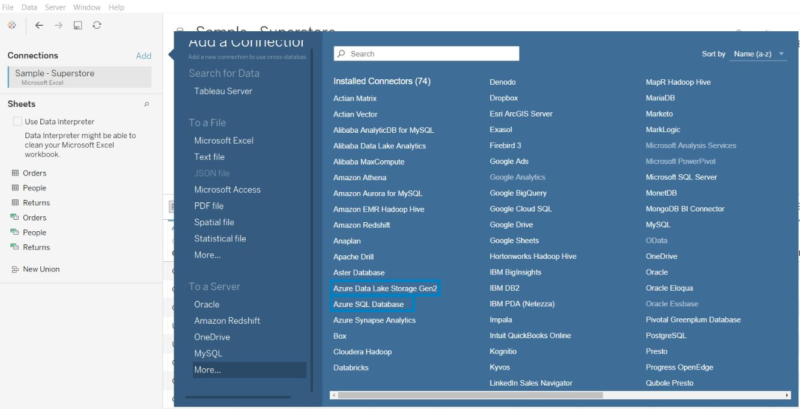
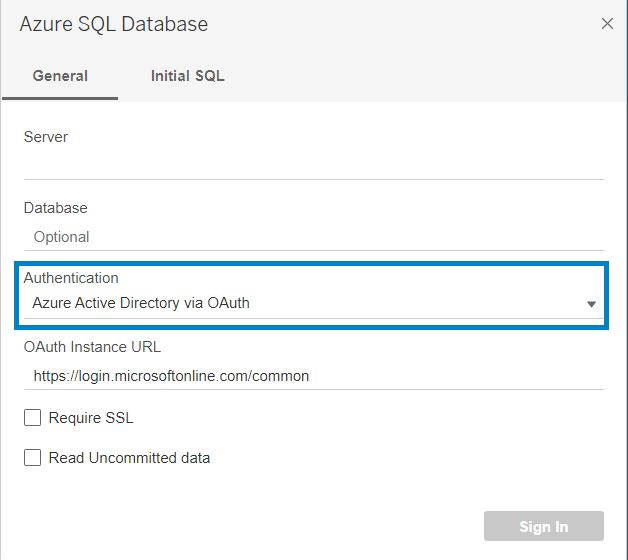
With the increase in popularity of Microsoft Azure services among users, Tableau has added multiple Azure connectors including Azure SQL Database and Azure Data Lake Gen 2 along with the existing Azure Synapse Analytics and Databricks. I can now connect to data that is stored in Azure’s SQL Database and Data Lake using the native Tableau connectors. Tableau has also introduced authentication to Azure services using the Azure Active Directory, making the connection more secure.
In addition to this, four new data connectors have been added to Tableau Online and Tableau Server. They are Amazon Athena, Apache Drill, OData and SharePoint Lists.
More Data Connections
With the increase in popularity of Microsoft Azure services among users, Tableau has added multiple Azure connectors including Azure SQL Database and Azure Data Lake Gen 2 along with the existing Azure Synapse Analytics and Databricks. I can now connect to data that is stored in Azure’s SQL Database and Data Lake using the native Tableau connectors. Tableau has also introduced authentication to Azure services using the Azure Active Directory, making the connection more secure.
In addition to this, four new data connectors have been added to Tableau Online and Tableau Server. They are Amazon Athena, Apache Drill, OData and SharePoint Lists.
 View Metrics
A difficulty that I had faced with the metric feature was that I was not able to know the other metrics that were created in the same dashboard. With this update I can see all the metrics associated with a particular dashboard and modify these metrics if required or create new ones within the metrics pane.
And previously, only if my site role were “Creator” or “Explorer”, I could see the metrics. But in this update, I can see all metrics connected to a dashboard irrespective of my site role.
View Metrics
A difficulty that I had faced with the metric feature was that I was not able to know the other metrics that were created in the same dashboard. With this update I can see all the metrics associated with a particular dashboard and modify these metrics if required or create new ones within the metrics pane.
And previously, only if my site role were “Creator” or “Explorer”, I could see the metrics. But in this update, I can see all metrics connected to a dashboard irrespective of my site role.
 Dashboard Extensions in Tableau
Earlier, to use an extension in a Tableau Dashboard, I had to drag and drop the extension object on the dashboard which would take me to its extension gallery web page and then I had to download it and then locate the downloaded extension on Tableau. Sounds tiring right?
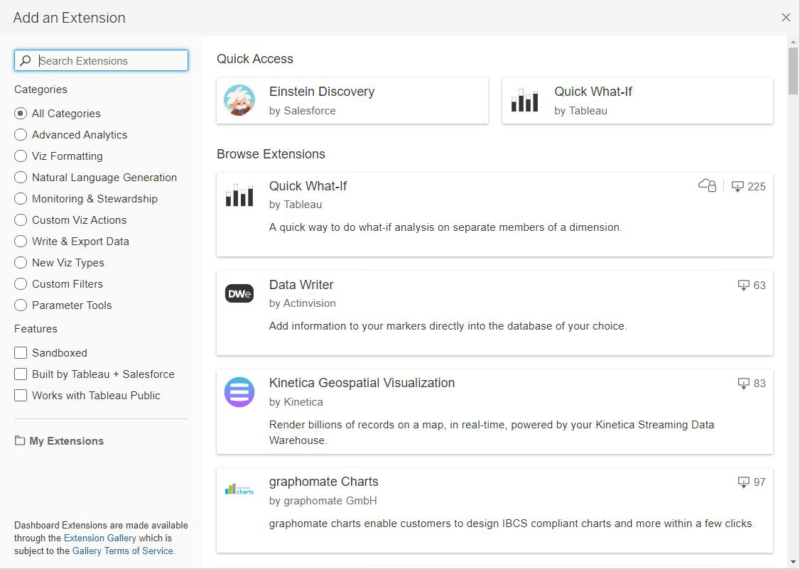
Not anymore! With this update, all I have to do is drag and drop the extension object onto the dashboard to select the required extension. I can now see all extensions and filter the list based on categories within the “Add an Extension” window in the Tableau screen.
Dashboard Extensions in Tableau
Earlier, to use an extension in a Tableau Dashboard, I had to drag and drop the extension object on the dashboard which would take me to its extension gallery web page and then I had to download it and then locate the downloaded extension on Tableau. Sounds tiring right?
Not anymore! With this update, all I have to do is drag and drop the extension object onto the dashboard to select the required extension. I can now see all extensions and filter the list based on categories within the “Add an Extension” window in the Tableau screen.
 Write to Excel in Tableau Prep
This is one feature that will prove useful to any regular Tableau Prep user. The days of exporting an output to csv and then converting it manually to an xlsx file are finally over.
Using the latest version of Tableau Prep, I can directly export the output of a workflow into an xlsx file.
Write to Excel in Tableau Prep
This is one feature that will prove useful to any regular Tableau Prep user. The days of exporting an output to csv and then converting it manually to an xlsx file are finally over.
Using the latest version of Tableau Prep, I can directly export the output of a workflow into an xlsx file.
 Device Designer for Web Authoring
Where before I could only generate device specific layouts in Tableau Desktop, now I can create custom phone or tablet views within the web itself. I no longer have to modify the device layout in Tableau Desktop and re-publish whenever a change in device layout is required.
Device Designer for Web Authoring
Where before I could only generate device specific layouts in Tableau Desktop, now I can create custom phone or tablet views within the web itself. I no longer have to modify the device layout in Tableau Desktop and re-publish whenever a change in device layout is required.
 Licensing Improvements
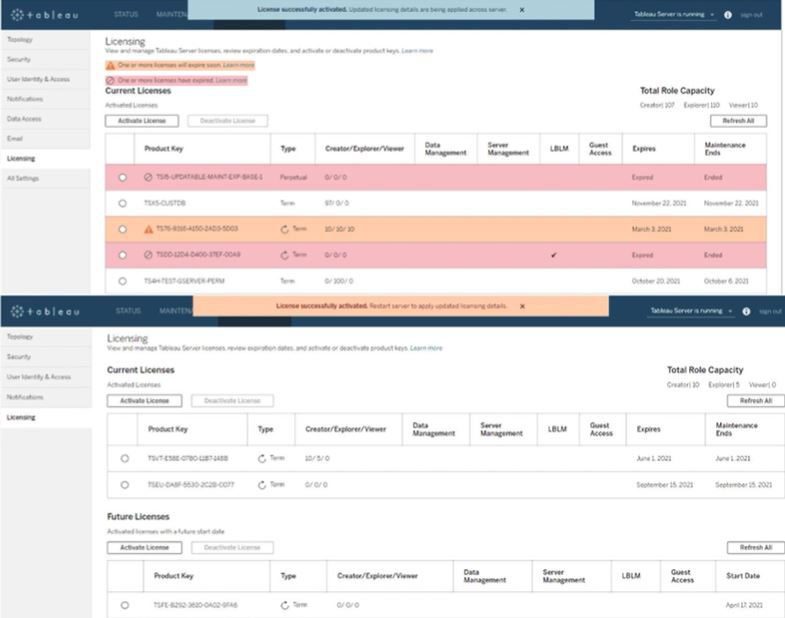
With this update, Tableau has introduced zero downtime licensing for the Tableau Server. Now for most of the tasks, whether it is the activation of a license or updating a feature that got added or applying some changes to user capacity, I no longer need to perform a server restart.
Licensing Improvements
With this update, Tableau has introduced zero downtime licensing for the Tableau Server. Now for most of the tasks, whether it is the activation of a license or updating a feature that got added or applying some changes to user capacity, I no longer need to perform a server restart.
 So, these are some features that have been helpful to me and these are just a few of the lot. To view all the new features in 2021.1, you can view it at Tableau 2021.1 New Features
In my view, Tableau has done a great job with its timely and inventive updates and seeing the rapid growth of AI and the increase of its application in numerous industries, I can predict for sure that Tableau will surprise the data science community with more innovative updates.
Images Courtesy: Tableau
So, these are some features that have been helpful to me and these are just a few of the lot. To view all the new features in 2021.1, you can view it at Tableau 2021.1 New Features
In my view, Tableau has done a great job with its timely and inventive updates and seeing the rapid growth of AI and the increase of its application in numerous industries, I can predict for sure that Tableau will surprise the data science community with more innovative updates.
Images Courtesy: Tableau
- Einstein Discovery
- Quick LODs
- More Data Connections
- View Metrics
- Dashboard Extensions in Tableau
- Write to Excel in Tableau Prep
- Device Designer for Web Authoring
- License Improvements
- Through Dashboard Extensions: To use “Einstein Discovery” in dashboards, I can just add an extension object on the dashboard and select Einstein Discovery. It will analyse the selected data and build predictive models. It shows me the top predictors in the view along with metrics that can be improved, and thus helping business decisions. This feature is available in Tableau Desktop, Tableau Server and Tableau Online.
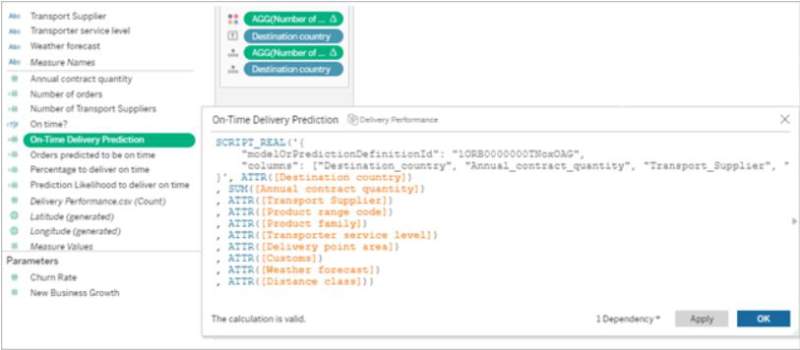
- Through Analytics Extension: With this feature, I can directly embed predictions into Tableau calculated fields. All I have to do is go to Salesforce, use Model Manager to generate a Tableau table calculation script and paste the script into the calculated field in Tableau. This script then accesses predictive models in Salesforce by passing the data required for the model. This saves my time since I don’t need to create a code for the model. This feature is only available in Tableau Desktop and Tableau Server.
- Through Tableau Prep: This feature was released in 2021.1.3 and its ingenuity is worth mentioning. With “Einstein Discovery” in Tableau Prep, I can now use predictions while preparing data. I can bulk score my data and create fields to show prediction outcomes, to show top predictors and to show recommendations for improvement of the output.
Quick LODs
LOD calculations are frequently used in Tableau to perform calculations on a fixed dimension. Where previously I had to mention the dimension to be fixed and the measures to be aggregated in a calculated field, now all I must do is select the dimension and measure in the data pane and right click to create an LOD calculation. Or even better, hold “Ctrl” to drag and drop the required measure field onto the dimension to be fixed. As simple as that.
I can modify the calculation with more dimensions or change the type of aggregation later, if required.
This feature is most beneficial as it reduces the chance of errors while creating complex LOD calculations, like misplacing a bracket, or adding any unnecessary characters by mistake.
More Data Connections
With the increase in popularity of Microsoft Azure services among users, Tableau has added multiple Azure connectors including Azure SQL Database and Azure Data Lake Gen 2 along with the existing Azure Synapse Analytics and Databricks. I can now connect to data that is stored in Azure’s SQL Database and Data Lake using the native Tableau connectors. Tableau has also introduced authentication to Azure services using the Azure Active Directory, making the connection more secure.
In addition to this, four new data connectors have been added to Tableau Online and Tableau Server. They are Amazon Athena, Apache Drill, OData and SharePoint Lists.
View Metrics
A difficulty that I had faced with the metric feature was that I was not able to know the other metrics that were created in the same dashboard. With this update I can see all the metrics associated with a particular dashboard and modify these metrics if required or create new ones within the metrics pane.
And previously, only if my site role were “Creator” or “Explorer”, I could see the metrics. But in this update, I can see all metrics connected to a dashboard irrespective of my site role.
Dashboard Extensions in Tableau
Earlier, to use an extension in a Tableau Dashboard, I had to drag and drop the extension object on the dashboard which would take me to its extension gallery web page and then I had to download it and then locate the downloaded extension on Tableau. Sounds tiring right?
Not anymore! With this update, all I have to do is drag and drop the extension object onto the dashboard to select the required extension. I can now see all extensions and filter the list based on categories within the “Add an Extension” window in the Tableau screen.
Write to Excel in Tableau Prep
This is one feature that will prove useful to any regular Tableau Prep user. The days of exporting an output to csv and then converting it manually to an xlsx file are finally over.
Using the latest version of Tableau Prep, I can directly export the output of a workflow into an xlsx file.
Device Designer for Web Authoring
Where before I could only generate device specific layouts in Tableau Desktop, now I can create custom phone or tablet views within the web itself. I no longer have to modify the device layout in Tableau Desktop and re-publish whenever a change in device layout is required.
Licensing Improvements
With this update, Tableau has introduced zero downtime licensing for the Tableau Server. Now for most of the tasks, whether it is the activation of a license or updating a feature that got added or applying some changes to user capacity, I no longer need to perform a server restart.
So, these are some features that have been helpful to me and these are just a few of the lot. To view all the new features in 2021.1, you can view it at Tableau 2021.1 New Features
In my view, Tableau has done a great job with its timely and inventive updates and seeing the rapid growth of AI and the increase of its application in numerous industries, I can predict for sure that Tableau will surprise the data science community with more innovative updates.
Images Courtesy: Tableau