How AI Decision-Making is Improving Enterprise Outcomes
Blog
Share 
AWS and GRC Framework: A Comprehensive Approach to Secure and Compliant Data Management
 30 October 2024
 Sumi S
Top Five Benefits of AWS GRC Solutions
Implementing AWS’s GRC solutions offers several advantages that go beyond compliance. Here are the top benefits: • Data-Driven Decision Making: Real-time monitoring and analytics enable organizations to make informed decisions that align with both strategic goals and compliance objectives. • Fostering Responsible Operations: By promoting a culture of governance and ethical practices, AWS helps organizations operate responsibly and build trust. • Advanced Security Measures: Features like encryption, identity management, and continuous threat detection provide robust protection for sensitive data. • Scalability and Flexibility: AWS solutions scale with your business, ensuring that governance and compliance measures grow alongside your operations. • Cost-Effective Operations: AWS’s pay-as-you-go model allows organizations to optimize their IT budgets while maintaining governance and compliance standards.
AWS and GRC Tools
Amazon Web Services (AWS) provides a comprehensive set of GRC tools and practices that can be integrated into the Governance, Risk Management, and Compliance (GRC) framework that empower businesses to effectively manage their data while adhering to industry standards and regulations. Below are some examples of AWS and GRC (Governance, Risk, and Compliance) tools and practices:
Governance: Establishing a Solid Framework
In the AWS ecosystem, governance refers to setting up policies, guidelines, and processes to ensure effective data and resource management. This framework supports business objectives while promoting ethical practices, transparency, and adherence to regulatory requirements. AWS provides several GRC tools and practices that centralize governance and enhance control over accounts, resources, and configurations. • AWS Organizations: This tool helps organizations manage multiple AWS accounts in one place, allowing for the easy implementation and enforcement of policies across the enterprise. Through Service Control Policies (SCPs), organizations can control permissions and ensure only authorized actions occur. • AWS Config: AWS Config is essential for governance as it tracks changes in AWS resource configurations. By providing detailed insights into the state and relationships of these resources over time, AWS Config ensures compliance with internal and external standards. • AWS Service Catalog: The AWS Service Catalog allows organizations to maintain oversight of their IT environment by managing catalogs of approved services. This guarantees that only pre-approved and compliant software, databases, and configurations are deployed. • AWS Control Tower: AWS Control Tower simplifies setting up and managing a secure, multi-account AWS environment. It automates governance best practices and continuously monitors compliance with pre-configured guardrails.
Risk Management: Safeguarding Against Threats
Identifying and managing risks is crucial in today's digital landscape. AWS offers a range of services to help organizations monitor their infrastructure, detect potential vulnerabilities, and respond to security threats swiftly. • AWS CloudTrail: CloudTrail logs and monitors API activity within AWS, allowing organizations to trace user actions and conduct investigations after security incidents. It’s also useful for forensic analysis to determine the cause of issues. • AWS Security Hub: As a centralized security dashboard, AWS Security Hub aggregates findings from multiple AWS services, helping businesses streamline incident response and maintain compliance. • Amazon GuardDuty: GuardDuty is a security service that detects suspicious activities and unauthorized behavior in AWS accounts. By leveraging machine learning and threat intelligence, it helps organizations preemptively address potential risks. • AWS Config Rules: These customizable rules automatically check resource configurations for compliance. If a resource deviates from the expected settings, alerts are triggered, enabling proactive issue resolution.
Compliance: Ensuring Adherence to Regulations
Compliance is vital for any organization handling sensitive data. AWS simplifies the process with a variety of tools to help organizations meet regulatory requirements and reduce audit burdens. • AWS Artifact: AWS Artifact offers on-demand access to important compliance documents, such as SOC reports and certifications like ISO and PCI DSS. This is especially helpful during audits, providing immediate access to evidence of AWS's adherence to standards. • AWS Shield & AWS Web Application Firewall (WAF): These services protect against DDoS attacks and unauthorized access attempts, ensuring web application availability and data integrity. Shield and WAF work together to filter out malicious traffic and ensure the security of incoming requests. • AWS Key Management Service (KMS) & AWS Certificate Manager (ACM): Data encryption is critical for compliance, and AWS KMS helps manage encryption keys securely. ACM automates the deployment of SSL/TLS certificates, protecting data both in transit and at rest. • AWS Audit Manager: AWS Audit Manager automates evidence collection for audits, continuously assessing your environment against industry standards. This reduces manual effort and ensures that organizations remain consistently compliant. AWS’s robust GRC framework empowers organizations to effectively manage data, mitigate risks, and ensure regulatory compliance. Leveraging AWS’s advanced tools not only supports meeting industry standards but also fosters innovation, resilience, and future-readiness within businesses.
Beinex: AWS Partner for the Middle East
Beinex is an AWS consulting partner, and we empower customers with AWS managed services to host their BI solutions and much more on the cloud. Our cloud migration experts bring in best-in-class stability and reliability by understanding your business strategy and working closely with you to deploy AWS infrastructure as a service. Connect with Us for a Free Demo Interested in our services? Try AWS for free: https://beinex.com/beinex-amazon-web-services/
Organizations increasingly turn to cloud computing solutions like Amazon Web Services (AWS) to enhance operational efficiency, scalability, and cost-effectiveness. However, with the migration of critical data and applications to the cloud, the need for robust Governance, Risk Management, and Compliance (GRC) frameworks becomes even more imperative.
Amazon Web Services (AWS) provides a robust set of tools that can be seamlessly integrated into GRC frameworks, enabling organizations to manage risks, comply with regulations, and implement consistent governance across cloud environments. Let’s explore the key benefits of using AWS for GRC and the essential AWS services in implementing a comprehensive GRC framework in your cloud environment.
Related Articles

Best Cloud Data Management Tools Fit for Businesses of All Sizes
What is Cloud Data Management?
Cloud data management refers to the framework that allows businesses to store, manage, and access their data using cloud-based services and applications. It encompasses the entire data lifecycle, from collection and storage to processing and analysis, while ensuring that data remains secure and compliant with regulatory standards. The flexibility of cloud data management allows organizations to scale up or down based on their needs and optimize data operations, which in turn leads to better decision-making and actionable business insights.
The Importance and Benefits of Cloud Data Management
Cloud data management has become a necessity in the data-centric world. Organizations are immersed with vast amounts of data, which must be efficiently stored, processed, and analyzed. Here are the key benefits:
- Scalability and Flexibility: One of the biggest advantages of cloud data management is its ability to scale as needed. Traditional data management systems often require substantial infrastructure investment, but cloud solutions allow businesses to pay only for the resources they use, making it cost-effective.
- Enhanced Data Security: With stricter regulations on data privacy (such as GDPR and HIPAA), cloud data management ensures that data is securely stored and compliant with global standards. Cloud service providers offer tools to protect data from unauthorized access and breaches.
- Improved Collaboration and Accessibility: Cloud data management allows users to access data from anywhere at any time, enabling remote work and collaboration across geographically dispersed teams.
- Disaster Recovery and Business Continuity: Cloud-based data management systems offer advanced disaster recovery options. By replicating data across multiple locations, organizations can ensure that their data is safe and accessible, even in the event of hardware failure or a catastrophe.
Cloud Data Management vs. Traditional Data Management
In contrast to traditional on-premises data management (TDM), cloud data management (CDM) provides enhanced flexibility and scalability. Traditional data management systems require a significant upfront investment in physical servers, storage, and IT staff, whereas CDM enables rapid scaling with minimal financial and physical overhead.
CDM also offers superior disaster recovery by distributing data across multiple locations, a benefit that is difficult to achieve with TDM’s centralized approach. Furthermore, CDM allows team members to access data remotely, enhancing collaboration—something that traditional systems often struggle to provide.
A Hybrid Approach to Data Management
For businesses looking to maintain control over sensitive data while leveraging cloud-based tools, a hybrid approach to data management combines the strengths of both cloud and traditional systems. A hybrid model allows organizations to store sensitive data on-premise while utilizing cloud resources for dynamic, less sensitive data. This approach offers scalability, cost-efficiency, and disaster recovery while keeping critical data secure and compliant with industry regulations.
Top Cloud Data Management Tools
Several leading cloud data management tools dominate the market, offering comprehensive solutions for businesses with various data needs. Here are the top three tools:
1. Amazon Web Services (AWS)
Amazon Web Services offers an extensive range of cloud-based tools and services that allow businesses to manage their data effectively. Notable AWS services include:
• Amazon S3: A scalable storage service designed for temporary and intermediate data storage.
• Amazon S3 Glacier: A low-cost cloud storage service ideal for long-term data archiving.
• Amazon Redshift: A fully managed data warehouse that makes analyzing large datasets using SQL simple.
• Amazon Athena: An interactive query service that allows users to analyze data in Amazon S3 using SQL.
• Amazon QuickSight: A scalable, serverless business intelligence service for building interactive dashboards.
AWS Pricing: AWS follows a pay-as-you-go pricing model, making it highly flexible for businesses of all sizes.
2. Microsoft Azure
Microsoft Azure provides a wide range of cloud-based tools for data management, making it a popular choice for enterprises. Key Azure services include:
• Azure Blob Storage: A massively scalable object storage solution for unstructured data.
• SQL Databases: Managed SQL database services that simplify data management without the need for complex infrastructure.
• Azure Data Explorer: A real-time data analytics service that can handle large datasets with minimal preprocessing.
• Private Cloud Deployments: For businesses looking for more control over their infrastructure.
Azure Pricing: Like AWS, Microsoft Azure also offers flexible pricing based on the services and resources used.
3. Google Cloud Platform (GCP)
Google Cloud Platform offers a range of cloud-based data management services, known for their strong integration with Google’s ecosystem and ease of use. Prominent services include:
• Google Cloud Storage: A fully managed service for storing unstructured data.
• Google BigQuery: A fully managed data warehouse that allows users to run SQL queries on large datasets.
• Cloud BigTable: A NoSQL database service designed for large-scale workloads.
• Google Data Studio: A business intelligence platform for building intuitive dashboards and visualizing data.
• Cloud Datalab: A powerful tool for machine learning and data science projects.
• Cloud Pub/Sub: A messaging service designed for real-time data ingestion and processing.
GCP Pricing: Google Cloud Platform offers competitive pricing with a flexible pay-as-you-go model that caters to various business needs.
Conclusion
Cloud data management is essential for modern businesses looking to stay competitive in the digital era. By offering scalability, enhanced security, improved collaboration, and disaster recovery, cloud data management tools like AWS, Microsoft Azure, and Google Cloud Platform provide a comprehensive solution to managing data efficiently and effectively. As data grows in volume and complexity, leveraging these tools will be key to driving innovation and maintaining a competitive edge.

Supercharge Your Tableau: Benefits of Tableau Accelerators

To Faster Insights and Beyond With Tableau 2021.1
Recognized as a leader in analytics and business intelligence platform for 9 consecutive years in Gartner Magic Quadrant, Tableau has a variety of options when it comes to analytics and visualizations and according to me, it keeps getting better and better with every update. The latest 2021.1 update comes packed with some impressive features and these are some of them that caught my eye:

 Quick LODs
LOD calculations are frequently used in Tableau to perform calculations on a fixed dimension. Where previously I had to mention the dimension to be fixed and the measures to be aggregated in a calculated field, now all I must do is select the dimension and measure in the data pane and right click to create an LOD calculation. Or even better, hold “Ctrl” to drag and drop the required measure field onto the dimension to be fixed. As simple as that.
I can modify the calculation with more dimensions or change the type of aggregation later, if required.
This feature is most beneficial as it reduces the chance of errors while creating complex LOD calculations, like misplacing a bracket, or adding any unnecessary characters by mistake.
 More Data Connections
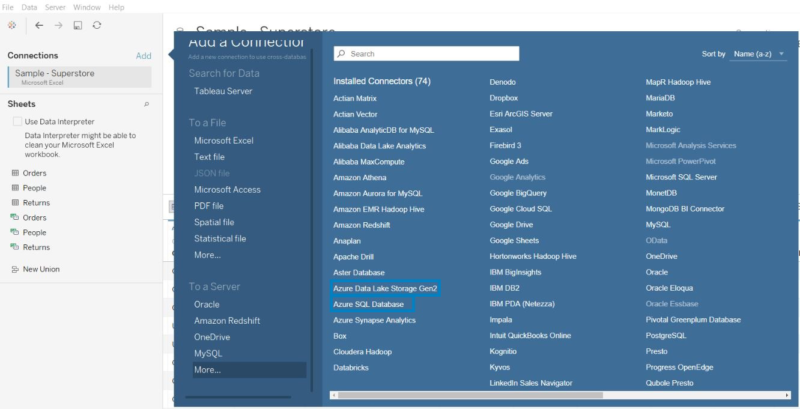
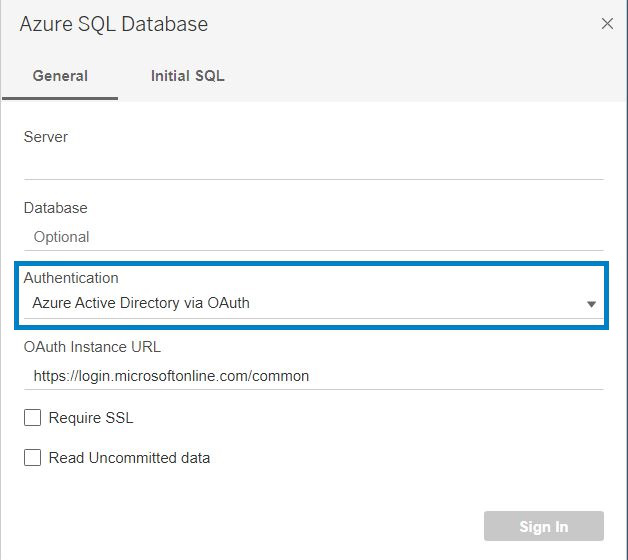
With the increase in popularity of Microsoft Azure services among users, Tableau has added multiple Azure connectors including Azure SQL Database and Azure Data Lake Gen 2 along with the existing Azure Synapse Analytics and Databricks. I can now connect to data that is stored in Azure’s SQL Database and Data Lake using the native Tableau connectors. Tableau has also introduced authentication to Azure services using the Azure Active Directory, making the connection more secure.
In addition to this, four new data connectors have been added to Tableau Online and Tableau Server. They are Amazon Athena, Apache Drill, OData and SharePoint Lists.
 View Metrics
A difficulty that I had faced with the metric feature was that I was not able to know the other metrics that were created in the same dashboard. With this update I can see all the metrics associated with a particular dashboard and modify these metrics if required or create new ones within the metrics pane.
And previously, only if my site role were “Creator” or “Explorer”, I could see the metrics. But in this update, I can see all metrics connected to a dashboard irrespective of my site role.
 Dashboard Extensions in Tableau
Earlier, to use an extension in a Tableau Dashboard, I had to drag and drop the extension object on the dashboard which would take me to its extension gallery web page and then I had to download it and then locate the downloaded extension on Tableau. Sounds tiring right?
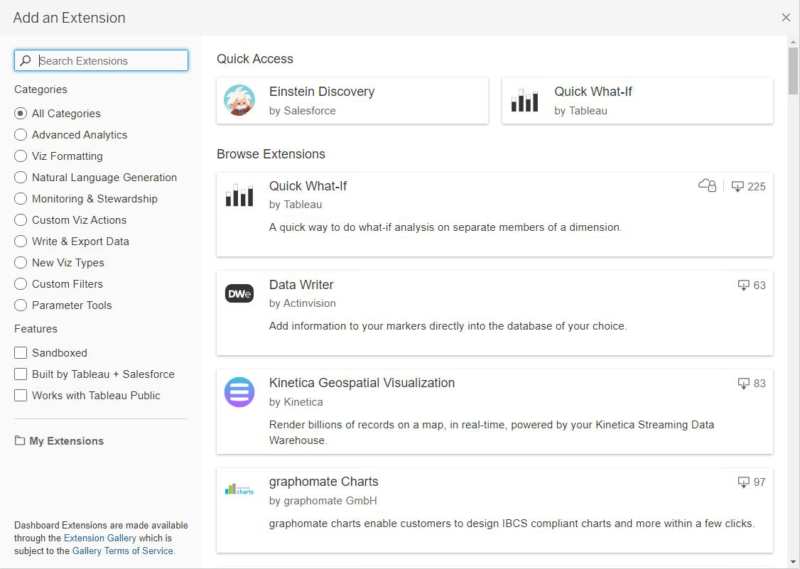
Not anymore! With this update, all I have to do is drag and drop the extension object onto the dashboard to select the required extension. I can now see all extensions and filter the list based on categories within the “Add an Extension” window in the Tableau screen.
 Write to Excel in Tableau Prep
This is one feature that will prove useful to any regular Tableau Prep user. The days of exporting an output to csv and then converting it manually to an xlsx file are finally over.
Using the latest version of Tableau Prep, I can directly export the output of a workflow into an xlsx file.
 Device Designer for Web Authoring
Where before I could only generate device specific layouts in Tableau Desktop, now I can create custom phone or tablet views within the web itself. I no longer have to modify the device layout in Tableau Desktop and re-publish whenever a change in device layout is required.
 Licensing Improvements
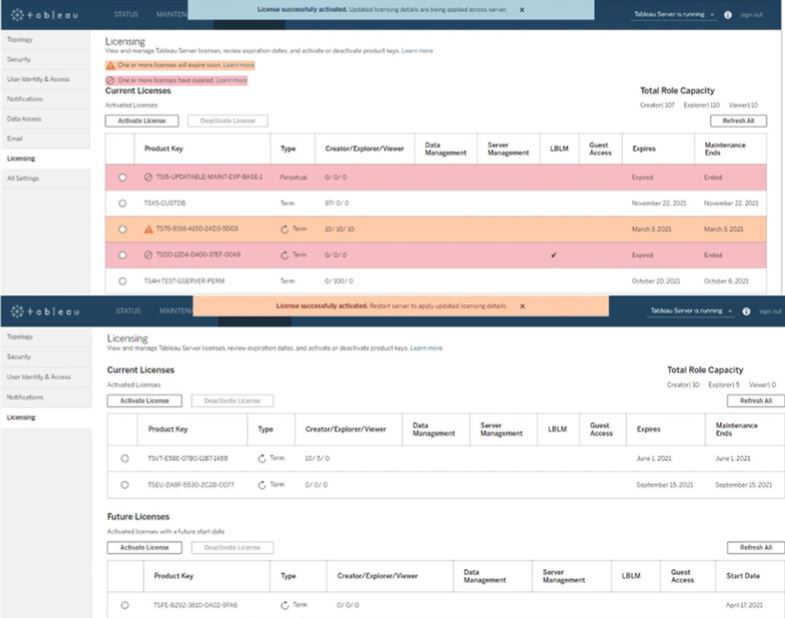
With this update, Tableau has introduced zero downtime licensing for the Tableau Server. Now for most of the tasks, whether it is the activation of a license or updating a feature that got added or applying some changes to user capacity, I no longer need to perform a server restart.
 So, these are some features that have been helpful to me and these are just a few of the lot. To view all the new features in 2021.1, you can view it at Tableau 2021.1 New Features
In my view, Tableau has done a great job with its timely and inventive updates and seeing the rapid growth of AI and the increase of its application in numerous industries, I can predict for sure that Tableau will surprise the data science community with more innovative updates.
Images Courtesy: Tableau
- Einstein Discovery
- Quick LODs
- More Data Connections
- View Metrics
- Dashboard Extensions in Tableau
- Write to Excel in Tableau Prep
- Device Designer for Web Authoring
- License Improvements
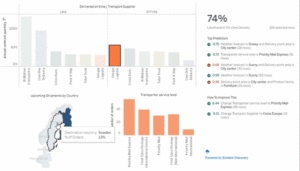
- Through Dashboard Extensions: To use “Einstein Discovery” in dashboards, I can just add an extension object on the dashboard and select Einstein Discovery. It will analyse the selected data and build predictive models. It shows me the top predictors in the view along with metrics that can be improved, and thus helping business decisions. This feature is available in Tableau Desktop, Tableau Server and Tableau Online.
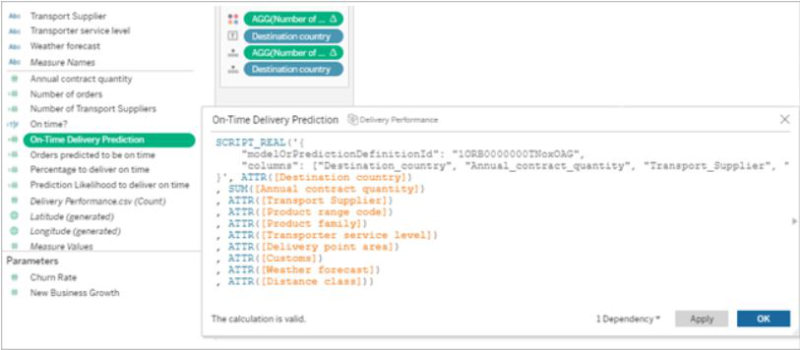
- Through Analytics Extension: With this feature, I can directly embed predictions into Tableau calculated fields. All I have to do is go to Salesforce, use Model Manager to generate a Tableau table calculation script and paste the script into the calculated field in Tableau. This script then accesses predictive models in Salesforce by passing the data required for the model. This saves my time since I don’t need to create a code for the model. This feature is only available in Tableau Desktop and Tableau Server.
- Through Tableau Prep: This feature was released in 2021.1.3 and its ingenuity is worth mentioning. With “Einstein Discovery” in Tableau Prep, I can now use predictions while preparing data. I can bulk score my data and create fields to show prediction outcomes, to show top predictors and to show recommendations for improvement of the output.
Quick LODs
LOD calculations are frequently used in Tableau to perform calculations on a fixed dimension. Where previously I had to mention the dimension to be fixed and the measures to be aggregated in a calculated field, now all I must do is select the dimension and measure in the data pane and right click to create an LOD calculation. Or even better, hold “Ctrl” to drag and drop the required measure field onto the dimension to be fixed. As simple as that.
I can modify the calculation with more dimensions or change the type of aggregation later, if required.
This feature is most beneficial as it reduces the chance of errors while creating complex LOD calculations, like misplacing a bracket, or adding any unnecessary characters by mistake.
More Data Connections
With the increase in popularity of Microsoft Azure services among users, Tableau has added multiple Azure connectors including Azure SQL Database and Azure Data Lake Gen 2 along with the existing Azure Synapse Analytics and Databricks. I can now connect to data that is stored in Azure’s SQL Database and Data Lake using the native Tableau connectors. Tableau has also introduced authentication to Azure services using the Azure Active Directory, making the connection more secure.
In addition to this, four new data connectors have been added to Tableau Online and Tableau Server. They are Amazon Athena, Apache Drill, OData and SharePoint Lists.
View Metrics
A difficulty that I had faced with the metric feature was that I was not able to know the other metrics that were created in the same dashboard. With this update I can see all the metrics associated with a particular dashboard and modify these metrics if required or create new ones within the metrics pane.
And previously, only if my site role were “Creator” or “Explorer”, I could see the metrics. But in this update, I can see all metrics connected to a dashboard irrespective of my site role.
Dashboard Extensions in Tableau
Earlier, to use an extension in a Tableau Dashboard, I had to drag and drop the extension object on the dashboard which would take me to its extension gallery web page and then I had to download it and then locate the downloaded extension on Tableau. Sounds tiring right?
Not anymore! With this update, all I have to do is drag and drop the extension object onto the dashboard to select the required extension. I can now see all extensions and filter the list based on categories within the “Add an Extension” window in the Tableau screen.
Write to Excel in Tableau Prep
This is one feature that will prove useful to any regular Tableau Prep user. The days of exporting an output to csv and then converting it manually to an xlsx file are finally over.
Using the latest version of Tableau Prep, I can directly export the output of a workflow into an xlsx file.
Device Designer for Web Authoring
Where before I could only generate device specific layouts in Tableau Desktop, now I can create custom phone or tablet views within the web itself. I no longer have to modify the device layout in Tableau Desktop and re-publish whenever a change in device layout is required.
Licensing Improvements
With this update, Tableau has introduced zero downtime licensing for the Tableau Server. Now for most of the tasks, whether it is the activation of a license or updating a feature that got added or applying some changes to user capacity, I no longer need to perform a server restart.
So, these are some features that have been helpful to me and these are just a few of the lot. To view all the new features in 2021.1, you can view it at Tableau 2021.1 New Features
In my view, Tableau has done a great job with its timely and inventive updates and seeing the rapid growth of AI and the increase of its application in numerous industries, I can predict for sure that Tableau will surprise the data science community with more innovative updates.
Images Courtesy: Tableau
A Complete Guide on 360 Advanced Analytics with Tableau and Alteryx
How can You Use Alteryx and Tableau for Advanced Analytics
1. Data Preparation with Alteryx
Alteryx provides powerful data preparation capabilities, including data cleaning, data integration, and data transformation. You can make use of it for:
- Importing data from various sources such as databases, spreadsheets, or APIs.
- Creating data preparation workflows, connecting different tools to cleanse, filter, aggregate, and manipulate your data. Use Alteryx's visual workflow interface.
- Deriving additional insights from your data to leverage Alteryx's advanced analytics tools like predictive modelling, time series analysis, or clustering.
2. Advanced Analytics with Alteryx
Alteryx offers a list of advanced analytics tools, such as predictive analytics, spatial analytics, and text analytics, that can be utilised for:
- Building machine learning models and performing regression analysis or classification tasks.
- Analysing geographic patterns, performing spatial clustering, or conducting network analysis.
- Performing sentiment analysis or topic modelling and extracting insights from unstructured text data by using Alteryx's text mining tools
3. Data Visualization and Reporting with Tableau
Once your data is prepared and enriched in Alteryx, you can connect Tableau to the output data and create interactive visualisations, and perform the following:
- Use Tableau's drag-and-drop interface to create charts, graphs, dashboards, and reports to visualise your data.
- Leverage Tableau's advanced visualisation features like calculated fields, table calculations, or trend lines to enhance your analysis.
- Combine multiple data sources, including the output from Alteryx, to create comprehensive dashboards that provide a holistic view of your data and insights.
4. Integrating Alteryx and Tableau
When it comes to pushing data from Alteryx to Tableau, there are indeed a couple of approaches you can consider ensuring a smooth integration between the Alteryx and Tableau platforms. Alteryx allows you to export the prepared and enriched data as a Tableau Data Extract (.tde) or Tableau Hyper Extract (. hyper) file. You can make use of it for the following functions:
Publishing Data Source Directly to Tableau Server:
Writing Data in Tableau’s hyper Format:
To integrate Alteryx with Tableau, you can:
Beinex partnership with Tableau & Alteryx
As the premium partner of Alteryx and Tableau, Beinex offers a unique advantage in leveraging the combined power of these two tools for your business. Our experts can help you unlock the full potential of your data through sophisticated data preparation, advanced analytics, and compelling visualisations that provide deeper insights into your business operations.
With our expertise, you can effectively make data-driven decisions and communicate complex analytics. Whether you need help with implementation, training, or ongoing support, Beinex is your go-to partner for all your data analysis needs. Get in touch with us today and see how we can help you transform your business with the combined power of Alteryx and Tableau.

Tableau for Financial Analytics: Transforming Data into Insights
Financial Analytics and Its Importance
Financial analytics offers actionable insights into an organization's monetary health and performance by utilizing data analysis tools and techniques for analyzing financial data. It involves assessing financial data from diverse sources, like income statements, market data, etc., to identify trends, make strategic, data-driven decisions, and optimize financial operations. Fundamental finance analytics is critical to businesses as they deliver data-driven insights that equip enterprises to make smarter decisions, optimize operations, and boost profitability. The following aspects imply the significance of financial analytics for businesses. • Analyzing financial performance • Creating accurate budgets and plans by forecasting based on market trends and historical data • Identifying and mitigating financial risks • Assessing potential investments to make informed decisions • Analyzing a company's cost structure for optimization • Harnessing big data to develop strategies for addressing challenges and making informed decisions • Facilitating continuous visibility into financial operation and performance • Detecting data gaps and analyzing historical data to improve business performance • Preventing fraud and eliminating manual, redundant tasks to enhance efficiency
Tableau for Financial Analytics
Businesses must utilize financial analytics tools and software to improve financial management, comply with regulations, identify cost-efficient prospects, optimize operations, and make informed decisions. These tools automate the analysis and interpretation of financial data, delivering valuable insights into budgeting, forecasting, and performance. Tableau makes financial analytics seamless with powerful, intuitive dashboards that facilitate data-driven decisions. With Tableau, users can easily visualize, analyze, and share data faster and detect patterns and trends that offer actionable insights. Tableau equips enterprises with an in-depth understanding of their spending, enabling effective optimization of resources. Be it tracking capital expenditures or assessing expense spending, Tableau transforms financial data into actionable insights that drive improved business outcomes. As financial analytics continues to evolve, the future of Tableau in financial analysis looks promising. Amidst the rising intricacies of financial fraud, there is a need for a robust, intuitive platform like Tableau, which is essential to detect fraud faster and reduce the impact of losses. As a popular data visualization and interaction tool in the finance domain, Tableau simplifies raw data, making it interactive and visually intelligible. Tableau uses financial analytics to improve efficiency in the following ways: • Acquiring insights from the financial data collected from diverse sources • Predicting accurately by utilizing analytics to get a detailed picture of financial perspectives • Lowering risk and saving time by tracking accounts to locate inactive or low-activity accounts
Financial Analytics Made Seamless: Tableau's Robust Capabilities
Tableau empowers financial analysts with deeper insights into financial data, enabling data-driven decisions. Let's take a look at the distinctive uses of Tableau in finance: • Automating Data Updates: Unlike traditional data reporting software like Excel, Tableau automates the process of updating data, formulas, and data reports in line with the changes, enabling faster and more efficient financial reporting and allowing users to save significant time. • Data Visualization: With Tableau's powerful data visualization capabilities, business giants can easily handle the intricacies of big data through graphical representations, real-time dashboards, and analytical data breakdowns. • Data Insights: Tableau's smarter data analytics and insight tools automatically analyze financial data and offer insights into it, allowing effortless analysis of bigger financial datasets for making important financial decisions. • Financial Reporting: Tableau offers distinctive financial reporting capabilities, transforming traditional reports like P&L statements, balance sheets, and cash flow statements into dynamic and automated experiences. Besides, Tableau delivers insightful recommendations based on the analyzed financial data, empowering users to make informed decisions. • Data Trends and Patterns: With features like data drill-down and data blending, Tableau helps acquire applicable data and identify variations, patterns, or trends within the enterprise.Tableau in Finance: Key Implementations
As a robust tool for smarter financial analytics, Tableau equips enterprises with the capability to visualize intricate data, enhance operations, and improve the decision-making process. Here are some of the key implementations in Tableau that enhance financial analysis, resulting in insightful scenario analysis and accurate forecasting. • Developing Interactive Tableau Financial Analysis Dashboards: Tableau dashboards offer a comprehensive view of the financial status of your organization, blending interactive features like action buttons, color schemes, drop-and-down filters, and intuitive layouts. Building engaging dashboards in Tableau converts the static financial data into a visual story, often incorporating various visualizations like dual-axis charts for comparison and bullet graphs for performance metrics. The interactive elements of Tableau dashboards allow for seamless manipulation of data views, enabling users to analyze deeper without switching from the primary dashboard. Example: Tableau financial analysis dashboards allow tracking key financial metrics like expenses, loan performance, and customer deposits while providing real-time updates. • Forecasting and Trend Analysis: For businesses to make strategic financial decisions, it is important to foresee future performance. The future of financial forecasting is enhanced by Tableau, which enables the creation of predictive models based on historical data patterns and the integration of statistical forecasting methods to project future trends. It helps businesses understand possible business trajectories. Example: Tableau creates visualizations comparing past performance against future projections based on historical sales data, seasonal trends, and customer purchase behaviors. • Scenario Analysis: Tableau facilitates the creation of multiple financial scenarios to assess how various factors affect financial outcomes. Analysts can use Tableau's flexibility to create different scenarios by modifying input variables to visualize the impacts on financial metrics. It helps stakeholders to have a sound idea of potential risks and opportunities. Example: Using Tableau to simulate economic conditions helps businesses assess profitability and the impact on non-performing loans (NPLs) and craft mitigation strategies. • Fraud Detection: Using Tableau for financial analytics helps organizations detect anomalies and suspicious patterns that may imply fraudulent activities. Tableau's powerful visualization capabilities help detect anomalies in financial transactions, and predictive modeling helps understand potential risks, reduce financial losses, and ensure compliance with security regulations. Example: Tableau visualizes transaction patterns and anomalies like unusually high spending across different locations. • Compliance and Risk Management: Tableau helps track financial compliance metrics and identify areas where a business may be at risk of non-compliance with regulations. For instance, it can help visualize tax liabilities, monitor debt covenants, or track audit results. Tableau also provides automated reports that track transactions and regulatory compliance. Example: A compliance dashboard might track specific ratios indicating whether a company adheres to legal financial limits. • Expense & Cost Analysis: Organizations can harness Tableau to track and analyze operational costs across departments, locations, or projects. By visualizing cost breakdowns and spending trends, finance teams can identify inefficiencies, optimize budgets, and implement cost-saving strategies. Example: Tableau visualizes spending trends, helping analyze expenses and detect cost-saving possibilities. The finance landscape is evolving rapidly, pushing modern businesses to adopt advanced BI solutions like Tableau rather than traditional spreadsheets. It is no longer the era of manual data preparation and analysis. Therefore, most organizations now rely on Tableau to create financial dashboards to track and report KPIs. Being a powerful data visualization platform with advanced analytics and interactive capabilities, Tableau helps build dynamic dashboards and redefine financial analytics. Adopting Tableau for financial services helps organizations harness its innovative features to upgrade their financial data management and reporting processes.