How AI Decision-Making is Improving Enterprise Outcomes
Blog
Share 
Alteryx Integration with Cloud Services
 6 January 2025
 Subbayya
Alteryx's Integration with Cloud Services
Alteryx enables businesses to get the most out of cloud services by integrating seamlessly. What makes integrations an essential aspect of modern data analytics is the organizations' increasing reliance on the cloud for handling large datasets. Let's look at Alteryx's integration with some prominent cloud platforms.
Alteryx + AWS
Alteryx can be integrated with AWS services like Amazon Redshift, S3, DynamoDB, EC2, and more, empowering users to maximize the power of data. This integration makes the analysis of large datasets effortless by moving them from AWS to Alteryx and then seeing the results in the cloud.
The benefits of this integration include:
• Managing data workloads of all sizes • Offering robust performance capabilities for large enterprises • Democratizing data analytics across organizations to handle data efficiently • Providing computing power and scalable storage to meet dynamic business requirements • Enhancing the accessibility of self-service analytics with Alteryx's user-friendly, drag-and-drop interface that supports no-code and code-based workflowsAlteryx + Snowflake
Alteryx operates Snowflake Data Cloud easily, facilitating seamless analysis of large datasets by extracting, transforming, and loading (ETL) data from Snowflake. The integration creates a centralized and user-friendly system with the infrastructure and tools to make analytics accessible. It also accelerates workflows, enhances scalability, and pushes data processing to Snowflake, offering flexible options to transform data: • In-database: Direct data processing in Snowflake by running SQL pushdown with no-code tools in Designer • Snowpark: Defining Alteryx's custom analytic building blocks, Pushing data processing to Snowflake directly. • Automatic Pushdown in Designer Cloud: Allows direct workflow implementation within Snowflake without requiring additional steps.
The benefits of this integration include:
• Improving analytics by leveraging Alteryx's code-friendly and no-code interface • Offering access to unified data and robust computing resources • Empowering users to access the entire dataset faster and safely. • Resolving distinctive industry problems with vertical-specific solutionsAlteryx + Google Cloud
Alteryx supports integration with services of Google Cloud Platform like BigQuery, Google Cloud Machine Learning Engine, Cloud Storage, and Cloud Dataflow, allowing users to harness the cloud platform's scalable infrastructure. The integration enables smarter self-service analytics across the enterprise and makes the analysis of large datasets seamless with the easy-to-use interface of Alteryx.
The benefits of this integration include:
• Powering data analytics objectives by deploying the new AI technologies • Empowering employees to perform advanced analytics workflows with or without coding expertise • Expediting workflows by processing voluminous data in BigQuery and using Google's compute resourcesAlteryx + Azure
Alteryx integrates Microsoft Azure, supporting connectivity to Azure services like Azure SQL Database, Data Lake, Blob Storage, and Azure Synapse Analytics. This integration allows businesses to transition data effortlessly to and from the cloud, process it within Alteryx, and run advanced analytics on a scalable platform.
The benefits of this integration include:
• Offering users a secure and scalable analytics environment. • Making the most of advanced analytics capabilities like predictive analytics and machine learning to foster innovation. • Speeding up analytics workflows by leveraging Azure's scalable infrastructure • Protecting sensitive data through analytics with Azure's powerful security features like access controls and encryption.The Benefits of Integrating Alteryx with Cloud Services
Beyond empowering business users to prepare, blend, and analyze data from diverse sources, Alteryx transforms how businesses interact with data through its integration capabilities. Integrating Alteryx with cloud services offers several benefits, including: • Boundless flexibility and scalability: The scalable infrastructure of cloud services facilitates effortless management of complex and vast chunks of data, making the analysis process easier. Integrating with Alteryx also entails seamless scaling with data workflows, enabling real-time analytics of big datasets. Besides, Alteryx's capability to connect to different cloud sources offers choice and flexibility. • Access to advanced analytical tools: Cloud platforms like Google Cloud, Azure, and AWS offer access to advanced analytical tools like machine learning models and AI capabilities. This accessibility improves data workflows. Alteryx can be integrated with these services to enhance data workflows with ML models, predictive analytics, etc. • Enhanced security: Security is the top priority when integrating Alteryx with cloud platforms, as they offer powerful security measures like data access controls, authentication, data encryption, and authorization to safeguard sensitive data. Plus, cloud services comply with regulatory demands and deploy firewalls to protect sensitive data. • Improved cost-efficiency: As a cost-effective alternative to on-premises infrastructure that stores and processes large datasets, cloud platforms lower costs and maximize ROI with their pay-as-you-go models. Considering the costs involved in hardware and maintaining and storing data of on-premises infrastructure, businesses can pay for what they use with cloud services. • Seamless collaboration: Integrating Alteryx with cloud platforms improved collaboration among teams, even across departments or locations. It ensures alignment by allowing everyone to work with the same datasets and workflows. Alteryx's integration with cloud services reimagines how businesses handle data and opens fresh prospects to optimize their data analytics processes. The integrations facilitate smarter decisions by boosting flexibility, scalability, and collaboration across departments or locations. Integrating with cloud platforms like Google Cloud, Azure, and AWS enhances accessibility to advanced analytics tools and unlocks your data power. Beinex, a premier-tier partner of Alteryx, offers consulting services that augment the transformative potential of your enterprise by making the most of the enterprise analytics platform and its robust capabilities. Contact us for a free demo: https://www.beinex.com/alteryx-partner/#request_demo
Given the voluminous data businesses generate, efficiently processing and analyzing extensive data is vital. Cloud computing redefines an organization's data management and analysis by delivering flexibility and scalability. Alteryx is a robust enterprise analytics platform that helps businesses leverage their data by enabling seamless integration with cloud services. Alteryx deploys deep technology integrations with prominent cloud platforms like Snowflake, Databricks, Azure, and more, facilitating connection with your data infrastructure. Be it cloud data warehouses or on-prem databases, Alteryx's integration capabilities enable business users to connect directly to the data. The platform's strong interoperability supports your business's cloud modernization journey at every step.
Related Articles
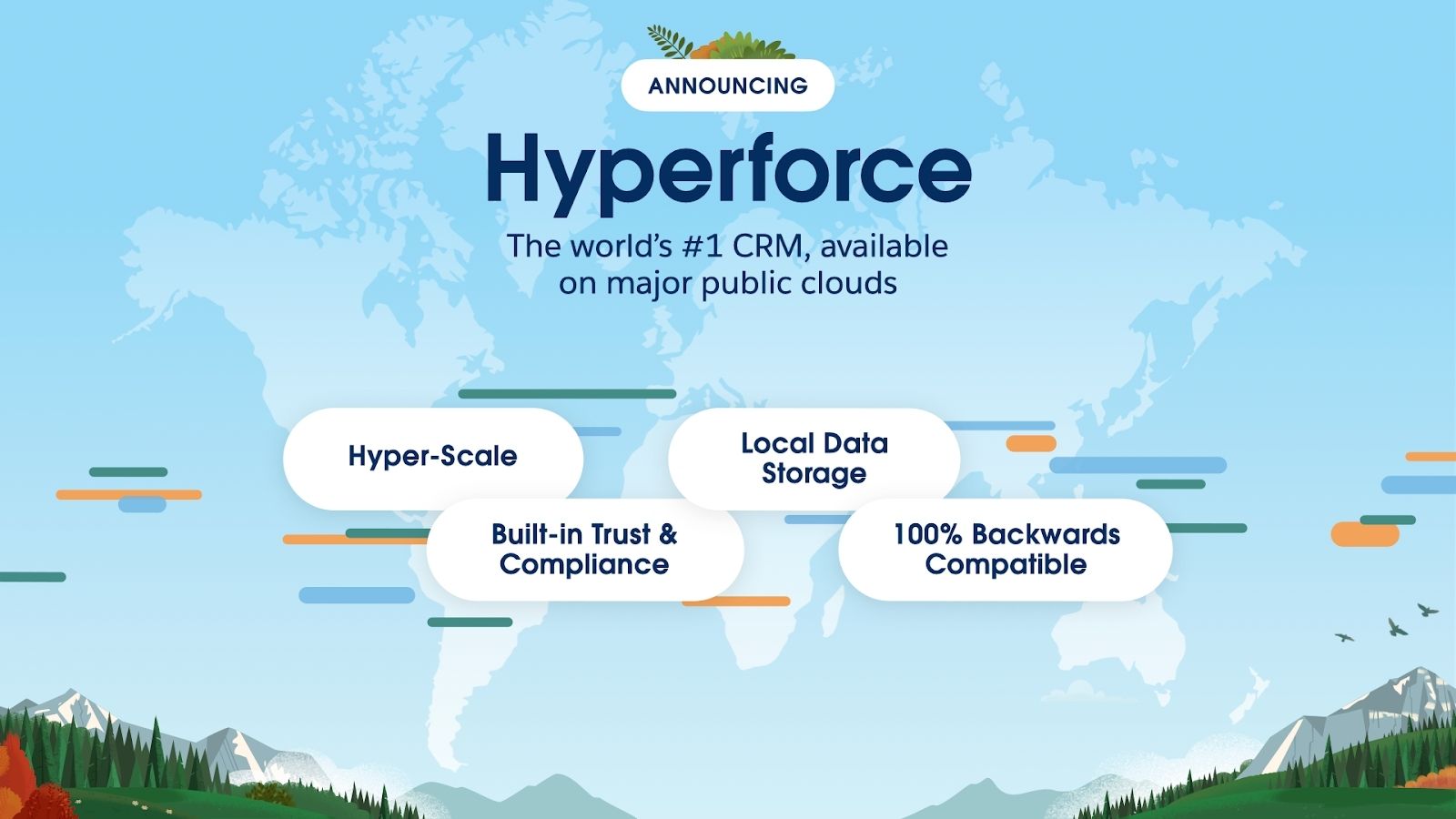
Let the force be with you: Data residency and Hyperforce
After two very long masked years, the world has slowly started to breathe, again!
With lockdowns on and work taking place from the very room you had slept a couple of hours back -- the human universe has been phenomenally re-engineered by a microscopic organism.
Your geographical location has been made immaterial in the digital world. But the same cannot be said about data, and this may sound paradoxical and ironic. For instance, an MNC’s location of the data now matters more than ever before. With a major chunk of data of many entities, especially government ones, on the public cloud, the airing of concerns related to data security, data sovereignty, data localisation/ data residency is growing louder in decibel terms.
This is where Hyperforce comes in.
Hyperforce is how Salesforce has reimagined its platform. It is now horizontally scalable, and through tie-ups with major cloud providers, the scalability has grown by leaps and bounds. Imagine you are a B2B company with 10,000 customers or a B2C company with tens of millions of customers: Hyperforce lets you scale up your capabilities and provides you with a single source of truth. But what if you are a multi-geographic business conglomerate in a heavily regulated industry like finance or health? How will you comply with data sovereignty, data localisation/ data residency requirements? Hyperforce’s collaboration with public cloud companies ensures that the data can be located at any specified place in the world, adhering to the local rules of data governance and storage locations. “Choose the location where your data will be stored to comply with regulations specific to your company, region, or industry — even in highly regulated industries like the public sector,” the store-data-locally-keep-it-compliant-globally mantra tells. Other features Hyperscalable: Hyperforce also enables you to scale the infrastructure as per the needs of the business by letting you access extra computing capacity as and when required. You can employ resources in the public cloud rather quickly. Yes, it is your decision whether to scale up or not, and the elasticity can be dictated by the nature of your requirements. Hypersecure: Also, trust is built-in, which puts security at the forefront of the architecture. Data privacy and security are sacrosanct. This leaves you with enough room to focus on innovation. Hypercompatible: And most important of all, backward compatibility ensures that all the extant Salesforce apps, customisations and integrations will continue to work on Hyperforce regardless of cloud. In the physical world, your geographical location assumes importance. But in the digital world, it is the location of the data that matters. Hyperforce, by virtue of its collaboration with major players in the cloud domain, ensures data residency requirements are adhered to when and where needed. The architecture is hyper-scalable, secure, and comes with backward compatibility. Hyperforce is soon to be launched in the UAE, and Beinex, a Salesforce partner, is all set to carry out implementation and consulting of and for Hyperforce.
To Faster Insights and Beyond With Tableau 2021.1
Recognized as a leader in analytics and business intelligence platform for 9 consecutive years in Gartner Magic Quadrant, Tableau has a variety of options when it comes to analytics and visualizations and according to me, it keeps getting better and better with every update. The latest 2021.1 update comes packed with some impressive features and these are some of them that caught my eye:

 Quick LODs
LOD calculations are frequently used in Tableau to perform calculations on a fixed dimension. Where previously I had to mention the dimension to be fixed and the measures to be aggregated in a calculated field, now all I must do is select the dimension and measure in the data pane and right click to create an LOD calculation. Or even better, hold “Ctrl” to drag and drop the required measure field onto the dimension to be fixed. As simple as that.
I can modify the calculation with more dimensions or change the type of aggregation later, if required.
This feature is most beneficial as it reduces the chance of errors while creating complex LOD calculations, like misplacing a bracket, or adding any unnecessary characters by mistake.
 More Data Connections
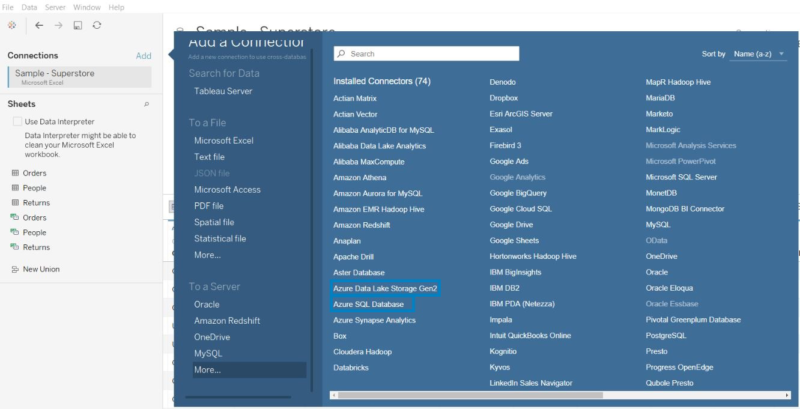
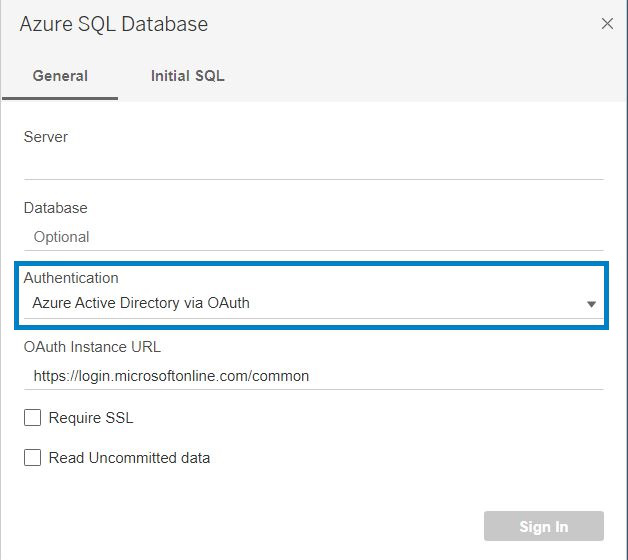
With the increase in popularity of Microsoft Azure services among users, Tableau has added multiple Azure connectors including Azure SQL Database and Azure Data Lake Gen 2 along with the existing Azure Synapse Analytics and Databricks. I can now connect to data that is stored in Azure’s SQL Database and Data Lake using the native Tableau connectors. Tableau has also introduced authentication to Azure services using the Azure Active Directory, making the connection more secure.
In addition to this, four new data connectors have been added to Tableau Online and Tableau Server. They are Amazon Athena, Apache Drill, OData and SharePoint Lists.
 View Metrics
A difficulty that I had faced with the metric feature was that I was not able to know the other metrics that were created in the same dashboard. With this update I can see all the metrics associated with a particular dashboard and modify these metrics if required or create new ones within the metrics pane.
And previously, only if my site role were “Creator” or “Explorer”, I could see the metrics. But in this update, I can see all metrics connected to a dashboard irrespective of my site role.
 Dashboard Extensions in Tableau
Earlier, to use an extension in a Tableau Dashboard, I had to drag and drop the extension object on the dashboard which would take me to its extension gallery web page and then I had to download it and then locate the downloaded extension on Tableau. Sounds tiring right?
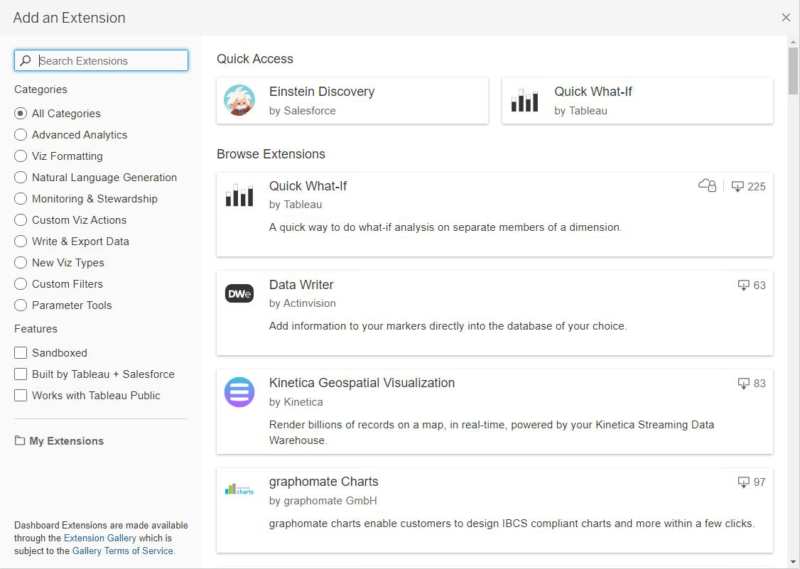
Not anymore! With this update, all I have to do is drag and drop the extension object onto the dashboard to select the required extension. I can now see all extensions and filter the list based on categories within the “Add an Extension” window in the Tableau screen.
 Write to Excel in Tableau Prep
This is one feature that will prove useful to any regular Tableau Prep user. The days of exporting an output to csv and then converting it manually to an xlsx file are finally over.
Using the latest version of Tableau Prep, I can directly export the output of a workflow into an xlsx file.
 Device Designer for Web Authoring
Where before I could only generate device specific layouts in Tableau Desktop, now I can create custom phone or tablet views within the web itself. I no longer have to modify the device layout in Tableau Desktop and re-publish whenever a change in device layout is required.
 Licensing Improvements
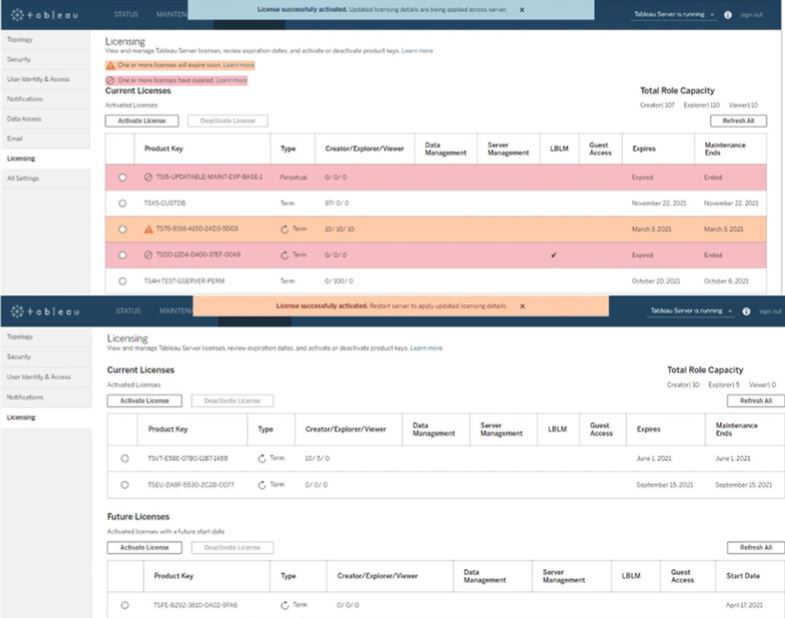
With this update, Tableau has introduced zero downtime licensing for the Tableau Server. Now for most of the tasks, whether it is the activation of a license or updating a feature that got added or applying some changes to user capacity, I no longer need to perform a server restart.
 So, these are some features that have been helpful to me and these are just a few of the lot. To view all the new features in 2021.1, you can view it at Tableau 2021.1 New Features
In my view, Tableau has done a great job with its timely and inventive updates and seeing the rapid growth of AI and the increase of its application in numerous industries, I can predict for sure that Tableau will surprise the data science community with more innovative updates.
Images Courtesy: Tableau
- Einstein Discovery
- Quick LODs
- More Data Connections
- View Metrics
- Dashboard Extensions in Tableau
- Write to Excel in Tableau Prep
- Device Designer for Web Authoring
- License Improvements
- Through Dashboard Extensions: To use “Einstein Discovery” in dashboards, I can just add an extension object on the dashboard and select Einstein Discovery. It will analyse the selected data and build predictive models. It shows me the top predictors in the view along with metrics that can be improved, and thus helping business decisions. This feature is available in Tableau Desktop, Tableau Server and Tableau Online.
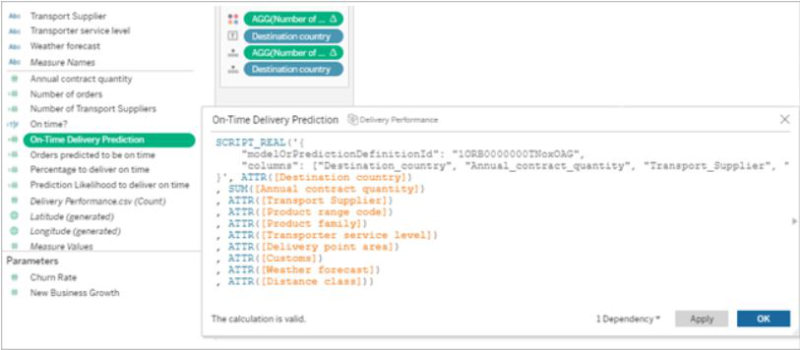
- Through Analytics Extension: With this feature, I can directly embed predictions into Tableau calculated fields. All I have to do is go to Salesforce, use Model Manager to generate a Tableau table calculation script and paste the script into the calculated field in Tableau. This script then accesses predictive models in Salesforce by passing the data required for the model. This saves my time since I don’t need to create a code for the model. This feature is only available in Tableau Desktop and Tableau Server.
- Through Tableau Prep: This feature was released in 2021.1.3 and its ingenuity is worth mentioning. With “Einstein Discovery” in Tableau Prep, I can now use predictions while preparing data. I can bulk score my data and create fields to show prediction outcomes, to show top predictors and to show recommendations for improvement of the output.
Quick LODs
LOD calculations are frequently used in Tableau to perform calculations on a fixed dimension. Where previously I had to mention the dimension to be fixed and the measures to be aggregated in a calculated field, now all I must do is select the dimension and measure in the data pane and right click to create an LOD calculation. Or even better, hold “Ctrl” to drag and drop the required measure field onto the dimension to be fixed. As simple as that.
I can modify the calculation with more dimensions or change the type of aggregation later, if required.
This feature is most beneficial as it reduces the chance of errors while creating complex LOD calculations, like misplacing a bracket, or adding any unnecessary characters by mistake.
More Data Connections
With the increase in popularity of Microsoft Azure services among users, Tableau has added multiple Azure connectors including Azure SQL Database and Azure Data Lake Gen 2 along with the existing Azure Synapse Analytics and Databricks. I can now connect to data that is stored in Azure’s SQL Database and Data Lake using the native Tableau connectors. Tableau has also introduced authentication to Azure services using the Azure Active Directory, making the connection more secure.
In addition to this, four new data connectors have been added to Tableau Online and Tableau Server. They are Amazon Athena, Apache Drill, OData and SharePoint Lists.
View Metrics
A difficulty that I had faced with the metric feature was that I was not able to know the other metrics that were created in the same dashboard. With this update I can see all the metrics associated with a particular dashboard and modify these metrics if required or create new ones within the metrics pane.
And previously, only if my site role were “Creator” or “Explorer”, I could see the metrics. But in this update, I can see all metrics connected to a dashboard irrespective of my site role.
Dashboard Extensions in Tableau
Earlier, to use an extension in a Tableau Dashboard, I had to drag and drop the extension object on the dashboard which would take me to its extension gallery web page and then I had to download it and then locate the downloaded extension on Tableau. Sounds tiring right?
Not anymore! With this update, all I have to do is drag and drop the extension object onto the dashboard to select the required extension. I can now see all extensions and filter the list based on categories within the “Add an Extension” window in the Tableau screen.
Write to Excel in Tableau Prep
This is one feature that will prove useful to any regular Tableau Prep user. The days of exporting an output to csv and then converting it manually to an xlsx file are finally over.
Using the latest version of Tableau Prep, I can directly export the output of a workflow into an xlsx file.
Device Designer for Web Authoring
Where before I could only generate device specific layouts in Tableau Desktop, now I can create custom phone or tablet views within the web itself. I no longer have to modify the device layout in Tableau Desktop and re-publish whenever a change in device layout is required.
Licensing Improvements
With this update, Tableau has introduced zero downtime licensing for the Tableau Server. Now for most of the tasks, whether it is the activation of a license or updating a feature that got added or applying some changes to user capacity, I no longer need to perform a server restart.
So, these are some features that have been helpful to me and these are just a few of the lot. To view all the new features in 2021.1, you can view it at Tableau 2021.1 New Features
In my view, Tableau has done a great job with its timely and inventive updates and seeing the rapid growth of AI and the increase of its application in numerous industries, I can predict for sure that Tableau will surprise the data science community with more innovative updates.
Images Courtesy: Tableau
How Mywhoosh Standardized Collaborative Workflow Creation by Implementing the “Alteryx Server” Platform on AWS that Paved the Way for 20% Better Business Predictions
Once a workflow is built, users want to share, secure, schedule, and monitor the assets that have been built. Alteryx Server allows users to publish their workflows to a central location where the workflows can be stored, shared, and controlled in a safe and “enterprise-grade” solution.
Challenge
- The IT infrastructure of MyWhoosh where the Alteryx Server platform was hosted was in an on-premise datacenter which was designed to be scalable and robust with multi node physical clusters including the server, storage and network components. However, most of the physical hardware was quite old and not equipped with the latest generation of physical servers.
- Frequent hardware crashes and portal downtime kept troubling the availability of the Alteryx Server application. Assigning a touch hand support person to power on the hardware that was down seemed quite impossible due the restrictions during covid period. Hence, MyWhoosh wanted to look for another viable solution.
- Though the hardware setup at MyWhoosh was well equipped to meet the occasional spikes in the traffic, it was observed that over a course of 6-month time, most of the IT infra was underutilized than predicted. It was realized that spending huge amount of money on an old hardware plus software maintenance, license costs, internet bandwidth, datacenter cooling and maintenance, touch support personnel and electricity costs – were keeping the business operations challenging.
- There was an attempt by MyWhoosh to select a cost-effective solution that can host Alteryx Server application servers, web servers and archival data. This way IT infra can be re-provisioned to host sensitive data on-premise and the rest on the cloud, thereby reducing the overall physical hardware costs spent on a yearly basis.
Why AWS
- MyWhoosh decided to migrate Alteryx Server, database servers and archival data to AWS.
- The Alteryx Server’s AWS architecture includes Amazon Elastic Compute Cloud (Amazon EC2), that provides complete control of its computing resources, updates to tables in Amazon Relational Database Service (Amazon RDS) and AWS Elastic Load Balancer was used to distribute the traffic to the underlying EC2 instances based on the load.
Benefits
- MyWhoosh uses AWS services to provision infrastructure and deploy the Alteryx Server platform to other departments within it. In addition, the Alteryx Server resources that are no longer required to be run all the time are made to auto shutdown thus saving cost. MyWhoosh reported a 30% cost reduction after implementation of AWS for the Alteryx Server platform.
- The implementation of Alteryx Server on AWS made MyWhoosh confident in the security of its data, and its accreditation team is enthusiastic about the monitoring and auditing capabilities provided by AWS tools. With the implementation of IAM roles, MyWhoosh IT team was able to isolate systems and tightly control user accesses. These capabilities were harder to achieve within the existing infra but were available out of the box with AWS
- By adopting AWS to host the Alteryx Server platform, MyWhoosh has been able to innovate and experiment to a degree previously impossible. For example, MyWhoosh compared the performance and cost-effectiveness of three different cloud solutions. Without moving to the AWS, the costs associated with running an outdated on-premise hardware would have creeped up and the alternative way of upgrading the existing on-prem infrastructure to the latest hardware models and then hosting the Alteryx Server application on top of it would have taken months.

All You Need to Know About Tableau Filters: Types of Filters in Tableau
Tableau filters allow their users to perform simple filtering using available metrics, as well as perform advanced filtering using complex calculations. While developing dashboards, Tableau offers the flexibility to view different types of filters such as drop-down filters, wildcard filters, list filters and many more. To enhance dashboard interactivity, Tableau has provided “Filter Actions” which allow users to filter an entire dashboard as per the value selected by the user in a particular visualization.
To create a filter that suits the user's requirements, Tableau engages several filtering techniques which also enhance data processing efficiency Each filter is designed for a specific function, and the order in which they are run can significantly impact performance.
6 Types of Filters in Tableau
Tableau employs six different types of filters, which are listed in the sequence of execution:
- Extract Filters
- Data Source Filters
- Context Filters
- Dimension Filters
- Measure Filters
- Table Calculation Filters
1. Extract Filters
Extract filters are utilised during the initial stage of data filtering. When datasets are uploaded to Tableau, we can utilise the extract filter to minimize the number of Tableau queries for the data source. By applying filters to the extract, we can further decrease the size of the data.
2. Data Source Filters
Data Source filters sort out any crucial or sensitive information while putting data into Tableau. It is compatible with both the Live and Extract connections.
We can add the data source filter to any column by selecting the ADD option. After selecting the ADD option, the ADD Filter dialogue box will appear, displaying all the fields. We can then select the field to which we wish to apply the filter and it is possible to change or delete data source filters as needed.
3. Context Filters
A context filter is generally used when we require this filter to be applied before any other filter. It has the potential to enhance the performance of massive data sources. They are made by dragging the dimension to the filter section box and selecting the Add to context option. This will make the dimension pill change its colour to “Grey”, indicating it is a context filter. Similarly, by clicking "Remove from Context", the filter becomes a simple dimension filter. A common use case for this filter would be when a user would like to find the top N products in any category.
4. Dimension Filters
Dimension fields include discrete categorical data, and we can remove or add the values we want to investigate. The process is simple as outlined below:
Step 1: Drag the dimensions from the dimension list to the filter section box.Step 2: From the Filter Dialog box, select the values that we want to analyze.
The Filter dialogue box contains four tabs:
- General: To select the members present in the dimension to either include or exclude
- Wildcard: To filter the result based on a particular pattern
- Condition: To filter the result based on a particular condition
- Top: To filter the Top N products belonging to a particular category.
5. Measure Filters
Measure filters are applied to the measure fields, which have quantitative data. It can be used as follows:- Drag the measured field from the Measure box to the Filter area
- Filter dialogue box with several functions will appear.
- Select the operation that needs to be performed and click Next.
In the subsequent dialog box, there are 4 types of filters:
- Range: To select the range of values to include in the result.
- At least: Select the minimum value of a measure to filter the data.
- At most: To select the maximum value of a measure to filter the data.
- Special: To select null or non-null values.
6. Table Calculation Filter
Table Calculation Filters, being the last type of filters to be executed in the sequence of execution, do not filter out the underlying data. It is mostly used to filter out contents in the current view. Table Calculations are functions that are utilised for building Calculated Fields like LOOKUP, WINDOW SUM, WINDOW AVG, and so on.Summing Up
Tableau Filters are the most commonly used feature by many organizations. It allows the clients to filter out confidential data and allows them to provide controlled view access to different internal users so that only data relevant to the user is accessed. Filtering out data means data processing becomes more efficient, which in turn makes the report generation process faster which in turn helps the organization arrive at quick and insightful business decisions.Use Cases Addendum
Let’s find out how Tableau filters work to solve various tasks :Use Case 1:
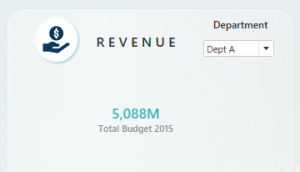

A simple drop-down filter can be used to filter the view of our requirements as shown in the visualization above.
In this example, Dept A has been selected such that the Total Budget is shown only for Dept A. Once we select Dept B, the Total Budget shows the respective value for Dept B
Use Case 2:

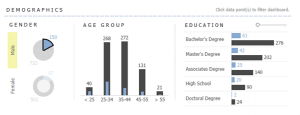
In the visualizations above, we can see the customer demographics related to gender, age group and educational status. With the help of Tableau’s Filter Actions, one can click on a particular segment and filter the rest of the visualizations as per the requirement.
For example, if we require to find how many customers in the age group of 35-44 are males, all we have to do is to click on the doughnut chart for “Male”, and the visualizations will show only the data for males. Now, we can find that the number of male customers in the age group of 35-44 is 272.
Use Case 3:
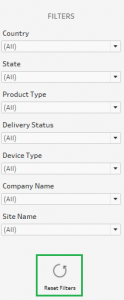
The Filter Action feature in Tableau can be leveraged to develop several creative solutions for customers. One such solution is the “Reset Filter” as shown in the above visualization.
With a combination of filters and filter actions, one can develop a reset filter that, on clicking, would reset all the currently applied filters on the dashboard and bring it back to its original unfiltered view. This comes in handy if the dashboard consists of multiple visualizations and contains heavy data.

Making your Business Smart and Sustainable for the digital age A Guide for Thought Leaders