How AI Decision-Making is Improving Enterprise Outcomes
Blog
Share 
13 Key Snowflake Features: Traits that Take It to the Top
 21 December 2022
  Sumi S
 A Compact List of Snowflake Features
- Decoupling of storage and compute in Snowflake
- Auto-Resume, Auto-Suspend, Auto-Scale
- Workload Separation and Concurrency
- Snowflake Administration
- Cloud Agnostic
- Semi-structured Data Storage
- Data Exchange
- Time Travel
- Cloning
- Snowpark
- Snowsight
- Security Features
- Snowflake Pricing
Let’s deep-dive:
1. Decoupling of storage and compute in Snowflake
Snowflake's decoupling of storage and compute features facilitates virtual warehouses and storage as separate entities. Leveraging this functionality of Snowflake, businesses can achieve greater flexibility in choosing the compute of their choice and incrementally pay for what they store and compute. Users can scale up / down or in/out based on the business SLA requirement. Scale up – Scale-out features do not require downtime and are almost instant.
2. Auto-Resume, Auto-Suspend, Auto-Scale
Snowflake's auto-resume and auto-suspend features provide minimal administration. Using auto-resume, Snowflake starts a compute cluster when a query is triggered and suspends compute clusters after a set time of inactivity. These two features ensure performance optimisation, cost management, and flexibility.
In business circumstances where more users are querying heterogeneous queries, setting up auto-scaling can help automatically expand the number of clusters from 1 to 10 at an increment of 1 based on the volume of queries sent to a compute simultaneously.
3. Workload Separation and Concurrency
Concurrency is no longer a problem for Snowflake, unlike traditional data warehouses with concurrency issues where users and processes must compete for resources. Because of Snowflake's multi-cluster architecture, concurrency is not an issue anymore.
This architecture also helps to divide workloads into their virtual warehouse and channel the traffic to each virtual warehouse (compute) by functions or departments.
4. Snowflake Administration
A data cloud as a service is provided by Snowflake (DWaas). Businesses can set up and administer a system without significant assistance from DBA or IT teams. Unlike the on-premise platforms, neither hardware commissioning nor software installation patch-update is s necessary. Snowflake manages software updates and introduces new functions and patches without downtime.
Snowflake automatically creates micro-partitioning. This feature reduces the requirement of manually indexing and clustering tables though these are available features in Snowflake.
5. Cloud Agnostic
Being a cloud-agnostic platform, Snowflake can migrate its workloads with other cloud providers. So, Snowflake is accessible on all three cloud providers: AWS, Azure, and GCP. Customers can easily integrate Snowflake into their existing cloud architecture and choose to deploy in locations preferred by their companies.
6. Semi-structured Data Storage
The requirement to manage semi-structured data, often in JSON format, gave rise to NoSQL database solutions. Data pipelines are created to extract attributes from JSON and mix them with structured data. By leveraging VARIANT, a schema on read data type, Snowflake's design enables storing structured and semi-structured data in the exact location. Both organised and semi-structured data can be stored using the VARIANT data type. Snowflake eliminates the need for data extraction pipelines by automatically analysing data, extracting properties, and saving it in a columnar format.
Snowflake can connect to staging areas like s3 bucket, Azure blob or GCP blob storage to retrieve and transform files stored in these platforms. This is regardless of the cloud Snowflake is hosted. A snowflake-managed staging area is also available. Tasks/ Streams or Snowpipe can be set to retrieve data at a scheduled time or almost instantly, respectively. Snowflake can work with CSV, JSON, XML, Avro, ORC, and Parquet file formats. Snowflake can also store metadata of unstructured data stored in the staging area.
7. Data Exchange
A wide range of data, data services, and applications are available on the Marketplace. From some of the world's top data and solution suppliers, you can find, assess, and buy data, data services, and apps through Marketplace. Direct access to data ready for querying and pre-built SaaS connections virtually eliminates the expenses and delays associated with conventional ETL operations and integration. The risk and hassle of duplicating and relocating outdated material should be avoided. Instead, you can receive automatic updates that are close to real-time and have secure access to shared, controlled, and live data.
8. Time Travel
One of the distinctive Snowflake elements is time travel. You may follow the evolution of data through time by using time travel. All accounts have access to this Snowflake feature, free and enabled by default for everyone. Additionally, this Snowflake feature allows you to retrieve a Table's historical data. At any moment throughout the previous 90 days, one can access the table's appearance.
Time travel encompasses the undrop feature. If an object has not been removed yet by the system, a dropped object can be recovered using the undrop command in Snowflake. When an object is undropped, it returns to its original condition. The option to undrop schemas or tables is also available.
9. Cloning
The clone capability allows us to quickly duplicate anything, including databases, schemas, tables, and other Snowflake objects, in almost real time. Therefore, cloning an object involves editing its metadata rather than duplicating its storage contents. You can quickly produce a clone of the whole production database for testing purposes.
10. Snowpark
With the help of the Snowpark feature, data scientists and data engineers proficient in Python, Scala, R, and Java may create and manage their codes in Snowflake. Snowpark helps to employ the computing capabilities of Snowflake to retrieve, transform, train and apply data science models on the data stored in Snowflake, which has a more apparent performance advantage,
11. Snowsight
The new Snowflake web user interface, Snowsight, replaces the traditional Snowflake SQL Worksheet and enables you to easily construct basic charts and dashboards that can be shared or explored by many users, do data validation while loading data and conduct ad-hoc data analysis. The Snowflake dashboards tool is an excellent option because it works well for individuals or small group users in an organisation who wish to generate straightforward visualisations and share information among themselves.
12. Security Features
Snowflake assures security for its users through the following methods:
- • By adding IP addresses to a whitelist, you may control network policies and limit who can access your account.
- • By supporting several authentication techniques, including federated authentication and two-factor authentication for SSO.
- • Using a hybrid approach of role-based access control and discretionary access control. In role-based access control, privileges are assigned to roles which are then transferred to users. Still, in discretionary access control, each object in the account has an owner who controls access to the object. This hybrid strategy offers a substantial level of flexibility and control.
AES 256 strong encryption is used to automatically encrypt all data, both in transit and at rest.
13. Snowflake Pricing
The advantages of Snowflake pricing are:
- • Pay for actual consumption only.
- • We can cut back on resource use to save costs.
- • Flexible payment. We can either pay on-demand or in advance (pre-purchased).
- • Scale up or down the use of cloud services, computing, and data storage automatically based on your needs.
- • There are no chances of overbuying or overprovisioning.
Optimisation of Snowflake spending through integration with innovative cost-monitoring platforms.
Snowflake stands as an ideal and popular choice because of its unique and updated features. It is also available across many data cloud providers and regions, making it accessible and suitable for all organisations. Why wait? Let’s experience Snowflake. Try now: https://beinex.com/snowflake/.
Snowflake's Cloud Data platform is one of the most sought-after tools by companies that wish to upgrade to a contemporary data architecture. Snowflake stands out from the rest of cloud data warehouse solutions as an integrated service platform because of a few unique features. Well, let's have a look at those remarkable traits at a glance.
Related Articles

Beinex Unveils Version 2 of the Cost Optimizer App on Snowflake
What’s New in Version 2
Version 2 of the Cost Optimizer app brings a host of innovative features aimed at empowering organizations to better understand and manage their Snowflake-related costs. The highlight of this release is the introduction of Cortex Usage Insights, which provides unprecedented visibility into resource utilization and optimization opportunities.
Changelog:
• Cortex Usage Insights: This new analytics feature allows users to track and optimize Cortex resource utilization. By providing detailed insights into how Cortex services are being used, organizations can identify inefficiencies and make data-driven decisions to reduce costs without compromising performance. • Enhanced Cost Transparency: Version 2 also includes improved reporting capabilities for Cortex-related expenditures. Users can now access granular cost breakdowns, enabling them to understand exactly where their Snowflake budget is being allocated and how to optimize it further. These enhancements make the Cost Optimizer app an indispensable tool for organizations leveraging Snowflake’s advanced capabilities, particularly those utilizing Cortex services.
What is Cortex Services from Snowflake?
Snowflake Cortex is a powerful suite of services designed to simplify and accelerate AI and machine learning (ML) workflows directly within the Snowflake Data Cloud. Cortex enables organizations to harness the power of AI without the need for extensive coding or specialized expertise. Key features of Snowflake Cortex include: • AI and ML Integration: Cortex allows users to build, train, and deploy machine learning models using SQL, making AI accessible to a broader range of users. • No-Code Development: With Cortex, even non-technical users can leverage AI capabilities to derive insights and make data-driven decisions. • Advanced Analytics: Cortex provides pre-built models and functions for tasks like anomaly detection, forecasting, and sentiment analysis, enabling organizations to unlock the full potential of their data. • Cortex LLM: Snowflake Cortex LLM Functions offer businesses seamless access to industry-leading large language models (LLMs) with enhanced retrieval capabilities and improved AI safety. This update introduces support for new high-performing LLMs.
By integrating Cortex Usage Insights into the Cost Optimizer app, Beinex is helping organizations maximize the value of their Snowflake Cortex investments while keeping costs under control. The Cost Optimizer app is available on the Snowflake Marketplace, making it easy for organizations to access and deploy this powerful tool. Whether you’re looking to optimize costs, gain deeper insights into resource utilization, or enhance your Cortex-related analytics, the Cost Optimizer app is your go-to solution. Get the Cost Optimizer App on Snowflake Marketplace Version 2 of Beinex’s Cost Optimizer app represents a significant step forward in cost management and optimization for Snowflake users. With its new Cortex Usage Insights and enhanced cost transparency features, the app empowers organizations to make smarter, data-driven decisions while keeping costs in check. Explore the Cost Optimizer app on the Snowflake Marketplace today and take the first step toward unlocking the full potential of your Snowflake investment.

Accelerate Your Digital Transformation: Tableau + AWS for Modern Cloud Analytics
AWS + Tableau: Together, a Match Made in Data Heaven
By embracing the synergy between Tableau and AWS, you're not just investing in tools; you're investing in a future fueled by data-driven insights. This powerful combination paves the way for a more agile, data-centric organization ready to thrive in the ever-evolving digital landscape. The digital landscape is evolving rapidly, and businesses are increasingly turning to the cloud for their analytics needs. This shift is driven by the cloud's ability to:
- Faster Time to Insights: The seamless integration between Tableau and AWS allows you to quickly get up and running with your analytics, enabling you to make data-driven decisions sooner.
- Effortless Data Management: Leverage the power of AWS data warehousing and management services to ensure your data is clean, organized, and readily accessible for analysis in Tableau.
- Advanced Analytics Capabilities: Tap into the power of AWS machine learning and artificial intelligence services to uncover hidden patterns and gain deeper insights from your data within the Tableau environment.
- Handle complex data integration: Seamlessly connect and analyze data from various sources, regardless of size or location.
- Empower self-service analytics: Enable users to explore and gain insights from data independently, fostering data-driven decision-making across the organization.
- Support digital transformation: Meet the growing demands of digital transformation with scalability, flexibility, and cost-efficiency.
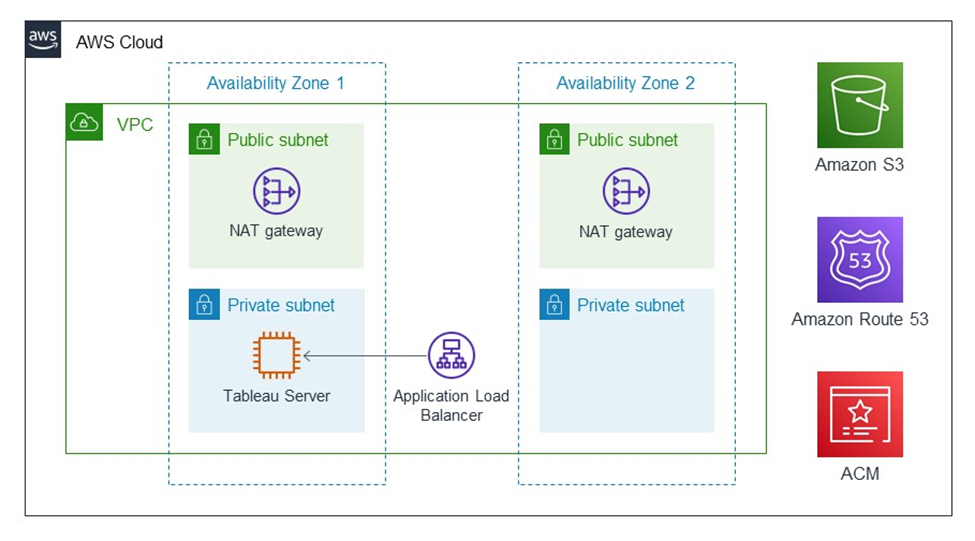
Image source: https://aws.amazon.com/solutions/partners/tableau-server/
Tableau: The Master of Data Visualization
Imagine transforming raw data into captivating, interactive visualizations that tell a clear story. Tableau is a game-changer in the world of data visualization. It empowers users of all technical backgrounds to:
- Connect to Diverse Data Sources: Tableau seamlessly connects to a wide range of data sources, both on-premise and in the cloud. This includes databases, spreadsheets, cloud applications, and even big data platforms.
- Effortlessly Drag-and-Drop Analysis: The user-friendly interface allows users to drag and drop data fields, explore trends, and create stunning visualizations without writing a single line of code.
- Craft Interactive Dashboards & Reports: Go beyond static reports. Tableau empowers you to create dynamic dashboards that users can interact with, filter data, and gain deeper insights on the fly.
- Foster Data-Driven Culture: Tableau democratizes data by making it accessible and understandable to everyone in the organization, fostering a data-driven culture where decisions are based on evidence, not intuition.
AWS: The Cloud Powerhouse for Scalability and Security
While Tableau excels at data visualization, the underlying infrastructure needs to be robust and scalable. This is where AWS, the world's leading cloud computing platform, comes into play. Here's how AWS empowers your Tableau deployment:
- Unmatched Scalability: AWS offers virtually limitless scalability to accommodate your growing data volumes and user base. As your data needs evolve, your cloud infrastructure can easily scale up or down to meet those demands.
- Enhanced Security: Security is paramount when dealing with sensitive data. AWS offers robust security features and compliance certifications, ensuring your data remains protected throughout its lifecycle.
- Cost-Effectiveness: The pay-as-you-go model of AWS allows you to optimize your costs. You only pay for the resources you use, eliminating the need for upfront investments in expensive hardware infrastructure.
- Wide Range of Services: AWS offers a comprehensive suite of services beyond just compute power. These services include data warehousing, machine learning, and data management tools, giving you a complete cloud ecosystem to manage your entire data pipeline.
Modern Cloud Analytics: A Collaborative Powerhouse
Modern Cloud Analytics is a collaborative initiative leveraging the expertise and resources of Tableau, AWS, and their extensive partner networks. Its objective is to maximize the value you extract from your data and analytics investments throughout your entire digital transformation journey, encompassing:
- Data Strategy and Migration: Develop a comprehensive plan to securely and efficiently migrate your data and analytics operations to the cloud.
- Optimization: Fine-tune your cloud analytics environment for peak performance and cost-effectiveness.
- Deployment and Scaling: Securely deploy and seamlessly scale your Tableau environment on AWS to adapt to your evolving needs.
Benefits of Modern Cloud Analytics:
- Faster Time to Value: Get up and running with cloud analytics quickly, enabling data-driven decisions sooner.
- Reduced Costs: Leverage the cloud's inherent cost-efficiency and scalability to optimize your analytics spending.
- Minimized Risks: Mitigate potential risks associated with cloud adoption by utilizing validated migration processes and expert guidance.
Unified Integration for Unparalleled Insights
Tableau and AWS offer a comprehensive solution for cloud-powered organizations. Both Tableau Server and Tableau Cloud operate flawlessly on AWS infrastructure, providing you with:
- Effortless Data Access: Streamlined workflows and effortless access to data stored within various AWS sources directly within the AWS ecosystem.
- Market-Leading Connectivity: Tableau serves as the ideal platform for analyzing data residing in diverse AWS data sources like:
- Amazon Redshift: A blazing-fast data warehouse designed to handle large datasets with efficiency.
- Amazon RDS: A managed relational database service offering high availability and scalability.
- Amazon EMR: A managed Hadoop framework for processing and analyzing massive datasets.
Enhanced Security and Broader Connectivity
Tableau's commitment to continuous improvement extends to its AWS integrations. Here's a glimpse into the exciting advancements:
- Enhanced Security: The updated Amazon Athena connector now supports secure authentication using third-party identity providers like Azure AD and Okta, adding an extra layer of security with multi-factor authentication options.
- Expanded Connectivity: The Tableau Exchange offers a plethora of new connectors, further extending your connection options within the AWS ecosystem.
- Amazon OpenSearch Connector: Effortlessly visualize and analyze data residing in Amazon OpenSearch.
- Amazon DocumentDB Connector: Gain valuable insights from your DocumentDB data through seamless interaction.
- Amazon Neptune Connector: Explore connections within your data by directly connecting to your Neptune graph database.
By embracing the synergy between Tableau and AWS, you're not just investing in tools, you're investing in a future fueled by data-driven insights. This powerful combination paves the way for a more agile, data-centric organization ready to thrive in the ever-evolving digital landscape.
How Beinex Can Assist You
Beinex is a premier Tableau partner and AWS consulting partner providing sustainable analytics solutions to organizations. Our Tableau and AWS-certified consultants help organizations build superior data visual analytics capabilities through bespoke training programs. We empower customers to host their BI solutions on the cloud with AWS infrastructure as a service. Get in touch with us for free trials and experience our expertise in providing analytics and cloud solutions.

AWS Serverless Evolution: What's New in the World of Cloud Innovation
Serverless Computing
Serverless computing, often referred to as "serverless," is a cloud computing model where developers can build and deploy applications without having to manage the underlying server infrastructure. In a traditional server-based architecture, developers need to provision, configure, and manage servers to run their applications, which can be complex and time-consuming.
In a serverless architecture, the cloud provider (such as Amazon Web Services with AWS Lambda, Microsoft Azure with Azure Functions, or Google Cloud with Google Cloud Functions) abstracts away the server management aspect. Developers can focus solely on writing code for the specific functions or tasks their application needs to perform without worrying about server provisioning, scaling, or maintenance.
Serverless services offer several significant benefits that can have a positive impact on application development, deployment, and management. Some of the key significances of serverless services include:
- Simplified Infrastructure Management
- Auto-Scaling
- Rapid Development and Deployment
- Event-Driven Architecture
- Reduced Administrative Overhead
- Global Scalability
- Resource Optimization
- Improved Fault Tolerance
Amazon Web Services (AWS) continuously introduces new capabilities and features to their serverless services for several reasons aimed at improving the developer experience, expanding use cases, and meeting evolving customer needs.
Latest buzz in AWS serverless services
1. General availability of AWS Database Migration Service Serverless
On June 2nd, 2023, AWS unveiled the widespread availability of AWS Database Migration Service (AWS DMS) Serverless. This release simplifies database migrations by automating the provisioning and scalability of migration resources. With AWS DMS Serverless, users gain the ability to seamlessly replicate data across a diverse range of widely used databases, analytics engines, and services—think PostgreSQL, MySQL, Oracle, Amazon Redshift, Amazon DynamoDB, Amazon Aurora, and more. By handling the often-cumbersome work of database migration, AWS DMS Serverless minimises the need for manual resource estimation, provisioning, monitoring, and scaling. This advancement translates to migration timeframes measured in hours, and cost savings realised through payment solely for consumed data migration resources.
2. Provisioned Concurrency for Amazon SageMaker Serverless Inference
As of May 10th, 2023, AWS has introduced the general availability of Provisioned Concurrency support for Amazon SageMaker Serverless Inference. This innovative feature ensures that models deployed on serverless endpoints offer consistent performance and impressive scalability. Through the integration of provisioned concurrency, users can infuse their serverless endpoints with a predetermined volume of concurrency, effectively maintaining the readiness and responsiveness of SageMaker endpoints. This offering particularly suits scenarios where traffic is predictable, yet throughput remains relatively low.
3. Amazon Aurora Serverless v2 is now available in 4 additional regions
The footprint of Amazon Aurora Serverless v2 has now expanded to include four additional regions. Aurora Serverless v2, an adaptive, automatic scaling configuration for Amazon Aurora, has the remarkable ability to instantaneously scale to accommodate even the most resource-intensive applications. By making precise capacity adjustments, Aurora Serverless v2 ensures that an application always receives the optimal database resources it demands. This dynamic resource allocation extends to encompass an impressive range of Amazon Aurora features, spanning read replicas, multi-AZ support, Performance Insights, and Global Database functionality. This powerful suite is ideally positioned to serve a diverse spectrum of applications. Enterprises dealing with an extensive array of applications or Software as a Service (SaaS) providers managing multi-tenant environments replete with numerous databases can harness the capabilities of Aurora Serverless v2 to deftly manage database capacity across their entire infrastructure.
4. AWS Lambda introduces response payload streaming
AWS Lambda, the bedrock of serverless computing, has ushered in an exceptional enhancement: response payload streaming. This capability enables AWS Lambda functions to gradually stream response payloads back to clients, even accommodating payloads that surpass the 6MB threshold. A monumental leap forward for web and mobile applications, this feature marks a departure from the conventional request-response model. Previously, applications built on Lambda necessitated the complete generation and buffering of responses before they could be sent to clients—an approach that often resulted in delayed first-byte transmission times. With response payload streaming, Lambda functions can transmit partial responses to clients as they are ready, substantially improving the all-important first-byte transmission time, a facet crucial for web and mobile applications alike. This innovation stands to elevate the performance of AWS Lambda-powered applications to new heights.
As AWS continues to introduce new capabilities, it's evident that the serverless paradigm is here to stay. This shift isn't just a technological trend; it's a fundamental change in how we architect, deploy, and scale applications. With each enhancement, AWS reinforces its commitment to providing customers with the tools they need to succeed. With AWS's ongoing dedication to pushing boundaries, the future of cloud computing holds the promise of even more remarkable advancements.
Beinex+ AWS Offerings
AWS provides security services such as AWS Shield and AWS WAF to help protect against phishing attacks. Strengthen your defences by integrating robust security software from the AWS Marketplace and embracing Two-Factor Authentication (2FA). Safeguard against evolving threats like homograph phishing for a safer online experience.
Beinex is an AWS consulting partner, and we empower customers to host their BI solutions, provide security services and much more on the cloud. Our cloud migration experts bring in best-in-class stability and reliability by understanding your business strategy and working closely with you to deploy AWS infrastructure as a service.
Top Picks: Tableau 2020.4
As a frequent user of Tableau Desktop and Server, check out my top picks from the list.
• Improved dynamic parameter
• Multiple marks layer support for maps
• Block comments in calculations
• Web authoring enhancements
• Offline map support for Tableau Server
• Tableau Server Management (TSM) improvements
• Multiple key activation on Tableau Server prior to TSM initialization
• Analytics Extension for Tableau Online
• Merge duplicate external assets
• Tableau Prep Builder in the browser
Tableau Desktop
Improved Dynamic Parameter
The dynamic parameter was one of the features which I used extensively starting from 2020.1. The feature allows us to populate parameter values based on a specified field whenever the workbook is opened. We will be able to select only the field with matching data types.
The feature update announced in Tableau 2020.4 gives me more privilege to customize the Dynamic Parameter. I can now set a parameter’s range to a field’s min and max value upon opening the workbook, or when the field’s data source is refreshed.
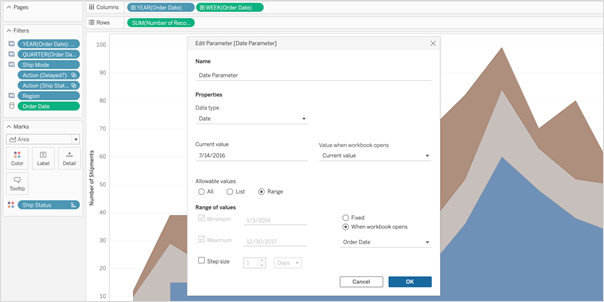 So, whenever I open the workbook or the extract is refreshed, Tableau displays the unique values within the range specified, giving more control over the parameter values displayed.
Multiple Marks Layer Support for Maps
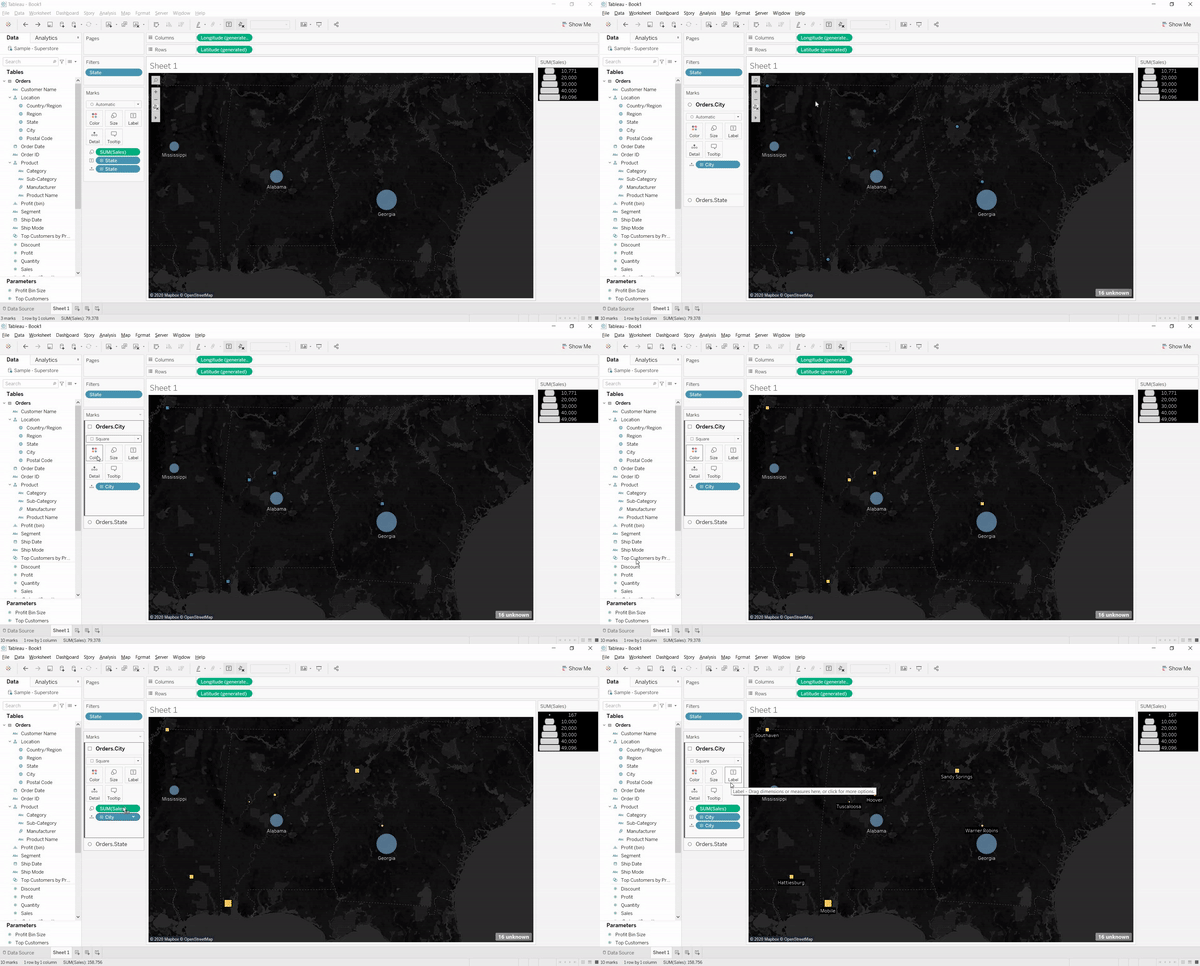
This is an exceptional feature to bring multiple spatial layers and context together to better understand and analyze geospatial data and map views. I will be able to include multiple marks layers from a data source to map visualizations and enhance the geospatial analysis. I can present more context in a single map view and perform further analysis with this feature.
So, whenever I open the workbook or the extract is refreshed, Tableau displays the unique values within the range specified, giving more control over the parameter values displayed.
Multiple Marks Layer Support for Maps
This is an exceptional feature to bring multiple spatial layers and context together to better understand and analyze geospatial data and map views. I will be able to include multiple marks layers from a data source to map visualizations and enhance the geospatial analysis. I can present more context in a single map view and perform further analysis with this feature.
 Block Comments in Calculations
Block comments is a simple yet one of the most useful features for me, which Tableau has announced in 2020.4. I often used to add comments in complex calculations for easy understanding in future references. Earlier, only single-line comments were possible, limiting the description I could add. But from now on, I can add comments of any length to calculation windows with block comments by simply starting the comment with /* and ending with */.
What makes it unique is that the new multi-line block comment feature is consistent with other popular programming languages. This feature is an example of Tableau’s on-going effort to provide its customers with an intuitive user experience.
Block Comments in Calculations
Block comments is a simple yet one of the most useful features for me, which Tableau has announced in 2020.4. I often used to add comments in complex calculations for easy understanding in future references. Earlier, only single-line comments were possible, limiting the description I could add. But from now on, I can add comments of any length to calculation windows with block comments by simply starting the comment with /* and ending with */.
What makes it unique is that the new multi-line block comment feature is consistent with other popular programming languages. This feature is an example of Tableau’s on-going effort to provide its customers with an intuitive user experience.
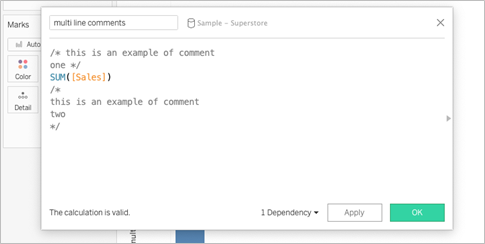 Tableau Server
Web Authoring Enhancements
Starting from Tableau 2020.4, it is possible to author dashboards from the browser just like how we design it in Tableau Desktop. With this web authoring enhancements, I can include Highlight actions, Format Mark Labels, apply filters to worksheets, create fixed sets, and even create extract in my workbooks from the browser itself. I no longer have to make changes from Tableau Desktop and publish it to the server. I can directly do it from the browser itself.
Tableau Server
Web Authoring Enhancements
Starting from Tableau 2020.4, it is possible to author dashboards from the browser just like how we design it in Tableau Desktop. With this web authoring enhancements, I can include Highlight actions, Format Mark Labels, apply filters to worksheets, create fixed sets, and even create extract in my workbooks from the browser itself. I no longer have to make changes from Tableau Desktop and publish it to the server. I can directly do it from the browser itself.
 Offline Map Support for Tableau Server
Rendering dashboards with maps is now faster compared to previous versions. Now, I can create maps using the offline map style in web authoring, ensuring the performance of map views in Tableau Server. Offline map support is a great deal for organizations with strict internet access restrictions, assuring that map view access to all its users.
Tableau Server Management (TSM) Improvements
Tableau Server Administration activities like installation, upgrade and backup are now easy like never before. I can retry installation or upgrade from the last checkpoint in case of an unexpected issue or error during installation or upgrade, saving my efforts to obliterate tableau server.
Backups can be performed twice as fast as previous versions, and I can monitor the progress with the new progress bar giving visibility into what step the backup is on and how much time is remaining.
Backups can also be scheduled using TSM command starting from 2020.4 and that is awesome. I no longer need to prepare batch script and depend on the windows task scheduler to schedule the backups on regular intervals; instead, I can schedule it with just a single command.
Multiple Key Activation on Tableau Server Prior to TSM Initialization
During Tableau Server installation, it is now possible to activate multiple license keys prior to TSM initialization. I will be able to save a lot of time by eliminating the need to restart after the installation is completed to activate multiple licenses and experience a smoother installation.
Analytics Extension for Tableau Online
The power of the Analytics extension is now unlocked in Tableau Online too. The feature was already available in Tableau Server, and it helped us dynamically perform advanced analysis with models and functions in R, Python and other platforms.
Analytics extension in Tableau Online significantly enhances the scope of using Advanced Analytics by the common users.
Merge Duplicate External Assets
Earlier, the Database or Table with similar names used to appear as multiple assets within Tableau Catalog. But, the new feature helps me to merge those multiple assets into a single one. I can manage assets easily and keep an organized view of External assets by merging the common ones.
Offline Map Support for Tableau Server
Rendering dashboards with maps is now faster compared to previous versions. Now, I can create maps using the offline map style in web authoring, ensuring the performance of map views in Tableau Server. Offline map support is a great deal for organizations with strict internet access restrictions, assuring that map view access to all its users.
Tableau Server Management (TSM) Improvements
Tableau Server Administration activities like installation, upgrade and backup are now easy like never before. I can retry installation or upgrade from the last checkpoint in case of an unexpected issue or error during installation or upgrade, saving my efforts to obliterate tableau server.
Backups can be performed twice as fast as previous versions, and I can monitor the progress with the new progress bar giving visibility into what step the backup is on and how much time is remaining.
Backups can also be scheduled using TSM command starting from 2020.4 and that is awesome. I no longer need to prepare batch script and depend on the windows task scheduler to schedule the backups on regular intervals; instead, I can schedule it with just a single command.
Multiple Key Activation on Tableau Server Prior to TSM Initialization
During Tableau Server installation, it is now possible to activate multiple license keys prior to TSM initialization. I will be able to save a lot of time by eliminating the need to restart after the installation is completed to activate multiple licenses and experience a smoother installation.
Analytics Extension for Tableau Online
The power of the Analytics extension is now unlocked in Tableau Online too. The feature was already available in Tableau Server, and it helped us dynamically perform advanced analysis with models and functions in R, Python and other platforms.
Analytics extension in Tableau Online significantly enhances the scope of using Advanced Analytics by the common users.
Merge Duplicate External Assets
Earlier, the Database or Table with similar names used to appear as multiple assets within Tableau Catalog. But, the new feature helps me to merge those multiple assets into a single one. I can manage assets easily and keep an organized view of External assets by merging the common ones.
 Tableau Prep
 Builder in the Browser
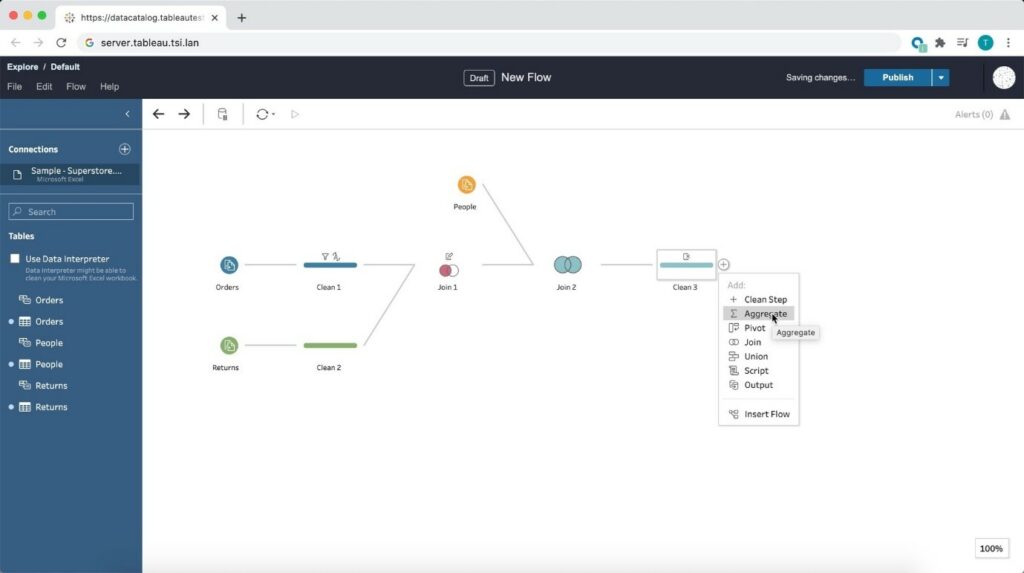
Prepare the data for visualizations from anywhere using a browser! Starting from 2020.4, Tableau is bringing the data prep process into one integrated platform on the web. Now I can easily prepare and manage prep flows from anywhere using a browser.
Tableau Prep
Tableau Prep Builder in the Browser
Prepare the data for visualizations from anywhere using a browser! Starting from 2020.4, Tableau is bringing the data prep process into one integrated platform on the web. Now I can easily prepare and manage prep flows from anywhere using a browser.
 Conclusion
Tableau is progressively evolving as a single platform for data preparations, visualization, and collaboration with every update and version release.
Author : Firdous Maqbool
Images Courtesy : Tableau
Conclusion
Tableau is progressively evolving as a single platform for data preparations, visualization, and collaboration with every update and version release.
Author : Firdous Maqbool
Images Courtesy : Tableau
So, whenever I open the workbook or the extract is refreshed, Tableau displays the unique values within the range specified, giving more control over the parameter values displayed.
Multiple Marks Layer Support for Maps
This is an exceptional feature to bring multiple spatial layers and context together to better understand and analyze geospatial data and map views. I will be able to include multiple marks layers from a data source to map visualizations and enhance the geospatial analysis. I can present more context in a single map view and perform further analysis with this feature.
Block Comments in Calculations
Block comments is a simple yet one of the most useful features for me, which Tableau has announced in 2020.4. I often used to add comments in complex calculations for easy understanding in future references. Earlier, only single-line comments were possible, limiting the description I could add. But from now on, I can add comments of any length to calculation windows with block comments by simply starting the comment with /* and ending with */.
What makes it unique is that the new multi-line block comment feature is consistent with other popular programming languages. This feature is an example of Tableau’s on-going effort to provide its customers with an intuitive user experience.
Tableau Server
Web Authoring Enhancements
Starting from Tableau 2020.4, it is possible to author dashboards from the browser just like how we design it in Tableau Desktop. With this web authoring enhancements, I can include Highlight actions, Format Mark Labels, apply filters to worksheets, create fixed sets, and even create extract in my workbooks from the browser itself. I no longer have to make changes from Tableau Desktop and publish it to the server. I can directly do it from the browser itself.
Offline Map Support for Tableau Server
Rendering dashboards with maps is now faster compared to previous versions. Now, I can create maps using the offline map style in web authoring, ensuring the performance of map views in Tableau Server. Offline map support is a great deal for organizations with strict internet access restrictions, assuring that map view access to all its users.
Tableau Server Management (TSM) Improvements
Tableau Server Administration activities like installation, upgrade and backup are now easy like never before. I can retry installation or upgrade from the last checkpoint in case of an unexpected issue or error during installation or upgrade, saving my efforts to obliterate tableau server.
Backups can be performed twice as fast as previous versions, and I can monitor the progress with the new progress bar giving visibility into what step the backup is on and how much time is remaining.
Backups can also be scheduled using TSM command starting from 2020.4 and that is awesome. I no longer need to prepare batch script and depend on the windows task scheduler to schedule the backups on regular intervals; instead, I can schedule it with just a single command.
Multiple Key Activation on Tableau Server Prior to TSM Initialization
During Tableau Server installation, it is now possible to activate multiple license keys prior to TSM initialization. I will be able to save a lot of time by eliminating the need to restart after the installation is completed to activate multiple licenses and experience a smoother installation.
Analytics Extension for Tableau Online
The power of the Analytics extension is now unlocked in Tableau Online too. The feature was already available in Tableau Server, and it helped us dynamically perform advanced analysis with models and functions in R, Python and other platforms.
Analytics extension in Tableau Online significantly enhances the scope of using Advanced Analytics by the common users.
Merge Duplicate External Assets
Earlier, the Database or Table with similar names used to appear as multiple assets within Tableau Catalog. But, the new feature helps me to merge those multiple assets into a single one. I can manage assets easily and keep an organized view of External assets by merging the common ones.
Tableau Prep
Tableau Prep Builder in the Browser
Prepare the data for visualizations from anywhere using a browser! Starting from 2020.4, Tableau is bringing the data prep process into one integrated platform on the web. Now I can easily prepare and manage prep flows from anywhere using a browser.
Conclusion
Tableau is progressively evolving as a single platform for data preparations, visualization, and collaboration with every update and version release.
Author : Firdous Maqbool
Images Courtesy : Tableau
Beinex Among First to Earn Dubai AI Seal at Dubai AI Week, Cementing Its Status as a Trusted AI Leader

Dubai AI Seal, the first-of-its-kind initiative, was launched under the directives of His Highness Sheikh Hamdan bin Mohammed bin Rashid Al Maktoum. Awarded by the Dubai Centre for Artificial Intelligence (DCAI), this AI Seal cements Beinex’s status as a trusted partner in AI solutions. It underscores our commitment to driving transformative impact across government and private industry throughout Dubai and beyond.
Beinex: Your Trusted AI Partner
Beinex stands out as a trusted partner for government and private-sector organizations, driving future-ready AI solutions that align with Dubai’s strategic vision for AI leadership.
• Validation of Excellence: This Seal affirms Beinex’s AI governance, data security practices, and solution quality robustness.
• Expanded Collaboration: Government and private-sector entities can confidently engage with Beinex, knowing we meet Dubai’s exacting standards.
• Visibility & Credibility: The seal's display highlights Beinex’s alignment with Dubai’s strategic vision for AI and further distinguishes us in a competitive market.
Connect With Us to Kickstart Your AI Journey
Dubai AI Seal: A Vision Driving Responsible AI Innovation in the Emirates
Launched in January 2025 as part of the Dubai Universal Blueprint for AI, the Dubai AI Seal is a pioneering accreditation designed to:
• Promote trust in AI service providers through a rigorous evaluation framework
• Strengthen partnerships between government bodies and certified technology companies
• Reinforce Dubai’s leadership in ethical, secure, and high-impact AI deployment
Companies licensed in Dubai offering AI-related products or services undergo a detailed assessment covering their AI activities, team expertise, ongoing and upcoming projects, and collaboration track record. Successful applicants receive a unique serial number and tier classification, granting them the right to display the Seal across digital platforms and promotional materials.
Beinex: Heralding AI Excellence and Innovation across the Middle East
At Beinex, we help businesses achieve full potential through our bespoke solutions in Advanced Analytics, AI/ML/RPA, Risk and Audit Analytics, Digital Twin, Generative AI, Competitive Intelligence, Data Governance, Business Intelligence, Cloud Engineering, Modern Cloud Analytics, Alteryx APA, and Tableau. As a trusted AI partner, we spearhead transformation across healthcare, finance, IT, HR, education, oil & gas, and more. Our clientele includes government bodies and private enterprises, and we drive real impact efficiently, effectively, and at scale. Beinex has also been recognized by Consultancy-ME as one of the Top Consulting Firms in the Middle East for 2024. We’ve earned top-tier rankings in Business Intelligence, Data Science, and Cloud Services, underscoring our excellence across critical service domains. In addition, Beinex has secured leading positions in the Government, Oil & Gas, Public Sector, Technology, and Banking industries. These prestigious accolades reflect our unwavering commitment to delivering innovative, high-impact solutions that drive success across diverse sectors. Looking Ahead As Dubai accelerates its AI ambitions, Beinex remains committed to pioneering responsible innovation that enhances quality of life and drives sustainable growth. We look forward to leveraging this recognition to deepen our impact, delivering state-of-the-art AI solutions that empower organizations to meet tomorrow’s challenges today.