How AI Decision-Making is Improving Enterprise Outcomes
Blog
Share 
WHAT’S NEW IN TABLEAU?
 9 February 2021
  Indumon Das
 Geo Spatial
Tableau 10.4 brings to its user’s new geospatial capabilities with linear geometry shapefile support. You could also use Tableau’s Web Data Connector to import spatial data from the web by connecting directly to GeoJSON. For the Technical minds, Tableau has also deployed MATLAB models for predictive business insights.
Data Source Certification
Have you ever wondered about the authenticity of your data, its credibility for retrieving business insights? Tableau 10.4 allows the site administrators and project leaders to set the certification for the data source which meet the organization’s compliance and security standards. This appears as a unique badge, giving users the confidence over their data.
Discussions
With Tableau 10.4, you can now benefit from the collective knowledge of your team. The real time commenting capability allows data discoveries and analytics based on the discussion and viz snapshots. Administrators can also disable this feature if required.
Additionally, Tableau gives data source recommendations helps you to find the right data source for your analysis. It also gives an option of publishing to older versions of Tableau Server using the latest version of Tableau desktop using downgrade and publish option.
What's new in Tableau - Key features of Tableau 10.4
Related Articles

Thrive in Synergy: Leveraging the Confluence of Business Intelligence & Advanced Analytics
In this data-driven world, enterprises are dependent on humongous quantities of data that are subsequently analysed to uncover trends previously hidden and to carry out business functions. New tools, techniques, and technologies like those of Business Intelligence, Advanced Analytics, Machine Learning are used to analyse data and devise insights-informed strategies.
Also, they help entrepreneurs by guiding them to plan day-to-day operations, ensure fast and accurate reporting, increase revenue, identify new revenue streams, identify revenue leakage…the list is virtually endless.
Advanced Analytics
Gartner explains Advanced Analytics as an autonomous or semi-autonomous examination of data or content using sophisticated techniques and tools to discover deeper insights, make predictions, or generate recommendations. It uses Machine Learning, Artificial Intelligence, Predictive Analytics, Data Visualisations, and Text Mining to examine large data sets.
In fact, Advanced Analytics is generally comprised of two divisions:
- Predictive Analytics
- Prescriptive Analytics
Predictive Analytics: What might happen in the future
Predictive Analysis is the third and most critical process of Advanced Analytics. It uses techniques like artificial intelligence, data mining, machine learning, modelling, and statistics to make predictions. Predictive modelling helps businesses like healthcare, marketing, sales, supply chain etc. to optimize operations, improve customer satisfaction, manage budgets, identify new markets, anticipate the impact of external events, develop new products and set business, marketing and pricing strategies.
Prescriptive Analytics: What should be done
Prescriptive analytics is a vital tool used in creating data-driven decisions. optimizing operations, growing sales, managing risks formulating strategies, and reaching organizational goals. It uses statistics and modelling to recommend future actions by applying data to the decision-making process.
Advanced Analytics and Business Intelligence Market Size
The Advanced Analytics market is showing continual progress as enterprises embrace these tools to effectively manage complex business processes. Reportlinker.com predicts that the global Advanced Analytics market size may grow from USD 33.8 billion in 2021 to USD 89.8 billion by 2026, at a Compound Annual Growth Rate (CAGR) of 21.6%.
A similar trend can be noticed in the case of the Business Intelligence market too. To quote Fortune Business Insights, “the Business Intelligence market is set to reach USD 43.03 Billion by 2028 in connection with rapid digitisation and robust demand for data personalisation to foster market development”.
Business Intelligence
Advanced Analytics is all about predicting future strategies, whereas Business Intelligence is focused on past performance, relying on methods such as querying, reporting, and dashboards. It uncovers trends and presents findings through visualization tools. The results show that companies adopt new approaches to increase operational efficiency and improve sales and customer relations through real-time analysis.
Functions of Business Intelligence are listed below:
Data Mining
Data mining is the process of unearthing information and patterns from massive datasets to visualizing in dashboards to generate inferences to assist the decision-making process. By adopting various techniques and procedures, knowledge is extracted to solve business problems to promote sales and marketing.
Process Mining
Powered by Data Mining and Power Analytics, Process Mining extracts insights from the existing data and helps to find the bottlenecks that hinder efficiency and compliance. It ensures a better customer experience, loT process improvement, identifies and analyses supply chain management weak links, optimises procurement and speed-up payment collection.
Complex Event Processing
CEP employs a set of techniques to analyse Big Data for real-time benefits. Opportunities and threats in business operations are identified and monitored to pave the way to success. Companies adopt CEP for fraud prevention and detection, real-time marketing, stock market trading and allied areas.
Business Performance Management
Widely known as Corporate Performance Management (CPM), BPM implies all processes or methodologies that optimise business performance. It also initiates the achievement of business goals like budgeting, planning, and forecasting and helps to improve employee performance. It identifies risks, selection of goals for progressive development, and streamlines financial processes.
Benchmarking
Benchmarking process is evaluating the management practices of one company with its best counterpart. Comparing the organisational processes in relation to the best performances allows companies to evolve by developing plans to improve their tactics.
Top 5 Advanced Analytics Tools
Alteryx: A self-service platform that can help users extract, clean and analyse data through an automated process.
Anaconda: It is an open-source Python and R-focussed platform to analyse and visualise data.
Google Cloud Platform: Known to be one of the enormous machine learning stacks, Google Cloud AI offers many products to analyse and manage data in real-time.
Knime: An open-source software that visualises data flows and helps discover new insights with minimal or no programming.
MS Azure: It is a platform (PaaS) that combines data from various sources, then stores and finally transforms it for different purposes.
Top 5 Business Intelligence Tools
Tableau: Tableau supports multiple data sources to easily analyse and visualise data in handy dashboards.
Power BI: This business analytics tool which can be accessed from anywhere helps in identifying real-time trends and delivering reports via real-time dashboards.
Qlik sense: It is a popular and complete Business Intelligence tool with its unique search and conversational analytics platform that discover new observations using natural language.
Micro strategy: It offers high speed and powerful dashboarding, cloud solutions and hyper-intelligence that can be accessed from a laptop or mobile.
IBM Cognos Analytics: Designed to discover even hidden patterns, Cognos Analytics interprets and presents data in a visualised pattern.
Conclusion
Business Intelligence and Advanced Analytics go hand in hand, from assisting business operations to improving customer satisfaction. Yet they are distinct from each other in their own ways. The amalgamation of these two technologies – Advanced Analytics and BI – improves the efficiency of business operations, delivering predictions based on historical and present data and enhancing performance in sales, maintenance, and customer satisfaction.
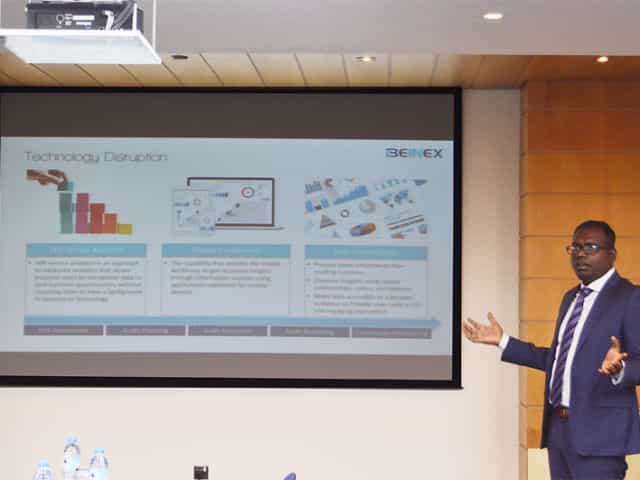
SELF SERVICE AUDIT ANALYTICS
TRANSFORM THE WAY YOU AND YOUR ORGANIZATION WORK WITH DATA –SELF SERVICE AUDIT ANALYTICS
Increasing complexities of risks and incessant emergence of disruptive technologies are demanding substantial change in internal audit processes. In today’s world of constant disruption, internal audit should evolve into a dynamic and future-oriented function. Businesses need broad-spectrum audit processes that extend beyond reviewing the obvious. Auditors should adopt forward-looking IA approaches, and should be able to provide deeper and valuable insights on strategy, execution, emerging risks, and hidden opportunities.
The 2016 Deloitte Global Chief Audit Executive Survey that polled more than 1200 CAEs from 29 countries and a diverse range of industries, reaffirms the growing need to conduct analytics-based auditing. More than a three quarter of the CAEs (79%) recommend the need for digital disruption and innovation to transform internal audit and enhance its value. The survey also cited the increasing relevance of cutting-edge technologies such as artificial intelligence, cognitive computing, and visual analytics.
Is skill-gap a concern?
More than half of CAEs (57%) who participated in the survey expressed their intense dissatisfaction about inadequate skills and insufficient expertise of audit teams.
When left unaddressed, these skill gaps will weaken auditors’ capabilities to deliver on changing stakeholder expectations. Stakeholders expect more forward-looking analysis to uncover risks and hidden opportunities. Or, gone are the days of static audit reports and analysis of sample data.
The Deloitte survey also cites risk anticipation (39%) and data analytics (34%) as the two groundbreaking innovations that are most likely to impact internal audit within the next five years. Changing business landscapes, technological advancements, and proliferation of data have brought forth the imminent need to leverage analytics and data visualization to increase the impact, influence, and effectiveness of internal
audit
Analytics Adoption Challenges
Even after 30 years of inception of data analytics, many auditors continue to adopt conventional internal audit methods and lag in technology adoption. Wondering why? Here are some of the reasons:
Can technology disruption be a savior?
Advancements in technology are fundamentally changing the nature of the audit and improving its effectiveness and relevance. Here are a few game-changing technology solutions that auditors can harness effectively to enhance the way they work with data:
1.Self-service analytics – Smart analytics for all
Self-service analytics is no more a buzzword. It’s the new norm. Self-service analytics empowers auditors to access data, perform queries, and create interactive reports that add richness and granularity to the insights derived. Anyone and everyone, with or without technical expertise, can harness the power of self-service analytics to work seamlessly with large data sets of any size or type, and discover savvy insights without having to write codes or learn programming languages.
Key advantages of using self-service analytics tools: Explore your data and create ad-hoc reports without IT skills
2.Mobile Analytics – Audit insights on the go
Regardless of the size of an organization or availability of data, it takes weeks to prepare and present comprehensive audit reports. The numbers are usually saved offline as large files or copied to multiple slides for boardroom meetings.
Mobile data analytics enables a concise and easily accessible digital avatar of audit reports and dynamic dashboards that can be accessed on mobile devices to interact and proactively monitor the business information on the go.
3.Data Visualization
When it comes to presenting audit data, reports and findings, one gets a single view of the entire raw data, all at once. This makes it difficult to decipher what is important and what isn’t, the reason why the point of sharing information gets defeated. Data visualization helps get a flexible and reliable way to identify and share pertinent information in a manner that everyone can easily understand.
There are many reasons why auditing is ripe for self-service analytics and visualization driven transformation. There is more data to examine within limited time span. Most financial and operational transactions are moving online, and the number of variables, outliers, trends, and patterns to identify and analyze continue to increase each day.
Visual analytics is the fastest way to analyze and understand structured or unstructured data of any size, without IT assistance. Visual technologies help speed up and improve decision making with heat maps, bubble charts, and interactive dashboards that are easy for C-suite executive, non-technical business users, and stakeholders to understand.
Everything gets better when you can do it yourself, right? Self-service audit analytics and visualization too are not different.
Benefits of self-service analytics in Internal Audit
Skills gap
Insufficient IT support
Difficulty to manage and manipulate data
Increasing requests for ad-hoc analysis and one-off reports
Difficulty in dealing with the basic aspects of data management and governance
Easy access to any source data
Guided analysis – Faster answers to complex questions
Intuitive drag-and-drop interface to create and share interactive reports.
Natural language processing to respond to complex queries
Interactive visualizations and personalized dashboards to identify patterns and trends
Fast to deploy and easy to manage
All-encompassing data analysis anywhere, at anytime
Process more information than reading numbers
Discover insights using spatial relationships, colors, and textures
Make data accessible to a broader audience and provide users with a rich and engaging experience

Snowflake and GenAI: Revolutionizing Data Analytics
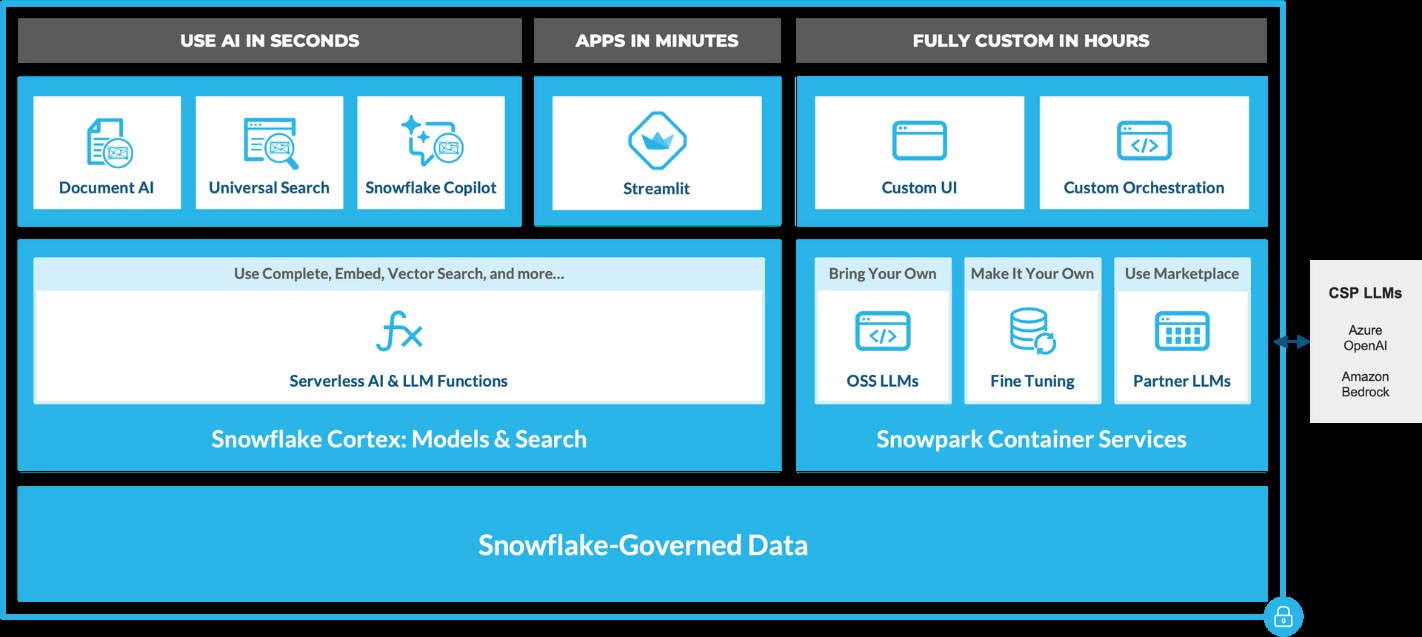
Snowflake Cortex: AI-Powered Data at Your Fingertips
Snowflake Cortex provides access to industry-leading AI models, including large language models (LLMs) and vector search functionality. These serverless tools simplify everyday analytics and AI development, all within a single line of SQL or Python.
 Source: https://www.snowflake.com/en/blog/use-ai-snowflake-cortex/
Key benefits include:
• Instant Access to AI Models: Snowflake users can leverage specialized machine learning and LLM models without managing expensive infrastructure. • Enhanced Data Insights: With Cortex, users can analyze vast datasets using Snowflake’s powerful AI capabilities, unlocking strategic insights to improve decision-making. • Simplified AI App Development: By removing technical barriers, Cortex democratizes AI access, enabling users of all skill levels to build AI applications.
LLM-Based Models for Unstructured Data (in private preview):
• Answer Extraction: Extract key information from unstructured datasets. • Sentiment Detection: Identify the sentiment in textual data. • Text Summarization: Create concise summaries of lengthy documents for quicker insights. • Translation: Perform large-scale text translation efficiently.ML-Based Models (available soon):
• Forecasting: Automatically forecast time series based on historical data, adjusting for seasonality and scaling. • Anomaly Detection: Detect outliers in time series data, useful for monitoring data pipelines. • Contribution Explorer: Identify key factors contributing to changes in metrics between two time intervals. • Classification: Categorize data into predefined classes to offer recommendations based on trends.
General Purpose Models for Broader Use Cases:
• Complete: Generate text completions using state-of-the-art open-source LLMs like Llama 2. • Text2SQL: Convert natural language queries into SQL, powered by Snowflake’s LLM, similar to the Snowflake Copilot feature. These serverless functions offer out-of-the-box capabilities that can be integrated into analytics workflows and app development in Snowflake. For example, with just a few lines of code, developers can embed these functions into chatbots using Streamlit. This allows Python-savvy users to build secure and powerful LLM applications quickly, often within hours.
Document AI
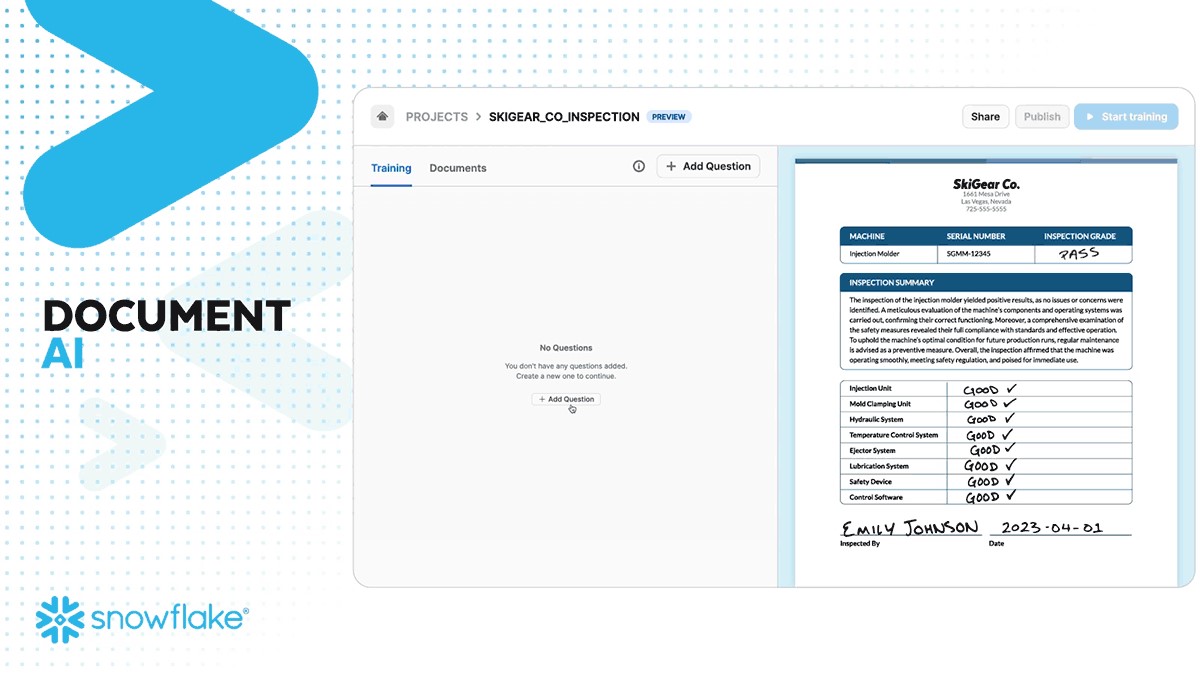
Document AI (currently in private preview) leverages large language models (LLMs) for seamless data extraction. By utilizing a pre-trained model and a user-friendly interface, customers can process various document types—such as PDFs, Word files, text files, and even screenshots—to quickly obtain answers to their queries. This capability can be scaled to build pipelines that automate data extraction, significantly reducing manual effort and saving time.
 Source: https://www.snowflake.com/en/blog/use-ai-snowflake-cortex/
Snowflake Copilot: Your AI-Powered SQL Assistant
Snowflake recently introduced Snowflake Copilot, an AI-driven solution that makes SQL query generation faster and more efficient. With Snowflake Copilot, users can ask data-related questions in plain English, and the AI will generate SQL queries to deliver the desired insights.
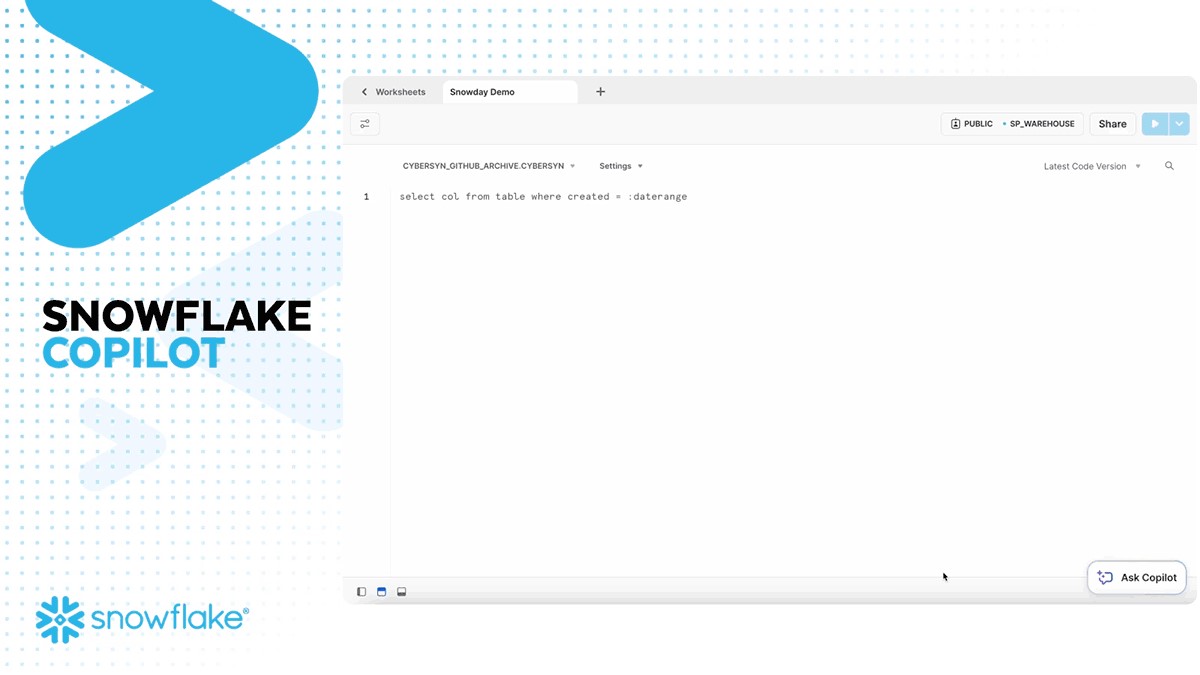
Key Features of Snowflake Copilot:
• Text-to-SQL: Users can interact with their data using natural language, eliminating the need for complex SQL coding. • Enhanced Accuracy: The AI continuously refines its understanding of user queries, providing more accurate SQL code suggestions. • Data Exploration: Ask open-ended questions about your data and receive detailed insights without writing complex queries.
The Future of Generative AI with Snowflake
Snowflake is pushing the boundaries of Generative AI with its continuous development of AI tools like Snowflake Cortex AI and Snowflake Copilot. These innovations pave the way for a future where natural language becomes the primary interface for data analysis, enabling businesses to extract more value from their data while maintaining robust governance.
By integrating AI capabilities directly into the data platform, Snowflake empowers users to streamline workflows, reduce processing times, and unlock new levels of productivity—all without needing deep AI expertise.
A Transformative Partnership for the Future
Generative AI, coupled with Snowflake’s powerful data platform, is a game-changer for businesses looking to innovate and scale. Whether it’s enhancing productivity, improving decision-making, or driving customer engagement, Snowflake’s AI solutions are built to transform how enterprises interact with their data.
As AI continues to evolve, so will Snowflake's offerings, bringing more capabilities, deeper insights, and greater efficiencies to businesses worldwide. Ready to experience the future of data analysis with Snowflake and AI? The journey has just begun!
Snowflake + Beinex Partnership
Beinex is a Snowflake Services Partner Premier Tier, and the partnership reaffirms Beinex’s commitment to delivering exceptional data solutions and positions the company at the forefront of industry advancements. Harnessing the true potential of the data, partnership drives innovation and success in the digital era.
Belonging to Snowflake Services Partner Premier Tier, Beinex leverages Snowflake’s advanced capabilities and seamlessly integrates them into its comprehensive data solutions. This enables Beinex to accelerate the pace of Digital Transformation for its clients, providing them with the tools necessary to extract maximum value from their data and thrive in an increasingly data-centric world.
Connect with us for a free demo: https://beinex.com/contact-us/

BI Tools: Decision-making is Now at Your Fingertips!
Here is a list of a few popular business intelligence tools companies use to gain insights:
1.Sisense: Leading Cloud Analytics Platform
Sisense is one of those data analytics and business intelligence tools known for its efficiency and easy-to-use quality. It enables anyone within an organisation to manage massive and intricate datasets and analyse and visualise data without any outsourcing. It also combines data from various sources, such as Adwords, Google Analytics, and Salesforce. The in-chip technology helps it to process data faster than any other tool. Gartner, G2, and Dresner have recognised Sisense as a leading cloud analytics platform.
2.SAP Business Intelligence: Price to the Upside
SAP Business Intelligence offers advanced analytics solutions such as machine learning, BI predictive analytics, and planning and analysis. This enterprise-level client/ server system application provides data visualisation and analytics applications, reporting and analysis, mobile analytics, and office integration.
The platform focuses heavily on Customer Experience (CX) and CRM, digital supply chain, ERP, etc. What's particularly appealing about this platform is the self-service, role-based dashboards, which allow users to create unique dashboards and applications. SAP is a robust software designed for all roles that provide many functionalities on a single platform. However, the product's complexity raises the price, so be equipped for it.
3.Datapine: Accessible to non-technical users
Datapine is a comprehensive business intelligence platform that makes the intricate process of data analytics accessible to non-technical users. Datapine's solution allows data analysts and business users to blend different data sources, perform advanced data analysis, build interactive business dashboards, and create actionable business insights by adopting a comprehensive self-service analytics approach.
4.Dundas BI: Access Multiple Data Sources in Real Time
Dundas BI is a browser-based business intelligence tool that enables users to access multiple data sources in real-time. It offers excellent visualisations in the form of tables, graphs, and charts that can be personalised and viewed on mobile devices and desktop computers. Users can easily create reports and extract specific performance metrics for analysis. Dundas aids all types of businesses and industries.
5.MicroStrategy: Fast Dashboarding in Action
MicroStrategy is a business intelligence tool for enterprises that provides powerful and fast dashboarding and data analytics, cloud solutions, and hyperintelligence. Users can use this solution to identify trends, and new possibilities, increase productivity, etc. It can be accessed via desktop or mobile and can be connected to one or more sources.
6.Yellowfin BI: No-co-Low-co Approach
Yellowfin BI is a business intelligence and analytics platform that combines visualisation, machine learning, and collaboration. It can quickly sort through massive amounts of data using intuitive filtering, and it is accessible from anywhere. This BI tool takes dashboards and visualisations to the next level by utilising a no-code/low code development environment.
7.Qlik Sense: Search & Conversational Analytics
A product of Qlik, QlikSense is a complete data analytics platform and business intelligence tool. QlikSense can be accessed from any device at any time. The user interface of QlikSense is optimised for touchscreen, which makes it a prevalent BI tool. It offers a one-of-a-kind associative analytics engine, sophisticated AI and a high-performance cloud platform, making it more attractive. An exciting feature of this platform is its Search & Conversational Analytics, enabling a faster and easier way to ask questions and discover new insights through natural language.
8.Zoho Analytics: Blend and Merge Data
Zoho Analytics is an excellent BI tool for detailed reporting and data analysis. It supports automatic data syncing and can be scheduled regularly. It quickly creates a connector and formulates meaningful reports by blending and merging data from various sources using the integration APIs. It helps to quickly identify the essential details by creating ersonalized reports and dashboards with an easy editor. It also includes a distinct commenting section in the sharing options, ideal for collaboration.
9.Microsoft Power BI: Identify Trends in Real Time
Microsoft Power BI is a web-based tool that is one of the best for data visualisation. It enables users to identify trends in real-time and includes brand new connectors that allow businesses to step up marketing campaigns. Microsoft Power BI is accessible virtually from any location as it is web-based. This tool is designed to integrate apps and deliver reports in real-time dashboards.
10.Looker: Ideal for SMEs
Looker, a data discovery app, is another business intelligence tool to watch for! This unique platform is now part of Google Cloud and integrates with any SQL database or warehouse and is ideal for startups, midsize businesses, and enterprise-grade businesses. This tool's advantages include its ease of use, useful visualisations, powerful collaboration features such as easy integration with apps, flexible sharing of data and reports via email or USL, and a dependable support system.
11.Clear Analytics: Just Need Essential Excel Skills to Use
Clear Analytics is an easy-to-use Excel-based software that can be utilised even by employees with just the essential Excel skills. It is a self-service Business Intelligence system with BI features like data creation, automation, analysis, and visualisation. Clear Analytics also functions with Microsoft Power BI, cleaning and modelling various datasets with Power Query and Power Pivot.
12.Tableau: Needs No Introduction
Tableau is a powerful BI tool that specialises in data discovery and visualisation. The software allows to quickly analyse, visualise, and share data without IT intervention. Tableau works with various data sources, including Microsoft Excel, Oracle, MS SQL, Google Analytics, and SalesForce. Users will have access to well-designed, user-friendly dashboards. Tableau also provides several products, such as Tableau Desktop (for anyone) and Tableau Server (analytics for organisations), both of which can be run locally, as well as Tableau Online (hosted analytics for organisations) and others.
13.Oracle BI: Proactive Intelligence Power
Oracle BI is a business intelligence technology and application portfolio for enterprises. This technology provides nearly all business intelligence capabilities, including dashboards, proactive intelligence, ad hoc reporting, etc. Oracle is a reliable choice ideal for businesses that need to analyse large amounts of data from Oracle and non-Oracle sources. Data archiving, versioning, a self-service portal, and alerts/notifications are also essential features.
14.Domo: Predictive Analysis on the Go
Domo is a fully cloud-based business intelligence platform that integrates spreadsheets, databases, and social media data. The platform provides visibility and analysis at the micro and macro levels, including predictive analysis powered by Mr Roboto, their AI engine. From cash balances and lists of your best-selling products by region to marketing ROI calculations for each channel, Domo has got you covered.
15.IBM Cognos Analytics: Hidden Patterns in Data Discovered
Cognos Analytics is a business intelligence platform powered by AI that supports the entire analytics cycle. It helps to visualise, analyse, and share actionable insights, from data discovery to data operationalisation. The data is interpreted and presented in a visually appealing report, and AI allows the discovery of hidden patterns in the data.
The use of advanced business intelligence reporting tools makes tasks simple and manageable. Business intelligence platforms are subject to change based on business needs and the advancement of technologies. Still, they have proven to be a great way to accomplish strategic goals effectively and efficiently.

What’s New in Tableau 2025.1: AI-Powered Insights, Multilingual Support, Private Connectivity, and More
Tableau 2025.1 at a Glance
- • Converse with Tableau Agent in six new languages using conversational AI.
- • Connect Tableau Cloud to AWS data securely with Private Connect.
- • Track KPIs on the go with a redesigned Pulse mobile homepage.
- • Programmatically access published data sources using VizQL Data Service.
- • Explore new features early with Tableau Cloud preview websites.
Let’s dive into the new updates in Tableau 2025.1:
1. Tableau Agent Multilingual Support
Perform multilingual data analysis. It is now possible for users to converse with Tableau Agent (and Tableau Pulse!) in French, Italian, German, Spanish, Japanese, and Portuguese. More people can now access conversational analytics in their native language.
With conversational AI, the Tableau Agent helps users navigate from data curation to exploration and accelerates all phases of analysis with generative AI. Additionally, because it is based on the Einstein Trust Layer, businesses can be assured that their data will remain safe, secure, and accessible only as intended.
2. Private Connect for Tableau Cloud
Use a dedicated, private connection to safely link Tableau Cloud to AWS data. Private Connect establishes a secure connection between Tableau Cloud and AWS data, ensuring your data remains private and is not made publicly available.
3. Revamped Tableau Pulse Homepage on Mobile
The redesigned Tableau Pulse mobile homepage enhances users' ability to engage with data on the go. With a side-by-side view of at least three key metrics, it allows for instant comparison and faster insight generation.
The clean, intuitive interface enables users to easily spot patterns, track trends over time, and take action quickly, without needing to dig through dashboards. Whether you're monitoring sales, operations, or customer engagement, Pulse ensures your most important KPIs are always within reach.
4. API for VizQL Data Services
VizQL Data Service is an innovative API that allows you to access published data sources in Tableau through programmatic queries rather than visualizations. Designed to maximize the versatility of your Tableau assets beyond traditional visualization, VizQL Data Service helps you tap into the analytic power of your data model anywhere.
It facilitates automating data processes by allowing you to run programmed queries directly on your data sources. By utilizing pre-existing Tableau connectivity and data models, you may more effectively design sophisticated, data-driven apps. You can now utilize your data models in any context, breaking free from the confines of visual tools.
5. Tableau Cloud Preview Websites
Tableau administrators can stay ahead of the curve by gaining early access to upcoming updates through release preview sites. This allows teams to test new features in advance, understand functional changes in a hands-on environment, and evaluate how updates will affect their organization’s unique dashboards and workflows—ensuring a smooth transition when the full release goes live.
In a Nutshell
The Tableau 2025.1 release brings a bunch of exciting updates to make working with data easier, smarter, and more secure. Now you can chat with Tableau Agent in multiple languages, get help with data prep and analysis using natural language, and connect securely to your AWS data using Private Connect. The refreshed Pulse homepage on mobile lets you track and compare key metrics at a glance, helping you make faster decisions wherever you are. Plus, with the new VizQL Data Service, developers can now access and use data directly, without relying on traditional dashboards. And if you're a Tableau admin, you get early access to test new features before they go live, so your team is always ready for what’s next.
Source: https://www.tableau.com/en-gb/2025-1-features