How AI Decision-Making is Improving Enterprise Outcomes
Blog
Share 
Top Picks: Tableau 2020.4
 19 April 2021
  FIRDOUS MAQBOOL
 As a frequent user of Tableau Desktop and Server, check out my top picks from the list.
• Improved dynamic parameter
• Multiple marks layer support for maps
• Block comments in calculations
• Web authoring enhancements
• Offline map support for Tableau Server
• Tableau Server Management (TSM) improvements
• Multiple key activation on Tableau Server prior to TSM initialization
• Analytics Extension for Tableau Online
• Merge duplicate external assets
• Tableau Prep Builder in the browser
Tableau Desktop
Improved Dynamic Parameter
The dynamic parameter was one of the features which I used extensively starting from 2020.1. The feature allows us to populate parameter values based on a specified field whenever the workbook is opened. We will be able to select only the field with matching data types.
The feature update announced in Tableau 2020.4 gives me more privilege to customize the Dynamic Parameter. I can now set a parameter’s range to a field’s min and max value upon opening the workbook, or when the field’s data source is refreshed.
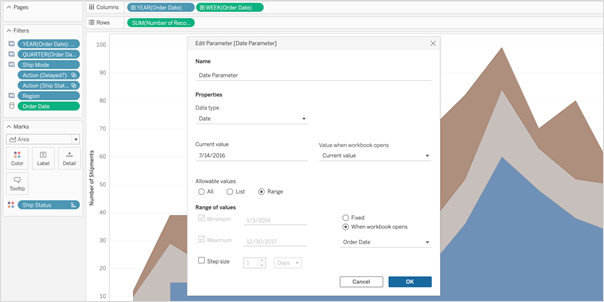 So, whenever I open the workbook or the extract is refreshed, Tableau displays the unique values within the range specified, giving more control over the parameter values displayed.
Multiple Marks Layer Support for Maps
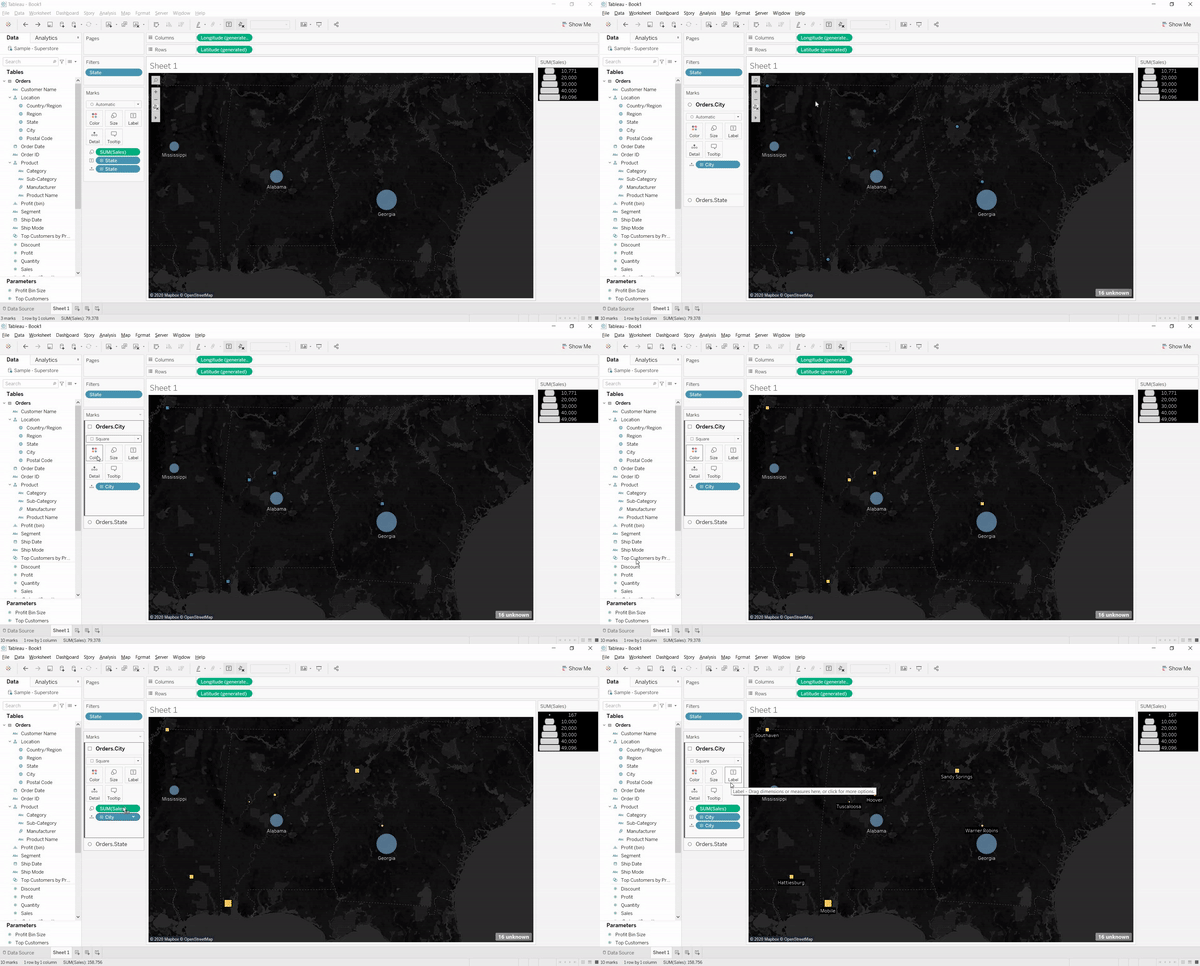
This is an exceptional feature to bring multiple spatial layers and context together to better understand and analyze geospatial data and map views. I will be able to include multiple marks layers from a data source to map visualizations and enhance the geospatial analysis. I can present more context in a single map view and perform further analysis with this feature.
So, whenever I open the workbook or the extract is refreshed, Tableau displays the unique values within the range specified, giving more control over the parameter values displayed.
Multiple Marks Layer Support for Maps
This is an exceptional feature to bring multiple spatial layers and context together to better understand and analyze geospatial data and map views. I will be able to include multiple marks layers from a data source to map visualizations and enhance the geospatial analysis. I can present more context in a single map view and perform further analysis with this feature.
 Block Comments in Calculations
Block comments is a simple yet one of the most useful features for me, which Tableau has announced in 2020.4. I often used to add comments in complex calculations for easy understanding in future references. Earlier, only single-line comments were possible, limiting the description I could add. But from now on, I can add comments of any length to calculation windows with block comments by simply starting the comment with /* and ending with */.
What makes it unique is that the new multi-line block comment feature is consistent with other popular programming languages. This feature is an example of Tableau’s on-going effort to provide its customers with an intuitive user experience.
Block Comments in Calculations
Block comments is a simple yet one of the most useful features for me, which Tableau has announced in 2020.4. I often used to add comments in complex calculations for easy understanding in future references. Earlier, only single-line comments were possible, limiting the description I could add. But from now on, I can add comments of any length to calculation windows with block comments by simply starting the comment with /* and ending with */.
What makes it unique is that the new multi-line block comment feature is consistent with other popular programming languages. This feature is an example of Tableau’s on-going effort to provide its customers with an intuitive user experience.
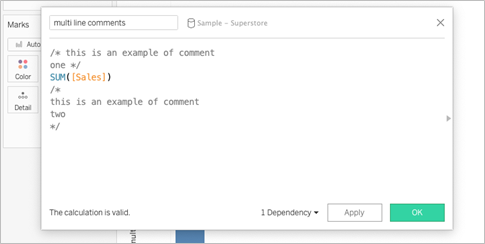 Tableau Server
Web Authoring Enhancements
Starting from Tableau 2020.4, it is possible to author dashboards from the browser just like how we design it in Tableau Desktop. With this web authoring enhancements, I can include Highlight actions, Format Mark Labels, apply filters to worksheets, create fixed sets, and even create extract in my workbooks from the browser itself. I no longer have to make changes from Tableau Desktop and publish it to the server. I can directly do it from the browser itself.
Tableau Server
Web Authoring Enhancements
Starting from Tableau 2020.4, it is possible to author dashboards from the browser just like how we design it in Tableau Desktop. With this web authoring enhancements, I can include Highlight actions, Format Mark Labels, apply filters to worksheets, create fixed sets, and even create extract in my workbooks from the browser itself. I no longer have to make changes from Tableau Desktop and publish it to the server. I can directly do it from the browser itself.
 Offline Map Support for Tableau Server
Rendering dashboards with maps is now faster compared to previous versions. Now, I can create maps using the offline map style in web authoring, ensuring the performance of map views in Tableau Server. Offline map support is a great deal for organizations with strict internet access restrictions, assuring that map view access to all its users.
Tableau Server Management (TSM) Improvements
Tableau Server Administration activities like installation, upgrade and backup are now easy like never before. I can retry installation or upgrade from the last checkpoint in case of an unexpected issue or error during installation or upgrade, saving my efforts to obliterate tableau server.
Backups can be performed twice as fast as previous versions, and I can monitor the progress with the new progress bar giving visibility into what step the backup is on and how much time is remaining.
Backups can also be scheduled using TSM command starting from 2020.4 and that is awesome. I no longer need to prepare batch script and depend on the windows task scheduler to schedule the backups on regular intervals; instead, I can schedule it with just a single command.
Multiple Key Activation on Tableau Server Prior to TSM Initialization
During Tableau Server installation, it is now possible to activate multiple license keys prior to TSM initialization. I will be able to save a lot of time by eliminating the need to restart after the installation is completed to activate multiple licenses and experience a smoother installation.
Analytics Extension for Tableau Online
The power of the Analytics extension is now unlocked in Tableau Online too. The feature was already available in Tableau Server, and it helped us dynamically perform advanced analysis with models and functions in R, Python and other platforms.
Analytics extension in Tableau Online significantly enhances the scope of using Advanced Analytics by the common users.
Merge Duplicate External Assets
Earlier, the Database or Table with similar names used to appear as multiple assets within Tableau Catalog. But, the new feature helps me to merge those multiple assets into a single one. I can manage assets easily and keep an organized view of External assets by merging the common ones.
Offline Map Support for Tableau Server
Rendering dashboards with maps is now faster compared to previous versions. Now, I can create maps using the offline map style in web authoring, ensuring the performance of map views in Tableau Server. Offline map support is a great deal for organizations with strict internet access restrictions, assuring that map view access to all its users.
Tableau Server Management (TSM) Improvements
Tableau Server Administration activities like installation, upgrade and backup are now easy like never before. I can retry installation or upgrade from the last checkpoint in case of an unexpected issue or error during installation or upgrade, saving my efforts to obliterate tableau server.
Backups can be performed twice as fast as previous versions, and I can monitor the progress with the new progress bar giving visibility into what step the backup is on and how much time is remaining.
Backups can also be scheduled using TSM command starting from 2020.4 and that is awesome. I no longer need to prepare batch script and depend on the windows task scheduler to schedule the backups on regular intervals; instead, I can schedule it with just a single command.
Multiple Key Activation on Tableau Server Prior to TSM Initialization
During Tableau Server installation, it is now possible to activate multiple license keys prior to TSM initialization. I will be able to save a lot of time by eliminating the need to restart after the installation is completed to activate multiple licenses and experience a smoother installation.
Analytics Extension for Tableau Online
The power of the Analytics extension is now unlocked in Tableau Online too. The feature was already available in Tableau Server, and it helped us dynamically perform advanced analysis with models and functions in R, Python and other platforms.
Analytics extension in Tableau Online significantly enhances the scope of using Advanced Analytics by the common users.
Merge Duplicate External Assets
Earlier, the Database or Table with similar names used to appear as multiple assets within Tableau Catalog. But, the new feature helps me to merge those multiple assets into a single one. I can manage assets easily and keep an organized view of External assets by merging the common ones.
 Tableau Prep
 Builder in the Browser
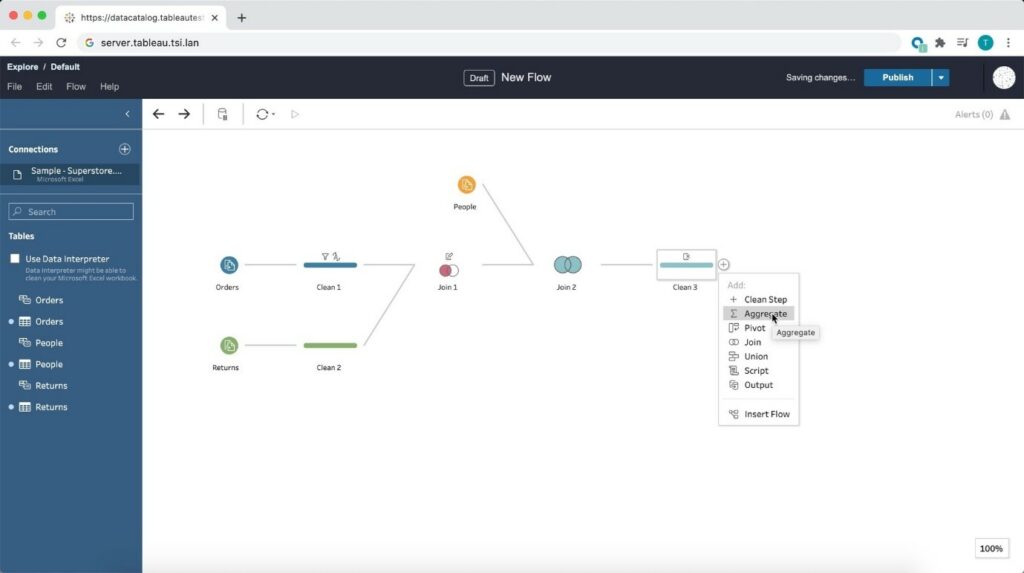
Prepare the data for visualizations from anywhere using a browser! Starting from 2020.4, Tableau is bringing the data prep process into one integrated platform on the web. Now I can easily prepare and manage prep flows from anywhere using a browser.
Tableau Prep
Tableau Prep Builder in the Browser
Prepare the data for visualizations from anywhere using a browser! Starting from 2020.4, Tableau is bringing the data prep process into one integrated platform on the web. Now I can easily prepare and manage prep flows from anywhere using a browser.
 Conclusion
Tableau is progressively evolving as a single platform for data preparations, visualization, and collaboration with every update and version release.
Author : Firdous Maqbool
Images Courtesy : Tableau
Conclusion
Tableau is progressively evolving as a single platform for data preparations, visualization, and collaboration with every update and version release.
Author : Firdous Maqbool
Images Courtesy : Tableau
So, whenever I open the workbook or the extract is refreshed, Tableau displays the unique values within the range specified, giving more control over the parameter values displayed.
Multiple Marks Layer Support for Maps
This is an exceptional feature to bring multiple spatial layers and context together to better understand and analyze geospatial data and map views. I will be able to include multiple marks layers from a data source to map visualizations and enhance the geospatial analysis. I can present more context in a single map view and perform further analysis with this feature.
Block Comments in Calculations
Block comments is a simple yet one of the most useful features for me, which Tableau has announced in 2020.4. I often used to add comments in complex calculations for easy understanding in future references. Earlier, only single-line comments were possible, limiting the description I could add. But from now on, I can add comments of any length to calculation windows with block comments by simply starting the comment with /* and ending with */.
What makes it unique is that the new multi-line block comment feature is consistent with other popular programming languages. This feature is an example of Tableau’s on-going effort to provide its customers with an intuitive user experience.
Tableau Server
Web Authoring Enhancements
Starting from Tableau 2020.4, it is possible to author dashboards from the browser just like how we design it in Tableau Desktop. With this web authoring enhancements, I can include Highlight actions, Format Mark Labels, apply filters to worksheets, create fixed sets, and even create extract in my workbooks from the browser itself. I no longer have to make changes from Tableau Desktop and publish it to the server. I can directly do it from the browser itself.
Offline Map Support for Tableau Server
Rendering dashboards with maps is now faster compared to previous versions. Now, I can create maps using the offline map style in web authoring, ensuring the performance of map views in Tableau Server. Offline map support is a great deal for organizations with strict internet access restrictions, assuring that map view access to all its users.
Tableau Server Management (TSM) Improvements
Tableau Server Administration activities like installation, upgrade and backup are now easy like never before. I can retry installation or upgrade from the last checkpoint in case of an unexpected issue or error during installation or upgrade, saving my efforts to obliterate tableau server.
Backups can be performed twice as fast as previous versions, and I can monitor the progress with the new progress bar giving visibility into what step the backup is on and how much time is remaining.
Backups can also be scheduled using TSM command starting from 2020.4 and that is awesome. I no longer need to prepare batch script and depend on the windows task scheduler to schedule the backups on regular intervals; instead, I can schedule it with just a single command.
Multiple Key Activation on Tableau Server Prior to TSM Initialization
During Tableau Server installation, it is now possible to activate multiple license keys prior to TSM initialization. I will be able to save a lot of time by eliminating the need to restart after the installation is completed to activate multiple licenses and experience a smoother installation.
Analytics Extension for Tableau Online
The power of the Analytics extension is now unlocked in Tableau Online too. The feature was already available in Tableau Server, and it helped us dynamically perform advanced analysis with models and functions in R, Python and other platforms.
Analytics extension in Tableau Online significantly enhances the scope of using Advanced Analytics by the common users.
Merge Duplicate External Assets
Earlier, the Database or Table with similar names used to appear as multiple assets within Tableau Catalog. But, the new feature helps me to merge those multiple assets into a single one. I can manage assets easily and keep an organized view of External assets by merging the common ones.
Tableau Prep
Tableau Prep Builder in the Browser
Prepare the data for visualizations from anywhere using a browser! Starting from 2020.4, Tableau is bringing the data prep process into one integrated platform on the web. Now I can easily prepare and manage prep flows from anywhere using a browser.
Conclusion
Tableau is progressively evolving as a single platform for data preparations, visualization, and collaboration with every update and version release.
Author : Firdous Maqbool
Images Courtesy : TableauI have always been impressed by the exciting features that tableau roll out in their releases. Tableau releases its feature update every quarter, and they have released Tableau 2020.4 with a range of new features and updates. The features of every Tableau release are selected based on various surveys and are curated based on research and feedback from the users.
Related Articles

Top Ten Business Intelligence Trends
What is Business Intelligence?
Business intelligence (BI) is an analysis that uses business-related strategies and technologies to assess, process, and interpret business information. This type of information helps businesses understand the current state of their organization and make informed decisions on how to take actions that are likely to yield their intended results.
Leveraging business intelligence insights offers several benefits to employers and employees, including strengthening performance and improving efficiency. For example, insights from business intelligence metrics can help employers understand where supply chain function might be breaking down or provide a snapshot of consumer products performing above or below expectations.
Top Trends in Business Intelligence in 2024
Finding the latest trends in BI can help your organization stay competitive and maximize your ability to use your data. While trends continually shift by nature, the following areas have rapidly risen in demand and application.
1. Augmented Analytics
Augmented analytics is an approach to data analytics that employs advanced technologies such as AI and machine learning to automate data preparation, insight generation, and insight sharing.In 2023, the global augmented analytics market was valued at USD 8.9 billion, marking a significant milestone in data-driven technologies. The market is on track for impressive expansion, with estimates predicting its value will climb to USD 11.6 billion in 2024 and soar to USD 91.4 billion by 2032. This remarkable growth, reflected in a compound annual growth rate (CAGR) of 29.4% between 2024 and 2032, underscores the rising importance of advanced analytics in transforming business intelligence and decision-making processes across industries.
Here are the advantages of augmented analytics:
Advantages: • Increased Efficiency: Automates data preparation, saving up to 60% of man-hours spent on manual data processing. • Broader Accessibility: Empowers non-technical users to gain insights, reducing dependency on data specialists by 40%. • Real-World Impact: Organizations using augmented analytics report a 25% increase in productivity due to faster decision-making.
2. Natural Language Processing (NLP)
Natural Language Processing (NLP) is a confluence of computational linguistics and artificial intelligence that enables machines to understand, interpret, generate, and respond to human language meaningfully and contextually. An example of a program that utilizes natural language processing is ChatGPT. The Natural Language Processing (NLP) market is projected to reach a value of USD 36.4 billion in 2024. With a robust compound annual growth rate (CAGR) of 27.5% from 2024 to 2030, the market is expected to expand significantly, reaching a volume of USD 156.8 billion by 2030. This rapid growth highlights the increasing adoption of NLP technologies across various industries, driving advancements in AI-driven communication and analytics tools. The advantages of Natural Language Processing (NLP) within the business intelligence landscape: Advantages: • Enhanced User Engagement: Reduces the learning curve for data tools, increasing user adoption by up to 30%. • Customer Insights: Companies using NLP for sentiment analysis report a 15% increase in customer satisfaction.
3. Data Storytelling
The growing dependence on data in the corporate landscape brings forth the need for data interpretation that extends beyond traditional methods. The narrative structure is one of the primary differentiators between data storytelling and data visualization. While data visualization can provide a visual representation of what the data is saying, data storytelling explains why the data matters, providing a more comprehensive understanding of the insights. According to Gartner, by 2025, data stories will become the most common method for consuming analytics, and data storytelling will dominate BI, with 75% of these stories being automatically produced through augmented analytics techniques. Advantages: • Better Understanding: Enhances comprehension of complex data, leading to a 20% reduction in misinterpretation. • Improved Decision-Making: Organizations using data storytelling have reported a 15% increase in strategic decision outcomes.4. Self-Service Analytics
Another BI trend is self-service analytics. It is a form of business intelligence wherein end-users, such as marketing professionals, are enabled to conduct data analyses and generate reports without the direct assistance of IT or data science teams. The self-service BI market is projected to reach USD 30 billion by 2036, expanding at a compound annual growth rate (CAGR) of 8% between 2024 and 2036. In 2023, the market size was valued at over USD 18 billion. This substantial growth is driven by the increasing demand for data democratization, as organizations seek to dismantle traditional data silos and enable non-technical users to access, analyze, and extract insights from data independently. Advantages: • Time Savings: Reduces report generation time by up to 50%, allowing for faster data-driven decisions. • Empowered Employees: Decreases IT workload by 30%, enabling more focus on strategic projects.
5. Decision Intelligence
DI goes beyond traditional analytics by creating a semantic framework that incorporates business rules and context, enabling predictive analytics to generate actionable, future-focused insights. This empowers organizations to make more informed and strategic decisions, often automating routine choices and accelerating complex ones. The DI market is on a robust growth trajectory, projected to surge from $13.3 billion in 2024 to a remarkable $50.1 billion by 2030. As businesses increasingly prioritize data-driven strategies, DI stands out as a pivotal tool for enhancing decision-making agility and precision, ensuring organizations stay ahead in a competitive landscape. Advantages: • Automated Decision-Making: Increases decision speed by up to 40%, significantly reducing time-to-insight. • Enhanced Strategic Planning: Companies using DI report a 25% improvement in strategic planning accuracy.6. Predictive Analytics
Predictive analytics is an advanced form of analytics that uses historical data, statistical algorithms, and machine-learning techniques to predict future events and trends. The predictive analytics market is projected to grow by USD 38.6 billion, at a CAGR of 28.9%, between 2023 and 2028. This rapid expansion is fueled by increasing demand for data-driven decision-making, advancements in AI and machine learning technologies, and the rising adoption of predictive analytics across various sectors, including finance, healthcare, and retail. Advantages: • Proactive Decision-Making: Reduces operational costs by up to 15% through accurate demand forecasting. • Risk Mitigation: Enhances risk assessment accuracy, leading to a 20% reduction in potential losses.
7. Artificial Intelligence (AI) in BI
Another emerging BI trend is the greater infusion of AI in business intelligence. AI's ability to automate data analysis, generate insights, and predict outcomes is redefining the way organizations interact with data. The Artificial Intelligence market is projected to reach a size of USD 184.0 billion in 2024, with an expected annual growth rate (CAGR) of 28.4% from 2024 to 2030. This growth is anticipated to result in a market volume of USD 826.7 billion by 2030. AI in BI typically involves the application of machine learning algorithms and advanced analytics techniques to automate data processing and interpretation tasks. From data collection and cleaning to analysis and insight generation, AI can significantly reduce the manual workload, speeding up the entire BI process. Advantages: • Operational Efficiency: Automates 70% of data analysis tasks, freeing up resources for strategic activities. • Cost Reduction: Reduces the cost of data processing by up to 20%8. Advanced Data Visualization
Advanced data visualization goes beyond basic charts and graphs, incorporating a variety of innovative visual elements such as heat maps, geographical maps, scatter plots, treemaps, and more into the dashboard design. These elements enable the presentation of multi-dimensional data in a single view, facilitating a more comprehensive understanding of the data. The global data visualization market showcased a strong value of USD 4.5 billion in 2017, highlighting the growing demand for effectively presenting complex data. By 2023, the market is expected to surge to USD 7.7 billion, reflecting a robust CAGR of 9.47%. Advantages: • Improved Insights: Increases data interpretation accuracy by 30%. • Enhanced Collaboration: Boosts cross-departmental collaboration by 25% through shared visual insights.
9. Mobile BI
Mobile business intelligence (BI) involves the use of mobile devices to access BI applications and data, enabling decision-makers to stay informed and make decisions, irrespective of their location. The global mobile business intelligence market, valued at USD 13.8 billion in 2023, is expected to grow at a CAGR of 15.3%, reaching USD 51.5 billion by 2032. Advantages: • Increased Accessibility: Provides real-time data access, enhancing decision-making speed by 35%. • Boosted Productivity: Enables on-the-go analysis, increasing productivity by 20%.10. Ethical Data Governance
The last BI trend on the list is ethical data governance, which addresses policies, procedures, and structures that ensure data quality and security, and ethical considerations related to data collection, processing, and use. The global data governance market is projected to reach USD 4.1 billion in 2024 and is expected to grow at a CAGR of 18.5% over the next decade, reaching USD 22.5 billion by 2034. The central principle behind Ethical Data Governance is respecting individual privacy and rights in all data activities. It involves implementing practices that ensure informed consent, data anonymization, and stringent access controls, among others, to protect individual privacy and prevent data misuse. Advantages: • Compliance Efficiency: Reduces compliance-related costs by up to 25%. • Increased Trust: Builds customer trust, leading to a 10% increase in brand loyalty.
Tableau in Action: Leveraging Latest BI Trends
Tableau integrates the latest BI trends into practical applications, enhancing decision-making and data insights. Let’s examine how some of the top BI trends are applied within Tableau. Here are a few examples:
- Augmented Analytics: With Tableau Einstein Discovery, companies can automate insights and speed up decision-making, especially in retail and finance.
- Natural Language Processing: Tableau’s NLP system allows users to explore data using simple language, enabling faster data processing without coding.
- Data Storytelling: Story Points help craft compelling narratives, increasing stakeholder engagement in areas like marketing and sales.
- Self-Service Analytics: Tableau enables business users to independently explore data, reducing IT workload and accelerating decisions in finance and supply chain.
- Predictive Analytics: Integrating with Einstein Discovery, Tableau’s predictive capabilities help industries like healthcare forecast trends and optimize operations.
- Mobile BI: Tableau’s mobile app allows for real-time access to data, improving productivity for on-the-go teams like sales.

An Ultimate Guide to All the Tableau Certifications
Top 4 Benefits of Tableau Certification
Tableau certification offers numerous benefits. It is a valuable investment for professionals looking to excel in the field of data visualisation and analysis.
Here are the four ways Tableau certification can help you:
Let’s deep-dive:
1. Enhanced Professional Credibility
Achieving Tableau certification demonstrates your expertise and proficiency in using the Tableau platform. It enhances your professional credibility and sets you apart from others in the BI realm. Employers and clients value certified professionals as they have proven their competence in leveraging Tableau for data visualisation and analysis.
2. Expanded Career Opportunities
Tableau certification opens doors to a wide range of career opportunities. Many organisations seek professionals with Tableau skills to help them effectively analyse and visualise their data.
With Tableau certification, you become a desirable candidate for job roles such as:
3. Improved Skills and Knowledge
The process of preparing for Tableau certification equips you with in-depth knowledge of Tableau's features, functionalities, and best practices. You gain hands-on experience in creating interactive dashboards, working with various data sources, and leveraging advanced analytics capabilities. This knowledge enhances your ability to leverage Tableau effectively in real-world scenarios.
4. Increased Efficiency and Productivity
Tableau certification equips you with the skills to efficiently utilise Tableau's tools and techniques. You learn how to quickly analyse and visualise data, identify insights, and communicate findings effectively. This improves your productivity, allowing you to quickly deliver impactful data visualisations and insights.
List of Tableau Certifications
By pursuing Tableau certifications, individuals can showcase their proficiency and specialisation in various Tableau-related roles, from desktop usage to server administration, data analysis, consulting, and architecture. Each Tableau certification offers a unique opportunity to advance one's career and make significant contributions in the field of data visualisation and analytics using Tableau.
Tableau offers five certifications:- Tableau Desktop Specialist Certification
- Tableau Server Certified Associate Certification
- Tableau Certified Data Analyst Certification
- Tableau Consultant Certification
- Tableau Architect Certification
Let's dive deep into more details:
1. Tableau Desktop Specialist Certification: This certification validates foundational knowledge and skills in using Tableau Desktop. It demonstrates proficiency in tasks such as connecting to data sources, creating basic visualisations, and implementing best data organisation and formatting practices.
2. Tableau Server Certified Associate Certification: It focuses on Tableau Server, a platform for publishing, sharing, and collaborating on Tableau visualisations. It confirms expertise in tasks like managing user access, publishing dashboards, and administering Tableau Server to ensure optimal performance and security.
3. Tableau Certified Data Analyst Certification: It is designed for individuals specialising in data analysis using Tableau. It certifies advanced skills in data exploration, applying statistical techniques, and creating insightful visualisations to uncover valuable insights and drive data-driven decision-making.
Popular Tableau Partner Certifications
1. Tableau Consultant Certification: The Tableau Consultant certification is for professionals who provide consulting services and guidance on Tableau implementation and utilisation. It demonstrates expertise in understanding business requirements, designing compelling data visualisations, and offering strategic recommendations to optimise Tableau deployments.
2. Tableau Architect Certification: The Tableau Architect certification is aimed at individuals responsible for designing and architecting Tableau solutions for organisations. It validates skills in data modelling, performance optimisation, and scalable Tableau infrastructure design to ensure efficient and robust implementations.
Tableau Certification Cost
Source: Tableau
List of Job roles for Tableau Professionals
- Tableau Consultant
- Data Analyst
- Business Analyst
- Business Intelligence Analyst
- Business Intelligence Developer
- Business Intelligence Manager
Why Beinex
If you are searching for the right place to start your Tableau training, Beinex can be your perfect choice. Our globally trained subject matter experts can assist you in catering customised training that suits your schedule. So, wait not! Get in touch with us!
Explore the Latest Advancements in AWS Storage Solutions
AWS Storage Solutions
AWS offers a comprehensive array of storage solutions tailored to specific use cases and demands. These include Amazon S3, Amazon EBS, Amazon EFS, Amazon Glacier, AWS Storage Gateway, Amazon FSx, and the AWS Snow Family. Each service is designed to address storage needs, from simple data storage to high-performance file systems and large-scale data transfer.
Here are some of the key storage solutions provided by AWS: Amazon S3 (Simple Storage Service):Latest Developments in AWS Storage Services
Over the past two quarters, AWS has introduced several exciting enhancements to its storage services, offering users greater flexibility and efficiency in managing their data. Let's delve into these notable updates:
AWS Backup's Local Time Zone Support
AWS Backup is a fully managed service that simplifies data protection across AWS services and hybrid workloads. The latest enhancement allows users to select their local time zone when creating or modifying backup plans. This eliminates the need for manual time zone conversions from UTC, making backup scheduling more user-friendly and convenient.
Amazon S3's Multivalue Answer for DNS Queries
Amazon S3 now offers Multivalue Answer (MVA) support for responding to DNS queries for S3 endpoints. With MVA, users can obtain up to eight S3 IP addresses per DNS query. This feature enables the automatic establishment of multiple concurrent connections to S3, potentially boosting throughput significantly. Moreover, MVA enhances retry operation efficiency by allowing applications to automatically attempt an alternative IP address without waiting for another DNS query. These improvements give users more robust and efficient access to Amazon S3 services.
General Availability of Mountpoint for Amazon S3
AWS has announced the general availability of Mountpoint for Amazon S3, an open-source file client that offers high-throughput access to Amazon Simple Storage Service (Amazon S3). This innovation reduces processing times and compute costs for data lake applications. Mountpoint for Amazon S3 acts as a file client that translates local file system API calls into S3 object API calls, including GET and PUT operations.
This feature is particularly valuable for workloads involving reading large datasets, ranging from terabytes to petabytes in size, and requiring the scalability and high throughput offered by Amazon S3. Use cases include machine learning training, reprocessing, autonomous vehicle data processing validation, and more. It supports sequential and random read operations on existing files and sequential write operations for creating new files. These capabilities enhance the efficiency of processing large-scale data stored in Amazon S3, making it a valuable tool for data-intensive applications.
Amazon S3 Glacier Flexible Retrieval Enhancements
Amazon S3 Glacier Flexible Retrieval has significantly improved data restore times, reducing them by up to 85%, and this improvement comes at no additional cost. These faster data restores are automatically applied to the Standard retrieval tier when Amazon S3 Batch Operations are used. Objects begin to be returned within minutes of initiating the restore process, facilitating quicker processing of restored data.
This enhancement benefits various tasks, such as transcoding media, restoring operational backups, training machine learning models, and analysing historical data. Leveraging S3 Batch Operations, archived data can be efficiently restored on a large scale by showing the objects to be retrieved and specifying the retrieval tier. The Standard retrieval tier now initiates restoring things within minutes, a substantial improvement compared to the previous 3–5 hour wait time. Overall restore throughput is also enhanced, thanks to new performance optimisations, enabling faster data workflows and quicker responses to business requirements.
AWS Backup Audit Manager's Delegated Backup Administrator Support
With AWS Organizations, the delegation of backup management has been expanded beyond the management account to dedicated administration accounts. This means that delegated administrators can now assume backup management responsibilities. As part of this launch, delegated backup administrators can centralise report generation and management on a large scale through AWS Backup Audit Manager. This feature is designed for auditing and reporting on data protection posture compliance.
Project Quotas Support in Amazon FSx for Lustre
Amazon FSx for Lustre, a fully managed service for high-performance file systems, now supports project quotas. This update allows users to easily group multiple files or directories within the file system into distinct projects and monitor storage usage per-project basis. Project quotas are particularly valuable for storage administrators responsible for managing file systems serving multiple projects or teams. This feature ensures no project exceeds its designated storage capacity, helping maintain effective resource allocation and control within the file system.
Beinex+ AWS Offerings
Beinex is an AWS consulting partner, and we empower customers to host their BI solutions and much more on the cloud. Our cloud migration experts bring in best-in-class stability and reliability by understanding your business strategy and working closely with you to deploy AWS infrastructure as a service.
AWS's commitment to innovation ensures that its storage solutions will remain at the forefront of the industry, providing users with the cutting-edge tools and capabilities required to thrive in the digital age. Embrace AWS storage solutions' possibilities and stay ahead in your data management endeavours.

Beinex Gets an Upgrade to Snowflake Services Partner Premier Tier
This significant milestone reflects our unwavering commitment to delivering the best solutions to our customers' data challenges. With this enhanced partnership, we are poised to offer our customers unparalleled opportunities to leverage Snowflake's unique architecture and revolutionise their data-driven strategies.
Beinex: The First Snowflake Premier Partner in the Middle East
Beinex is the first Data & Analytics firm in UAE to enter Snowflake Services Partner Premier Tier. Beinex's exceptional service quality and the expertise of its consultants, scientists, and engineers have been demonstrated through years of unparalleled dedication to clients. The partnership between Beinex and Snowflake is set to revolutionise how businesses unlock the true power of their data.
The New Status Helps Us Serve You Even Better!
Snowflake's cutting-edge cloud data platform has garnered widespread recognition for its ability to deliver unmatched performance, scalability, and ease of use.
By attaining the Premier Tier Partner status:
- Beinex can further leverage Snowflake's advanced capabilities and integrate them seamlessly into your solutions.
- Enable and empower Digital Transformation at an accelerated pace for our clients with experience and competency of the right kind in accompaniment.
- Aid our customers with the tools they need to extract maximum value from their data, propelling them towards success in an increasingly data-centric world.
Snowflake's architecture utilises a cloud-native approach, separating storage and compute, which results in unparalleled flexibility and scalability. This means that businesses can dynamically scale their computing resources as needed without the limitations of traditional on-premises solutions.
By embracing this architecture, our customers can say goodbye to lengthy and resource-intensive data processing times, paving the way for faster time-to-insights and improved operational efficiency.
Beinex+ Snowflake
The collaboration between Beinex and Snowflake has opened a new realm of possibilities for our mutual customers. The clients are further assured of the superior knowledge and competence possessed by Beinex’s league of Data Engineers, Data Scientists and Consultants in all matters Snowflake.
Now, organisations can experience a quantum leap in their data processing capabilities by harnessing the power of Snowflake's unique architecture. The ability to process vast amounts of data with lightning speed enables businesses to derive real-time insights and confidently make critical decisions.
Our partnership with Snowflake enables us to offer you advanced features like automated tuning and elastic compute, along with analytics modernisation services, to help your organisation realise exponential Return on Investment.
A Major Milestone for Beinex
The attainment of Snowflake Services Partner Premium Tier marks an exciting milestone for Beinex. This partnership underscores our dedication to delivering exceptional data solutions and reinforces our commitment to staying at the forefront of industry advancements. Together, Beinex and Snowflake are primed to transform how businesses harness their data's true potential, driving innovation and success in the digital era.
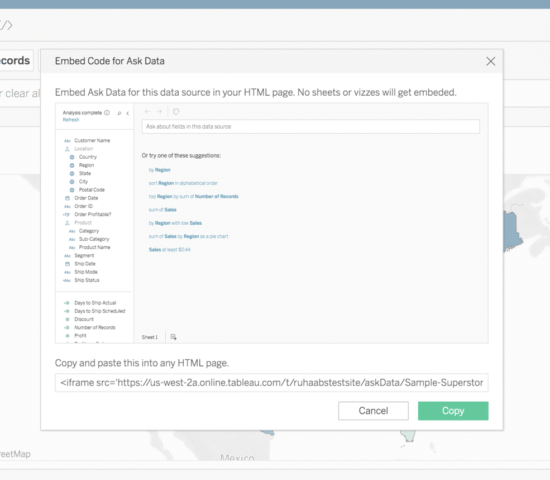
TABLEAU 2019.3 – WHAT TO EXPECT?
Tableau 2019.3 – What to Expect?
Tableau’s mission has always been to develop and deliver what customers ask. With Tableau server’s latest version 2019.3 (in beta now), it has brought out many exciting features like embedding Askdata, maintenance message, extract encryption at rest and more. Let us have a look at some of these upcoming features.
Ask Data improvements
I love to see when Tableau listens to customer feedback and continue to work on those asks. Ask Data is one of the most waited features in Tableau server’s previous releases and customers have asked if it can be embedded on other portals. With this release we can embed Ask Data into other company portals and let people ask questions.

Extract Encryption at Rest
Tableau cloud already provides volume encryption at rest and we already know that. Now with Tableau server, you will have the flexibility to have the encryption at REST for extracts. Server admins can enforce encryption of all extracts on their site or allow users to specify encryption for their published extracts.

It gives multiple options to enable this. We can have it for all the extracts or let user decide which extracts should be encrypted.
PDF attachment to subscriptions
It sounds very simple. But attaching pdf while sending the subscription was never an easy task. Tableau has made it easy now.

While creating a subscription, you can mention whether it should be an image or PDF or both.
Passwordless Tableau Server upgrades, node addition
As a server specialist, I know how tedious it is to enter password on a command prompt screen where you don’t see any characters getting typed. Often it goes wrong and we must reinitiate the process. With 2019.3, we can upgrade tableau server to next version with out manually entering the password or we can add new node without a password.

Adding a new node to the cluster no longer requires the username/password, if the bootstrap file you have created was in the last two hours.
Export to what you want
Exporting to PowerPoint will have all the sheets and sometimes we don’t need this. If you are a user who wants to export specific sheets in the workbook, this feature covers you. Now you have the option to select the sheets that you want to export.

And many more capabilities like new search results page, context filters on web, content sharing improvements, new product language Italian, etc. Beinex is a digital transformation organization en-rooted with ideas, innovation and unparalleled customer service. Our mission is to transform the way individuals and the organizations work with the data through innovation and experience.
If you are interested in learning more about the latest Tableau release and use cases, please contact us at training@beinex.com/ info@beinex.com and we would be happy to schedule a Tableau demo or training for you and your company.
The features shown above are currently in beta release and these might or mightn’t be available in the actual release.