How AI Decision-Making is Improving Enterprise Outcomes
Blog
Share 
Three Steps to Implement Intelligent Automation(Infographic)
 24 April 2023
  Sumi S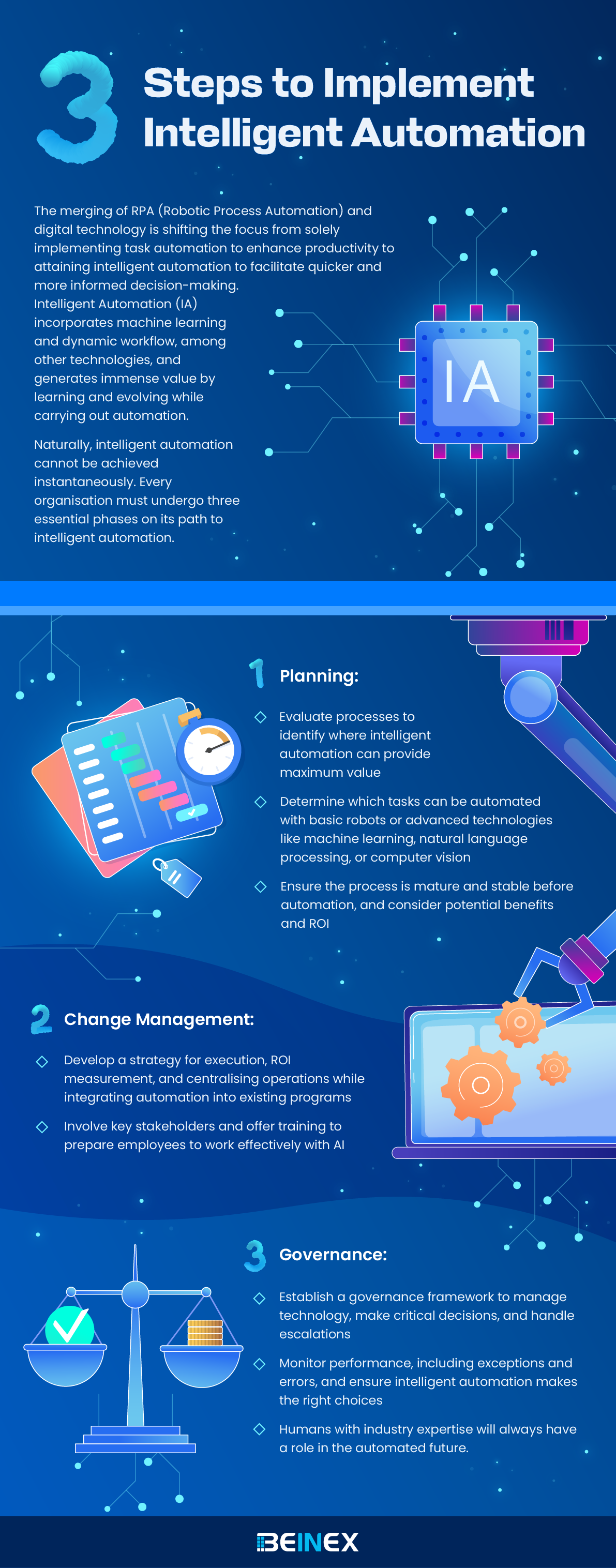
-
Related Articles

Accelerate Your Digital Transformation: Tableau + AWS for Modern Cloud Analytics
AWS + Tableau: Together, a Match Made in Data Heaven
By embracing the synergy between Tableau and AWS, you're not just investing in tools; you're investing in a future fueled by data-driven insights. This powerful combination paves the way for a more agile, data-centric organization ready to thrive in the ever-evolving digital landscape. The digital landscape is evolving rapidly, and businesses are increasingly turning to the cloud for their analytics needs. This shift is driven by the cloud's ability to:
- Faster Time to Insights: The seamless integration between Tableau and AWS allows you to quickly get up and running with your analytics, enabling you to make data-driven decisions sooner.
- Effortless Data Management: Leverage the power of AWS data warehousing and management services to ensure your data is clean, organized, and readily accessible for analysis in Tableau.
- Advanced Analytics Capabilities: Tap into the power of AWS machine learning and artificial intelligence services to uncover hidden patterns and gain deeper insights from your data within the Tableau environment.
- Handle complex data integration: Seamlessly connect and analyze data from various sources, regardless of size or location.
- Empower self-service analytics: Enable users to explore and gain insights from data independently, fostering data-driven decision-making across the organization.
- Support digital transformation: Meet the growing demands of digital transformation with scalability, flexibility, and cost-efficiency.
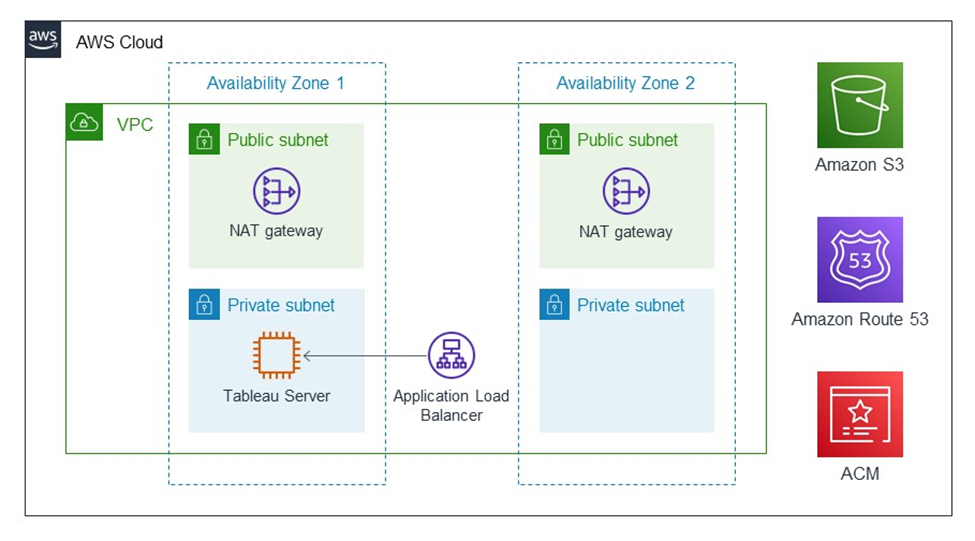
Image source: https://aws.amazon.com/solutions/partners/tableau-server/
Tableau: The Master of Data Visualization
Imagine transforming raw data into captivating, interactive visualizations that tell a clear story. Tableau is a game-changer in the world of data visualization. It empowers users of all technical backgrounds to:
- Connect to Diverse Data Sources: Tableau seamlessly connects to a wide range of data sources, both on-premise and in the cloud. This includes databases, spreadsheets, cloud applications, and even big data platforms.
- Effortlessly Drag-and-Drop Analysis: The user-friendly interface allows users to drag and drop data fields, explore trends, and create stunning visualizations without writing a single line of code.
- Craft Interactive Dashboards & Reports: Go beyond static reports. Tableau empowers you to create dynamic dashboards that users can interact with, filter data, and gain deeper insights on the fly.
- Foster Data-Driven Culture: Tableau democratizes data by making it accessible and understandable to everyone in the organization, fostering a data-driven culture where decisions are based on evidence, not intuition.
AWS: The Cloud Powerhouse for Scalability and Security
While Tableau excels at data visualization, the underlying infrastructure needs to be robust and scalable. This is where AWS, the world's leading cloud computing platform, comes into play. Here's how AWS empowers your Tableau deployment:
- Unmatched Scalability: AWS offers virtually limitless scalability to accommodate your growing data volumes and user base. As your data needs evolve, your cloud infrastructure can easily scale up or down to meet those demands.
- Enhanced Security: Security is paramount when dealing with sensitive data. AWS offers robust security features and compliance certifications, ensuring your data remains protected throughout its lifecycle.
- Cost-Effectiveness: The pay-as-you-go model of AWS allows you to optimize your costs. You only pay for the resources you use, eliminating the need for upfront investments in expensive hardware infrastructure.
- Wide Range of Services: AWS offers a comprehensive suite of services beyond just compute power. These services include data warehousing, machine learning, and data management tools, giving you a complete cloud ecosystem to manage your entire data pipeline.
Modern Cloud Analytics: A Collaborative Powerhouse
Modern Cloud Analytics is a collaborative initiative leveraging the expertise and resources of Tableau, AWS, and their extensive partner networks. Its objective is to maximize the value you extract from your data and analytics investments throughout your entire digital transformation journey, encompassing:
- Data Strategy and Migration: Develop a comprehensive plan to securely and efficiently migrate your data and analytics operations to the cloud.
- Optimization: Fine-tune your cloud analytics environment for peak performance and cost-effectiveness.
- Deployment and Scaling: Securely deploy and seamlessly scale your Tableau environment on AWS to adapt to your evolving needs.
Benefits of Modern Cloud Analytics:
- Faster Time to Value: Get up and running with cloud analytics quickly, enabling data-driven decisions sooner.
- Reduced Costs: Leverage the cloud's inherent cost-efficiency and scalability to optimize your analytics spending.
- Minimized Risks: Mitigate potential risks associated with cloud adoption by utilizing validated migration processes and expert guidance.
Unified Integration for Unparalleled Insights
Tableau and AWS offer a comprehensive solution for cloud-powered organizations. Both Tableau Server and Tableau Cloud operate flawlessly on AWS infrastructure, providing you with:
- Effortless Data Access: Streamlined workflows and effortless access to data stored within various AWS sources directly within the AWS ecosystem.
- Market-Leading Connectivity: Tableau serves as the ideal platform for analyzing data residing in diverse AWS data sources like:
- Amazon Redshift: A blazing-fast data warehouse designed to handle large datasets with efficiency.
- Amazon RDS: A managed relational database service offering high availability and scalability.
- Amazon EMR: A managed Hadoop framework for processing and analyzing massive datasets.
Enhanced Security and Broader Connectivity
Tableau's commitment to continuous improvement extends to its AWS integrations. Here's a glimpse into the exciting advancements:
- Enhanced Security: The updated Amazon Athena connector now supports secure authentication using third-party identity providers like Azure AD and Okta, adding an extra layer of security with multi-factor authentication options.
- Expanded Connectivity: The Tableau Exchange offers a plethora of new connectors, further extending your connection options within the AWS ecosystem.
- Amazon OpenSearch Connector: Effortlessly visualize and analyze data residing in Amazon OpenSearch.
- Amazon DocumentDB Connector: Gain valuable insights from your DocumentDB data through seamless interaction.
- Amazon Neptune Connector: Explore connections within your data by directly connecting to your Neptune graph database.
By embracing the synergy between Tableau and AWS, you're not just investing in tools, you're investing in a future fueled by data-driven insights. This powerful combination paves the way for a more agile, data-centric organization ready to thrive in the ever-evolving digital landscape.
How Beinex Can Assist You
Beinex is a premier Tableau partner and AWS consulting partner providing sustainable analytics solutions to organizations. Our Tableau and AWS-certified consultants help organizations build superior data visual analytics capabilities through bespoke training programs. We empower customers to host their BI solutions on the cloud with AWS infrastructure as a service. Get in touch with us for free trials and experience our expertise in providing analytics and cloud solutions.

10 Tableau Data Dashboard Design Hacks for Clear Insights & Faster Decisions
1. Understand Your Audience
The best dashboards are built with a specific audience in mind. Consider who will be using your dashboard and what their goals are. Are they busy executives who need to quickly grasp key performance indicators (KPIs), or are they analysts who need to drill down into details? Once you know your audience, you can tailor your dashboard design to their needs.
 Source: https://www.tableau.com/learn/whitepapers/10-best-practices-building-effective-dashboards?utm_medium=blog
2. Optimize Layout
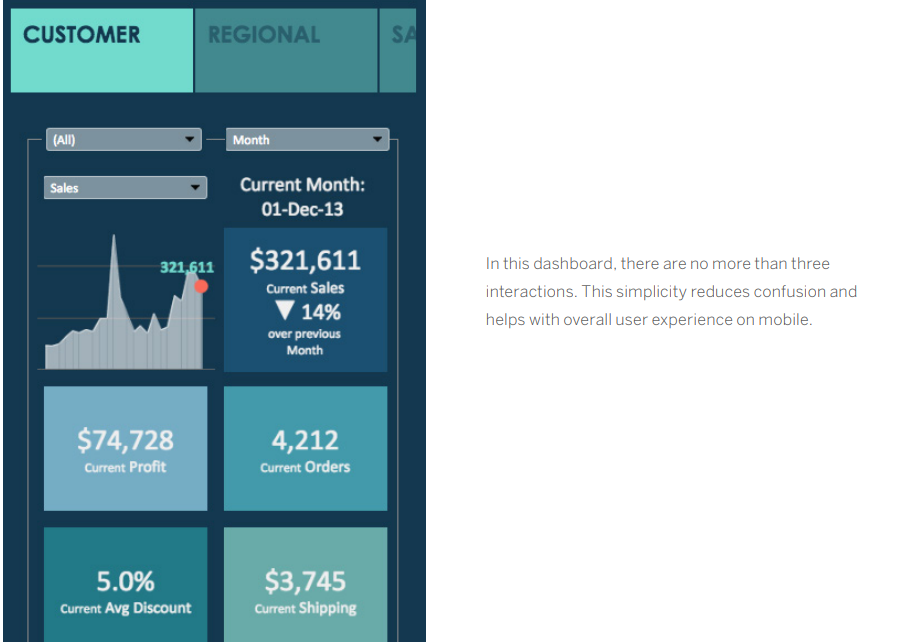
In today's mobile-first world, it's important to design dashboards that look good and function well on a variety of devices. When designing your dashboard, consider how your audience will be consuming the information. If they're primarily using mobile phones, you'll need to prioritize the most important KPIs and optimize the layout for a small screen.
3. Minimize Page Load Times
No one wants to wait for a dashboard to load. Slow load times can be caused by a variety of factors, including the size of your data set and the complexity of your visualizations. To improve load times, you can optimize your data queries, use extracts, and leverage Tableau's built-in performance optimization features.
4. Insights-Based Design
When designing your dashboard layout, consider how your audience will naturally "read" the information. Group related pieces of information together and use visual cues like shading, lines, and white space to guide the eye. The most important information should be placed in the upper left corner of the dashboard, as this is where most viewers will start looking.
5. Minimize Views and Colors
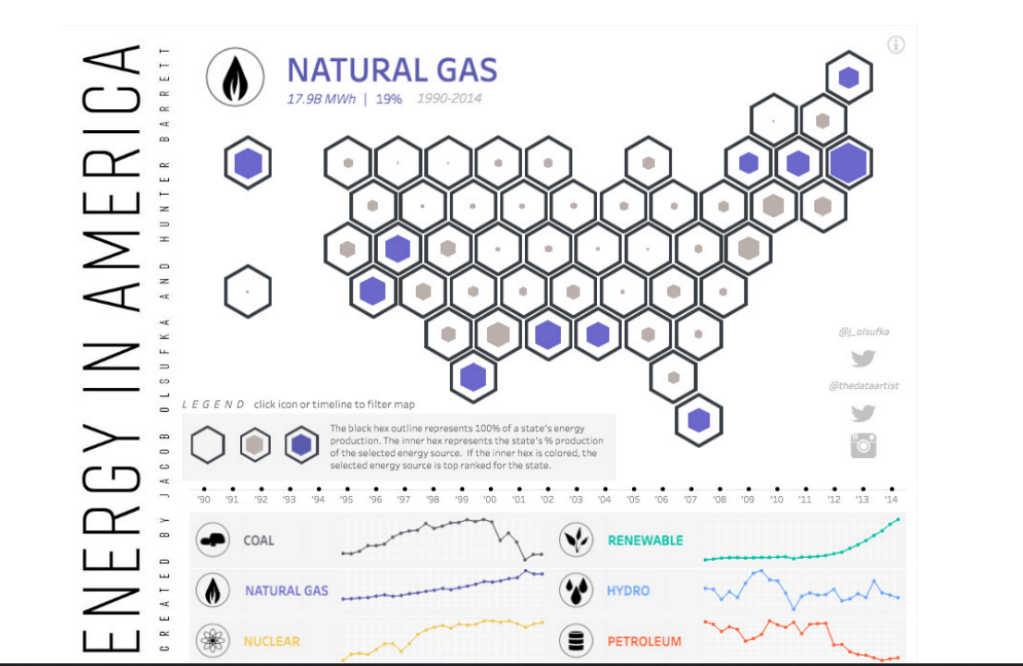
It's tempting to include every relevant piece of data in your dashboard, but this can lead to information overload. Stick to two or three key views, and use color strategically to highlight important trends or patterns. Avoid using too many colors, as this can make your dashboard visually overwhelming.
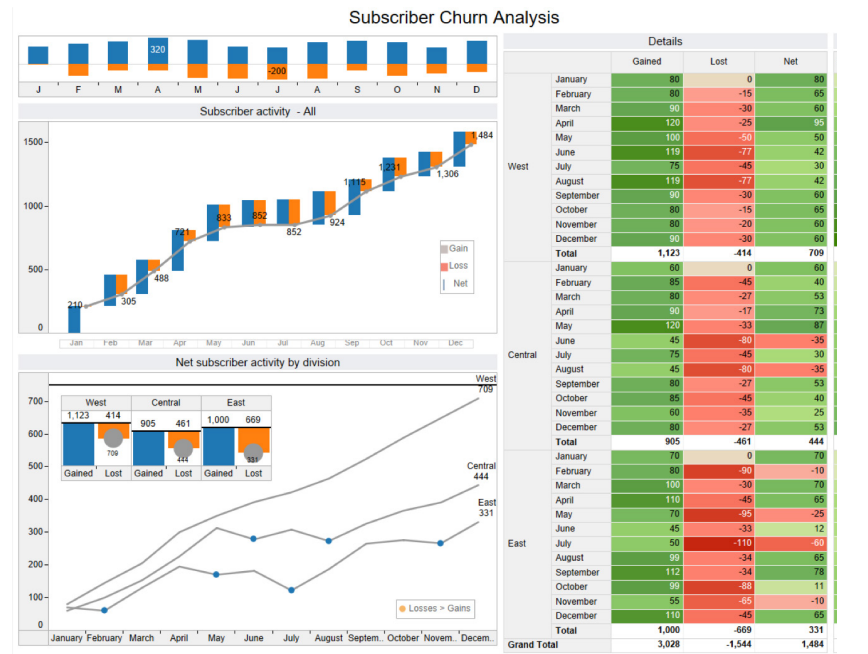
6. Incorporate Interactive Features
Dashboards are most powerful when they allow users to interact with the data. Use filters, highlights, and actions to let users explore the data in different ways. This will help them to gain a deeper understanding of the information and answer their own questions.
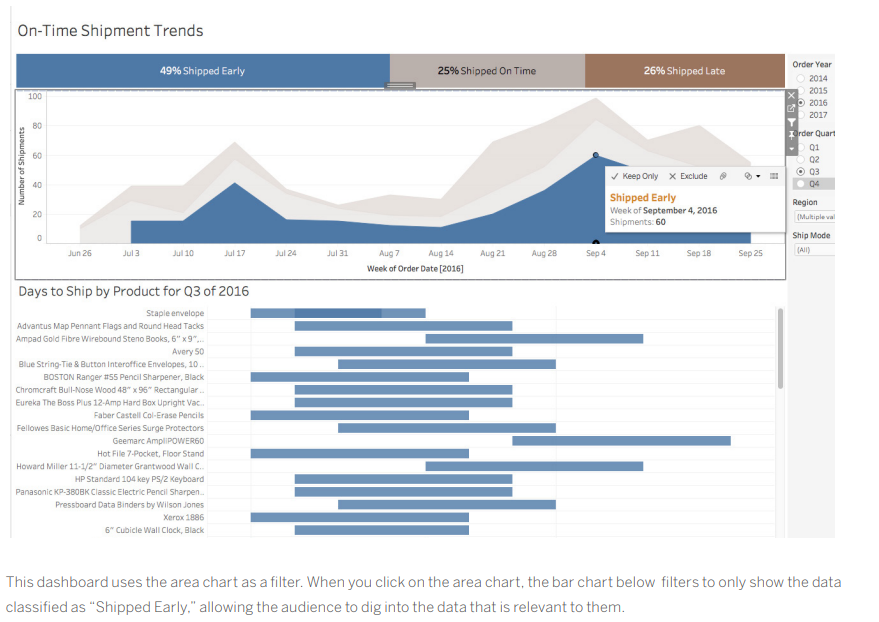
7. Arrange by Hierarchy
When formatting your dashboard, it's best to start with the largest elements and work your way down to the smallest. This will help you to avoid accidentally overwriting your changes. The hierarchy of dashboard formatting typically follows this order: theme, workbook, and worksheet.
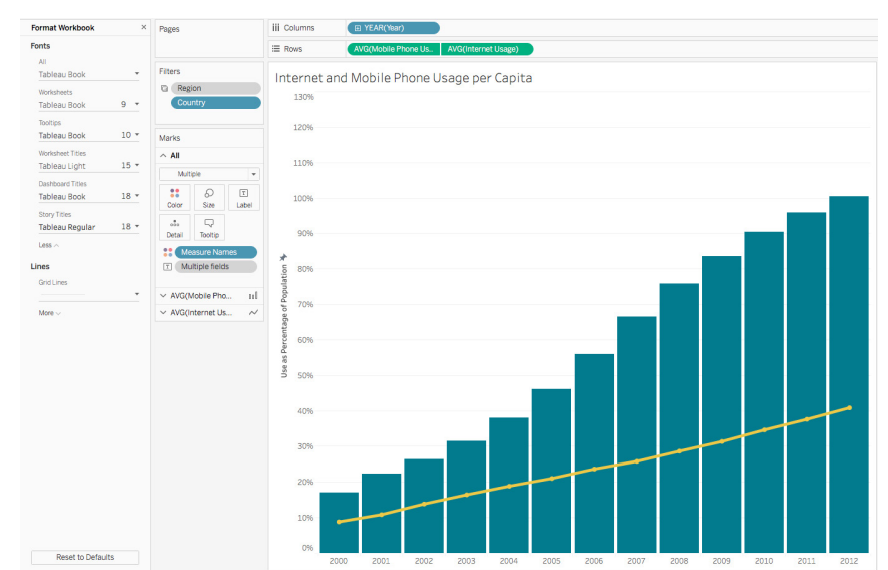
8. Utilize Tooltips and Whitespace for Effective Design
Tooltips are a great way to provide additional information without cluttering up your dashboard. Use tooltips to display detailed data points or to link to external resources. White space is also essential for good dashboard design. It helps to improve readability and make your dashboard less visually overwhelming.
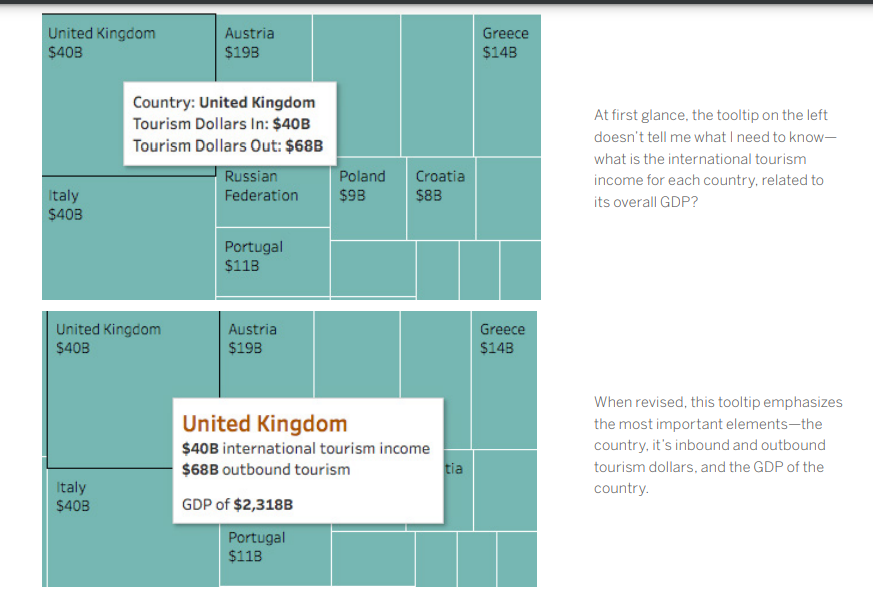
9. Prioritize Clarity
Every element on your dashboard should serve a purpose. If a title, legend, or axis label isn't necessary, get rid of it. Consider using a floating layout to create more white space and improve readability.

10. Ensure Dashboard Effectiveness
Once you've built your dashboard, it's important to test it with your target audience. Ask them how they're using the dashboard and if it helps them answer their questions. Use their feedback to iterate on your design and create dashboards that are truly effective.
By following these best practices, you can create dashboards that are clear, concise, and actionable. Effective dashboards will help your audience understand your data and make better decisions.
How Beinex Can Assist You
Beinex, a premier Tableau partner, provides sustainable analytics solutions to organizations and helps to build superior data visual analytics capabilities internally through our bespoke training programs. Our team of Tableau-certified consultants are real-life Tableau business users who are passionate about Tableau and delivering a world-class experience. Connect with us for a Tableau free trial: www.beinex.com/free-tableau-software
Image source: https://www.tableau.com/learn/whitepapers/10-best-practices-building-effective-dashboards?utm_medium=blog

Alteryx Integration with Cloud Services
Alteryx's Integration with Cloud Services
Alteryx enables businesses to get the most out of cloud services by integrating seamlessly. What makes integrations an essential aspect of modern data analytics is the organizations' increasing reliance on the cloud for handling large datasets. Let's look at Alteryx's integration with some prominent cloud platforms.
Alteryx + AWS
Alteryx can be integrated with AWS services like Amazon Redshift, S3, DynamoDB, EC2, and more, empowering users to maximize the power of data. This integration makes the analysis of large datasets effortless by moving them from AWS to Alteryx and then seeing the results in the cloud.
The benefits of this integration include:
• Managing data workloads of all sizes • Offering robust performance capabilities for large enterprises • Democratizing data analytics across organizations to handle data efficiently • Providing computing power and scalable storage to meet dynamic business requirements • Enhancing the accessibility of self-service analytics with Alteryx's user-friendly, drag-and-drop interface that supports no-code and code-based workflowsAlteryx + Snowflake
Alteryx operates Snowflake Data Cloud easily, facilitating seamless analysis of large datasets by extracting, transforming, and loading (ETL) data from Snowflake. The integration creates a centralized and user-friendly system with the infrastructure and tools to make analytics accessible. It also accelerates workflows, enhances scalability, and pushes data processing to Snowflake, offering flexible options to transform data: • In-database: Direct data processing in Snowflake by running SQL pushdown with no-code tools in Designer • Snowpark: Defining Alteryx's custom analytic building blocks, Pushing data processing to Snowflake directly. • Automatic Pushdown in Designer Cloud: Allows direct workflow implementation within Snowflake without requiring additional steps.
The benefits of this integration include:
• Improving analytics by leveraging Alteryx's code-friendly and no-code interface • Offering access to unified data and robust computing resources • Empowering users to access the entire dataset faster and safely. • Resolving distinctive industry problems with vertical-specific solutionsAlteryx + Google Cloud
Alteryx supports integration with services of Google Cloud Platform like BigQuery, Google Cloud Machine Learning Engine, Cloud Storage, and Cloud Dataflow, allowing users to harness the cloud platform's scalable infrastructure. The integration enables smarter self-service analytics across the enterprise and makes the analysis of large datasets seamless with the easy-to-use interface of Alteryx.
The benefits of this integration include:
• Powering data analytics objectives by deploying the new AI technologies • Empowering employees to perform advanced analytics workflows with or without coding expertise • Expediting workflows by processing voluminous data in BigQuery and using Google's compute resourcesAlteryx + Azure
Alteryx integrates Microsoft Azure, supporting connectivity to Azure services like Azure SQL Database, Data Lake, Blob Storage, and Azure Synapse Analytics. This integration allows businesses to transition data effortlessly to and from the cloud, process it within Alteryx, and run advanced analytics on a scalable platform.
The benefits of this integration include:
• Offering users a secure and scalable analytics environment. • Making the most of advanced analytics capabilities like predictive analytics and machine learning to foster innovation. • Speeding up analytics workflows by leveraging Azure's scalable infrastructure • Protecting sensitive data through analytics with Azure's powerful security features like access controls and encryption.The Benefits of Integrating Alteryx with Cloud Services
Beyond empowering business users to prepare, blend, and analyze data from diverse sources, Alteryx transforms how businesses interact with data through its integration capabilities. Integrating Alteryx with cloud services offers several benefits, including: • Boundless flexibility and scalability: The scalable infrastructure of cloud services facilitates effortless management of complex and vast chunks of data, making the analysis process easier. Integrating with Alteryx also entails seamless scaling with data workflows, enabling real-time analytics of big datasets. Besides, Alteryx's capability to connect to different cloud sources offers choice and flexibility. • Access to advanced analytical tools: Cloud platforms like Google Cloud, Azure, and AWS offer access to advanced analytical tools like machine learning models and AI capabilities. This accessibility improves data workflows. Alteryx can be integrated with these services to enhance data workflows with ML models, predictive analytics, etc. • Enhanced security: Security is the top priority when integrating Alteryx with cloud platforms, as they offer powerful security measures like data access controls, authentication, data encryption, and authorization to safeguard sensitive data. Plus, cloud services comply with regulatory demands and deploy firewalls to protect sensitive data. • Improved cost-efficiency: As a cost-effective alternative to on-premises infrastructure that stores and processes large datasets, cloud platforms lower costs and maximize ROI with their pay-as-you-go models. Considering the costs involved in hardware and maintaining and storing data of on-premises infrastructure, businesses can pay for what they use with cloud services. • Seamless collaboration: Integrating Alteryx with cloud platforms improved collaboration among teams, even across departments or locations. It ensures alignment by allowing everyone to work with the same datasets and workflows. Alteryx's integration with cloud services reimagines how businesses handle data and opens fresh prospects to optimize their data analytics processes. The integrations facilitate smarter decisions by boosting flexibility, scalability, and collaboration across departments or locations. Integrating with cloud platforms like Google Cloud, Azure, and AWS enhances accessibility to advanced analytics tools and unlocks your data power. Beinex, a premier-tier partner of Alteryx, offers consulting services that augment the transformative potential of your enterprise by making the most of the enterprise analytics platform and its robust capabilities. Contact us for a free demo: https://www.beinex.com/alteryx-partner/#request_demo

Time-series Analysis in Tableau and 6 Real-world Success Stories
What is Time Series Analysis?
Time series analysis involves examining data that changes over time or where time is a variable in the outcomes. Time isn't just a data point; it's the primary axis on which the data is based.
The main difference with time series analysis is that data is collected at regular time intervals. This helps identify patterns in the data, forming trends, cycles, or seasonal variations. With a consistent time frame of historical data, time series forecasting becomes a valuable tool for predicting future data. Time's crucial role as a variable in data across industries makes time series analysis widely applicable. Explore a few examples outlined below.
6 Real-world Examples of Time Series Analysis in Various Industries
Example 1: Health Authority Enhances Patient Care
Problem: Inefficient resource use and rising costs of care and operations over time.
Solution: Utilizing data analytics, a prominent health authority conducted a comprehensive analysis of patient data. Examining historical data on patient stays, treatments, and conditions, they identified optimal times for administering medication, resulting in reduced average length of stay and cost savings for both patients and the system.
Insight: Time series analysis in healthcare extends beyond patient care to chronic disease research and epidemic-scale studies. Tracking chronic diseases over time and analyzing patient data using time series methods contribute to advancements in the field.
Example 2: Retail Giant Identifies Sales Opportunities
Problem: Slow data analysis affecting decision-making days before events.
Solution: A leading retail giant's front-office team integrated all data sources to gain a comprehensive view. Implementing time series analysis dashboards, they swiftly identified sales opportunities by forecasting against seasonal trends. Proactive measures were taken to increase ticket sales for upcoming events based on real-time insights.
Insight: Time series analysis aids retail giants in making data-driven decisions, predicting consumer trends, and strategizing marketing efforts, ensuring maximum impact.
Example 3: Manufacturing Company Improves Forecasting Accuracy
Problem: Inaccurate and time-consuming operations, manufacturing, and sales forecasting.
Solution: A manufacturing company revamped its forecasting process using time series analysis and modeling. By leveraging better data and faster analysis, they reduced analysis time from one day to one hour. Accurate forecasts in supply chain and manufacturing processes led to significant cost reductions in inventory, supply chain, labor, and capital equipment.
Insight: Time series analysis proves invaluable in optimizing forecasting models, enhancing accuracy, and streamlining operations in manufacturing.
Example 4: Marketing Analytics Scaling for Media Clients
Problem: Evolving marketing technologies making it challenging to quickly analyze information for media clients.
Solution: An analytics firm centralizes over 100 data sources using Tableau, allowing quick data retrieval and the creation of custom dashboards. Time series analysis aids in media forecasting, enabling the firm to develop insightful "what if" analyses. This empowers clients to make informed decisions about marketing investments.
Insight: Time series analysis combined with data centralization is crucial for scaling marketing analytics, providing clients with actionable insights.
Example 5: Streamlining IT Costs Through Self-Service Analytics
Problem: Business decisions based on static reports, consuming time and resources.
Solution: A retail group enables department staff with self-service analytics in Tableau, reducing IT costs by 20%. Time series analysis is applied for accurate forecasting of retail and IT trends, optimizing product orders and resource allocation.
Insight: Time series analysis aids in accurate forecasting for retail and IT trends, optimizing resource allocation, and reducing IT costs.
Example 6: Innovative Use of Data Analytics in Auditing Processes
Problem: Traditional audits were time-consuming and lacked value addition.
Solution: An organization in the energy sector used Tableau to analyze a year's worth of data, uncovering trends in financial processes. This data-driven approach revolutionized their auditing processes, providing deeper insights into the financial health of the organization.
Insight: Time series analysis proves instrumental in data-driven audits, providing a comprehensive view of historical data and uncovering trends for better decision-making.
These real-world examples showcase the versatility and impact of time series analysis across different industries, emphasizing its crucial role in data-driven decision-making and business optimization.

The Launch of AWS Middle East (UAE) Region: Marking a Holistic Shift
For Beinex, being a custodian of data engineering and data analytics technologies, presence of AWS in UAE offers a plethora of opportunities for customers in terms of:
(a) Drawing customer centricity and confidence in data related services increasing productivity
(b) Building highly scalable and efficient data lakes/data warehouses/data marts to create ‘center of excellences in data’
(c) One-stop unified data access, security and governance using AWS data stack, thereby removing multiple overheads and solutions
(d) Building and deploying ML models and integrating with analytics services creating business far-sightedness
(e) Reducing time to market taken by "product based" data analytics solution to blazing fast AWS services boosting innovation
The new AWS Middle East (UAE) Region consists of three Availability Zones (AZs) and becomes AWS’s second region in the Middle East with the existing AWS Region in Bahrain, launched in 2019. The new AWS Region gives organizations even greater choice for running their applications and serving end users from data centers located in the UAE, using advanced AWS technologies to drive innovation.
AWS Regions are composed of Availability Zones that place infrastructure in separate and distinct geographic locations. Availability Zones are located far enough from each other to support customers’ business continuity but near enough to provide low latency for high availability applications that use multiple Availability Zones.
Each Availability Zone has independent power, cooling, and physical security and is connected through redundant, ultra-low latency networks. AWS customers focused on high availability can design their applications to run in multiple Availability Zones to achieve even greater fault tolerance. The launch of the AWS Middle East (UAE) Region will enable local customers with data residency requirements to store data securely in the UAE, while providing customers with even lower latency across the country.
Beinex has prescriptive and predictive data analytics product suites comprising of a mix of services (Redshift, S3, Glue, Athena, Kinesis, EMR etc.) customized along with BI viz platform apps like Tableau & Alteryx, all on the AWS platform. Beinex is also competent in data innovation using AI/ ML stack with Amazon Sagemaker.
The firm is a preferred partner of Aurex, a SaaS based GRC solution. The company has capabilities in data engineering technologies like data ingestion, data lakes, ETL & data transformation, data visualization and AI/ ML models leading to insights generation platforms.
The launch of AWS Middle East (UAE) Region will catalytically encourage the Public Sector to shift to Cloud in a big way. It will drastically alter the way business is conducted in that realm, providing an added boost to the entire region. Besides, the AWS range of services characterized by AI-ML capabilities will facilitate ease of living and convenience in all walks of life across the society.