How AI Decision-Making is Improving Enterprise Outcomes
Blog
Share 
The Modus Operandi of Dictionary Attacks: Combating AI-powered Threats
 12 April 2023
  Sumi S
 What is an AI-based Dictionary Attack
Cyberattacks , known as "dictionary attacks", attempt to crack passwords by using a list of terms from a dictionary. Every word in a dictionary is tested in a traditional dictionary attack until the correct password is discovered. However, using AI algorithms, attackers can now create custom dictionaries based on information about the victim, such as their name, birthdate, and social media activity. These algorithms can analyse large amounts of data and identify patterns to create more accurate and effective dictionaries. As a result, these attacks are becoming more sophisticated and challenging to defend against.
How Do AI-based Dictionary Attacks Operate
AI-based dictionary attacks are far more successful than conventional techniques because they use machine learning algorithms to recognise and forecast patterns in the data. These algorithms look for patterns and correlations in the data and build models that can predict passwords using methods like deep learning, neural networks, and natural language processing.
Attackers can compile customised dictionaries more likely to contain the victim's password by gathering information about their targets from social media platforms and other internet sources. They also have access to reinforcement learning algorithms, which allow them to learn from their errors and gradually increase their success rate. As a result, these attacks may be pretty successful and challenging to identify.
How to Defend Against AI-based Dictionary Attacks
Employ Secure Passwords: One of the most excellent strategies to fend off dictionary attacks is to use secure passwords that are difficult to guess. Long passwords with a mix of capital and lowercase letters, digits, and special characters are recommended. An example is cited below:
Regular Password: Akh!l@5991
Secure Password: VS654a!4@s6d546
Implement Multi-Factor Authentication (MFA): By demanding users to enter two or more forms of identity when logging in, MFA adds an extra layer of security. This might require a user's phone to receive a one-time passcode or a fingerprint scan.
Limit Login Attempts: Organisations can restrict how many times a user can try to log in before being locked out. This stops an attacker from trying numerous passwords and guessing the right one.
Monitor User Behaviour: By monitoring user behaviour, businesses can spot suspicious behaviour, such as recurrent login failures or odd login locations. Security personnel should be aware of a potential attack, enabling them to take precautions.
Implement AI-Based Security Measures: Businesses can also put their own AI-based security measures in place to fend off dictionary attacks. AI algorithms can spot and stop suspicious activities or look for trends in user behaviour to spot future attacks.
Summing Up
Dictionary attacks based on AI are growing more complex, making it harder to defend against them. Yet, organisations can significantly lower their chance of being a cyber-attack target by implementing the techniques mentioned above. To protect the security of the business, it is also crucial to keep aware and informed on the most recent cybersecurity trends and dangers.
Do you find it difficult to navigate this new realm? Do you find AI & Automation difficult to implement? How resilient is your AI & Automation power?
Beinex AI & Automation Services puts you at ease, literally. From NLP-NLG Chatbots to Syntax Migrators to Predictive Modelling to Web Scraping to Social Media Analytics, we offer a range of AI and Automation services that can streamline and automate many of your redundant workflows within a short turnaround time.
The use of AI in dictionary attacks has become increasingly prevalent in recent times. These attacks involve the creation of custom dictionaries that enhance password-guessing accuracy using AI algorithms. This blog delves into the nature of AI-based dictionary attacks and suggests countermeasures to combat them.
Related Articles

Snowflake Time Travel: How to Leverage it to Achieve Optimal Results
Benefits of Snowflake Time Travel
With Snowflake Time Travel, you can access historical data, including data that has been altered or deleted, at any given point. This feature is helpful for various tasks, such as:- • Querying data that has been modified or erased in the past
- • Duplicating entire tables, schemas, or databases at or before specific dates
- • Restoring deleted tables, schemas, and databases
How to activate Snowflake Time Travel?
Activating Snowflake Time Travel is a simple process that requires no additional effort. It is automatically activated with a retention period of one day. Nonetheless, upgrading to the Snowflake Enterprise Edition is necessary to customise the Data Retention Period and extend it to 90 days for Databases, Schemas, and Tables. It's important to note that increasing the Data Retention Period results in additional storage usage, reflected in your monthly Storage Fees.
Data Retention Period in Snowflake
In Snowflake, Data Retention Period determine how long historical data is retained to support Time Travel functionality. When data in a table is altered, such as through deletions or updates, Snowflake maintains the previous state of the data so that Time Travel operations (like SELECT, CREATE...CLONE, UNDROP) can be performed on it. By default, all Snowflake accounts have a standard retention period of one day (24 hours).
However, the Retention Period can be adjusted at the account and object level in the Snowflake Standard Edition to 0 (or unset to the default of 1 day) for databases, schemas, and tables.
In the Snowflake Enterprise Edition or higher, the Retention Period can be set to 0 for temporary databases, schemas, tables, and temporary tables. For permanent databases, schemas, and tables, the Retention Time can be configured to any duration between 0 and 90 days.
Functions of Snowflake Time Travel SQL Extensions
Snowflake Time Travel SQL Extensions are special SQL commands that allow users to query historical data from a specific point in time using the Time Travel feature. These extensions enable users to perform various Time Travel operations, including:
- a. CLONE: This command creates a copy of a table, schema, or database at a specific point in time using Time Travel.
- b. UNDROP: This command restores a dropped table, schema, or database to a specific point in time using Time Travel.
- c. HISTORY: This command retrieves the history of changes made to a table, schema, or database over time using Time Travel.
- d. AS OF: This command retrieves data from a table as it appeared at a specific point in time using Time Travel.
Specifying a Custom Data Retention Period for Snowflake Time Travel
To specify a custom Data Retention Period for Snowflake Time Travel, you can use the DATA_RETENTION_TIME IN_DAYS argument in the command when creating a table, schema, or database. By default, the maximum Retention Time in Standard Edition is set to 1 day (i.e. 24 hours), while in Snowflake Enterprise Edition (and higher), it can be set to any value up to 90 days.
The Data Retention Time can be set in the way it has been placed in the example below.
To create a schema with a custom Data Retention Period of 60 days, you can use the following SQL command:
create table mytable(col1 number, col2 date) data_retention_time_in_days=60;
Modify the Data Retention Period for Snowflake Objects
To modify the Data Retention Period of a Snowflake object, any change made to the Retention Period affects both active data and data in Time Travel. Depending on whether the period is increased or decreased, the following impacts occur:
- a. Increasing Retention
- b. Decreasing Retention
Let’s dive deep into more details:
a. Increasing Retention
Snowflake Time Travel preserves the data for a more extended period. For instance, if a Table’s Retention Time is increased from 10 to 20 days, the data set to be deleted after ten days will be retained for an additional ten days before being moved to Fail-Safe. However, data over ten days old and already transferred to Fail-Safe mode is unaffected.
b. Decreasing Retention
The duration of data stored in Time Travel is reduced. The shorter Retention Period applies only to active data updated after the Retention Period is shortened. If the data is still within the new Retention Period, it stays in Time Travel; otherwise, it is placed in Fail-Safe Mode. For instance, if a table with a 10-day Retention Period is reduced to 1 day, data from day 2 through day ten will be transferred to Fail-Safe, and only data from day one will be accessible through Time Travel.
Since the background process moves the data from Snowflake Time Travel to Fail-Safe, it may take some time to see the changes. Although Snowflake guarantees that the data will be transferred, it does not specify when the process will be finished. The data remains accessible via Time Travel until the background process is completed.
To change an object's Retention Period, use ALTER object command, such as the following command for modifying a table's Retention Period:
alter table mytable set data_retention_time_in_days=30;
Snowflake Time Travel Data Query
To query previous versions of data in Snowflake Time Travel, you can use the AT | BEFORE Clause after making any DML actions on a table. This clause allows you to query data at or before a certain point in the table's history throughout the retention period. The specified threshold can be either time-based (e.g., a timestamp or time offset from the present) or a statement ID (e.g., SELECT or INSERT).
For example, to select historical data from a table as of a specific date and time, you can use a query like:
sql
SELECT * FROM my table AT (TIMESTAMP => 'Fri, 05 May 2023 16:20:00 -
If you want to pull data from a table that was last updated a certain number of minutes ago, you can use a query like:
sql
SELECT * FROM my_table AT(OFFSET => -60*5);
And to collect historical data from a table up to a specified statement's modifications, but not including them, you can use a query like:
Sql
SELECT * FROM my_table BEFORE(STATEMENT => '8e5d0ca9-005e-44e6-b858-a8f5b37c57
How to Restore Deleted Objects by Utilising the UNDROP Command?
To restore a deleted object that hasn't been permanently removed from the system (meaning it can still be seen in the "SHOW object type> HISTORY" output), you can use the UNDROP command in conjunction with Snowflake Time Travel. This command can be applied to various objects, such as tables, schemas, and databases. It effectively reverts the thing to its previous state before it was deleted with the DROP command. For example, the UNDROP command can also restore a dropped database.
Summing Up
Snowflake Time Travel’s features can enhance your decision-making process and overall data experience. If you're looking for a Snowflake service provider, Beinex is an excellent option. Our partnership with Snowflake enables us to offer advanced features like automated tuning, elastic compute, and analytics modernisation services to help your organisation realise exponential Returns on Investment.

Tableau 2024.3: Advanced Features Redefining Data Analytics and Collaboration
Tableau Cloud Manager
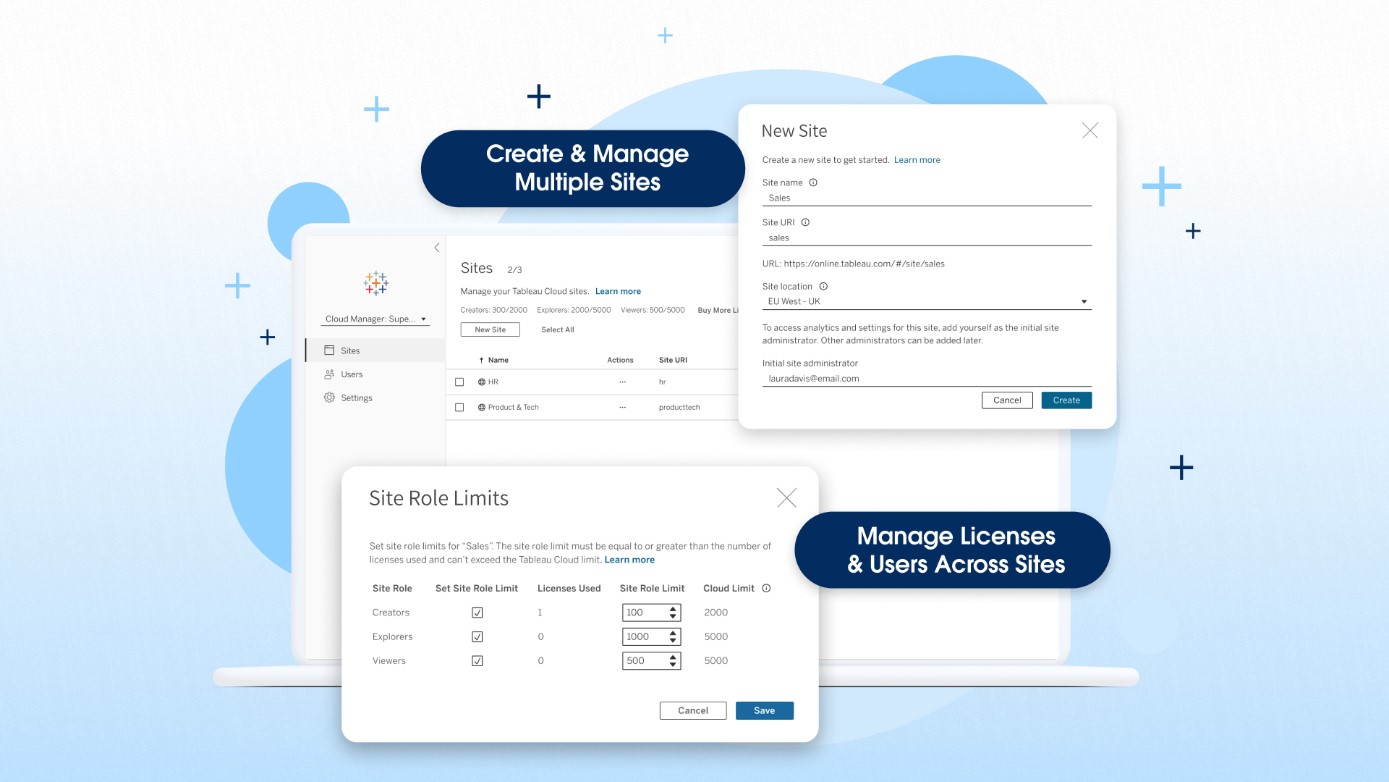
Tableau Cloud Manager is an enhancement to Tableau Cloud that allows customers to create and manage multiple Tableau sites with centralized management of licenses and users. Tableau Cloud Manager simplifies the expansion and administration of your cloud analytics environment, helps ensure you meet governance and data residency requirements and introduces new administrative efficiencies. The highlights of Tableau Cloud Manager are: 1. Expand analytics across your organization with multiple Tableau Cloud sites Tableau Cloud Manager enables Tableau Cloud customers to create and manage multiple sites in a single deployment. Additionally, Tableau Cloud Admins can deploy these sites in the regions of their choice. This functionality is particularly beneficial for global organizations with geographically dispersed teams. By allowing for the establishment of region-specific sites, Tableau Cloud Manager enables tailored analytics experiences that cater to the unique needs and compliance requirements of every team in your organization. Your Tableau Cloud edition determines site limits: • Tableau Cloud (standard): up to 3 sites • Tableau Cloud Enterprise: up to 10 sites • Tableau+: up to 50 sites 2. Effectively manage multi-site deployments Tableau Cloud Manager acts as a layer atop your Tableau Cloud sites, offering centralized management features that help you scale your analytics operations. Customers who deploy multiple sites can manage sites and license users in one place, including granting users access to multiple sites without requiring distinct licenses for each site. 3. Enhance governance with a new Cloud Admin role Tableau Cloud Manager also introduces a new Cloud Admin role, a level above the traditional Site Admin. This allows for more flexibility in how your organization manages and governs your analytics environment based on your unique needs. A smaller organization may employ the same person as a Cloud Admin and a Site Admin. For larger organizations, your Cloud Admin could be someone in IT using higher-level administrative capabilities to implement more control and coordination across your Tableau Cloud sites.
Multiple External Identity Providers on a Site
You can now enable up to 20 identity providers on a single Tableau Cloud site. This feature allows administrators to offer secure access to external users, internal users, and partners. By using multiple identity providers, you can achieve site consolidation and simplify access for both internal and external users throughout the organization.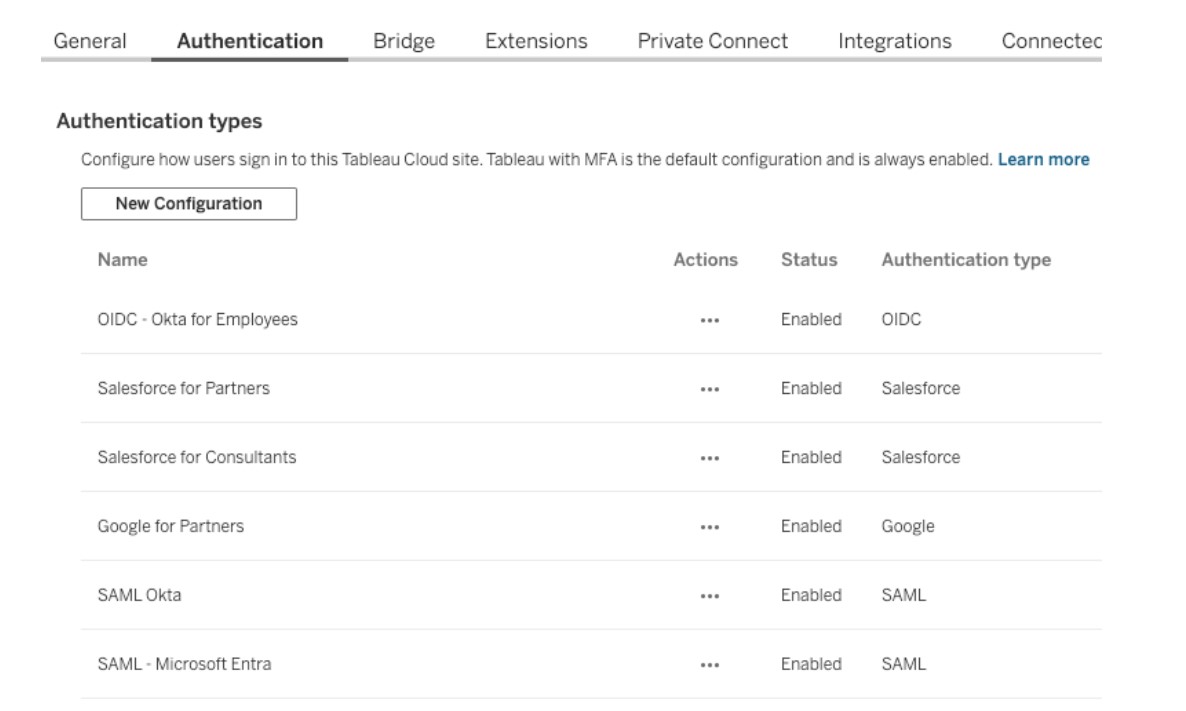
Table Viz Extension
Transform traditional reporting into visual analytics while addressing your users' needs. Tables are essential visualizations for analysts, allowing them to examine data as text and convey detailed information at a granular level. The Table Viz Extension, developed and maintained by Tableau, enables you to incorporate detailed tables and grid views into your dashboards for users who favor traditional reporting formats. You can load this new visualization type into your marks card, configure new columns by dragging fields onto the card, and interact with the table directly for customization.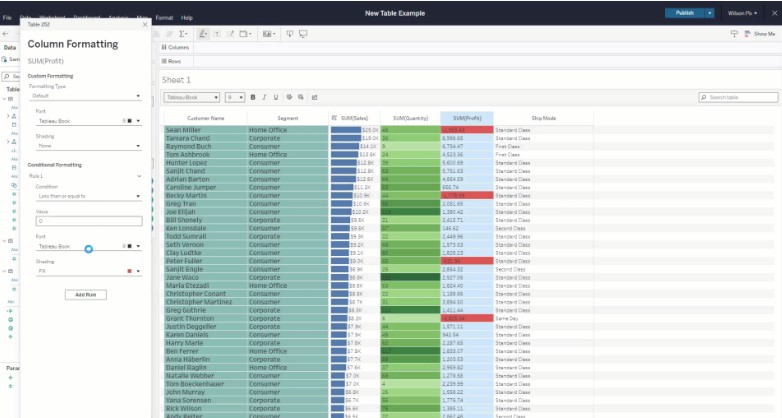
Spatial Parameters
Tableau 2024.3 introduces the full Tableau experience for geospatial data with the support of Spatial Parameters. In addition to the standard parameter types (such as string and integer), authors can now choose a “Spatial” type. These parameters create rich, interactive dashboards that allow you to ask and answer questions about geospatial information. The Spatial type enables the parameter to capture spatial geometries—points, lines, and polygons representing locations, paths, and regions. With Spatial Parameters, end users can select individual points, which are then passed as input into calculations, facilitating dynamic behavior based on their selections. This functionality is similar to existing parameter behavior but is now extended to include spatial objects. Read more about spatial parameters: https://beinex.com/topics/spatial-parameters-enhancing-geospatial-analysis-and-adding-interactivity-to-your-maps/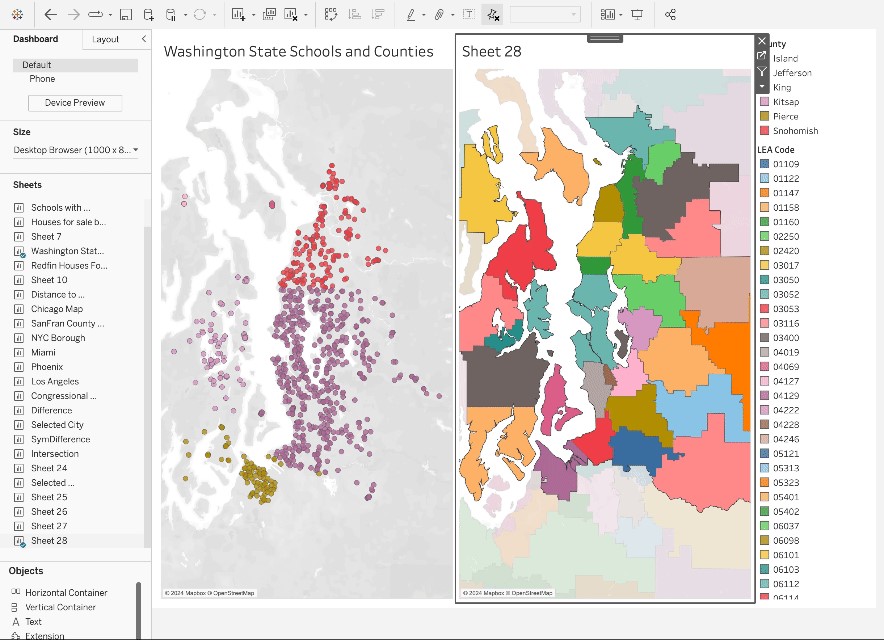
Display Data Model for Published Data Sources
Gain a visual understanding of how tables within your data model are related to Published Data Sources. You can view the relationships between tables and fields in Tableau by simply clicking on the Data Source pane in a Tableau workbook. By enabling analysts to see and comprehend how tables in the data model are interconnected in Published Data Sources, they can confidently create accurate visualizations with a clear understanding of the data model's semantics.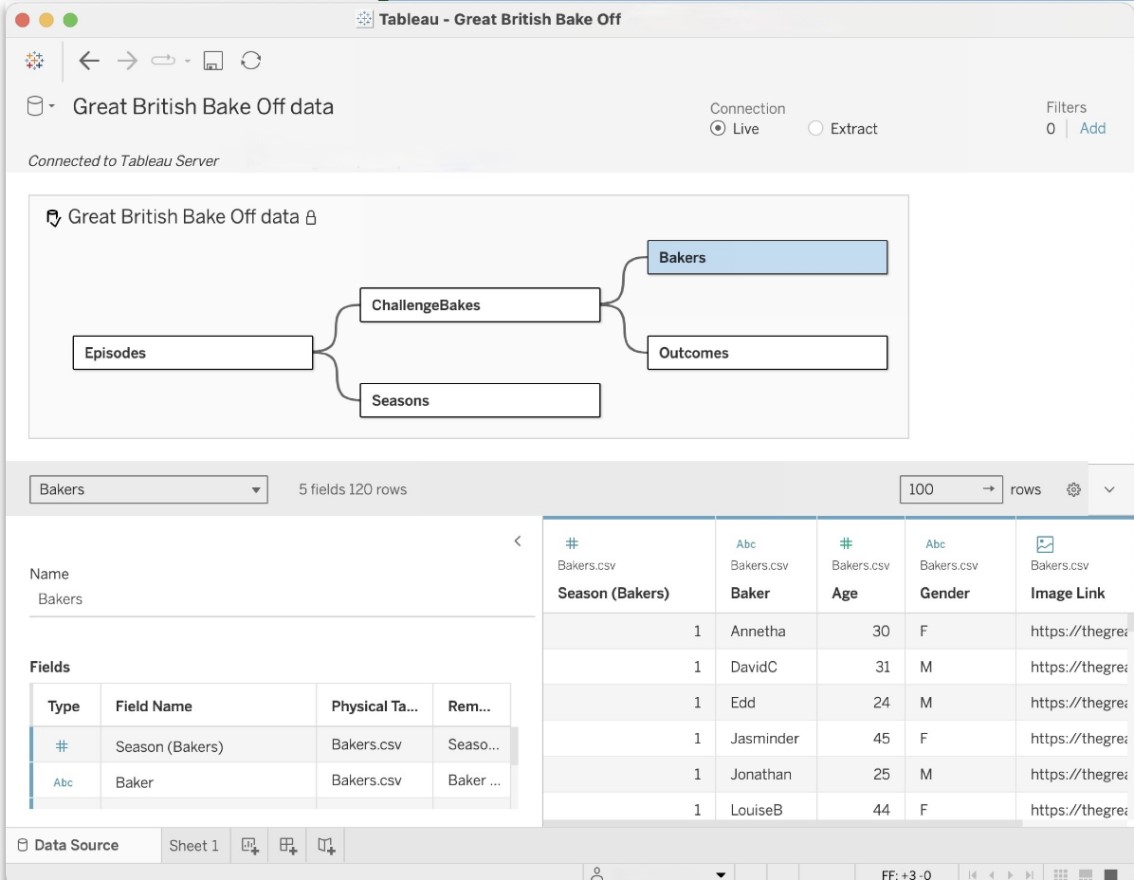
Tableau Cloud App for Microsoft Teams
The new Tableau Cloud App for Microsoft Teams allows users to seamlessly integrate data-driven insights into their daily workflows, resulting in faster and more efficient decision-making. This integration enables real-time data sharing, making it easy for users to share their favorite Tableau dashboards and Pulse metrics without leaving Teams—in personal apps, messages, channels, and meetings. From there, they can analyze and share their insights in a message or channel. Pinned channel content is also available to explore in Teams meetings, providing a fully interactive experience. This promotes a more data-driven culture by ensuring everyone can collaborate effectively with access to the same data and analytics.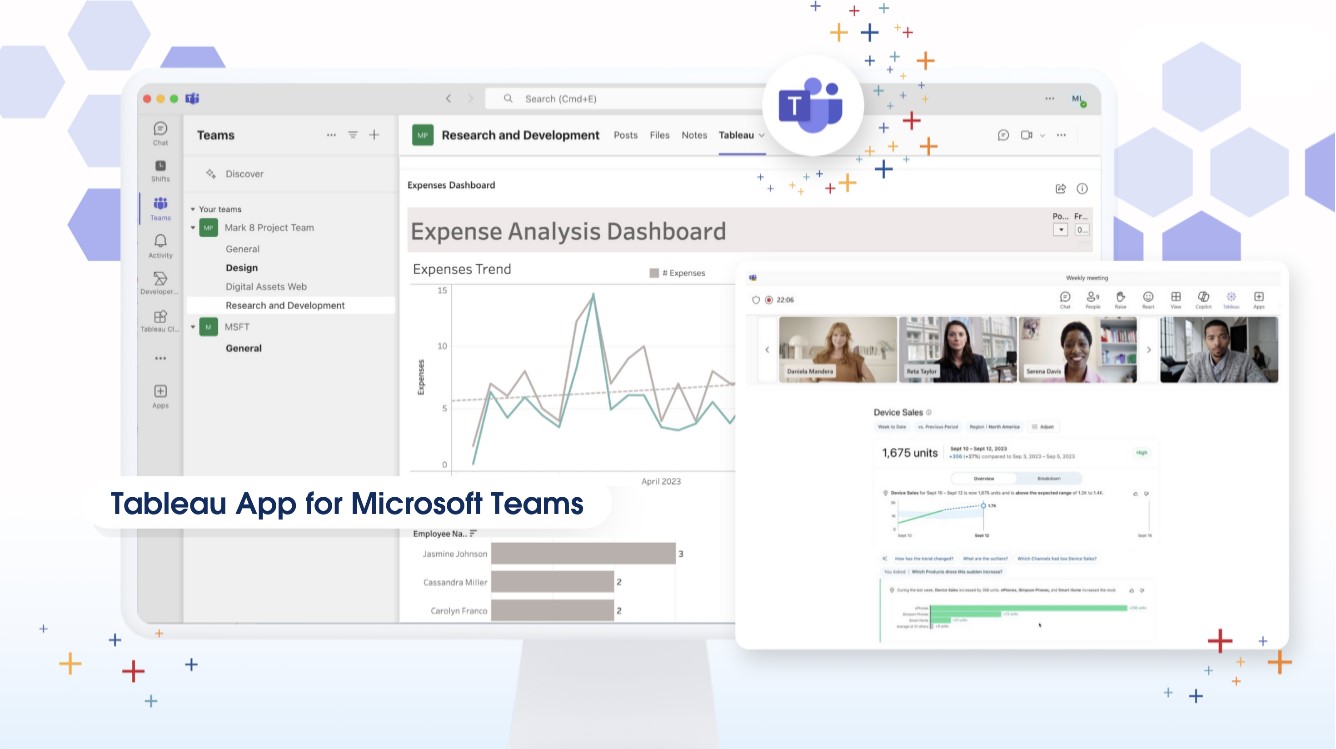 Image source: https://www.tableau.com/products/new-features
How Beinex Can Assist You
Beinex, a premier Tableau partner, offers sustainable analytics solutions to organizations and enhances their internal data visualization capabilities through customized training programs. Our team of Tableau-certified consultants consists of experienced Tableau business users who are passionate about the platform and committed to delivering an exceptional experience. Connect with us to embrace transformation: https://www.beinex.com/free-tableau-software/

Automating Compliance Checks with AWS Systems Manager
The Need for Automating Compliance
As business environments today are rapidly changing and highly regulated, it is important to automate compliance to boost accuracy, efficiency, and scalability. The following aspects emphasize why automating compliance is highly significant. • Amplifies security by complying with data privacy and safety regulations. • Saving time and effort by automating recurring tasks like monitoring, reporting, and audits. • Deploying the required infrastructure faster and in a standardized format. • Boosting accuracy by reducing the risks of human error and consistently adhering to industry standards.
What is an AWS Systems Manager?
A unified management system, an AWS Systems Manager, streamlines infrastructure management by improving visibility and giving you control over your AWS infrastructure. It delivers a suite of tools for managing configurations, automating repetitive tasks, patching systems, maintaining consistent configurations, and securely managing secrets and configurations. The primary features of AWS Systems Manager associated with compliance are: • Compliance Dashboards: They offer a centralized visualization of your compliance status, emphasizing resources that are non-compliant to facilitate faster remediation. • Patch Manager: It automates the deployment and monitoring of patches across your instances. • State Manager: It ensures that your systems are configured to a specific desired state.
Compliance Made Effortless: Automation with AWS Systems Manager
A comprehensive management service, AWS Systems Manager, allows you to automatically accumulate and aggregate data from your AWS resources. It provides a unified view of your AWS environment, making managing and monitoring your resources easier. Compliance, an AWS Systems Manager capability, enables the scanning for inconsistencies in compliance and configuration and offers real-time compliance insights. This capability facilitates drilling down into certain non-compliant resources from the data aggregated from multiple AWS accounts. The additional features and benefits Compliance provides are as follows: • Utilizing AWS Config to see compliance history and monitor changes. • Exporting data to Amazon Athena and Amazon QuickSight to generate organization-wise reports. • Using Amazon EventBridge, State Manager or Run Command to fix issues. • Customizing compliance to develop compliance types to fit your business needs. • Employing AWS Systems Manager for seamless integration of third-party compliance tools and automation of configuration management and vulnerability scanning. AWS Systems Manager facilitates the automation of intricate and recurring tasks associated with configuration, patching, and software installation. It allows businesses to run these tasks across systems simultaneously while minimizing the time needed to effect the changes and ensuring consistency in the process. This execution enables software compliance, including maintaining antivirus definitions up to date, implementing firewall policies, and setting patch baselines. The automation capability of AWS Systems Manager entails streamlining the deployment, maintenance, and remediations of AWS services like Amazon EC2, Amazon S3, and more.
Let’s explore how AWS Systems Manager automates compliance checks:
• Centralizing compliance management: AWS Systems Manager offers a unified compliance dashboard that lets users see the compliance status across different AWS accounts and regions in real-time. The dashboard consolidates data from the state manager and patch manager to centralize compliance management, enabling easy detection and addressing of specific non-compliant resources. • Enforcing configuration: Users can define and implement preferred states for the resources with the State Manager. It ensures consistency in configurations and compliance in setting permissions, configuring firewall rules, or installing software. • Patch Management: It automates the processes of patching applications and operating systems on your instances, allowing users to select authorized patches and schedules for automatic deployment. It makes sure that your systems are up-to-date and stay compliant with the safety standards. • Automating Remediation: AWS Systems Manager allows the automated remediation of non-compliant resources. For example, if a system falls out of compliance due to a missing patch, Patch Manager can trigger an automatic patch deployment to resolve the issue. • Facilitating integration with AWS Config: AWS Systems Manager integrates seamlessly with AWS Config, which helps assess and monitor configuration modifications against compliance rules. This integration facilitates continuous monitoring and automated reporting, ensuring a robust compliance posture.Some of the benefits of using AWS Systems Manager for compliance include:
• Saving time and expediting remediation as automation of compliance processes checks reduces manual effort. • Streamlines the audit processes and ensures audit readiness through meticulous logging and documentation of compliance actions. • Fortifies security by detecting and addressing vulnerabilities on time and ensures your enterprise aligns with the standard security practices. • Leverages existing AWS infrastructure to reduce the requirement for reliable compliance tools, saving costs. • Offers real-time insights into the compliance status across your AWS environment, facilitating proactive management. AWS Systems Manager can be a game changer for businesses looking forward to ensuring compliance with complex regulations and industry standards across a dynamic IT environment. Automating compliance checks boosts accuracy, efficiency, and security, transforming compliance management into a streamlined workflow. Beinex is an AWS consulting partner that lets you navigate the AWS landscape and leverage it for unprecedented business benefits. Connect with us for a free demo: Beinex - Beinex - Your Reliable AWS Partner for Cloud Computing Services
Reactive vs Proactive AI Governance: Why Enterprises Must Go Beyond Compliance
Enterprise AI adoption is accelerating, but governance maturity is not keeping pace. According to a 2025 research report by Infosys on Responsible Enterprise AI in the Agentic Era, 95% of enterprises reported AI-related incidents in the last two years, while only 2% met the " responsible AI “gold standard readiness levels. Another 2025 study on the state of AI security found that 70% of organizations still lack optimized AI governance frameworks.
This gap explains why enterprises can no longer treat AI governance as a compliance checkbox. Beyond avoiding regulatory penalties, governance today is about ensuring reliability, accountability, security, transparency, and business resilience as AI becomes embedded into core operations.

13 Key Snowflake Features: Traits that Take It to the Top
A Compact List of Snowflake Features
- Decoupling of storage and compute in Snowflake
- Auto-Resume, Auto-Suspend, Auto-Scale
- Workload Separation and Concurrency
- Snowflake Administration
- Cloud Agnostic
- Semi-structured Data Storage
- Data Exchange
- Time Travel
- Cloning
- Snowpark
- Snowsight
- Security Features
- Snowflake Pricing
Let’s deep-dive:
1. Decoupling of storage and compute in Snowflake
Snowflake's decoupling of storage and compute features facilitates virtual warehouses and storage as separate entities. Leveraging this functionality of Snowflake, businesses can achieve greater flexibility in choosing the compute of their choice and incrementally pay for what they store and compute. Users can scale up / down or in/out based on the business SLA requirement. Scale up – Scale-out features do not require downtime and are almost instant.
2. Auto-Resume, Auto-Suspend, Auto-Scale
Snowflake's auto-resume and auto-suspend features provide minimal administration. Using auto-resume, Snowflake starts a compute cluster when a query is triggered and suspends compute clusters after a set time of inactivity. These two features ensure performance optimisation, cost management, and flexibility.
In business circumstances where more users are querying heterogeneous queries, setting up auto-scaling can help automatically expand the number of clusters from 1 to 10 at an increment of 1 based on the volume of queries sent to a compute simultaneously.
3. Workload Separation and Concurrency
Concurrency is no longer a problem for Snowflake, unlike traditional data warehouses with concurrency issues where users and processes must compete for resources. Because of Snowflake's multi-cluster architecture, concurrency is not an issue anymore.
This architecture also helps to divide workloads into their virtual warehouse and channel the traffic to each virtual warehouse (compute) by functions or departments.
4. Snowflake Administration
A data cloud as a service is provided by Snowflake (DWaas). Businesses can set up and administer a system without significant assistance from DBA or IT teams. Unlike the on-premise platforms, neither hardware commissioning nor software installation patch-update is s necessary. Snowflake manages software updates and introduces new functions and patches without downtime.
Snowflake automatically creates micro-partitioning. This feature reduces the requirement of manually indexing and clustering tables though these are available features in Snowflake.
5. Cloud Agnostic
Being a cloud-agnostic platform, Snowflake can migrate its workloads with other cloud providers. So, Snowflake is accessible on all three cloud providers: AWS, Azure, and GCP. Customers can easily integrate Snowflake into their existing cloud architecture and choose to deploy in locations preferred by their companies.
6. Semi-structured Data Storage
The requirement to manage semi-structured data, often in JSON format, gave rise to NoSQL database solutions. Data pipelines are created to extract attributes from JSON and mix them with structured data. By leveraging VARIANT, a schema on read data type, Snowflake's design enables storing structured and semi-structured data in the exact location. Both organised and semi-structured data can be stored using the VARIANT data type. Snowflake eliminates the need for data extraction pipelines by automatically analysing data, extracting properties, and saving it in a columnar format.
Snowflake can connect to staging areas like s3 bucket, Azure blob or GCP blob storage to retrieve and transform files stored in these platforms. This is regardless of the cloud Snowflake is hosted. A snowflake-managed staging area is also available. Tasks/ Streams or Snowpipe can be set to retrieve data at a scheduled time or almost instantly, respectively. Snowflake can work with CSV, JSON, XML, Avro, ORC, and Parquet file formats. Snowflake can also store metadata of unstructured data stored in the staging area.
7. Data Exchange
A wide range of data, data services, and applications are available on the Marketplace. From some of the world's top data and solution suppliers, you can find, assess, and buy data, data services, and apps through Marketplace. Direct access to data ready for querying and pre-built SaaS connections virtually eliminates the expenses and delays associated with conventional ETL operations and integration. The risk and hassle of duplicating and relocating outdated material should be avoided. Instead, you can receive automatic updates that are close to real-time and have secure access to shared, controlled, and live data.
8. Time Travel
One of the distinctive Snowflake elements is time travel. You may follow the evolution of data through time by using time travel. All accounts have access to this Snowflake feature, free and enabled by default for everyone. Additionally, this Snowflake feature allows you to retrieve a Table's historical data. At any moment throughout the previous 90 days, one can access the table's appearance.
Time travel encompasses the undrop feature. If an object has not been removed yet by the system, a dropped object can be recovered using the undrop command in Snowflake. When an object is undropped, it returns to its original condition. The option to undrop schemas or tables is also available.
9. Cloning
The clone capability allows us to quickly duplicate anything, including databases, schemas, tables, and other Snowflake objects, in almost real time. Therefore, cloning an object involves editing its metadata rather than duplicating its storage contents. You can quickly produce a clone of the whole production database for testing purposes.
10. Snowpark
With the help of the Snowpark feature, data scientists and data engineers proficient in Python, Scala, R, and Java may create and manage their codes in Snowflake. Snowpark helps to employ the computing capabilities of Snowflake to retrieve, transform, train and apply data science models on the data stored in Snowflake, which has a more apparent performance advantage,
11. Snowsight
The new Snowflake web user interface, Snowsight, replaces the traditional Snowflake SQL Worksheet and enables you to easily construct basic charts and dashboards that can be shared or explored by many users, do data validation while loading data and conduct ad-hoc data analysis. The Snowflake dashboards tool is an excellent option because it works well for individuals or small group users in an organisation who wish to generate straightforward visualisations and share information among themselves.
12. Security Features
Snowflake assures security for its users through the following methods:
- • By adding IP addresses to a whitelist, you may control network policies and limit who can access your account.
- • By supporting several authentication techniques, including federated authentication and two-factor authentication for SSO.
- • Using a hybrid approach of role-based access control and discretionary access control. In role-based access control, privileges are assigned to roles which are then transferred to users. Still, in discretionary access control, each object in the account has an owner who controls access to the object. This hybrid strategy offers a substantial level of flexibility and control.
AES 256 strong encryption is used to automatically encrypt all data, both in transit and at rest.
13. Snowflake Pricing
The advantages of Snowflake pricing are:
- • Pay for actual consumption only.
- • We can cut back on resource use to save costs.
- • Flexible payment. We can either pay on-demand or in advance (pre-purchased).
- • Scale up or down the use of cloud services, computing, and data storage automatically based on your needs.
- • There are no chances of overbuying or overprovisioning.
Optimisation of Snowflake spending through integration with innovative cost-monitoring platforms.
Snowflake stands as an ideal and popular choice because of its unique and updated features. It is also available across many data cloud providers and regions, making it accessible and suitable for all organisations. Why wait? Let’s experience Snowflake. Try now: https://beinex.com/snowflake/.