How AI Decision-Making is Improving Enterprise Outcomes
Blog
Share 
The Business Value of Migration to Amazon Web Services
 11 December 2023
  Team Beinex
 AWS: Four Types of Cloud Business Value
In the era of digital transformation and infrastructure modernization, the journey to the cloud has been both exhilarating and challenging. Many businesses have successfully migrated their "easy" applications to the cloud. However, a prevailing concern lingers among business leaders—an uncertainty about the returns on investment in terms of time and effort. Questions arise about productivity gains, data security, and the impact on critical agility metrics, such as time to market. Here, we delve into the distinct results observed by AWS users across four pivotal domains of cloud business worth: cost efficiency, workforce efficiency, resilience, and adaptability.
1. Cost Savings: More Than Meets the Eye
Migrating infrastructure to Amazon Web Services (AWS) yields significant cost savings, averaging around 20% in total infrastructure expenses. Top performers witness a staggering 47% reduction, highlighting the potential for substantial savings. Yet, the nuances lie in application-specific cost reductions that vary based on factors like application complexity and cloud tenure.
Studies reveal a significant financial shift for organizations venturing into AWS migration. On average, businesses witness a remarkable 20% reduction in total infrastructure costs—a noteworthy achievement translating to a staggering $69 million slashed from an average pre-migration annual IT spend of $345 million. However, the journey to AWS doesn’t merely stop at these impressive numbers. For top performers, the stakes are higher, yielding an exceptional 47% savings in total infrastructure costs. This equates to a colossal $164 million reduction from an average annual IT spend of $349 million. (Refer to Fig. 1 for a graphical representation.)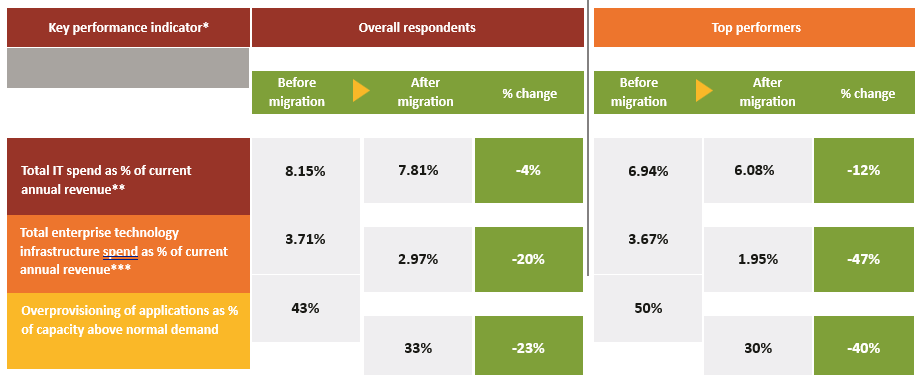

2. Workforce Efficiency
Following the migration of applications to AWS, there's a noticeable enhancement in IT infrastructure staff productivity among respondents. They report a remarkable 66% rise in the number of retained VMs managed per administrator. Such post-migration efficiencies enable a strategic shift, allowing 17% of staff positions to transition from routine infrastructure maintenance to pivotal roles focusing on infrastructure planning, architecture, orchestration, and innovation (Refer to Fig. 3 for visual representation)

A commercial finance organization exemplifies the tangible impact of AWS migration on innovation. Their technology division experienced a significant leap in developer focus post-migration. Initially allocating 20% of developer time to crafting new features, their shift to AWS elevated these efforts drastically. For customer relationship management and business intelligence, the focus surged to an impressive 60%, witnessing a threefold increase. However, the transformation was even more substantial for their migrated financial planning and analysis system, skyrocketing from a mere 20% pre-migration to a staggering 80% post-migration—showcasing an unparalleled fourfold increase.
3. Resilience
Cloud technology has redefined resilience by elevating system availability, reducing latency, and fortifying security measures. The disruptive impact of the pandemic accentuated the criticality of resilience, surpassing the effectiveness of traditional disaster recovery approaches and redundant data centers. Cloud-based infrastructure emerged as a crucial linchpin, ensuring uninterrupted operations during tumultuous times.
The scalability inherent in cloud services played a pivotal role during the pandemic, exceeding initial capacity plans by an astounding 90%. This scalability was instrumental in swiftly connecting and supporting remote workers, effectively mitigating disruptions. Chief Information Officers (CIOs) emphasized that their previous migration to AWS significantly facilitated the accommodation of sudden surges in demand, underscoring the importance of cloud infrastructure in maintaining seamless operations during critical periods.
A U.S.-based healthcare nonprofit's strategic migration of its last on-premises ERP system to the cloud in 2019 fortuitously positioned it for the subsequent shutdowns and challenges brought on by the pandemic. The seamless integration of cloud technology enabled the organization to navigate and maintain operational continuity amidst adversity, highlighting the indispensable role of cloud solutions in supporting mission-critical functions and adapting to hybrid office-remote work models.
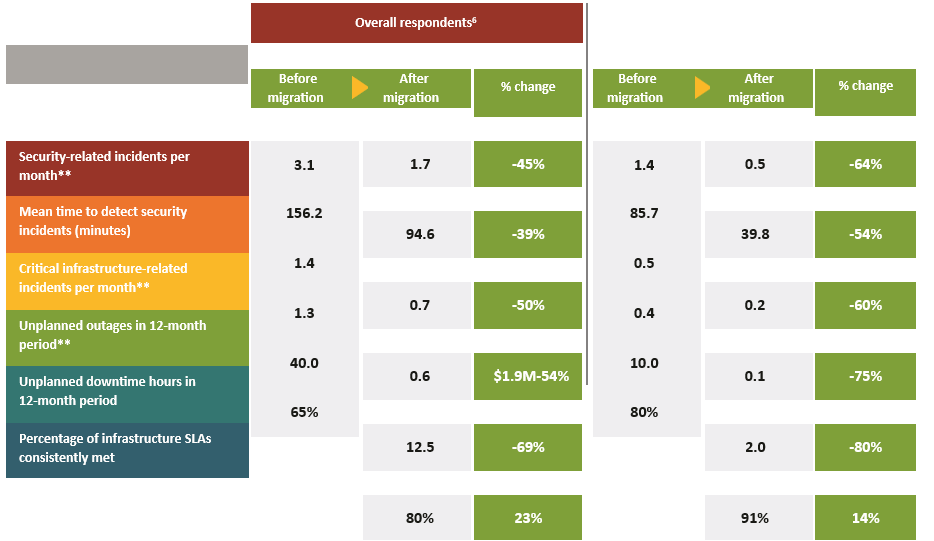
In today's digital commerce landscape, system downtime carries profound consequences far beyond inconvenience. It significantly impacts businesses, directing customers towards competitors' platforms. The financial implications of downtime are staggering, averaging 79 minutes and costing approximately $84,650 per hour in 2020. Furthermore, the aftermath of data breaches and ransomware attacks extends beyond financial costs, causing public embarrassment and substantial recovery expenses, averaging $4.6 million for cyberattacks and $4.2 million for data breaches.
The migration to AWS represents a transformative milestone, significantly bolstering both availability and security. Many key resilience Key Performance Indicators (KPIs) exceeded the 50% mark, as illustrated in Fig. 4. This substantial enhancement underscores the transformative impact of AWS migration in fortifying operational resilience and proactively mitigating potential threats.
4. Adaptability
The most strategic of all cloud migration benefits, agility equips organizations for success in a digital business environment. Agility refers to the ability to respond quickly and effectively to changes in business conditions or disruptive business events. Broadly speaking, the more technology infrastructure an organization has in the cloud, the more agile it can be. A study by The Hackett Group on agility in business services functions (i.e., finance, HR, IT, and procurement), found that the most agile organizations have 41% of their infrastructure in the cloud, compared to just 29% for the average respondent.
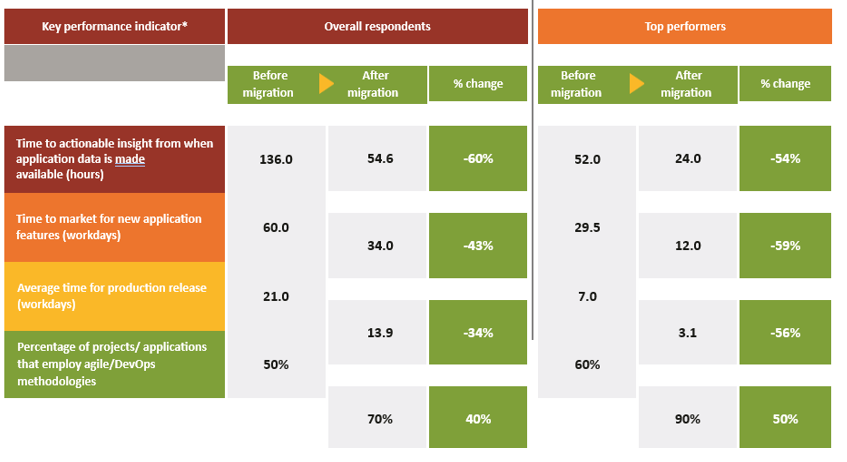
Winning in a digitally competitive industry or market depends heavily on agility in product development. A major aspect is the speed at which new technology-enabled products and features are brought to market. For applications in the cloud, technology organizations are better able to use agile/DevOps methodologies thanks to services that simplify and accelerate provisioning infrastructure, deploying application code, automating software release processes, and monitoring application and infrastructure performance. These changes, combined with the development-team productivity gains discussed earlier, contribute to a 43% decrease in time to market and a faster pace for production releases (Fig. 5).
Recommendations
The Cloud Services Study underscores how migrating to AWS drives substantial business value across cost savings, staff productivity, resiliency, and agility. It dispels the notion that the cloud is solely a cost-saving venture, highlighting its strategic superiority over traditional on-premises infrastructure. The agility alone—enabling quicker time to market, enhanced insights, and frequent production releases—positions organizations competitively in the digital sphere. This transformative shift from infrastructure management to innovative development is a pivotal game-changer.
In forthcoming reports, we'll delve deeper into specific migration strategies and cloud financial management practices that contribute to superior outcomes. Meanwhile, here are key insights from this study:
The Hackett Group embarked on a comprehensive global Cloud Services Study spanning over 1,000 organizations between October and December 2021. Their aim? To assess the tangible business advantages of transitioning from on-premises infrastructure to cloud-hosted systems, while also identifying the strategies that enable organizations to optimize the value derived from this shift.
Commissioned by AWS, the findings and insights presented herein reflect the independent analysis and perspectives of The Hackett Group.
Related Articles

Alteryx and Generative AI: The Alteryx Approach
1. Generative AI Features in Existing Products
Alteryx is proactively identifying areas where GenAI can improve the productivity and efficiency of its customers. These innovations are integrated into existing tools, such as Alteryx Designer, to streamline processes, automate routine tasks, and enhance the overall analytics experience. For example: OpenAI Connector: Users can now integrate GenAI directly into Alteryx Designer workflows to streamline communication and share data more effectively. AI-Generated Workflow Summaries: These summaries automate documentation processes, helping users enhance governance and auditability.
2. Enterprise-Ready Generative AI Platform
Alteryx’s GenAI platform enables businesses to create, train, and deploy custom AI models that operate securely within their organizational firewall. This approach ensures that data privacy and security are maintained while offering organizations the flexibility to tailor AI models to specific business needs. Alteryx also provides an environment for creating proprietary models that are customized to fit each organization’s workflows, making it easier to integrate AI-driven analytics into everyday operations.
3. New GenAI Applications and Interfaces
Data analytics is a collaborative process that involves various stakeholders, including analysts, data scientists, engineers, and knowledge workers. With Alteryx, these roles can now collaborate in real time through multi-modal analytics powered by GenAI. The flexibility to use different analytical tools—like SQL, Python, notebooks, or Alteryx workflows—opens doors for more seamless collaboration across different teams. GenAI applications like Magic Documents allow Alteryx users to automatically generate insight-rich reports in just a few clicks, drastically reducing time-to-insights and increasing productivity across business functions.
Introducing Alteryx AiDIN
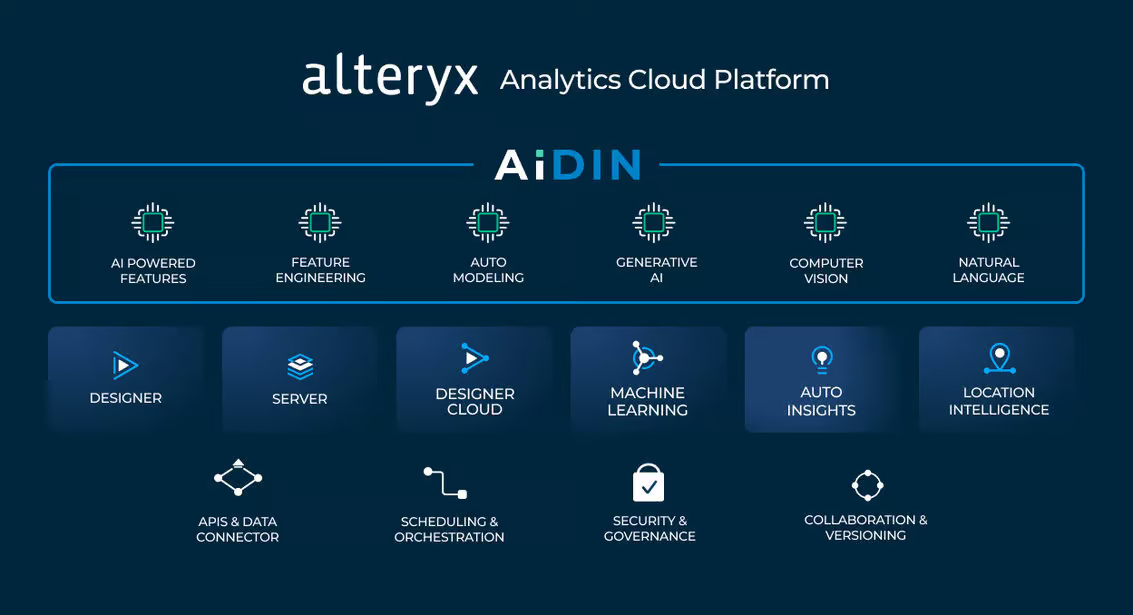
AiDIN is Alteryx's umbrella for all AI-related capabilities, combining existing AI features with cutting-edge GenAI innovations. Alteryx AiDIN enables users to leverage advanced AI models for analytics, whether it's extracting insights, automating tasks, or generating complex reports. Some of the key benefits include:
• Improved Time-to-Value: AiDIN accelerates the time it takes to derive insights from data, enabling quick decision-making for critical business tasks.
• Increased Operational Efficiency: By automating repetitive tasks, AiDIN frees up time for users to focus on higher-value activities.
• Enhanced Governance: Alteryx AiDIN ensures that AI capabilities meet stringent enterprise-grade governance and security standards.
 Source: https://www.alteryx.com/blog/alteryx-announces-generative-ai-capabilities
Data Security and Trust: The Alteryx AiDIN Commitment
A key concern in any AI-driven platform is data security and the integrity of AI-generated outputs. Alteryx AiDIN prioritizes these through: 1. Mitigating Hallucinations In generative AI, "hallucinations" refer to scenarios where AI models produce plausible but incorrect information. Alteryx has implemented stringent quality checks and continuous feedback mechanisms to minimize these errors. This ensures that businesses can rely on the outputs generated by AiDIN for decision-making. 2. Fact-Checking Mechanisms Alteryx AiDIN integrates fact-checking tools to verify AI-generated insights against actual source data. This added layer of validation helps organizations maintain the accuracy and reliability of their analyses. 3. Data Privacy and Security Alteryx ensures that data privacy is maintained at all stages of the AI process. AiDIN offers two key deployment options: Private Data Handling and SaaS. Both options provide robust encryption and ensure that sensitive data is securely managed within a customer’s ecosystem, giving businesses peace of mind as they adopt AI.
The Future of AI-Driven Analytics
The integration of GenAI into the Alteryx platform paves the way for smarter, more accessible analytics. With capabilities like OpenAI integration, Magic Documents, and enterprise-level model customization, Alteryx is enabling organizations to maximize the value of their data, improve efficiency, and foster a more collaborative analytics environment. By combining GenAI’s potential with trusted, secure analytics, Alteryx is redefining how enterprises interact with data—delivering faster insights and more impactful results across industries. Get in touch with us for a free demo: https://www.alteryx.com/designer-trial/free-30-days?

Learning to Trust Zero Trust
ZTA in Simple Terms
It is a cybersecurity paradigm focused on enterprise resource protection. This includes data; no matter where it resides, cloud or on-premises, and resources like printers, compute resources and Internet of Things (IoT) actuators. The objective of the paradigm is to prevent unauthorised access to data and resources but at the same time enable authorised and approved subject to have access to the same. The word subject can mean user, device or an application/ service. The paradigm also envisions making the access control enforcement as granular as possible. Thus, “Zero trust architecture (ZTA) is an enterprise’s cybersecurity plan that utilizes zero trust concepts and encompasses component relationships, workflow planning, and access policies. Therefore, a zero-trust enterprise is the network infrastructure (physical and virtual) and operational policies that are in place for an enterprise as a product of a zero trust architecture plan.” Zero trust (ZT) provides a collection of concepts and ideas designed to minimize uncertainty in enforcing accurate, least privilege per-request access decisions in information systems and services in the face of a network viewed as compromised. The crux of the concept is that trust must be continually evaluated. If a subject needs access to data or resources, it is granted after authentication and authorisation, but it will not go beyond the minimum privileges needed to perform the mission.Benefits of Implementing ZTA
The ZTA paradigm comes packed with a slew of benefits:- Supporting employees/ workers with secure and reliable access to a multitude of resources from anywhere using any device, any time
- Resource protection irrespective of whether it is on-prem or cloud
- Improving visibility and governance: who, what, and how users are accessing enterprise data and apps.
- Limiting of insider threat borne of the need-to-know approach to resource access
- Limiting of lateral movements of attackers in the system which perimeter security-oriented networks are otherwise prone to.
- Limiting the cost for recovery and mitigation
- Ensuring confidentiality and security of sensitive enterprise data
- Enhanced risk mitigation courtesy of continuous assessment and review of resource access
ZTA: How it Works
The Zero Trust Architecture evaluates the level of confidence about the subject’s identity for a unique request and if the device used to place the request have proper security posture. The system also evaluates if there are other factors that should be considered and that change the confidence level. Also the access rules are made as granular as possible to enforce those least privileges needed to perform the action in the request. Image courtesy: https://nvlpubs.nist.gov/nistpubs/SpecialPublications/NIST.SP.800-207.pdf
Three terms assume significance in the context of Zero Trust. They are Implicit Trust Zone, Policy Decision Point (PDP) and Policy Enforcement Point (PEP). Implicit Trust Zone represents an area where all the entities are trusted to at least the level of the last PDP/PEP gateway. In other words, the PDP/ PEP engine decides as to whether a request for resource should be allowed access to the Implicit Trust Zone from where it can access the resource.
The PDP/ PEP gate is more like an airport security checkpoint. The passengers, once they have been through the security check are granted access to boarding gates where they can wait for the entry to the airplane. They are considered worthy of trust once they are through. The boarding area is thus the Implicit Trust Zone in the analogy. In our case, the idea is to explicitly authenticate and authorize all subjects, assets and workflows that make up the enterprise.
Image courtesy: https://nvlpubs.nist.gov/nistpubs/SpecialPublications/NIST.SP.800-207.pdf
Three terms assume significance in the context of Zero Trust. They are Implicit Trust Zone, Policy Decision Point (PDP) and Policy Enforcement Point (PEP). Implicit Trust Zone represents an area where all the entities are trusted to at least the level of the last PDP/PEP gateway. In other words, the PDP/ PEP engine decides as to whether a request for resource should be allowed access to the Implicit Trust Zone from where it can access the resource.
The PDP/ PEP gate is more like an airport security checkpoint. The passengers, once they have been through the security check are granted access to boarding gates where they can wait for the entry to the airplane. They are considered worthy of trust once they are through. The boarding area is thus the Implicit Trust Zone in the analogy. In our case, the idea is to explicitly authenticate and authorize all subjects, assets and workflows that make up the enterprise.
Challenges of Implementing the ZTA
For where there are opportunities, there are challenges. The road to ZTA implementation has its fair share of challenges.- There is no single solution encompassing all the tenets of Zero Trust. A one-size-fits-all approach is off the table for obvious reasons. Many different technologies need to be integrated and often, they are of varying maturity.
- Investment in terms of time, resources and technical capabilities. Migration of extant and legacy systems to a Zero Trust environment is not as easy as it sounds.
- And finally, there is no such thing as 100% fool-proof security. The ZTA control plane is still susceptible to compromise.
Overcoming ZTA Implementation Challenges
The challenges need a holistic approach to overcoming them.- Getting hold of visibility: The resources within the enterprise and who needs access to the same and when; these queries should be ascertained at a granular level. This exercise must be inclusive of:
- Identities
- Permissions
- Configurations
- Activities crisscrossing the cloud infrastructure which are about access to networks and resources that are publicly exposed.
- Managing risk: Continuous risk assessment exercise across the cloud IT stack including but not limited to:
- Identity
- Networks
- Compute & storage segments
- Publicly exposed resources if any
- Third-party risks originating from vendors, clients etc.
Beinex and the Zero Trust Architecture
Beinex has solid experience in fostering Zero Trust Architecture capabilities amongst clients. Considering the fact that 90+ entities of Beinex are government clients, our Digital Transformation Team is well positioned to implement the paradigm in multiple domains. Contact us to know more about our offerings.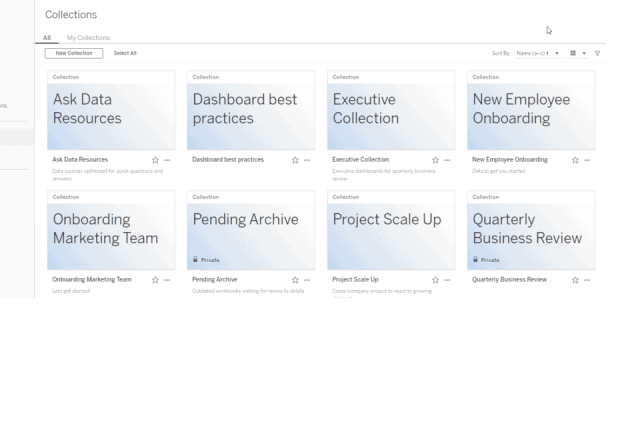
Tableau 2021.2 : New Features
This has changed the way we interpret information by giving us a look into past insights but also to forecast future events, allowing us to make informed decisions.
Tableau 2021.2. includes ‘ask and explain data’ for viewers, allow connected desktops, Collections, and many more valuable features. Some of the key enhancements are listed below.
Collections provides a new format to organize content across your sites on both Tableau Online and Server into manageable folders. You may group item together from different projects and workbooks and you can reuse content in multiple contexts without additional storage or resources. Collections also makes it easier to share content around a central theme. For example, you can create a “Daily Sales” collection that includes dashboards with daily sales statistics, ETL data flow, data sources, etc.
Collections helps you congregate your data. You are given the leeway to create, explore and save your content privately. Another key feature of ‘Collections” is that users can create customized collections which are by default private. However, you are given the option to share the collection with any authorized users you choose to provide access to.
1) User Management Enhancement


In earlier versions, a subscribed user, deleted by an admin, was not erased from the system entirely. They were then classified as an 'unlicensed user'.
With version 2021.2, the subscribed creator will be deleted automatically when an admin deletes a user either via the UI or the REST API, without the extra step of reassigning the subscription ownership.
2) Ask Data Enhancements
Ask Data Lenses
A new feature introduced with this update is 'Ask Data Lenses'. It allows for easy data curation with defined columns and value synonyms and also provides suggested questions to allow for more inclusive data from a variety of sources.
(The update brings a new content type that is Ask Data Lenses, making it easy to curate data with the definition of column and value synonyms and suggested questions so you can better leverage existing published data sources.)
They are created alongside published data sources Ask Data use case(s) while maintaining the underlying data source as its own entity.
These 'lenses' are comparable to ‘views’. For those of you who are adept with SQL, where you can write selected statements specifically to extract the required columns, give definitions, whilst maintaining the integrity of the data source. Similarly, once created, ‘lenses’ can be accessed by viewers, opening Ask Data to a new class of users that struggle to self-serve their needs today.
Entity Search
Entity Search shows users search results of keywords, like the Google search box. Ask Data gives you word-by-word search results, giving you instant feedback on your data and what Ask Data can do. Ask Data will automatically choose the most relevant interpretation of your search and these search results help you build that input more effectively by selecting the right fields and values in the data set. Ask data learns from your selections to choose smarter defaults for future searches.

MFA allows users to easily add an additional layer of security to their accounts.
This feature unlocks the ability for Tableau Online customers who utilize native Tableau ID authentication to enforce multi-factor authentication (MFA) when their users sign into their sites. End-users can use applications like Salesforce Authenticator or Google Authenticator to perform additional verification of their identity when they log on to Tableau.
MFA makes it much harder for common threats like phishing attacks and account takeovers to succeed. MFA is one of the easiest and most effective ways customers can enhance login security and safeguard their business and data against external threats.


 Easily rename multiple fields in prep allows creators to transition seamlessly from web authoring to Tableau Desktop with a single click of a button. Creators will now be able to edit any workbook that they have permission to on Desktop.
Prior to 2021.2, users had to manually change each header name. For example, if a user wanted to change “Customer” at the start of multiple header names, they would need to click on each field name and individually change/remove “Customer” in the field name. Not a big deal when there are less than 10 columns to update. However, for customers with data sets of 50+ columns, it is more cumbersome to have to individually change each field name. This feature allows a customer to quickly add a prefix, rename or add a suffix to multiple fields collectively.
Easily rename multiple fields in prep allows creators to transition seamlessly from web authoring to Tableau Desktop with a single click of a button. Creators will now be able to edit any workbook that they have permission to on Desktop.
Prior to 2021.2, users had to manually change each header name. For example, if a user wanted to change “Customer” at the start of multiple header names, they would need to click on each field name and individually change/remove “Customer” in the field name. Not a big deal when there are less than 10 columns to update. However, for customers with data sets of 50+ columns, it is more cumbersome to have to individually change each field name. This feature allows a customer to quickly add a prefix, rename or add a suffix to multiple fields collectively.
 Tableau Prep is expanding its output capabilities to include Google BigQuery, enabling you to add or update data in Google BigQuery with clean, prepped data from your flow each time it is run.
TABLEAU DESKTOP 2020.2 – Key Features
1) Maps: Spatial File Support
The Marks Layers Control SP1 feature provides a control that allows users to toggle the visibility of layers on a map viz. The control works like a filter and the user is free to choose which layer(s) to view in order to answer their question. In addition, the user can control the interactivity of the map viz by selectively enabling or disabling selection on the layer in question.
Tableau Prep is expanding its output capabilities to include Google BigQuery, enabling you to add or update data in Google BigQuery with clean, prepped data from your flow each time it is run.
TABLEAU DESKTOP 2020.2 – Key Features
1) Maps: Spatial File Support
The Marks Layers Control SP1 feature provides a control that allows users to toggle the visibility of layers on a map viz. The control works like a filter and the user is free to choose which layer(s) to view in order to answer their question. In addition, the user can control the interactivity of the map viz by selectively enabling or disabling selection on the layer in question.
 Toggle button – Our users can now use a button to show/hide any dashboard zone, floating or tiled. This function was previously limited to floating horizontal and vertical containers only.
URL support for images – Users can now add images via external URLs, which also provides GIF support for images on the internet and workbooks. Loading these images will be time-efficient.
Toggle button – Our users can now use a button to show/hide any dashboard zone, floating or tiled. This function was previously limited to floating horizontal and vertical containers only.
URL support for images – Users can now add images via external URLs, which also provides GIF support for images on the internet and workbooks. Loading these images will be time-efficient.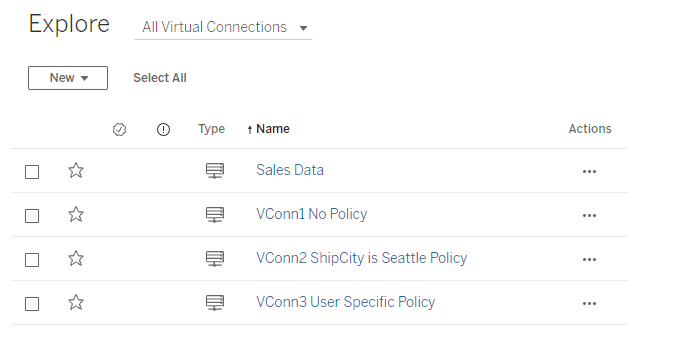
Tableau Version 2021.4: Bringing Automation to Data Management
Bringing automation to data management is one of Tableau’s big focuses for this release, to help users get insights faster.
Some key features that help with that are:
 Centralized Row-Level Security - Bring precision and agility to data protection
In general, Row-Level Security (RLS) refers to filtering out rows of data at query time based on the current user's identity. Due to this, different users can view the same table, viz, or report and see only data they are authorized to see. RLS allows scenarios like having a regional manager only see sales created within their team, but not sales from another manager's team.
Rather than implementing RLS individually on every Tableau workbook or data source accessing a sensitive table, virtual connections can be used to centrally define and manage data policies. These policies will be consistently applied across all connected Tableau Flows, Data Sources, or Workbooks that depend on that data. This gives granular control over data security while bringing flexibility to reuse data sources.
Centralized Row-Level Security - Bring precision and agility to data protection
In general, Row-Level Security (RLS) refers to filtering out rows of data at query time based on the current user's identity. Due to this, different users can view the same table, viz, or report and see only data they are authorized to see. RLS allows scenarios like having a regional manager only see sales created within their team, but not sales from another manager's team.
Rather than implementing RLS individually on every Tableau workbook or data source accessing a sensitive table, virtual connections can be used to centrally define and manage data policies. These policies will be consistently applied across all connected Tableau Flows, Data Sources, or Workbooks that depend on that data. This gives granular control over data security while bringing flexibility to reuse data sources.
 Edit Published Data Source
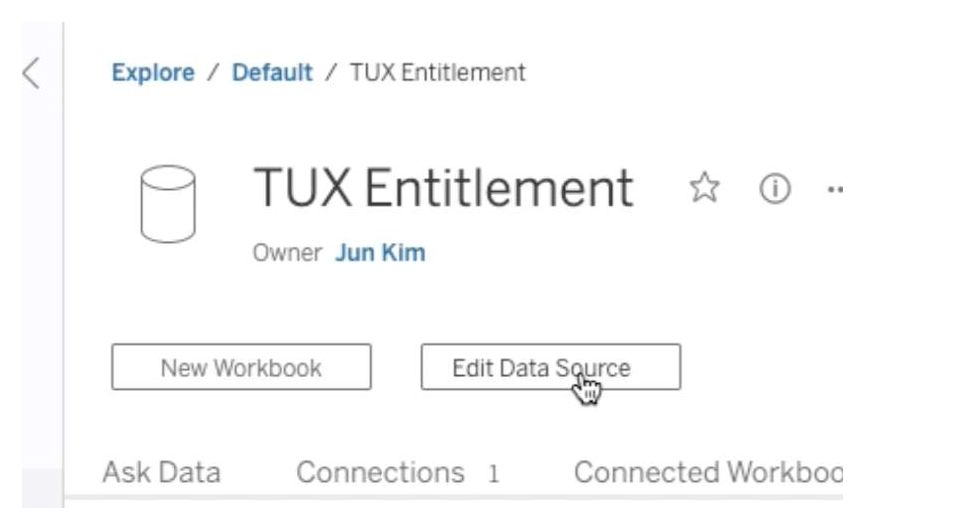
This feature makes managing data sources very effortless. Now we can create, edit and rename data sources directly in Tableau Server and Tableau Online, test the changes, and publish—all without leaving the browser. This streamlines the governance and metadata management.
Edit Published Data Source
This feature makes managing data sources very effortless. Now we can create, edit and rename data sources directly in Tableau Server and Tableau Online, test the changes, and publish—all without leaving the browser. This streamlines the governance and metadata management.
 Parameters in Tableau Prep
 speed up and simplify tasks by enabling users to easily change data inputs, data outputs, and values used throughout a flow which makes reusing them much easier.
Supported step types in 2021.4:
Parameters in Tableau Prep
Parameters in Tableau Prep speed up and simplify tasks by enabling users to easily change data inputs, data outputs, and values used throughout a flow which makes reusing them much easier.
Supported step types in 2021.4:
 Tableau 2021.4 Highlights
- Virtual Connections
- Centralized Row-Level Security
- Edit Published Data Source
- Parameters in Tableau Prep
Centralized Row-Level Security - Bring precision and agility to data protection
In general, Row-Level Security (RLS) refers to filtering out rows of data at query time based on the current user's identity. Due to this, different users can view the same table, viz, or report and see only data they are authorized to see. RLS allows scenarios like having a regional manager only see sales created within their team, but not sales from another manager's team.
Rather than implementing RLS individually on every Tableau workbook or data source accessing a sensitive table, virtual connections can be used to centrally define and manage data policies. These policies will be consistently applied across all connected Tableau Flows, Data Sources, or Workbooks that depend on that data. This gives granular control over data security while bringing flexibility to reuse data sources.
Edit Published Data Source
This feature makes managing data sources very effortless. Now we can create, edit and rename data sources directly in Tableau Server and Tableau Online, test the changes, and publish—all without leaving the browser. This streamlines the governance and metadata management.
Parameters in Tableau Prep
Parameters in Tableau Prep speed up and simplify tasks by enabling users to easily change data inputs, data outputs, and values used throughout a flow which makes reusing them much easier.
Supported step types in 2021.4:
- Inputs /Outputs File path/File name
- Published data source name
- Calculated fields
- Filters
Tableau 2021.4 Highlights
- Data Management
- Virtual Connections
- Centralized Row-Level Security
- Tableau Catalog
- Inherited column descriptions
- Create flows from Catalog pages
- Tableau Prep Builder
- Tableau Prep Parameters
- Create Tiles
- Flow output Subscriptions
- Tableau Online
- Connected Apps
- Tableau Bridge Multi-Pool
- Analytics
- Metric Updates
- Show Metric status with colors
- Customize comparison period and data window
- Embed metrics
- Replay Animations
- Web authoring improvements
- Edit published data sources on Server and Online
- Copy/Paste Dashboard Zones
- Metric Updates
Snowflake: Handling Semi-structured Data with Variant and Flatten
Semi-structured Formats with Snowflake Support
The number of sources that produce semi-structured data has increased exponentially in recent years. The arrival of Snowflake Data Cloud has made it effortless to process complex datasets. Snowflake supports storing and processing semi-structured data. It supports semi-structured formats enlisted below:- • JSON
- • Avro
- • ORC
- • Parquet
- • XML
- • Variant
- • Flatten
Variant
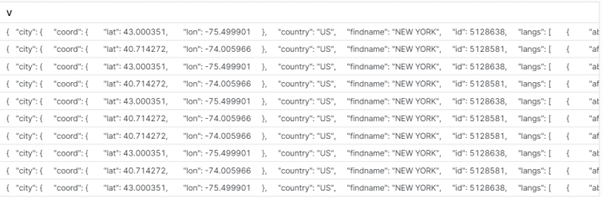
A variant is a datatype which can hold semi-structured data in a single field. Snowflake stores semi-structured data in the column format when semi-structured data is loaded into a VARIANT column. A single row can contain other underlying data. Let’s demonstrate with the help of examples:
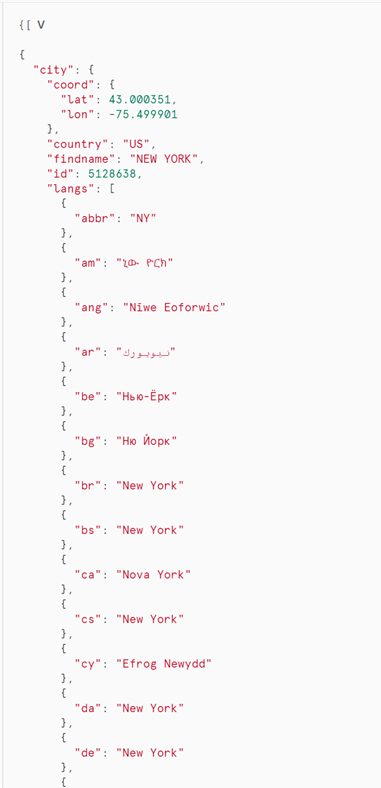

The stored data can be easily retrieved and structured from the above table by a simple query as below:
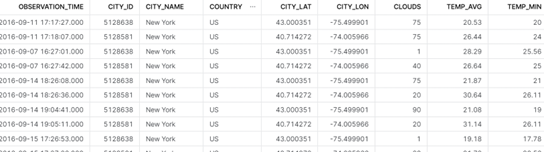
select
v:time::timestamp as observation_time,
v:city.id::int as city_id,
v:city.name::string as city_name,
v:city.country::string as country,
v:city.coord.lat::float as city_lat,
v:city.coord.lon::float as city_lon,
v:clouds.all::int as clouds,
(v:main.temp::float)-273.15 as temp_avg,
(v:main.temp_min::float)-273.15 as temp_min,
(v:main.temp_max::float)-273.15 as temp_max,
v:weather[0].main::string as weather,
v:weather[0].description::string as weather_desc,
v:weather[0].icon::string as weather_icon,
v:wind.deg::float as wind_dir,
v:wind.speed::float as wind_speed
from json_weather_data
Note: ‘v’ is the Field (Column) name, and the JSON tags are arranged alongside to retrieve datasets.
Flatten
Compound values are flattened into multiple rows with the use of the Snowflake Flatten Command. A tool called Snowflake FLATTEN is used to transform semi-structured data into a relational structure. Relatively complex JSON structures such as nested JSON structures can be structured with FLATTEN function in Snowflake. Here is an example of the same:
 The above JSON file stores a single set of conversations between two texters in a single row. If the requirement is to get every individual message as a separate row a FLATTEN function can be used to produce the following result:

Here is the query to generate the above table from semi-structured data:
(SELECTb.value:message_date::TIMESTAMP AS Time_Of_Message,
b.value:conversation_number::STRING AS Conversation_num,
b.value:message:message_text:msg_txt::STRING AS Message,
ROW_NUMBER() OVER ( PARTITION BY b.value:dialogId::STRING ORDER BY
b.value:message_date::TIMESTAMP ASC) as Message_order
FROM customer_messages t,LATERAL FLATTEN(input => t.v) b);
Summing Up
The ability of Snowflake’s assistance is undeniable. It aids you to make better decisions and offers a better overall experience when attempting to get the most out of your data, through features like Flatten and Variant. If you want to be a part of Snowflake’s incredible platform, let us help you. Beinex’s partnership with Snowflake enables us to offer you advanced features like automated tuning and elastic computing, along with analytics modernization services, to help your organisation realise exponential Return on Investment.