How AI Decision-Making is Improving Enterprise Outcomes
Blog
Share 
The Agentic-AI-First Global Capability Centers: From Decision Support to Decision Execution
 22 July 2026
  Subbayya
 Fewer than 10% of enterprises have successfully scaled agentic AI; yet Global Capability Centers (GCCs) may be the one structural environment built to change that. According to McKinsey, nearly two-thirds of enterprises have already experimented with agentic AI, but the gap between experimentation and scale remains wide.
Why the Agentic AI GCC Is the Next Evolution of GCC 4.0
The defining feature of GCC 4.0 is the transition from task execution to outcome ownership. Unlike traditional AI assistants that generate content or insights, Autonomous AI Workers can plan, coordinate, execute, and adapt across entire business processes with minimal human intervention.
This shift enables enterprises to move beyond isolated automation and build intelligent operations that continuously improve over time.
How Multi-agent Systems Enterprise Workflows Transform Operations
The real value of multi-agent systems enterprise lies in collaboration. Instead of one AI handling a single task, multiple specialized agents work together to complete end-to-end workflows.
For example, during IT incident management, one agent detects anomalies, another identifies root causes, a third validates security implications, and a fourth automatically creates remediation tickets and updates stakeholders. Similarly, vendor reconciliation can involve agents validating invoices, matching purchase orders, flagging discrepancies, initiating approvals, and updating ERP systems, all without manual intervention.
This orchestration reduces processing time, minimizes human error, and allows employees to focus on strategic initiatives rather than repetitive operational tasks.
The Role of GCCs in Scaling Agentic AI
Understanding the role of GCCs in scaling agentic AI begins with recognizing their unique position within global enterprises. GCCs already manage standardized processes across finance, HR, procurement, customer operations, and IT, making them ideal environments for testing and scaling autonomous workflows.
As organizations increasingly evaluate GCCs on innovation rather than cost savings, how agentic systems are reshaping global capability centers becomes a strategic business question rather than a technology discussion. This is especially visible in fast-growing enterprise hubs across the Middle East, South Asia, and Southeast Asia, where GCC expansion is accelerating alongside digital transformation mandates.
However, governance remains essential. Deloitte reports that only 21% of enterprises currently have mature governance models for agentic AI, reinforcing that successful deployments require strong oversight alongside automation.
Deploying Autonomous AI Agents in Shared Services
The next phase of enterprise transformation involves deploying autonomous AI agents in shared services where repetitive, rules-based workflows already exist. Rather than replacing employees, these AI agents become digital teammates that execute workflows while humans oversee exceptions, compliance, and strategic decision-making.
This balanced model enables organizations to improve operational resilience, accelerate service delivery, and build scalable AI-powered operating models without compromising governance.
The next competitive edge in enterprise operations won't come from AI that recommends actions; it will come from AI that executes them safely and at scale. GCCs, with their standardized processes and centralized governance, are structurally well-placed to lead that transition. Organizations that begin deploying autonomous AI workers and orchestrated multi-agent systems at enterprise scale now won't just keep pace with GCC 4.0; they'll define what it looks like.
Ready to explore how agentic AI can transform your GCC? Connect with our experts to discover how intelligent multi-agent systems can help your enterprise move from decision support to decision execution: securely, responsibly, and at scale.
Related Articles

11 Key Alteryx Designer Features You Should Know About
How Alteryx Designer Can Help You
A handy drag-and-drop, code-friendly tool, users of data analytics can easily extract, transform, and load data from virtually any source using Alteryx Designer. Using repeatable workflows, it facilitates predictive, statistical, and geospatial analysis, enabling the generation and sharing of insights within hours.
Key Features of Alteryx Designer
The platform is incredibly reliable and suitable for employing in almost any sector or industry. Major features of Alteryx Designer that you should be in the know of:1. Go Code- free or Code- friendly
You can use a code-free or code-based interface regardless of your level of coding expertise. Use C++, Python, or R languages to write code in this interface.
2. Lesser Time, Greater Efficiency
Alteryx Designer rapidly extracts and integrates data from many sources producing faster insights that help to make smarter decisions.
3. Automated Workflows
It is possible to automate repetitive workflows or update them as needed to save time by enabling analytics scaling.
4. Easy Integration
Alteryx Designer provides a wide range of software for companies to select according to their requirements. It directly integrates with Alteryx Analytics Gallery, Alteryx Analytics Server, Alteryx Connect, and Alteryx Promote. Integration with R, Python, Tableau, Power BI, SAP, Sharepoint, Salesforce, Github, and Microsoft Azure tools is also made possible.
5. Spatial Analytics
Data analysis based on demographic, firmographic, and geospatial intelligence helps to produce insightful business decisions.
6. Predictive Analytics
Predictive analytics is provided across the entire analytics workflow, and by employing Alteryx Designer, accessing, preparing, and modelling data can be done in a single platform. Sharing the results can be done using the same.
7. Macro
A macro is a group of tools that help to save repeated analytic processes. It saves time by automating repetitive tasks.
8. Assisted Modelling
As a new feature in Alteryx Designer, it enables users to create ML pipelines and make predictions based on historical data.
9. Reporting
With the help of the user-friendly reporting tools in Alteryx, users can produce high-quality data-driven reports. The user can create top-notch reports with text, data, charts, maps, and images using various designs. A variety of output formats, including HTML, PDF, RTF, DOCX, XLSX, and PCXML, are supported by the reporting engine.
10. Alteryx Community
One of the main advantages is Alteryx community support. Let's say you cannot design a workflow or be unsure about how to perform some tasks. The Alteryx community will then be of great assistance to you in providing instant and informative replies.
11. Intelligence Suite
It is quite easy to extract concepts and insights from structured and unstructured data using Alteryx’s Intelligence Suite. Using the sentiment analysis tool, it is easier to identify the emotion hidden in the data and share the insights. The computer vision tool quickly processes huge data sets automatically, and it is possible to play with Data Science with automated Machine Learning tool.
Click here to Download Alteryx Designer Opting for a Free Trial

Agentic AI and Enterprise Intelligence: Leading Trends, Challenges, and Opportunities in 2026 and Beyond
For a long time, enterprise intelligence relied on dashboards, reports, and predictive systems. These tools helped leaders see what happened and predict what could happen next. However, the users still had to interpret the results and act on them themselves.
Now, that approach is changing with the adoption of Agentic AI. According to Gartner research, 40% of enterprise applications are expected to include task-specific AI agents by 2026, up from less than 5% in 2025.

BI Tools: Decision-making is Now at Your Fingertips!
Here is a list of a few popular business intelligence tools companies use to gain insights:
1.Sisense: Leading Cloud Analytics Platform
Sisense is one of those data analytics and business intelligence tools known for its efficiency and easy-to-use quality. It enables anyone within an organisation to manage massive and intricate datasets and analyse and visualise data without any outsourcing. It also combines data from various sources, such as Adwords, Google Analytics, and Salesforce. The in-chip technology helps it to process data faster than any other tool. Gartner, G2, and Dresner have recognised Sisense as a leading cloud analytics platform.
2.SAP Business Intelligence: Price to the Upside
SAP Business Intelligence offers advanced analytics solutions such as machine learning, BI predictive analytics, and planning and analysis. This enterprise-level client/ server system application provides data visualisation and analytics applications, reporting and analysis, mobile analytics, and office integration.
The platform focuses heavily on Customer Experience (CX) and CRM, digital supply chain, ERP, etc. What's particularly appealing about this platform is the self-service, role-based dashboards, which allow users to create unique dashboards and applications. SAP is a robust software designed for all roles that provide many functionalities on a single platform. However, the product's complexity raises the price, so be equipped for it.
3.Datapine: Accessible to non-technical users
Datapine is a comprehensive business intelligence platform that makes the intricate process of data analytics accessible to non-technical users. Datapine's solution allows data analysts and business users to blend different data sources, perform advanced data analysis, build interactive business dashboards, and create actionable business insights by adopting a comprehensive self-service analytics approach.
4.Dundas BI: Access Multiple Data Sources in Real Time
Dundas BI is a browser-based business intelligence tool that enables users to access multiple data sources in real-time. It offers excellent visualisations in the form of tables, graphs, and charts that can be personalised and viewed on mobile devices and desktop computers. Users can easily create reports and extract specific performance metrics for analysis. Dundas aids all types of businesses and industries.
5.MicroStrategy: Fast Dashboarding in Action
MicroStrategy is a business intelligence tool for enterprises that provides powerful and fast dashboarding and data analytics, cloud solutions, and hyperintelligence. Users can use this solution to identify trends, and new possibilities, increase productivity, etc. It can be accessed via desktop or mobile and can be connected to one or more sources.
6.Yellowfin BI: No-co-Low-co Approach
Yellowfin BI is a business intelligence and analytics platform that combines visualisation, machine learning, and collaboration. It can quickly sort through massive amounts of data using intuitive filtering, and it is accessible from anywhere. This BI tool takes dashboards and visualisations to the next level by utilising a no-code/low code development environment.
7.Qlik Sense: Search & Conversational Analytics
A product of Qlik, QlikSense is a complete data analytics platform and business intelligence tool. QlikSense can be accessed from any device at any time. The user interface of QlikSense is optimised for touchscreen, which makes it a prevalent BI tool. It offers a one-of-a-kind associative analytics engine, sophisticated AI and a high-performance cloud platform, making it more attractive. An exciting feature of this platform is its Search & Conversational Analytics, enabling a faster and easier way to ask questions and discover new insights through natural language.
8.Zoho Analytics: Blend and Merge Data
Zoho Analytics is an excellent BI tool for detailed reporting and data analysis. It supports automatic data syncing and can be scheduled regularly. It quickly creates a connector and formulates meaningful reports by blending and merging data from various sources using the integration APIs. It helps to quickly identify the essential details by creating ersonalized reports and dashboards with an easy editor. It also includes a distinct commenting section in the sharing options, ideal for collaboration.
9.Microsoft Power BI: Identify Trends in Real Time
Microsoft Power BI is a web-based tool that is one of the best for data visualisation. It enables users to identify trends in real-time and includes brand new connectors that allow businesses to step up marketing campaigns. Microsoft Power BI is accessible virtually from any location as it is web-based. This tool is designed to integrate apps and deliver reports in real-time dashboards.
10.Looker: Ideal for SMEs
Looker, a data discovery app, is another business intelligence tool to watch for! This unique platform is now part of Google Cloud and integrates with any SQL database or warehouse and is ideal for startups, midsize businesses, and enterprise-grade businesses. This tool's advantages include its ease of use, useful visualisations, powerful collaboration features such as easy integration with apps, flexible sharing of data and reports via email or USL, and a dependable support system.
11.Clear Analytics: Just Need Essential Excel Skills to Use
Clear Analytics is an easy-to-use Excel-based software that can be utilised even by employees with just the essential Excel skills. It is a self-service Business Intelligence system with BI features like data creation, automation, analysis, and visualisation. Clear Analytics also functions with Microsoft Power BI, cleaning and modelling various datasets with Power Query and Power Pivot.
12.Tableau: Needs No Introduction
Tableau is a powerful BI tool that specialises in data discovery and visualisation. The software allows to quickly analyse, visualise, and share data without IT intervention. Tableau works with various data sources, including Microsoft Excel, Oracle, MS SQL, Google Analytics, and SalesForce. Users will have access to well-designed, user-friendly dashboards. Tableau also provides several products, such as Tableau Desktop (for anyone) and Tableau Server (analytics for organisations), both of which can be run locally, as well as Tableau Online (hosted analytics for organisations) and others.
13.Oracle BI: Proactive Intelligence Power
Oracle BI is a business intelligence technology and application portfolio for enterprises. This technology provides nearly all business intelligence capabilities, including dashboards, proactive intelligence, ad hoc reporting, etc. Oracle is a reliable choice ideal for businesses that need to analyse large amounts of data from Oracle and non-Oracle sources. Data archiving, versioning, a self-service portal, and alerts/notifications are also essential features.
14.Domo: Predictive Analysis on the Go
Domo is a fully cloud-based business intelligence platform that integrates spreadsheets, databases, and social media data. The platform provides visibility and analysis at the micro and macro levels, including predictive analysis powered by Mr Roboto, their AI engine. From cash balances and lists of your best-selling products by region to marketing ROI calculations for each channel, Domo has got you covered.
15.IBM Cognos Analytics: Hidden Patterns in Data Discovered
Cognos Analytics is a business intelligence platform powered by AI that supports the entire analytics cycle. It helps to visualise, analyse, and share actionable insights, from data discovery to data operationalisation. The data is interpreted and presented in a visually appealing report, and AI allows the discovery of hidden patterns in the data.
The use of advanced business intelligence reporting tools makes tasks simple and manageable. Business intelligence platforms are subject to change based on business needs and the advancement of technologies. Still, they have proven to be a great way to accomplish strategic goals effectively and efficiently.

LOD (Level of Detail) Expressions in Tableau
Types of LOD Expressions in Tableau
- FIXED
- INCLUDE
- EXCLUDE
There are three types of LOD expressions in Tableau:
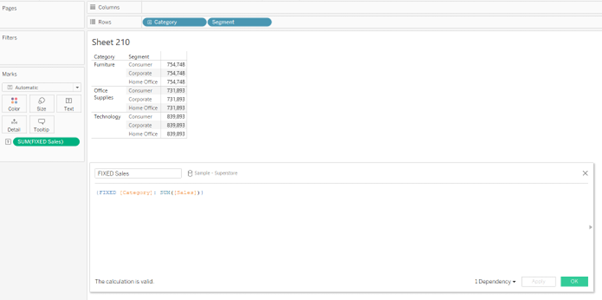
FIXED: The FIXED LOD expression calculates values based on specific dimensions, regardless of the dimensions present in the visualisation. It creates a virtual level of detail for the calculation. For example, {FIXED [Category]: SUM([Sales])} would calculate the total sales for each category, irrespective of other dimensions used in the visualisation.
INCLUDE: The INCLUDE LOD expression calculates values at the specified level while incorporating the dimension(s) used in the visualisation. It allows you to aggregate data for a specific dimension while considering other dimensions in the visualisation. For example, {INCLUDE [Region]: AVG([Profit])} would calculate the average profit for each region, considering all other dimensions in the visualisation.

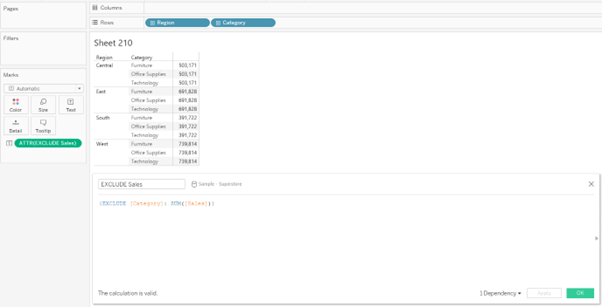
EXCLUDE: The EXCLUDE LOD expression calculates values at the specified level while excluding the dimension(s) used in the visualisation. It enables you to aggregate data for a specific dimension while ignoring other dimensions in the visualisation. For example, {EXCLUDE [Product]: SUM([Revenue])} would calculate the total revenue for each product, excluding any other dimensions present.
FIXED LOD Tableau Function
In Tableau, the FIXED Level of Detail (LOD) is the widely used function that allows you to perform calculations using specific dimensions, irrespective of the dimensions present in the visualisation. It creates a virtual level of detail for the calculation, providing precise control over your analysis's granularity.
Steps to Create a FIXED Level of Detail Tableau Function
In Tableau, the FIXED Level of Detail (LOD) function allows you to perform calculations using specific dimensions, irrespective of the dimensions present in the visualisation. It creates a virtual level of detail for the calculation, providing precise control over your analysis's granularity.
The steps to create the FIXED LOD function are as follows:
- • Create a calculated field. (This can be done by clicking on the drop-down next to the “Search” bar in the dimension pane or by selecting “Analysis” and selecting “Create Calculated Field”)
- • Type in the FIXED LOD Formula in the calculated field and drop the field into the view.
- • We can obtain the syntax of the FIXED expressions when we search for “Aggregate” functions in the calculated field.

Example
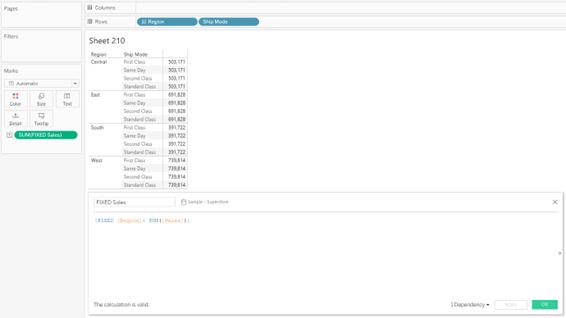
The following FIXED level of detail expression computes the sum of sales per region:
Beinex+ Tableau Offerings
Beinex has 100 years of combined experience in Tableau and is led by professionals who have successfully delivered Tableau projects in the region for large private and public sector organisations. Our team of Tableau-certified consultants are real-life Tableau business users passionate about Tableau and providing a world-class experience. In addition to providing sustainable analytics solutions, Beinex will help organisations to build superior data visual analytics capabilities internally through our bespoke training programs.
Coming Soon: Tableau 2022.1 – What Does It Offer New
- List the unused data sources: Data sources imported in a workbook but not used are highlighted by the new feature. The developer can remove these data sources from the data source list to make the workbook faster.
- List of unused fields or data columns: Just like the data sources, workbook optimizer also highlights the data columns not used across the workbook. Removing these at the data source level can help improve the overall performance of the workbook.
- List of sheets not used in the dashboard: It is a common practise that developers tend to create sheets not used in the final dashboard. This creates unnecessary clutter and makes the dashboard slower. The workbook optimiser feature gives a list of such sheets which the user can delete to optimise the performance of the workbook further.
- Highlights lengthy calculations: The feature provides a list of calculations which are too complex and in turn reduce the performance of the dashboard. Simplifying a few of these can improve performance to a great extent.
 Ask Data Phrase Builder: This feature is available on Tableau Server and Tableau Online
Add field would look like as shown in the below screenshot:
Ask Data Phrase Builder: This feature is available on Tableau Server and Tableau Online
Add field would look like as shown in the below screenshot:
 Customize View Data: This feature is available on Tableau Server, Desktop and Tableau Online
This feature enables to reshape the tabular data behind your visualisation in the View data interface. One can create new columns, remove columns from the default view, change the order and sort the data using this feature. This reshaped data can also be exported as csv file to be shared with the team.
Change the root table: This feature is available on Tableau Server, Desktop and Tableau Online
Managing multiple data tables becomes easier and flexible with this new feature. One can swap any table to be the root table with a single click. This allows one to change the layout of the table quickly, reshape the data with a different root table and delete a specific table without deleting child nodes. For e.g., let us assume a user had to create a data source for an analysis using 3 tables namely ‘customers’, ‘orders’ and ‘returns’. The user creates the data model such that ‘customers’ is the root table followed by ‘orders’ and ‘returns’. But after performing some analysis the user realises that ‘orders’ should be the main root table. In such cases the user would have to re-create the data again from scratch but with the new ‘Swap with root table’ feature user can do the changes with a few clicks.
Parameter Enhancements in Tableau Prep
In version 2022.1 Tableau Prep is adding even more places where one can use parameters in the flow as well as user enhancements. Now, one can:
Customize View Data: This feature is available on Tableau Server, Desktop and Tableau Online
This feature enables to reshape the tabular data behind your visualisation in the View data interface. One can create new columns, remove columns from the default view, change the order and sort the data using this feature. This reshaped data can also be exported as csv file to be shared with the team.
Change the root table: This feature is available on Tableau Server, Desktop and Tableau Online
Managing multiple data tables becomes easier and flexible with this new feature. One can swap any table to be the root table with a single click. This allows one to change the layout of the table quickly, reshape the data with a different root table and delete a specific table without deleting child nodes. For e.g., let us assume a user had to create a data source for an analysis using 3 tables namely ‘customers’, ‘orders’ and ‘returns’. The user creates the data model such that ‘customers’ is the root table followed by ‘orders’ and ‘returns’. But after performing some analysis the user realises that ‘orders’ should be the main root table. In such cases the user would have to re-create the data again from scratch but with the new ‘Swap with root table’ feature user can do the changes with a few clicks.
Parameter Enhancements in Tableau Prep
In version 2022.1 Tableau Prep is adding even more places where one can use parameters in the flow as well as user enhancements. Now, one can:
- Get a list of all the parameters in one place rather than finding them in the flow. One can delete these parameters directly from the parameter window rather than to find it in the flow first.
- Include parameter names in exported output files.
- Include parameters in SQL scripts that you run before or after writing the flow output to a database. Include parameters in worksheet names when writing the flow output to Microsoft Excel.
- 1. Improvements in Esri Data Connector
- 2. Addition of new Accelerators
- 3. Added connectors to connect to more data sources