How AI Decision-Making is Improving Enterprise Outcomes
Blog
Share 
Tableau User Group: One Unique Network and a Force Multiplier
 29 November 2022
  Rakesh Neelakandan
 You are into Business Intelligence & Data Visualisation and want to :
- • Learn more about Tableau and its infinite visualization possibilities
- • Get some exposure and want to showcase your work to the world and get some valuable skill-enhancing feedback
- • Network with like-minded peers
Be assured, you are in the right place!
Learn, grow and network: that is what Tableau User Groups are all about. You may be a novice, a beginner, an intermediate or an expert in Tableau. TUG, as they are known in an abbreviated form, provide you with spaces to support connection, growth, and inspiration.
Be a part of an excellent ecosystem of ideas! Get the inspiration you need! Showcase your work, get useful feedback and flourish!
TUG UAE Launch
Now comes the big news: Tableau User Group, UAE launch is around the corner, and we all are quite excited about it!- Date: 14 December 2022; Wednesday
- Venue:The First Collection Business Bay Hotel, Dubai
- Time: 5.00 PM to 8.00 PM GST
- Speakers: Kush Goel and Sanchit Katiyar of Beinex Consulting
- Sponsor: Beinex
Be there, and you will be joined by Kush Goel and Sanchit Katiyar of Beinex Consulting to provide you with more insights to Tableau.
You can secure tons and tons of motivation from your peers across geographies and industries and further your analytics skills. You will have a community cheer you and guide you along the way! All in Dubai!
TUG! The pull of it is incredible.
The Tableau User Group Experience
You need not be an expert to join TUG! This idea comes from a Tableau User Group leader from Oklahoma City.
“A mistake I made early on was thinking I had to be the expert. At the end of the day, it’s about the community and how you can get the community involved and talking. Remember (as a leader) your job is…not to know everything about Tableau,” Amber Smart noted. The purpose of TUG is to share knowledge, engage in networking and give back to the community.
“Here, everything about Tableau is discussed, from basics to advanced. Thus, you get to learn best practices, tips, shortcuts, little tricks that help you save time, ramp up efficiency and a lot of other things,” said Abdelaziz Mahjoub, Lead Consultant, Analytics at Beinex Consulting. He was instrumental in setting up Cairo TUG.
“If there is one aspect that marks TUG, then it is the eagerness with which the participants imbibe knowledge. Everyone was curious to know what they could know more, and all of them were kind enough to share with others what they already knew,” Mahjoub noted.
So, be there and make the TUG, UAE launch a grand success.
Here is the link to the TUG UAE LinkedIn: https://www.linkedin.com/groups/14118611/
"Here, everything about Tableau is discussed, from basics to advanced. Thus, you get to learn best practices, tips, shortcuts, little tricks that help you save time, ramp up efficiency and a lot of other things,"
Related Articles

Understanding Data Clean Rooms
Uncovering Data Sharing
Traditional data-sharing methods involve copying files via FTP/cloud, employing ETL pipelines, or utilising APIs. While these methods facilitate data exchange, they come with inherent limitations. Security vulnerabilities, data inaccuracies, and high maintenance costs are just a few of the challenges organisations face. Snowflake's Secure Data Sharing offers a standard shift by enabling seamless, governed access to data within the Snowflake platform.
Secure Data Sharing
Secure data sharing is ideal for granting raw data access across business units or to trusted partners for analysis. It fosters informed decision-making and facilitates data monetisation by providing secure, revocable access to valuable datasets.
Snowflake's Role in Secure Data Sharing
Snowflake's Cloud Data Platform empowers organisations to collaborate securely, driving cost savings and uncovering new insights. With Snowflake Secure Data Sharing, businesses can:
Introducing Data Clean Rooms
In the era of heightened data privacy concerns, data clean rooms emerge as a game-changer. Unlike traditional clean rooms, modern data clean rooms go beyond physical boundaries. They operate as a framework, eliminating the need to relocate data. In essence, a data clean room allows providers to dictate query rules without granting access to underlying data.
When to Opt for Data Clean Rooms
While secure data sharing suffices for many collaborations, data clean rooms shine in scenarios involving sensitive or regulated data. Regulations like CCPA and GDPR mandate stringent privacy adherence, making data clean rooms indispensable for privacy-preserving collaboration. For industries like media and advertising, data clean rooms enable personalised insights without compromising consumer privacy.
Snowflake Global Data Clean Room
Snowflake Global Data Clean Room revolutionises multi-party collaboration by safeguarding data privacy. Leveraging Snowflake's robust collaboration and governance features, it facilitates secure analysis across clouds and regions, mitigating the risk of data exposure or re-identification.
Choosing the Right Approach
In navigating data collaboration, enterprises must prioritise security and compliance. While Snowflake Secure Data Sharing suits low-risk collaborations, data clean rooms are indispensable for handling sensitive or regulated data. By embracing these innovative solutions, businesses can foster a culture of secure collaboration, driving insights and innovation while safeguarding data privacy.

How Mywhoosh Standardized Collaborative Workflow Creation by Implementing the “Alteryx Server” Platform on AWS that Paved the Way for 20% Better Business Predictions
Once a workflow is built, users want to share, secure, schedule, and monitor the assets that have been built. Alteryx Server allows users to publish their workflows to a central location where the workflows can be stored, shared, and controlled in a safe and “enterprise-grade” solution.
Challenge
- The IT infrastructure of MyWhoosh where the Alteryx Server platform was hosted was in an on-premise datacenter which was designed to be scalable and robust with multi node physical clusters including the server, storage and network components. However, most of the physical hardware was quite old and not equipped with the latest generation of physical servers.
- Frequent hardware crashes and portal downtime kept troubling the availability of the Alteryx Server application. Assigning a touch hand support person to power on the hardware that was down seemed quite impossible due the restrictions during covid period. Hence, MyWhoosh wanted to look for another viable solution.
- Though the hardware setup at MyWhoosh was well equipped to meet the occasional spikes in the traffic, it was observed that over a course of 6-month time, most of the IT infra was underutilized than predicted. It was realized that spending huge amount of money on an old hardware plus software maintenance, license costs, internet bandwidth, datacenter cooling and maintenance, touch support personnel and electricity costs – were keeping the business operations challenging.
- There was an attempt by MyWhoosh to select a cost-effective solution that can host Alteryx Server application servers, web servers and archival data. This way IT infra can be re-provisioned to host sensitive data on-premise and the rest on the cloud, thereby reducing the overall physical hardware costs spent on a yearly basis.
Why AWS
- MyWhoosh decided to migrate Alteryx Server, database servers and archival data to AWS.
- The Alteryx Server’s AWS architecture includes Amazon Elastic Compute Cloud (Amazon EC2), that provides complete control of its computing resources, updates to tables in Amazon Relational Database Service (Amazon RDS) and AWS Elastic Load Balancer was used to distribute the traffic to the underlying EC2 instances based on the load.
Benefits
- MyWhoosh uses AWS services to provision infrastructure and deploy the Alteryx Server platform to other departments within it. In addition, the Alteryx Server resources that are no longer required to be run all the time are made to auto shutdown thus saving cost. MyWhoosh reported a 30% cost reduction after implementation of AWS for the Alteryx Server platform.
- The implementation of Alteryx Server on AWS made MyWhoosh confident in the security of its data, and its accreditation team is enthusiastic about the monitoring and auditing capabilities provided by AWS tools. With the implementation of IAM roles, MyWhoosh IT team was able to isolate systems and tightly control user accesses. These capabilities were harder to achieve within the existing infra but were available out of the box with AWS
- By adopting AWS to host the Alteryx Server platform, MyWhoosh has been able to innovate and experiment to a degree previously impossible. For example, MyWhoosh compared the performance and cost-effectiveness of three different cloud solutions. Without moving to the AWS, the costs associated with running an outdated on-premise hardware would have creeped up and the alternative way of upgrading the existing on-prem infrastructure to the latest hardware models and then hosting the Alteryx Server application on top of it would have taken months.

13 Key Snowflake Features: Traits that Take It to the Top
A Compact List of Snowflake Features
- Decoupling of storage and compute in Snowflake
- Auto-Resume, Auto-Suspend, Auto-Scale
- Workload Separation and Concurrency
- Snowflake Administration
- Cloud Agnostic
- Semi-structured Data Storage
- Data Exchange
- Time Travel
- Cloning
- Snowpark
- Snowsight
- Security Features
- Snowflake Pricing
Let’s deep-dive:
1. Decoupling of storage and compute in Snowflake
Snowflake's decoupling of storage and compute features facilitates virtual warehouses and storage as separate entities. Leveraging this functionality of Snowflake, businesses can achieve greater flexibility in choosing the compute of their choice and incrementally pay for what they store and compute. Users can scale up / down or in/out based on the business SLA requirement. Scale up – Scale-out features do not require downtime and are almost instant.
2. Auto-Resume, Auto-Suspend, Auto-Scale
Snowflake's auto-resume and auto-suspend features provide minimal administration. Using auto-resume, Snowflake starts a compute cluster when a query is triggered and suspends compute clusters after a set time of inactivity. These two features ensure performance optimisation, cost management, and flexibility.
In business circumstances where more users are querying heterogeneous queries, setting up auto-scaling can help automatically expand the number of clusters from 1 to 10 at an increment of 1 based on the volume of queries sent to a compute simultaneously.
3. Workload Separation and Concurrency
Concurrency is no longer a problem for Snowflake, unlike traditional data warehouses with concurrency issues where users and processes must compete for resources. Because of Snowflake's multi-cluster architecture, concurrency is not an issue anymore.
This architecture also helps to divide workloads into their virtual warehouse and channel the traffic to each virtual warehouse (compute) by functions or departments.
4. Snowflake Administration
A data cloud as a service is provided by Snowflake (DWaas). Businesses can set up and administer a system without significant assistance from DBA or IT teams. Unlike the on-premise platforms, neither hardware commissioning nor software installation patch-update is s necessary. Snowflake manages software updates and introduces new functions and patches without downtime.
Snowflake automatically creates micro-partitioning. This feature reduces the requirement of manually indexing and clustering tables though these are available features in Snowflake.
5. Cloud Agnostic
Being a cloud-agnostic platform, Snowflake can migrate its workloads with other cloud providers. So, Snowflake is accessible on all three cloud providers: AWS, Azure, and GCP. Customers can easily integrate Snowflake into their existing cloud architecture and choose to deploy in locations preferred by their companies.
6. Semi-structured Data Storage
The requirement to manage semi-structured data, often in JSON format, gave rise to NoSQL database solutions. Data pipelines are created to extract attributes from JSON and mix them with structured data. By leveraging VARIANT, a schema on read data type, Snowflake's design enables storing structured and semi-structured data in the exact location. Both organised and semi-structured data can be stored using the VARIANT data type. Snowflake eliminates the need for data extraction pipelines by automatically analysing data, extracting properties, and saving it in a columnar format.
Snowflake can connect to staging areas like s3 bucket, Azure blob or GCP blob storage to retrieve and transform files stored in these platforms. This is regardless of the cloud Snowflake is hosted. A snowflake-managed staging area is also available. Tasks/ Streams or Snowpipe can be set to retrieve data at a scheduled time or almost instantly, respectively. Snowflake can work with CSV, JSON, XML, Avro, ORC, and Parquet file formats. Snowflake can also store metadata of unstructured data stored in the staging area.
7. Data Exchange
A wide range of data, data services, and applications are available on the Marketplace. From some of the world's top data and solution suppliers, you can find, assess, and buy data, data services, and apps through Marketplace. Direct access to data ready for querying and pre-built SaaS connections virtually eliminates the expenses and delays associated with conventional ETL operations and integration. The risk and hassle of duplicating and relocating outdated material should be avoided. Instead, you can receive automatic updates that are close to real-time and have secure access to shared, controlled, and live data.
8. Time Travel
One of the distinctive Snowflake elements is time travel. You may follow the evolution of data through time by using time travel. All accounts have access to this Snowflake feature, free and enabled by default for everyone. Additionally, this Snowflake feature allows you to retrieve a Table's historical data. At any moment throughout the previous 90 days, one can access the table's appearance.
Time travel encompasses the undrop feature. If an object has not been removed yet by the system, a dropped object can be recovered using the undrop command in Snowflake. When an object is undropped, it returns to its original condition. The option to undrop schemas or tables is also available.
9. Cloning
The clone capability allows us to quickly duplicate anything, including databases, schemas, tables, and other Snowflake objects, in almost real time. Therefore, cloning an object involves editing its metadata rather than duplicating its storage contents. You can quickly produce a clone of the whole production database for testing purposes.
10. Snowpark
With the help of the Snowpark feature, data scientists and data engineers proficient in Python, Scala, R, and Java may create and manage their codes in Snowflake. Snowpark helps to employ the computing capabilities of Snowflake to retrieve, transform, train and apply data science models on the data stored in Snowflake, which has a more apparent performance advantage,
11. Snowsight
The new Snowflake web user interface, Snowsight, replaces the traditional Snowflake SQL Worksheet and enables you to easily construct basic charts and dashboards that can be shared or explored by many users, do data validation while loading data and conduct ad-hoc data analysis. The Snowflake dashboards tool is an excellent option because it works well for individuals or small group users in an organisation who wish to generate straightforward visualisations and share information among themselves.
12. Security Features
Snowflake assures security for its users through the following methods:
- • By adding IP addresses to a whitelist, you may control network policies and limit who can access your account.
- • By supporting several authentication techniques, including federated authentication and two-factor authentication for SSO.
- • Using a hybrid approach of role-based access control and discretionary access control. In role-based access control, privileges are assigned to roles which are then transferred to users. Still, in discretionary access control, each object in the account has an owner who controls access to the object. This hybrid strategy offers a substantial level of flexibility and control.
AES 256 strong encryption is used to automatically encrypt all data, both in transit and at rest.
13. Snowflake Pricing
The advantages of Snowflake pricing are:
- • Pay for actual consumption only.
- • We can cut back on resource use to save costs.
- • Flexible payment. We can either pay on-demand or in advance (pre-purchased).
- • Scale up or down the use of cloud services, computing, and data storage automatically based on your needs.
- • There are no chances of overbuying or overprovisioning.
Optimisation of Snowflake spending through integration with innovative cost-monitoring platforms.
Snowflake stands as an ideal and popular choice because of its unique and updated features. It is also available across many data cloud providers and regions, making it accessible and suitable for all organisations. Why wait? Let’s experience Snowflake. Try now: https://beinex.com/snowflake/.

A Step-by-Step Guide to Predictive Analytics in Alteryx
5 Steps in Alteryx Predictive Analytics Process
The five major stages of the predictive analytics process cycle include selecting a target variable, examining the data, collecting the data, creating the model, and scoring the model.A detailed description of the steps involved in the predictive analytics process in Alteryx:
- Step 1: Select a Target Variable
- Step 2: Analyse Your Data
- Step 3: Run Calculations/ Collect New Data
- Step 4: Model Building
- Step 5: Score the Model
Step 1: Select a Target Variable
Select the target variable which is the column that should be predicted. It could be a binary or non-binary categorisation or a numerical value and it can be continuous or time-based. Each of these target variables helps in finding business solutions. But just because time is a variable in the problem does not mean that a time-based model will be the best way to solve it. Simultaneously if a field has a numeric value, it does not mean that a binary model cannot be utilised in finding insights.
Step 2: Analyse Your Data
The largest contributor to excellent predictive models is the sample size. Anything less than 5000 records is counted as under-sampled and using it is not considered the best practice.
Alteryx and Tableau Prep are both excellent tools for understanding data by creating histograms, scatterplots, and correlation matrices. Before step 3, in the data transformation procedure, it is better to know what types of variables are in the data. There are various sorts of predictor variables and several types of target variables, and each must be structured differently.
- Categorical Data: String fields with no order are categorical data. It contains data in the form of text.
- Ordinal Data: String fields with an order are ordinal data. It can be substituted into numeric order in a predictive workflow.
- Numeric Data: It represents information with a measurable value.
- Cyclical Information: Data which gets repeated as such in a cyclic process is cyclic information.
Step 3: Run Calculations/ Collect New Data
Obtaining the greatest data or inferring fields from present data, such as adding seasonality, can be a powerful predictor variable. Always be inventive in the choice of variables. It is crucial to note that if there is to infer a piece of data, it is sometimes unwise to include both that data and the original data column in the same model because the predictive model would automatically give higher weight to this column. It is also critical to recognise that while it is beneficial to include factors with correlation, variables that drown out all other variables must occasionally be removed.
Step 4: Model Building
a. Make Use of the Decision Tree
Using a Decision Tree, it is possible to rapidly discover which of the factors are the most crucial for predicting the target variable. This model will not be utilised in the final forecast since it will over-fit, but it will show whether some of the variables are overly connected to the target variable.
b. Experiment with Different Models
Data Science is complicated, and it is difficult to know which model will yield the best results, therefore a variety of models, such as Random Forest, Boosted Models, and Neural Networks can be employed for better results.
Step 5: Score the Model
Alteryx offers a scoring tool that may be used to score models. During this step, data should be withheld for the model to test and score. Even though different models can provide different scores, through testing and reconfiguring, accurate predictions can be made.
What makes Alteryx an exceptional tool for predictive analytics?
These remarkable capabilities make Alteryx an excellent tool to carry out predictive analytics tasks easily:
- • No or Low coding required
- • Predictive analytics by drag and drop
- • Predictive tool kit for specifically performing predictive analytics
- • Integration to R and Python
- • Variety of built-in and custom ML models are available
- • Model customizations are possible
- • Automation and/or scheduling of predictive analytics workflows
Predictive Analytics Tools
Predictive analytics solutions use the power of data to help businesses in identifying trends in customer behaviour, making predictions, and developing optimised marketing plans.
The tools that aid in predictive analytics are enlisted below:
- Data Investigation Tools
- Predictive Tools
- Tools for the Modern Statistical Learning Method
- Tools for Predictive Model Comparison and Hypothesis Testing
- Tool for Predicting Values for All General Predictive Modeling Tools
1. Data Investigation Tools
Data investigation tools contain tools that help to get a better understanding of data. To better understand the data used in a predictive analytics project including both visualization tools and tools that provide tables of descriptive statistics.
The list of data investigation tools is given below:
- Field Summary Tool
- Heat Plot Tool
- Histogram Tool
- Plot of Means Tool
- Scatterplot Tool
- Violin Plot Tool
2. Predictive Tools
This category contains general predictive modelling tools for classification and regression models, and also tools for predictive modelling related to model comparison and hypothesis testing.
Predictive tools are enlisted below:
- Count Regression Tool
- Gamma Regression Tool
- Linear Regression Tool
- Logistic Regression Tool
- Naïve Bayes Classifier Tool
- Neutral Network Tool
- Stepwise Tool
- Support Vector Machine Tool
3. Tools for the Modern Statistical Learning Method
- Boosted Model Tool
- Decision Tree Tool
- Forest Model Tool
- Spline Tool
4. Tools for Predictive Model Comparison and Hypothesis Testing
- Cross-Validation Tool
- Lift Chart Tool
- Model Coefficients Tool
- Model Comparison Tool
- Nested Test Tool
- Test of Means Tool
- Variance Inflation Factors Tool
5. Tool for Predicting Values for All General Predictive Modeling Tools
- Score Tool
6. Time Series Tools
- ARIMA tool
- ETS tool
- TS Compare Tool
- TS Covariate Forecast Tool
- TS Filler Tool
- TS Forecast Tool
- TS Forecast Factory Tool
- TS Model Factory Tool
- TS Plot Tool

LOD (Level of Detail) Expressions in Tableau
Types of LOD Expressions in Tableau
- FIXED
- INCLUDE
- EXCLUDE
There are three types of LOD expressions in Tableau:
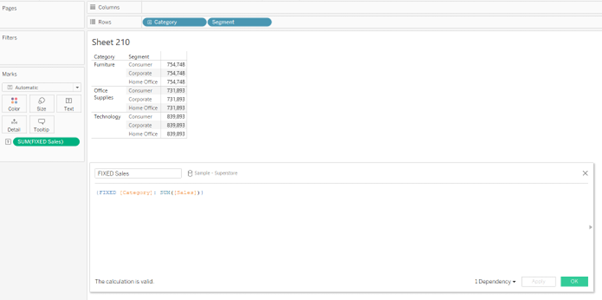
FIXED: The FIXED LOD expression calculates values based on specific dimensions, regardless of the dimensions present in the visualisation. It creates a virtual level of detail for the calculation. For example, {FIXED [Category]: SUM([Sales])} would calculate the total sales for each category, irrespective of other dimensions used in the visualisation.
INCLUDE: The INCLUDE LOD expression calculates values at the specified level while incorporating the dimension(s) used in the visualisation. It allows you to aggregate data for a specific dimension while considering other dimensions in the visualisation. For example, {INCLUDE [Region]: AVG([Profit])} would calculate the average profit for each region, considering all other dimensions in the visualisation.

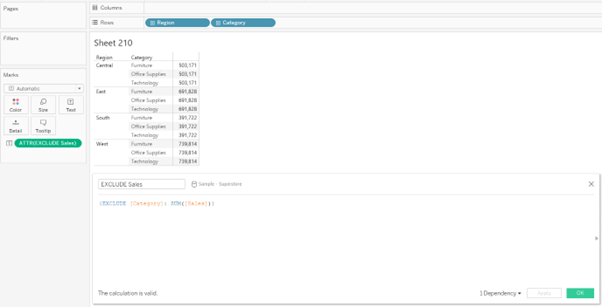
EXCLUDE: The EXCLUDE LOD expression calculates values at the specified level while excluding the dimension(s) used in the visualisation. It enables you to aggregate data for a specific dimension while ignoring other dimensions in the visualisation. For example, {EXCLUDE [Product]: SUM([Revenue])} would calculate the total revenue for each product, excluding any other dimensions present.
FIXED LOD Tableau Function
In Tableau, the FIXED Level of Detail (LOD) is the widely used function that allows you to perform calculations using specific dimensions, irrespective of the dimensions present in the visualisation. It creates a virtual level of detail for the calculation, providing precise control over your analysis's granularity.
Steps to Create a FIXED Level of Detail Tableau Function
In Tableau, the FIXED Level of Detail (LOD) function allows you to perform calculations using specific dimensions, irrespective of the dimensions present in the visualisation. It creates a virtual level of detail for the calculation, providing precise control over your analysis's granularity.
The steps to create the FIXED LOD function are as follows:
- • Create a calculated field. (This can be done by clicking on the drop-down next to the “Search” bar in the dimension pane or by selecting “Analysis” and selecting “Create Calculated Field”)
- • Type in the FIXED LOD Formula in the calculated field and drop the field into the view.
- • We can obtain the syntax of the FIXED expressions when we search for “Aggregate” functions in the calculated field.

Example
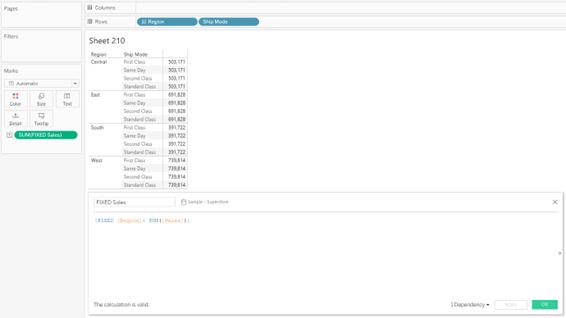
The following FIXED level of detail expression computes the sum of sales per region:
Beinex+ Tableau Offerings
Beinex has 100 years of combined experience in Tableau and is led by professionals who have successfully delivered Tableau projects in the region for large private and public sector organisations. Our team of Tableau-certified consultants are real-life Tableau business users passionate about Tableau and providing a world-class experience. In addition to providing sustainable analytics solutions, Beinex will help organisations to build superior data visual analytics capabilities internally through our bespoke training programs.