How AI Decision-Making is Improving Enterprise Outcomes
Blog
Share 
Tableau + AWS: Dashboards Development Using AWS Glue DataBrew
 13 April 2023
  Joseph John Thenamkodath
 With AWS Glue DataBrew, we can transform and prepare datasets from Amazon Aurora and other Amazon Relational Database Service (Amazon RDS) databases and upload them into Amazon S3 to visualise the transformed data on a dashboard using Tableau.
Here is how to do it:
With AWS Glue DataBrew, we can:
1. Transform and prepare datasets from:
a. Amazon Simple Storage Service (Amazon S3)
b. Amazon Aurora
c. Amazon Relational Database Service (Amazon RDS) databases
2. Upload them into Amazon S3
3. Visualize the transformed data on a dashboard using Tableau
Method:
1. You can create a JDBC connection for Amazon Redshift and a DataBrew project on the DataBrew console.
2. DataBrew queries data from Amazon Redshift by creating a recipe and performing transformations.
3. The DataBrew job writes the final output to an S3 bucket in Tableau Hyper format.
4. You can now upload the file into Tableau for further visualisation and analysis.
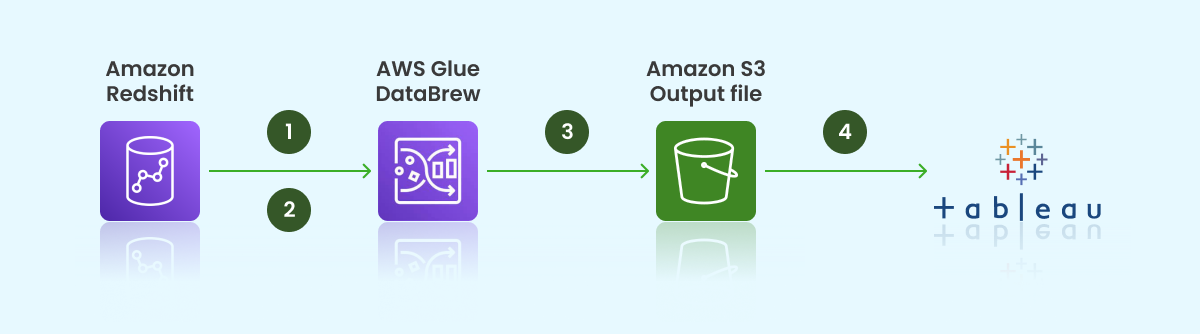
Result: Creation of predictive dashboards on top of the S3 bucket
AWS Glue DataBrew is a tool for data analysts and scientists that simplifies cleaning and standardising data to prepare it for machine learning and analytics.
Integration of Tableau and AWS services, specifically using AWS Glue DataBrew, can be utilised to develop dynamic dashboards. These tools offer efficient data preparation and visualisation capabilities, enabling users to gain insights quickly from their data. Follow along to learn how to combine the power of Tableau and AWS for your data analytics needs.
Related Articles

Snowflake Time Travel: How to Leverage it to Achieve Optimal Results
Benefits of Snowflake Time Travel
With Snowflake Time Travel, you can access historical data, including data that has been altered or deleted, at any given point. This feature is helpful for various tasks, such as:- • Querying data that has been modified or erased in the past
- • Duplicating entire tables, schemas, or databases at or before specific dates
- • Restoring deleted tables, schemas, and databases
How to activate Snowflake Time Travel?
Activating Snowflake Time Travel is a simple process that requires no additional effort. It is automatically activated with a retention period of one day. Nonetheless, upgrading to the Snowflake Enterprise Edition is necessary to customise the Data Retention Period and extend it to 90 days for Databases, Schemas, and Tables. It's important to note that increasing the Data Retention Period results in additional storage usage, reflected in your monthly Storage Fees.
Data Retention Period in Snowflake
In Snowflake, Data Retention Period determine how long historical data is retained to support Time Travel functionality. When data in a table is altered, such as through deletions or updates, Snowflake maintains the previous state of the data so that Time Travel operations (like SELECT, CREATE...CLONE, UNDROP) can be performed on it. By default, all Snowflake accounts have a standard retention period of one day (24 hours).
However, the Retention Period can be adjusted at the account and object level in the Snowflake Standard Edition to 0 (or unset to the default of 1 day) for databases, schemas, and tables.
In the Snowflake Enterprise Edition or higher, the Retention Period can be set to 0 for temporary databases, schemas, tables, and temporary tables. For permanent databases, schemas, and tables, the Retention Time can be configured to any duration between 0 and 90 days.
Functions of Snowflake Time Travel SQL Extensions
Snowflake Time Travel SQL Extensions are special SQL commands that allow users to query historical data from a specific point in time using the Time Travel feature. These extensions enable users to perform various Time Travel operations, including:
- a. CLONE: This command creates a copy of a table, schema, or database at a specific point in time using Time Travel.
- b. UNDROP: This command restores a dropped table, schema, or database to a specific point in time using Time Travel.
- c. HISTORY: This command retrieves the history of changes made to a table, schema, or database over time using Time Travel.
- d. AS OF: This command retrieves data from a table as it appeared at a specific point in time using Time Travel.
Specifying a Custom Data Retention Period for Snowflake Time Travel
To specify a custom Data Retention Period for Snowflake Time Travel, you can use the DATA_RETENTION_TIME IN_DAYS argument in the command when creating a table, schema, or database. By default, the maximum Retention Time in Standard Edition is set to 1 day (i.e. 24 hours), while in Snowflake Enterprise Edition (and higher), it can be set to any value up to 90 days.
The Data Retention Time can be set in the way it has been placed in the example below.
To create a schema with a custom Data Retention Period of 60 days, you can use the following SQL command:
create table mytable(col1 number, col2 date) data_retention_time_in_days=60;
Modify the Data Retention Period for Snowflake Objects
To modify the Data Retention Period of a Snowflake object, any change made to the Retention Period affects both active data and data in Time Travel. Depending on whether the period is increased or decreased, the following impacts occur:
- a. Increasing Retention
- b. Decreasing Retention
Let’s dive deep into more details:
a. Increasing Retention
Snowflake Time Travel preserves the data for a more extended period. For instance, if a Table’s Retention Time is increased from 10 to 20 days, the data set to be deleted after ten days will be retained for an additional ten days before being moved to Fail-Safe. However, data over ten days old and already transferred to Fail-Safe mode is unaffected.
b. Decreasing Retention
The duration of data stored in Time Travel is reduced. The shorter Retention Period applies only to active data updated after the Retention Period is shortened. If the data is still within the new Retention Period, it stays in Time Travel; otherwise, it is placed in Fail-Safe Mode. For instance, if a table with a 10-day Retention Period is reduced to 1 day, data from day 2 through day ten will be transferred to Fail-Safe, and only data from day one will be accessible through Time Travel.
Since the background process moves the data from Snowflake Time Travel to Fail-Safe, it may take some time to see the changes. Although Snowflake guarantees that the data will be transferred, it does not specify when the process will be finished. The data remains accessible via Time Travel until the background process is completed.
To change an object's Retention Period, use ALTER object command, such as the following command for modifying a table's Retention Period:
alter table mytable set data_retention_time_in_days=30;
Snowflake Time Travel Data Query
To query previous versions of data in Snowflake Time Travel, you can use the AT | BEFORE Clause after making any DML actions on a table. This clause allows you to query data at or before a certain point in the table's history throughout the retention period. The specified threshold can be either time-based (e.g., a timestamp or time offset from the present) or a statement ID (e.g., SELECT or INSERT).
For example, to select historical data from a table as of a specific date and time, you can use a query like:
sql
SELECT * FROM my table AT (TIMESTAMP => 'Fri, 05 May 2023 16:20:00 -
If you want to pull data from a table that was last updated a certain number of minutes ago, you can use a query like:
sql
SELECT * FROM my_table AT(OFFSET => -60*5);
And to collect historical data from a table up to a specified statement's modifications, but not including them, you can use a query like:
Sql
SELECT * FROM my_table BEFORE(STATEMENT => '8e5d0ca9-005e-44e6-b858-a8f5b37c57
How to Restore Deleted Objects by Utilising the UNDROP Command?
To restore a deleted object that hasn't been permanently removed from the system (meaning it can still be seen in the "SHOW object type> HISTORY" output), you can use the UNDROP command in conjunction with Snowflake Time Travel. This command can be applied to various objects, such as tables, schemas, and databases. It effectively reverts the thing to its previous state before it was deleted with the DROP command. For example, the UNDROP command can also restore a dropped database.
Summing Up
Snowflake Time Travel’s features can enhance your decision-making process and overall data experience. If you're looking for a Snowflake service provider, Beinex is an excellent option. Our partnership with Snowflake enables us to offer advanced features like automated tuning, elastic compute, and analytics modernisation services to help your organisation realise exponential Returns on Investment.

Strategic Insights with Tableau Pulse: Real-Time Insights for Every Team
Setting Up Metrics Is a Breeze
Configuring metrics in Tableau Pulse takes just minutes. Whether it’s setting up your own custom metrics or utilizing pre-defined ones, the process is straightforward and user-friendly. And once set up, the visuals, descriptions, and insights are generated automatically, enabling team members to stay updated on performance with ease.
Pro Tip: You can also customize existing metrics to meet specific goals. For example, a custom metric was developed to track interactions generated by teams in the field, with a target of reaching a high engagement level within a set timeframe. This tailored approach has streamlined the process of monitoring performance and recognizing accomplishments.
Integrating Data into the Flow of Work
Tableau Pulse effortlessly integrates data into the tools you use daily, like Slack or email, allowing you to stay informed without disrupting your workflow. Each morning, you can start your day by reviewing the Pulse Digest in Slack, which provides a snapshot of key metrics, trends, and insights.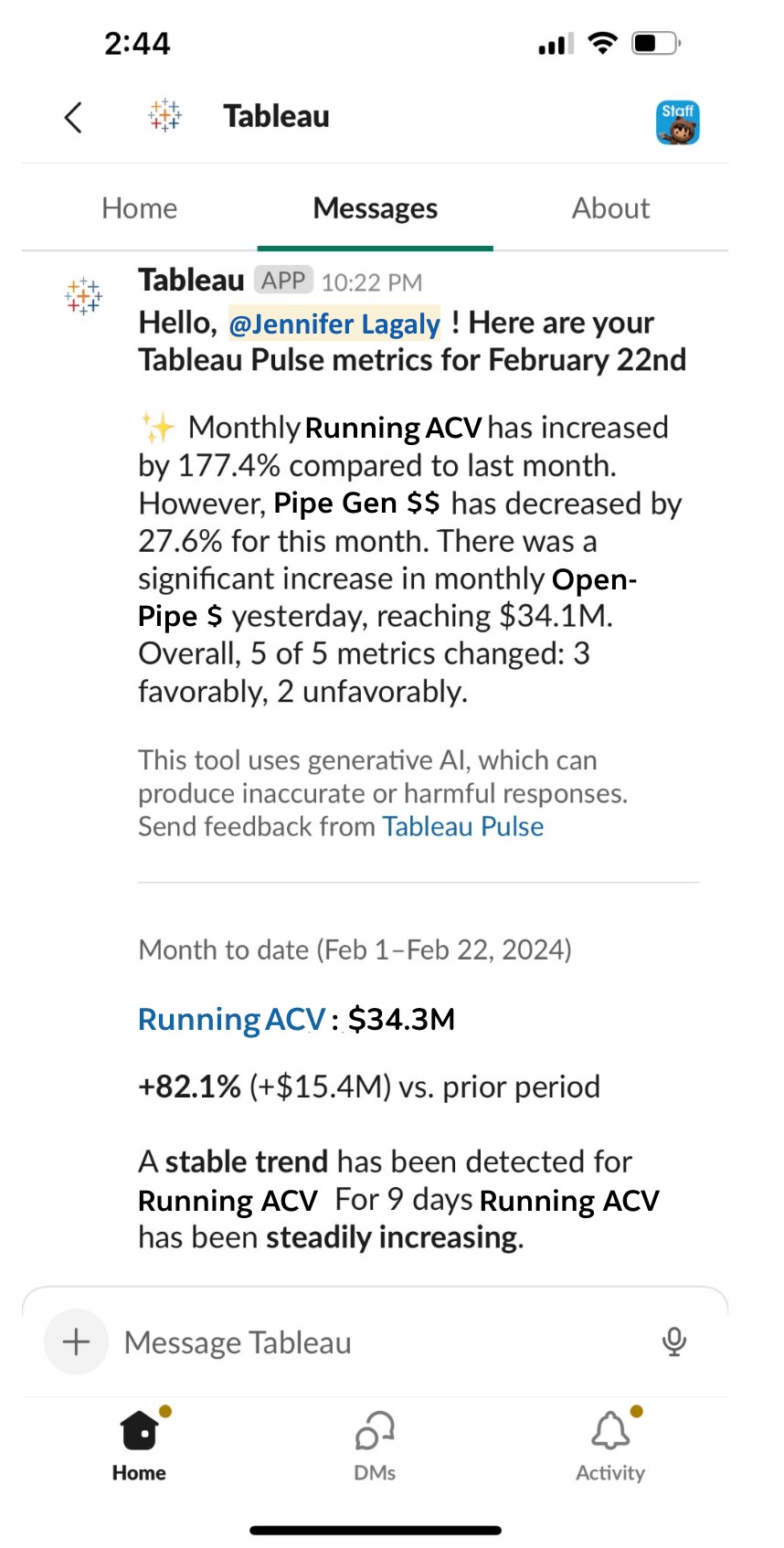 Source:https://www.tableau.com/blog/how-tableau-chief-revenue-officer-uses-tableau-pulse
Decipher Trends with Intelligent Metrics
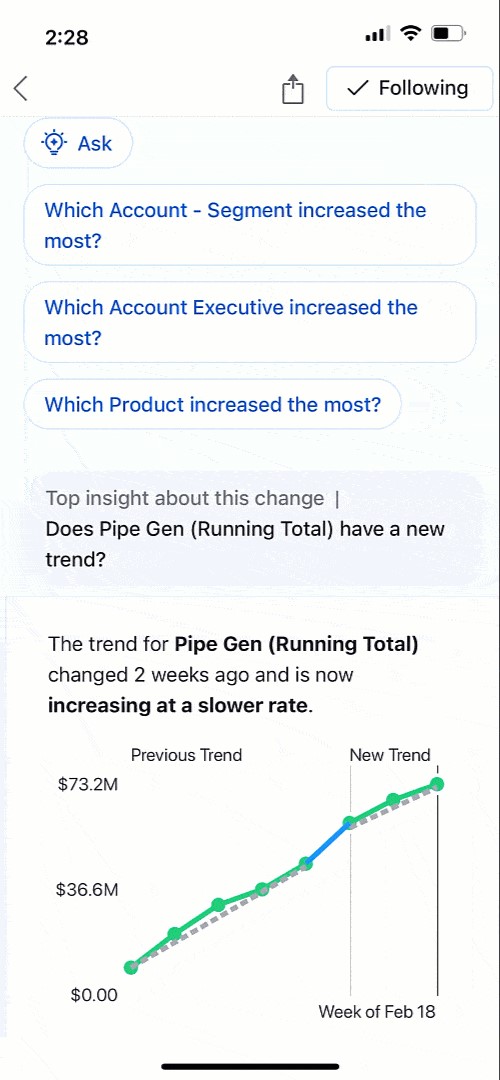
Monitoring metrics is not solely focused on tracking numbers; it also involves identifying opportunities and addressing challenges. With AI-generated summaries of key metrics like Annual Contract Value (ACV) and Pipeline Generation, Tableau Pulse helps you understand the context behind the data. The live updates ensure that any changes are reflected immediately, providing real-time insights that are always up-to-date.
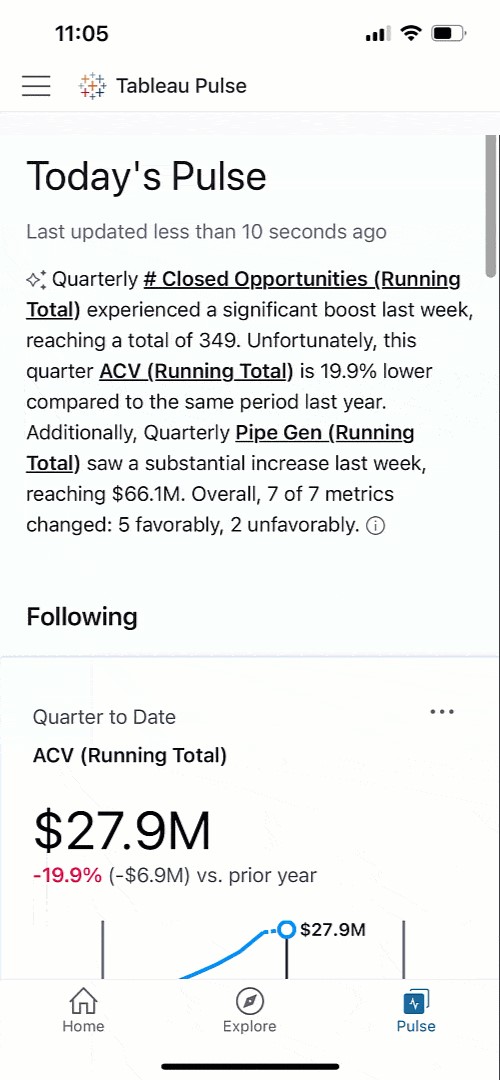
Get a Clear View of Business Performance
Tableau Pulse’s intuitive visualizations and natural language summaries make it easy to compare current and past performance, helping you identify areas that may need closer attention. For instance, if Pipeline Generation is up 10.9% year over year but showing signs of slowing, Pulse allows you to dig deeper, understand the cause, and take timely action to keep growth on track.
Tableau Pulse is available on mobile, and these insights are accessible wherever you are, making it easy to stay connected to your data on the go.
Analyze Business Segments with Precision
Tableau Pulse enables detailed analysis of various business segments, offering a clear view of how different teams and departments contribute to overall success. With just a click, you can explore revenue trends, track team performance, and understand the impact of different strategies across the organization.This level of analysis, which once required hours of manual work, is now at your fingertips. You can easily filter by segment, product, or deal size to gain nuanced insights that drive better decision-making.
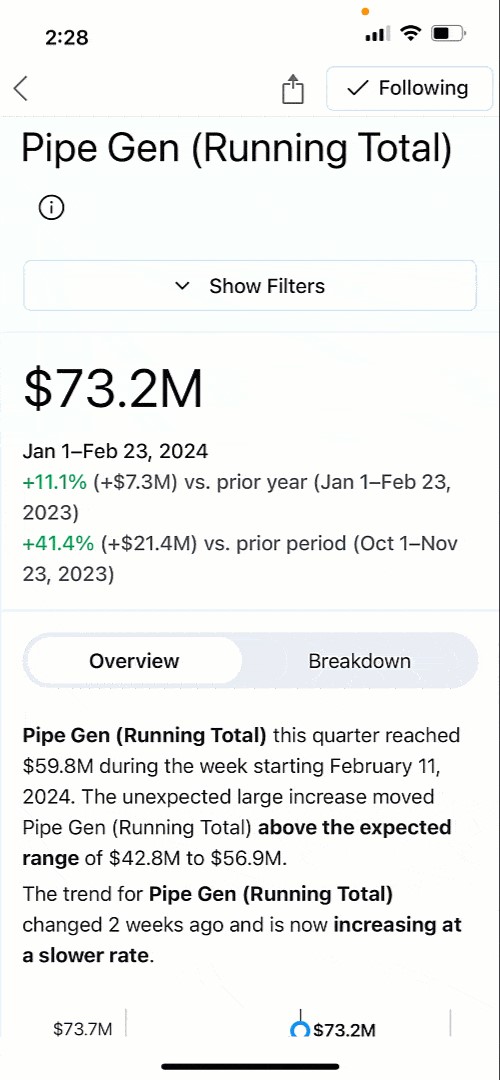
Ask Smart, Data-Driven Questions
Powered by AI, Tableau Pulse does more than just report numbers. It actively helps you explore trends by suggesting relevant questions and providing insights in clear, understandable language. Whether it’s identifying which sales regions are thriving or where potential issues may arise, Pulse empowers you to make data-driven decisions with confidence.
Foster a Data-Driven Culture
Tableau Pulse is designed to be accessible to everyone, regardless of their level of data expertise. By integrating insights into tools like Slack, Pulse ensures that critical information is always at hand, promoting a culture of informed decision-making across the organization. This democratization of data means that every team member can contribute meaningfully to achieving our shared goals.
Tableau Pulse has truly transformed how we approach strategic decisions, placing personalized, contextually relevant insights directly in our workflow. It empowers everyone to be data-driven, aligning efforts towards achieving your company objectives and navigating the dynamic challenges of business with agility and insight.
Want to Transform Your Business?
Watch our demo to see how Tableau Pulse, powered by Tableau AI, can elevate your business strategy, and start your free Tableau Pulse trial today: https://www.beinex.com/free-tableau-software/
SELF-SERVICE AUDIT ANALYTICS - Beinex
SELF-SERVICE AUDIT ANALYTICS: TRANSFORM YOUR APPROACH
Despite the fact that data analytics and Computer Assisted Audit Techniques (CAAT) have been part of auditing for nearly 30 years, many organisations are still struggling with the implementation of effective data analytics to enhance internal audit quality and effectiveness. Experts at Beinex Consulting offer advice and help.
Increasing complexities of risk and incessant emergence of disruptive technologies are demanding substantial change in internal audit processes. In today’s world of constant disruption, internal audit should evolve into a dynamic and future-orientated function. So what’s getting in the way?
Click here to read the full sponsored feature by Beinex Consulting

Digital Transformation in Banking: The Golden Touch of RPA
The brick-and-mortar banking model faced an existential threat with the emergence of Fintech (financial technology), or new technology that aims to enhance and automate the delivery and use of financial services. And later, new-gen technology companies started to deliver these services on secure digital platforms at a lower cost, resulting in traditional banks adopting advanced technology too.
Most banks were apprehensive about adopting automation to the finance function. This concern is frequently centered on whether it is possible to replace existing systems entirely with automation. The core banking system is perhaps the best example. Automating ‘untouchable’ core functions is not necessary. Instead, it can deal with the issues that surround them. But rooting your digital transformation in all other banking processes in intelligent, digital workflows is feasible.
What is digital banking?
Digital banking involves digitising all traditional banking products, procedures, and activities to serve customers through online channels. Examples include obtaining bank statements, cash withdrawals, funds’ transfers, accounts management and checking opening deposit accounts, loan management, bill payment, cheque management, and transaction records monitoring.
With digital banking, all banking services are accessible round-the-clock on mobile phones, PCs, and other intelligent devices. Thanks to digital banking software, all traditional services are now easier to obtain, comprehend, and manage.
Leading banks in the UAE make significant financial investments in the digital transformation of their banking operations and launch digital-only banks in the country.
Pros of digital banking
Here are some of the most known benefits of digital banking:1. Scalability
Numerous functions provided by digital banks are just absent from traditional banks. This includes investing directly in stock markets and acquiring cryptocurrency and gold using the banking app. The user of digital banking can modify their security preferences, transaction caps, and even whether they wish to enable NFC or magnetic stripe transactions.
2. Personalisation
In digital banking, sophisticated personalisation tactics are powered by artificial intelligence (AI) and machine learning (ML). Customers can get timely financial solutions, interactive tools, and instructional resources from banks. Automatic budgeting, expenditure analytics, and savings reminders are a few technologies that can inform and engage customers.
3. Cost savings
Traditional banks spend a lot of time and expense on the checking and accounting processes. The elimination of unnecessary operations is what makes digital banking software's operational costs less expensive. With digital banking systems, banks may take on less labour by automating the procedures related to routine transactions. Because fewer persons and stages are required for transactions when technology is used, there is a lower chance of financial mistakes, and money transfers are more straightforward.
The touch of automation
Let’s also look at the most automated processes in the banking industry that have undergone complete digitization with the touch of automation.
1. Loan processing
RPA or Robotic Process Automation can reduce lengthy procedures that typically take months to as little as 10–15 minutes. Automation enables essential data extracted from customer-submitted documents to validate all details. Systems employ Machine Learning to make better-informed judgments based on data analytics supported by more straightforward statistical methods. Intermediary bots infer business logic and ask the user to correct any inaccurate entries to ensure safer loan judgments and automatic confirmation letter creation
2. Know Your Customer (KYC)
Not only is Know Your Customer (KYC) a necessary compliance procedure for any bank, but it is also the trickiest. To execute the customer checks, this process requires at least 150 and maybe thousands of FTEs.
According to Thomson Reuters, a small number of banks annually invest at least $500 million in KYC compliance. Banks have recently begun utilising RPA to gather and flawlessly check consumer information to cut costs and resources. Because of this, banks can now complete the KYC procedure with fewer resources and mistakes.
3. Anti-Money Laundering (AML)
One of the most data-intensive processes, AML, can be made simpler with some help from Robotic Process Automation (RPA). Implementing RPA has proven more efficient than labour-intensive traditional banking solutions in identifying suspicious banking transactions or automating repetitive operations.
4. Fraud Detection
Banks are concerned about enhancing their fraud detection system due to the rising banking fraud scenario. Banking fraud has increased since the introduction of cutting-edge technologies. Considering this, it is virtually hard for banks to manually review each transaction to spot fraud trends in real-time. RPA cleverly uses the "if-then" principle to spot any potential fraud and report it for prompt resolution with the relevant department.
5. Mortgage processing
Both banks and their clients find mortgage processing extremely labour-intensive and cumbersome. Before processing each loan request, banks manage their mortgage procedure for more than a month, going through several unnerving stages like job verification, credit checks, and inspection. The processing of mortgage loans could be severely delayed by even the slightest mistake made by either the customer or the bank.
But RPA has accelerated this process for banks. Robotics goes through a defined set of rules to eliminate potential bottlenecks and speed up mortgage processing.
Customer acceptance of digital banking services has rapidly increased throughout the UAE. According to bankers, the older generation, initially apprehensive, is now quickly adjusting, whereas younger clients are quick to accept digital offerings and digital-only platforms. Digital banks are drawing a lot of new consumers due to lower account maintenance expenses and improved deposit returns.
How Beinex can help you
Beinex is a Dubai-based digital transformation organisation anchored in innovation, creativity, and unrivalled customer service. Our extensive analytics modernisation and training services will empower you to construct an intelligent and dynamic banking enterprise. Our extensively experienced consultants enable a seamless digital experience for the banking industry.

Top 10 Game-Changing Benefits of Generative AI for Your Business
What is Generative AI
Generative AI is a subfield of Artificial Intelligence that utilizes patterns found in vast databases to produce original content, including text, images, music, and videos. GenAI aims to provide creative and human-like outputs, in contrast to classical AI, which primarily makes predictions or classifies data. Generative AI models, such as OpenAI's ChatGPT and DALL-E, utilize sophisticated neural networks, specifically transformer architecture, to produce content that is logical and sensitive.
Industries are transforming with the help of generative AI, and its benefits are innumerable. Marketers are using it to automate campaigns and generate personalized content at scale, while writers and creators rely on it to spark ideas and accelerate production. In healthcare, it's being explored for diagnostics, treatment planning, and medical research. At its core, Generative AI isn't just a tool; it's a transformative force reshaping how we create, innovate, and solve complex problems across sectors.
GenAI Solutions in the UAE
The Generative AI market in the UAE is on an impressive growth trajectory. Currently, the market is estimated to have reached USD 220 million and is expected to surpass USD 1.3 billion by 2030, growing at a CAGR of over 35%. With the UAE's commitment to becoming an AI-driven economy, including initiatives such as the UAE National AI Strategy 2031, the region is emerging as a hub for AI adoption and innovation.
Top 10 Benefits of Generative AI
Generative AI is reshaping how businesses create, operate, and innovate. Here are the top ten key benefits of GenAI that you can leverage for your business:
1. Automates Content Creation
Generative AI tools streamline content development, including blog posts, ad copy, social media content, and other types of content. Marketing teams use AI to generate drafts, brainstorm ideas, and iterate quickly. It speeds up production, improves quality through iterative feedback, and reduces the need for hiring additional staff. GenAI tools can craft landing page content or email campaigns that effectively highlight your brand's voice.
2. Delivers Hyper-Personalized Experiences
AI leverages customer and product data to generate personalized recommendations and messaging. In e-commerce, this can mean showing the right product to the right user at the right time. Personalized AI outputs enhance engagement and conversion rates.
To ensure ethical outcomes, businesses are auditing training datasets to prevent bias, which is particularly crucial in sensitive sectors such as healthcare, finance, and hiring.
3. Enhances Product Design and Innovation
AI models analyze market trends and customer behavior to guide product development. By processing vast datasets, they uncover unmet needs and help generate concepts that align with evolving consumer preferences. Many GenAI tools aid in rapid prototyping and idea testing.
4. Strengthens Cybersecurity
Generative AI boosts threat detection by identifying anomalies in network traffic and alerting teams in real time. It excels at identifying phishing patterns, malware signatures, and unusual behaviors more quickly than manual reviews. As attackers also begin using AI, this defense becomes increasingly critical.
5. Accelerates Healthcare Research
Generative AI is expediting drug discovery and diagnostics. AI also allows the generation of synthetic patient data, facilitating preclinical testing without privacy risks. It shortens development timelines and supports personalized medicine by analyzing genetic and clinical datasets. It can also predict diseases before they strike us.
Read Our AI in Healthcare Case Study on Cardiovascular Disease Prevention!
6. Streamlines Business Processes
AI automates repetitive tasks such as summarizing reports, drafting emails, or analyzing PDFs. GenAI Tools allow teams to focus on strategic work rather than data wrangling. For example, HR teams can auto-generate job descriptions, and sales teams can craft personalized follow-up emails using AI.
Book a Free Demo of Our Document Chatbot
7. Improves Customer Support
Generative AI chatbots offer 24/7 support, providing context-aware responses to resolve queries. Unlike traditional bots, these systems adapt in real time, understand tone, and escalate issues when necessary. Businesses utilize various tools to achieve faster resolution times and higher satisfaction scores.
8. Accelerates Market Innovation
By analyzing market signals, customer behavior, and industry shifts, AI uncovers opportunities for product, service, or business model innovation. It reduces risk and helps companies make data-backed decisions about where to invest. AI can forecast trends and simulate outcomes before committing resources, allowing for informed decision-making.
9. Drives Digital Transformation
AI encourages traditional industries, like oil & gas, construction, logistics, and agriculture, to adopt technology by demonstrating clear ROI. Predictive maintenance, supply chain optimization, and workflow automation are just a few areas where AI proves valuable. It helps leaders make faster, more informed decisions, accelerating digital adoption.
10. Accelerates Creative Innovation
Generative AI serves as a brainstorming partner. Designers utilize tools like Midjourney for rapid visual prototyping, while writers and product teams employ chatbots to refine their ideas. These tools provide novel starting points, enabling creators to break through mental blocks and explore new directions more quickly.
Summing Up
Beinex GenAI Solutions is at the forefront of transformation, helping organizations in the UAE explore the full potential of generative AI. As one of the recipients of the Dubai AI seal, Beinex is enabling businesses to innovate faster and operate smarter, from automating content generation to creating intelligent decision-making systems. Businesses that adopt it strategically are gaining a competitive edge, not just by saving time, but by reimagining what's possible.