How AI Decision-Making is Improving Enterprise Outcomes
Blog
Share 
Supercharge Your Tableau: Benefits of Tableau Accelerators
 26 June 2023
  Sumi S
-
Related Articles
Cohort Retention Analysis in Tableau
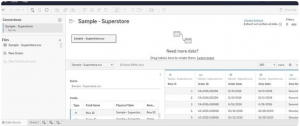
To start, access the Superstore Dataset, available for download on Kaggle. Use Tableau Public to connect to this dataset and explore the rows and columns to understand the documented data related to the Superstore. This exploration sets the stage for the subsequent cohort retention analysis.
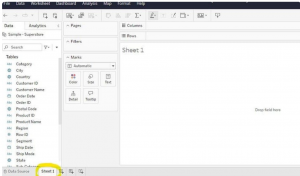
 Move over to the Sheet 1 tab; this will serve as your dedicated workspace where you'll craft your visualizations. This area will be your canvas to build and design the subsequent analyses and visual representations.
To perform cohort analysis effectively, specific data points are necessary:
Unique Identifier: Utilize the Customer ID as the unique identifier for each customer.
First Purchase Date: This marks the date when a customer made their initial purchase, a pivotal point for creating cohort groups.
Revenue Data: Information regarding the financial aspect of each transaction.
Creating Calculated Fields
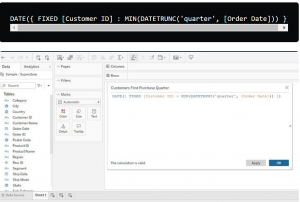
One crucial calculated field needed is the "Customers’ First Purchase Date (quarter)." Since the dataset doesn't contain the first purchase date field, a calculated field is essential. This field is derived from computations based on existing data in the dataset, enabling the identification of when each customer made their initial purchase. Calculated fields are instrumental in manipulating and analyzing data by performing calculations based on existing dataset information.

To create quarter and year cohorts based on the customers' first purchase date:
Defining Cohorts: In this dataset spanning four years (2014–2017), cohorts will be based on the quarter and year when customers made their initial purchase. This approach ensures a manageable cohort table for analysis.Calculation for Quarter Identification: The calculation to establish the quarter in which a customer made their first purchase involves determining the quarter and year from the purchase date.
This calculation utilizes the 'DATETRUNC' function to extract the quarter from the 'First Purchase Date' field, aligning customers based on the quarter they made their initial purchase.
Flexibility in Cohort Creation: While quarters and years are chosen for cohort segmentation in this scenario, other time parameters like days, weeks, or months could also be used for cohort creation, depending on the dataset and analytical objectives. However, for this particular dataset, quarters and years were deemed more practical for effective analysis.
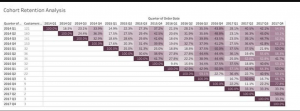
Assembling the cohort retention table involves using the calculated fields previously created to form a comprehensive table that illustrates cohort-based metrics, particularly the number of unique customers per first quarter and the retention rate.
Here's how to assemble the cohort table:


This formula divides the count of unique customers by the total number of customers from the first quarter, providing the retention rate for each subsequent period.
This table allows for a clear visualization of how customer retention varies across different cohorts over subsequent periods, providing insights into the effectiveness of retaining customers acquired in specific quarters.
This step-by-step guide is incredibly detailed for constructing the cohort table in Tableau. It breaks down the process systematically, ensuring proper visualization of the cohort analysis.
Interpreting the retention rates from this table involves examining both the rows and columns:
Rows (First and Second Columns): Here, you'll find different year and quarter groups representing cohorts, along with the count of customers who made their first purchase in each respective period.Columns (Third Column): As you move across the table, you'll encounter the percentages indicating how many customers continued making purchases at the Superstore across subsequent quarters after their initial purchase.
For instance, if 160 customers made their first purchase in 2014 Q2, you'd observe that 24.4% returned to make purchases in 2014 Q3, and 36.3% made purchases in 2014 Q4. This trend continues across the subsequent periods.
 In conclusion, creating calculated fields is an essential part of conducting cohort analysis in Tableau. It involves utilizing functions effectively. If you're new to Tableau functions, exploring articles or resources on Tableau functions could fill any knowledge gaps and provide a deeper understanding of their usage in data analysis and visualization. The provided Tableau article on functions might be particularly helpful for a more comprehensive understanding.
Measuring Data Culture Maturity: How to Evaluate and Maximize the Benefits of a Mature Data Culture
What is the Data Culture Maturity Model?
The Data Culture Maturity Model by Alation is a framework designed to guide organizations through various levels of data proficiency. It categorizes data culture maturity into distinct stages, allowing organizations to understand their current position, set achievable goals, and implement strategies to progress further. This model addresses data discovery, data governance, data literacy, and data leadership elements that collectively foster a robust data culture. Each phase in the model encourages organizations to embed data at the core of their operations, transforming it into a valuable resource for decision-making and competitive advantage.
Why is Data Culture Maturity Important?
Data culture maturity is crucial for leaders who recognize that a data-driven approach can be a differentiator in today's competitive market. For CDOs, CIOs, BI professionals, and business leaders, fostering a mature data culture means establishing a strong foundation for data-enabled innovation and agile decision-making. As data culture evolves, organizations can explore the benefits of data self-service, increase trust in data, and leverage data literacy to make decisions backed by concrete insights.
Empowering a Data Culture: Key Tenets
The Alation Data Culture Maturity Model comprises four core tenets that organizations should focus on to elevate their data culture: Data Search & Discovery, Data Governance, Data Literacy, and Data Leadership. Let’s explore each tenet and its role in building a mature data culture.
1. Data Search & Discovery
Data Search & Discovery is the foundation of any data culture. It focuses on enabling users to quickly and easily find, understand, and trust the data they need. Organizations with mature data search capabilities invest in technologies like data catalogs, which streamline data search through features like intuitive search, contextual data, and cross-platform integration. These tools reduce the time users spend searching for data, empowering analysts to focus on value-added tasks instead of answering repetitive data queries. Alation pioneered the data catalog concept, which has evolved into a comprehensive data intelligence platform. The modern data catalog supports not only data search and discovery but also functions like data governance and cloud migration. These capabilities create a data culture that encourages self-service and fosters a deeper understanding of the data available to all employees. Measuring Value: Data search maturity can be measured by the time saved on data searches, the frequency of data queries, and the volume of self-service analytics. Organizations can leverage these metrics to assess their return on investment (ROI) and the efficiency of their data catalog.2. Data Governance
Data Governance establishes the rules and policies that ensure data is managed responsibly and is readily accessible and secure. In a mature data culture, governance extends beyond compliance, enhancing data search and data literacy. Organizations with strong governance frameworks reduce the risk of regulatory fines, establish data trustworthiness, and improve data quality. Defining Data Governance: Data governance can be seen as the “authority and control” over data assets. This entails organizing policies, procedures, roles, and responsibilities to align with the company’s data goals. Alation emphasizes that governance must go beyond traditional definitions to include active governance, which fosters collaboration, defines common data language, and establishes shared processes. Measuring Value: Effective governance can be measured by the percentage of data assets that meet governance standards, the number of governance-related issues resolved, and regulatory compliance rates. This not only assures data quality but builds trust in data for decision-making.3. Data Literacy
Data Literacy is about ensuring that individuals at all levels can read, work with, analyze, and argue with data. This element focuses on equipping employees with the skills to understand and utilize data effectively, bridging the gap between raw data and actionable insights. Building data literacy involves training, creating a framework for collaboration, and promoting data-driven thinking. Building Data Literacy: Successful data literacy programs generally follow a step-by-step approach, starting with assessments, followed by targeted training, and promoting an internal culture of data use. Organizations can embed literacy initiatives in data catalogs, where employees can access learning resources, engage in discussions, and collaborate with subject-matter experts. Measuring Value: Data literacy maturity can be assessed by monitoring the percentage of catalog contributions from a broad base of users, showing a shift from “gut-based” to data-driven decision-making. Additionally, organizations can track the frequency of cross-departmental data collaborations as an indicator of a well-integrated data culture.4. Data Leadership
Data Leadership is the most vital element, acting as the catalyst that drives data culture maturity forward. Effective data leaders champion data initiatives, implement change management programs, and consistently highlight the connection between data and business outcomes. They focus on aligning data objectives with strategic goals, ensuring that data initiatives generate tangible business value. The Role of Data Leadership: Mature data leaders embed data in strategic planning, empower departments to utilize data in decision-making, and foster a data-driven mindset throughout the organization. They work to make data initiatives visible, promoting metrics and KPIs that reflect the value added by data maturity. Measuring Value: Organizations can measure data leadership through the number of data stewards and subject matter experts identified, the impact of data on key business outcomes, and the frequency of data-driven initiatives across departments. When leadership drives data culture, the organization benefits from enhanced innovation, agility, and competitive advantage.Articulating Business Value Through Data Maturity
One of the primary objectives of the Data Culture Maturity Model is to showcase how advanced data culture drives business outcomes. To demonstrate this, data leaders can tie maturity metrics to specific business cases, such as self-service analytics, regulatory compliance, and data democratization.
Self-Service Analytics
In organizations with high data culture maturity, self-service analytics is a practical application. With accessible data catalogs and robust data literacy programs, employees can independently search, analyze, and interpret data. This capability speeds up decision-making and fosters a sense of ownership in data-driven outcomes. Measuring Success: Key metrics include time saved in data discovery, the reuse of existing data reports, and improved analytics turnaround. Organizations with a mature self-service model also report a higher degree of cross-departmental data sharing, indicating a well-established data culture.Active Data Governance
Active data governance ensures that data is handled in a structured and compliant manner. This framework allows organizations to confidently share data, meet regulatory standards, and promote accountability. Cataloging data assets facilitates governance, giving leaders insight into who accesses data, where it’s used, and how it complies with policies. Measuring Success: Metrics such as compliance rates, the reduction of data-related risks, and the number of governance-compliant assets serve as valuable indicators. Strong governance fosters trust in data, enhancing organizational agility and data-driven decision-making.Cloud Data Migration
Cloud data migration initiatives also benefit from a mature data culture. When data is cataloged and governed effectively, migrating to the cloud becomes a streamlined process. Migrating to cloud-based platforms not only reduces infrastructure costs but enables scalable data access and faster analytics. Measuring Success: Metrics to gauge the success of cloud migration include the speed of migration, the reduction in storage costs, and the increased accessibility of data post-migration. A data-mature organization can better leverage cloud capabilities for innovation and resilience.Conclusion: Tying It All Together
The Alation Data Culture Maturity Model provides a comprehensive framework for organizations looking to elevate their data culture. By focusing on data search & discovery, governance, literacy, and leadership, companies can foster a data-centric environment where data is trusted, accessible, and utilized effectively. Measuring the maturity of these components helps organizations quantify their data culture and demonstrate the business value added at each stage. In partnership with Alation, Beinex delivers comprehensive data governance solutions that enhance discoverability, enforce robust access controls, and streamline data auditing processes. By leveraging Alation's industry-leading data intelligence platform, Beinex helps organizations optimize their data strategies, driving business growth and operational efficiency. Connect with us for the transformation you seek: https://beinex.com/data-governance/

The Launch of AWS Middle East (UAE) Region: Marking a Holistic Shift
For Beinex, being a custodian of data engineering and data analytics technologies, presence of AWS in UAE offers a plethora of opportunities for customers in terms of:
(a) Drawing customer centricity and confidence in data related services increasing productivity
(b) Building highly scalable and efficient data lakes/data warehouses/data marts to create ‘center of excellences in data’
(c) One-stop unified data access, security and governance using AWS data stack, thereby removing multiple overheads and solutions
(d) Building and deploying ML models and integrating with analytics services creating business far-sightedness
(e) Reducing time to market taken by "product based" data analytics solution to blazing fast AWS services boosting innovation
The new AWS Middle East (UAE) Region consists of three Availability Zones (AZs) and becomes AWS’s second region in the Middle East with the existing AWS Region in Bahrain, launched in 2019. The new AWS Region gives organizations even greater choice for running their applications and serving end users from data centers located in the UAE, using advanced AWS technologies to drive innovation.
AWS Regions are composed of Availability Zones that place infrastructure in separate and distinct geographic locations. Availability Zones are located far enough from each other to support customers’ business continuity but near enough to provide low latency for high availability applications that use multiple Availability Zones.
Each Availability Zone has independent power, cooling, and physical security and is connected through redundant, ultra-low latency networks. AWS customers focused on high availability can design their applications to run in multiple Availability Zones to achieve even greater fault tolerance. The launch of the AWS Middle East (UAE) Region will enable local customers with data residency requirements to store data securely in the UAE, while providing customers with even lower latency across the country.
Beinex has prescriptive and predictive data analytics product suites comprising of a mix of services (Redshift, S3, Glue, Athena, Kinesis, EMR etc.) customized along with BI viz platform apps like Tableau & Alteryx, all on the AWS platform. Beinex is also competent in data innovation using AI/ ML stack with Amazon Sagemaker.
The firm is a preferred partner of Aurex, a SaaS based GRC solution. The company has capabilities in data engineering technologies like data ingestion, data lakes, ETL & data transformation, data visualization and AI/ ML models leading to insights generation platforms.
The launch of AWS Middle East (UAE) Region will catalytically encourage the Public Sector to shift to Cloud in a big way. It will drastically alter the way business is conducted in that realm, providing an added boost to the entire region. Besides, the AWS range of services characterized by AI-ML capabilities will facilitate ease of living and convenience in all walks of life across the society.

Building Smarter Dashboards with Tableau's AI Features
The Rise of AI-Driven Analytics
Artificial intelligence (AI) has transformed the analytics landscape, enabling organizations to automate complex tasks, identify patterns, and predict future trends. Tableau's AI-powered capabilities are designed to augment human intelligence, streamlining the analytics process and uncovering new opportunities.
Tableau's AI Features: A Brief Dive
1. Tableau Pulse: Powered by AI, Tableau Pulse offers contextual, personalized, and intelligent insights at your fingertips. It redefines data experience by making data accessible to everyone despite their expertise in data visualization tools. The Insights Platform within Tableau Pulse automates the identification of contributors, trends, drivers, and outliers for relevant metrics and streamlines and democratizes data analysis. Tableau Pulse's Metrics Layer lets KPIs and key metrics and KPIs be defined and utilized consistently across the enterprise, creating a unified source of truth for decision-making. Tableau Pulse also offers a Next-Gen Experience by offering intuitive, user-friendly metrics directly into the tools users already work with, such as email or the Tableau web app, enabling users to engage with data in real-time and effortlessly scale insights.
Real-World Application: Employing Tableau Pulse in the supply chain helps track and monitor shipping times, inventory levels, and supplier performance in real time, facilitating informed and proactive decision-making.
2. Tableau Agent: A conversational AI assistant, Tableau Agent facilitates the data journey for new analysts using generative AI to expedite the analysis process from data collection to exploration. Tableau Agent is built on the Einstein Trust Layer, ensuring enterprises' data remains safe and accessible. It streamlines the stages of analysis by effortlessly creating calculations using natural language, making the process easier and faster for technical and non-technical users. It also creates AI-generated descriptions for data sources to convey their objective and essence consistently and informatively.
Real-World Application: In dealing with customer engagement, Tableau Agent helps personalize marketing strategies and campaigns to augment customer interaction based on customer preferences and behavior.
3. Einstein Copilot for Tableau: Quickly identify trends and explore data at every analysis phase with the reliable AI assistant, Eintein Copilot for Tableau. It doesn't matter if you are a novice or a seasoned analyst, as Einstein Copilot for Tableau enhances your Tableau experience by making analytics accessible to facilitate actionable insights and informed decisions. With this feature, you can easily produce AI-generated descriptions of data assets and explore data utilizing natural language directly from Tableau Cloud Web Authoring.
Real-World Application: Utilizing Einstein Copilot streamlines data analysis for business users by offering instant and expert-level insights to the questions asked without needing any technical expertise in data analysis.
4. Tableau Explorer: This feature employs machine learning algorithms to automatically identify key insights, patterns, trends, and correlations within your data. Discovering hidden data insights with AI offers intelligent recommendations for charts, dashboards, visualizations, and dashboards. Further, Tableau Explorer generates data-driven narratives, emphasizing key findings clearly and concisely. It enables users to grasp complex data insights and make informed decisions quickly.
Real-World Application: Using Tableau Explores optimizes operational efficiency by analyzing production data, facilitating the identification of areas of process improvement, and reducing costs.
5. Predictive Analytics: Tableau's predictive models enable you to forecast future outcomes, identify potential risks, and optimize business strategies. Regression analysis identifies relationships between variables while clustering groups similar data points for segmentation. Decision trees visualize complex decision-making processes, making understanding and optimizing outcomes easier.
Real-World Application: Predictive Analytics develops predictive models to forecast revenue and sales, allocate resources efficiently, and analyze data to check for potential setbacks.
6. Natural Language Processing (NLP): Tableau's NLP capabilities allow users to ask questions and receive answers in natural language, simplifying the analytics process. Tableau's Ask Data feature enables users to ask queries in everyday language and get answers instantly. The Explain Data feature automatically describes data patterns and trends and patterns, improving understanding and insight. Besides, text analysis facilitates sentiment analysis, entity recognition, and topic modeling, unlocking valuable insights from unstructured data.
Real-World Application: NLP facilitates the sentiment analysis of customer feedback, that is, analyzing the data from reviews, surveys, and social media to understand customers' sentiments and base decisions accordingly.
7. Automated Data Preparation: Tableau's AI-driven data preparation streamlines data cleaning, joining, and aggregation, freeing up valuable time for analysis. The AI-powered algorithms help identify and rectify errors, propose optimal data formats, and detect inconsistencies and missing values. It ensures data accuracy, completeness, and trustability, allowing users to concentrate on higher-level analysis and decision-making.
Real-World Application: Automating data preparation for financial reports simplifies the process by reducing manual effort and enhancing the accuracy of results.
Organizations across various industries have successfully leveraged Tableau's AI features to:
1. Enhance customer experience as predictive analytics helps identify customer churn patterns.
2. Optimize operations as automated data preparation streamlines supply-chain management.
3. Drive revenue growth as AI-driven insights uncover new business opportunities.
Dashboards that Talk: Revolutionizing Business Insights
Interactive dashboards that engage with you have revolutionized how businesses interact with data, ushering in an era of conversational analytics. Tableau, a pioneer in data visualization, has been at the forefront of this revolution, empowering organizations to unlock hidden insights and drive informed decision-making. With Tableau's natural language processing (NLP) capabilities, users can ask questions and receive answers in a conversational format, eliminating the need for tedious data analysis. This seamless interaction lets stakeholders focus on strategic decision-making rather than getting bogged down in data intricacies. Furthermore, Tableau's automated insights and predictive analytics capabilities allow businesses to forecast trends, identify potential risks, and optimize operations, giving them a competitive edge in today's fast-paced market. The implications of interactive dashboards extend far beyond data analysis, transforming the very fabric of business operations. Executive dashboards can now provide real-time strategic guidance, while sales dashboards can predict performance and identify areas for improvement. Operational dashboards can monitor processes in real time, enabling swift corrective action. Moreover, customer service dashboards can deliver personalized support, fostering enhanced customer experiences. As AI and NLP continue to advance, the possibilities for talking dashboards will only expand, enabling businesses to tap into unprecedented levels of insight and innovation. By embracing these cutting-edge technologies, organizations can unlock new avenues for growth, efficiency, and competitiveness, ultimately redefining the future of business intelligence. With Tableau at the helm, the era of conversational analytics has truly begun, and the potential for transformation is vast.
Building Smarter Dashboards
To harness the full potential of Tableau's AI features, consider the following best practices: 1. Define Clear Objectives: Align your dashboard with key business goals and objectives. 2. Select Relevant Data: Focus on high-quality, relevant data to ensure accurate insights. 3. Leverage AI-Driven Insights: Use Tableau Explorer and predictive analytics to uncover hidden trends. 4. Design Intuitive Visualizations: Create clear, concise dashboards that facilitate decision-making. In today's data-driven landscape, building smarter dashboards is critical for business success. Tableau's AI features empower organizations to unlock hidden insights, drive informed decision-making, and stay ahead of the competition. By embracing these cutting-edge capabilities and following best practices, IT professionals, business leaders, and data analysts can create dashboards that propel business growth and innovation.

Tableau with AWS: Business Intelligence and Data Analysis of a Higher Order
The cloud-based approach delivers:
1. Better performance2. More flexibility
3. Enhanced cost savings
4. Improved security
5. Facilitates excellent teamwork opportunities
Specifically, Tableau on AWS lets you process data more quickly and scale up or down resources as needed. Plus, you can access a range of AWS services to optimise your Tableau setup. AWS also provides tools to help you save money and a secure environment to protect against cyber threats and data breaches. Ultimately, Tableau on AWS enables teams to collaborate more efficiently, taking their data analysis and business intelligence to the next level.
There are several other benefits to using Tableau on AWS beyond scalability, cost, and security. Here are some additional insights:
1. Faster Deployment: With Tableau on AWS, you can deploy new instances of Tableau in minutes rather than days or weeks as you would with on-premises infrastructure. This is because AWS has pre-configured templates for Tableau that make it easy to spin up new instances quickly. 2. Better Performance: Tableau on AWS is designed to exploit AWS's high-performance infrastructure. Tableau runs faster and more efficiently on AWS than on traditional on-premises infrastructure. 3. Integration with Other AWS Services: Tableau on AWS integrates seamlessly with other AWS services, such as Amazon S3 for data storage, Amazon Redshift for data warehousing, and Amazon EMR for big data processing. This makes building a complete analytics solution easier by using Tableau and other AWS services. 4. Improved Disaster Recovery: With Tableau on AWS, disaster recovery is built. AWS provides automated backup and recovery services to quickly recover your Tableau environment and data if there is a disaster or outage. 5. Global Reach: AWS has data centres worldwide, meaning you can deploy Tableau in the region closest to your users for better performance. This is especially important for organisations with a global presence.Overall, Tableau on AWS offers several advantages over on-premises infrastructure. By leveraging AWS's scalability, cost-effectiveness, and security, organisations can run Tableau more efficiently and with better performance. Additionally, AWS's integration with other services and global reach make it an attractive option for organisations looking to build a comprehensive analytics solution.
Tableau Server on AWS deployment options
The following list outlines the available options for deploying Tableau Server on AWS:
1. Self-Deployment on EC2 Instance: This option involves users provisioning and configuring an EC2 instance and deploying Tableau Server. This provides the most significant control over the deployment process and can be customised to specific needs. However, it also requires more expertise and effort from the user.
2. Quick Start Deployment: The Tableau Server on AWS Quick Start provides an automated deployment process using AWS CloudFormation templates. This simplifies the deployment process and ensures that best practices are followed. However, it may be less customisable than self-deployment.
3. AWS Marketplace Deployment: Tableau Server is also available on the AWS Marketplace with pre-built AWS CloudFormation templates. This provides a quick and easy way to deploy Tableau Server, with different pricing and instance options public. However, users may have less control over the deployment process than over self-deployment.
Users should evaluate their specific needs and expertise when selecting a deployment option. Self-deployment provides the most significant control and customisation, while Quick Start and AWS Marketplace deployment offer simplified and quick deployment options.