How AI Decision-Making is Improving Enterprise Outcomes
Blog
Share 
Snowflake and GenAI: Revolutionizing Data Analytics
 6 November 2024
  Sumi S
 Snowflake Cortex: AI-Powered Data at Your Fingertips
Snowflake Cortex provides access to industry-leading AI models, including large language models (LLMs) and vector search functionality. These serverless tools simplify everyday analytics and AI development, all within a single line of SQL or Python.
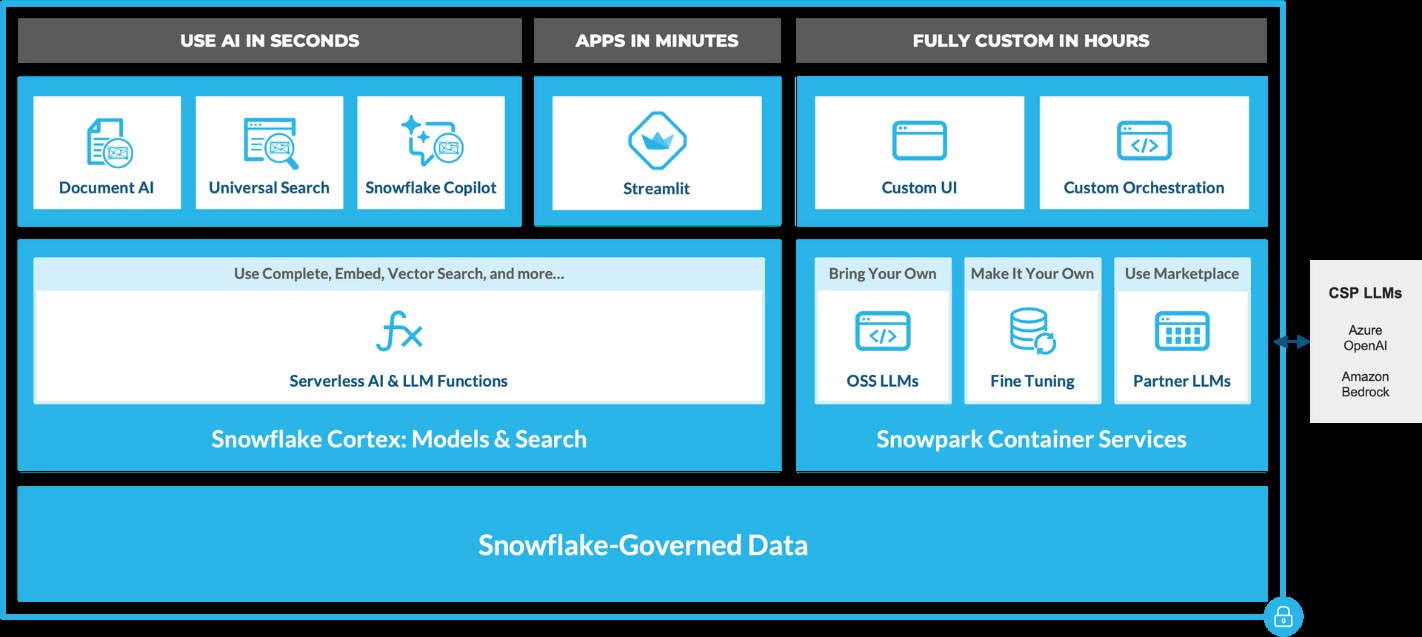 Source: https://www.snowflake.com/en/blog/use-ai-snowflake-cortex/
Key benefits include:
• Instant Access to AI Models: Snowflake users can leverage specialized machine learning and LLM models without managing expensive infrastructure. • Enhanced Data Insights: With Cortex, users can analyze vast datasets using Snowflake’s powerful AI capabilities, unlocking strategic insights to improve decision-making. • Simplified AI App Development: By removing technical barriers, Cortex democratizes AI access, enabling users of all skill levels to build AI applications.
LLM-Based Models for Unstructured Data (in private preview):
• Answer Extraction: Extract key information from unstructured datasets. • Sentiment Detection: Identify the sentiment in textual data. • Text Summarization: Create concise summaries of lengthy documents for quicker insights. • Translation: Perform large-scale text translation efficiently.ML-Based Models (available soon):
• Forecasting: Automatically forecast time series based on historical data, adjusting for seasonality and scaling. • Anomaly Detection: Detect outliers in time series data, useful for monitoring data pipelines. • Contribution Explorer: Identify key factors contributing to changes in metrics between two time intervals. • Classification: Categorize data into predefined classes to offer recommendations based on trends.
General Purpose Models for Broader Use Cases:
• Complete: Generate text completions using state-of-the-art open-source LLMs like Llama 2. • Text2SQL: Convert natural language queries into SQL, powered by Snowflake’s LLM, similar to the Snowflake Copilot feature. These serverless functions offer out-of-the-box capabilities that can be integrated into analytics workflows and app development in Snowflake. For example, with just a few lines of code, developers can embed these functions into chatbots using Streamlit. This allows Python-savvy users to build secure and powerful LLM applications quickly, often within hours.
Document AI
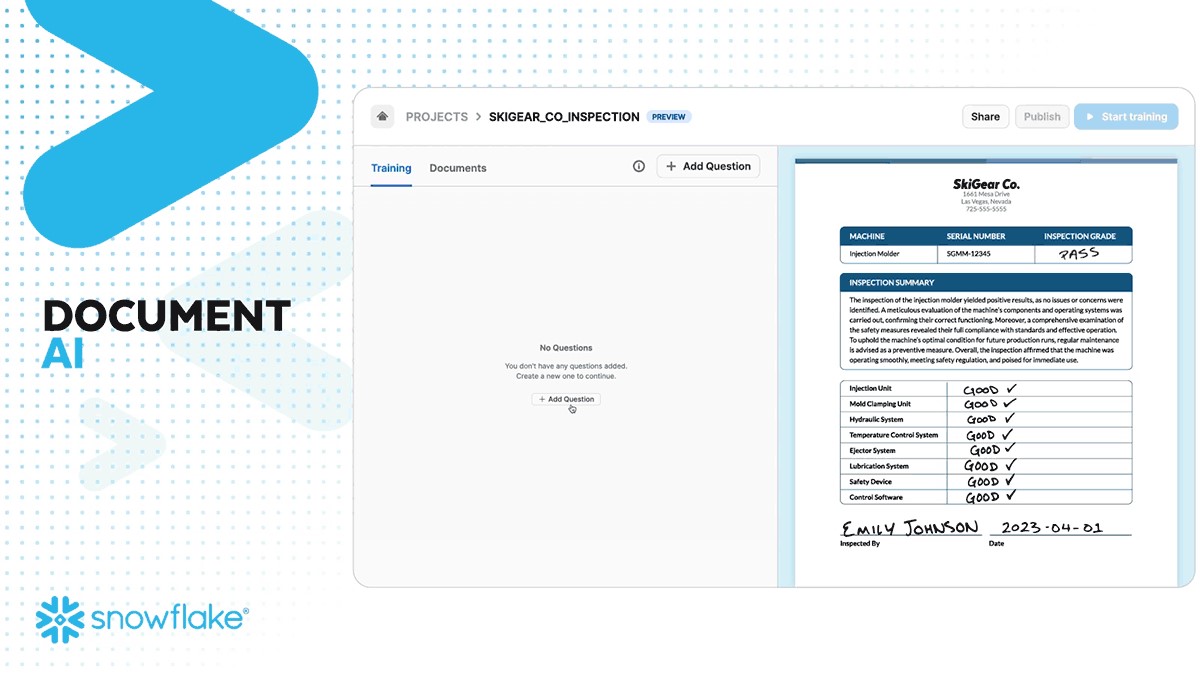
Document AI (currently in private preview) leverages large language models (LLMs) for seamless data extraction. By utilizing a pre-trained model and a user-friendly interface, customers can process various document types—such as PDFs, Word files, text files, and even screenshots—to quickly obtain answers to their queries. This capability can be scaled to build pipelines that automate data extraction, significantly reducing manual effort and saving time.
 Source: https://www.snowflake.com/en/blog/use-ai-snowflake-cortex/
Snowflake Copilot: Your AI-Powered SQL Assistant
Snowflake recently introduced Snowflake Copilot, an AI-driven solution that makes SQL query generation faster and more efficient. With Snowflake Copilot, users can ask data-related questions in plain English, and the AI will generate SQL queries to deliver the desired insights.
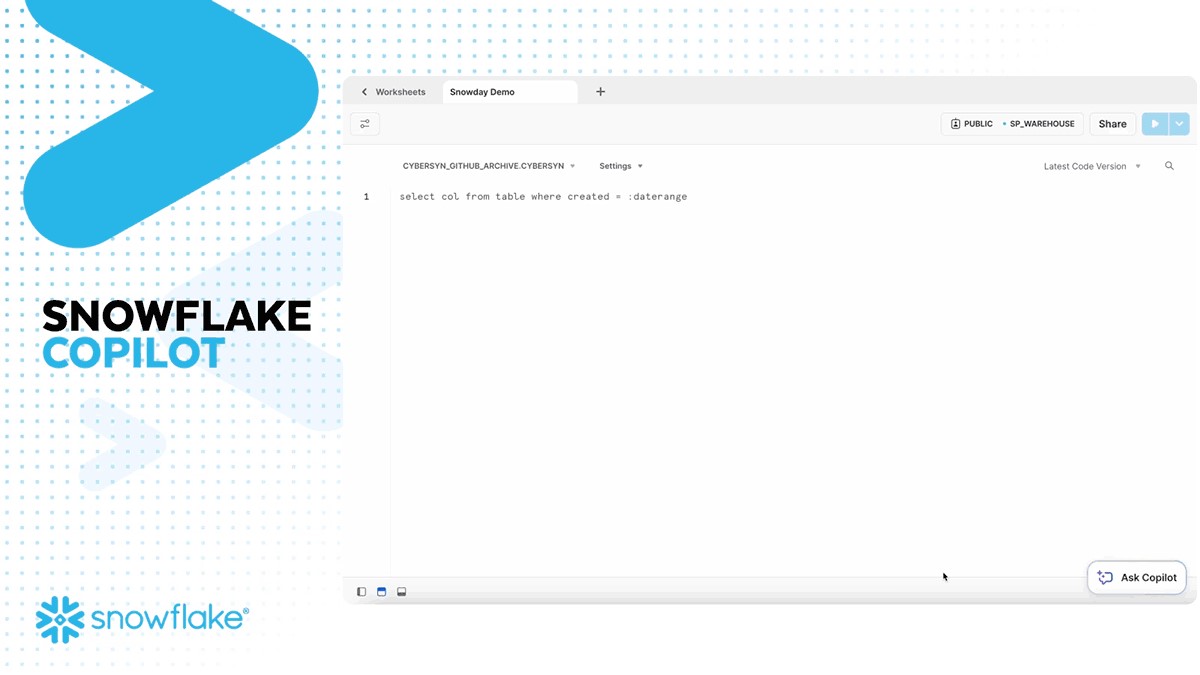
Key Features of Snowflake Copilot:
• Text-to-SQL: Users can interact with their data using natural language, eliminating the need for complex SQL coding. • Enhanced Accuracy: The AI continuously refines its understanding of user queries, providing more accurate SQL code suggestions. • Data Exploration: Ask open-ended questions about your data and receive detailed insights without writing complex queries.
The Future of Generative AI with Snowflake
Snowflake is pushing the boundaries of Generative AI with its continuous development of AI tools like Snowflake Cortex AI and Snowflake Copilot. These innovations pave the way for a future where natural language becomes the primary interface for data analysis, enabling businesses to extract more value from their data while maintaining robust governance.
By integrating AI capabilities directly into the data platform, Snowflake empowers users to streamline workflows, reduce processing times, and unlock new levels of productivity—all without needing deep AI expertise.
A Transformative Partnership for the Future
Generative AI, coupled with Snowflake’s powerful data platform, is a game-changer for businesses looking to innovate and scale. Whether it’s enhancing productivity, improving decision-making, or driving customer engagement, Snowflake’s AI solutions are built to transform how enterprises interact with their data.
As AI continues to evolve, so will Snowflake's offerings, bringing more capabilities, deeper insights, and greater efficiencies to businesses worldwide. Ready to experience the future of data analysis with Snowflake and AI? The journey has just begun!
Snowflake + Beinex Partnership
Beinex is a Snowflake Services Partner Premier Tier, and the partnership reaffirms Beinex’s commitment to delivering exceptional data solutions and positions the company at the forefront of industry advancements. Harnessing the true potential of the data, partnership drives innovation and success in the digital era.
Belonging to Snowflake Services Partner Premier Tier, Beinex leverages Snowflake’s advanced capabilities and seamlessly integrates them into its comprehensive data solutions. This enables Beinex to accelerate the pace of Digital Transformation for its clients, providing them with the tools necessary to extract maximum value from their data and thrive in an increasingly data-centric world.
Connect with us for a free demo: https://beinex.com/contact-us/
As a leader in cloud data platforms, Snowflake is at the forefront of integrating AI capabilities. Staying in sync with the latest AI trends, Snowflake is advancing its generative artificial intelligence capabilities by introducing features that do not necessitate specialized AI expertise or the management of a complex infrastructure.
Apparently, Snowflake has recently introduced Snowflake Cortex, which brings powerful AI capabilities that allow businesses to build and deploy AI applications directly within Snowflake’s secure environment. With access to industry-leading AI models, LLMs, vector search, and LLM-powered features, Snowflake Cortex allows users of any skill level to leverage generative AI for valuable, secure insights, simplifying the journey from data to action.
Related Articles

Data Ethics: Principles, Characteristics and Regulatory Aspects
The Principles of Data Ethics
And there are five of these principles:
- Ownership: The individual, himself/ herself/ themself, possesses the ownership of the data related to the person. A firm cannot take that data without the consent of the person lest it be deemed stealing.
- Transparency: The individual, aka data subject, has the right to know how a particular enterprise intends to collect, store and utilise the data concerned with the person.
- Privacy: Any bit of Personally Identifiable Information (PII) should not be made publicly available unless otherwise consented to. This includes the name, address, phone number etc.
- Intention: If the firm is collecting data on the individuals to fulfill unstated malicious intentions, it goes against the spirit of ethics.
- Outcome: If the collected data, despite the right intentions, come to have an unwanted outcome vis-a-vis the owner of the data, thanks to an algorithmic bias or any other reason, then the data ethics stand violated.
Characteristics of Data Ethics
Largely there are four characteristics that portray data ethics.
- Vouching for and ensuring data security and protecting customer info: When you handle customer data, as an enterprise, you are bound to protect it, prevent breaches, and ensure data never gets compromised. This is easier said than done. IBM India, in a report, outlines that “data breach average cost increased 2.6% from USD 4.24 million in 2021 to USD 4.35 million in 2022.”
- Offering clear benefits: It is a kind of social contract clause. You give your consumers greater speed, convenience, value and savings, and they (users, patients, clients, employees, customers and partners) will not be hesitant to part with their data as long as they are guaranteed and followed on the guarantee of data in safe hands not prone to misuse.
- Provision for consumer agency: Look at this scenario from a McKinsey report: “If a customer receives an offer and says, ‘I think I got this because of how you’re using my data, and that makes me uncomfortable. I don’t think I ever agreed to this,’ another company might say, ‘On page 41, down in the footnote in the four-point font, you did actually agree to this.’ Here, the customer has no agency. Worse than that, he feels he has been duped by the company. Game over! Remember, your reputation as an enterprise and the trust that you painstakingly cultivated over the years with customers can vanish in as much time as it takes for the customer to hit the post button on social media.
- Doing what you promise: The company should do what it has promised it will do or risk credibility and reputation.
In short, companies that adhere to the principles of fairness, privacy, transparency, and accountability in data matters can earn and retain the trust of their customers or clients. Trust is one power of attorney. It empowers a firm to not only ensure better customer service and experience by exercising the power of data it has been granted but also preserve and enhance its reputation.
Regulations and Data Ethics
Regulatory requirements and ethical obligations are mutually related and complementing. The European Union’s General Data Protection Regulation (GDPR) went into effect (only) in May 2018. But the Internet and data collection using the Internet predate it. Does it mean that companies could have done whatever they wanted to do with data prior to GDPR? Negative.
Ethics is your enterprise’s shadow. It is born with it as its twin. Regulation or law is the caretaker that comes afterwards.
“The bar here is not regulation. The bar here is setting an expectation with consumers and then meeting that expectation—and doing it in a way that’s additive to your brand,” an expert noted.
No wonder you are obliged to build company-specific data usage rules rather than await the regulators and legislators to chip in with guidelines and laws which could be too late or sometimes too little. Ascertain what are the no-go areas; areas where you cannot take the data to.
Once it is done, it is important that you communicate the data values internally and externally so that everyone is on the same page. You also need to set up an agency (e.g. Data Ethics Board) and institutionalise and propagate the values that you designed. C-suite should also be made a part of this ethics board or should be kept posted on the developments in the board.
Top Picks: Tableau 2020.4
As a frequent user of Tableau Desktop and Server, check out my top picks from the list.
• Improved dynamic parameter
• Multiple marks layer support for maps
• Block comments in calculations
• Web authoring enhancements
• Offline map support for Tableau Server
• Tableau Server Management (TSM) improvements
• Multiple key activation on Tableau Server prior to TSM initialization
• Analytics Extension for Tableau Online
• Merge duplicate external assets
• Tableau Prep Builder in the browser
Tableau Desktop
Improved Dynamic Parameter
The dynamic parameter was one of the features which I used extensively starting from 2020.1. The feature allows us to populate parameter values based on a specified field whenever the workbook is opened. We will be able to select only the field with matching data types.
The feature update announced in Tableau 2020.4 gives me more privilege to customize the Dynamic Parameter. I can now set a parameter’s range to a field’s min and max value upon opening the workbook, or when the field’s data source is refreshed.
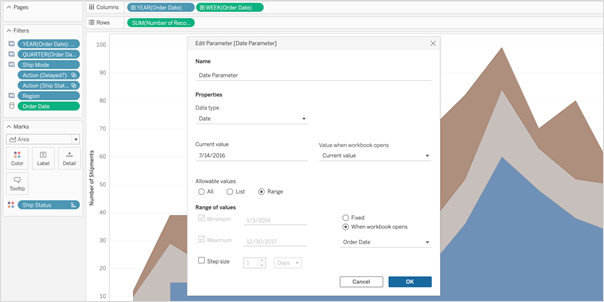 So, whenever I open the workbook or the extract is refreshed, Tableau displays the unique values within the range specified, giving more control over the parameter values displayed.
Multiple Marks Layer Support for Maps
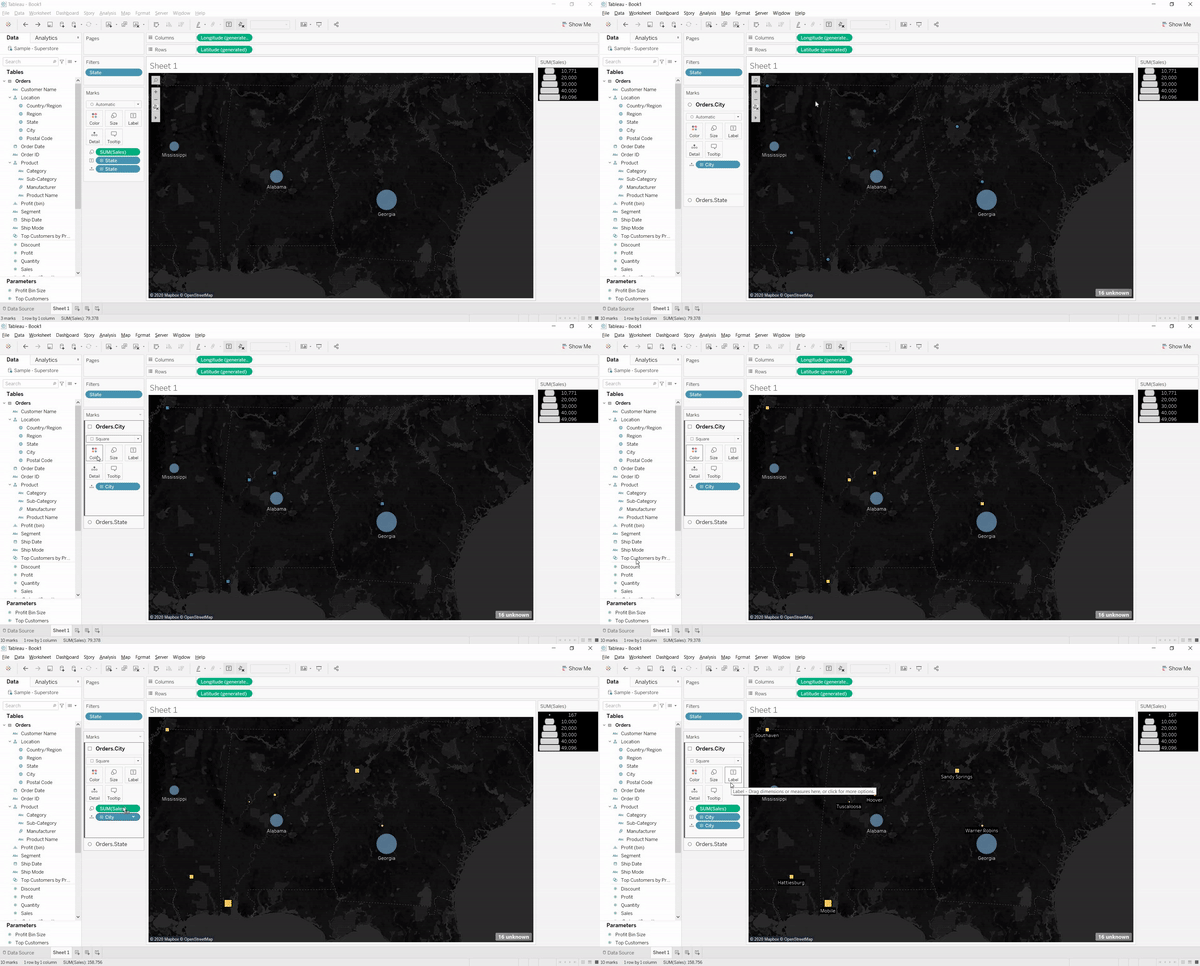
This is an exceptional feature to bring multiple spatial layers and context together to better understand and analyze geospatial data and map views. I will be able to include multiple marks layers from a data source to map visualizations and enhance the geospatial analysis. I can present more context in a single map view and perform further analysis with this feature.
So, whenever I open the workbook or the extract is refreshed, Tableau displays the unique values within the range specified, giving more control over the parameter values displayed.
Multiple Marks Layer Support for Maps
This is an exceptional feature to bring multiple spatial layers and context together to better understand and analyze geospatial data and map views. I will be able to include multiple marks layers from a data source to map visualizations and enhance the geospatial analysis. I can present more context in a single map view and perform further analysis with this feature.
 Block Comments in Calculations
Block comments is a simple yet one of the most useful features for me, which Tableau has announced in 2020.4. I often used to add comments in complex calculations for easy understanding in future references. Earlier, only single-line comments were possible, limiting the description I could add. But from now on, I can add comments of any length to calculation windows with block comments by simply starting the comment with /* and ending with */.
What makes it unique is that the new multi-line block comment feature is consistent with other popular programming languages. This feature is an example of Tableau’s on-going effort to provide its customers with an intuitive user experience.
Block Comments in Calculations
Block comments is a simple yet one of the most useful features for me, which Tableau has announced in 2020.4. I often used to add comments in complex calculations for easy understanding in future references. Earlier, only single-line comments were possible, limiting the description I could add. But from now on, I can add comments of any length to calculation windows with block comments by simply starting the comment with /* and ending with */.
What makes it unique is that the new multi-line block comment feature is consistent with other popular programming languages. This feature is an example of Tableau’s on-going effort to provide its customers with an intuitive user experience.
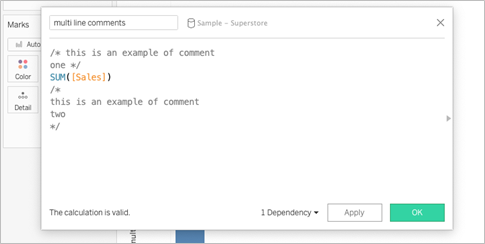 Tableau Server
Web Authoring Enhancements
Starting from Tableau 2020.4, it is possible to author dashboards from the browser just like how we design it in Tableau Desktop. With this web authoring enhancements, I can include Highlight actions, Format Mark Labels, apply filters to worksheets, create fixed sets, and even create extract in my workbooks from the browser itself. I no longer have to make changes from Tableau Desktop and publish it to the server. I can directly do it from the browser itself.
Tableau Server
Web Authoring Enhancements
Starting from Tableau 2020.4, it is possible to author dashboards from the browser just like how we design it in Tableau Desktop. With this web authoring enhancements, I can include Highlight actions, Format Mark Labels, apply filters to worksheets, create fixed sets, and even create extract in my workbooks from the browser itself. I no longer have to make changes from Tableau Desktop and publish it to the server. I can directly do it from the browser itself.
 Offline Map Support for Tableau Server
Rendering dashboards with maps is now faster compared to previous versions. Now, I can create maps using the offline map style in web authoring, ensuring the performance of map views in Tableau Server. Offline map support is a great deal for organizations with strict internet access restrictions, assuring that map view access to all its users.
Tableau Server Management (TSM) Improvements
Tableau Server Administration activities like installation, upgrade and backup are now easy like never before. I can retry installation or upgrade from the last checkpoint in case of an unexpected issue or error during installation or upgrade, saving my efforts to obliterate tableau server.
Backups can be performed twice as fast as previous versions, and I can monitor the progress with the new progress bar giving visibility into what step the backup is on and how much time is remaining.
Backups can also be scheduled using TSM command starting from 2020.4 and that is awesome. I no longer need to prepare batch script and depend on the windows task scheduler to schedule the backups on regular intervals; instead, I can schedule it with just a single command.
Multiple Key Activation on Tableau Server Prior to TSM Initialization
During Tableau Server installation, it is now possible to activate multiple license keys prior to TSM initialization. I will be able to save a lot of time by eliminating the need to restart after the installation is completed to activate multiple licenses and experience a smoother installation.
Analytics Extension for Tableau Online
The power of the Analytics extension is now unlocked in Tableau Online too. The feature was already available in Tableau Server, and it helped us dynamically perform advanced analysis with models and functions in R, Python and other platforms.
Analytics extension in Tableau Online significantly enhances the scope of using Advanced Analytics by the common users.
Merge Duplicate External Assets
Earlier, the Database or Table with similar names used to appear as multiple assets within Tableau Catalog. But, the new feature helps me to merge those multiple assets into a single one. I can manage assets easily and keep an organized view of External assets by merging the common ones.
Offline Map Support for Tableau Server
Rendering dashboards with maps is now faster compared to previous versions. Now, I can create maps using the offline map style in web authoring, ensuring the performance of map views in Tableau Server. Offline map support is a great deal for organizations with strict internet access restrictions, assuring that map view access to all its users.
Tableau Server Management (TSM) Improvements
Tableau Server Administration activities like installation, upgrade and backup are now easy like never before. I can retry installation or upgrade from the last checkpoint in case of an unexpected issue or error during installation or upgrade, saving my efforts to obliterate tableau server.
Backups can be performed twice as fast as previous versions, and I can monitor the progress with the new progress bar giving visibility into what step the backup is on and how much time is remaining.
Backups can also be scheduled using TSM command starting from 2020.4 and that is awesome. I no longer need to prepare batch script and depend on the windows task scheduler to schedule the backups on regular intervals; instead, I can schedule it with just a single command.
Multiple Key Activation on Tableau Server Prior to TSM Initialization
During Tableau Server installation, it is now possible to activate multiple license keys prior to TSM initialization. I will be able to save a lot of time by eliminating the need to restart after the installation is completed to activate multiple licenses and experience a smoother installation.
Analytics Extension for Tableau Online
The power of the Analytics extension is now unlocked in Tableau Online too. The feature was already available in Tableau Server, and it helped us dynamically perform advanced analysis with models and functions in R, Python and other platforms.
Analytics extension in Tableau Online significantly enhances the scope of using Advanced Analytics by the common users.
Merge Duplicate External Assets
Earlier, the Database or Table with similar names used to appear as multiple assets within Tableau Catalog. But, the new feature helps me to merge those multiple assets into a single one. I can manage assets easily and keep an organized view of External assets by merging the common ones.
 Tableau Prep
 Builder in the Browser
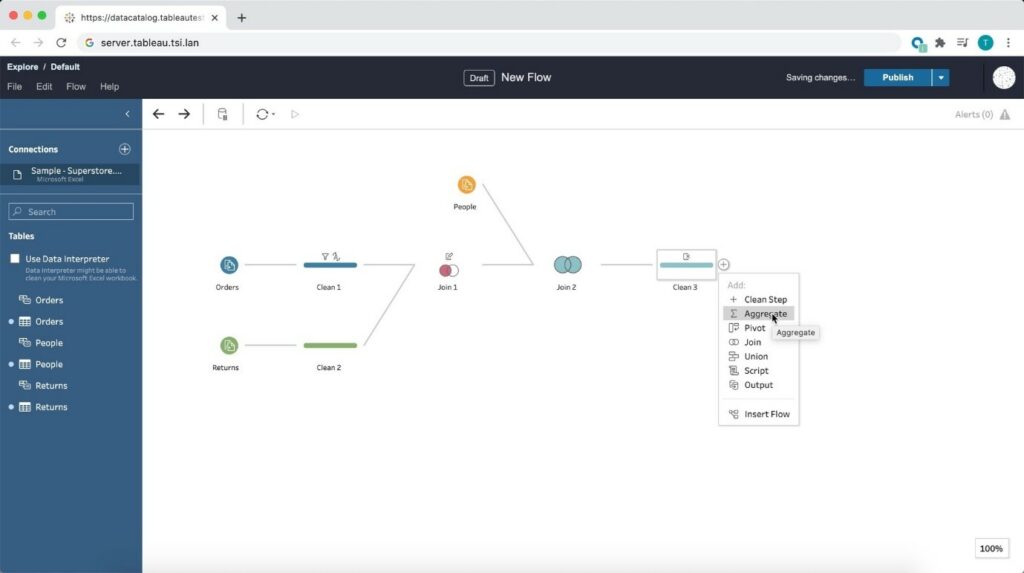
Prepare the data for visualizations from anywhere using a browser! Starting from 2020.4, Tableau is bringing the data prep process into one integrated platform on the web. Now I can easily prepare and manage prep flows from anywhere using a browser.
Tableau Prep
Tableau Prep Builder in the Browser
Prepare the data for visualizations from anywhere using a browser! Starting from 2020.4, Tableau is bringing the data prep process into one integrated platform on the web. Now I can easily prepare and manage prep flows from anywhere using a browser.
 Conclusion
Tableau is progressively evolving as a single platform for data preparations, visualization, and collaboration with every update and version release.
Author : Firdous Maqbool
Images Courtesy : Tableau
Conclusion
Tableau is progressively evolving as a single platform for data preparations, visualization, and collaboration with every update and version release.
Author : Firdous Maqbool
Images Courtesy : Tableau
So, whenever I open the workbook or the extract is refreshed, Tableau displays the unique values within the range specified, giving more control over the parameter values displayed.
Multiple Marks Layer Support for Maps
This is an exceptional feature to bring multiple spatial layers and context together to better understand and analyze geospatial data and map views. I will be able to include multiple marks layers from a data source to map visualizations and enhance the geospatial analysis. I can present more context in a single map view and perform further analysis with this feature.
Block Comments in Calculations
Block comments is a simple yet one of the most useful features for me, which Tableau has announced in 2020.4. I often used to add comments in complex calculations for easy understanding in future references. Earlier, only single-line comments were possible, limiting the description I could add. But from now on, I can add comments of any length to calculation windows with block comments by simply starting the comment with /* and ending with */.
What makes it unique is that the new multi-line block comment feature is consistent with other popular programming languages. This feature is an example of Tableau’s on-going effort to provide its customers with an intuitive user experience.
Tableau Server
Web Authoring Enhancements
Starting from Tableau 2020.4, it is possible to author dashboards from the browser just like how we design it in Tableau Desktop. With this web authoring enhancements, I can include Highlight actions, Format Mark Labels, apply filters to worksheets, create fixed sets, and even create extract in my workbooks from the browser itself. I no longer have to make changes from Tableau Desktop and publish it to the server. I can directly do it from the browser itself.
Offline Map Support for Tableau Server
Rendering dashboards with maps is now faster compared to previous versions. Now, I can create maps using the offline map style in web authoring, ensuring the performance of map views in Tableau Server. Offline map support is a great deal for organizations with strict internet access restrictions, assuring that map view access to all its users.
Tableau Server Management (TSM) Improvements
Tableau Server Administration activities like installation, upgrade and backup are now easy like never before. I can retry installation or upgrade from the last checkpoint in case of an unexpected issue or error during installation or upgrade, saving my efforts to obliterate tableau server.
Backups can be performed twice as fast as previous versions, and I can monitor the progress with the new progress bar giving visibility into what step the backup is on and how much time is remaining.
Backups can also be scheduled using TSM command starting from 2020.4 and that is awesome. I no longer need to prepare batch script and depend on the windows task scheduler to schedule the backups on regular intervals; instead, I can schedule it with just a single command.
Multiple Key Activation on Tableau Server Prior to TSM Initialization
During Tableau Server installation, it is now possible to activate multiple license keys prior to TSM initialization. I will be able to save a lot of time by eliminating the need to restart after the installation is completed to activate multiple licenses and experience a smoother installation.
Analytics Extension for Tableau Online
The power of the Analytics extension is now unlocked in Tableau Online too. The feature was already available in Tableau Server, and it helped us dynamically perform advanced analysis with models and functions in R, Python and other platforms.
Analytics extension in Tableau Online significantly enhances the scope of using Advanced Analytics by the common users.
Merge Duplicate External Assets
Earlier, the Database or Table with similar names used to appear as multiple assets within Tableau Catalog. But, the new feature helps me to merge those multiple assets into a single one. I can manage assets easily and keep an organized view of External assets by merging the common ones.
Tableau Prep
Tableau Prep Builder in the Browser
Prepare the data for visualizations from anywhere using a browser! Starting from 2020.4, Tableau is bringing the data prep process into one integrated platform on the web. Now I can easily prepare and manage prep flows from anywhere using a browser.
Conclusion
Tableau is progressively evolving as a single platform for data preparations, visualization, and collaboration with every update and version release.
Author : Firdous Maqbool
Images Courtesy : Tableau
Tableau User Group: One Unique Network and a Force Multiplier
You are into Business Intelligence & Data Visualisation and want to :
- • Learn more about Tableau and its infinite visualization possibilities
- • Get some exposure and want to showcase your work to the world and get some valuable skill-enhancing feedback
- • Network with like-minded peers
Be assured, you are in the right place!
Learn, grow and network: that is what Tableau User Groups are all about. You may be a novice, a beginner, an intermediate or an expert in Tableau. TUG, as they are known in an abbreviated form, provide you with spaces to support connection, growth, and inspiration.
Be a part of an excellent ecosystem of ideas! Get the inspiration you need! Showcase your work, get useful feedback and flourish!
TUG UAE Launch
Now comes the big news: Tableau User Group, UAE launch is around the corner, and we all are quite excited about it!- Date: 14 December 2022; Wednesday
- Venue:The First Collection Business Bay Hotel, Dubai
- Time: 5.00 PM to 8.00 PM GST
- Speakers: Kush Goel and Sanchit Katiyar of Beinex Consulting
- Sponsor: Beinex
Be there, and you will be joined by Kush Goel and Sanchit Katiyar of Beinex Consulting to provide you with more insights to Tableau.
You can secure tons and tons of motivation from your peers across geographies and industries and further your analytics skills. You will have a community cheer you and guide you along the way! All in Dubai!
TUG! The pull of it is incredible.
The Tableau User Group Experience
You need not be an expert to join TUG! This idea comes from a Tableau User Group leader from Oklahoma City.
“A mistake I made early on was thinking I had to be the expert. At the end of the day, it’s about the community and how you can get the community involved and talking. Remember (as a leader) your job is…not to know everything about Tableau,” Amber Smart noted. The purpose of TUG is to share knowledge, engage in networking and give back to the community.
“Here, everything about Tableau is discussed, from basics to advanced. Thus, you get to learn best practices, tips, shortcuts, little tricks that help you save time, ramp up efficiency and a lot of other things,” said Abdelaziz Mahjoub, Lead Consultant, Analytics at Beinex Consulting. He was instrumental in setting up Cairo TUG.
“If there is one aspect that marks TUG, then it is the eagerness with which the participants imbibe knowledge. Everyone was curious to know what they could know more, and all of them were kind enough to share with others what they already knew,” Mahjoub noted.
So, be there and make the TUG, UAE launch a grand success.
Here is the link to the TUG UAE LinkedIn: https://www.linkedin.com/groups/14118611/

Don’t Miss Out on These 6 New Features of Tableau 2023.2
List of Key Features in Tableau 2023.2
- Enhanced Multi-row calculations in Tableau Prep
- Line Patterns
- Personal Access Token Admin Control
- Editable Viz Alt Text
- Salesforce Data Cloud Connector
- Effortless Tracking of Known Issues
1. Enhanced Multi-row calculations in Tableau Prep
Gone are the days of complex formulas and tedious coding. With just a few clicks, Tableau Prep empowers you to perform multiple-row calculations, making your data preparation process a breeze. Calculate the difference from, percent difference from, or even execute moving calculations effortlessly without breaking a sweat.
Tableau Prep's enhanced calculation capabilities are like a magic wand in your hands, eliminating the need for intricate calculations or diving into complicated code. You're now equipped with the tools to effortlessly transform your raw data into actionable insights, paving the way for smarter decision-making and unlocking the true potential of your analytics journey.
Get ready to unleash the full potential of your data with LOOKUP calculations. Seamlessly compose complex expressions that enable you to access and analyse data across multiple rows, empowering you to unveil hidden insights and patterns.
2. Introducing Line Patterns
The next game-changing feature in Tableau 2023.2 is Line Patterns. This exciting addition provides a whole new level of flexibility and customisation when it comes to creating visually stunning data visualisations.
With Line Patterns, you now have the power to choose from a variety of line styles, including solid, dashed, or dotted lines. These patterns allow you to effortlessly highlight specific areas of interest within your visualisations, making it easier than ever to convey complex information with clarity and impact.
Imagine comparing actual data against modelled values with striking visual cues or effortlessly differentiating lines in dynamic or crowded visualisations. Line Patterns give you the ability to create eye-catching visuals that captivate your audience and make your data come to life. No longer will you be limited to static, monotonous lines. Line Patterns empower you to add a touch of creativity and personalisation to your visualisations.
3. Personal Access Token Admin Control
Gone are the days of compromising on security compliance. With this latest release, Site Admins are granted an array of tools to manage PAT creation privileges, tailor their validity periods to organisational needs, and wield their data protection prowess like never before. You hold the keys From a single dashboard to determine who can create PATs and fine-tune their lifespans, ranging from a day to a full year.
But the excitement doesn't stop there! We've taken proactive security measures to the next level. For Tableau Cloud sites created after version 2023.2, PATs come disabled by default, providing an additional layer of protection. Moreover, we've listened to your feedback, and the default expiration period has been thoughtfully shortened to 180 days, aligning with best practices and ensuring optimal data security.
4. Editable Viz Alt Text
With the latest feature, content authors have the power to edit the automatically generated alt text, opening the doors to endless possibilities. Whether through the Data Guide panel or the Accessibility option in the Worksheet drop-down menu, you can now add up to 2,500 characters of detailed alt text to craft captivating descriptions that bring your visualisations to life. Step into a realm of creativity and inclusivity, ensuring that everyone can fully comprehend and appreciate the story behind your data.
5. Salesforce Data Cloud Connector
With Tableau's enhanced Salesforce Data Cloud connector, say goodbye to complex installations as this driverless connector effortlessly connects your data sources. Use Data Spaces, where you can create customised visualisations tailored to specific contexts, organising metadata, data, and processes to empower stakeholders. Enjoy a user-friendly interface that replaces object API names with object labels, making table selection a breeze. With support for 11 additional functions, including datetime capabilities, supercharge your content creation and data analysis processes.
6. Effortless Tracking of Known Issues
We've streamlined the process of tracking known issues, making it effortless to stay in the loop. Discover the centralised Known Issues page, where you can effortlessly monitor the status of experiences, from working as expected to be in review, in progress, scheduled, or deployed. With intuitive drop-down filters, you can easily navigate through Tableau components and subscribe to specific issues for automatic email updates.
Additionally, our revamped Tableau Help now includes comprehensive "Release Notes" documentation, offering insights into new features and updates across Tableau Cloud, Tableau Server, Tableau Desktop, and Tableau Prep. Stay informed, empowered, and ahead of the curve with our enhanced status tracking and knowledge resources.
Upgrade to Tableau 2023.2
The release of Tableau 2023.2 brings a host of exciting features and enhancements that empower users to unlock the full potential of their data. With each release, Tableau continues to evolve and revolutionise the data analytics landscape, empowering users to discover insights, tell compelling stories, and easily make data-driven decisions. Upgrade to Tableau 2023.2 and embark on a data exploration and innovation journey like never before.
If you are interested in learning more about earlier versions of Tableau, click the links below:
Tableau New Features Unveiled: Tableau 2023.1 Release
Tableau Version 2021.4: Bringing Automation to Data Management
How Beinex Can Assist You
Beinex, a premier Tableau partner, provide sustainable analytics solutions to organisations and help to build superior data visual analytics capabilities internally through our bespoke training programs. Our team of Tableau-certified consultants are real-life Tableau business users who are passionate about Tableau and delivering a world-class experience. Connect with us for a Tableau free trial.

Four Ways SMBs can Leverage Digital Transformation
The digital transformation uses digital technologies to transform businesses’ operations, deliver customer value, and compete in the market. For SMBs, digital transformation can provide a pathway to growth, unlocking new potential for efficiency, productivity, and innovation.
The Context and the Harvest Potential
Reports suggest that SMBs that are digitally engaged can increase their profits up to twice as fast as their offline counterparts. Digital transformation opens up new market opportunities for SMBs, driving overall growth.
Some noteworthy figures include the expected economic value of digital transformation to reach $100 trillion by 2025. While 21% of organisations believe their digital transformation efforts are complete, 87% of senior business leaders consider digitalisation a company priority, with 79% of corporate strategists indicating that it is reinventing their business and creating new revenue streams.
Moreover, 71% of leaders believe that the role of the workforce is crucial in implementing digital transformation, as employees play an essential part in driving and adopting new technologies.
How to Get Started?
To commence the digital transformation process for your SMB, you should initiate a discussion with your team regarding the concept of digital transformation and how it will impact your business. Additionally, it is crucial to consider a few points, such as:
• Identify the areas where your business is falling behind compared to your competitors.
• Determine which components of your current business plan require replacement or technological advancement.
• Evaluate the operations that are time-consuming and can be automated
Here are some key pathways in which SMBs can unlock their potential through digital transformation:
1. Embracing Cloud Computing
One fundamental way SMBs can unlock their potential through digital transformation is by embracing cloud computing. Cloud computing has become a game-changer for SMBs, providing access to powerful tools and technologies without significant upfront investment. With cloud-based solutions, SMBs can scale their operations, reduce IT costs, and gain the agility needed to compete in a fast-paced market.
Cloud computing provides SMBs access to various services, including storage, computing power, and software applications, all delivered over the Internet. Using cloud-based services, SMBs can eliminate the need for on-premise IT infrastructure, reduce maintenance costs, and free up resources to focus on core business activities.
Cloud-based solutions also offer SMBs the flexibility to scale their operations quickly and efficiently. With cloud computing, SMBs can easily adjust their IT infrastructure to meet changing business needs, whether adding new users, increasing storage capacity, or rolling out new applications.
2. Leveraging Data Analytics
Data is the lifeblood of modern businesses, and SMBs can harness the power of data analytics to gain insights into customer behaviour, market trends, and operational performance. By leveraging data analytics tools, SMBs can make more informed decisions, improve processes, and identify new growth opportunities.
Data analytics tools can help SMBs to:
• Monitor customer behaviour and preferences
• Identify trends and patterns in sales data
• Optimise pricing and inventory management
• Improve marketing effectiveness
• Enhance operational efficiency
To leverage data analytics effectively, SMBs must have the proper data management and analysis tools. This includes collecting, storing, and analysing data from various sources, such as customer relationship management (CRM) systems, sales data, and social media metrics.
3. Automating Business Processes
Automation has revolutionised how businesses operate, and SMBs can benefit from automating routine tasks and processes. Automation can help SMBs to reduce costs, increase efficiency, and improve customer satisfaction by freeing up resources to focus on higher-value activities.
Automated processes can include:
• Invoicing and billing
• Inventory management
• Payroll processing
• Customer service
• Marketing and sales
By automating these processes, SMBs can reduce errors, improve productivity, and deliver a more consistent customer experience. Automation can also free up resources to focus on more strategic initiatives, such as product development and business expansion.
4. Embracing E-commerce
E-commerce has become a vital channel for SMBs to reach customers and generate revenue. By embracing e-commerce platforms, SMBs can expand their reach, reduce overhead costs, and offer customers a convenient, digital-first experience.
E-commerce platforms provide SMBs with a range of benefits, including:
• Access to a global customer base
• Reduced overhead costs
• Increased sales and revenue
• Improved customer experience
• Flexibility and scalability
To remain competitive in the digital marketplace, SMBs must adopt online marketing strategies and cloud-based solutions for operational efficiency. Moreover, customer-centricity is the primary focus in the digital market, unlike the traditional profit-oriented approach.
Summing Up
The scope of digital transformation is vast, and there is much more to it than meets the eye. Studies show that 85% of decision-makers feel digital integration is necessary within two years or less.
As such, the future of digital transformation will feature technology at the heart of all business processes and prioritise customer satisfaction. However, there will be significant challenges regarding needing more resources and skills, which business leaders must address and mitigate.
Beinex Digital, a part of Beinex Holdings, is a digital transformation entity with a comprehensive suite of independent products that address specific business gaps, use cases, and needs. The growth strategy of Beinex Digital revolves around inducing digital transformation as a way of life for businesses worldwide.
Rather than waiting for change to happen, businesses should start acting. The question is, are you prepared to embrace digital transformation?