How AI Decision-Making is Improving Enterprise Outcomes
Blog
Share 
RUNNING THE MIGHTY SMALL LANGUAGE MODEL PHI-3 ON SNOWFLAKE
 26 April 2024
  Team Beinex
 What is an SLM?
A Small Language Model (SLM) is tailored to excel in simpler tasks, offering boosted accessibility and user-friendliness for organizations operating with limited resources. Besides, they can be readily fine-tuned to align with specific requirements. Small language models are particularly well-suited for organizations aiming to develop applications capable of operating local devices instead of relying on cloud infrastructure. They are especially beneficial for tasks that do not necessitate extensive reasoning or immediate responses.
Reasons to use SLMs
Given the growing popularity and applicability of SLMs across various domains, particularly in areas like sustainability and the volume of data required for training, there are multiple reasons for employing them.
What is Phi-3?
Microsoft has a suite of small language models (SLMs) known as 'Phi,' demonstrating outstanding performance across various benchmarks. Microsoft's recent release is Phi-3, a series of open AI models. The Phi-3 models represent a prototype of capability and cost-effectiveness among small language models (SLMs), exceeding models of equivalent and larger sizes across the spectrum of coding, language, reasoning, and mathematical standards. This launch broadens the array of high-calibre models accessible to customers, providing them with more practical options as they craft and construct generative AI applications.
Phi-3-mini, a 3.8B language model, is accessible through Microsoft Azure AI Studio, Hugging Face, and Ollama. It is offered in two context-length variations—4K and 128K tokens. Notably, it is the first model within its category to support a context window of up to 128K tokens with minimal impact on quality. Furthermore, it is instruction-tuned, implying that it has been trained to comprehend and adhere to diverse instructions, mirroring natural human communication patterns. This ensures that the model is readily deployable straight out of the box. Phi-3-mini is available on Azure AI to leverage the deploy-eval-finetune toolchain, and it is also accessible on Ollama for developers to execute locally on their laptops.
Features of Phi-3
Phi-3 models exhibit distinctive superiority over language models of comparable and larger dimensions on key benchmarks, showcasing the following features:
Snowflake meets Phi-3: Advantages
The key pain point about LLMs is the computing required to host and run them. Setting up a dozen GPUs to run models can be expensive and complex. There's where Snowflake steps up. Snowflake's compute pool option enables users to easily and quickly set up and manage compute clusters. Phi-3 comes into the picture because of its cost-effective GPU utilization.
Can you imagine a situation where your language model only requires less than 3GB of GPU memory for inference? Well, now it's possible, all thanks to Phi-3. It's a state-of-the-art SLM that produces excellent results over GP3.5 and Mistral 8x7B, which are much bigger models. This opens the door for more cost-effective solutions to be brought up in the AI space. Add Snowflake for hosting; you have an excellent setup to host, test, and build AI applications. Read below how Beinex managed to run Phi-3 on Day 0 in Snowflake.
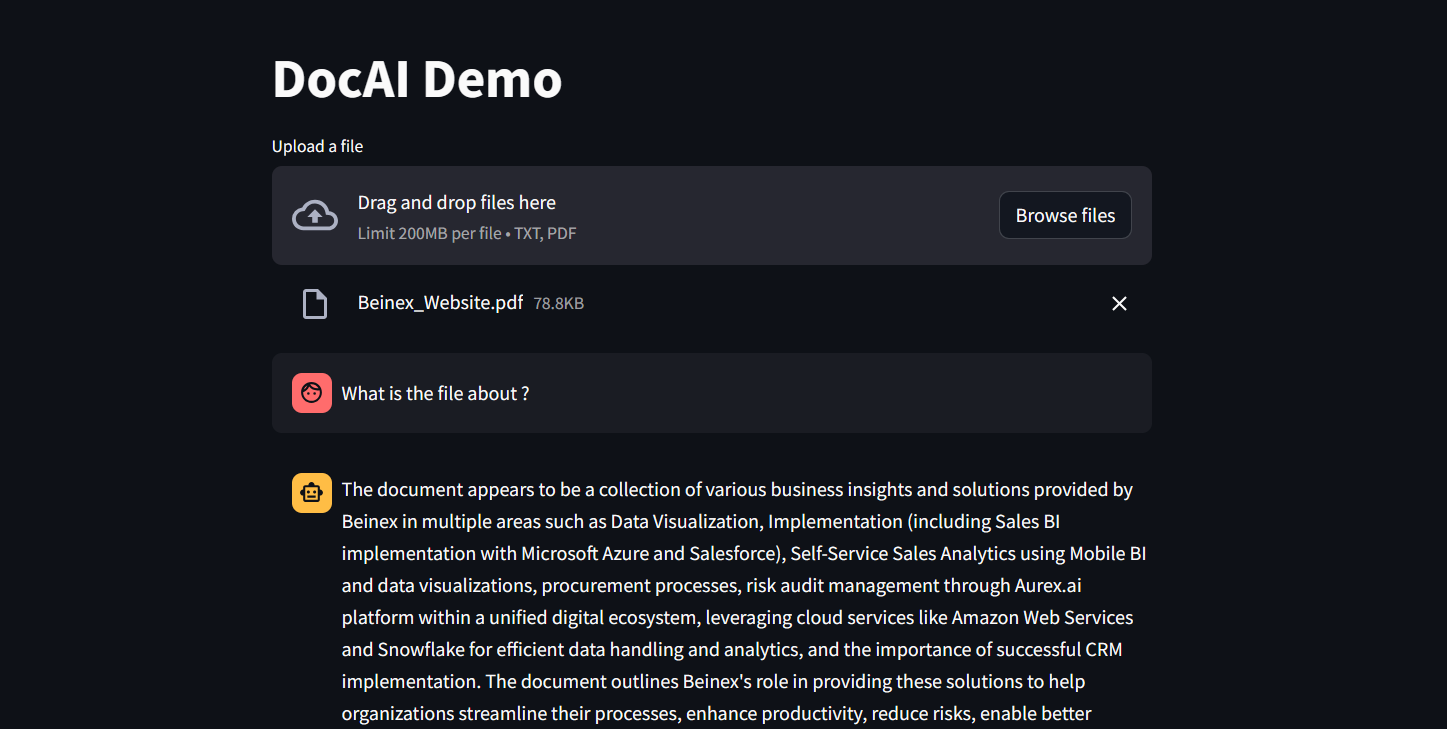 Figure 1: DocAI running on Phi-3
Implementing Phi-3 on Snowflake: What Beinex Did and How Beinex Did it?
Beinex has seamlessly integrated Phi-3 into Snowflake to help enterprises unlock their data's full potential through advanced language processing capabilities and enhance decision-making with deeper insights. The integration facilitates Snowflake users to:
Here's a detailed guide on implementing Phi-3 on Snowflake:
Step 1: Create Necessary Objects
-- Run by ACCOUNTADMIN to allow connecting to Hugging Face to download the model
-- Stage to store LLM models
CREATE STAGE <stagename> IF NOT EXISTS models
DIRECTORY = (ENABLE = TRUE)
ENCRYPTION = (TYPE='SNOWFLAKE_SSE');
-- Stage to store YAML specs
CREATE STAGE <stagename> IF NOT EXISTS specs
DIRECTORY = (ENABLE = TRUE)
ENCRYPTION = (TYPE='SNOWFLAKE_SSE');
-- Image repository
CREATE OR REPLACE IMAGE REPOSITORY images;
-- Compute pool to run containers
CREATE COMPUTE POOL GPU_NV_S
MIN_NODES = 1
MAX_NODES = 1
INSTANCE_FAMILY = GPU_NV_S;
Step 2: Docker Image Code - ollama
FROM ollama/ollama
RUN $(ollama serve > output.log 2>&1 &) && sleep 10 && ollama pull phi3 && pkill ollama && rm output.log
ENTRYPOINT ["ollama"]
CMD ["serve"]
Step 3: Tag and Push the Docker Image
docker tag ollama <SNOW_ORG-SNOW_ACCOUNT>.registry.snowflakecomputing.com/db/schema/image respository /ollama
docker push <SNOW_ORG-SNOW_ACCOUNT>.registry.snowflakecomputing.com db/schema/image repository /ollama
Step 4: Docker Image - UDF
FROM python:3.11
WORKDIR /app
ADD ./requirements.txt /app/
RUN pip install --no-cache-dir -r requirements.txt
ADD ./ /app
EXPOSE 5000
ENV FLASK_APP=app
CMD ["flask", "run", "--host=0.0.0.0"]
App.py content is given below :
from flask import Flask, request, Response, jsonify
import logging
import re
import os
from openai import OpenAI
client = OpenAI(
base_url='http://ollama:11434/v1',
api_key="EMPTY",
)
model = "phi3"
app = Flask(__name__)
app.logger.setLevel(logging.ERROR)
def extract_json_from_string(s):
logging.info(f"Extracting JSON from string: {s}")
# Use a regular expression to find a JSON-like string
matches = re.findall(r"\{[^{}]*\}", s)
if matches:
# Return the first match (assuming there's only one JSON object embedded)
return matches[0]
# Return the original string if no JSON object is found
return s
@app.route("/", methods=["POST"])
def udf():
try:
request_data: dict = request.get_json(force=True) # type: ignore
return_data = []
for index, col1 in request_data["data"]:
completion = client.chat.completions.create(
model=model,
messages=[
{
"role": "system",
"content": "You are a bot to help extract data and should give professional responses",
},
{"role": "user", "content": col1},
],
)
return_data.append(
[index, extract_json_from_string(completion.choices[0].message.content)]
)
return jsonify({"data": return_data})
except Exception as e:
app.logger.exception(e)
return jsonify(str(e)), 500
Step 6: YAML File
spec:
containers:
- name: ollama
image: <SNOW_ORG-SNOW_ACCOUNT>.registry.snowflakecomputing.com/ db/schema/image respository /Phi3
resources:
requests:
nvidia.com/gpu: 1
limits:
nvidia.com/gpu: 1
env:
NUM_GPU: 1
MAX_GPU_MEMORY: 24Gib
volumeMounts:
- name: llm-workspace
mountPath: /<stage name>
- name: udf
image: <SNOW_ORG-SNOW_ACCOUNT>.registry.snowflakecomputing.com/ db/schema/image respository /ollama_udf
endpoints:
- name: chat
port: 5000
public: false
- name: llm
port: 11434
public: false
volumes:
- name: llm-workspace
source: "@<llm stage_name>"
Step 7: Upload YAML File and Create Service
Upload the YAML file to the created stage, where the stage name in the YAML file should match the stage created in Step 2.
-- Create service
create service phi3
IN COMPUTE POOL <name of compute pool created>
FROM @dash_stage
SPECIFICATION_FILE = '<name of yaml file uploaded>';
Step 8: Create Service Function
Create a service function on the service (after it starts).
create or replace function phi3chat(prompt text)
returns text
service= phi3
endpoint=chat;
Check Service Status
Use the following command to check the status of the service:
SELECT
v.value:containerName::varchar container_name,
v.value:status::varchar status,
v.value:message::varchar message
FROM (
SELECT parse_json(system$get_service_status('<service name>'))
) t,
LATERAL FLATTEN(input => t.$1) v;
Benefits of Running Phi-3 on Snowflake
1. Cost-Effectiveness and Efficiency:
2. Compatibility with Smaller GPUs:
3. Exceptional Performance:
4. Faster Response Times:
SLM vs LLM
The choice between small and large language models hinges on organizational needs, task complexity, and resource availability.
LLMs excel in applications requiring the orchestration of intricate tasks, encompassing advanced reasoning, data analysis, and contextual comprehension.
On the other hand, SLMs present viable options for regulated industries and sectors facing scenarios necessitating top-tier results while maintaining data within their premises.
Both large and small language models possess distinct strengths and applications. While large language models thrive in managing complex workflows, small language models deliver impressive performance despite their compact size.
While some customers may exclusively require small models, others may favour larger models, with many seeking to integrate both types in various configurations. Ultimately, the optimal selection depends on the unique context and objectives of the organization. Besides transitioning from large to small models, the trend is evolving towards a diversified portfolio of models. This means that instead of relying on a single model, customers can choose from various models with different sizes, capabilities, and resource requirements. This empowers customers to decide the best model for their scenario, balancing performance and resource constraints.
In Artificial Intelligence, the advent of Large Language Models (LLMs) has ushered in a wave of innovation, empowering users to unleash their productivity and creativity. However, their significant size often translates to substantial computational demands. Over time, Small Language Models (SLMs) have emerged, expanding our ability to engage with diverse natural and programming languages. Nevertheless, certain user inquiries demand greater precision and specialized knowledge beyond the scope of generalized language models.
Consequently, there's a growing need for tailored Small Language Models capable of rivalling LLM performance while mitigating runtime costs and ensuring a secure and easily manageable framework. While LLMs remain paramount for addressing complex tasks, Microsoft has spearheaded the development of a series of SLMs that retain many LLM capabilities but boast smaller sizes and are trained on more compact datasets.
Related Articles

Steps to Create Sets and Set Actions in Tableau
Top Differences between Dynamic Set and Fixed Set
Dynamic Set- Set members change when the underlying data changes.
- It has a single dimension.
- Set members do not change.
- It can be single-dimensional or multidimensional.
Steps to Create a Dynamic Set
The process to create a dynamic set is as follows: In the Data pane, right-click on the sub-category dimension and choose Create > Set. (Figure 1)
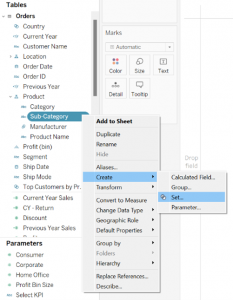
Figure 1: Creating a Set
• In the Create Set dialog box, set up your set. You can configure it using the following tabs:
1. General: Use the General tab to choose one or multiple values to be considered when computing the set. Alternatively, you can choose the Use All option to consistently consider all members, even when new members are added or removed.
If you know the top-selling products beforehand, you can manually select the products as shown in Figure 2 below.
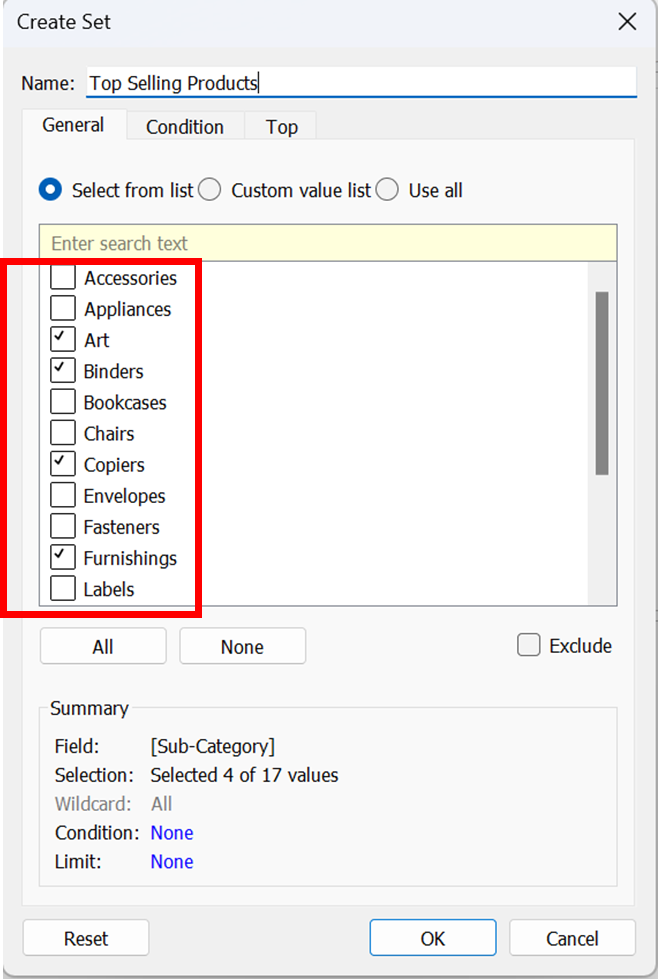
Figure 2: Creating a Set using General Tab
2. Condition: Utilize the Condition tab to establish criteria that decide which members should be incorporated into the set.
You can specify this condition and create the set if you need products with sales greater than $50,000. (Figure 3)
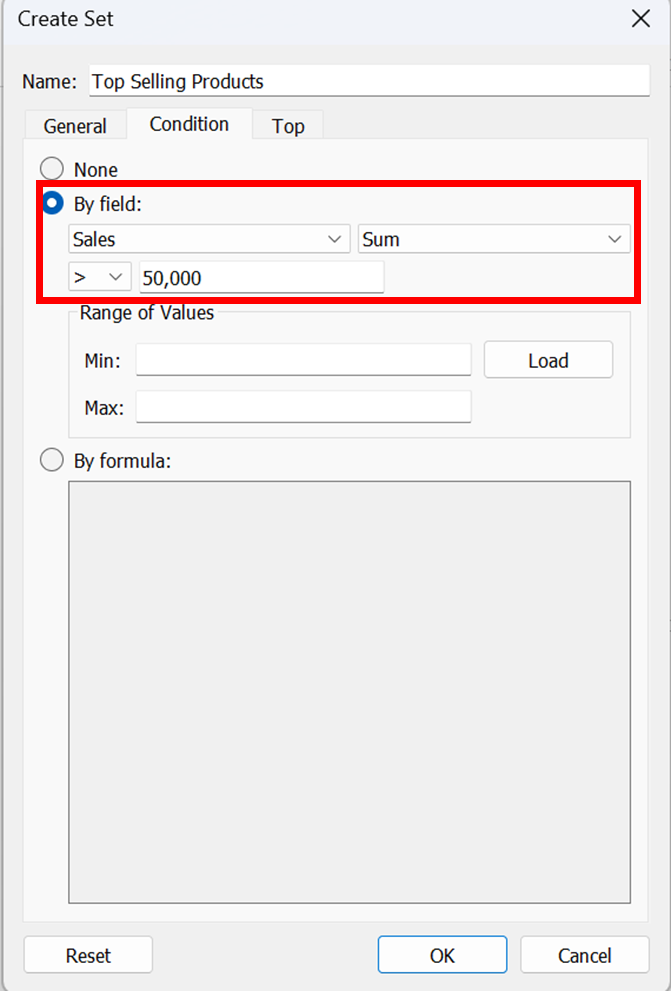
Figure 3: Creating a Set using Condition Tab
3. Top: Employ the Top tab to set restrictions on which members should be included in the set.
For instance, you can establish a limit based on total sales, where only the top 5 products with the highest sales are included. (Figure 4)
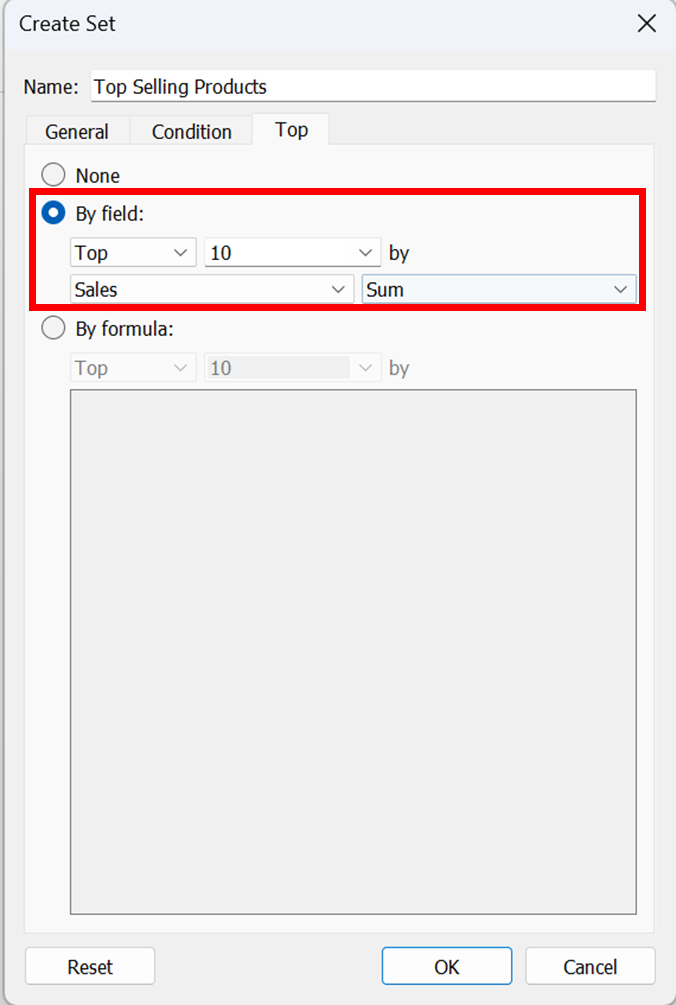
Figure 4: Creating a Set using Top Tab
- Once you have completed the configuration, click the "OK" button.
- The newly created set will appear at the bottom of the Data pane within the Sets section. You can identify it by the set icon, which denotes a set field.
Steps to Create a Fixed Set
The process to create a fixed set is as follows:
- In the developed visualisation, select one or more marks from the view (Figure 5).
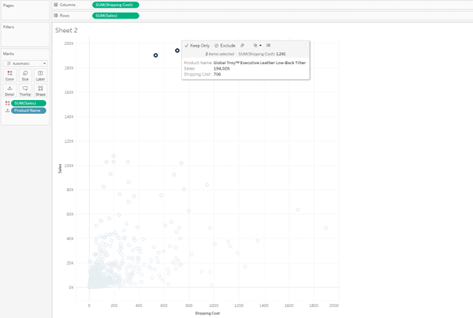
Figure 5: Selecting the marks.
- Right-click on the selected mark and select “Create Set” (Figure 6).

Figure 6: Creating the set.
- Type a name for the developed set (Figure 7).
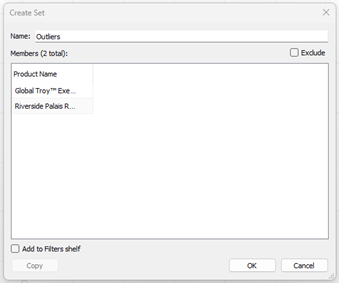
Figure 7: Typing the Set Name.
- When finished, select “OK”. This newly created set can be accessed from the data pane. When this set is placed in the filter, the view will be filtered to show only the relevant set values.
Top Benefits of Sets in Tableau
• Top N or Bottom N Analysis: Sets can filter the data to display only the top or bottom N values based on a specific condition. For example, you could create a set to show the top 10 products by profit or even combine sets and display the top N and bottom N products by profit in a single chart. (Figure 8)

Figure 8: Top 3 and Bottom 3 Products by Profit
• Segmentation Analysis: Sets can also segment data into groups based on a specific condition. This can be useful for analysing performance differences between different groups. For example, you could create a set to segment customers based on their geographic location.
• Excluding Data: Sets can be used to exclude specific data points from a visualisation. For example, you could create a set to exclude customers who have not purchased in the last six months.
What is Set Actions in Tableau
Set actions allow users to modify the values within a set, on selection of marks within a view. This enables your audience to engage directly with a visualisation or dashboard and control various aspects of their analysis.
To utilise set actions:
- Create sets associated with your data source.
- Build set actions using the created sets.
- Optionally, create calculated fields that incorporate the sets.
- Construct visualisations referencing the sets.
- Test and adjust the set actions for desired behaviour.
To create a set action that helps in drilling down category:
1. Create a set that selects a particular category (Figure 9 shows creating a set using the general tab selecting only furniture)

Figure 9: Creating Category Set using General Tab
2. If you are in a worksheet, go to Worksheet > Actions.
If you are in a dashboard, go to Dashboard > Actions.

3. In the Actions dialog box, click “Add Action” and choose "Change Set Values."
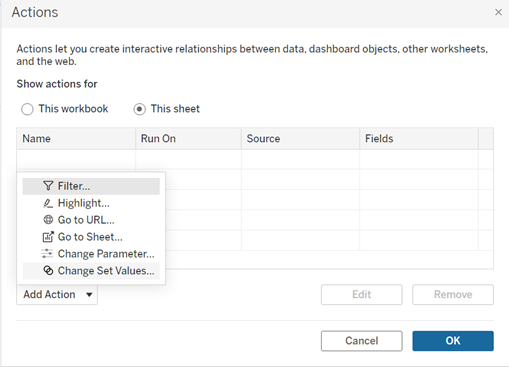
4. In the Add/Edit Set Action dialog box:
• Provide a descriptive name for the action.
• Choose a source sheet or data source. By default, the current sheet is selected. If you opt for a data source or dashboard, you can select specific sheets within it.
• Choose the desired method for users to execute the action:
- Hover: The action will trigger when a user hovers the mouse cursor over a mark in the view.
- Select: The action will activate when a user clicks a mark in the view.
- Menu: The action will initiate when a user right-clicks (or control-click on Mac) a selected mark in the view and then selects an option from the context menu.
• To specify the target set:
- First, choose the data source from the available options.
- Then, select the desired set from the Target Setlist.

Figure 10: Setting up set action
• Specify what happens when the action is run in the view:
- Assign values to set - Replaces all values in the set with selected values.
- Add values to set - Adds individually selected values to the set.
- Remove values from the set - Removes individually selected values from the set
• When the selection is cleared in the view:
- "Keep set values" will retain the current values in the set without any changes.
- "Add all values to set" will include all possible values in the set.
- "Remove all values from set" will remove all previously selected values from the set.
5. After configuring the desired behaviour, click "OK" to save the changes and return to the view.
6. To ensure the set action functions as intended, interact with the visualisation, and test its behaviour.
Benefits of Set Actions
- Filtering: Set actions can filter data based on user selections. For example, you could create a set step that filters the data to show only the top 10 customers in a particular region.
- Highlighting: Set actions can also highlight data based on user selections. For example, you could create a set action highlighting all the customers who have purchased in a particular month.
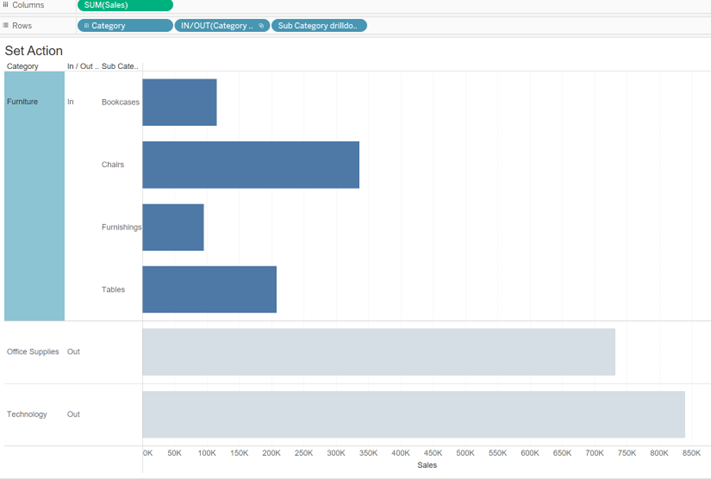
- Drill-downs: Set actions can create drill-downs that allow users to explore the data in greater detail. For example, you could create a set action enabling users to drill down from a high-level view of category by sales to a more detailed view of sales by sub-category. (Figure 11)
Geo Spatial Analysis Using Map Layers, Buffer Calculations, and Parameter Actions
For instance, the dashboard given below mirrors a project undertaken for a client seeking insights into the pandemic's impact on their business across specific areas. They wanted to determine the number of stores stocking their product within a defined radius, highlighting the local business impact amid the pandemic.
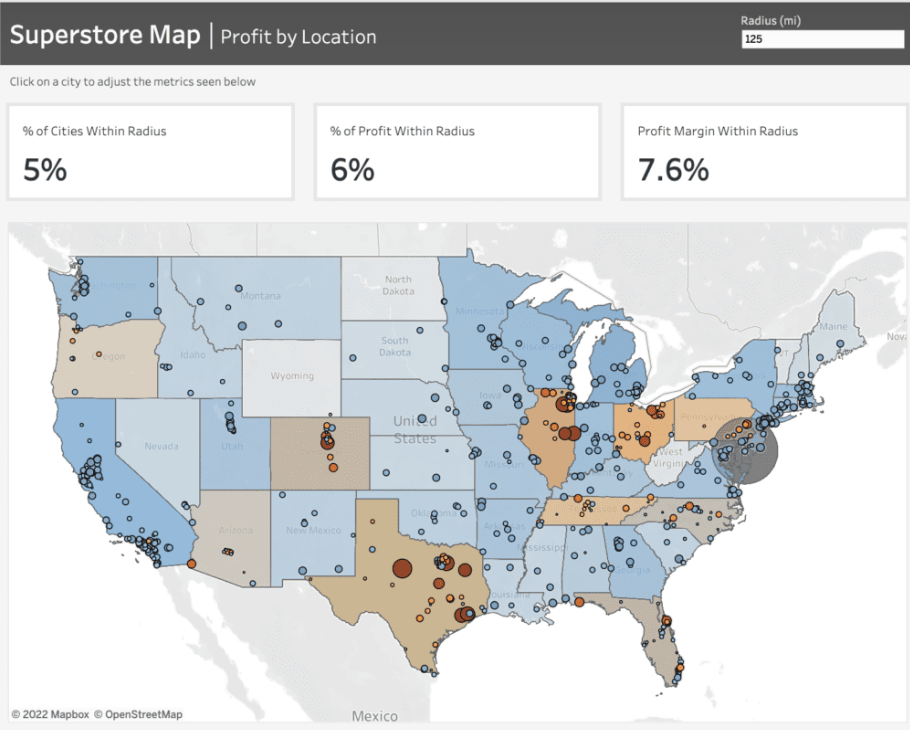 To craft the map showcased in this dashboard, we leverage Tableau's map layers feature introduced in version 2020.4. For further insights into this functionality, additional details can be found here.
Prior to initiating the map creation process, frequently refer to the Profit Margin field. Here's the calculation for this field: it computes the percentage of Sales that translates into Profit. This calculation enables us to gauge the profitability derived from our sales figures.
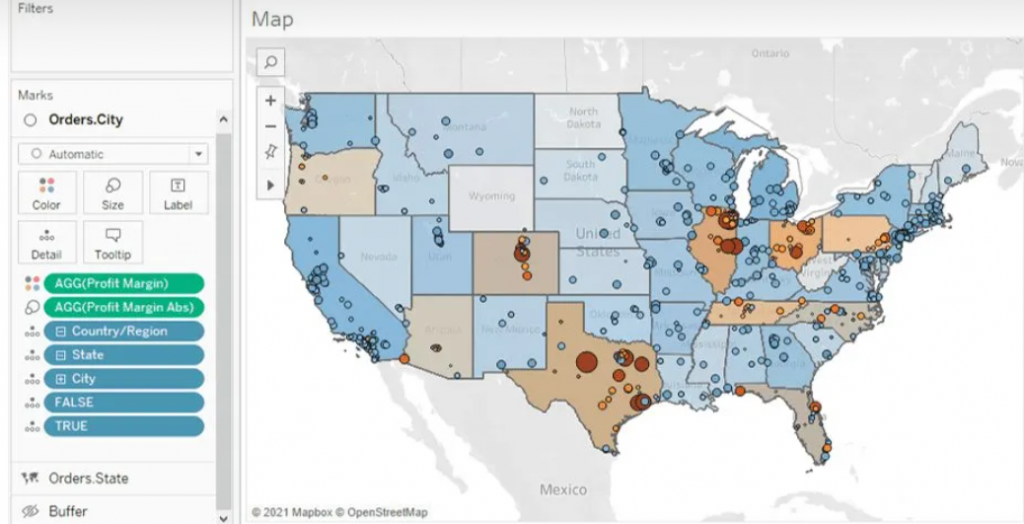
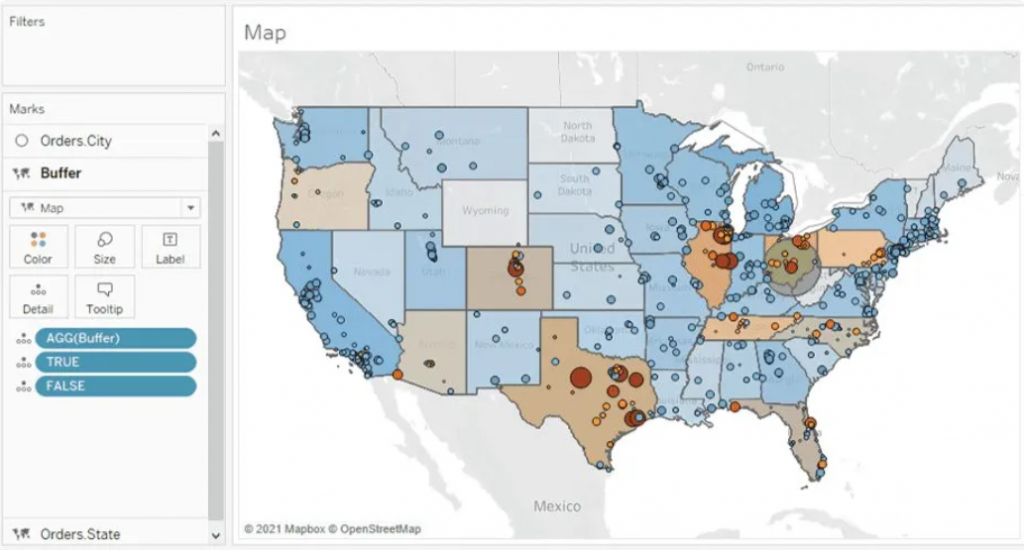
 For the States map layer, the State field is utilized and placed on the 'Detail' shelf. Each state is color-coded based on its Profit Margin.
Moving to the Cities layer, the City field is added onto the top left area labeled "Add a Marks Layer." To ensure the visibility of every city, the State level of detail is included as well. This accounts for cities existing in multiple states, displaying every city/state combination. Cities are color-coded using the Profit Margin field, with additional color based on the absolute value of the Profit Margin. This helps visualize the range and direction of profitability for each city.
Buffer Calculation
The Buffer calculation generates a radius, known as a "buffer," around a specific map point, defined within the syntax parameters. Here's the syntax breakdown for the Buffer: The initial part determines the center location, followed by the distance around the point, and finally, the chosen unit of measurement.
 To establish the desired centroid point, we employ the Makepoint function. This function simply utilizes latitude and longitude coordinates to generate a point on the map. Below is the calculation illustrating its usage.
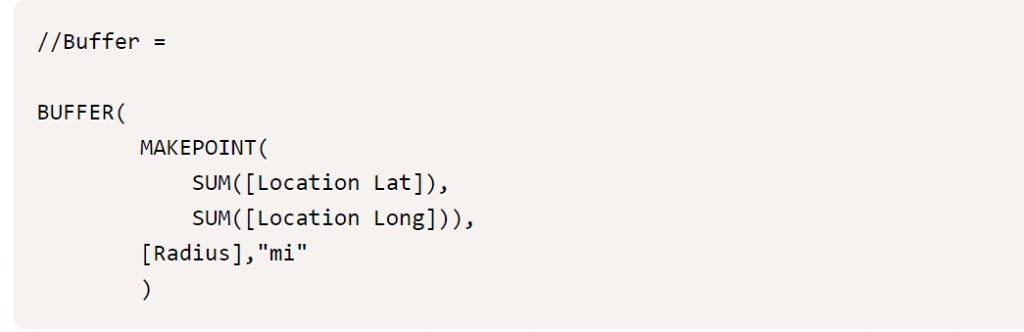
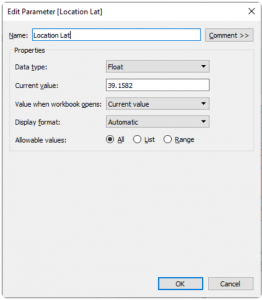
To achieve the interactivity you desire, you'll begin by creating three parameters: [Location Lat], [Location Long], and [Radius]. These parameters offer flexibility, allowing you to adjust them within the dashboard interface.
As you click on different cities, the [Location Lat] and [Location Long] fields dynamically change, altering the central point. Meanwhile, the [Radius] field, functioning as an input parameter, enables you to modify the radius distance according to your preferences. This setup grants you personalized control over these parameters directly within the dashboard.
With the creation of the final map layer field, you can now drag this field to the top left of the map and add it to the existing layers. Once done, you'll have all the map layers integrated into the map, allowing you to recreate the dashboard as depicted below. This comprehensive setup will mirror the dashboard layout and functionality.
Parameter Actions
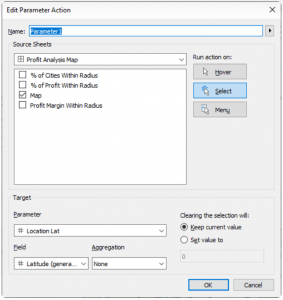
Parameter Actions are essential at this stage to ensure dynamic interaction within the map layers. By implementing parameter actions, we enable the Location Lat and Location Long fields to adjust dynamically when clicking on a city. This action directly affects the MAKEPOINT() field within the Buffer calculation, effectively altering the radius location. Below, you can observe the setup of the parameter action and how it facilitates this dynamic transformation.
 Finally, we aim for these parameters to influence the available metrics showcased at the top of the dashboard. These metrics offer insights into the concentration of profit and profit margin within the selected radius. Below, you'll find the supporting calculations and the formulae for the metrics displayed on the dashboard. These metrics serve as indicators of profitability and profit margin concentration within the chosen radius.
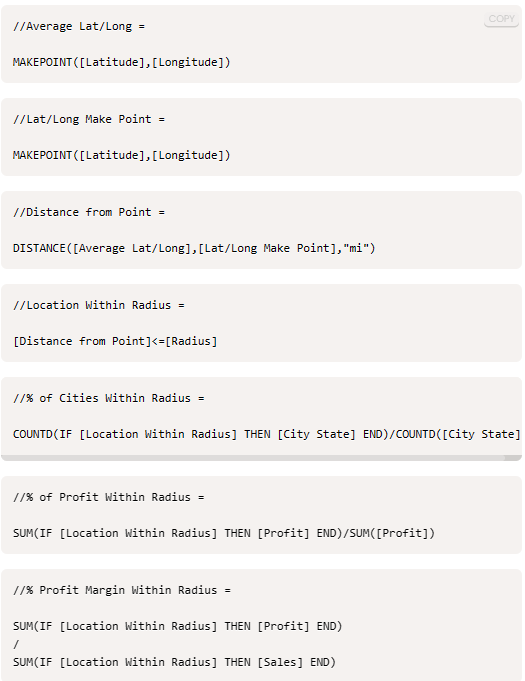
Wrapping up, creating interactive data visualizations opens doors to explore and comprehend information, fostering informed decision-making and exploration of new analytical paths.

IMAGE IN BAR CHART – NEW LEVELS OF TABLEAU VISUALIZATION!
The following blog depicts the technique created by Alex Jones (@jusdespommes) blog about “How to… create a chart from an image in Tableau!”.
Show/Hide Containers
Tableau 2019.2 has introduced an option to show/hide containers (when the container is a floating type). Many experts have come up with different use cases such as hiding and showing the filters, parameters, or even a worksheet with a click which occupies much space in the dashboard using this feature.
This feature is pretty simple to use and comes in handy when we want to save some space in our dashboards.
How to Swap image in Bar Chart?
1.Create a simple bar chart in Tableau 2019.2. We have used “Top 5 Grossing Games Worldwide 2018” to create a bar chart and sorted based on the revenue.
2.Remove the label, header and export the worksheet to image. Worksheet > Export > Image (Choose ‘view’ in Export Image dialog box)
3. Open Photopea, which is an online photo editor and open the saved worksheet image.
File > Open > Image
4. Now, download 2 images from online which we are going to use for bar chart.
5.Copy and paste image 1 on top of the bar image. Now we will be having two layers of images one above another.
(We can even re-position, crop the image if needed)
6.Choose ‘Magic Wand’ from the tool bar at left side. Click on the image, and we can see the selection in dotted lines.
7.Choose the top layer (image 1) and click delete. Now we can able to get the below image.
8.The background of the image needs to transparent. So, delete the below layer (bar chart image) using delete icon at the bottom right corner.
9.Now, choose File > Export as > .PNG to save the image as .png format (this will retain the transparent layer)
10.Repeat the same steps with image 2 to get the same effect.
Note: Keep the same resolution and image size as the previous one.
10.1.Now, open Tableau Desktop and bring in the image as floating type.
11.We have to position the bar chart over the image. To make it easy, decrease the opacity of the bar chart and give border.
12. Add labels and tooltip to the bar chart.
13.Now the dashboard looks like this. We can able to hover on bars to see tooltip.
14.Now, comes the trick of using ‘Show/Hide Containers’ to swap image. Bring a container to floating and add image 2 to the container. (Set the padding to zero)
15.Next, we have to position the both images and the bar chart one above another. To make it easy, use x, y axes and size w, h to position accurately.
Note: Make sure the position of the 3 objects (Use Floating Order) follows the below order as all are in floating.
- Image 1 (Below layer)
- Image 2 inside container (Middle layer – where show/hide option is to be used)
- Bar Chart (Top layer)
16.Choose the container and right click at the top right corner. Enable ‘Add Show/ Hide Button.’ Now we can see a floating button.
17.We can customize the button by adding image and tooltip to buttons.
18.We have used below customized images (created with PowerPoint) for buttons to swap between 2 images.
19.Another simple trick is that we can control the transparency of the image by adjusting the opacity of the bars.
20.Take a look at the final dashboard….

How to Automate and Improve Your Data Governance Processes for Better Results
What is Data Governance?
Data governance is the process of managing the availability, usability, integrity, and security of data in an enterprise system. It establishes policies, procedures, and standards for how data is collected, stored, used, and shared. It's about ensuring the right data is available to the right people at the right time, in a secure and compliant manner.Why Automate Data Governance?
Automating data governance processes brings several benefits, including: • Improved Data Quality: Automation can identify and correct data errors, inconsistencies, and duplicates, leading to improved data quality and more reliable insights. • Increased Efficiency: Automation streamlines data governance processes, reducing manual effort, freeing up valuable time, and accelerating decision-making. • Reduced Costs: Automation helps reduce the costs associated with manual data governance processes, minimizing errors and the need for rework. • Enhanced Compliance: Automation helps ensure compliance with data privacy regulations, such as GDPR, CCPA, and HIPAA, minimizing risk and potential penalties. • Better Decision-Making: By improving data quality and accessibility, automation enables better, more data-driven decision-making. • Scalability: Manual processes struggle to keep up with growing data volumes. Automation allows your governance framework to scale effectively.How to Automate Data Governance Processes?
Several approaches exist for automating data governance, and often a combination is most effective: • Data Discovery and Classification: Automated tools, like data catalogs, can help discover and classify data based on its content, sensitivity, and other criteria. This is the foundation for understanding your data landscape. • Data Quality Monitoring: Automated tools can continuously monitor data quality, identify potential issues, and trigger alerts for remediation. • Data Lineage Tracking: Automated tools can track the origin and movement of data, providing a clear audit trail and helping to ensure data quality and compliance. This is crucial for understanding how data is transformed and used. • Data Access Control: Automated tools can enforce data access policies, ensuring that only authorized users can access sensitive data, protecting privacy and security. • Data Masking and Anonymization: Automated tools can mask or anonymize sensitive data to protect privacy while still allowing for data analysis and testing. • Metadata Management: Automated tools can capture and manage metadata, providing context and meaning to data assets, making them easier to find and understand.The Role of Data Catalogs like Alation
Data catalogs play a critical role in automating data governance. They act as a central inventory of all data assets, providing a single source of truth about your data. Modern data catalogs like Alation offer: • Automated Data Discovery and Profiling: Automatically scan and profile data sources to identify and catalog data assets. • Data Lineage: Visually map the journey of data from its origin to its consumption, showing transformations and dependencies. • Data Quality Rules and Monitoring: Define and enforce data quality rules and automatically monitor data for compliance. • Collaboration and Knowledge Sharing: Enable data users to collaborate, share knowledge about data assets, and contribute to data governance efforts. • Search and Discovery: Empower users to easily find the data they need, along with relevant metadata and context.Best Practices for Automating Data Governance
• Develop a Data Governance Strategy: Before automating, define clear goals, objectives, and metrics for your data governance program. • Identify Key Stakeholders: Engage business users, IT, compliance, and other stakeholders to ensure alignment and buy-in. • Choose the Right Tools: Select tools that meet your specific needs and integrate with your existing data infrastructure. Consider a platform approach that can address multiple aspects of governance. • Implement a Phased Approach: Start with a pilot project to demonstrate value and refine your approach before scaling to the entire organization. • Focus on Data Literacy: Train your employees on data governance policies, procedures, and the use of automated tools. • Monitor and Evaluate: Continuously monitor the effectiveness of your automated data governance processes and make adjustments as needed.How to Embrace Better Data Governance?
Data governance doesn’t have to be a bottleneck. Organizations can reduce manual workloads, improve compliance, and drive innovation by adopting automation and leveraging tools like data catalogs. Ready to transform your data governance strategy? Get a Free Assessment Now!
Building a Sustainable Future for Your Business A Roadmap for Business Success in the 21st Century