How AI Decision-Making is Improving Enterprise Outcomes
Blog
Share 
RecapAI: An AI-Powered Assistant for Priority Tracking and Follow-Through
 4 December 2025
  Team Beinex
 What is RecapAI Agent
RecapAI is an AI-powered assistant that helps professionals quickly regain context after time away from work. It analyzes meetings, deadlines, communications, and updates to identify what has changed, what requires action, and what should be prioritized next. Instead of reviewing multiple tools and threads, users receive a clear, structured overview of critical follow-ups, key discussions, and upcoming priorities.
Connect With Us for a Free Demo!
How RecapAI Supports You
While you are away, RecapAI quietly keeps your workspace running. It monitors your inbox, tracks meeting updates, notes shifting deadlines, and identifies what needs your attention. It works like a calm, thoughtful assistant who knows exactly what matters and what can wait.
Our RecapAI agent welcomes you with a brief, clear summary – no scrolling, no searching, no overwhelm. You open your workspace, and everything makes sense instantly.
Your:
- • Shifted deadlines
- • Key meeting
- • Follow-ups you need to send
- • People to catch up
- • Upcoming priorities – all sorted for you.
It feels like someone has already organised your day and highlighted only what matters. RecapAI Agent isn't just a summarizer – It understands your priorities. You return after a break and instantly know what needs your attention.
Summing Up
RecapAI goes beyond simple summarization by aligning information with the user’s responsibilities and priorities. It supports focused decision-making and quicker re-engagement. The best part is that RecapAI makes sure users return to work informed, organized, and ready to act.
Connect with us if you want to know more about RecapAI: https://beinex.com/contact-us/
Imagine this- You finally take that long, overdue vacation. No meetings. No notifications. Zero stress. You wake up slowly, enjoy long breakfasts, spend unrushed time with your family, the kind of peace you’ve been postponing for months.
For a few days, work feels distant – exactly how a break should feel. Then you return to work. And boom, everything hits at once. Meetings have piled up. Clients are waiting. Deadlines have shifted. Suddenly, the quiet vacation starts to feel like a guilt trip as the next few days disappear into catching up. You skim emails halfheartedly, jump between threads, and try to piece together what you missed. Before you even settle in, the workload pulls you right back into the rush.
This is where we all wish things worked differently, so we built a solution.
Meet RecapAI Agent, your intelligent work companion who’ll keep track of your tasks while you recharge.
Related Articles
Data Calculations in Tableau: Sum and Running Sum
[sc name="quote" quote="“The functions, even as they may look simple, are pretty useful for any Tableau Consultant especially if they are working on finance-related projects,”" author="Joseph John, Senior Consultant, Analytics, Beinex"][/sc]

What is Tableau Sum and Running Sum?
Sum
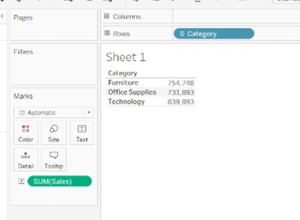
SUM is one of the commonly performed functions in Tableau. The Tableau Sum function seeks out the Sum of records under consideration. It is the total of the values present in a field. The screenshot provided below exhibits the total sum of sales for each of the three categories as given in Sheet 1.
In the sample dataset shown below, the sum of sales is shown corresponding to each of the corresponding values in the dimension "Category". For example, "Furniture" has a total sale of 754,748, which could be comprising of furniture related products such as Tables, Chairs etc.
Running Sum
A RUNNING SUM is a cumulative total in a row or column from the first value to the final value in the respective row or column. For instance, in the example given below, the cumulative values of Furniture and Office Supplies stand at 1,486,641 and that value when added to Technology’s value of 839,893 gives 2,326,534.
You can summarise or modify the granularity of your data using aggregate functions. An aggregate part combines the values of multiple lines to provide a single value. Examples of aggregate functions apart from sum are measurements based on Count, Count Distinct, Fixed Calculations, and other standard integration functions.
Every time you include a measure in your view, an aggregate is automatically applied to that measure. Depending on the context of the view, different aggregation techniques are used. Analysts can well utilise these features to simplify the whole complex process of data analysis, and organisations can harness them for insightful decisions.

AWS vs AZURE vs GCP: THE LEADING CSPs FROM A COMPARATIVE LENS
Benefits of Cloud Computing
Worldwide Vendor Market Share
 Sourced from: Cloud Market Share Q2 2023: AWS, Microsoft, Google Battle | CRN
AMAZON WEB SERVICES (AWS)
Amazon Web Services is the most extensive and widely adopted cloud platform worldwide, offering over 200 fully featured services across global data centres. AWS is used by millions of customers, including fast-growing startups, major enterprises, and prominent government agencies, to reduce costs, enhance agility, and accelerate innovation.
The USPs of AWS
Popular Customers of AWS
Netflix:Netflix relies on AWS for most of its computing and storage requirements, including analytics, databases, recommendation engines, video transcoding and numerous functions utilizing over 100,000 server instances on the AWS platform.BMW Group: BMW Group leverages AWS to acquire the agility and flexibility necessary for democratizing data usage and expediting innovation.
Philips: Philips is an early adopter of AWS that utilizes AWS services to manage the Philips HealthSuite Platform, ensuring scalability, cost-effectiveness, and regulatory-compliant solutions.
Salesforce: Salesforce shares a global strategic relationship with AWS, utilizing AWS compute, storage and AI solutions to create and deploy innovative business applications.
Pinterest: The exabyte data platform of Pinterest is hosted exclusively on AWS, managing log search and analytics that surpass 1.7TB. This implementation has led to a 30% reduction in operational costs.
Coca-Cola: After its migration to AWS, Coca-Cola has reduced operational costs by 40% and IT ticket volume by 80%.
Regions & Availability
AWS boasts the most expansive global cloud infrastructure. Gartner has acknowledged the AWS Region and Availability Zone framework as the endorsed strategy for operating enterprise applications demanding high availability.
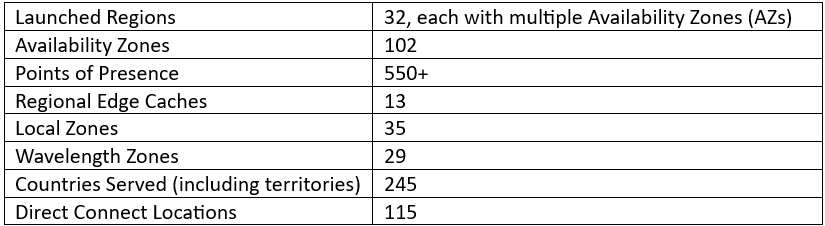
The AWS Cloud covers 102 Availability Zones across 32 geographic regions worldwide, with disclosed intentions to introduce an additional 15 Availability Zones and 5 AWS Regions in Germany, Canada, Thailand, Malaysia and New Zealand.
MICROSOFT AZURE
The Azure cloud platform encompasses over 200 products and services crafted to empower you to bring innovative solutions to fruition, addressing current challenges while shaping the future. It offers the flexibility to build, run, and manage applications across various clouds, on-premises, and at the edge, utilizing the tools and frameworks as per your preferences.
The USPs of Microsoft Azure
Popular Customers of Microsoft Azure
New York City Department of Environmental Protection (DEP): DEP uses a Microsoft infrastructure specifically designed with modern security considerations. With the solution in the cloud, Microsoft manages disaster recovery, reducing the necessity for maintaining certain skill sets in-house. CCC Group: CCC Group utilizes Azure Data Lake and Data Warehouse to collect, store, and segment data. Panasonic Connect Co: Panasonic Connect Co maximizes the benefits of PaaS services such as Azure IoT Hub, Synapse Analytics, and Azure Kubernetes Services. Hamburg Commercial Bank: Hamburg Commercial Bank opted for Microsoft Azure Virtual Desktop to achieve improved performance, reliability, and enhanced interoperability with other Microsoft technologies previously invested in. Barnsley Hospital NHS Foundation Trust: Barnsley Hospital NHS Foundation Trust adopted a new, integrated platform using Power Platform and Microsoft Teams for video consultations. During the COVID-19 pandemic lockdowns, the Trust rapidly deployed Microsoft Teams to facilitate remote work and staff collaboration.Regions & Availability:
Microsoft operates highly secure data centre facilities globally, forming a distributed infrastructure that sustains thousands of online services. This expansive, globally distributed infrastructure prioritizes sustainability, bringing applications closer to users, ensuring data residency, and providing customers with comprehensive compliance and resiliency options.
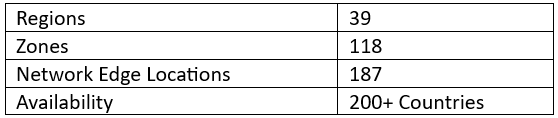
As of March 2023, Microsoft Azure boasts 160 active data centres spread across 60 regions worldwide. These Azure regions, defined by geographical areas, house one or more physical Azure data centres. Operating within a latency-defined perimeter, these data centres are strategically positioned to deliver optimal performance and security to users.
Azure leads with over 60 announced regions, surpassing all other cloud providers. It is accessible in 140 countries, showcasing a global presence that sets it apart in cloud computing.
GOOGLE CLOUD PLATFORM (GCP)
Google Cloud, also called Google Cloud Platform, offers computing resources dedicated to developing, deploying, and operating web applications. While its cloud infrastructure supports applications like Google Workplace, GCP primarily serves as a platform for constructing and managing custom applications. These applications can subsequently be published on the web, leveraging the extensive capabilities of its hyperscale data centre facilities.
The USPs of the Google Cloud Platform
Popular Customers of the Google Cloud Platform
Etsy: Utilizing the collaborative tools offered in Google Workspace, Etsy meets the evolving needs of sellers and buyers innovatively, fostering continued growth and enhancing the sustainability of its operations. X (formerly Twitter): Twitter's complete shifting of its ad analytics data platform to Google Cloud granted developers increased agility, allowing them to configure existing data pipelines more easily and build new features acceleratedly. Airbus Defence and Space: Airbus Defence and Space's Intelligence business line employs Google Cloud to construct a scalable online platform, enabling customers to access petabytes of satellite imagery in real-time.Regions & Availability
Google Cloud provides global coverage through regions distributed worldwide, ensuring low cost, minimal latency, and optimal application availability for customers.
Follow the link to have a look into a tabular comparison of the solutions provided by the CSPs: AWS, Azure and GCP. https://cloud.google.com/docs/get-started/aws-azure-gcp-service-comparison
Making your Business Smart and Sustainable for the digital age A Guide for Thought Leaders
The road to sustainability
Reducing your IT footprint requires a multi-pronged approach. Here are some key steps: 1. Energy Efficiency: • Optimize Data Centers: Virtualization and cloud computing can significantly reduce the number of physical servers needed. Implementing efficient cooling systems, such as liquid cooling, can minimize energy consumption. Continuously monitor and improve Power Usage Effectiveness (PUE) to track and enhance energy efficiency. • Focus on Hardware and Software: Invest in energy-efficient devices like laptops, servers, and networking equipment. Optimize software for reduced energy consumption and implement robust standby power management features. • Embrace Renewable Energy: Explore the use of solar, wind, or hydro power to power data centers and office spaces. 2. E-waste Reduction: • Responsible Disposal: Establish proper e-waste recycling programs that ensure data security during device disposal. Partner with certified e-waste recyclers who adhere to responsible and environmentally sound practices. • Extend Product Life Cycles: Implement repair and refurbishment programs to extend the lifespan of IT equipment. Encourage modular designs that allow for easier upgrades and repairs, reducing the need for complete replacements. 3. Sustainable Procurement: • Prioritize Sustainability in Vendor Selection: Choose vendors with strong sustainability commitments, such as those that utilize renewable energy, minimize waste, and prioritize ethical sourcing. • Source Materials Responsibly: Favor materials like recycled plastics and metals and ensure that minerals used in electronics are sourced ethically and responsibly. • Evaluate the Entire Supply Chain: Assess the environmental impact of the entire IT supply chain, from manufacturing to transportation and disposal.New Trends in Sustainability
The landscape of sustainable IT is constantly evolving. Here are some key emerging trends: • Circular Economy Principles: Embrace a circular economy model by minimizing waste through reuse, repair, and recycling. Design products with end-of-life considerations, ensuring that components can be easily recovered and reused. Create closed-loop systems for IT components, where materials are recovered and remanufactured into new products. • AI and Machine Learning for Sustainability: Leverage AI and machine learning to optimize energy consumption in data centers through predictive maintenance. Utilize AI-powered resource management systems to optimize cooling, power distribution, and space utilization. Explore AI-driven solutions to address environmental challenges, such as developing more efficient renewable energy technologies. • Edge Computing and Sustainability: Edge computing, where data processing occurs closer to the source, can significantly reduce data transmission distances and latency. This can lead to reduced energy consumption associated with data transfer and improve energy efficiency by enabling localized renewable energy solutions.How Sustainability is Changing the Business Landscape
Sustainability is no longer just a "nice-to-have"; it's becoming a critical factor for business success: • Competitive Advantage: Companies with strong sustainability practices can attract environmentally conscious customers, enhance brand reputation, and build stronger customer loyalty. Sustainable practices can differentiate businesses in the marketplace and give them a competitive edge. • Regulatory Compliance: Increasingly stringent environmental regulations are driving businesses to adopt sustainable practices. Non-compliance can result in fines, penalties, and damage to brand reputation. • Investor Pressure: Investors are increasingly prioritizing Environmental, Social, and Governance (ESG) factors in their investment decisions. Companies with strong sustainability records are more likely to attract investment and access sustainable finance options.Impact of These Factors
By embracing sustainable IT practices, businesses can: • Reduce Environmental Impact: Lower carbon emissions, reduce energy consumption, and minimize e-waste, contributing to a healthier planet. • Achieve Cost Savings: Reduce energy costs, increase equipment lifespan, and improve resource utilization, leading to significant cost savings. • Drive Innovation and Job Creation: Foster innovation in sustainable technologies and create new job opportunities in the green IT sector. Embracing sustainability in IT is not just an environmental responsibility; it's a strategic imperative for businesses. By implementing the steps outlined above and aligning with emerging trends, businesses can not only reduce their environmental impact but also gain a significant competitive advantage in the evolving market. The future of IT lies in sustainability, and those who embrace it will be best positioned for success.
Top 6 Benefits of Social Media Listening plus Top 6 Tools to Aid You
What is Social Media Listening?
Social media listening is the practice of constantly scanning social media channels for comments and feedback regarding your brand, product, and services and using that data to take appropriate action. Searching for specific terms and subjects related to a business or sector and competitor remarks is a common aspect of social listening.
Two processes were engaged in social media listening: monitoring and action. Both processes analyse online interactions and conversations and act on the results. Social media listening becomes effective only when a concrete action follows information collection.
Including social media listening in your overall social media strategy has many advantages. Major benefits are:
1. Increased Customer Engagement
One of the main advantages of social media listening is the ability to monitor social media users’ conversations about your business or brand, whether they specifically mention you in the chat. This allows you to directly answer queries or comments or write posts dealing with recurring issues or questions. When businesses try to communicate with their customers, it fosters trust, boosts engagement, and strengthens brand loyalty.
Follow-up action is a vital component of social media listening. One fantastic start approach is leveraging the information you gather to develop a social media plan that responds to frequent comments or directly engages your audience.
2. Opportunities to Observe and Monitor Trends
You can gain a broad understanding of people’s opinions about your company and its sector through social media listening, enabling you to identify emerging trends or hot topics. This is very helpful for social media purposes and your research and design department and public relations team to explore potential partnerships or new avenues for your brand, depending on your product or service.
3. Conflict Resolution
For business, crises might happen at any time. In that case, customer reactions will be crucial to resolving the issue effectively. Social media listening can assist you in keeping track of client mood and guiding your decision-making if your business experiences a customer fallout or crisis. Assessing the actual responses of your customers can help you to move forward. Proper social media listening and subsequent action based on that can directly impact the development of your business.
4. Monitoring the Competition
You can follow the discussions involving your competitor by using keywords. This can assist you in locating any weaknesses in their business strategies or products that you can later exploit. Similarly, you can use this information to strengthen your brand in areas where you believe they are stronger than you.
5. Leveraging Influencers to Promote Marketing
With social listening, you can locate influencers who are already talking about your company and influencing your customers. Similarly, if influencers disparage your company, you can connect with them and see if there are any chances to change their opinions. You can also monitor their concerns and work to improve on suggestions. It's crucial to take these creators' comments seriously because they have sizable fan bases that can impact the thoughts of millions of consumers.
6. Tracking Events
Social listening will be beneficial to better understand how participants feel before, during, and after an event. Utilise social listening to learn about your participants' experiences and identify areas where the event may be improved or continued. This is particularly useful because it enables you to deal with potential roadblocks as they arise or keep doing what's working.
List of Social Media Listening Tools
You can use various social listening tools to communicate information, raise brand awareness, provide service and support, and more. Let’s discuss a few such tools:
1. Hootsuite
Hootsuite allows you to create social media streams that keep an eye on conversations, hashtags, mentions, and keywords. Instead of signing in and out of numerous social platforms, you may monitor conversations and comments directly from your social media dashboard. By keeping an eye on the competition, networking with influencers on social media, and identifying prospective brand champions, Hootsuite lets you stay on top of developments in your sector.
2. Adview
Adview is used exclusively for social listening on Facebook and Instagram ads. It can monitor up to three Facebook Ad Accounts across unlimited pages. Using Adview, you can respond to comments on all of your Facebook and Instagram advertising from one location. Furthermore, you receive data on the ads receiving the most comments so that you may adjust your campaigns accordingly.
3. Talkwalker
Talkwalker provides powerful social listening software features that monitor blogs, forums, videos, news websites, reviews, and social networks in one dashboard. Advanced filters enable you to segregate your data so that you may concentrate on the messages and audience that are most important to you. You may also set up alerts to inform you of any mentions or keyword usage increases. With Talkwalker, it's simple to keep an eye on conversations involving your brand and analyse their mood, engagement, reach, and comments.
4. Synthesio
Synthesio monitors talks on incredibly niche subjects in carefully selected communities. You may segment your social listening data using various criteria, including language, geography, demographics, sentiment, gender, and more. A valid social reputation score is also included in the reports to see how you compare to your rivals.
5. Mentionlytics
Mentionlytics tracks mentions, keywords, and sentiment across several languages on blogs, news websites, and social media platforms. Additionally, it makes it easy to locate influencers across social media platforms and other internet sources. You can quickly monitor terms in several languages, keep track of your top influencers, and even identify the sentiment behind each mention.
6. Brand 24
Brand 24 uses automated sentimental analysis to separate positive, negative, and neutral mentions by monitoring online reviews, mentions on social media, blogs, message boards, news websites etc. It helps to find out about your online mentions, boost client happiness, and increase lead generation for your company.
Final Words
It is high time for companies to get out of their bubbles and accept the masses' opinions, remarks, compliments, complaints, and inquiries on social media. In all sense, social media listening has excellent benefits and tools that can guide you in building your market presence by paying heed to social media.
Beinex Digital Offerings
Our bespoke digital solutions with a comprehensive suite of independent products are focused on addressing specific business gaps, use cases, and needs. No matter where your digital maturity currently stands, we can provide you with a Quantum Leap by deploying the unique business-consulting-technology model. Reach out to us: https://beinex.com/beinex-digital/

The Business Value of Migration to Amazon Web Services
AWS: Four Types of Cloud Business Value
In the era of digital transformation and infrastructure modernization, the journey to the cloud has been both exhilarating and challenging. Many businesses have successfully migrated their "easy" applications to the cloud. However, a prevailing concern lingers among business leaders—an uncertainty about the returns on investment in terms of time and effort. Questions arise about productivity gains, data security, and the impact on critical agility metrics, such as time to market. Here, we delve into the distinct results observed by AWS users across four pivotal domains of cloud business worth: cost efficiency, workforce efficiency, resilience, and adaptability.
1. Cost Savings: More Than Meets the Eye
Migrating infrastructure to Amazon Web Services (AWS) yields significant cost savings, averaging around 20% in total infrastructure expenses. Top performers witness a staggering 47% reduction, highlighting the potential for substantial savings. Yet, the nuances lie in application-specific cost reductions that vary based on factors like application complexity and cloud tenure.
Studies reveal a significant financial shift for organizations venturing into AWS migration. On average, businesses witness a remarkable 20% reduction in total infrastructure costs—a noteworthy achievement translating to a staggering $69 million slashed from an average pre-migration annual IT spend of $345 million. However, the journey to AWS doesn’t merely stop at these impressive numbers. For top performers, the stakes are higher, yielding an exceptional 47% savings in total infrastructure costs. This equates to a colossal $164 million reduction from an average annual IT spend of $349 million. (Refer to Fig. 1 for a graphical representation.)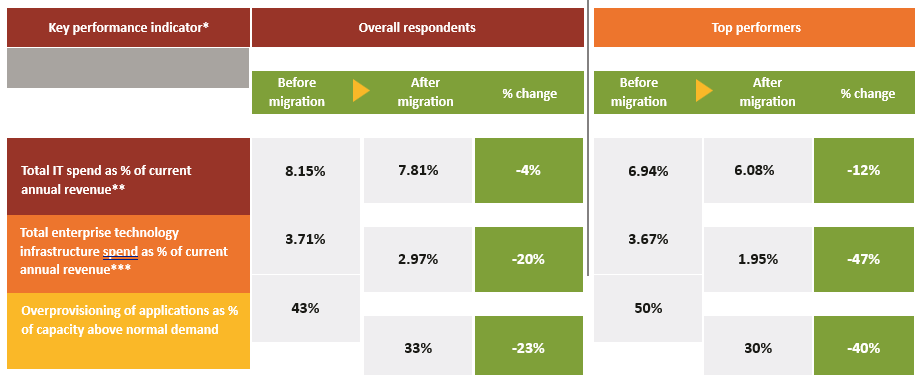

2. Workforce Efficiency
Following the migration of applications to AWS, there's a noticeable enhancement in IT infrastructure staff productivity among respondents. They report a remarkable 66% rise in the number of retained VMs managed per administrator. Such post-migration efficiencies enable a strategic shift, allowing 17% of staff positions to transition from routine infrastructure maintenance to pivotal roles focusing on infrastructure planning, architecture, orchestration, and innovation (Refer to Fig. 3 for visual representation)

A commercial finance organization exemplifies the tangible impact of AWS migration on innovation. Their technology division experienced a significant leap in developer focus post-migration. Initially allocating 20% of developer time to crafting new features, their shift to AWS elevated these efforts drastically. For customer relationship management and business intelligence, the focus surged to an impressive 60%, witnessing a threefold increase. However, the transformation was even more substantial for their migrated financial planning and analysis system, skyrocketing from a mere 20% pre-migration to a staggering 80% post-migration—showcasing an unparalleled fourfold increase.
3. Resilience
Cloud technology has redefined resilience by elevating system availability, reducing latency, and fortifying security measures. The disruptive impact of the pandemic accentuated the criticality of resilience, surpassing the effectiveness of traditional disaster recovery approaches and redundant data centers. Cloud-based infrastructure emerged as a crucial linchpin, ensuring uninterrupted operations during tumultuous times.
The scalability inherent in cloud services played a pivotal role during the pandemic, exceeding initial capacity plans by an astounding 90%. This scalability was instrumental in swiftly connecting and supporting remote workers, effectively mitigating disruptions. Chief Information Officers (CIOs) emphasized that their previous migration to AWS significantly facilitated the accommodation of sudden surges in demand, underscoring the importance of cloud infrastructure in maintaining seamless operations during critical periods.
A U.S.-based healthcare nonprofit's strategic migration of its last on-premises ERP system to the cloud in 2019 fortuitously positioned it for the subsequent shutdowns and challenges brought on by the pandemic. The seamless integration of cloud technology enabled the organization to navigate and maintain operational continuity amidst adversity, highlighting the indispensable role of cloud solutions in supporting mission-critical functions and adapting to hybrid office-remote work models.
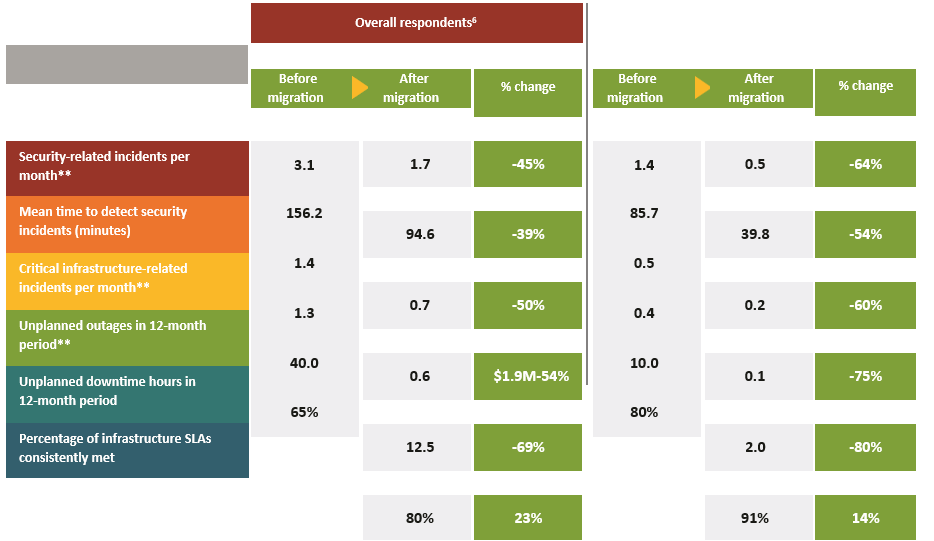
In today's digital commerce landscape, system downtime carries profound consequences far beyond inconvenience. It significantly impacts businesses, directing customers towards competitors' platforms. The financial implications of downtime are staggering, averaging 79 minutes and costing approximately $84,650 per hour in 2020. Furthermore, the aftermath of data breaches and ransomware attacks extends beyond financial costs, causing public embarrassment and substantial recovery expenses, averaging $4.6 million for cyberattacks and $4.2 million for data breaches.
The migration to AWS represents a transformative milestone, significantly bolstering both availability and security. Many key resilience Key Performance Indicators (KPIs) exceeded the 50% mark, as illustrated in Fig. 4. This substantial enhancement underscores the transformative impact of AWS migration in fortifying operational resilience and proactively mitigating potential threats.
4. Adaptability
The most strategic of all cloud migration benefits, agility equips organizations for success in a digital business environment. Agility refers to the ability to respond quickly and effectively to changes in business conditions or disruptive business events. Broadly speaking, the more technology infrastructure an organization has in the cloud, the more agile it can be. A study by The Hackett Group on agility in business services functions (i.e., finance, HR, IT, and procurement), found that the most agile organizations have 41% of their infrastructure in the cloud, compared to just 29% for the average respondent.
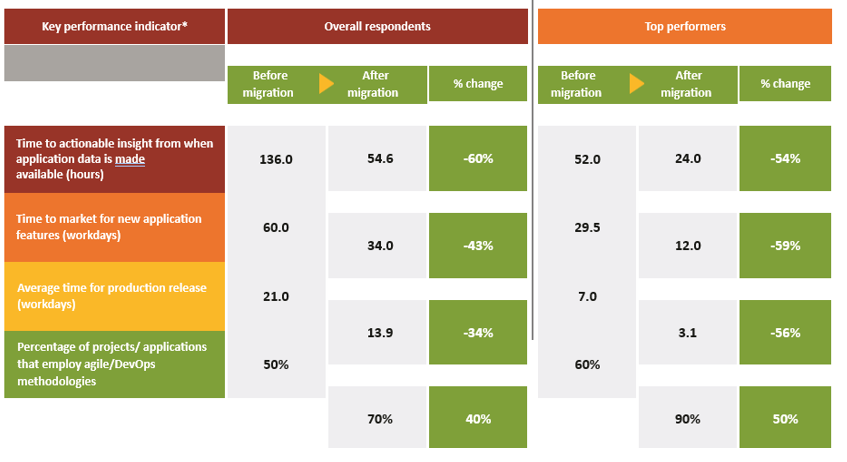
Winning in a digitally competitive industry or market depends heavily on agility in product development. A major aspect is the speed at which new technology-enabled products and features are brought to market. For applications in the cloud, technology organizations are better able to use agile/DevOps methodologies thanks to services that simplify and accelerate provisioning infrastructure, deploying application code, automating software release processes, and monitoring application and infrastructure performance. These changes, combined with the development-team productivity gains discussed earlier, contribute to a 43% decrease in time to market and a faster pace for production releases (Fig. 5).
Recommendations
The Cloud Services Study underscores how migrating to AWS drives substantial business value across cost savings, staff productivity, resiliency, and agility. It dispels the notion that the cloud is solely a cost-saving venture, highlighting its strategic superiority over traditional on-premises infrastructure. The agility alone—enabling quicker time to market, enhanced insights, and frequent production releases—positions organizations competitively in the digital sphere. This transformative shift from infrastructure management to innovative development is a pivotal game-changer.
In forthcoming reports, we'll delve deeper into specific migration strategies and cloud financial management practices that contribute to superior outcomes. Meanwhile, here are key insights from this study: