How AI Decision-Making is Improving Enterprise Outcomes
Blog
Share 
Protecting Data in AWS: Encryption and Key Management
 24 April 2023
  Team Beinex
 Why Encryption is Important
Encryption is a security technique that converts data into a format that is unreadable by unauthorised individuals. It is particularly crucial when it comes to protecting sensitive information such as personal data, bank records, and trade secrets. By encrypting data, even if an attacker accesses it, they cannot read it without the correct decryption key.
AWS provides various encryption options to protect data:
- Server-side Encryption
- Client-side Encryption
- Key Management
1. Server-Side Encryption
Data at rest can be encrypted in AWS by using server-side encryption. Server-side encryption is available for AWS services, including Amazon S3, Amazon EBS, Amazon RDS, and Amazon Redshift.
When you utilise server-side encryption, AWS encrypts the data before putting it on a disc. The security of your information is guaranteed because AWS also manages the encryption keys required to encrypt and decrypt data.
2. Client-side Encryption
Data can be encrypted on the client side before being uploaded to AWS. Client-side encryption adds a layer of security by allowing you to manage the encryption keys used to encrypt and decrypt your data.
Client-side encryption is available for AWS services, including Amazon S3, Amazon EBS, and Amazon RDS. Client-side encryption requires additional administration and security measures because it forces users to control the encryption keys directly.
3. Key Management
Key management is the process of generating, storing, and controlling encryption keys. AWS provides critical management services, including AWS CloudHSM and Key Management Service (KMS).
You can easily create and manage the encryption keys to secure data using AWS Key Management Service (KMS), a managed service. Some AWS services, such as Amazon S3, Amazon EBS, and Amazon RDS, are compatible with AWS KMS.
A hardware security module (HSM) called AWS CloudHSM offers secure key management and storage. AWS services, including Amazon S3, Amazon EBS, and Amazon RDS, can be used with AWS CloudHSM.
Best Practices for Protecting Data in AWS
Use these best measures to protect your data in AWS: 1. Encrypt sensitive data: Use either server-side or client-side encryption to encrypt all sensitive data. Robust encryption methods like Advanced Encryption Standard (AES) should exist with 256-bit keys. The Amazon Web Services (AWS) KMS service can generate and manage encryption keys.
2. Utilise AWS CloudHSM: For other key management and security, use AWS CloudHSM.
3. Set up multi-factor authentication: Multi-factor authentication adds security to AWS accounts and services (MFA).
Conclusion
Amazon Web Services (AWS) is a comprehensive cloud computing platform that enables millions of customers worldwide to deploy and scale their services on the cloud while enjoying cost savings upfront. Data security is a critical concern for any organisation, and AWS provides several services to help address this issue. Encryption plays a vital role in data protection, and it is essential to follow best practices to safeguard the security and safety of data on AWS.
Beinex is an AWS consulting partner, and we empower customers to host their BI solutions and much more on the cloud. Our cloud migration experts bring in best-in-class stability and reliability by understanding your business strategy and working closely with you to deploy AWS infrastructure as a service.Maintaining data security is crucial for organisations, as data is considered a valuable asset in the current digital era. Consequently, it is vital to prioritise the protection of data. AWS offers an essential feature for ensuring data security - encryption. This blog post will discuss how encryption and key management can be used to secure data on AWS.
Related Articles

Artificial Intelligence Services & Solutions to Grow Your Business in the UAE
Top 4 Common AI Implementation Challenges: How They Can Be Resolved
Businesses face several challenges, and some may seem small, but they can lead to massive losses over time if unaddressed. Let's see what they are and how AI can resolve:
- Manual and Repetitive Tasks
Spending time on repetitive tasks like filling forms and handling data entries decreases the productivity of your team. AI automation frees them to focus on strategic tasks like planning, problem-solving, and innovation. - Data Silos
When data is scattered across departments and tools, it results in difficulty in collaboration and slows down decision-making. With a connected data system powered by AI, your team can use it to drive value. - Loss of Customers
If your business is losing loyal clients due to slow responses and poor personalization, AI helps you respond faster, understand customer behavior, and build better relationships. - Static Production Lines
Production and operations stay rigid if your business can't easily adapt to demand changes, identify issues early, or scale smoothly. AI brings flexibility, helping you adjust in real-time.
How Beinex AI Services Solve Your Business Problems
Artificial Intelligence (AI) services & solutions help you lead in your industry. Here's what you get with Beinex:
- Strategic AI Consulting Services
Our expert consultants work closely with your team to define clear goals, assess your business environment, and develop a safe and effective AI implementation plan. We help you understand the true potential of AI and customize solutions for your specific needs. - AI Enablement Analysis
Businesses often have AI goals but lack clarity on scope, feasibility, and design. Beinex closes this gap by validating feasibility, selecting the right tools, and building a clear roadmap for success. - Exploratory Data Analysis
The next step is to analyze your existing data sources, assess them, and clean up any necessary issues. It ensures your AI system has strong foundations. - AI Training and Roadmapping
We align AI strategies with your business goals through awareness programmes to hands-on training. Our roadmap is practical, secure, and designed for real-world adoption. - AI-Powered Automation
By automating everyday tasks like report generation, approvals, and data processing, our AI solutions boost efficiency, cut costs, and save time. AI models like GPT-4, Claude, LLaMa, and PaLM 2 support modernizing legacy systems and enhancing your processes for speed, accuracy, and scale. - AI Agents for Support and Sales
AI-driven chatbots and voice agents can handle customer queries, sales interactions, and internal processes 24/7, resulting in faster service, cost reduction, and scaling operations. You can automate replies, generate content, and improve your digital experience instantly.
Book a Free Demo of Our Document Chatbot - Smart Product Integrations
We help you make your existing products smarter. You can upgrade your products with AI to meet customer needs using predictive analytics, recommendation systems, or adaptive automation. - Compliance and Security Consultation
We offer robust compliance measures to ensure you remain compliant with GDPR, CCPA, and HIPAA regulations, thereby mitigating potential risks and maintaining data integrity. - Generative AI Solutions & LLM Development
We build and integrate private GenAI models that create, understand, and automate content, ensuring your data remains secure and compliant. - Predictive Analytics and Forecasting
By analyzing historical data, we help you forecast trends, predict outcomes, and make proactive decisions.
AI Solutions for Every Industry
At Beinex, we offer AI solutions tailored to your industry. Here's how we support various domains:
Healthcare
We automate patient scheduling, assist with medical inquiries, and support diagnostics using AI, resulting in improved care delivery, reduced wait times, and improved hospital operations.
Read Our AI in Healthcare Case Study on Cardiovascular Disease Prevention!
Retail Industry
Our AI tools help retailers manage inventory, pricing, and customer service more effectively. It assists in demand forecasting and in delivering personalized shopping experiences to customers.
Finance and Banking
AI in finance automates loan approvals, detects fraud, and offers personalized financial insights to customers. AI agents assist with customer queries, boosting efficiency and security.
Explore Our AI Solutions in Banking!
E-commerce
We implement AI recommendation engines and chatbots that boost engagement, conversions, and retention. Inventory forecasting and automated marketing become more intelligent and efficient.
Education
AI-powered tutoring adapts to students' performance. Automated grading tools reduce the burden of admins, and virtual learning assistants make classes interactive and engaging.
Energy and Utilities
AI helps monitor grid performance, predict failures, and optimize consumption. We support green energy efforts through real-time analytics and predictive maintenance.
Equip Your Business with the Right AI Strategy
Businesses waste time and money as they struggle with manual processes, lost data, and disconnected teams. At Beinex, we help you fix that with our Artificial Intelligence solutions. As a leading AI services and development company in the UAE, Beinex offers intelligent solutions that are practical, scalable, and results-driven.
AI should bring value to your business and support you in growing. Whether you're just starting or looking to expand your AI strategy, Beinex, as one of the first recipients of the prestigious Dubai AI seal, can assist you. We bring innovation to your business with practical, reliable, and high-impact Artificial Intelligence services in Dubai, UAE. We offer:
- • Deep expertise in AI and ML solutions
- • Strong strategic and technical consulting
- • End-to-end support from design to deployment
- • Proven results in various domains
Connect with us: https://beinex.com/contact-us/
References:
Top Picks: Tableau 2020.4
As a frequent user of Tableau Desktop and Server, check out my top picks from the list.
• Improved dynamic parameter
• Multiple marks layer support for maps
• Block comments in calculations
• Web authoring enhancements
• Offline map support for Tableau Server
• Tableau Server Management (TSM) improvements
• Multiple key activation on Tableau Server prior to TSM initialization
• Analytics Extension for Tableau Online
• Merge duplicate external assets
• Tableau Prep Builder in the browser
Tableau Desktop
Improved Dynamic Parameter
The dynamic parameter was one of the features which I used extensively starting from 2020.1. The feature allows us to populate parameter values based on a specified field whenever the workbook is opened. We will be able to select only the field with matching data types.
The feature update announced in Tableau 2020.4 gives me more privilege to customize the Dynamic Parameter. I can now set a parameter’s range to a field’s min and max value upon opening the workbook, or when the field’s data source is refreshed.
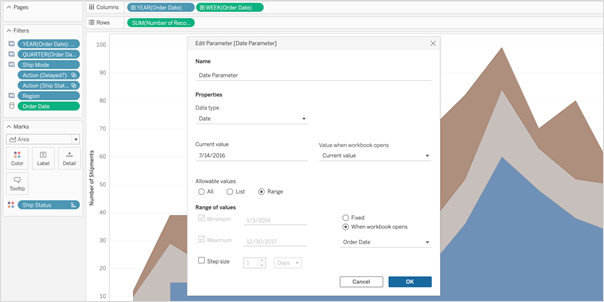 So, whenever I open the workbook or the extract is refreshed, Tableau displays the unique values within the range specified, giving more control over the parameter values displayed.
Multiple Marks Layer Support for Maps
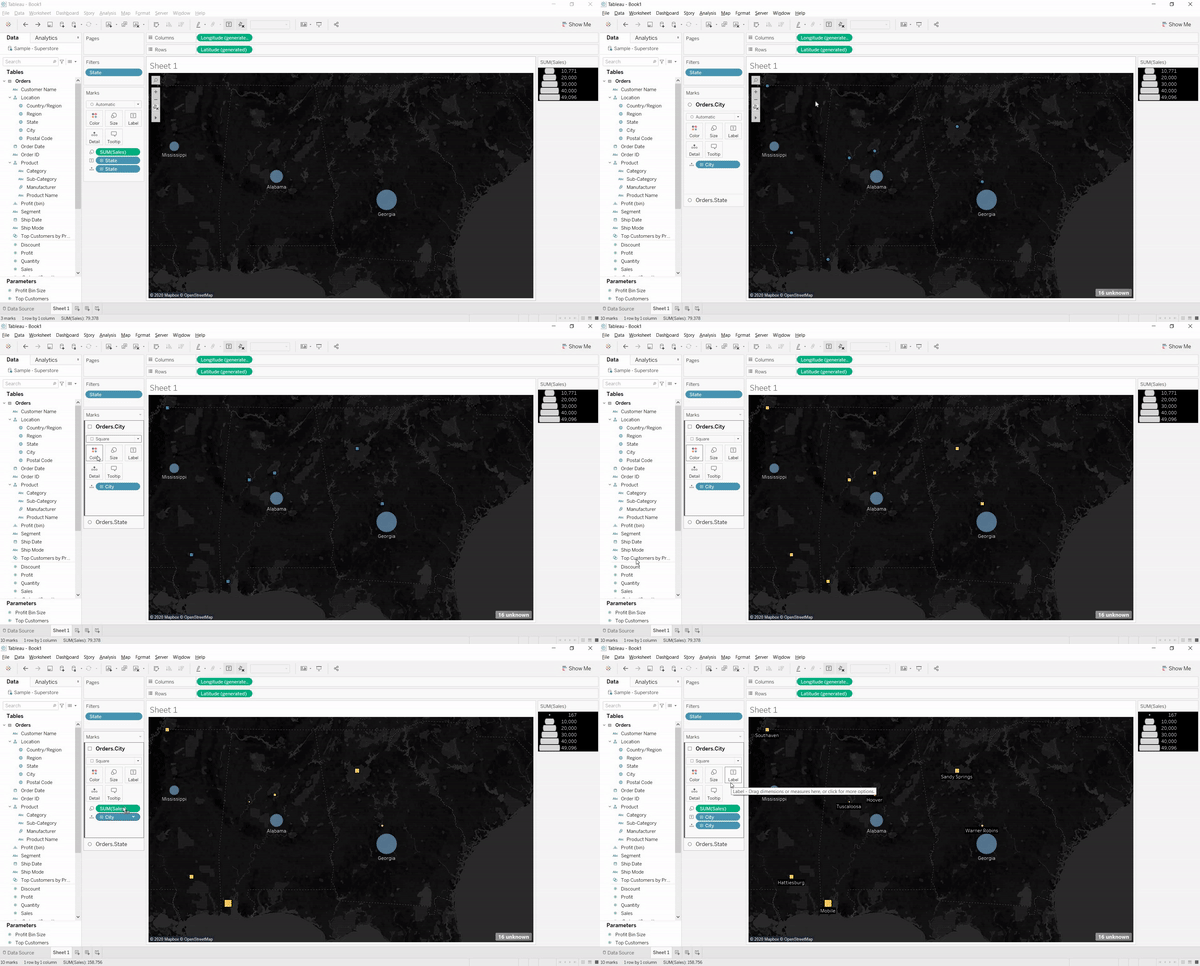
This is an exceptional feature to bring multiple spatial layers and context together to better understand and analyze geospatial data and map views. I will be able to include multiple marks layers from a data source to map visualizations and enhance the geospatial analysis. I can present more context in a single map view and perform further analysis with this feature.
So, whenever I open the workbook or the extract is refreshed, Tableau displays the unique values within the range specified, giving more control over the parameter values displayed.
Multiple Marks Layer Support for Maps
This is an exceptional feature to bring multiple spatial layers and context together to better understand and analyze geospatial data and map views. I will be able to include multiple marks layers from a data source to map visualizations and enhance the geospatial analysis. I can present more context in a single map view and perform further analysis with this feature.
 Block Comments in Calculations
Block comments is a simple yet one of the most useful features for me, which Tableau has announced in 2020.4. I often used to add comments in complex calculations for easy understanding in future references. Earlier, only single-line comments were possible, limiting the description I could add. But from now on, I can add comments of any length to calculation windows with block comments by simply starting the comment with /* and ending with */.
What makes it unique is that the new multi-line block comment feature is consistent with other popular programming languages. This feature is an example of Tableau’s on-going effort to provide its customers with an intuitive user experience.
Block Comments in Calculations
Block comments is a simple yet one of the most useful features for me, which Tableau has announced in 2020.4. I often used to add comments in complex calculations for easy understanding in future references. Earlier, only single-line comments were possible, limiting the description I could add. But from now on, I can add comments of any length to calculation windows with block comments by simply starting the comment with /* and ending with */.
What makes it unique is that the new multi-line block comment feature is consistent with other popular programming languages. This feature is an example of Tableau’s on-going effort to provide its customers with an intuitive user experience.
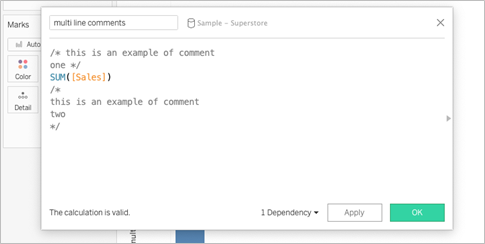 Tableau Server
Web Authoring Enhancements
Starting from Tableau 2020.4, it is possible to author dashboards from the browser just like how we design it in Tableau Desktop. With this web authoring enhancements, I can include Highlight actions, Format Mark Labels, apply filters to worksheets, create fixed sets, and even create extract in my workbooks from the browser itself. I no longer have to make changes from Tableau Desktop and publish it to the server. I can directly do it from the browser itself.
Tableau Server
Web Authoring Enhancements
Starting from Tableau 2020.4, it is possible to author dashboards from the browser just like how we design it in Tableau Desktop. With this web authoring enhancements, I can include Highlight actions, Format Mark Labels, apply filters to worksheets, create fixed sets, and even create extract in my workbooks from the browser itself. I no longer have to make changes from Tableau Desktop and publish it to the server. I can directly do it from the browser itself.
 Offline Map Support for Tableau Server
Rendering dashboards with maps is now faster compared to previous versions. Now, I can create maps using the offline map style in web authoring, ensuring the performance of map views in Tableau Server. Offline map support is a great deal for organizations with strict internet access restrictions, assuring that map view access to all its users.
Tableau Server Management (TSM) Improvements
Tableau Server Administration activities like installation, upgrade and backup are now easy like never before. I can retry installation or upgrade from the last checkpoint in case of an unexpected issue or error during installation or upgrade, saving my efforts to obliterate tableau server.
Backups can be performed twice as fast as previous versions, and I can monitor the progress with the new progress bar giving visibility into what step the backup is on and how much time is remaining.
Backups can also be scheduled using TSM command starting from 2020.4 and that is awesome. I no longer need to prepare batch script and depend on the windows task scheduler to schedule the backups on regular intervals; instead, I can schedule it with just a single command.
Multiple Key Activation on Tableau Server Prior to TSM Initialization
During Tableau Server installation, it is now possible to activate multiple license keys prior to TSM initialization. I will be able to save a lot of time by eliminating the need to restart after the installation is completed to activate multiple licenses and experience a smoother installation.
Analytics Extension for Tableau Online
The power of the Analytics extension is now unlocked in Tableau Online too. The feature was already available in Tableau Server, and it helped us dynamically perform advanced analysis with models and functions in R, Python and other platforms.
Analytics extension in Tableau Online significantly enhances the scope of using Advanced Analytics by the common users.
Merge Duplicate External Assets
Earlier, the Database or Table with similar names used to appear as multiple assets within Tableau Catalog. But, the new feature helps me to merge those multiple assets into a single one. I can manage assets easily and keep an organized view of External assets by merging the common ones.
Offline Map Support for Tableau Server
Rendering dashboards with maps is now faster compared to previous versions. Now, I can create maps using the offline map style in web authoring, ensuring the performance of map views in Tableau Server. Offline map support is a great deal for organizations with strict internet access restrictions, assuring that map view access to all its users.
Tableau Server Management (TSM) Improvements
Tableau Server Administration activities like installation, upgrade and backup are now easy like never before. I can retry installation or upgrade from the last checkpoint in case of an unexpected issue or error during installation or upgrade, saving my efforts to obliterate tableau server.
Backups can be performed twice as fast as previous versions, and I can monitor the progress with the new progress bar giving visibility into what step the backup is on and how much time is remaining.
Backups can also be scheduled using TSM command starting from 2020.4 and that is awesome. I no longer need to prepare batch script and depend on the windows task scheduler to schedule the backups on regular intervals; instead, I can schedule it with just a single command.
Multiple Key Activation on Tableau Server Prior to TSM Initialization
During Tableau Server installation, it is now possible to activate multiple license keys prior to TSM initialization. I will be able to save a lot of time by eliminating the need to restart after the installation is completed to activate multiple licenses and experience a smoother installation.
Analytics Extension for Tableau Online
The power of the Analytics extension is now unlocked in Tableau Online too. The feature was already available in Tableau Server, and it helped us dynamically perform advanced analysis with models and functions in R, Python and other platforms.
Analytics extension in Tableau Online significantly enhances the scope of using Advanced Analytics by the common users.
Merge Duplicate External Assets
Earlier, the Database or Table with similar names used to appear as multiple assets within Tableau Catalog. But, the new feature helps me to merge those multiple assets into a single one. I can manage assets easily and keep an organized view of External assets by merging the common ones.
 Tableau Prep
 Builder in the Browser
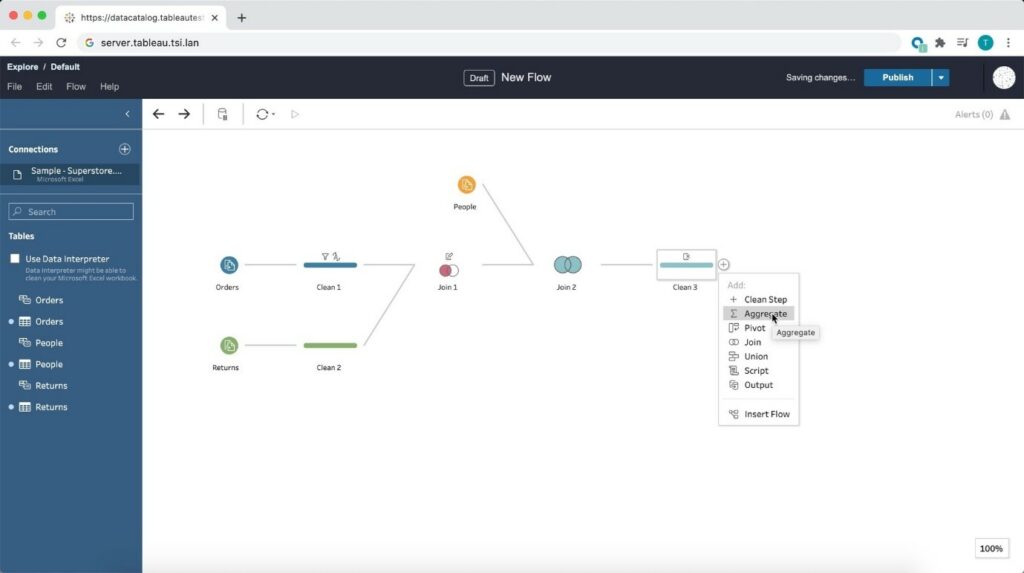
Prepare the data for visualizations from anywhere using a browser! Starting from 2020.4, Tableau is bringing the data prep process into one integrated platform on the web. Now I can easily prepare and manage prep flows from anywhere using a browser.
Tableau Prep
Tableau Prep Builder in the Browser
Prepare the data for visualizations from anywhere using a browser! Starting from 2020.4, Tableau is bringing the data prep process into one integrated platform on the web. Now I can easily prepare and manage prep flows from anywhere using a browser.
 Conclusion
Tableau is progressively evolving as a single platform for data preparations, visualization, and collaboration with every update and version release.
Author : Firdous Maqbool
Images Courtesy : Tableau
Conclusion
Tableau is progressively evolving as a single platform for data preparations, visualization, and collaboration with every update and version release.
Author : Firdous Maqbool
Images Courtesy : Tableau
So, whenever I open the workbook or the extract is refreshed, Tableau displays the unique values within the range specified, giving more control over the parameter values displayed.
Multiple Marks Layer Support for Maps
This is an exceptional feature to bring multiple spatial layers and context together to better understand and analyze geospatial data and map views. I will be able to include multiple marks layers from a data source to map visualizations and enhance the geospatial analysis. I can present more context in a single map view and perform further analysis with this feature.
Block Comments in Calculations
Block comments is a simple yet one of the most useful features for me, which Tableau has announced in 2020.4. I often used to add comments in complex calculations for easy understanding in future references. Earlier, only single-line comments were possible, limiting the description I could add. But from now on, I can add comments of any length to calculation windows with block comments by simply starting the comment with /* and ending with */.
What makes it unique is that the new multi-line block comment feature is consistent with other popular programming languages. This feature is an example of Tableau’s on-going effort to provide its customers with an intuitive user experience.
Tableau Server
Web Authoring Enhancements
Starting from Tableau 2020.4, it is possible to author dashboards from the browser just like how we design it in Tableau Desktop. With this web authoring enhancements, I can include Highlight actions, Format Mark Labels, apply filters to worksheets, create fixed sets, and even create extract in my workbooks from the browser itself. I no longer have to make changes from Tableau Desktop and publish it to the server. I can directly do it from the browser itself.
Offline Map Support for Tableau Server
Rendering dashboards with maps is now faster compared to previous versions. Now, I can create maps using the offline map style in web authoring, ensuring the performance of map views in Tableau Server. Offline map support is a great deal for organizations with strict internet access restrictions, assuring that map view access to all its users.
Tableau Server Management (TSM) Improvements
Tableau Server Administration activities like installation, upgrade and backup are now easy like never before. I can retry installation or upgrade from the last checkpoint in case of an unexpected issue or error during installation or upgrade, saving my efforts to obliterate tableau server.
Backups can be performed twice as fast as previous versions, and I can monitor the progress with the new progress bar giving visibility into what step the backup is on and how much time is remaining.
Backups can also be scheduled using TSM command starting from 2020.4 and that is awesome. I no longer need to prepare batch script and depend on the windows task scheduler to schedule the backups on regular intervals; instead, I can schedule it with just a single command.
Multiple Key Activation on Tableau Server Prior to TSM Initialization
During Tableau Server installation, it is now possible to activate multiple license keys prior to TSM initialization. I will be able to save a lot of time by eliminating the need to restart after the installation is completed to activate multiple licenses and experience a smoother installation.
Analytics Extension for Tableau Online
The power of the Analytics extension is now unlocked in Tableau Online too. The feature was already available in Tableau Server, and it helped us dynamically perform advanced analysis with models and functions in R, Python and other platforms.
Analytics extension in Tableau Online significantly enhances the scope of using Advanced Analytics by the common users.
Merge Duplicate External Assets
Earlier, the Database or Table with similar names used to appear as multiple assets within Tableau Catalog. But, the new feature helps me to merge those multiple assets into a single one. I can manage assets easily and keep an organized view of External assets by merging the common ones.
Tableau Prep
Tableau Prep Builder in the Browser
Prepare the data for visualizations from anywhere using a browser! Starting from 2020.4, Tableau is bringing the data prep process into one integrated platform on the web. Now I can easily prepare and manage prep flows from anywhere using a browser.
Conclusion
Tableau is progressively evolving as a single platform for data preparations, visualization, and collaboration with every update and version release.
Author : Firdous Maqbool
Images Courtesy : Tableau
Understanding Data Clean Rooms
Uncovering Data Sharing
Traditional data-sharing methods involve copying files via FTP/cloud, employing ETL pipelines, or utilising APIs. While these methods facilitate data exchange, they come with inherent limitations. Security vulnerabilities, data inaccuracies, and high maintenance costs are just a few of the challenges organisations face. Snowflake's Secure Data Sharing offers a standard shift by enabling seamless, governed access to data within the Snowflake platform.
Secure Data Sharing
Secure data sharing is ideal for granting raw data access across business units or to trusted partners for analysis. It fosters informed decision-making and facilitates data monetisation by providing secure, revocable access to valuable datasets.
Snowflake's Role in Secure Data Sharing
Snowflake's Cloud Data Platform empowers organisations to collaborate securely, driving cost savings and uncovering new insights. With Snowflake Secure Data Sharing, businesses can:
Introducing Data Clean Rooms
In the era of heightened data privacy concerns, data clean rooms emerge as a game-changer. Unlike traditional clean rooms, modern data clean rooms go beyond physical boundaries. They operate as a framework, eliminating the need to relocate data. In essence, a data clean room allows providers to dictate query rules without granting access to underlying data.
When to Opt for Data Clean Rooms
While secure data sharing suffices for many collaborations, data clean rooms shine in scenarios involving sensitive or regulated data. Regulations like CCPA and GDPR mandate stringent privacy adherence, making data clean rooms indispensable for privacy-preserving collaboration. For industries like media and advertising, data clean rooms enable personalised insights without compromising consumer privacy.
Snowflake Global Data Clean Room
Snowflake Global Data Clean Room revolutionises multi-party collaboration by safeguarding data privacy. Leveraging Snowflake's robust collaboration and governance features, it facilitates secure analysis across clouds and regions, mitigating the risk of data exposure or re-identification.
Choosing the Right Approach
In navigating data collaboration, enterprises must prioritise security and compliance. While Snowflake Secure Data Sharing suits low-risk collaborations, data clean rooms are indispensable for handling sensitive or regulated data. By embracing these innovative solutions, businesses can foster a culture of secure collaboration, driving insights and innovation while safeguarding data privacy.
TABLEAU 2019.2 RELEASE
Tableau 2019.2 Release – A Deeper Dive
Tableau has released the newest version of the platform that enhances the way people visualize and interact with data. In this article we’ll go through some of the exciting new changes included in Tableau 2019.2 and how business will benefit from these newly enhanced and released features.
The major release of Tableau has on-boarded some impressive features and functionality that will have big influence in data visualization and business productivity. In this post, we will highlight some significant and exciting features that are a part of this release.
1. Upscale your Viz with Vector Maps:
Vector Maps enhances your mapping experience by rendering a crisp output as you pan, zoom in, and zoom out to explore your geospatial data. This new feature also leverages the census data from American Community Survey (ACS) to incorporate demographics data into your dashboard.
Highlights:
Enhanced mapping interaction with sharp rendering
Improved default maps styles: Dark, Normal, and Light
New map styles: Street, Satellite, and Outdoor
New background mapping styles: subway and train stations, building footprints, terrain, and water labels
Demographics data from American Community Survey (ACS)
Usability:

Above recording is a view of the new map styles that is a part of the Tableau 2019.2 release. Here you can see how simple it is to include and switch between the newly added map layers. The maps have become crisper while zooming and panning.
2. Enable Interactivity with Parameter Actions
Improved parameter actions is another powerful feature that powers up interactivity in your dashboards and help your viewers gain deeper insights into the trends. It unlocks the ability of a viewer to visually change a parameter’s value thereby offering you endless possibilities to create a truly interactive dashboard.
Highlights:
Interactive relationships between data, dashboard, objects, other workbook sheets and web
Enhanced interactivity by creating marks on a Viz
Improved user experience by transferring control to the end user
Allows users to dynamically change SQL queries, drive reference lines, calculations and filters
Usability:

With this feature the end users can dynamically view the parameter values. In the above example, we have created a parameter ‘order date’ and placed Day of order date and sales into the view and we have added reference line for sales. When applied in a parameter action, the values get changed dynamically.
3. Left Nav, Favorites, and Recent for Enhanced Navigation
Navigate seamlessly and find the content you are searching with the improved navigation. The new navigation features will intensify the already powerful content browsing experience. You can easily find your favorite and recent content including projects and prep flow at the top.
Highlights:
Improved access to key pages and content
New quick access navigation bar with personalized content relevancy
Welcome screen with navigation walk-through for new users
Completely re-designed homepage
Usability:

4. Talk to your data with AskData
AskData is a fairly new module and growing quickly in popularity with the 2019.1 release. Tableau is continuing to expand on this by adding streamlined and innovative capabilities to AskData. You now have the option to add calculations on the fly without having to build them into the data source. You can also ask more sophisticated questions and get answers with the enhanced AskData.
Highlights:
Improved interface to allow more conversational interactions
Enhanced language processing to edit statements from an existing question
Features to execute calculations on the fly
Usability:

In the above example, you can experience the power of the natural language processing engine built into the latest version of ask data. When we ask ‘How are my sales doing by numbers?’, the system automatically understands our query and displays the sum of sales by segment. We can further segment it by year by asking further questions or adjust the values according to our requirements.
These are only a few of the many exciting updates Tableau has incorporated to continue pushing the boundaries of data analytics and prepare for the future market changes. A complete list of updates and features could be found in Tableau’s release notes: https://www.tableau.com/products/all-features
Beinex is a digital transformation organization en-rooted with ideas, innovation and unparalleled customer service. Our mission is to transform the way individuals and the organizations work with the data through innovation and experience.
If you are interested in learning more about the latest Tableau 2019.2 features and updates, please contact us at training@beinex.com/ info@beinex.com and we would be happy to schedule a Tableau demo or training for you and your company.
WHAT’S NEW IN TABLEAU?
Geo Spatial
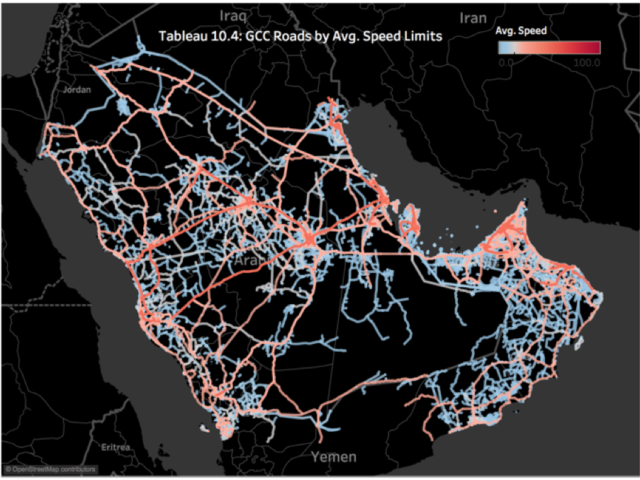
Tableau 10.4 brings to its user’s new geospatial capabilities with linear geometry shapefile support. You could also use Tableau’s Web Data Connector to import spatial data from the web by connecting directly to GeoJSON. For the Technical minds, Tableau has also deployed MATLAB models for predictive business insights.
Data Source Certification
Have you ever wondered about the authenticity of your data, its credibility for retrieving business insights? Tableau 10.4 allows the site administrators and project leaders to set the certification for the data source which meet the organization’s compliance and security standards. This appears as a unique badge, giving users the confidence over their data.
Discussions
With Tableau 10.4, you can now benefit from the collective knowledge of your team. The real time commenting capability allows data discoveries and analytics based on the discussion and viz snapshots. Administrators can also disable this feature if required.
Additionally, Tableau gives data source recommendations helps you to find the right data source for your analysis. It also gives an option of publishing to older versions of Tableau Server using the latest version of Tableau desktop using downgrade and publish option.