How AI Decision-Making is Improving Enterprise Outcomes
Blog
Share 
PARAMETER ACTION + SHEET ACTION
 23 September 2019
  Team Beinex
 Parameter Action + Sheet Action: Extended Tableau Interactivity
Tableau has included lots of sought-after features into its latest release, Tableau 2019.2. If you’ve been eagerly looking forward to the release of the latest Tableau version to try out the whole new Parameter Actions, well – the wait is over!
In our previous blog post about Tableau 2019.2, we had already covered some of the major features of the release. In this blog, we will be diving deep into ‘parameter action’ and the combination of Parameter Action + Sheet Action with a simple example using Sample-Superstore dataset.
What are Parameter Actions?
Parameters are constant values created by a user to perform certain functions in Tableau and can be used in calculations, reference lines and some other analytic scenarios. A parameter can be a set of strings, numbers, etc. With parameter, the user can able to select only one value at a time.
With parameter actions, users have the option to control the parameter values dynamically when clicking or hovering on certain elements on a viz. We can use parameter actions in a worksheet or a dashboard which extends the interactive ability of Tableau. This enables the users to visually change the parameter value with few interactions, which is cool. Parameter action can unleash the possibilities for designers to come up with new levels of interactivity to the dashboards.
Steps to achieve Parameter Action + Sheet Action:
1. First, create the sheets of required KPIs. We have created 4 sheets;
- Sales Trend
- Number of Customers
- Sales by Segment
- Quantity Vs. Sales


2. Create a Year calc from ‘Order Date’ field.

3. Create a parameter using ‘Year’ calculated field. (This parameter is used in Parameter Action)

4. Create a calculated field ‘Parameter Calc’ which is used to color/highlight the selected year.

5. Drag the ‘Parameter Calc’ to Color and Size in marks shelf.

6. If you apply ‘Parameter Calc’ to the created sheet, it will look something like this. The selected year in ‘Year Parameter’ will be highlighted with the color and size.

7. Now, we need a toggle to switch between years. So, we have to create a sheet like below,
(Like before, drag the ‘Parameter Calc’ to color and size in marks shelf)

8. Arrange the sheets in a dashboard. Give a header and format the texts, fonts, colors if required.

9. How to create ‘Parameter Action’
- Select Dashboard > Actions.
- In the Actions dialog box, click Add Action and then select Change Parameter.

- Select ‘Year Toggle’ as Source sheet and choose ‘Select’ in Run action on:
- Select ‘Year Parameter’ as Target Parameter.

- Now, if you select a year, the parts in the sheet corresponding to the selected year will get highlighted in color and other parts are grayed out.
10. How to create ‘Sheet Action’
- Select Dashboard > Actions.
- In the Actions dialog box, click Add Action and then select Filter.
- Select ‘Year Toggle’ as Source sheet and all the sheets in the dashboard as Target Sheets
- Choose ‘Select’ in Run action on and choose ‘Show all values’ in Clearing the selection will

Now, we have set both Parameter Action and Sheet Action for ‘Year Toggle’ sheet.
If we single click on the year, it will highlight (Parameter Action) the year throughout the dashboard and if we double click on the year, it will filter out (Sheet Action) that particular year throughout the dashboard.

Beinex is a digital transformation organization en-rooted with ideas, innovation and unparalleled customer service. Our mission is to transform the way individuals and the organizations work with the data through innovation and experience.
If you are interested in learning more about the latest Tableau parameter actions and use cases, please contact us at training@beinex.com/ info@beinex.com
and we would be happy to schedule a Tableau demo or training for you and your company.


-
Related Articles

Snowflake and GenAI: Revolutionizing Data Analytics
Snowflake Cortex: AI-Powered Data at Your Fingertips
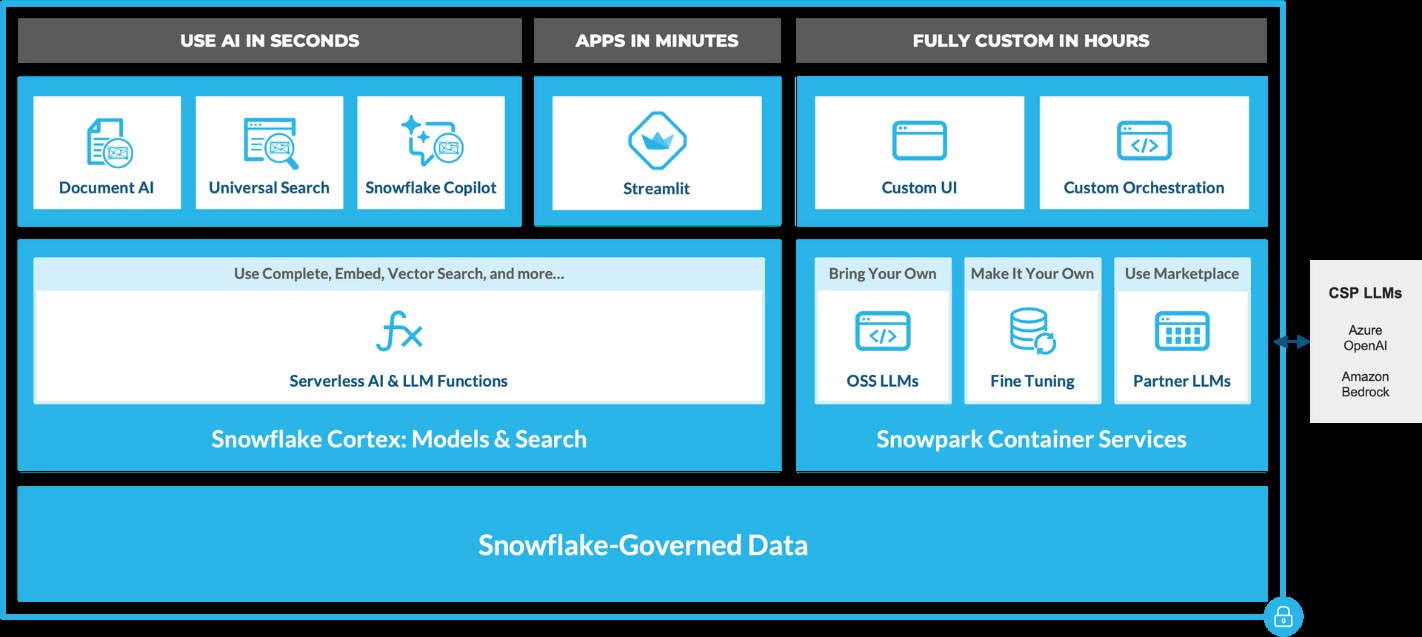
Snowflake Cortex provides access to industry-leading AI models, including large language models (LLMs) and vector search functionality. These serverless tools simplify everyday analytics and AI development, all within a single line of SQL or Python.
 Source: https://www.snowflake.com/en/blog/use-ai-snowflake-cortex/
Key benefits include:
• Instant Access to AI Models: Snowflake users can leverage specialized machine learning and LLM models without managing expensive infrastructure. • Enhanced Data Insights: With Cortex, users can analyze vast datasets using Snowflake’s powerful AI capabilities, unlocking strategic insights to improve decision-making. • Simplified AI App Development: By removing technical barriers, Cortex democratizes AI access, enabling users of all skill levels to build AI applications.
LLM-Based Models for Unstructured Data (in private preview):
• Answer Extraction: Extract key information from unstructured datasets. • Sentiment Detection: Identify the sentiment in textual data. • Text Summarization: Create concise summaries of lengthy documents for quicker insights. • Translation: Perform large-scale text translation efficiently.ML-Based Models (available soon):
• Forecasting: Automatically forecast time series based on historical data, adjusting for seasonality and scaling. • Anomaly Detection: Detect outliers in time series data, useful for monitoring data pipelines. • Contribution Explorer: Identify key factors contributing to changes in metrics between two time intervals. • Classification: Categorize data into predefined classes to offer recommendations based on trends.
General Purpose Models for Broader Use Cases:
• Complete: Generate text completions using state-of-the-art open-source LLMs like Llama 2. • Text2SQL: Convert natural language queries into SQL, powered by Snowflake’s LLM, similar to the Snowflake Copilot feature. These serverless functions offer out-of-the-box capabilities that can be integrated into analytics workflows and app development in Snowflake. For example, with just a few lines of code, developers can embed these functions into chatbots using Streamlit. This allows Python-savvy users to build secure and powerful LLM applications quickly, often within hours.
Document AI
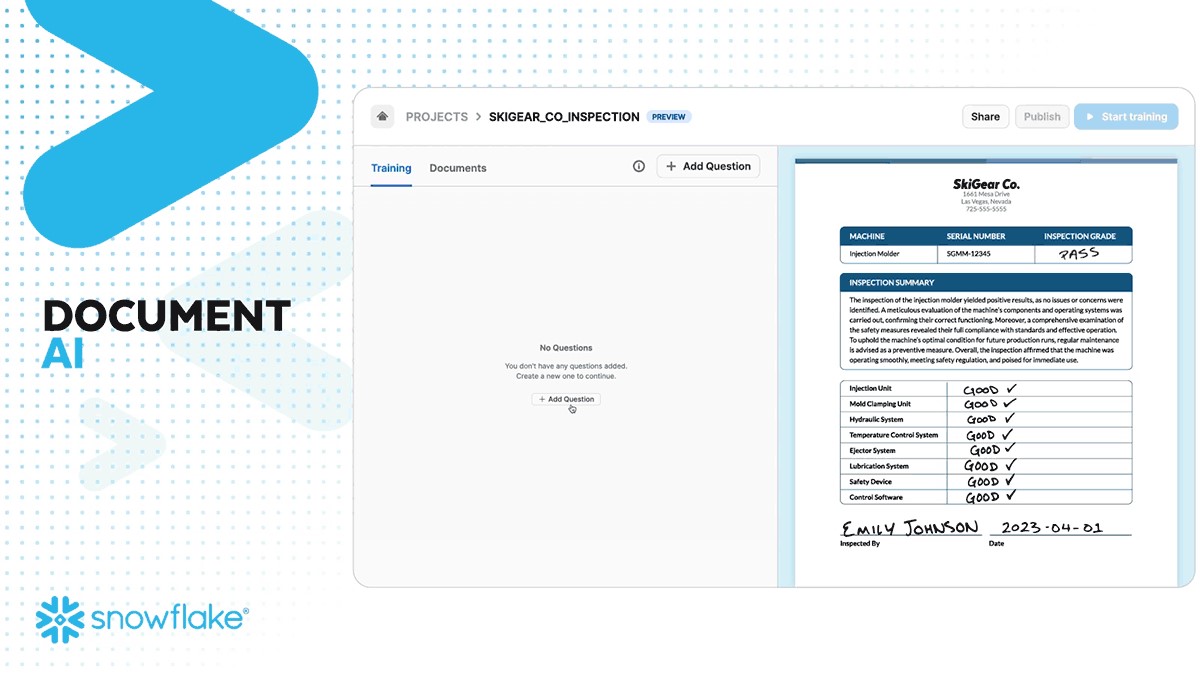
Document AI (currently in private preview) leverages large language models (LLMs) for seamless data extraction. By utilizing a pre-trained model and a user-friendly interface, customers can process various document types—such as PDFs, Word files, text files, and even screenshots—to quickly obtain answers to their queries. This capability can be scaled to build pipelines that automate data extraction, significantly reducing manual effort and saving time.
 Source: https://www.snowflake.com/en/blog/use-ai-snowflake-cortex/
Snowflake Copilot: Your AI-Powered SQL Assistant
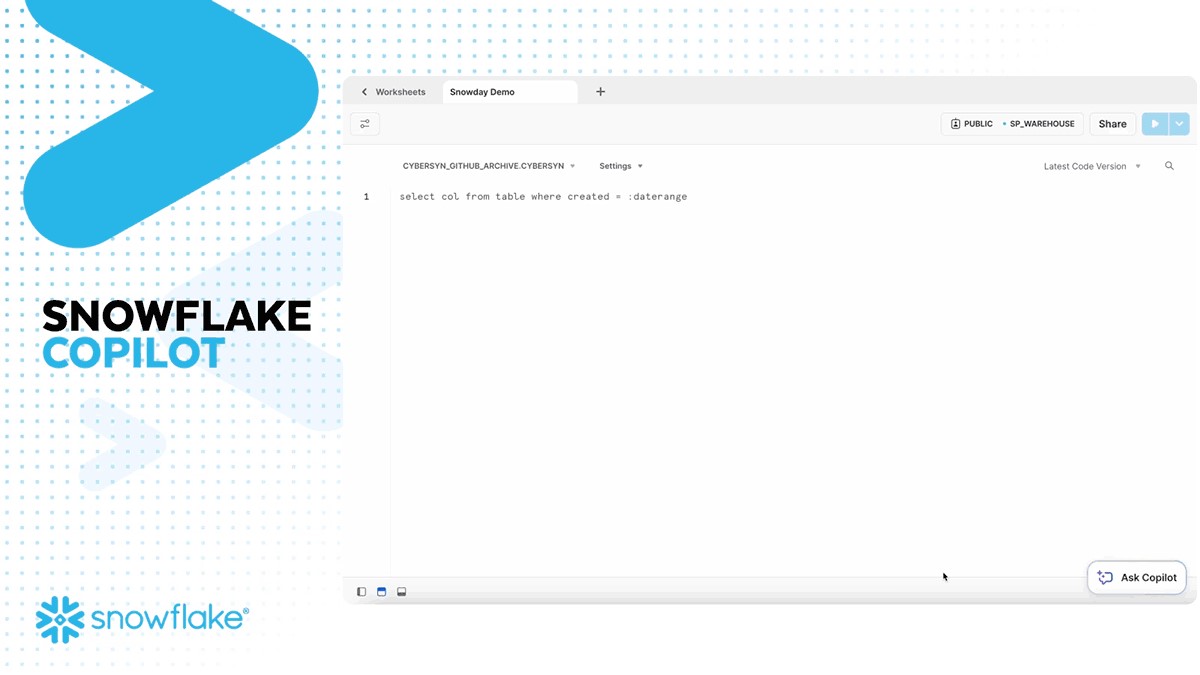
Snowflake recently introduced Snowflake Copilot, an AI-driven solution that makes SQL query generation faster and more efficient. With Snowflake Copilot, users can ask data-related questions in plain English, and the AI will generate SQL queries to deliver the desired insights.
Key Features of Snowflake Copilot:
• Text-to-SQL: Users can interact with their data using natural language, eliminating the need for complex SQL coding. • Enhanced Accuracy: The AI continuously refines its understanding of user queries, providing more accurate SQL code suggestions. • Data Exploration: Ask open-ended questions about your data and receive detailed insights without writing complex queries.
The Future of Generative AI with Snowflake
Snowflake is pushing the boundaries of Generative AI with its continuous development of AI tools like Snowflake Cortex AI and Snowflake Copilot. These innovations pave the way for a future where natural language becomes the primary interface for data analysis, enabling businesses to extract more value from their data while maintaining robust governance.
By integrating AI capabilities directly into the data platform, Snowflake empowers users to streamline workflows, reduce processing times, and unlock new levels of productivity—all without needing deep AI expertise.
A Transformative Partnership for the Future
Generative AI, coupled with Snowflake’s powerful data platform, is a game-changer for businesses looking to innovate and scale. Whether it’s enhancing productivity, improving decision-making, or driving customer engagement, Snowflake’s AI solutions are built to transform how enterprises interact with their data.
As AI continues to evolve, so will Snowflake's offerings, bringing more capabilities, deeper insights, and greater efficiencies to businesses worldwide. Ready to experience the future of data analysis with Snowflake and AI? The journey has just begun!
Snowflake + Beinex Partnership
Beinex is a Snowflake Services Partner Premier Tier, and the partnership reaffirms Beinex’s commitment to delivering exceptional data solutions and positions the company at the forefront of industry advancements. Harnessing the true potential of the data, partnership drives innovation and success in the digital era.
Belonging to Snowflake Services Partner Premier Tier, Beinex leverages Snowflake’s advanced capabilities and seamlessly integrates them into its comprehensive data solutions. This enables Beinex to accelerate the pace of Digital Transformation for its clients, providing them with the tools necessary to extract maximum value from their data and thrive in an increasingly data-centric world.
Connect with us for a free demo: https://beinex.com/contact-us/

AWS vs AZURE vs GCP: THE LEADING CSPs FROM A COMPARATIVE LENS
Benefits of Cloud Computing
Worldwide Vendor Market Share
 Sourced from: Cloud Market Share Q2 2023: AWS, Microsoft, Google Battle | CRN
AMAZON WEB SERVICES (AWS)
Amazon Web Services is the most extensive and widely adopted cloud platform worldwide, offering over 200 fully featured services across global data centres. AWS is used by millions of customers, including fast-growing startups, major enterprises, and prominent government agencies, to reduce costs, enhance agility, and accelerate innovation.
The USPs of AWS
Popular Customers of AWS
Netflix:Netflix relies on AWS for most of its computing and storage requirements, including analytics, databases, recommendation engines, video transcoding and numerous functions utilizing over 100,000 server instances on the AWS platform.BMW Group: BMW Group leverages AWS to acquire the agility and flexibility necessary for democratizing data usage and expediting innovation.
Philips: Philips is an early adopter of AWS that utilizes AWS services to manage the Philips HealthSuite Platform, ensuring scalability, cost-effectiveness, and regulatory-compliant solutions.
Salesforce: Salesforce shares a global strategic relationship with AWS, utilizing AWS compute, storage and AI solutions to create and deploy innovative business applications.
Pinterest: The exabyte data platform of Pinterest is hosted exclusively on AWS, managing log search and analytics that surpass 1.7TB. This implementation has led to a 30% reduction in operational costs.
Coca-Cola: After its migration to AWS, Coca-Cola has reduced operational costs by 40% and IT ticket volume by 80%.
Regions & Availability
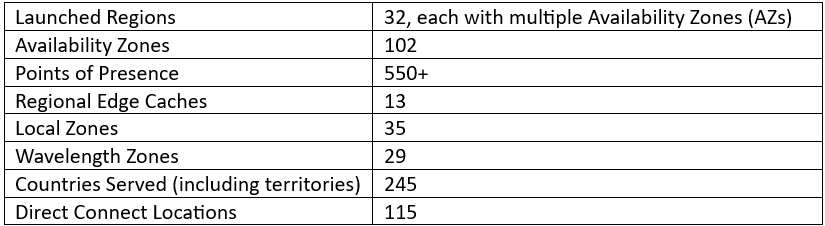
AWS boasts the most expansive global cloud infrastructure. Gartner has acknowledged the AWS Region and Availability Zone framework as the endorsed strategy for operating enterprise applications demanding high availability.
The AWS Cloud covers 102 Availability Zones across 32 geographic regions worldwide, with disclosed intentions to introduce an additional 15 Availability Zones and 5 AWS Regions in Germany, Canada, Thailand, Malaysia and New Zealand.
MICROSOFT AZURE
The Azure cloud platform encompasses over 200 products and services crafted to empower you to bring innovative solutions to fruition, addressing current challenges while shaping the future. It offers the flexibility to build, run, and manage applications across various clouds, on-premises, and at the edge, utilizing the tools and frameworks as per your preferences.
The USPs of Microsoft Azure
Popular Customers of Microsoft Azure
New York City Department of Environmental Protection (DEP): DEP uses a Microsoft infrastructure specifically designed with modern security considerations. With the solution in the cloud, Microsoft manages disaster recovery, reducing the necessity for maintaining certain skill sets in-house. CCC Group: CCC Group utilizes Azure Data Lake and Data Warehouse to collect, store, and segment data. Panasonic Connect Co: Panasonic Connect Co maximizes the benefits of PaaS services such as Azure IoT Hub, Synapse Analytics, and Azure Kubernetes Services. Hamburg Commercial Bank: Hamburg Commercial Bank opted for Microsoft Azure Virtual Desktop to achieve improved performance, reliability, and enhanced interoperability with other Microsoft technologies previously invested in. Barnsley Hospital NHS Foundation Trust: Barnsley Hospital NHS Foundation Trust adopted a new, integrated platform using Power Platform and Microsoft Teams for video consultations. During the COVID-19 pandemic lockdowns, the Trust rapidly deployed Microsoft Teams to facilitate remote work and staff collaboration.Regions & Availability:
Microsoft operates highly secure data centre facilities globally, forming a distributed infrastructure that sustains thousands of online services. This expansive, globally distributed infrastructure prioritizes sustainability, bringing applications closer to users, ensuring data residency, and providing customers with comprehensive compliance and resiliency options.
As of March 2023, Microsoft Azure boasts 160 active data centres spread across 60 regions worldwide. These Azure regions, defined by geographical areas, house one or more physical Azure data centres. Operating within a latency-defined perimeter, these data centres are strategically positioned to deliver optimal performance and security to users.
Azure leads with over 60 announced regions, surpassing all other cloud providers. It is accessible in 140 countries, showcasing a global presence that sets it apart in cloud computing.
GOOGLE CLOUD PLATFORM (GCP)
Google Cloud, also called Google Cloud Platform, offers computing resources dedicated to developing, deploying, and operating web applications. While its cloud infrastructure supports applications like Google Workplace, GCP primarily serves as a platform for constructing and managing custom applications. These applications can subsequently be published on the web, leveraging the extensive capabilities of its hyperscale data centre facilities.
The USPs of the Google Cloud Platform
Popular Customers of the Google Cloud Platform
Etsy: Utilizing the collaborative tools offered in Google Workspace, Etsy meets the evolving needs of sellers and buyers innovatively, fostering continued growth and enhancing the sustainability of its operations. X (formerly Twitter): Twitter's complete shifting of its ad analytics data platform to Google Cloud granted developers increased agility, allowing them to configure existing data pipelines more easily and build new features acceleratedly. Airbus Defence and Space: Airbus Defence and Space's Intelligence business line employs Google Cloud to construct a scalable online platform, enabling customers to access petabytes of satellite imagery in real-time.Regions & Availability
Google Cloud provides global coverage through regions distributed worldwide, ensuring low cost, minimal latency, and optimal application availability for customers.
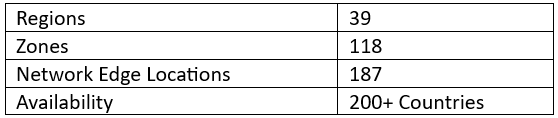
Follow the link to have a look into a tabular comparison of the solutions provided by the CSPs: AWS, Azure and GCP. https://cloud.google.com/docs/get-started/aws-azure-gcp-service-comparison

Eyes Wide Open: Defending Against Homograph Phishing Schemes
Understanding Homograph Phishing Attacks
Homograph phishing attacks rely on Internationalised Domain Names (IDNs), a feature designed to accommodate non-ASCII characters in domain names. While this capacity improves internet access for people of varied language backgrounds, it also allows for harmful exploitation. Cybercriminals can now register domain names that appear identical or almost equivalent to regular Latin characters but come from alternative Unicode character sets.
For example:- Legitimate Website: www.login.microsoft.com
- Homograph Phishing URL: www.login.micrsoft.com
In this example, the 'o' in the homograph URL is not the standard Latin 'o,' but rather the Latin Small Letter Sideways 'ᴑ', which visually appears identical. To unsuspecting users, the homograph URL looks indistinguishable from the legitimate one and consequently fall prey to it.
The Dangers of Homograph Phishing Attacks
Homograph phishing attacks pose significant risks, primarily due to their ability to deceive users successfully by means of:
- Credential Theft: Cybercriminals utilise homograph URLs to impersonate reputable websites and deceive users into entering their login credentials, collecting critical information.
- Financial Fraud: Attackers may imitate banking websites, payment portals, or e-commerce platforms to steal credit card information or banking information from unsuspecting consumers, resulting in financial losses.
- Malware Distribution: Homograph URLs can route users to fraudulent websites or start malware downloads, possibly infecting their devices and leading to data breaches.
- Business Email Compromise (BEC): Homograph phishing URLs help in BEC attacks, in which attackers imitate high-ranking officials to trick employees into making fraudulent money transfers or disclosing sensitive information.
Protecting Against Homograph Phishing Attacks
While homograph phishing attacks can be challenging to detect, several preventive measures can help enhance cybersecurity like those of:
- Domain Monitoring: Monitor domain registrations regularly for questionable or homograph URLs that mimic valid domains. Security professionals can also employ specialised tools to proactively identify potential risks.
- Using Web Browsers with IDN Support: Modern web browsers include features for detecting and displaying problematic homograph URLs. Check that your browser is up to date and that IDN support is enabled.
- URL Inspection: Hovering over links to show the actual domain before clicking on them encourages people to carefully analyse URLs. Homograph URLs may appear deceiving at first view, but they disclose their actual nature with closer inspection.
- Deploying Security Software: To detect and block fraudulent URLs and emails, use powerful security solutions such as anti-phishing software, firewalls, and email filters.
- Cybersecurity Awareness Training: Educate staff and users about the dangers of homograph phishing attempts and encourage them to be proactive in cybersecurity.
Defending against homograph phishing attacks necessitates a multi-pronged approach. Organisations and people must use domain monitoring services such as Amazon Route 53 and web browsers with IDN capability to identify fraudulent URLs. It is critical to educate clients about the risks through cybersecurity training.
Beinex+ AWS Offerings
AWS provides security services such as AWS Shield and AWS WAF to help protect against phishing attacks. Strengthen your defences by integrating robust security software from the AWS Marketplace and embracing Two-Factor Authentication (2FA). Safeguard against evolving threats like homograph phishing for a safer online experience.
Beinex is an AWS consulting partner, and we empower customers to host their BI solutions, provide security services and much more on the cloud. Our cloud migration experts bring in best-in-class stability and reliability by understanding your business strategy and working closely with you to deploy AWS infrastructure as a service.

Coming Soon: Tableau 2022.1 – What Does It Offer New
- List the unused data sources: Data sources imported in a workbook but not used are highlighted by the new feature. The developer can remove these data sources from the data source list to make the workbook faster.
- List of unused fields or data columns: Just like the data sources, workbook optimizer also highlights the data columns not used across the workbook. Removing these at the data source level can help improve the overall performance of the workbook.
- List of sheets not used in the dashboard: It is a common practise that developers tend to create sheets not used in the final dashboard. This creates unnecessary clutter and makes the dashboard slower. The workbook optimiser feature gives a list of such sheets which the user can delete to optimise the performance of the workbook further.
- Highlights lengthy calculations: The feature provides a list of calculations which are too complex and in turn reduce the performance of the dashboard. Simplifying a few of these can improve performance to a great extent.
 Ask Data Phrase Builder: This feature is available on Tableau Server and Tableau Online
Add field would look like as shown in the below screenshot:
Ask Data Phrase Builder: This feature is available on Tableau Server and Tableau Online
Add field would look like as shown in the below screenshot:
 Customize View Data: This feature is available on Tableau Server, Desktop and Tableau Online
This feature enables to reshape the tabular data behind your visualisation in the View data interface. One can create new columns, remove columns from the default view, change the order and sort the data using this feature. This reshaped data can also be exported as csv file to be shared with the team.
Change the root table: This feature is available on Tableau Server, Desktop and Tableau Online
Managing multiple data tables becomes easier and flexible with this new feature. One can swap any table to be the root table with a single click. This allows one to change the layout of the table quickly, reshape the data with a different root table and delete a specific table without deleting child nodes. For e.g., let us assume a user had to create a data source for an analysis using 3 tables namely ‘customers’, ‘orders’ and ‘returns’. The user creates the data model such that ‘customers’ is the root table followed by ‘orders’ and ‘returns’. But after performing some analysis the user realises that ‘orders’ should be the main root table. In such cases the user would have to re-create the data again from scratch but with the new ‘Swap with root table’ feature user can do the changes with a few clicks.
Parameter Enhancements in Tableau Prep
In version 2022.1 Tableau Prep is adding even more places where one can use parameters in the flow as well as user enhancements. Now, one can:
Customize View Data: This feature is available on Tableau Server, Desktop and Tableau Online
This feature enables to reshape the tabular data behind your visualisation in the View data interface. One can create new columns, remove columns from the default view, change the order and sort the data using this feature. This reshaped data can also be exported as csv file to be shared with the team.
Change the root table: This feature is available on Tableau Server, Desktop and Tableau Online
Managing multiple data tables becomes easier and flexible with this new feature. One can swap any table to be the root table with a single click. This allows one to change the layout of the table quickly, reshape the data with a different root table and delete a specific table without deleting child nodes. For e.g., let us assume a user had to create a data source for an analysis using 3 tables namely ‘customers’, ‘orders’ and ‘returns’. The user creates the data model such that ‘customers’ is the root table followed by ‘orders’ and ‘returns’. But after performing some analysis the user realises that ‘orders’ should be the main root table. In such cases the user would have to re-create the data again from scratch but with the new ‘Swap with root table’ feature user can do the changes with a few clicks.
Parameter Enhancements in Tableau Prep
In version 2022.1 Tableau Prep is adding even more places where one can use parameters in the flow as well as user enhancements. Now, one can:
- Get a list of all the parameters in one place rather than finding them in the flow. One can delete these parameters directly from the parameter window rather than to find it in the flow first.
- Include parameter names in exported output files.
- Include parameters in SQL scripts that you run before or after writing the flow output to a database. Include parameters in worksheet names when writing the flow output to Microsoft Excel.
- 1. Improvements in Esri Data Connector
- 2. Addition of new Accelerators
- 3. Added connectors to connect to more data sources

Prepping the data on Tableau: Five aspects that matter
Data preparation is purging imperfectly formed data, reorganising unclean data, and merging various data sets for analysis. Rows and columns in the data structure must be changed, and data types and values must be cleaned up. The amount of time it takes to find insights directly depends on how quickly and well you prepare your data. The entire process can be sped up by being aware of the extent of the data you're studying and observing the modifications you make to the data.
With the help of Tableau Prep Builder, data can be combined, shaped, and cleaned more quickly and easily for analysis within Tableau. You can swiftly obtain high-quality data using the linear and visual approach when preparing your data.
When ushering in data into a data prep tool, it is always better to know what you're working with and whether you're looking at the complete data set or just a subset. Before you begin cleaning, you might also need to undertake some data research. Five crucial steps are to be taken care of for prepping the data.
Let's have a look:



 One technique to get beyond this obstacle is visualising the data pane in Tableau Desktop as to how it should appear. Do you have columns with the same value in several places? Should each product be in a single field with the sales transactions stated below, or should each product have its column with the sales transactions listed underneath? The latter is more likely, and a pivot is necessary for this situation.
You will be joining the data if you need to combine two tables. By using a join, you can increase the number of fields in your data source that you can investigate. Although a join can be added at any point during the data preparation process, the sooner you use it, the sooner you will comprehend the data set and identify areas that require immediate attention.
One technique to get beyond this obstacle is visualising the data pane in Tableau Desktop as to how it should appear. Do you have columns with the same value in several places? Should each product be in a single field with the sales transactions stated below, or should each product have its column with the sales transactions listed underneath? The latter is more likely, and a pivot is necessary for this situation.
You will be joining the data if you need to combine two tables. By using a join, you can increase the number of fields in your data source that you can investigate. Although a join can be added at any point during the data preparation process, the sooner you use it, the sooner you will comprehend the data set and identify areas that require immediate attention.
 Like appending two data sets together, a union enables you to do so. For instance, you might have an Excel file where each sheet displays transactions from different years. You may maintain the same structure with extra rows by using a union rather than joining the tables.
After your data has been organised, processed, and filtered, it's time to interpret what it is trying to tell you. Tableau Prep connects with your entire business intelligence platform like many other data preparation products. To allow others to begin their analysis, publish the extract to Tableau Server or Tableau Cloud. Bring it into Tableau Desktop to start posing and investigating more in-depth queries. The hardest part of the data analysis process is now complete. It's time to share the breakthroughs that resulted from your hard work.
Like appending two data sets together, a union enables you to do so. For instance, you might have an Excel file where each sheet displays transactions from different years. You may maintain the same structure with extra rows by using a union rather than joining the tables.
After your data has been organised, processed, and filtered, it's time to interpret what it is trying to tell you. Tableau Prep connects with your entire business intelligence platform like many other data preparation products. To allow others to begin their analysis, publish the extract to Tableau Server or Tableau Cloud. Bring it into Tableau Desktop to start posing and investigating more in-depth queries. The hardest part of the data analysis process is now complete. It's time to share the breakthroughs that resulted from your hard work.
1. Adjust the data sample size
To speed up your data preparation process and improve performance, you should generally only connect to a small portion of a vast data set. You might occasionally prefer to view the entire data set, and Tableau Prep enables you to do so. If a sample doesn't help you complete your data preparation task, you can try the following:
- a. Boost the size of your data sample: Adjust the sample's row count by returning to the input stage. You can add more rows or include all the data but remember that doing so might make the performance slower. Another word of caution is that utilising a specified number of rows will only return the fastest method the underlying database can find to replace the given rows.
- b. Take random sampling: Tableau Prep automatically chooses the optimal number of rows to return based on the total number of fields in the collection and the data types of those columns. The database level random sampling occurs and returns the specified number of rows. The database returns a sample after inspecting each entry. Not all data sources provide this option, which could also affect performance.
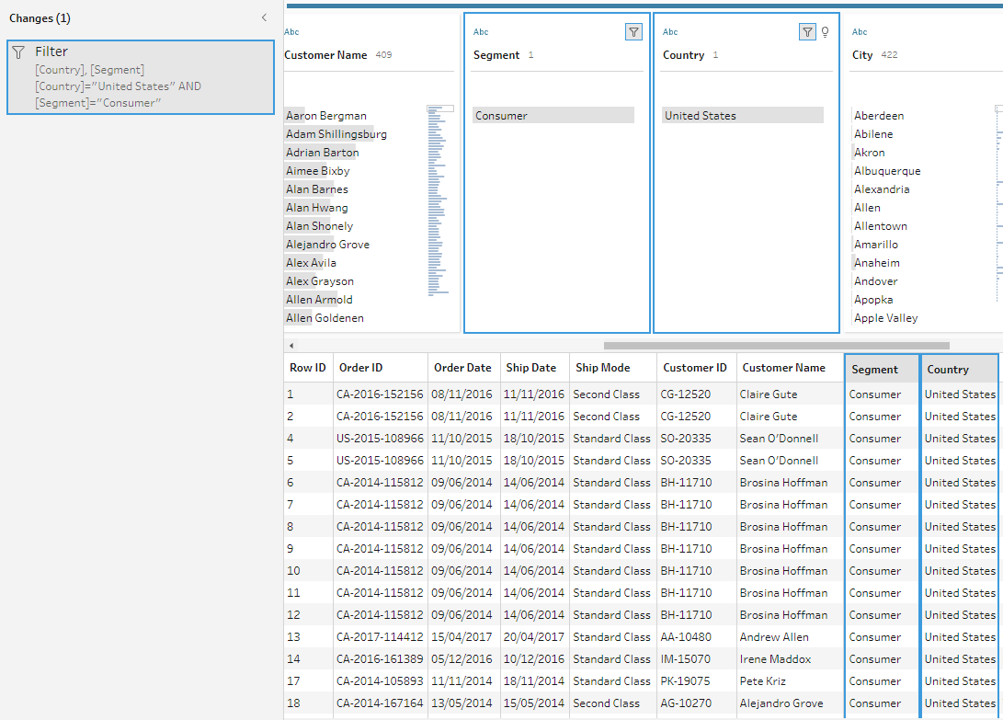
- c. Add a step filter at the input stage: You may ensure that the information pulled into your data set is pertinent to your research by including a filter at the input stage. This improves performance while providing you with a more representative sample.
2.Evaluate the data
You'll probably want to start by counting the number of distinct values in each field. A simple check at the column header at the top reveals how many states are represented in the data set. You'll also want to understand how various values connect to identify data outliers or problems. You can utilise highlighting in Tableau Prep to find correlations between different fields. The data grid view is condensed to only display the records with the selected value in the chosen field when you click on a value in the profile pane. Tableau Prep highlights the corresponding values in blue, and the values span areas.
3.Filter the data
Limit the fields you import into Tableau Prep to those you'll need for your analysis to maximise the overall effectiveness of your data preparation process. By filtering your data, you can verify that you're performing the proper analysis while saving time. For instance, if you need to look at sales data from the previous two years, you may use the range or relative date filters to limit the date field to that period. You might want to eliminate any incorrect or irrelevant data. A value in the data pane can be excluded with a single click. You can do this at any time during your flow.
4.Assess and tidy up the data
Tableau's data types will have an impact on your analysis. Therefore, it's critical to correctly identify each field before beginning. Even though Tableau allows you to update aliases, alter data types, split lots, and create calculations, it is far simpler to carry out these tasks beforehand, particularly when preparing the data set for someone else. Tableau Prep includes built-in capabilities to aggregate and replace recurring characters or pronunciation, saving you from having to edit each one individually so that you don't have to; these solutions use algorithms to make cleaning easier. Or, if you foresee a missing value, you may manually add it so that it will be included when the flow processes the complete data set. You can apply a computation if you know that a field must be cleaned or filtered, but it takes more than the user interface offers.
5.Understand the data results
Deciding about the final data set's appearance while you begin to prepare your data can be difficult. For Tableau to effectively analyse your data, you might need to merge numerous data sources or pivot your data from columns to rows.
One technique to get beyond this obstacle is visualising the data pane in Tableau Desktop as to how it should appear. Do you have columns with the same value in several places? Should each product be in a single field with the sales transactions stated below, or should each product have its column with the sales transactions listed underneath? The latter is more likely, and a pivot is necessary for this situation.
You will be joining the data if you need to combine two tables. By using a join, you can increase the number of fields in your data source that you can investigate. Although a join can be added at any point during the data preparation process, the sooner you use it, the sooner you will comprehend the data set and identify areas that require immediate attention.
Like appending two data sets together, a union enables you to do so. For instance, you might have an Excel file where each sheet displays transactions from different years. You may maintain the same structure with extra rows by using a union rather than joining the tables.
After your data has been organised, processed, and filtered, it's time to interpret what it is trying to tell you. Tableau Prep connects with your entire business intelligence platform like many other data preparation products. To allow others to begin their analysis, publish the extract to Tableau Server or Tableau Cloud. Bring it into Tableau Desktop to start posing and investigating more in-depth queries. The hardest part of the data analysis process is now complete. It's time to share the breakthroughs that resulted from your hard work.