How AI Decision-Making is Improving Enterprise Outcomes
Blog
Share 
LOD (Level of Detail) Expressions in Tableau
 17 October 2023
  Sumi S
 Types of LOD Expressions in Tableau
- FIXED
- INCLUDE
- EXCLUDE
There are three types of LOD expressions in Tableau:
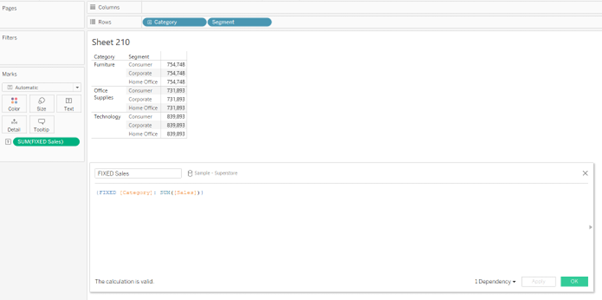
FIXED: The FIXED LOD expression calculates values based on specific dimensions, regardless of the dimensions present in the visualisation. It creates a virtual level of detail for the calculation. For example, {FIXED [Category]: SUM([Sales])} would calculate the total sales for each category, irrespective of other dimensions used in the visualisation.
INCLUDE: The INCLUDE LOD expression calculates values at the specified level while incorporating the dimension(s) used in the visualisation. It allows you to aggregate data for a specific dimension while considering other dimensions in the visualisation. For example, {INCLUDE [Region]: AVG([Profit])} would calculate the average profit for each region, considering all other dimensions in the visualisation.

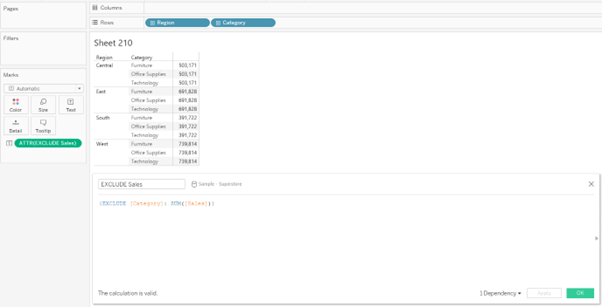
EXCLUDE: The EXCLUDE LOD expression calculates values at the specified level while excluding the dimension(s) used in the visualisation. It enables you to aggregate data for a specific dimension while ignoring other dimensions in the visualisation. For example, {EXCLUDE [Product]: SUM([Revenue])} would calculate the total revenue for each product, excluding any other dimensions present.
FIXED LOD Tableau Function
In Tableau, the FIXED Level of Detail (LOD) is the widely used function that allows you to perform calculations using specific dimensions, irrespective of the dimensions present in the visualisation. It creates a virtual level of detail for the calculation, providing precise control over your analysis's granularity.
Steps to Create a FIXED Level of Detail Tableau Function
In Tableau, the FIXED Level of Detail (LOD) function allows you to perform calculations using specific dimensions, irrespective of the dimensions present in the visualisation. It creates a virtual level of detail for the calculation, providing precise control over your analysis's granularity.
The steps to create the FIXED LOD function are as follows:
- • Create a calculated field. (This can be done by clicking on the drop-down next to the “Search” bar in the dimension pane or by selecting “Analysis” and selecting “Create Calculated Field”)
- • Type in the FIXED LOD Formula in the calculated field and drop the field into the view.
- • We can obtain the syntax of the FIXED expressions when we search for “Aggregate” functions in the calculated field.

Example
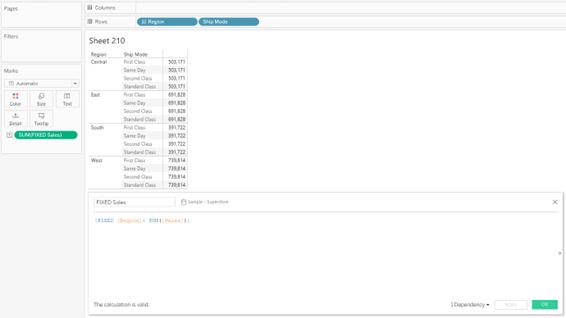
The following FIXED level of detail expression computes the sum of sales per region:
Beinex+ Tableau Offerings
Beinex has 100 years of combined experience in Tableau and is led by professionals who have successfully delivered Tableau projects in the region for large private and public sector organisations. Our team of Tableau-certified consultants are real-life Tableau business users passionate about Tableau and providing a world-class experience. In addition to providing sustainable analytics solutions, Beinex will help organisations to build superior data visual analytics capabilities internally through our bespoke training programs.
In Tableau, "Level of Detail" (LOD) expressions are a powerful feature that allows you to perform calculations at different granularities within your data. With LOD expressions, you can control the level at which an aggregation or calculation takes place, regardless of the visualisation's dimensions.
Related Articles

Alation Data Catalog: The Key to Unlocking Effective Modern Data Governance
Challenges in Data Governance
Organizations often face challenges aligning with business goals to ensure data quality, security, and visibility. Alation's Data Catalog centralized data management and enhances accessibility, helping businesses address the data governance challenges by managing data in line with the policies and standards. Some of the challenges in data governance are as follows: • Issues in Data Quality: This happens due to incorrect or insufficient data in the system, which can result in expensive errors and affect decision-making. Enterprises must follow continuous monitoring to ensure high data quality and maintain trust in data assets. • Struggling with Data Silos: For effective data governance, organizations must break down data silos as the separate storing of data across departments could hinder data accessibility and sharing, resulting in inefficiencies. • Concerns about Compliance and Security: To avoid sensitive data breaches, organizations must comply with the regulations and standards and enforce strong security measures. Ignoring the compliance requirements can result in reputational damage, legal consequences, and hefty penalties.
More About Data Catalog
A Data Catalog is a warehouse of data assets that improves comprehension, governance, discovery, use, and management of data. It helps unify extensive and intricate data ecosystems into a single hub and breaks down silos, leveraging data the right way. The centralized view of enterprise data assets provided by the data catalog allows leaders to effectively drive cross-collaboration and scale data usage. Despite being a data repository, a modern data catalog assists in making business processes more data-driven. From enhancing operational efficiency to boosting customer experience to making strategic decisions, a data catalog is equipped to make the most of the data. A data catalog facilitates business decisions by letting people locate, understand, and trust the required data. Some of the fundamental functionalities and features of a data catalog are as follows: • Managing metadata: Brings together metadata from diverse sources into a centralized platform and offers a comprehensive picture of data across your enterprise. • Automating data discovery and search: Employs advanced search capabilities (search by tags, keywords domains, natural language, etc.), AI, and ML to locate and access relevant data assets. • Ensuring data quality: Allows data customers to understand data quality and build trust in the data through documentation of quality regulations, displaying data quality metrics, and quality profiling. • Tracking data lineage: Tracks the data flow from its source to destination, mapping the critical data aspects throughout the organization during the transformation. It also includes metadata about the transformation and data assets, enabling impact analysis. • Fortifying data governance: Enables data classification to assign suitable policies for ensuring compliance with regulations.
How Alation's Data Catalog Strengthens Modern Data Governance
Companies with data catalogs are more likely to acquire and retain customers and achieve profitability than those that do not have one. The following aspects elaborate on how Alation unlocks smarter data governance with its data catalog. • Breaking down data silos and centralizing data access: The Alation Data Catalog helps businesses struggling with data silos by centralizing data access and enabling easy data discovery and retrieval from a unified platform. Centralizing facilitates collaboration between departments by eliminating barriers between them. The enhanced collaboration enables effortless sharing of data assets and insights, fostering better decision-making and collaboration. • Managing metadata: Metadata management is paramount to data governance. With Alation Data Catalog, users can access powerful metadata management capabilities to handle data regulations, relationships, and definitions effectively. It allows users to understand and gain trust and confidence in their data assets. With features like end-to-end data lineage, automated metadata harvesting, and policy enforcement, Alation ensures data accuracy, accessibility, and compliance. • Enhancing data quality through Data Profiling and Cleansing: Data quality stays crucial for any organization to ensure trustworthy analytics and reporting. The Alation Data Catalog's data profiling and cleansing tools help detect inconsistencies and inaccuracies in data, helping enterprises maintain high data quality standards. • Guaranteeing compliance and security: With the Alation Data Catalog, compliance, and security can be ensured by implementing access controls and permissions. It entails protecting sensitive and confidential information by enabling the restriction of data access based on roles. • Fortifying data security: The comprehensive audit trails and monitoring offered by the Alation data catalog are important for data security as they facilitate tracking data usage and changes over time. It also helps identify possible breaches and unauthorized access, enhancing accountability and transparency across the enterprise. • Making progress through continuous monitoring: Conducting routine audits to evaluate compliance and data quality is vital for ensuring data governance remains effective and adaptive to the dynamic requirements. Alation Data Catalog's monitoring tools offer insights into the use of data and the likelihood of serious security breaches, enabling informed decisions about policy modifications. It is important for businesses to invest in training programs for data users as they help them understand the functions of data catalog and apply the best practices. With the Alation Data Catalog, businesses can promote collaboration and maintain data integrity and safety. Alation's holistic approach to data governance builds a trustworthy and accountable culture. The Alation Data Catalog functions as a powerful enabler, equipping enterprises to thrive in a data-driven world by streamlining complex governance tasks and promoting a culture of data literacy. In partnership with Alation, Beinex equips businesses with the support to fulfill data governance requirements while streamlining implementation and saving time. Connect with us for a demo: Beinex - Beinex: Your Trusted Alation Partner in Dubai, UAE, MEA, KSA & UK for Data Intelligence

Data Sharing Best Practices in Snowflake
Snowflake Data Sharing
Data sharing in Snowflake equips you to share specific objects with another Snowflake account or a designated reader account. The beauty of this process lies in the fact that the data isn't duplicated or moved between accounts.
Now, why is this a game-changer for organisations? When constructing data pipelines and developing data products, it's a common practice to shuttle data between databases and diverse systems to blend different datasets.
Consider this scenario: You have transactional data within your online transactional processing (OLTP) database, and you wish to integrate it with external data for a machine learning model. Traditionally, organizations would export data into a data lake, import external data, and then employ tools like Apache Spark for analysis.
But what if, instead, you could simply deposit your data into Snowflake, and the external data source could seamlessly share its data with your organisation, eliminating the need to load it separately? This eradicates the challenge of keeping data copies synchronised, resulting in savings on storage, computing costs, and maintenance efforts.
Imagine your company possesses valuable information that can guide other companies in making informed decisions. For instance, let's say your company can provide precise estimates for product delivery times based on proprietary data, and you want to offer this information for sale to your customers.
Enter Snowflake data sharing—it empowers you to precisely do that.
Case Studies: Snowflake Data Sharing
Citing two instances where leading organisations use Snowflake to improve actionable data sharing, collaboration and reporting capabilities.
1. A Pioneering Technology Leader
A well-known Swedish-Swiss multinational corporation successfully implemented a streamlined data strategy using the Snowflake Data Cloud, adopting an "extract once, use everywhere" approach that simplified data consolidation and enablement. By transitioning from nightly extracts, which caused significant system overhead, to a single, near real-time Change Data Capture (CDC) process, the company achieved efficient replication of information to Snowflake with minimal impact. The utilisation of Snowflake Secure Data Sharing facilitated secure and governed data collaboration across the four business areas.
2. A Leading fast-food Restaurant Chain
Snowflake's data-sharing capabilities have revolutionised decision-making for a fast-food restaurant chain. They can effortlessly share crucial sales, inventory, and operational data with external entities, expanding from three to over 30 parties.
With a high-performance database platform hosting over 2 million transaction records, the restaurant chain has established a robust data management and analysis infrastructure through Snowflake, empowering its operational and marketing endeavours.
Moreover, by consolidating all data onto Snowflake, the organisation has achieved a remarkable 70% reduction in operational IT costs, demonstrating the platform's efficiency and cost-effectiveness.
Centralising and sharing data with Snowflake significantly eased the development of data products for various purposes, including marketing campaign analytics, quotation success metrics, production line tools, and supply chain dashboards. These data products are utilised by thousands of users globally, including internal stakeholders and external vendors, enhancing collaboration and efficiency across the organisation.
What are the best practices for Snowflake data sharing?
Optimize your Snowflake data sharing experience with these essential practices. Ensure data security by utilizing secure views to filter and mask sensitive information. Enhance clarity and understanding by employing descriptive names and comments for your shares. Monitor and fine-tune your sharing activities using Snowflake Information Schema or Account Usage views. Foster communication and collaboration with your consumers to create a seamless workflow.
Take command of your data sharing environment by setting quotas and limits with the ALTER SHARE command. Keep your consumers informed about any changes or updates to your shares, and actively seek feedback to refine your data-sharing strategy. Explore additional data sources through Snowflake Data Exchange or Data Marketplace to enrich your analytics.
These best practices safeguard sensitive data, ensure compliance with data privacy regulations, clarify the purpose of each share, and provide insights into usage and performance, ultimately enhancing your data analysis capabilities. Below are some best practices for data sharing with Snowflake:
- Understand Snowflake Data Sharing Familiarize yourself with Snowflake's data sharing features, such as Secure Data Sharing (SDS) and Sharehouse, to leverage the platform effectively.
- Role-Based Access Control (RBAC) Implement strong RBAC policies to control who can share data and who can access shared data. Define roles and permissions to ensure data security and compliance.
- Secure Data Sharing Use Secure Data Sharing (SDS) to securely share data with external parties without copying or moving the data. Implement encryption and access controls to protect sensitive information.
- Sharehouse Best Practices If using Sharehouse, follow best practices for creating and managing share objects. This includes defining share schemas, tables, and using the appropriate share options for your use case.
- Data Masking and Redaction Apply data masking or redaction policies to shared data to protect sensitive information. Ensure that shared data complies with privacy regulations and internal data governance policies.
- Query Performance Optimization Optimize query performance for shared data by using clustering keys, partitioning, and indexing. This helps enhance the efficiency of queries on large datasets.
- Versioning and Change Tracking Implement versioning and change tracking mechanisms to keep track of updates and changes in shared data. This ensures data lineage and helps with auditing and troubleshooting.
- Documentation and Metadata Maintain comprehensive documentation and metadata for shared datasets. Include information about the source, purpose, and any transformations applied. This helps users understand the shared data context.
- Governance and Monitoring Establish governance practices for data sharing, including regular reviews of shared data objects and access logs. Monitor data-sharing activities to identify any anomalies or potential security issues.
- Educate Users Provide training and documentation for users involved in data-sharing activities. Ensure they understand the best practices, security protocols, and the impact of data sharing on performance.
- Regular Audits and Reviews Conduct regular audits and reviews of shared data objects, permissions, and access controls. This helps maintain data integrity, security, and compliance with organizational policies.
- Cost Monitoring
By adhering to these best practices, you can:
1. Shield Sensitive Data: Employ secure views to fortify sensitive information.
2. Navigate Data Privacy Regulations: Ensure compliance with data privacy regulations by controlling access and usage.
3. Illuminate the Purpose of Each Share: Maintain transparency regarding the intended purpose and content of each shared dataset.
4. Efficiently Monitor Usage and Performance: Keep a finger on the pulse of usage patterns and optimize performance for streamlined data sharing.
5. Elevate Your Data Analysis Journey: Enrich your analytics by exploring diverse data sources and unlocking fresh perspectives.
What’s Next
1. Enhanced Data Collaboration Tools:
Best Way to Share Data for Your Business
For secure collaboration, old ways of copying data are no longer the best. If you're working with trusted partners and it's privacy-compliant, Snowflake Secure Data Sharing is a quick and secure option. But, if you're dealing with sensitive or regulated data, especially when the risk is high, consider using a data clean room for an extra layer of security and compliance.
Beinex + Snowflake Offerings
Beinex’s partnership with Snowflake enables us to offer you advanced features like automated tuning and elastic compute, along with analytics modernisation services, to help your organisation realise exponential Return on Investment.

RUNNING THE MIGHTY SMALL LANGUAGE MODEL PHI-3 ON SNOWFLAKE
What is an SLM?
A Small Language Model (SLM) is tailored to excel in simpler tasks, offering boosted accessibility and user-friendliness for organizations operating with limited resources. Besides, they can be readily fine-tuned to align with specific requirements. Small language models are particularly well-suited for organizations aiming to develop applications capable of operating local devices instead of relying on cloud infrastructure. They are especially beneficial for tasks that do not necessitate extensive reasoning or immediate responses.
Reasons to use SLMs
Given the growing popularity and applicability of SLMs across various domains, particularly in areas like sustainability and the volume of data required for training, there are multiple reasons for employing them.
What is Phi-3?
Microsoft has a suite of small language models (SLMs) known as 'Phi,' demonstrating outstanding performance across various benchmarks. Microsoft's recent release is Phi-3, a series of open AI models. The Phi-3 models represent a prototype of capability and cost-effectiveness among small language models (SLMs), exceeding models of equivalent and larger sizes across the spectrum of coding, language, reasoning, and mathematical standards. This launch broadens the array of high-calibre models accessible to customers, providing them with more practical options as they craft and construct generative AI applications.
Phi-3-mini, a 3.8B language model, is accessible through Microsoft Azure AI Studio, Hugging Face, and Ollama. It is offered in two context-length variations—4K and 128K tokens. Notably, it is the first model within its category to support a context window of up to 128K tokens with minimal impact on quality. Furthermore, it is instruction-tuned, implying that it has been trained to comprehend and adhere to diverse instructions, mirroring natural human communication patterns. This ensures that the model is readily deployable straight out of the box. Phi-3-mini is available on Azure AI to leverage the deploy-eval-finetune toolchain, and it is also accessible on Ollama for developers to execute locally on their laptops.
Features of Phi-3
Phi-3 models exhibit distinctive superiority over language models of comparable and larger dimensions on key benchmarks, showcasing the following features:
Snowflake meets Phi-3: Advantages
The key pain point about LLMs is the computing required to host and run them. Setting up a dozen GPUs to run models can be expensive and complex. There's where Snowflake steps up. Snowflake's compute pool option enables users to easily and quickly set up and manage compute clusters. Phi-3 comes into the picture because of its cost-effective GPU utilization.
Can you imagine a situation where your language model only requires less than 3GB of GPU memory for inference? Well, now it's possible, all thanks to Phi-3. It's a state-of-the-art SLM that produces excellent results over GP3.5 and Mistral 8x7B, which are much bigger models. This opens the door for more cost-effective solutions to be brought up in the AI space. Add Snowflake for hosting; you have an excellent setup to host, test, and build AI applications. Read below how Beinex managed to run Phi-3 on Day 0 in Snowflake.
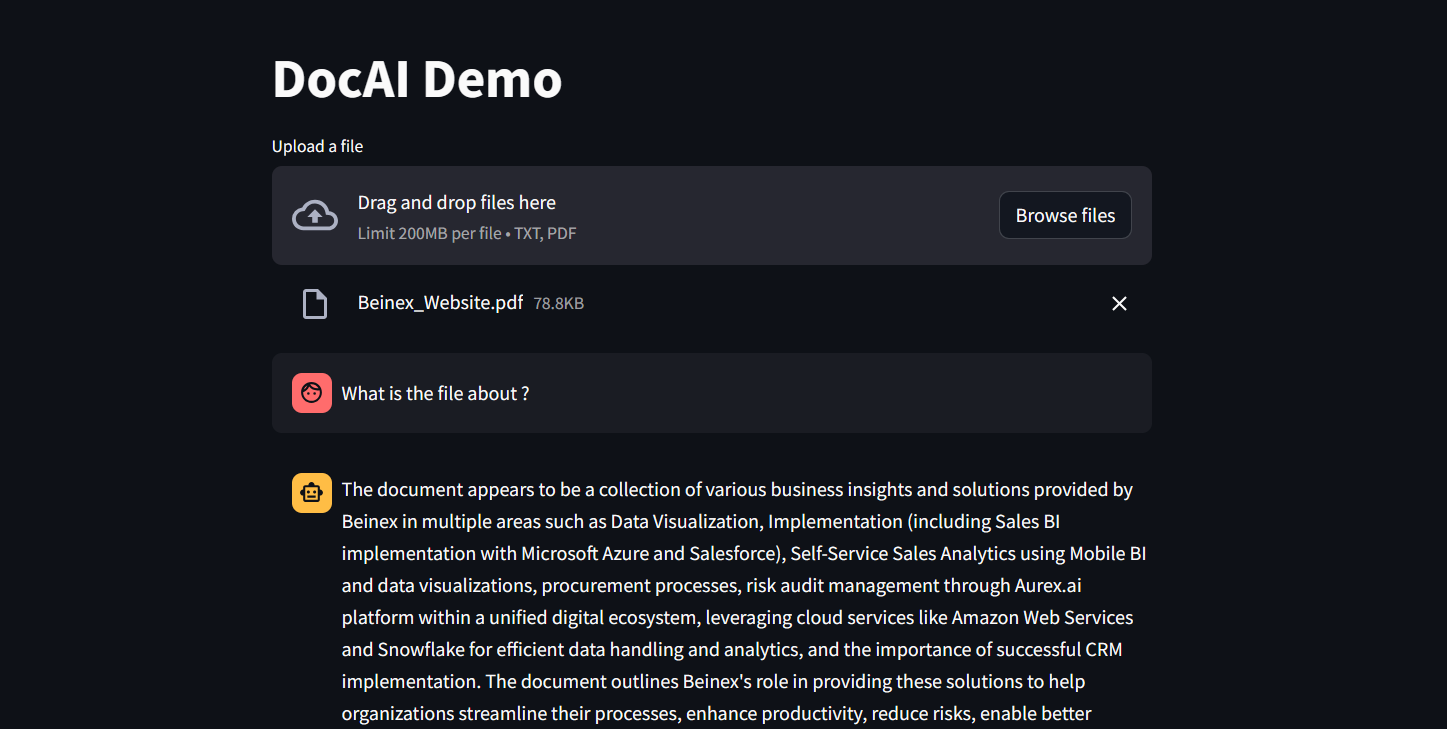 Figure 1: DocAI running on Phi-3
Implementing Phi-3 on Snowflake: What Beinex Did and How Beinex Did it?
Beinex has seamlessly integrated Phi-3 into Snowflake to help enterprises unlock their data's full potential through advanced language processing capabilities and enhance decision-making with deeper insights. The integration facilitates Snowflake users to:
Here's a detailed guide on implementing Phi-3 on Snowflake:
Step 1: Create Necessary Objects
-- Run by ACCOUNTADMIN to allow connecting to Hugging Face to download the model
-- Stage to store LLM models
CREATE STAGE <stagename> IF NOT EXISTS models
DIRECTORY = (ENABLE = TRUE)
ENCRYPTION = (TYPE='SNOWFLAKE_SSE');
-- Stage to store YAML specs
CREATE STAGE <stagename> IF NOT EXISTS specs
DIRECTORY = (ENABLE = TRUE)
ENCRYPTION = (TYPE='SNOWFLAKE_SSE');
-- Image repository
CREATE OR REPLACE IMAGE REPOSITORY images;
-- Compute pool to run containers
CREATE COMPUTE POOL GPU_NV_S
MIN_NODES = 1
MAX_NODES = 1
INSTANCE_FAMILY = GPU_NV_S;
Step 2: Docker Image Code - ollama
FROM ollama/ollama
RUN $(ollama serve > output.log 2>&1 &) && sleep 10 && ollama pull phi3 && pkill ollama && rm output.log
ENTRYPOINT ["ollama"]
CMD ["serve"]
Step 3: Tag and Push the Docker Image
docker tag ollama <SNOW_ORG-SNOW_ACCOUNT>.registry.snowflakecomputing.com/db/schema/image respository /ollama
docker push <SNOW_ORG-SNOW_ACCOUNT>.registry.snowflakecomputing.com db/schema/image repository /ollama
Step 4: Docker Image - UDF
FROM python:3.11
WORKDIR /app
ADD ./requirements.txt /app/
RUN pip install --no-cache-dir -r requirements.txt
ADD ./ /app
EXPOSE 5000
ENV FLASK_APP=app
CMD ["flask", "run", "--host=0.0.0.0"]
App.py content is given below :
from flask import Flask, request, Response, jsonify
import logging
import re
import os
from openai import OpenAI
client = OpenAI(
base_url='http://ollama:11434/v1',
api_key="EMPTY",
)
model = "phi3"
app = Flask(__name__)
app.logger.setLevel(logging.ERROR)
def extract_json_from_string(s):
logging.info(f"Extracting JSON from string: {s}")
# Use a regular expression to find a JSON-like string
matches = re.findall(r"\{[^{}]*\}", s)
if matches:
# Return the first match (assuming there's only one JSON object embedded)
return matches[0]
# Return the original string if no JSON object is found
return s
@app.route("/", methods=["POST"])
def udf():
try:
request_data: dict = request.get_json(force=True) # type: ignore
return_data = []
for index, col1 in request_data["data"]:
completion = client.chat.completions.create(
model=model,
messages=[
{
"role": "system",
"content": "You are a bot to help extract data and should give professional responses",
},
{"role": "user", "content": col1},
],
)
return_data.append(
[index, extract_json_from_string(completion.choices[0].message.content)]
)
return jsonify({"data": return_data})
except Exception as e:
app.logger.exception(e)
return jsonify(str(e)), 500
Step 6: YAML File
spec:
containers:
- name: ollama
image: <SNOW_ORG-SNOW_ACCOUNT>.registry.snowflakecomputing.com/ db/schema/image respository /Phi3
resources:
requests:
nvidia.com/gpu: 1
limits:
nvidia.com/gpu: 1
env:
NUM_GPU: 1
MAX_GPU_MEMORY: 24Gib
volumeMounts:
- name: llm-workspace
mountPath: /<stage name>
- name: udf
image: <SNOW_ORG-SNOW_ACCOUNT>.registry.snowflakecomputing.com/ db/schema/image respository /ollama_udf
endpoints:
- name: chat
port: 5000
public: false
- name: llm
port: 11434
public: false
volumes:
- name: llm-workspace
source: "@<llm stage_name>"
Step 7: Upload YAML File and Create Service
Upload the YAML file to the created stage, where the stage name in the YAML file should match the stage created in Step 2.
-- Create service
create service phi3
IN COMPUTE POOL <name of compute pool created>
FROM @dash_stage
SPECIFICATION_FILE = '<name of yaml file uploaded>';
Step 8: Create Service Function
Create a service function on the service (after it starts).
create or replace function phi3chat(prompt text)
returns text
service= phi3
endpoint=chat;
Check Service Status
Use the following command to check the status of the service:
SELECT
v.value:containerName::varchar container_name,
v.value:status::varchar status,
v.value:message::varchar message
FROM (
SELECT parse_json(system$get_service_status('<service name>'))
) t,
LATERAL FLATTEN(input => t.$1) v;
Benefits of Running Phi-3 on Snowflake
1. Cost-Effectiveness and Efficiency:
2. Compatibility with Smaller GPUs:
3. Exceptional Performance:
4. Faster Response Times:
SLM vs LLM
The choice between small and large language models hinges on organizational needs, task complexity, and resource availability.
LLMs excel in applications requiring the orchestration of intricate tasks, encompassing advanced reasoning, data analysis, and contextual comprehension.
On the other hand, SLMs present viable options for regulated industries and sectors facing scenarios necessitating top-tier results while maintaining data within their premises.
Both large and small language models possess distinct strengths and applications. While large language models thrive in managing complex workflows, small language models deliver impressive performance despite their compact size.
While some customers may exclusively require small models, others may favour larger models, with many seeking to integrate both types in various configurations. Ultimately, the optimal selection depends on the unique context and objectives of the organization. Besides transitioning from large to small models, the trend is evolving towards a diversified portfolio of models. This means that instead of relying on a single model, customers can choose from various models with different sizes, capabilities, and resource requirements. This empowers customers to decide the best model for their scenario, balancing performance and resource constraints.

Eyes Wide Open: Defending Against Homograph Phishing Schemes
Understanding Homograph Phishing Attacks
Homograph phishing attacks rely on Internationalised Domain Names (IDNs), a feature designed to accommodate non-ASCII characters in domain names. While this capacity improves internet access for people of varied language backgrounds, it also allows for harmful exploitation. Cybercriminals can now register domain names that appear identical or almost equivalent to regular Latin characters but come from alternative Unicode character sets.
For example:- Legitimate Website: www.login.microsoft.com
- Homograph Phishing URL: www.login.micrsoft.com
In this example, the 'o' in the homograph URL is not the standard Latin 'o,' but rather the Latin Small Letter Sideways 'ᴑ', which visually appears identical. To unsuspecting users, the homograph URL looks indistinguishable from the legitimate one and consequently fall prey to it.
The Dangers of Homograph Phishing Attacks
Homograph phishing attacks pose significant risks, primarily due to their ability to deceive users successfully by means of:
- Credential Theft: Cybercriminals utilise homograph URLs to impersonate reputable websites and deceive users into entering their login credentials, collecting critical information.
- Financial Fraud: Attackers may imitate banking websites, payment portals, or e-commerce platforms to steal credit card information or banking information from unsuspecting consumers, resulting in financial losses.
- Malware Distribution: Homograph URLs can route users to fraudulent websites or start malware downloads, possibly infecting their devices and leading to data breaches.
- Business Email Compromise (BEC): Homograph phishing URLs help in BEC attacks, in which attackers imitate high-ranking officials to trick employees into making fraudulent money transfers or disclosing sensitive information.
Protecting Against Homograph Phishing Attacks
While homograph phishing attacks can be challenging to detect, several preventive measures can help enhance cybersecurity like those of:
- Domain Monitoring: Monitor domain registrations regularly for questionable or homograph URLs that mimic valid domains. Security professionals can also employ specialised tools to proactively identify potential risks.
- Using Web Browsers with IDN Support: Modern web browsers include features for detecting and displaying problematic homograph URLs. Check that your browser is up to date and that IDN support is enabled.
- URL Inspection: Hovering over links to show the actual domain before clicking on them encourages people to carefully analyse URLs. Homograph URLs may appear deceiving at first view, but they disclose their actual nature with closer inspection.
- Deploying Security Software: To detect and block fraudulent URLs and emails, use powerful security solutions such as anti-phishing software, firewalls, and email filters.
- Cybersecurity Awareness Training: Educate staff and users about the dangers of homograph phishing attempts and encourage them to be proactive in cybersecurity.
Defending against homograph phishing attacks necessitates a multi-pronged approach. Organisations and people must use domain monitoring services such as Amazon Route 53 and web browsers with IDN capability to identify fraudulent URLs. It is critical to educate clients about the risks through cybersecurity training.
Beinex+ AWS Offerings
AWS provides security services such as AWS Shield and AWS WAF to help protect against phishing attacks. Strengthen your defences by integrating robust security software from the AWS Marketplace and embracing Two-Factor Authentication (2FA). Safeguard against evolving threats like homograph phishing for a safer online experience.
Beinex is an AWS consulting partner, and we empower customers to host their BI solutions, provide security services and much more on the cloud. Our cloud migration experts bring in best-in-class stability and reliability by understanding your business strategy and working closely with you to deploy AWS infrastructure as a service.
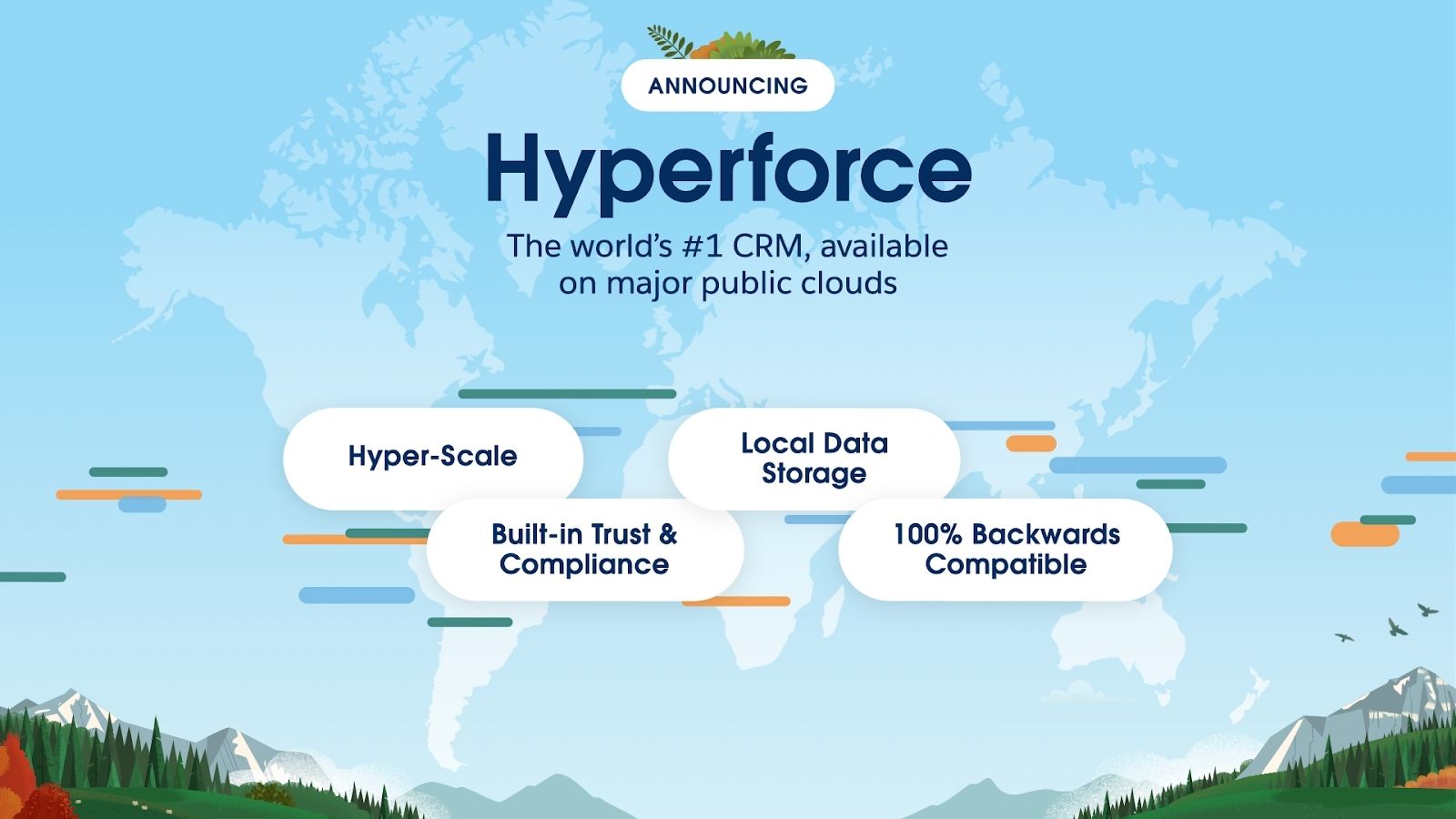
Let the force be with you: Data residency and Hyperforce
After two very long masked years, the world has slowly started to breathe, again!
With lockdowns on and work taking place from the very room you had slept a couple of hours back -- the human universe has been phenomenally re-engineered by a microscopic organism.
Your geographical location has been made immaterial in the digital world. But the same cannot be said about data, and this may sound paradoxical and ironic. For instance, an MNC’s location of the data now matters more than ever before. With a major chunk of data of many entities, especially government ones, on the public cloud, the airing of concerns related to data security, data sovereignty, data localisation/ data residency is growing louder in decibel terms.