Just Go Wild: Beinex Offsite Visit to Munnar
In the evening, we had a wild-theme based gala party, and all got dressed up in sync with the theme, ‘Just Go Wild’. It was fun to watch everyone from the Manager to the employees dressed up in the same theme. We had an exhilarating DJ party manned by Darryl Gaulbert which made us all shake a leg to the tune. We danced and roared to the music. It was indeed wild!
The following day after breakfast, we met our founder Indumon Das, who had a chat with us regarding the journey of Beinex and his vision. It inspired us all to have a dream and pursue it fearlessly. Some of us accessed the infinity pool late afternoon and had great fun swimming and playing pool ball.
It was a blissful evening based on an ethnic wear theme. We competed for the best ethnic outfit of the evening. The different hues and styles made the evening stunning. Everyone flaunted the traditional wear in style. We had a musical evening with a live barbeque and a sumptuous dinner.
Finally, the day of leaving Munnar dawned; March 19. We all had breakfast in the morning and packed our backpacks. Most of us were pretty reluctant to leave Munnar as we were not ready to lose the bond we created together. Nonetheless, we vowed to stay connected. We boarded the buses around 10 AM and waved goodbye to Munnar.
When we reached Edapally in the evening, a surprise goody bag was waiting. It was an impressive and admirable gesture from our firm. Beinex has a culture of nurturing growth and spreading positivity, and employees’ comfort is the priority here.
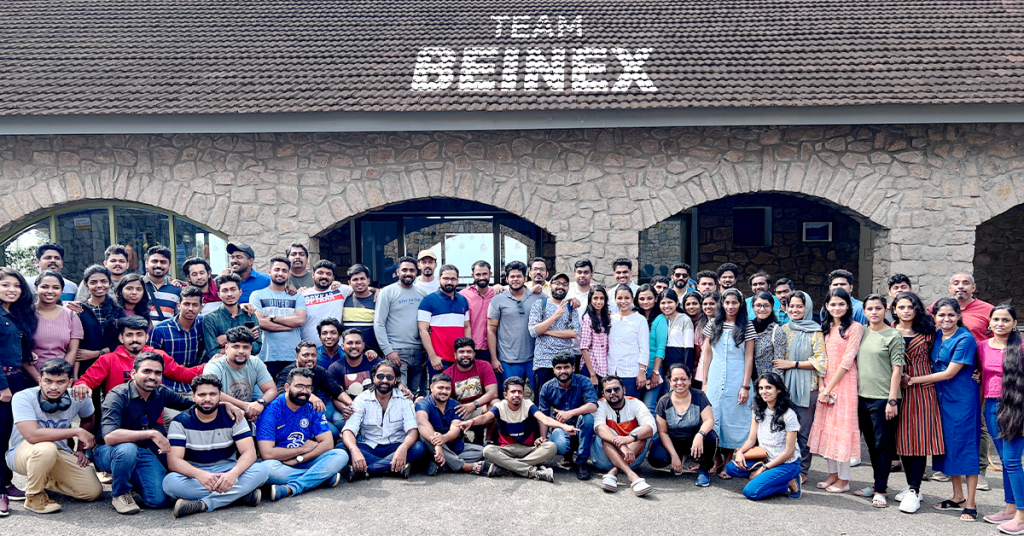
Yes, we had a fantastic time together. After this retreat, our rejuvenated and motivated minds are ready to bounce back to work with enhanced spirit. We are looking forward to more team building sessions in the future to meet each other more often.We were just voices or images on ‘Teams’ until we finally met on 17 March 2022. After many days of contemplation and planning to turn our offsite visit into a memorable one, the day arrived. We were all super excited to meet each other. Even though we are spread across different geographies, it could not prevent us from having the much-awaited meeting.

Related Articles

The context
There is a popular perception that a desktop job in IT is synonymous with ill health. As the pandemic swept the globe and knocked down everything on its path from lives to livelihood, the IT industry continued to prosper due to the explosive growth in the digital arena.
But it came accompanied with its own set of problems and challenges. Long working hours and sedentary lifestyle have taken its toll. The incidence of lifestyle diseases for knowledge workers went in tandem with the northward growth map of the IT industry.
The Beinex difference
Beinex was an exception to this rule; thanks to the fitness challenge it had initiated as a part of its Autumn Connect programme: a competition for its employees with a slew of challenges they took on enthusiastically from cooking healthy food to addressing fitness goals.
Beinex Planethon
In sync with this spirit, and to promote it further, Beinex conducted ‘Beinex Planethon’.
Date: April 07, 2022
Time: 7.00 AM- 8.00 AM IST
Venue: JNI Stadium, Kochi, India
It was a jovial day for us, even as we had to report at the JNI premises by 6.30 AM. The morning was pleasant and by the time it became 7.00 AM, all of us had assembled at the flag-off location.
Shiny Justine and her daughter Surya Ann Justine flagged off the Marathon. Shiny Justine delivered an inspirational speech before the flag off. She exhorted the gathering to make fitness initiatives habitual. She spoke to us that it takes just a small percentage of our time to add to fitness and health and it prevents medical exigencies from popping up suddenly.
Post the marathon session she was awarded a memento as a token of our appreciation.
Let us do our bit. Now is the time to draw inspiration and make fitness a habit! Run for our health and yes, run for our planet.
Alteryx's Integration with Cloud Services
Alteryx enables businesses to get the most out of cloud services by integrating seamlessly. What makes integrations an essential aspect of modern data analytics is the organizations' increasing reliance on the cloud for handling large datasets. Let's look at Alteryx's integration with some prominent cloud platforms.
Alteryx + AWS
Alteryx can be integrated with AWS services like Amazon Redshift, S3, DynamoDB, EC2, and more, empowering users to maximize the power of data. This integration makes the analysis of large datasets effortless by moving them from AWS to Alteryx and then seeing the results in the cloud.
The benefits of this integration include:
• Managing data workloads of all sizes • Offering robust performance capabilities for large enterprises • Democratizing data analytics across organizations to handle data efficiently • Providing computing power and scalable storage to meet dynamic business requirements • Enhancing the accessibility of self-service analytics with Alteryx's user-friendly, drag-and-drop interface that supports no-code and code-based workflowsAlteryx + Snowflake
Alteryx operates Snowflake Data Cloud easily, facilitating seamless analysis of large datasets by extracting, transforming, and loading (ETL) data from Snowflake. The integration creates a centralized and user-friendly system with the infrastructure and tools to make analytics accessible. It also accelerates workflows, enhances scalability, and pushes data processing to Snowflake, offering flexible options to transform data: • In-database: Direct data processing in Snowflake by running SQL pushdown with no-code tools in Designer • Snowpark: Defining Alteryx's custom analytic building blocks, Pushing data processing to Snowflake directly. • Automatic Pushdown in Designer Cloud: Allows direct workflow implementation within Snowflake without requiring additional steps.
The benefits of this integration include:
• Improving analytics by leveraging Alteryx's code-friendly and no-code interface • Offering access to unified data and robust computing resources • Empowering users to access the entire dataset faster and safely. • Resolving distinctive industry problems with vertical-specific solutionsAlteryx + Google Cloud
Alteryx supports integration with services of Google Cloud Platform like BigQuery, Google Cloud Machine Learning Engine, Cloud Storage, and Cloud Dataflow, allowing users to harness the cloud platform's scalable infrastructure. The integration enables smarter self-service analytics across the enterprise and makes the analysis of large datasets seamless with the easy-to-use interface of Alteryx.
The benefits of this integration include:
• Powering data analytics objectives by deploying the new AI technologies • Empowering employees to perform advanced analytics workflows with or without coding expertise • Expediting workflows by processing voluminous data in BigQuery and using Google's compute resourcesAlteryx + Azure
Alteryx integrates Microsoft Azure, supporting connectivity to Azure services like Azure SQL Database, Data Lake, Blob Storage, and Azure Synapse Analytics. This integration allows businesses to transition data effortlessly to and from the cloud, process it within Alteryx, and run advanced analytics on a scalable platform.
The benefits of this integration include:
• Offering users a secure and scalable analytics environment. • Making the most of advanced analytics capabilities like predictive analytics and machine learning to foster innovation. • Speeding up analytics workflows by leveraging Azure's scalable infrastructure • Protecting sensitive data through analytics with Azure's powerful security features like access controls and encryption.The Benefits of Integrating Alteryx with Cloud Services
Beyond empowering business users to prepare, blend, and analyze data from diverse sources, Alteryx transforms how businesses interact with data through its integration capabilities. Integrating Alteryx with cloud services offers several benefits, including: • Boundless flexibility and scalability: The scalable infrastructure of cloud services facilitates effortless management of complex and vast chunks of data, making the analysis process easier. Integrating with Alteryx also entails seamless scaling with data workflows, enabling real-time analytics of big datasets. Besides, Alteryx's capability to connect to different cloud sources offers choice and flexibility. • Access to advanced analytical tools: Cloud platforms like Google Cloud, Azure, and AWS offer access to advanced analytical tools like machine learning models and AI capabilities. This accessibility improves data workflows. Alteryx can be integrated with these services to enhance data workflows with ML models, predictive analytics, etc. • Enhanced security: Security is the top priority when integrating Alteryx with cloud platforms, as they offer powerful security measures like data access controls, authentication, data encryption, and authorization to safeguard sensitive data. Plus, cloud services comply with regulatory demands and deploy firewalls to protect sensitive data. • Improved cost-efficiency: As a cost-effective alternative to on-premises infrastructure that stores and processes large datasets, cloud platforms lower costs and maximize ROI with their pay-as-you-go models. Considering the costs involved in hardware and maintaining and storing data of on-premises infrastructure, businesses can pay for what they use with cloud services. • Seamless collaboration: Integrating Alteryx with cloud platforms improved collaboration among teams, even across departments or locations. It ensures alignment by allowing everyone to work with the same datasets and workflows. Alteryx's integration with cloud services reimagines how businesses handle data and opens fresh prospects to optimize their data analytics processes. The integrations facilitate smarter decisions by boosting flexibility, scalability, and collaboration across departments or locations. Integrating with cloud platforms like Google Cloud, Azure, and AWS enhances accessibility to advanced analytics tools and unlocks your data power. Beinex, a premier-tier partner of Alteryx, offers consulting services that augment the transformative potential of your enterprise by making the most of the enterprise analytics platform and its robust capabilities. Contact us for a free demo: https://www.beinex.com/alteryx-partner/#request_demo

5 Steps in Alteryx Predictive Analytics Process
The five major stages of the predictive analytics process cycle include selecting a target variable, examining the data, collecting the data, creating the model, and scoring the model.A detailed description of the steps involved in the predictive analytics process in Alteryx:
- Step 1: Select a Target Variable
- Step 2: Analyse Your Data
- Step 3: Run Calculations/ Collect New Data
- Step 4: Model Building
- Step 5: Score the Model
Step 1: Select a Target Variable
Select the target variable which is the column that should be predicted. It could be a binary or non-binary categorisation or a numerical value and it can be continuous or time-based. Each of these target variables helps in finding business solutions. But just because time is a variable in the problem does not mean that a time-based model will be the best way to solve it. Simultaneously if a field has a numeric value, it does not mean that a binary model cannot be utilised in finding insights.
Step 2: Analyse Your Data
The largest contributor to excellent predictive models is the sample size. Anything less than 5000 records is counted as under-sampled and using it is not considered the best practice.
Alteryx and Tableau Prep are both excellent tools for understanding data by creating histograms, scatterplots, and correlation matrices. Before step 3, in the data transformation procedure, it is better to know what types of variables are in the data. There are various sorts of predictor variables and several types of target variables, and each must be structured differently.
- Categorical Data: String fields with no order are categorical data. It contains data in the form of text.
- Ordinal Data: String fields with an order are ordinal data. It can be substituted into numeric order in a predictive workflow.
- Numeric Data: It represents information with a measurable value.
- Cyclical Information: Data which gets repeated as such in a cyclic process is cyclic information.
Step 3: Run Calculations/ Collect New Data
Obtaining the greatest data or inferring fields from present data, such as adding seasonality, can be a powerful predictor variable. Always be inventive in the choice of variables. It is crucial to note that if there is to infer a piece of data, it is sometimes unwise to include both that data and the original data column in the same model because the predictive model would automatically give higher weight to this column. It is also critical to recognise that while it is beneficial to include factors with correlation, variables that drown out all other variables must occasionally be removed.
Step 4: Model Building
a. Make Use of the Decision Tree
Using a Decision Tree, it is possible to rapidly discover which of the factors are the most crucial for predicting the target variable. This model will not be utilised in the final forecast since it will over-fit, but it will show whether some of the variables are overly connected to the target variable.
b. Experiment with Different Models
Data Science is complicated, and it is difficult to know which model will yield the best results, therefore a variety of models, such as Random Forest, Boosted Models, and Neural Networks can be employed for better results.
Step 5: Score the Model
Alteryx offers a scoring tool that may be used to score models. During this step, data should be withheld for the model to test and score. Even though different models can provide different scores, through testing and reconfiguring, accurate predictions can be made.
What makes Alteryx an exceptional tool for predictive analytics?
These remarkable capabilities make Alteryx an excellent tool to carry out predictive analytics tasks easily:
- • No or Low coding required
- • Predictive analytics by drag and drop
- • Predictive tool kit for specifically performing predictive analytics
- • Integration to R and Python
- • Variety of built-in and custom ML models are available
- • Model customizations are possible
- • Automation and/or scheduling of predictive analytics workflows
Predictive Analytics Tools
Predictive analytics solutions use the power of data to help businesses in identifying trends in customer behaviour, making predictions, and developing optimised marketing plans.
The tools that aid in predictive analytics are enlisted below:
- Data Investigation Tools
- Predictive Tools
- Tools for the Modern Statistical Learning Method
- Tools for Predictive Model Comparison and Hypothesis Testing
- Tool for Predicting Values for All General Predictive Modeling Tools
1. Data Investigation Tools
Data investigation tools contain tools that help to get a better understanding of data. To better understand the data used in a predictive analytics project including both visualization tools and tools that provide tables of descriptive statistics.
The list of data investigation tools is given below:
- Field Summary Tool
- Heat Plot Tool
- Histogram Tool
- Plot of Means Tool
- Scatterplot Tool
- Violin Plot Tool
2. Predictive Tools
This category contains general predictive modelling tools for classification and regression models, and also tools for predictive modelling related to model comparison and hypothesis testing.
Predictive tools are enlisted below:
- Count Regression Tool
- Gamma Regression Tool
- Linear Regression Tool
- Logistic Regression Tool
- Naïve Bayes Classifier Tool
- Neutral Network Tool
- Stepwise Tool
- Support Vector Machine Tool
3. Tools for the Modern Statistical Learning Method
- Boosted Model Tool
- Decision Tree Tool
- Forest Model Tool
- Spline Tool
4. Tools for Predictive Model Comparison and Hypothesis Testing
- Cross-Validation Tool
- Lift Chart Tool
- Model Coefficients Tool
- Model Comparison Tool
- Nested Test Tool
- Test of Means Tool
- Variance Inflation Factors Tool
5. Tool for Predicting Values for All General Predictive Modeling Tools
- Score Tool
6. Time Series Tools
- ARIMA tool
- ETS tool
- TS Compare Tool
- TS Covariate Forecast Tool
- TS Filler Tool
- TS Forecast Tool
- TS Forecast Factory Tool
- TS Model Factory Tool
- TS Plot Tool

ZTA in Simple Terms
It is a cybersecurity paradigm focused on enterprise resource protection. This includes data; no matter where it resides, cloud or on-premises, and resources like printers, compute resources and Internet of Things (IoT) actuators. The objective of the paradigm is to prevent unauthorised access to data and resources but at the same time enable authorised and approved subject to have access to the same. The word subject can mean user, device or an application/ service. The paradigm also envisions making the access control enforcement as granular as possible. Thus, “Zero trust architecture (ZTA) is an enterprise’s cybersecurity plan that utilizes zero trust concepts and encompasses component relationships, workflow planning, and access policies. Therefore, a zero-trust enterprise is the network infrastructure (physical and virtual) and operational policies that are in place for an enterprise as a product of a zero trust architecture plan.” Zero trust (ZT) provides a collection of concepts and ideas designed to minimize uncertainty in enforcing accurate, least privilege per-request access decisions in information systems and services in the face of a network viewed as compromised. The crux of the concept is that trust must be continually evaluated. If a subject needs access to data or resources, it is granted after authentication and authorisation, but it will not go beyond the minimum privileges needed to perform the mission.Benefits of Implementing ZTA
The ZTA paradigm comes packed with a slew of benefits:- Supporting employees/ workers with secure and reliable access to a multitude of resources from anywhere using any device, any time
- Resource protection irrespective of whether it is on-prem or cloud
- Improving visibility and governance: who, what, and how users are accessing enterprise data and apps.
- Limiting of insider threat borne of the need-to-know approach to resource access
- Limiting of lateral movements of attackers in the system which perimeter security-oriented networks are otherwise prone to.
- Limiting the cost for recovery and mitigation
- Ensuring confidentiality and security of sensitive enterprise data
- Enhanced risk mitigation courtesy of continuous assessment and review of resource access
ZTA: How it Works
The Zero Trust Architecture evaluates the level of confidence about the subject’s identity for a unique request and if the device used to place the request have proper security posture. The system also evaluates if there are other factors that should be considered and that change the confidence level. Also the access rules are made as granular as possible to enforce those least privileges needed to perform the action in the request.
Image courtesy: https://nvlpubs.nist.gov/nistpubs/SpecialPublications/NIST.SP.800-207.pdf
Three terms assume significance in the context of Zero Trust. They are Implicit Trust Zone, Policy Decision Point (PDP) and Policy Enforcement Point (PEP). Implicit Trust Zone represents an area where all the entities are trusted to at least the level of the last PDP/PEP gateway. In other words, the PDP/ PEP engine decides as to whether a request for resource should be allowed access to the Implicit Trust Zone from where it can access the resource.
The PDP/ PEP gate is more like an airport security checkpoint. The passengers, once they have been through the security check are granted access to boarding gates where they can wait for the entry to the airplane. They are considered worthy of trust once they are through. The boarding area is thus the Implicit Trust Zone in the analogy. In our case, the idea is to explicitly authenticate and authorize all subjects, assets and workflows that make up the enterprise.
Challenges of Implementing the ZTA
For where there are opportunities, there are challenges. The road to ZTA implementation has its fair share of challenges.- There is no single solution encompassing all the tenets of Zero Trust. A one-size-fits-all approach is off the table for obvious reasons. Many different technologies need to be integrated and often, they are of varying maturity.
- Investment in terms of time, resources and technical capabilities. Migration of extant and legacy systems to a Zero Trust environment is not as easy as it sounds.
- And finally, there is no such thing as 100% fool-proof security. The ZTA control plane is still susceptible to compromise.
Overcoming ZTA Implementation Challenges
The challenges need a holistic approach to overcoming them.- Getting hold of visibility: The resources within the enterprise and who needs access to the same and when; these queries should be ascertained at a granular level. This exercise must be inclusive of:
- Identities
- Permissions
- Configurations
- Activities crisscrossing the cloud infrastructure which are about access to networks and resources that are publicly exposed.
- Managing risk: Continuous risk assessment exercise across the cloud IT stack including but not limited to:
- Identity
- Networks
- Compute & storage segments
- Publicly exposed resources if any
- Third-party risks originating from vendors, clients etc.
Beinex and the Zero Trust Architecture
Beinex has solid experience in fostering Zero Trust Architecture capabilities amongst clients. Considering the fact that 90+ entities of Beinex are government clients, our Digital Transformation Team is well positioned to implement the paradigm in multiple domains. Contact us to know more about our offerings.
The cloud-based approach delivers:
1. Better performance2. More flexibility
3. Enhanced cost savings
4. Improved security
5. Facilitates excellent teamwork opportunities
Specifically, Tableau on AWS lets you process data more quickly and scale up or down resources as needed. Plus, you can access a range of AWS services to optimise your Tableau setup. AWS also provides tools to help you save money and a secure environment to protect against cyber threats and data breaches. Ultimately, Tableau on AWS enables teams to collaborate more efficiently, taking their data analysis and business intelligence to the next level.
There are several other benefits to using Tableau on AWS beyond scalability, cost, and security. Here are some additional insights:
1. Faster Deployment: With Tableau on AWS, you can deploy new instances of Tableau in minutes rather than days or weeks as you would with on-premises infrastructure. This is because AWS has pre-configured templates for Tableau that make it easy to spin up new instances quickly. 2. Better Performance: Tableau on AWS is designed to exploit AWS's high-performance infrastructure. Tableau runs faster and more efficiently on AWS than on traditional on-premises infrastructure. 3. Integration with Other AWS Services: Tableau on AWS integrates seamlessly with other AWS services, such as Amazon S3 for data storage, Amazon Redshift for data warehousing, and Amazon EMR for big data processing. This makes building a complete analytics solution easier by using Tableau and other AWS services. 4. Improved Disaster Recovery: With Tableau on AWS, disaster recovery is built. AWS provides automated backup and recovery services to quickly recover your Tableau environment and data if there is a disaster or outage. 5. Global Reach: AWS has data centres worldwide, meaning you can deploy Tableau in the region closest to your users for better performance. This is especially important for organisations with a global presence.Overall, Tableau on AWS offers several advantages over on-premises infrastructure. By leveraging AWS's scalability, cost-effectiveness, and security, organisations can run Tableau more efficiently and with better performance. Additionally, AWS's integration with other services and global reach make it an attractive option for organisations looking to build a comprehensive analytics solution.
Tableau Server on AWS deployment options
The following list outlines the available options for deploying Tableau Server on AWS:
1. Self-Deployment on EC2 Instance: This option involves users provisioning and configuring an EC2 instance and deploying Tableau Server. This provides the most significant control over the deployment process and can be customised to specific needs. However, it also requires more expertise and effort from the user.
2. Quick Start Deployment: The Tableau Server on AWS Quick Start provides an automated deployment process using AWS CloudFormation templates. This simplifies the deployment process and ensures that best practices are followed. However, it may be less customisable than self-deployment.
3. AWS Marketplace Deployment: Tableau Server is also available on the AWS Marketplace with pre-built AWS CloudFormation templates. This provides a quick and easy way to deploy Tableau Server, with different pricing and instance options public. However, users may have less control over the deployment process than over self-deployment.
Users should evaluate their specific needs and expertise when selecting a deployment option. Self-deployment provides the most significant control and customisation, while Quick Start and AWS Marketplace deployment offer simplified and quick deployment options.