How AI Decision-Making is Improving Enterprise Outcomes
Blog
Share 
How to Manage Alteryx Data Connections
 1 March 2023
  Sumi S
 One of the highlights of Alteryx is Data Connections. It can be relied upon to generate and handle your data connections from a central location. The user can access it using their username and password.
The main advantages of Alteryx that set it apart :
- • data connectivity is high
- • direct access to the data sources/ bases
With the help of the Manage Data Connections window, it is possible to:
- • view connections you have already created
- • view connections shared with you
- • add new connections.
3 Steps to Create and Manage Your Data Connections with Alteryx
- Adding
- Testing
- Sharing
1. To Add a Data Connection
If the user wants to add a data connection, select Add New Data Connection on the Data Connections page. Then from the Connection drop-down select the connection type.
2. Testing Data Connections
The second step is to test the data connections. A controller and two or more worker machines make up a multi-node setup of the Server. With this arrangement, the test functionality examines the connection on the controller machine rather than the individual worker computers. One should verify the identical database drivers and driver versions are installed on every system to make sure the connection will function on any of them. Connection Test FailuresThe connection tests can fail due to multiple reasons. The user can save data connections even though they have failed the connection test.
These are the most typical causes of connection tests failing:
- • The server and database can be inaccessible to you in some circumstances. For instance, only the connection end user can access the server or database in certain cases.
- • Your ability to connect to the server or database may also be blocked by network security.
- • Sometimes the server is unable to connect to the host of the database server. At that time ping the database server host while logged into the server where Server is installed to check for network connectivity. The credentials for the database are incorrect or do not have the necessary access permissions. Get in touch with the database manager.
- • The database is unavailable. To ensure that the database is operational and performing as expected, get in touch with the database administrator.
- • The Server configuration you are using has several nodes.
3. To Share a Data Connection
After creating a Data Connection, go back to the Data Connections page to share it with users or custom groups for use in Designer.Note: Keep in mind that you must connect with a Curator or the gallery administrator to make sure that they have access to the necessary data connections if you want to allow the workflow to be used by particular users or groups.
Follow the steps mentioned below to share a Data Connection:
- • Choose the shareable data connection by clicking the pencil icon on the Data Connections screen.
- • Select Users or Custom Groups on the Modify Data Connections screen.
- • Enter a user's or a group's name here.
- • Choose the user or the group.
Note: Verify that the user's machine is installed with the same or a more recent version of the Microsoft SQL Server Native Client before initiating a Microsoft SQL Server connection. Go over to Troubleshooting.
a. Cancelling Access to a Data Connection
Choose the "x" icon next to a user's name to remove their access to a connection.
b. Modify a Data Connection
- 1. Choose the pencil icon on the Data Connections page.
- 2. Alter the Name or Connection String fields on the Modify Data Connections screen.
- 3. You can share the connection with people and groups using the Users or Custom Groups pages.
- 4. Choose Save.
1. Choose the trash can icon next to the connection name to remove the connection.
Tools in Alteryx Designer
Let’s have a look at the input tools available in Alteryx Designer:1. Input Data Tool
 By connecting the Input Data tool to a file or database, you can utilise it to add data to your workflow. This tool has a wide range of configuration possibilities.
2. Directory Tool

The Directory tool can be used to return a list of all the files present in the given directory. The tool returns file names along with additional details about each file, including file size, creation, and modification dates, and more.
3. Dynamic Input Tool

Using the Dynamic Input tool, it is possible to change file names, amend database queries, or alter input pathways that were created using data from your workflow are all possible If you're reading from a database, Alteryx will do it at runtime and will dynamically select which entries are read.
4. Connect In-DB Tool

When compared to conventional analysis techniques, the Connect In-Database tool can significantly enhance performance by allowing blending and analysis on large data sets without removing the data from the database.
Without proper tools, providing answers to business concerns would be time-consuming, laborious, hazardous, and possibly impossible. Here Alteryx can be of great help as it aids you to streamline operations, automate procedures, and provide predictive and geospatial solutions. While other technologies make the same claims, Alteryx is one of the incredible tools that empowers business users and analysts in addition to IT personnel.
Related Articles

Coming Soon: Tableau 2022.1 – What Does It Offer New
- List the unused data sources: Data sources imported in a workbook but not used are highlighted by the new feature. The developer can remove these data sources from the data source list to make the workbook faster.
- List of unused fields or data columns: Just like the data sources, workbook optimizer also highlights the data columns not used across the workbook. Removing these at the data source level can help improve the overall performance of the workbook.
- List of sheets not used in the dashboard: It is a common practise that developers tend to create sheets not used in the final dashboard. This creates unnecessary clutter and makes the dashboard slower. The workbook optimiser feature gives a list of such sheets which the user can delete to optimise the performance of the workbook further.
- Highlights lengthy calculations: The feature provides a list of calculations which are too complex and in turn reduce the performance of the dashboard. Simplifying a few of these can improve performance to a great extent.
 Ask Data Phrase Builder: This feature is available on Tableau Server and Tableau Online
Add field would look like as shown in the below screenshot:
Ask Data Phrase Builder: This feature is available on Tableau Server and Tableau Online
Add field would look like as shown in the below screenshot:
 Customize View Data: This feature is available on Tableau Server, Desktop and Tableau Online
This feature enables to reshape the tabular data behind your visualisation in the View data interface. One can create new columns, remove columns from the default view, change the order and sort the data using this feature. This reshaped data can also be exported as csv file to be shared with the team.
Change the root table: This feature is available on Tableau Server, Desktop and Tableau Online
Managing multiple data tables becomes easier and flexible with this new feature. One can swap any table to be the root table with a single click. This allows one to change the layout of the table quickly, reshape the data with a different root table and delete a specific table without deleting child nodes. For e.g., let us assume a user had to create a data source for an analysis using 3 tables namely ‘customers’, ‘orders’ and ‘returns’. The user creates the data model such that ‘customers’ is the root table followed by ‘orders’ and ‘returns’. But after performing some analysis the user realises that ‘orders’ should be the main root table. In such cases the user would have to re-create the data again from scratch but with the new ‘Swap with root table’ feature user can do the changes with a few clicks.
Parameter Enhancements in Tableau Prep
In version 2022.1 Tableau Prep is adding even more places where one can use parameters in the flow as well as user enhancements. Now, one can:
Customize View Data: This feature is available on Tableau Server, Desktop and Tableau Online
This feature enables to reshape the tabular data behind your visualisation in the View data interface. One can create new columns, remove columns from the default view, change the order and sort the data using this feature. This reshaped data can also be exported as csv file to be shared with the team.
Change the root table: This feature is available on Tableau Server, Desktop and Tableau Online
Managing multiple data tables becomes easier and flexible with this new feature. One can swap any table to be the root table with a single click. This allows one to change the layout of the table quickly, reshape the data with a different root table and delete a specific table without deleting child nodes. For e.g., let us assume a user had to create a data source for an analysis using 3 tables namely ‘customers’, ‘orders’ and ‘returns’. The user creates the data model such that ‘customers’ is the root table followed by ‘orders’ and ‘returns’. But after performing some analysis the user realises that ‘orders’ should be the main root table. In such cases the user would have to re-create the data again from scratch but with the new ‘Swap with root table’ feature user can do the changes with a few clicks.
Parameter Enhancements in Tableau Prep
In version 2022.1 Tableau Prep is adding even more places where one can use parameters in the flow as well as user enhancements. Now, one can:
- Get a list of all the parameters in one place rather than finding them in the flow. One can delete these parameters directly from the parameter window rather than to find it in the flow first.
- Include parameter names in exported output files.
- Include parameters in SQL scripts that you run before or after writing the flow output to a database. Include parameters in worksheet names when writing the flow output to Microsoft Excel.
- 1. Improvements in Esri Data Connector
- 2. Addition of new Accelerators
- 3. Added connectors to connect to more data sources

Automating Compliance Checks with AWS Systems Manager
The Need for Automating Compliance
As business environments today are rapidly changing and highly regulated, it is important to automate compliance to boost accuracy, efficiency, and scalability. The following aspects emphasize why automating compliance is highly significant. • Amplifies security by complying with data privacy and safety regulations. • Saving time and effort by automating recurring tasks like monitoring, reporting, and audits. • Deploying the required infrastructure faster and in a standardized format. • Boosting accuracy by reducing the risks of human error and consistently adhering to industry standards.
What is an AWS Systems Manager?
A unified management system, an AWS Systems Manager, streamlines infrastructure management by improving visibility and giving you control over your AWS infrastructure. It delivers a suite of tools for managing configurations, automating repetitive tasks, patching systems, maintaining consistent configurations, and securely managing secrets and configurations. The primary features of AWS Systems Manager associated with compliance are: • Compliance Dashboards: They offer a centralized visualization of your compliance status, emphasizing resources that are non-compliant to facilitate faster remediation. • Patch Manager: It automates the deployment and monitoring of patches across your instances. • State Manager: It ensures that your systems are configured to a specific desired state.
Compliance Made Effortless: Automation with AWS Systems Manager
A comprehensive management service, AWS Systems Manager, allows you to automatically accumulate and aggregate data from your AWS resources. It provides a unified view of your AWS environment, making managing and monitoring your resources easier. Compliance, an AWS Systems Manager capability, enables the scanning for inconsistencies in compliance and configuration and offers real-time compliance insights. This capability facilitates drilling down into certain non-compliant resources from the data aggregated from multiple AWS accounts. The additional features and benefits Compliance provides are as follows: • Utilizing AWS Config to see compliance history and monitor changes. • Exporting data to Amazon Athena and Amazon QuickSight to generate organization-wise reports. • Using Amazon EventBridge, State Manager or Run Command to fix issues. • Customizing compliance to develop compliance types to fit your business needs. • Employing AWS Systems Manager for seamless integration of third-party compliance tools and automation of configuration management and vulnerability scanning. AWS Systems Manager facilitates the automation of intricate and recurring tasks associated with configuration, patching, and software installation. It allows businesses to run these tasks across systems simultaneously while minimizing the time needed to effect the changes and ensuring consistency in the process. This execution enables software compliance, including maintaining antivirus definitions up to date, implementing firewall policies, and setting patch baselines. The automation capability of AWS Systems Manager entails streamlining the deployment, maintenance, and remediations of AWS services like Amazon EC2, Amazon S3, and more.
Let’s explore how AWS Systems Manager automates compliance checks:
• Centralizing compliance management: AWS Systems Manager offers a unified compliance dashboard that lets users see the compliance status across different AWS accounts and regions in real-time. The dashboard consolidates data from the state manager and patch manager to centralize compliance management, enabling easy detection and addressing of specific non-compliant resources. • Enforcing configuration: Users can define and implement preferred states for the resources with the State Manager. It ensures consistency in configurations and compliance in setting permissions, configuring firewall rules, or installing software. • Patch Management: It automates the processes of patching applications and operating systems on your instances, allowing users to select authorized patches and schedules for automatic deployment. It makes sure that your systems are up-to-date and stay compliant with the safety standards. • Automating Remediation: AWS Systems Manager allows the automated remediation of non-compliant resources. For example, if a system falls out of compliance due to a missing patch, Patch Manager can trigger an automatic patch deployment to resolve the issue. • Facilitating integration with AWS Config: AWS Systems Manager integrates seamlessly with AWS Config, which helps assess and monitor configuration modifications against compliance rules. This integration facilitates continuous monitoring and automated reporting, ensuring a robust compliance posture.Some of the benefits of using AWS Systems Manager for compliance include:
• Saving time and expediting remediation as automation of compliance processes checks reduces manual effort. • Streamlines the audit processes and ensures audit readiness through meticulous logging and documentation of compliance actions. • Fortifies security by detecting and addressing vulnerabilities on time and ensures your enterprise aligns with the standard security practices. • Leverages existing AWS infrastructure to reduce the requirement for reliable compliance tools, saving costs. • Offers real-time insights into the compliance status across your AWS environment, facilitating proactive management. AWS Systems Manager can be a game changer for businesses looking forward to ensuring compliance with complex regulations and industry standards across a dynamic IT environment. Automating compliance checks boosts accuracy, efficiency, and security, transforming compliance management into a streamlined workflow. Beinex is an AWS consulting partner that lets you navigate the AWS landscape and leverage it for unprecedented business benefits. Connect with us for a free demo: Beinex - Beinex - Your Reliable AWS Partner for Cloud Computing Services
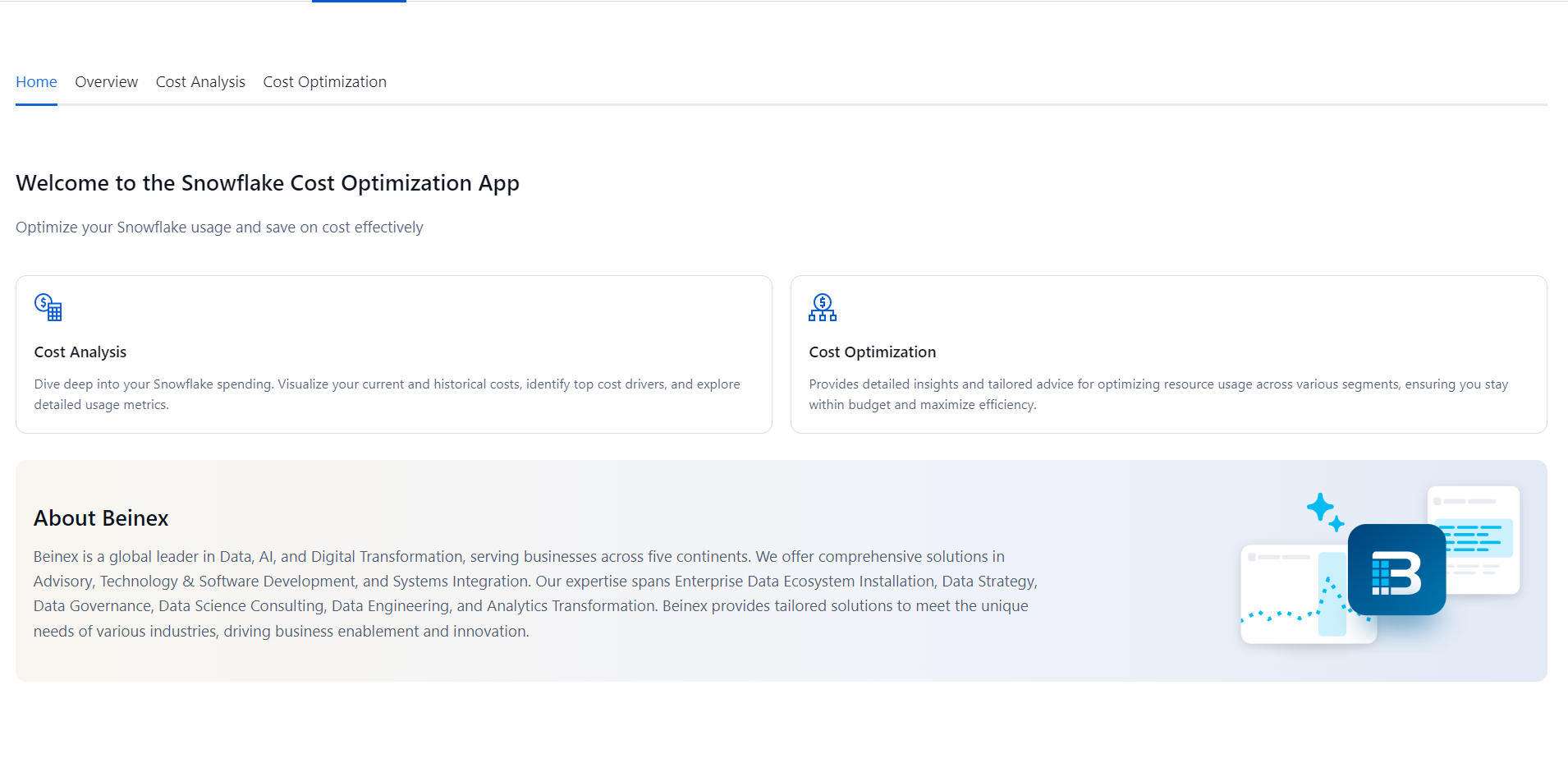
Transform Your Snowflake Operations with Beinex: Achieve Cost Efficiency, Real-Time Insights, and Accelerated Innovation
Cost Optimization
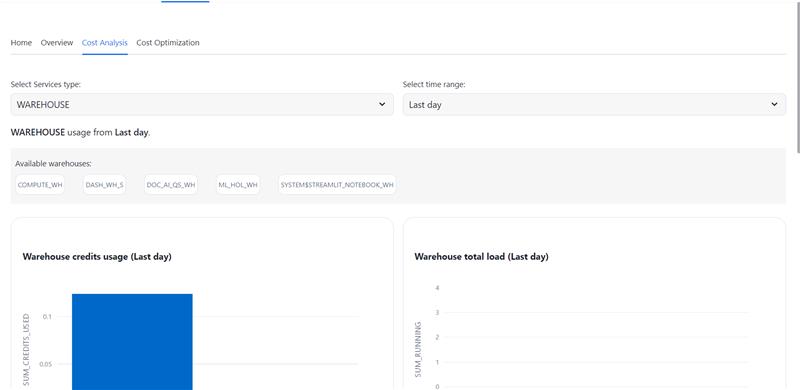
- • Real-time and Historical Cost Analysis: Leverage granular cost insights to identify and mitigate resource inefficiencies.
- • Precision Cost Attribution: Accurately pinpoint the root causes of cost deviations within your Snowflake environment.
- • Optimized Resource Utilization: Receive data-driven recommendations to optimize resource allocation and minimize unnecessary expenditures.
- • Proactive Cost Management: Implement preventative measures to avoid unexpected cost spikes and ensure adherence to budget constraints.
Learn more: https://app.snowflake.com/marketplace/listing/GZT8Z14W95T/beinex-consulting-llc-cost-optimizer
Beinex's strategic partnership with Snowflake empowers organizations to harness the full potential of their data. By leveraging Snowflake's powerful data cloud platform, Beinex offers comprehensive solutions for data management, analytics, and machine learning. This partnership enables organizations to accelerate their data-driven initiatives, reduce costs, and gain a competitive edge. Together, Beinex and Snowflake deliver innovative solutions that drive business growth and innovation.

Protecting Data in AWS: Encryption and Key Management
Why Encryption is Important
Encryption is a security technique that converts data into a format that is unreadable by unauthorised individuals. It is particularly crucial when it comes to protecting sensitive information such as personal data, bank records, and trade secrets. By encrypting data, even if an attacker accesses it, they cannot read it without the correct decryption key.
AWS provides various encryption options to protect data:
- Server-side Encryption
- Client-side Encryption
- Key Management
1. Server-Side Encryption
Data at rest can be encrypted in AWS by using server-side encryption. Server-side encryption is available for AWS services, including Amazon S3, Amazon EBS, Amazon RDS, and Amazon Redshift.
When you utilise server-side encryption, AWS encrypts the data before putting it on a disc. The security of your information is guaranteed because AWS also manages the encryption keys required to encrypt and decrypt data.
2. Client-side Encryption
Data can be encrypted on the client side before being uploaded to AWS. Client-side encryption adds a layer of security by allowing you to manage the encryption keys used to encrypt and decrypt your data.
Client-side encryption is available for AWS services, including Amazon S3, Amazon EBS, and Amazon RDS. Client-side encryption requires additional administration and security measures because it forces users to control the encryption keys directly.
3. Key Management
Key management is the process of generating, storing, and controlling encryption keys. AWS provides critical management services, including AWS CloudHSM and Key Management Service (KMS).
You can easily create and manage the encryption keys to secure data using AWS Key Management Service (KMS), a managed service. Some AWS services, such as Amazon S3, Amazon EBS, and Amazon RDS, are compatible with AWS KMS.
A hardware security module (HSM) called AWS CloudHSM offers secure key management and storage. AWS services, including Amazon S3, Amazon EBS, and Amazon RDS, can be used with AWS CloudHSM.
Best Practices for Protecting Data in AWS
Use these best measures to protect your data in AWS: 1. Encrypt sensitive data: Use either server-side or client-side encryption to encrypt all sensitive data. Robust encryption methods like Advanced Encryption Standard (AES) should exist with 256-bit keys. The Amazon Web Services (AWS) KMS service can generate and manage encryption keys.
2. Utilise AWS CloudHSM: For other key management and security, use AWS CloudHSM.
3. Set up multi-factor authentication: Multi-factor authentication adds security to AWS accounts and services (MFA).
Conclusion
Amazon Web Services (AWS) is a comprehensive cloud computing platform that enables millions of customers worldwide to deploy and scale their services on the cloud while enjoying cost savings upfront. Data security is a critical concern for any organisation, and AWS provides several services to help address this issue. Encryption plays a vital role in data protection, and it is essential to follow best practices to safeguard the security and safety of data on AWS.
Beinex is an AWS consulting partner, and we empower customers to host their BI solutions and much more on the cloud. Our cloud migration experts bring in best-in-class stability and reliability by understanding your business strategy and working closely with you to deploy AWS infrastructure as a service.
AWS Systems Manager: Proven Best Use Cases and a Real-World Success Story
AWS Systems Manager seamlessly operates with both Windows and Linux OS and integrates with CloudWatch metrics, CloudWatch Dashboard, and AWS Config. Moreover, it enables the creation of resource groups spanning various AWS services, allowing for aggregated operational data viewing and facilitating monitoring, troubleshooting, and resource group-specific actions.
Common use cases and best practices for AWS Systems Manager capabilities are listed below:
Automation
Inventory
Maintenance Windows
Parameter Store
Patch Manager
Run Command
Session Manager
State Manager
Managed Nodes
Case Study: A Global Cloud Solutions and Services Company Enhances Scalability and Efficiency with AWS Systems Manager
Client: A Global Cloud Solutions and Services Company
A technology services company that specialises in helping organisations across 120 countries adopt modern technologies and manage them efficiently. They focus on creating solutions for hybrid and multi-cloud environments.
Requirement: Finding Scalability on AWS Systems Manager
The client faced a significant challenge in managing multi-cloud environments at scale reliably and cost-effectively. Manually handling activities across hundreds of thousands of different compute instances was resource-intensive and delayed issue resolution. They needed a solution that could run both on-premises and on the cloud and wanted a single tool for managing their suite of solutions.>
Challenges
Process: Supporting Automation, Staff Productivity, and Transparency on AWS
The client began using AWS Systems Manager in 2015 for various products and extended its use to other cloud environments in 2019. Since 2019, the client has utilised AWS Systems Manager to power patching activities across all major cloud providers they support. They perform mass patching at scale, covering over 62,000 VMs across all their managed services. VM Management automates traditionally manual tasks like patching, agent distribution, server diagnostics, and issue remediation. It significantly reduces labour, costs, and errors associated with manual tasks, enhancing security and efficiency.
SmartTickets, a component in VM Management, handled thousands of incidents and automated responses using AWS Systems Manager, saving time and reducing costs for the company. They also used Amazon CloudWatch for monitoring and observability and automated runbooks for real-time monitoring and alerts.
AWS Systems Manager provides a single-pane view of environments, improving customer visibility and decision-making.
Result: Taking Automation to the Next Level on AWS
The client plans to develop custom runbooks with customers and further automate responses and resolutions using AWS Systems Manager. They have successfully solved industry challenges by saving time, cutting costs, and reducing complexity for both their customers and themselves.
Key Takeaway
The client leveraged AWS Systems Manager to streamline and automate their operations, resulting in improved efficiency, cost reduction, and enhanced customer satisfaction. With automation, they can swiftly respond to and resolve issues, meeting customer expectations effectively.
How Beinex Can Help You
Beinex is an AWS consulting partner, and we empower customers to host their BI solutions and much more on the cloud. Our cloud migration experts bring in best-in-class stability and reliability by understanding your business strategy and working closely with you to deploy AWS infrastructure as a service.