How AI Decision-Making is Improving Enterprise Outcomes
Blog
Share 
How Mywhoosh Standardized Collaborative Workflow Creation by Implementing the “Alteryx Server” Platform on AWS that Paved the Way for 20% Better Business Predictions
 12 July 2022
  Team Beinex
 Once a workflow is built, users want to share, secure, schedule, and monitor the assets that have been built. Alteryx Server allows users to publish their workflows to a central location where the workflows can be stored, shared, and controlled in a safe and “enterprise-grade” solution.
Challenge
- The IT infrastructure of MyWhoosh where the Alteryx Server platform was hosted was in an on-premise datacenter which was designed to be scalable and robust with multi node physical clusters including the server, storage and network components. However, most of the physical hardware was quite old and not equipped with the latest generation of physical servers.
- Frequent hardware crashes and portal downtime kept troubling the availability of the Alteryx Server application. Assigning a touch hand support person to power on the hardware that was down seemed quite impossible due the restrictions during covid period. Hence, MyWhoosh wanted to look for another viable solution.
- Though the hardware setup at MyWhoosh was well equipped to meet the occasional spikes in the traffic, it was observed that over a course of 6-month time, most of the IT infra was underutilized than predicted. It was realized that spending huge amount of money on an old hardware plus software maintenance, license costs, internet bandwidth, datacenter cooling and maintenance, touch support personnel and electricity costs – were keeping the business operations challenging.
- There was an attempt by MyWhoosh to select a cost-effective solution that can host Alteryx Server application servers, web servers and archival data. This way IT infra can be re-provisioned to host sensitive data on-premise and the rest on the cloud, thereby reducing the overall physical hardware costs spent on a yearly basis.
Why AWS
- MyWhoosh decided to migrate Alteryx Server, database servers and archival data to AWS.
- The Alteryx Server’s AWS architecture includes Amazon Elastic Compute Cloud (Amazon EC2), that provides complete control of its computing resources, updates to tables in Amazon Relational Database Service (Amazon RDS) and AWS Elastic Load Balancer was used to distribute the traffic to the underlying EC2 instances based on the load.
Benefits
- MyWhoosh uses AWS services to provision infrastructure and deploy the Alteryx Server platform to other departments within it. In addition, the Alteryx Server resources that are no longer required to be run all the time are made to auto shutdown thus saving cost. MyWhoosh reported a 30% cost reduction after implementation of AWS for the Alteryx Server platform.
- The implementation of Alteryx Server on AWS made MyWhoosh confident in the security of its data, and its accreditation team is enthusiastic about the monitoring and auditing capabilities provided by AWS tools. With the implementation of IAM roles, MyWhoosh IT team was able to isolate systems and tightly control user accesses. These capabilities were harder to achieve within the existing infra but were available out of the box with AWS
- By adopting AWS to host the Alteryx Server platform, MyWhoosh has been able to innovate and experiment to a degree previously impossible. For example, MyWhoosh compared the performance and cost-effectiveness of three different cloud solutions. Without moving to the AWS, the costs associated with running an outdated on-premise hardware would have creeped up and the alternative way of upgrading the existing on-prem infrastructure to the latest hardware models and then hosting the Alteryx Server application on top of it would have taken months.
About Alteryx Server
Alteryx Server gives organizations the ability to access, manipulate, analyze, and output data. The Alteryx Designer product allows people to build workflows that step through complex processes logically. Some workflows are performed once to answer a question; some are performed many times to automate processes like reconciliations. Other workflows are built to refresh complex dashboards built with Alteryx, Power BI, or other platforms
Related Articles
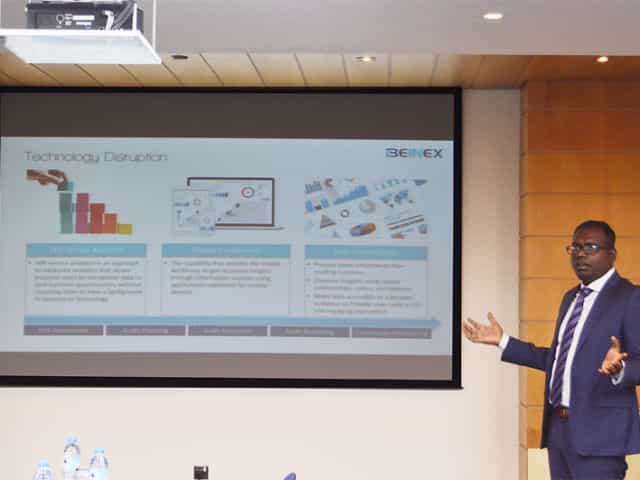
SELF SERVICE AUDIT ANALYTICS
TRANSFORM THE WAY YOU AND YOUR ORGANIZATION WORK WITH DATA –SELF SERVICE AUDIT ANALYTICS
Increasing complexities of risks and incessant emergence of disruptive technologies are demanding substantial change in internal audit processes. In today’s world of constant disruption, internal audit should evolve into a dynamic and future-oriented function. Businesses need broad-spectrum audit processes that extend beyond reviewing the obvious. Auditors should adopt forward-looking IA approaches, and should be able to provide deeper and valuable insights on strategy, execution, emerging risks, and hidden opportunities.
The 2016 Deloitte Global Chief Audit Executive Survey that polled more than 1200 CAEs from 29 countries and a diverse range of industries, reaffirms the growing need to conduct analytics-based auditing. More than a three quarter of the CAEs (79%) recommend the need for digital disruption and innovation to transform internal audit and enhance its value. The survey also cited the increasing relevance of cutting-edge technologies such as artificial intelligence, cognitive computing, and visual analytics.
Is skill-gap a concern?
More than half of CAEs (57%) who participated in the survey expressed their intense dissatisfaction about inadequate skills and insufficient expertise of audit teams.
When left unaddressed, these skill gaps will weaken auditors’ capabilities to deliver on changing stakeholder expectations. Stakeholders expect more forward-looking analysis to uncover risks and hidden opportunities. Or, gone are the days of static audit reports and analysis of sample data.
The Deloitte survey also cites risk anticipation (39%) and data analytics (34%) as the two groundbreaking innovations that are most likely to impact internal audit within the next five years. Changing business landscapes, technological advancements, and proliferation of data have brought forth the imminent need to leverage analytics and data visualization to increase the impact, influence, and effectiveness of internal
audit
Analytics Adoption Challenges
Even after 30 years of inception of data analytics, many auditors continue to adopt conventional internal audit methods and lag in technology adoption. Wondering why? Here are some of the reasons:
Can technology disruption be a savior?
Advancements in technology are fundamentally changing the nature of the audit and improving its effectiveness and relevance. Here are a few game-changing technology solutions that auditors can harness effectively to enhance the way they work with data:
1.Self-service analytics – Smart analytics for all
Self-service analytics is no more a buzzword. It’s the new norm. Self-service analytics empowers auditors to access data, perform queries, and create interactive reports that add richness and granularity to the insights derived. Anyone and everyone, with or without technical expertise, can harness the power of self-service analytics to work seamlessly with large data sets of any size or type, and discover savvy insights without having to write codes or learn programming languages.
Key advantages of using self-service analytics tools: Explore your data and create ad-hoc reports without IT skills
2.Mobile Analytics – Audit insights on the go
Regardless of the size of an organization or availability of data, it takes weeks to prepare and present comprehensive audit reports. The numbers are usually saved offline as large files or copied to multiple slides for boardroom meetings.
Mobile data analytics enables a concise and easily accessible digital avatar of audit reports and dynamic dashboards that can be accessed on mobile devices to interact and proactively monitor the business information on the go.
3.Data Visualization
When it comes to presenting audit data, reports and findings, one gets a single view of the entire raw data, all at once. This makes it difficult to decipher what is important and what isn’t, the reason why the point of sharing information gets defeated. Data visualization helps get a flexible and reliable way to identify and share pertinent information in a manner that everyone can easily understand.
There are many reasons why auditing is ripe for self-service analytics and visualization driven transformation. There is more data to examine within limited time span. Most financial and operational transactions are moving online, and the number of variables, outliers, trends, and patterns to identify and analyze continue to increase each day.
Visual analytics is the fastest way to analyze and understand structured or unstructured data of any size, without IT assistance. Visual technologies help speed up and improve decision making with heat maps, bubble charts, and interactive dashboards that are easy for C-suite executive, non-technical business users, and stakeholders to understand.
Everything gets better when you can do it yourself, right? Self-service audit analytics and visualization too are not different.
Benefits of self-service analytics in Internal Audit
Skills gap
Insufficient IT support
Difficulty to manage and manipulate data
Increasing requests for ad-hoc analysis and one-off reports
Difficulty in dealing with the basic aspects of data management and governance
Easy access to any source data
Guided analysis – Faster answers to complex questions
Intuitive drag-and-drop interface to create and share interactive reports.
Natural language processing to respond to complex queries
Interactive visualizations and personalized dashboards to identify patterns and trends
Fast to deploy and easy to manage
All-encompassing data analysis anywhere, at anytime
Process more information than reading numbers
Discover insights using spatial relationships, colors, and textures
Make data accessible to a broader audience and provide users with a rich and engaging experience

SELF-SERVICE AUDIT ANALYTICS - Beinex
SELF-SERVICE AUDIT ANALYTICS: TRANSFORM YOUR APPROACH
Despite the fact that data analytics and Computer Assisted Audit Techniques (CAAT) have been part of auditing for nearly 30 years, many organisations are still struggling with the implementation of effective data analytics to enhance internal audit quality and effectiveness. Experts at Beinex Consulting offer advice and help.
Increasing complexities of risk and incessant emergence of disruptive technologies are demanding substantial change in internal audit processes. In today’s world of constant disruption, internal audit should evolve into a dynamic and future-orientated function. So what’s getting in the way?
Click here to read the full sponsored feature by Beinex Consulting

Tableau for Financial Analytics: Transforming Data into Insights
Financial Analytics and Its Importance
Financial analytics offers actionable insights into an organization's monetary health and performance by utilizing data analysis tools and techniques for analyzing financial data. It involves assessing financial data from diverse sources, like income statements, market data, etc., to identify trends, make strategic, data-driven decisions, and optimize financial operations. Fundamental finance analytics is critical to businesses as they deliver data-driven insights that equip enterprises to make smarter decisions, optimize operations, and boost profitability. The following aspects imply the significance of financial analytics for businesses. • Analyzing financial performance • Creating accurate budgets and plans by forecasting based on market trends and historical data • Identifying and mitigating financial risks • Assessing potential investments to make informed decisions • Analyzing a company's cost structure for optimization • Harnessing big data to develop strategies for addressing challenges and making informed decisions • Facilitating continuous visibility into financial operation and performance • Detecting data gaps and analyzing historical data to improve business performance • Preventing fraud and eliminating manual, redundant tasks to enhance efficiency
Tableau for Financial Analytics
Businesses must utilize financial analytics tools and software to improve financial management, comply with regulations, identify cost-efficient prospects, optimize operations, and make informed decisions. These tools automate the analysis and interpretation of financial data, delivering valuable insights into budgeting, forecasting, and performance. Tableau makes financial analytics seamless with powerful, intuitive dashboards that facilitate data-driven decisions. With Tableau, users can easily visualize, analyze, and share data faster and detect patterns and trends that offer actionable insights. Tableau equips enterprises with an in-depth understanding of their spending, enabling effective optimization of resources. Be it tracking capital expenditures or assessing expense spending, Tableau transforms financial data into actionable insights that drive improved business outcomes. As financial analytics continues to evolve, the future of Tableau in financial analysis looks promising. Amidst the rising intricacies of financial fraud, there is a need for a robust, intuitive platform like Tableau, which is essential to detect fraud faster and reduce the impact of losses. As a popular data visualization and interaction tool in the finance domain, Tableau simplifies raw data, making it interactive and visually intelligible. Tableau uses financial analytics to improve efficiency in the following ways: • Acquiring insights from the financial data collected from diverse sources • Predicting accurately by utilizing analytics to get a detailed picture of financial perspectives • Lowering risk and saving time by tracking accounts to locate inactive or low-activity accounts
Financial Analytics Made Seamless: Tableau's Robust Capabilities
Tableau empowers financial analysts with deeper insights into financial data, enabling data-driven decisions. Let's take a look at the distinctive uses of Tableau in finance: • Automating Data Updates: Unlike traditional data reporting software like Excel, Tableau automates the process of updating data, formulas, and data reports in line with the changes, enabling faster and more efficient financial reporting and allowing users to save significant time. • Data Visualization: With Tableau's powerful data visualization capabilities, business giants can easily handle the intricacies of big data through graphical representations, real-time dashboards, and analytical data breakdowns. • Data Insights: Tableau's smarter data analytics and insight tools automatically analyze financial data and offer insights into it, allowing effortless analysis of bigger financial datasets for making important financial decisions. • Financial Reporting: Tableau offers distinctive financial reporting capabilities, transforming traditional reports like P&L statements, balance sheets, and cash flow statements into dynamic and automated experiences. Besides, Tableau delivers insightful recommendations based on the analyzed financial data, empowering users to make informed decisions. • Data Trends and Patterns: With features like data drill-down and data blending, Tableau helps acquire applicable data and identify variations, patterns, or trends within the enterprise.Tableau in Finance: Key Implementations
As a robust tool for smarter financial analytics, Tableau equips enterprises with the capability to visualize intricate data, enhance operations, and improve the decision-making process. Here are some of the key implementations in Tableau that enhance financial analysis, resulting in insightful scenario analysis and accurate forecasting. • Developing Interactive Tableau Financial Analysis Dashboards: Tableau dashboards offer a comprehensive view of the financial status of your organization, blending interactive features like action buttons, color schemes, drop-and-down filters, and intuitive layouts. Building engaging dashboards in Tableau converts the static financial data into a visual story, often incorporating various visualizations like dual-axis charts for comparison and bullet graphs for performance metrics. The interactive elements of Tableau dashboards allow for seamless manipulation of data views, enabling users to analyze deeper without switching from the primary dashboard. Example: Tableau financial analysis dashboards allow tracking key financial metrics like expenses, loan performance, and customer deposits while providing real-time updates. • Forecasting and Trend Analysis: For businesses to make strategic financial decisions, it is important to foresee future performance. The future of financial forecasting is enhanced by Tableau, which enables the creation of predictive models based on historical data patterns and the integration of statistical forecasting methods to project future trends. It helps businesses understand possible business trajectories. Example: Tableau creates visualizations comparing past performance against future projections based on historical sales data, seasonal trends, and customer purchase behaviors. • Scenario Analysis: Tableau facilitates the creation of multiple financial scenarios to assess how various factors affect financial outcomes. Analysts can use Tableau's flexibility to create different scenarios by modifying input variables to visualize the impacts on financial metrics. It helps stakeholders to have a sound idea of potential risks and opportunities. Example: Using Tableau to simulate economic conditions helps businesses assess profitability and the impact on non-performing loans (NPLs) and craft mitigation strategies. • Fraud Detection: Using Tableau for financial analytics helps organizations detect anomalies and suspicious patterns that may imply fraudulent activities. Tableau's powerful visualization capabilities help detect anomalies in financial transactions, and predictive modeling helps understand potential risks, reduce financial losses, and ensure compliance with security regulations. Example: Tableau visualizes transaction patterns and anomalies like unusually high spending across different locations. • Compliance and Risk Management: Tableau helps track financial compliance metrics and identify areas where a business may be at risk of non-compliance with regulations. For instance, it can help visualize tax liabilities, monitor debt covenants, or track audit results. Tableau also provides automated reports that track transactions and regulatory compliance. Example: A compliance dashboard might track specific ratios indicating whether a company adheres to legal financial limits. • Expense & Cost Analysis: Organizations can harness Tableau to track and analyze operational costs across departments, locations, or projects. By visualizing cost breakdowns and spending trends, finance teams can identify inefficiencies, optimize budgets, and implement cost-saving strategies. Example: Tableau visualizes spending trends, helping analyze expenses and detect cost-saving possibilities. The finance landscape is evolving rapidly, pushing modern businesses to adopt advanced BI solutions like Tableau rather than traditional spreadsheets. It is no longer the era of manual data preparation and analysis. Therefore, most organizations now rely on Tableau to create financial dashboards to track and report KPIs. Being a powerful data visualization platform with advanced analytics and interactive capabilities, Tableau helps build dynamic dashboards and redefine financial analytics. Adopting Tableau for financial services helps organizations harness its innovative features to upgrade their financial data management and reporting processes.

Prepping the data on Tableau: Five aspects that matter
Data preparation is purging imperfectly formed data, reorganising unclean data, and merging various data sets for analysis. Rows and columns in the data structure must be changed, and data types and values must be cleaned up. The amount of time it takes to find insights directly depends on how quickly and well you prepare your data. The entire process can be sped up by being aware of the extent of the data you're studying and observing the modifications you make to the data.
With the help of Tableau Prep Builder, data can be combined, shaped, and cleaned more quickly and easily for analysis within Tableau. You can swiftly obtain high-quality data using the linear and visual approach when preparing your data.
When ushering in data into a data prep tool, it is always better to know what you're working with and whether you're looking at the complete data set or just a subset. Before you begin cleaning, you might also need to undertake some data research. Five crucial steps are to be taken care of for prepping the data.
Let's have a look:



 One technique to get beyond this obstacle is visualising the data pane in Tableau Desktop as to how it should appear. Do you have columns with the same value in several places? Should each product be in a single field with the sales transactions stated below, or should each product have its column with the sales transactions listed underneath? The latter is more likely, and a pivot is necessary for this situation.
You will be joining the data if you need to combine two tables. By using a join, you can increase the number of fields in your data source that you can investigate. Although a join can be added at any point during the data preparation process, the sooner you use it, the sooner you will comprehend the data set and identify areas that require immediate attention.
One technique to get beyond this obstacle is visualising the data pane in Tableau Desktop as to how it should appear. Do you have columns with the same value in several places? Should each product be in a single field with the sales transactions stated below, or should each product have its column with the sales transactions listed underneath? The latter is more likely, and a pivot is necessary for this situation.
You will be joining the data if you need to combine two tables. By using a join, you can increase the number of fields in your data source that you can investigate. Although a join can be added at any point during the data preparation process, the sooner you use it, the sooner you will comprehend the data set and identify areas that require immediate attention.
 Like appending two data sets together, a union enables you to do so. For instance, you might have an Excel file where each sheet displays transactions from different years. You may maintain the same structure with extra rows by using a union rather than joining the tables.
After your data has been organised, processed, and filtered, it's time to interpret what it is trying to tell you. Tableau Prep connects with your entire business intelligence platform like many other data preparation products. To allow others to begin their analysis, publish the extract to Tableau Server or Tableau Cloud. Bring it into Tableau Desktop to start posing and investigating more in-depth queries. The hardest part of the data analysis process is now complete. It's time to share the breakthroughs that resulted from your hard work.
Like appending two data sets together, a union enables you to do so. For instance, you might have an Excel file where each sheet displays transactions from different years. You may maintain the same structure with extra rows by using a union rather than joining the tables.
After your data has been organised, processed, and filtered, it's time to interpret what it is trying to tell you. Tableau Prep connects with your entire business intelligence platform like many other data preparation products. To allow others to begin their analysis, publish the extract to Tableau Server or Tableau Cloud. Bring it into Tableau Desktop to start posing and investigating more in-depth queries. The hardest part of the data analysis process is now complete. It's time to share the breakthroughs that resulted from your hard work.
1. Adjust the data sample size
To speed up your data preparation process and improve performance, you should generally only connect to a small portion of a vast data set. You might occasionally prefer to view the entire data set, and Tableau Prep enables you to do so. If a sample doesn't help you complete your data preparation task, you can try the following:
- a. Boost the size of your data sample: Adjust the sample's row count by returning to the input stage. You can add more rows or include all the data but remember that doing so might make the performance slower. Another word of caution is that utilising a specified number of rows will only return the fastest method the underlying database can find to replace the given rows.
- b. Take random sampling: Tableau Prep automatically chooses the optimal number of rows to return based on the total number of fields in the collection and the data types of those columns. The database level random sampling occurs and returns the specified number of rows. The database returns a sample after inspecting each entry. Not all data sources provide this option, which could also affect performance.
- c. Add a step filter at the input stage: You may ensure that the information pulled into your data set is pertinent to your research by including a filter at the input stage. This improves performance while providing you with a more representative sample.
2.Evaluate the data
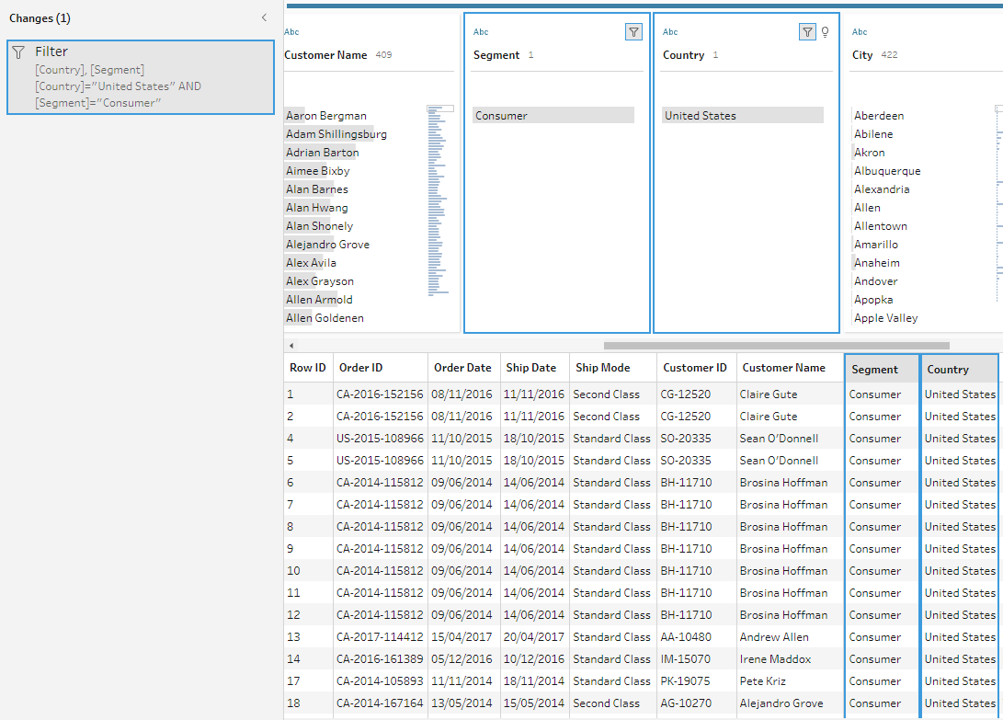
You'll probably want to start by counting the number of distinct values in each field. A simple check at the column header at the top reveals how many states are represented in the data set. You'll also want to understand how various values connect to identify data outliers or problems. You can utilise highlighting in Tableau Prep to find correlations between different fields. The data grid view is condensed to only display the records with the selected value in the chosen field when you click on a value in the profile pane. Tableau Prep highlights the corresponding values in blue, and the values span areas.
3.Filter the data
Limit the fields you import into Tableau Prep to those you'll need for your analysis to maximise the overall effectiveness of your data preparation process. By filtering your data, you can verify that you're performing the proper analysis while saving time. For instance, if you need to look at sales data from the previous two years, you may use the range or relative date filters to limit the date field to that period. You might want to eliminate any incorrect or irrelevant data. A value in the data pane can be excluded with a single click. You can do this at any time during your flow.
4.Assess and tidy up the data
Tableau's data types will have an impact on your analysis. Therefore, it's critical to correctly identify each field before beginning. Even though Tableau allows you to update aliases, alter data types, split lots, and create calculations, it is far simpler to carry out these tasks beforehand, particularly when preparing the data set for someone else. Tableau Prep includes built-in capabilities to aggregate and replace recurring characters or pronunciation, saving you from having to edit each one individually so that you don't have to; these solutions use algorithms to make cleaning easier. Or, if you foresee a missing value, you may manually add it so that it will be included when the flow processes the complete data set. You can apply a computation if you know that a field must be cleaned or filtered, but it takes more than the user interface offers.
5.Understand the data results
Deciding about the final data set's appearance while you begin to prepare your data can be difficult. For Tableau to effectively analyse your data, you might need to merge numerous data sources or pivot your data from columns to rows.
One technique to get beyond this obstacle is visualising the data pane in Tableau Desktop as to how it should appear. Do you have columns with the same value in several places? Should each product be in a single field with the sales transactions stated below, or should each product have its column with the sales transactions listed underneath? The latter is more likely, and a pivot is necessary for this situation.
You will be joining the data if you need to combine two tables. By using a join, you can increase the number of fields in your data source that you can investigate. Although a join can be added at any point during the data preparation process, the sooner you use it, the sooner you will comprehend the data set and identify areas that require immediate attention.
Like appending two data sets together, a union enables you to do so. For instance, you might have an Excel file where each sheet displays transactions from different years. You may maintain the same structure with extra rows by using a union rather than joining the tables.
After your data has been organised, processed, and filtered, it's time to interpret what it is trying to tell you. Tableau Prep connects with your entire business intelligence platform like many other data preparation products. To allow others to begin their analysis, publish the extract to Tableau Server or Tableau Cloud. Bring it into Tableau Desktop to start posing and investigating more in-depth queries. The hardest part of the data analysis process is now complete. It's time to share the breakthroughs that resulted from your hard work.
Spatial Parameters: Enhancing Geospatial Analysis and Adding Interactivity to Your Maps
What Are Spatial Parameters?
Spatial parameters in Tableau allow you to dynamically interact with geospatial data within your visualizations. These parameters enable you to select spatial objects like points, polygons, multi-polygons, lines, or collections for calculations. Unlike traditional parameters, which work with values like text or numbers, spatial parameters offer the flexibility to work with geospatial data like coordinates and spatial shapes. You can create spatial parameters in two ways: 1. From a data source: If your data contains spatial fields (like latitude and longitude), you can load these as spatial parameters. 2. Using Well-Known Text (WKT) : This method allows you to manually input spatial data in text format to create custom spatial parameters. Spatial parameters can be used in the same way as other parameters in Tableau, including parameter controls, actions, and dynamic values. Note: Spatial parameters can only be created from spatial data fields (such as latitude and longitude). Creating spatial parameters from text string fields, like a "Country" field, is not feasible as it might be assigned as a geographic role but remains a text field.
Top Benefits of Using Spatial Parameters
Spatial parameters have offered immense possibilities for Tableau experts to analyze and visualize geospatial data. Key benefits are listed below: 1. Cross-Data Source Spatial Exploration With spatial parameters, you can explore spatial relationships between data sources that don't support joins. Unlike traditional data sources, which can be limited by join constraints, spatial parameters allow you to compare spatial regions from different datasets. This means you can dynamically analyze relationships across multiple data sources without the need for complex joins. 2. Skip Long Joins Previously, working with large spatial datasets required time-consuming spatial joins. Now, spatial parameters enable you to bypass these long joins and conduct spatial analysis much faster. You can use parameters to compare regions across multiple data sources instantly, even with vast datasets. 3. Interactive and Dynamic Analysis Spatial parameters allow users to visually interact with geospatial data in real time. Like other parameter types, you can use parameter controls to input points, lines, or polygons and adjust your analysis on the fly. This flexibility allows you to dynamically change spatial boundaries and relationships during your analysis. 4. Distance-Based Queries With spatial parameters, you can perform distance-based queries without complex calculations. For example, you can control the size of a buffer and see what lies within that buffer directly from the worksheet. This makes it easy to conduct proximity analysis without the need for complicated formulas. 5. Create Custom Regions Spatial parameters allow you to create custom regions by selecting points, lines, and polygons and combining them into a single parameter. For instance, you can create a sales region by combining multiple states into one spatial parameter. This enables you to tailor regions for specific analysis scenarios.
Spatial Calculations in Tableau 2024.3: What’s New
Tableau 2024.3 also introduces three new spatial calculations to help you evaluate spatial relationships: • SYMDIFFERENCE: Identifies areas that are unique between two regions. • INTERSECTION: Shows the overlap or intersection between two regions. • DIFFERENCE: Displays areas present in one region but not in the other. These new spatial calculations provide powerful tools to analyze and compare geospatial data.
Union Aggregation for Spatial Data
In previous versions of Tableau, the only aggregation available for spatial data was Collect, which groups spatial elements together. Union Aggregation has been introduced in Tableau 2024.3, allowing you to dissolve the boundaries between regions and providing even greater flexibility in working with spatial data.
Validating Spatial Calculations
Tableau 2024.2 introduced the Validate Calculation feature, which can help you detect and correct errors in your spatial data. This tool is handy when working with complex spatial datasets. Tableau's new Spatial Parameters and related features, such as spatial calculations and union aggregation, provide powerful capabilities for geospatial analysis. Whether comparing spatial regions, performing proximity-based queries, or creating custom areas, these features enable dynamic and flexible analysis beyond traditional methods.
How Beinex Can Assist You
Beinex, a premier Tableau partner, provides sustainable analytics solutions to organizations and helps to build superior data visual analytics capabilities internally through our bespoke training programs. Our team of Tableau-certified consultants are real-life Tableau business users passionate about Tableau and delivering a world-class experience. Connect with us for a free demo: https://www.beinex.com/free-tableau-software/