How AI Decision-Making is Improving Enterprise Outcomes
Blog
Share 
How Atlantis Dubai Standardized Interactive Data Visualization By Implementing The Tableau Server Platform On AWS That Drove Faster and Smarter Decisions Leading to 11 Increment In H
 12 July 2022
  Admin
Admin While sharing the content, permissions can be given to each user that restricts them from editing, applying different types of filters, and sharing it further. Users can create apps and add specific visuals to create live dashboards that can be accessed through smartphones and tablets. Moreover, one can collaborate with other designers and administrators to work together and create highly customized reports for a particular field.
Challenge
- The IT infrastructure of Atlantis where the Tableau Server platform was hosted was in an on-premise datacenter which was designed to be scalable and robust with multi node physical clusters including the server, storage and network components. However, most of the physical hardware was quite old and not equipped with the latest generation of physical servers.
- Frequent hardware crashes and portal downtime kept troubling the availability of the Tableau Server application. Assigning a touch hand support person to power on the hardware that was down seemed quite impossible due the restrictions during covid period. Hence, Atlantis wanted to look for another viable solution.
- Though the hardware setup at Atlantis was well equipped to meet the occasional spikes in the traffic, it was observed that over a course of 6-month time, most of the IT infra was underutilized than predicted. It was realized that spending huge amount of money on an old hardware plus software maintenance, license costs, internet bandwidth, datacenter cooling and maintenance, touch support personnel and electricity costs – were keeping the business operations challenging.
- There was an attempt by Atlantis to select a cost-effective solution that can host Tableau Server application servers, web servers and archival data. This way IT infra can be re-provisioned to host sensitive data on-premise and the rest on the cloud, thereby reducing the overall physical hardware costs spent on a yearly basis.
Why AWS
- Atlantis decided to migrate Tableau Server, database servers, and archival data to AWS.
- The Tableau Server’s AWS architecture includes Amazon Elastic Compute Cloud (Amazon EC2), that provides complete control of its computing resources, updates to tables in Amazon Relational Database Service (Amazon RDS) and AWS Elastic Load Balancer was used to distribute the traffic to the underlying EC2 instances based on the load.
Benefits
- Atlantis uses AWS services to provision infrastructure and deploy the Tableau Server platform to other departments within it. In addition, the Tableau Server resources that are no longer required to be run all the time are made to auto shutdown thus saving cost. Atlantis reported a 28% cost reduction after implementation of AWS for the Tableau Server platform.
- The implementation of Tableau Server on AWS made Atlantis confident in the security of its data, and its accreditation team is enthusiastic about the monitoring and auditing capabilities provided by AWS tools. With the implementation of IAM roles, Atlantis IT team was able to isolate systems and tightly control user accesses. These capabilities were harder to achieve within the existing infra but were available out of the box with AWS
- By adopting AWS to host the Tableau Server platform, Atlantis has been able to innovate and experiment to a degree previously impossible. For example, Atlantis compared the performance and cost-effectiveness of three different cloud solutions. Without moving to the AWS, the costs associated with running an outdated on-premise hardware would have creeped up and the alternative way of upgrading the existing on-prem infrastructure to the latest hardware models and then hosting the Tableau Server application on top of it would have taken months.
About Tableau Server
Tableau Server is an online platform that allows users to host and manage Tableau data sources, workbooks, reports, and dashboards created on Tableau Desktop. One can access Tableau Server from a web browser to create new workspaces, publish reports and dashboards, and share them with other users.
Related Articles

Best Cloud Data Management Tools Fit for Businesses of All Sizes
What is Cloud Data Management?
Cloud data management refers to the framework that allows businesses to store, manage, and access their data using cloud-based services and applications. It encompasses the entire data lifecycle, from collection and storage to processing and analysis, while ensuring that data remains secure and compliant with regulatory standards. The flexibility of cloud data management allows organizations to scale up or down based on their needs and optimize data operations, which in turn leads to better decision-making and actionable business insights.
The Importance and Benefits of Cloud Data Management
Cloud data management has become a necessity in the data-centric world. Organizations are immersed with vast amounts of data, which must be efficiently stored, processed, and analyzed. Here are the key benefits:
- Scalability and Flexibility: One of the biggest advantages of cloud data management is its ability to scale as needed. Traditional data management systems often require substantial infrastructure investment, but cloud solutions allow businesses to pay only for the resources they use, making it cost-effective.
- Enhanced Data Security: With stricter regulations on data privacy (such as GDPR and HIPAA), cloud data management ensures that data is securely stored and compliant with global standards. Cloud service providers offer tools to protect data from unauthorized access and breaches.
- Improved Collaboration and Accessibility: Cloud data management allows users to access data from anywhere at any time, enabling remote work and collaboration across geographically dispersed teams.
- Disaster Recovery and Business Continuity: Cloud-based data management systems offer advanced disaster recovery options. By replicating data across multiple locations, organizations can ensure that their data is safe and accessible, even in the event of hardware failure or a catastrophe.
Cloud Data Management vs. Traditional Data Management
In contrast to traditional on-premises data management (TDM), cloud data management (CDM) provides enhanced flexibility and scalability. Traditional data management systems require a significant upfront investment in physical servers, storage, and IT staff, whereas CDM enables rapid scaling with minimal financial and physical overhead.
CDM also offers superior disaster recovery by distributing data across multiple locations, a benefit that is difficult to achieve with TDM’s centralized approach. Furthermore, CDM allows team members to access data remotely, enhancing collaboration—something that traditional systems often struggle to provide.
A Hybrid Approach to Data Management
For businesses looking to maintain control over sensitive data while leveraging cloud-based tools, a hybrid approach to data management combines the strengths of both cloud and traditional systems. A hybrid model allows organizations to store sensitive data on-premise while utilizing cloud resources for dynamic, less sensitive data. This approach offers scalability, cost-efficiency, and disaster recovery while keeping critical data secure and compliant with industry regulations.
Top Cloud Data Management Tools
Several leading cloud data management tools dominate the market, offering comprehensive solutions for businesses with various data needs. Here are the top three tools:
1. Amazon Web Services (AWS)
Amazon Web Services offers an extensive range of cloud-based tools and services that allow businesses to manage their data effectively. Notable AWS services include:
• Amazon S3: A scalable storage service designed for temporary and intermediate data storage.
• Amazon S3 Glacier: A low-cost cloud storage service ideal for long-term data archiving.
• Amazon Redshift: A fully managed data warehouse that makes analyzing large datasets using SQL simple.
• Amazon Athena: An interactive query service that allows users to analyze data in Amazon S3 using SQL.
• Amazon QuickSight: A scalable, serverless business intelligence service for building interactive dashboards.
AWS Pricing: AWS follows a pay-as-you-go pricing model, making it highly flexible for businesses of all sizes.
2. Microsoft Azure
Microsoft Azure provides a wide range of cloud-based tools for data management, making it a popular choice for enterprises. Key Azure services include:
• Azure Blob Storage: A massively scalable object storage solution for unstructured data.
• SQL Databases: Managed SQL database services that simplify data management without the need for complex infrastructure.
• Azure Data Explorer: A real-time data analytics service that can handle large datasets with minimal preprocessing.
• Private Cloud Deployments: For businesses looking for more control over their infrastructure.
Azure Pricing: Like AWS, Microsoft Azure also offers flexible pricing based on the services and resources used.
3. Google Cloud Platform (GCP)
Google Cloud Platform offers a range of cloud-based data management services, known for their strong integration with Google’s ecosystem and ease of use. Prominent services include:
• Google Cloud Storage: A fully managed service for storing unstructured data.
• Google BigQuery: A fully managed data warehouse that allows users to run SQL queries on large datasets.
• Cloud BigTable: A NoSQL database service designed for large-scale workloads.
• Google Data Studio: A business intelligence platform for building intuitive dashboards and visualizing data.
• Cloud Datalab: A powerful tool for machine learning and data science projects.
• Cloud Pub/Sub: A messaging service designed for real-time data ingestion and processing.
GCP Pricing: Google Cloud Platform offers competitive pricing with a flexible pay-as-you-go model that caters to various business needs.
Conclusion
Cloud data management is essential for modern businesses looking to stay competitive in the digital era. By offering scalability, enhanced security, improved collaboration, and disaster recovery, cloud data management tools like AWS, Microsoft Azure, and Google Cloud Platform provide a comprehensive solution to managing data efficiently and effectively. As data grows in volume and complexity, leveraging these tools will be key to driving innovation and maintaining a competitive edge.

RUNNING THE MIGHTY SMALL LANGUAGE MODEL PHI-3 ON SNOWFLAKE
What is an SLM?
A Small Language Model (SLM) is tailored to excel in simpler tasks, offering boosted accessibility and user-friendliness for organizations operating with limited resources. Besides, they can be readily fine-tuned to align with specific requirements. Small language models are particularly well-suited for organizations aiming to develop applications capable of operating local devices instead of relying on cloud infrastructure. They are especially beneficial for tasks that do not necessitate extensive reasoning or immediate responses.
Reasons to use SLMs
Given the growing popularity and applicability of SLMs across various domains, particularly in areas like sustainability and the volume of data required for training, there are multiple reasons for employing them.
What is Phi-3?
Microsoft has a suite of small language models (SLMs) known as 'Phi,' demonstrating outstanding performance across various benchmarks. Microsoft's recent release is Phi-3, a series of open AI models. The Phi-3 models represent a prototype of capability and cost-effectiveness among small language models (SLMs), exceeding models of equivalent and larger sizes across the spectrum of coding, language, reasoning, and mathematical standards. This launch broadens the array of high-calibre models accessible to customers, providing them with more practical options as they craft and construct generative AI applications.
Phi-3-mini, a 3.8B language model, is accessible through Microsoft Azure AI Studio, Hugging Face, and Ollama. It is offered in two context-length variations—4K and 128K tokens. Notably, it is the first model within its category to support a context window of up to 128K tokens with minimal impact on quality. Furthermore, it is instruction-tuned, implying that it has been trained to comprehend and adhere to diverse instructions, mirroring natural human communication patterns. This ensures that the model is readily deployable straight out of the box. Phi-3-mini is available on Azure AI to leverage the deploy-eval-finetune toolchain, and it is also accessible on Ollama for developers to execute locally on their laptops.
Features of Phi-3
Phi-3 models exhibit distinctive superiority over language models of comparable and larger dimensions on key benchmarks, showcasing the following features:
Snowflake meets Phi-3: Advantages
The key pain point about LLMs is the computing required to host and run them. Setting up a dozen GPUs to run models can be expensive and complex. There's where Snowflake steps up. Snowflake's compute pool option enables users to easily and quickly set up and manage compute clusters. Phi-3 comes into the picture because of its cost-effective GPU utilization.
Can you imagine a situation where your language model only requires less than 3GB of GPU memory for inference? Well, now it's possible, all thanks to Phi-3. It's a state-of-the-art SLM that produces excellent results over GP3.5 and Mistral 8x7B, which are much bigger models. This opens the door for more cost-effective solutions to be brought up in the AI space. Add Snowflake for hosting; you have an excellent setup to host, test, and build AI applications. Read below how Beinex managed to run Phi-3 on Day 0 in Snowflake.
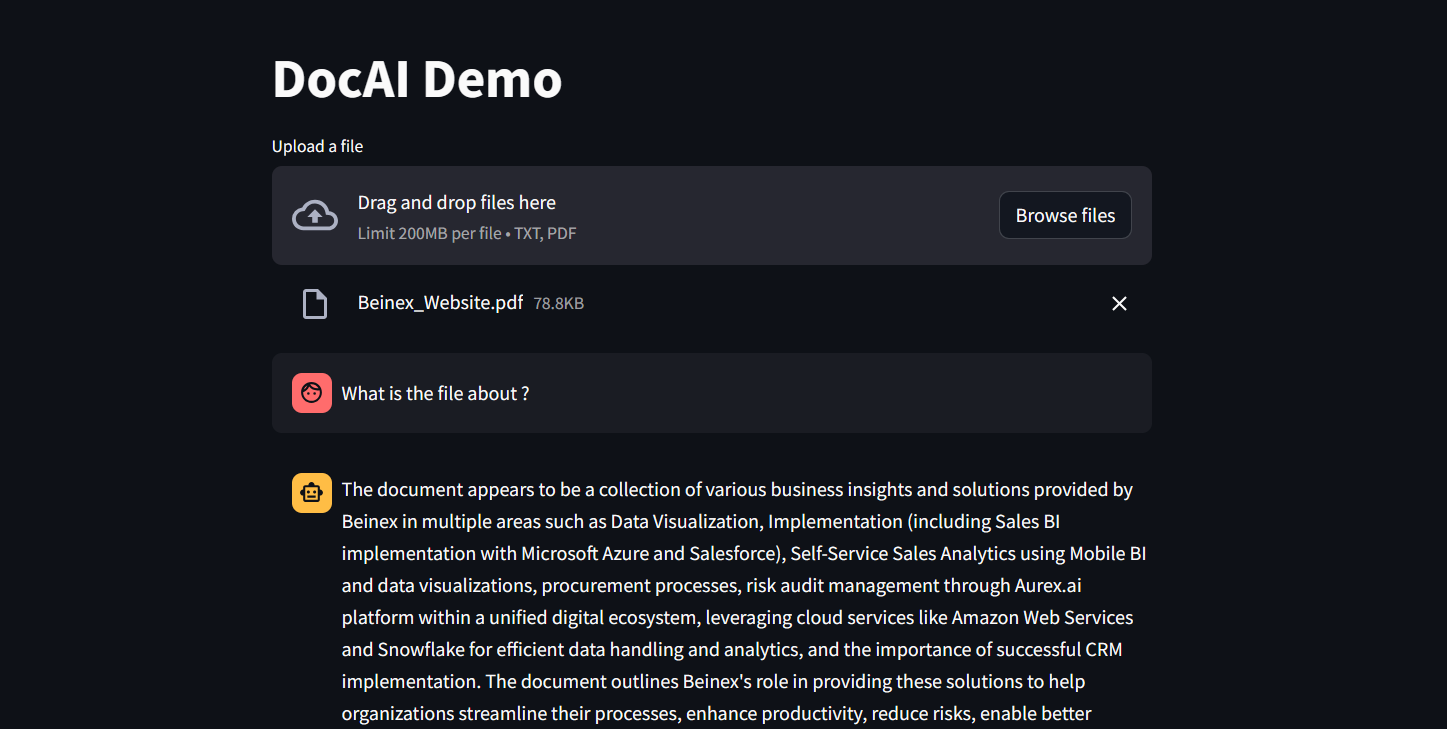 Figure 1: DocAI running on Phi-3
Implementing Phi-3 on Snowflake: What Beinex Did and How Beinex Did it?
Beinex has seamlessly integrated Phi-3 into Snowflake to help enterprises unlock their data's full potential through advanced language processing capabilities and enhance decision-making with deeper insights. The integration facilitates Snowflake users to:
Here's a detailed guide on implementing Phi-3 on Snowflake:
Step 1: Create Necessary Objects
-- Run by ACCOUNTADMIN to allow connecting to Hugging Face to download the model
-- Stage to store LLM models
CREATE STAGE <stagename> IF NOT EXISTS models
DIRECTORY = (ENABLE = TRUE)
ENCRYPTION = (TYPE='SNOWFLAKE_SSE');
-- Stage to store YAML specs
CREATE STAGE <stagename> IF NOT EXISTS specs
DIRECTORY = (ENABLE = TRUE)
ENCRYPTION = (TYPE='SNOWFLAKE_SSE');
-- Image repository
CREATE OR REPLACE IMAGE REPOSITORY images;
-- Compute pool to run containers
CREATE COMPUTE POOL GPU_NV_S
MIN_NODES = 1
MAX_NODES = 1
INSTANCE_FAMILY = GPU_NV_S;
Step 2: Docker Image Code - ollama
FROM ollama/ollama
RUN $(ollama serve > output.log 2>&1 &) && sleep 10 && ollama pull phi3 && pkill ollama && rm output.log
ENTRYPOINT ["ollama"]
CMD ["serve"]
Step 3: Tag and Push the Docker Image
docker tag ollama <SNOW_ORG-SNOW_ACCOUNT>.registry.snowflakecomputing.com/db/schema/image respository /ollama
docker push <SNOW_ORG-SNOW_ACCOUNT>.registry.snowflakecomputing.com db/schema/image repository /ollama
Step 4: Docker Image - UDF
FROM python:3.11
WORKDIR /app
ADD ./requirements.txt /app/
RUN pip install --no-cache-dir -r requirements.txt
ADD ./ /app
EXPOSE 5000
ENV FLASK_APP=app
CMD ["flask", "run", "--host=0.0.0.0"]
App.py content is given below :
from flask import Flask, request, Response, jsonify
import logging
import re
import os
from openai import OpenAI
client = OpenAI(
base_url='http://ollama:11434/v1',
api_key="EMPTY",
)
model = "phi3"
app = Flask(__name__)
app.logger.setLevel(logging.ERROR)
def extract_json_from_string(s):
logging.info(f"Extracting JSON from string: {s}")
# Use a regular expression to find a JSON-like string
matches = re.findall(r"\{[^{}]*\}", s)
if matches:
# Return the first match (assuming there's only one JSON object embedded)
return matches[0]
# Return the original string if no JSON object is found
return s
@app.route("/", methods=["POST"])
def udf():
try:
request_data: dict = request.get_json(force=True) # type: ignore
return_data = []
for index, col1 in request_data["data"]:
completion = client.chat.completions.create(
model=model,
messages=[
{
"role": "system",
"content": "You are a bot to help extract data and should give professional responses",
},
{"role": "user", "content": col1},
],
)
return_data.append(
[index, extract_json_from_string(completion.choices[0].message.content)]
)
return jsonify({"data": return_data})
except Exception as e:
app.logger.exception(e)
return jsonify(str(e)), 500
Step 6: YAML File
spec:
containers:
- name: ollama
image: <SNOW_ORG-SNOW_ACCOUNT>.registry.snowflakecomputing.com/ db/schema/image respository /Phi3
resources:
requests:
nvidia.com/gpu: 1
limits:
nvidia.com/gpu: 1
env:
NUM_GPU: 1
MAX_GPU_MEMORY: 24Gib
volumeMounts:
- name: llm-workspace
mountPath: /<stage name>
- name: udf
image: <SNOW_ORG-SNOW_ACCOUNT>.registry.snowflakecomputing.com/ db/schema/image respository /ollama_udf
endpoints:
- name: chat
port: 5000
public: false
- name: llm
port: 11434
public: false
volumes:
- name: llm-workspace
source: "@<llm stage_name>"
Step 7: Upload YAML File and Create Service
Upload the YAML file to the created stage, where the stage name in the YAML file should match the stage created in Step 2.
-- Create service
create service phi3
IN COMPUTE POOL <name of compute pool created>
FROM @dash_stage
SPECIFICATION_FILE = '<name of yaml file uploaded>';
Step 8: Create Service Function
Create a service function on the service (after it starts).
create or replace function phi3chat(prompt text)
returns text
service= phi3
endpoint=chat;
Check Service Status
Use the following command to check the status of the service:
SELECT
v.value:containerName::varchar container_name,
v.value:status::varchar status,
v.value:message::varchar message
FROM (
SELECT parse_json(system$get_service_status('<service name>'))
) t,
LATERAL FLATTEN(input => t.$1) v;
Benefits of Running Phi-3 on Snowflake
1. Cost-Effectiveness and Efficiency:
2. Compatibility with Smaller GPUs:
3. Exceptional Performance:
4. Faster Response Times:
SLM vs LLM
The choice between small and large language models hinges on organizational needs, task complexity, and resource availability.
LLMs excel in applications requiring the orchestration of intricate tasks, encompassing advanced reasoning, data analysis, and contextual comprehension.
On the other hand, SLMs present viable options for regulated industries and sectors facing scenarios necessitating top-tier results while maintaining data within their premises.
Both large and small language models possess distinct strengths and applications. While large language models thrive in managing complex workflows, small language models deliver impressive performance despite their compact size.
While some customers may exclusively require small models, others may favour larger models, with many seeking to integrate both types in various configurations. Ultimately, the optimal selection depends on the unique context and objectives of the organization. Besides transitioning from large to small models, the trend is evolving towards a diversified portfolio of models. This means that instead of relying on a single model, customers can choose from various models with different sizes, capabilities, and resource requirements. This empowers customers to decide the best model for their scenario, balancing performance and resource constraints.
TABLEAU 2020.3 NEW FEATURES – TOP PICKS
I’ve always been a huge Tableau fan as they never fail to impress me by bringing out new exciting features in every release. Tableau has yet again released a new version after a thorough research based on people’s experience, thoughts, and comments.
As a result, Tableau 2020.3 has an exciting feature with respect to Predictive modelling functions, especially useful to advanced analytics geeks. There are so many other new features which everyone will appreciate – such as IN operator for calculations, Search improvements in data pane, Data quality warnings on Tableau Server and many more!
Here are my top picks from the list.
The IN Operator
The much-awaited feature for the SQL lovers. The IN operator is a shorthand replacement for multiple OR functions. By using IN operator, we will be able to create concise calculation fields instead of never-ending lines of ‘OR’.
Let’s look into a simple use case by assuming that I am interested to know the sales value of ‘Apple Products’ compared to all other products, then I can use IN operator to with IF statement to group the products to “Apple Product” and “Other Products”
IF [Product Name] IN (‘Apple iPhone 5′,’Apple iPhone 5C’,’Apple iPhone 5S’) THEN “Apple Products” ELSE “Other Products” END
Predictive Modelling Function
Now the predictive genes would be happy to see more features on the prediction module of Tableau. With the added advantages of the functions MODEL_QUANTILE and MODEL_PERCENTILE, now the prediction function goes beyond the existing trendline analysis. Both the functions will help to build a model that understands how your data is distributed around a best-fit line.
MODEL_QUANTILE is a table calculation that returns a target value at a specified percentile, based on other predictors MODEL_PERCENTILE is a table calculation that returns the probability of the expected value being less than or equal to the observed mark, based on other predictors
 Search improvements in Data pane
While developing business specific dashboards, we need to create several calculations and its needs to be adjusted or new calculations needs to be created from existing calculations as per the business unit’s requirements.
With the newly added Search improvement feature, our lives are made easy by searching or filtering specific filed based on field name, type, or comments.
Search improvements in Data pane
Write to external databases in Tableau Prep
Write to external databases in Tableau Prep
The wow moment for prep is here with the introduction of the ability to output to a database. In all previous versions of Prep, we have been able to write to an extract file or csv, and now from the latest 2020.3 introduces the ability to output to a database. Currently supported databases are SQL Server, MySQL, PostgreSQL, Amazon Redshift, Snowflake, Oracle, and Teradata.
As shown in the below example, result from the flow can be saved to a data base table from the output step by choosing “Database table” option, specify your server connection (with login credentials) , choose the data base and then the table.
And now, Write to database will power the analytics journey by helping to solve the issues related to, data sources, data security and data governance
Open or Upload Workbooks On The Web within Tableau Server
Sharing your work and exploring insights from others just got easier. You can now open a Tableau workbook or upload it straight to the web without having to use Tableau Desktop. Simply select the workbook (.twb or .twbx) you want to upload and publish directly to your site on Tableau Server or Online. Only users with the appropriate publishing permissions will have the ability to upload content.
Open or Upload Workbooks On The Web within Tableau Server
Three refresh options are available, they are
Earlier prep was used mainly for
Set Data Quality Warnings on Tableau Server
Data quality warnings make it possible to let users know when a data asset is flagged, whether because the data is under maintenance, it’s stale, or some other reason. With high visibility data quality warnings, not only let users know about the issue but make sure they do not miss it.
Are you interested in learning more about Tableau’s new features or the features? Are you a Tableau user and would like to become a Tableau Champion?
If the answer to the above questions is a big “YES”, Please contact us at training@beinex.com/ info@beinex.com and we would be happy to schedule a Tableau demo or training for you and your company.
Search improvements in Data pane
While developing business specific dashboards, we need to create several calculations and its needs to be adjusted or new calculations needs to be created from existing calculations as per the business unit’s requirements.
With the newly added Search improvement feature, our lives are made easy by searching or filtering specific filed based on field name, type, or comments.
Search improvements in Data pane
Write to external databases in Tableau Prep
Write to external databases in Tableau Prep
The wow moment for prep is here with the introduction of the ability to output to a database. In all previous versions of Prep, we have been able to write to an extract file or csv, and now from the latest 2020.3 introduces the ability to output to a database. Currently supported databases are SQL Server, MySQL, PostgreSQL, Amazon Redshift, Snowflake, Oracle, and Teradata.
As shown in the below example, result from the flow can be saved to a data base table from the output step by choosing “Database table” option, specify your server connection (with login credentials) , choose the data base and then the table.
And now, Write to database will power the analytics journey by helping to solve the issues related to, data sources, data security and data governance
Open or Upload Workbooks On The Web within Tableau Server
Sharing your work and exploring insights from others just got easier. You can now open a Tableau workbook or upload it straight to the web without having to use Tableau Desktop. Simply select the workbook (.twb or .twbx) you want to upload and publish directly to your site on Tableau Server or Online. Only users with the appropriate publishing permissions will have the ability to upload content.
Open or Upload Workbooks On The Web within Tableau Server
Three refresh options are available, they are
Earlier prep was used mainly for
Set Data Quality Warnings on Tableau Server
Data quality warnings make it possible to let users know when a data asset is flagged, whether because the data is under maintenance, it’s stale, or some other reason. With high visibility data quality warnings, not only let users know about the issue but make sure they do not miss it.
Are you interested in learning more about Tableau’s new features or the features? Are you a Tableau user and would like to become a Tableau Champion?
If the answer to the above questions is a big “YES”, Please contact us at training@beinex.com/ info@beinex.com and we would be happy to schedule a Tableau demo or training for you and your company.
Search improvements in Data pane
While developing business specific dashboards, we need to create several calculations and its needs to be adjusted or new calculations needs to be created from existing calculations as per the business unit’s requirements.
With the newly added Search improvement feature, our lives are made easy by searching or filtering specific filed based on field name, type, or comments.
Search improvements in Data pane
Write to external databases in Tableau Prep
Write to external databases in Tableau Prep
The wow moment for prep is here with the introduction of the ability to output to a database. In all previous versions of Prep, we have been able to write to an extract file or csv, and now from the latest 2020.3 introduces the ability to output to a database. Currently supported databases are SQL Server, MySQL, PostgreSQL, Amazon Redshift, Snowflake, Oracle, and Teradata.
As shown in the below example, result from the flow can be saved to a data base table from the output step by choosing “Database table” option, specify your server connection (with login credentials) , choose the data base and then the table.
And now, Write to database will power the analytics journey by helping to solve the issues related to, data sources, data security and data governance
Open or Upload Workbooks On The Web within Tableau Server
Sharing your work and exploring insights from others just got easier. You can now open a Tableau workbook or upload it straight to the web without having to use Tableau Desktop. Simply select the workbook (.twb or .twbx) you want to upload and publish directly to your site on Tableau Server or Online. Only users with the appropriate publishing permissions will have the ability to upload content.
Open or Upload Workbooks On The Web within Tableau Server
Three refresh options are available, they are
Create table- if the table is an already existing one, it will be deleted
Append to Table –Without impacting the existing records, data will be added as new records
Replace Data – This selection will Replaces data in the existing table.
Preparing data so that it can be used in extract refresh of exiting tableau dashboards
Generic data preparations and export to csv

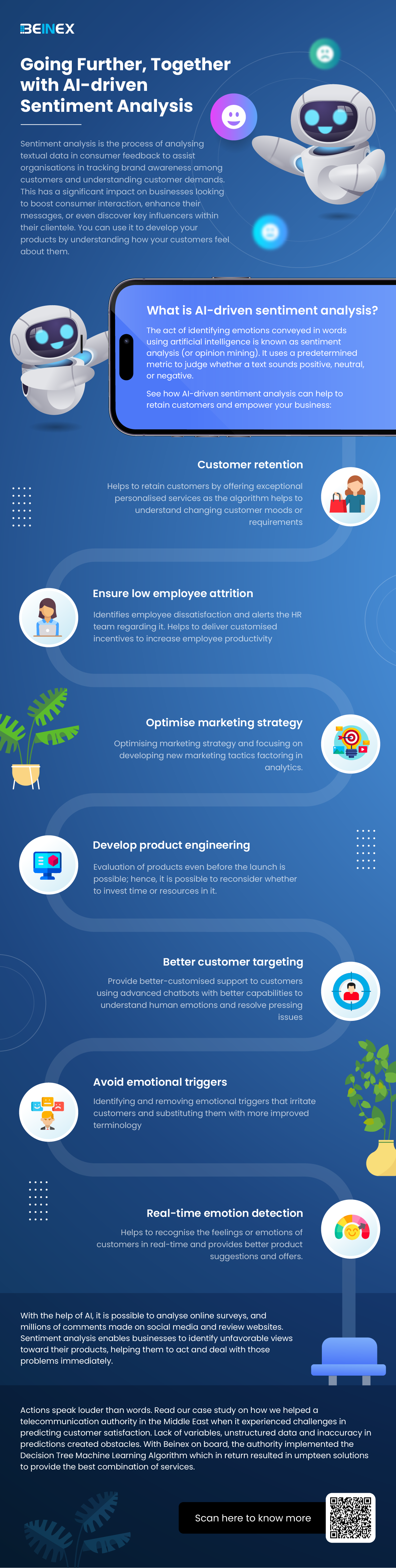
Going Further, Together with AI-driven Sentiment Analysis (Infographics)

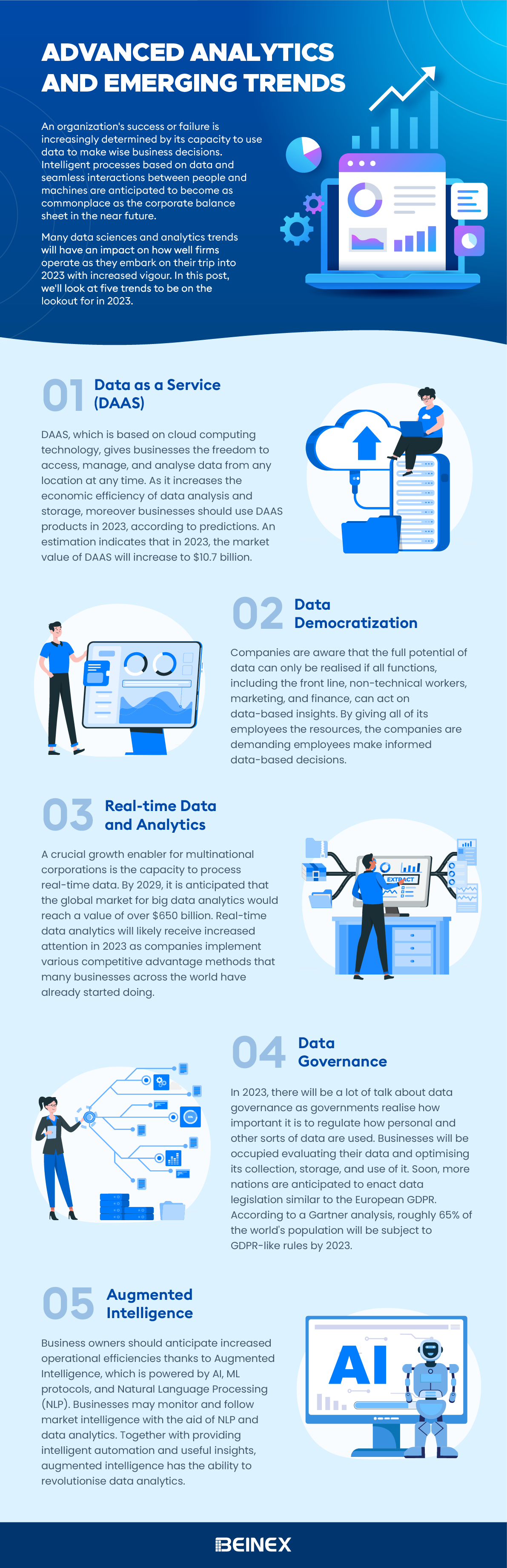
Advanced Analytics and Emerging Trends(Infographic)