How AI Decision-Making is Improving Enterprise Outcomes
Blog
Share 
مخطط شريطي ديناميكي مع أداة التقاطع
 28 April 2021
  Salman M
 لكن هذا لا ينطبق على أداة التقطيع المرئية، والتي لا تحتوي إلا على ميزة التصفية المتقاطعة وعدم وجود ميزة تفاعل. جعلني هذا أتساءل عما إذا كان بإمكاننا تحقيق تمييز متقاطع باستخدام مرئي تقطيع من خلال بعض الحلول التي تسمح لي بمقارنة فئة واحدة مع أخرى بسهولة من خلال تمييز متقاطع

 /* يتحقق الشرط الأول من عدم وجود تصفية سيعيد جميع القيم،
ثم سيتم التحقق مما إذا كانت مجموعة القيم المحددة مضمنة في عمود الفئة.
ستعيد القيمة المحددة لونًا داكنًا معينًا بينما ستعطي القيمة غير المحددة لونًا أفتح. */
/* يتحقق الشرط الأول من عدم وجود تصفية سيعيد جميع القيم،
ثم سيتم التحقق مما إذا كانت مجموعة القيم المحددة مضمنة في عمود الفئة.
ستعيد القيمة المحددة لونًا داكنًا معينًا بينما ستعطي القيمة غير المحددة لونًا أفتح. */
 تمت إضافة المقياس في قسم قيمة الحقل
 تمت إضافة أداة تقطيع الفئات من جدول الفئات المحددة
 أخيرًا رتبتهم وشاهدت شيء كالسحر.

بعد بعض البحث، ربما وجدت طريقة للقيام بذلك. فيما يلي الخطوات بالتفصيل لتحقيق ذلك
التصفية العادية للبيانات باستخدام أداة التقاطع:
يوضح المثال أدناه التقسيم العادي للبيانات حيث تنعكس القيمة المحددة فقط في المخطط الشريطي. هذا لا يسمح لي بمقارنة القيم الأخرى بسهولة أو التركيز على القيمة المحددة من خلال التمييز.
تسليط الضوء الديناميكي مع القطاعة:
يوضح المثال أدناه التمييز الديناميكي حيث يمكنني اختيار الفئات في أداة التقاطع لتمييزها للمقارنة مع الفئات الأخرى. يمكنني بسهولة التركيز على الفئات المحددة ومقارنة قيم القياس بالفئات الأخرى.
الحل:
أولاً، لقد قمت بإنشاء جدول غير متصل بالفئات. يمكن القيام بذلك بسهولة باستخدام صيغة البيانات التالية.
Selected Category = VALUES(Orders[Category])
إنشاء مقياس سيتم إضافته إلى التنسيق الشرطي في قسم لون البيانات في جزء التنسيق.
Selected Colour bar =
var selected_category = VALUES ('Selected Category'[Category])
var category_to_highlight = SELECTEDVALUE (Orders [Category])
var filtered = ISFILTERED ('Selected Category'[Category])
var result =
    SWITCH(TRUE(),NOT(filtered),"#0055cc", category_to_highlight in selected_category && filtered,"#0055cc","#9cd0ed")
return result
تفسير:
شريط الألوان المحدد =var selected_category = VALUES ('Selected Category'[Category]) // taking values from category tablevar category_to_highlight = SELECTEDVALUE (Orders [Category]) // Using selected value function
var filtered = ISFILTERED ('Selected Category'[Category]) // checks if the column is filtered and will return true or falsevar result = SWITCH(TRUE(),NOT(filtered),"#0055cc", category_to_highlight in selected_category && filtered,"#0055cc","#9cd0ed")
نتيجة العودة
تم إنشاء مخطط شريطي بإجمالي المبيعات المعطاة في قسم القيمة وسيتم إعطاء عمود الفئة من بيانات المصدر كمحور.
أعطى ذلك تأثير التمييز عن طريق إضافة مقياس في قسم قيمة الحقل من التنسيق الشرطي للون البيانات.
تمت إضافة المقياس في قسم قيمة الحقل
تمت إضافة أداة تقطيع الفئات من جدول الفئات المحددة
أخيرًا رتبتهم وشاهدت شيء كالسحر.
خاتمة:
ينتقل هذا إلى إظهار الميزات المخفية لـ قوة ذكاء الأعمال التي يمكن للمرء استكشافها مع القليل من العبث بشرطة من DAX. هذه المدونة هي الأولى في سلسلة من العديد من المدونات الأنيقة. أتمنى أن تنال إعجابك ونتطلع إلى ملاحظاتك.قوة ذكاء الأعمال هي واحدة من أفضل أدوات ذكاء الأعمال المتوفرة في السوق. إذا كنت قد استخدمتها، فسوف تدرك أنها أداة سهلة الاستخدام توفر ميزات السحب والإفلات ولديها إمكانات الخدمة الذاتية المضمنة فيها. يمكننا تصفية البيانات وفقًا للفئة أو العنصر المحدد باستخدام أداة التقطيع المرئية أو تحديد عناصر مرئية أخرى. قوة ذكاء الأعمال، توجد "ميزة تحرير التفاعل" حيث يمكنك تبديل ترشيح البيانات بين تمييز متقاطع أو تصفية متقاطعة أو عدم وجود تفاعل بين كل عنصر مرئي
Related Articles

Automating Compliance Checks with AWS Systems Manager
The Need for Automating Compliance
As business environments today are rapidly changing and highly regulated, it is important to automate compliance to boost accuracy, efficiency, and scalability. The following aspects emphasize why automating compliance is highly significant. • Amplifies security by complying with data privacy and safety regulations. • Saving time and effort by automating recurring tasks like monitoring, reporting, and audits. • Deploying the required infrastructure faster and in a standardized format. • Boosting accuracy by reducing the risks of human error and consistently adhering to industry standards.
What is an AWS Systems Manager?
A unified management system, an AWS Systems Manager, streamlines infrastructure management by improving visibility and giving you control over your AWS infrastructure. It delivers a suite of tools for managing configurations, automating repetitive tasks, patching systems, maintaining consistent configurations, and securely managing secrets and configurations. The primary features of AWS Systems Manager associated with compliance are: • Compliance Dashboards: They offer a centralized visualization of your compliance status, emphasizing resources that are non-compliant to facilitate faster remediation. • Patch Manager: It automates the deployment and monitoring of patches across your instances. • State Manager: It ensures that your systems are configured to a specific desired state.
Compliance Made Effortless: Automation with AWS Systems Manager
A comprehensive management service, AWS Systems Manager, allows you to automatically accumulate and aggregate data from your AWS resources. It provides a unified view of your AWS environment, making managing and monitoring your resources easier. Compliance, an AWS Systems Manager capability, enables the scanning for inconsistencies in compliance and configuration and offers real-time compliance insights. This capability facilitates drilling down into certain non-compliant resources from the data aggregated from multiple AWS accounts. The additional features and benefits Compliance provides are as follows: • Utilizing AWS Config to see compliance history and monitor changes. • Exporting data to Amazon Athena and Amazon QuickSight to generate organization-wise reports. • Using Amazon EventBridge, State Manager or Run Command to fix issues. • Customizing compliance to develop compliance types to fit your business needs. • Employing AWS Systems Manager for seamless integration of third-party compliance tools and automation of configuration management and vulnerability scanning. AWS Systems Manager facilitates the automation of intricate and recurring tasks associated with configuration, patching, and software installation. It allows businesses to run these tasks across systems simultaneously while minimizing the time needed to effect the changes and ensuring consistency in the process. This execution enables software compliance, including maintaining antivirus definitions up to date, implementing firewall policies, and setting patch baselines. The automation capability of AWS Systems Manager entails streamlining the deployment, maintenance, and remediations of AWS services like Amazon EC2, Amazon S3, and more.
Let’s explore how AWS Systems Manager automates compliance checks:
• Centralizing compliance management: AWS Systems Manager offers a unified compliance dashboard that lets users see the compliance status across different AWS accounts and regions in real-time. The dashboard consolidates data from the state manager and patch manager to centralize compliance management, enabling easy detection and addressing of specific non-compliant resources. • Enforcing configuration: Users can define and implement preferred states for the resources with the State Manager. It ensures consistency in configurations and compliance in setting permissions, configuring firewall rules, or installing software. • Patch Management: It automates the processes of patching applications and operating systems on your instances, allowing users to select authorized patches and schedules for automatic deployment. It makes sure that your systems are up-to-date and stay compliant with the safety standards. • Automating Remediation: AWS Systems Manager allows the automated remediation of non-compliant resources. For example, if a system falls out of compliance due to a missing patch, Patch Manager can trigger an automatic patch deployment to resolve the issue. • Facilitating integration with AWS Config: AWS Systems Manager integrates seamlessly with AWS Config, which helps assess and monitor configuration modifications against compliance rules. This integration facilitates continuous monitoring and automated reporting, ensuring a robust compliance posture.Some of the benefits of using AWS Systems Manager for compliance include:
• Saving time and expediting remediation as automation of compliance processes checks reduces manual effort. • Streamlines the audit processes and ensures audit readiness through meticulous logging and documentation of compliance actions. • Fortifies security by detecting and addressing vulnerabilities on time and ensures your enterprise aligns with the standard security practices. • Leverages existing AWS infrastructure to reduce the requirement for reliable compliance tools, saving costs. • Offers real-time insights into the compliance status across your AWS environment, facilitating proactive management. AWS Systems Manager can be a game changer for businesses looking forward to ensuring compliance with complex regulations and industry standards across a dynamic IT environment. Automating compliance checks boosts accuracy, efficiency, and security, transforming compliance management into a streamlined workflow. Beinex is an AWS consulting partner that lets you navigate the AWS landscape and leverage it for unprecedented business benefits. Connect with us for a free demo: Beinex - Beinex - Your Reliable AWS Partner for Cloud Computing Services
AWS Security Hub: Master Cloud Security with a Unified Approach
What is AWS Security Hub?
AWS Security Hub offers a unified, organized, and prioritized view of the compliance status and security posture of your AWS accounts in a standardized format. It automates the security best practice checks of single and multiple AWS accounts. It centralizes the security alerts into one format and place, helping you comprehend the security framework of your AWS environment. It offers a pre-built dashboard that helps manage and prioritize any alerts or issues in your AWS environment found from security checks. Security Hub assesses security controls, performs compliance checks, and generates control findings to gauge your organization's adherence to security best practices. By automating security best practice checks, Security Hub streamlines the understanding and enhancing of the security posture of your AWS accounts. It offers multiple security standards to handle your organization's security position, including Foundational Security Best Practices developed by AWS and external compliance frameworks like Center for Internet Security (CIS) and Payment Card Industry Data Security Standard (PCI DSS). These standards have various security controls, each defining a security best practice. Besides generating control findings, Security Hub acquires findings from AWS services like Amazon Inspector and Amazon GuardDuty and also supports third-party products, offering a centralized view of several security-related issues. Also, the automation capabilities of the Security Hub simplified the triage and remediation of security issues. For example, by setting automation rules, critical discoveries get updated automatically in case of a security check failure.Features of AWS Security Hub
Centralized Cloud Security Management: It offers a unified dashboard that tracks security findings from AWS services like AWS Config and third-party tools, enhancing and prioritizing them in a single place. Third-Party Integration: AWS Security Hub seamlessly integrates with third-party tools like Splunk, consolidating data from multiple sources into a unified view. Tailored Security Insights: It enables the customization of security insights and alerts, allowing organizations to adapt their security posture to specific needs. Automated Compliance and Security Checks: By automating compliance and security checks on AWS accounts, resources, and services, AWS Security Hub enables the detection of security issues, continuous monitoring, and evaluation while ensuring they adhere to industry best practices and standards.Top Benefits of AWS Security Hub
• Streamlines managing cloud security by centralizing all security data in a single place, offering a consolidated view that helps detect possible threats. • Enhances real-time threat detection by facilitating integration with AWS services like Amazon GuardDuty. • Ensures regulatory compliance by fulfilling the industry security criteria and standards • Conducts constant security checks by following industry standards and practices to identify and monitor AWS accounts and resources that need attention, flagging any misconfigurations in security. • Enables automated remediation for specific findings and customized actions triggered upon detection. In short, AWS Security Hub enhances cloud security by centralizing monitoring of accounts, services, and resources, performing automated security assessments, enabling businesses to comply with security standards, and integrating with AWS services for real-time threat detection. It can be quite difficult to manage security in complex cloud environments, but AWS Security Hub streamlines the process by delivering real-time security insights into your AWS environment, consolidating security alerts from different tools into a unified view, and automating security checks to enhance protection and efficiency. As an AWS consulting partner, Beinex offers AWS-managed services to our customers to host their BI solutions and more on the cloud. Our cloud migration experts ensure top-tier stability and reliability by aligning with your business strategy and collaborating closely with you to deploy AWS infrastructure as a service seamlessly. Connect with us for a free demo: https://beinex.com/beinex-amazon-web-services/
13 Key Snowflake Features: Traits that Take It to the Top
A Compact List of Snowflake Features
- Decoupling of storage and compute in Snowflake
- Auto-Resume, Auto-Suspend, Auto-Scale
- Workload Separation and Concurrency
- Snowflake Administration
- Cloud Agnostic
- Semi-structured Data Storage
- Data Exchange
- Time Travel
- Cloning
- Snowpark
- Snowsight
- Security Features
- Snowflake Pricing
Let’s deep-dive:
1. Decoupling of storage and compute in Snowflake
Snowflake's decoupling of storage and compute features facilitates virtual warehouses and storage as separate entities. Leveraging this functionality of Snowflake, businesses can achieve greater flexibility in choosing the compute of their choice and incrementally pay for what they store and compute. Users can scale up / down or in/out based on the business SLA requirement. Scale up – Scale-out features do not require downtime and are almost instant.
2. Auto-Resume, Auto-Suspend, Auto-Scale
Snowflake's auto-resume and auto-suspend features provide minimal administration. Using auto-resume, Snowflake starts a compute cluster when a query is triggered and suspends compute clusters after a set time of inactivity. These two features ensure performance optimisation, cost management, and flexibility.
In business circumstances where more users are querying heterogeneous queries, setting up auto-scaling can help automatically expand the number of clusters from 1 to 10 at an increment of 1 based on the volume of queries sent to a compute simultaneously.
3. Workload Separation and Concurrency
Concurrency is no longer a problem for Snowflake, unlike traditional data warehouses with concurrency issues where users and processes must compete for resources. Because of Snowflake's multi-cluster architecture, concurrency is not an issue anymore.
This architecture also helps to divide workloads into their virtual warehouse and channel the traffic to each virtual warehouse (compute) by functions or departments.
4. Snowflake Administration
A data cloud as a service is provided by Snowflake (DWaas). Businesses can set up and administer a system without significant assistance from DBA or IT teams. Unlike the on-premise platforms, neither hardware commissioning nor software installation patch-update is s necessary. Snowflake manages software updates and introduces new functions and patches without downtime.
Snowflake automatically creates micro-partitioning. This feature reduces the requirement of manually indexing and clustering tables though these are available features in Snowflake.
5. Cloud Agnostic
Being a cloud-agnostic platform, Snowflake can migrate its workloads with other cloud providers. So, Snowflake is accessible on all three cloud providers: AWS, Azure, and GCP. Customers can easily integrate Snowflake into their existing cloud architecture and choose to deploy in locations preferred by their companies.
6. Semi-structured Data Storage
The requirement to manage semi-structured data, often in JSON format, gave rise to NoSQL database solutions. Data pipelines are created to extract attributes from JSON and mix them with structured data. By leveraging VARIANT, a schema on read data type, Snowflake's design enables storing structured and semi-structured data in the exact location. Both organised and semi-structured data can be stored using the VARIANT data type. Snowflake eliminates the need for data extraction pipelines by automatically analysing data, extracting properties, and saving it in a columnar format.
Snowflake can connect to staging areas like s3 bucket, Azure blob or GCP blob storage to retrieve and transform files stored in these platforms. This is regardless of the cloud Snowflake is hosted. A snowflake-managed staging area is also available. Tasks/ Streams or Snowpipe can be set to retrieve data at a scheduled time or almost instantly, respectively. Snowflake can work with CSV, JSON, XML, Avro, ORC, and Parquet file formats. Snowflake can also store metadata of unstructured data stored in the staging area.
7. Data Exchange
A wide range of data, data services, and applications are available on the Marketplace. From some of the world's top data and solution suppliers, you can find, assess, and buy data, data services, and apps through Marketplace. Direct access to data ready for querying and pre-built SaaS connections virtually eliminates the expenses and delays associated with conventional ETL operations and integration. The risk and hassle of duplicating and relocating outdated material should be avoided. Instead, you can receive automatic updates that are close to real-time and have secure access to shared, controlled, and live data.
8. Time Travel
One of the distinctive Snowflake elements is time travel. You may follow the evolution of data through time by using time travel. All accounts have access to this Snowflake feature, free and enabled by default for everyone. Additionally, this Snowflake feature allows you to retrieve a Table's historical data. At any moment throughout the previous 90 days, one can access the table's appearance.
Time travel encompasses the undrop feature. If an object has not been removed yet by the system, a dropped object can be recovered using the undrop command in Snowflake. When an object is undropped, it returns to its original condition. The option to undrop schemas or tables is also available.
9. Cloning
The clone capability allows us to quickly duplicate anything, including databases, schemas, tables, and other Snowflake objects, in almost real time. Therefore, cloning an object involves editing its metadata rather than duplicating its storage contents. You can quickly produce a clone of the whole production database for testing purposes.
10. Snowpark
With the help of the Snowpark feature, data scientists and data engineers proficient in Python, Scala, R, and Java may create and manage their codes in Snowflake. Snowpark helps to employ the computing capabilities of Snowflake to retrieve, transform, train and apply data science models on the data stored in Snowflake, which has a more apparent performance advantage,
11. Snowsight
The new Snowflake web user interface, Snowsight, replaces the traditional Snowflake SQL Worksheet and enables you to easily construct basic charts and dashboards that can be shared or explored by many users, do data validation while loading data and conduct ad-hoc data analysis. The Snowflake dashboards tool is an excellent option because it works well for individuals or small group users in an organisation who wish to generate straightforward visualisations and share information among themselves.
12. Security Features
Snowflake assures security for its users through the following methods:
- • By adding IP addresses to a whitelist, you may control network policies and limit who can access your account.
- • By supporting several authentication techniques, including federated authentication and two-factor authentication for SSO.
- • Using a hybrid approach of role-based access control and discretionary access control. In role-based access control, privileges are assigned to roles which are then transferred to users. Still, in discretionary access control, each object in the account has an owner who controls access to the object. This hybrid strategy offers a substantial level of flexibility and control.
AES 256 strong encryption is used to automatically encrypt all data, both in transit and at rest.
13. Snowflake Pricing
The advantages of Snowflake pricing are:
- • Pay for actual consumption only.
- • We can cut back on resource use to save costs.
- • Flexible payment. We can either pay on-demand or in advance (pre-purchased).
- • Scale up or down the use of cloud services, computing, and data storage automatically based on your needs.
- • There are no chances of overbuying or overprovisioning.
Optimisation of Snowflake spending through integration with innovative cost-monitoring platforms.
Snowflake stands as an ideal and popular choice because of its unique and updated features. It is also available across many data cloud providers and regions, making it accessible and suitable for all organisations. Why wait? Let’s experience Snowflake. Try now: https://beinex.com/snowflake/.

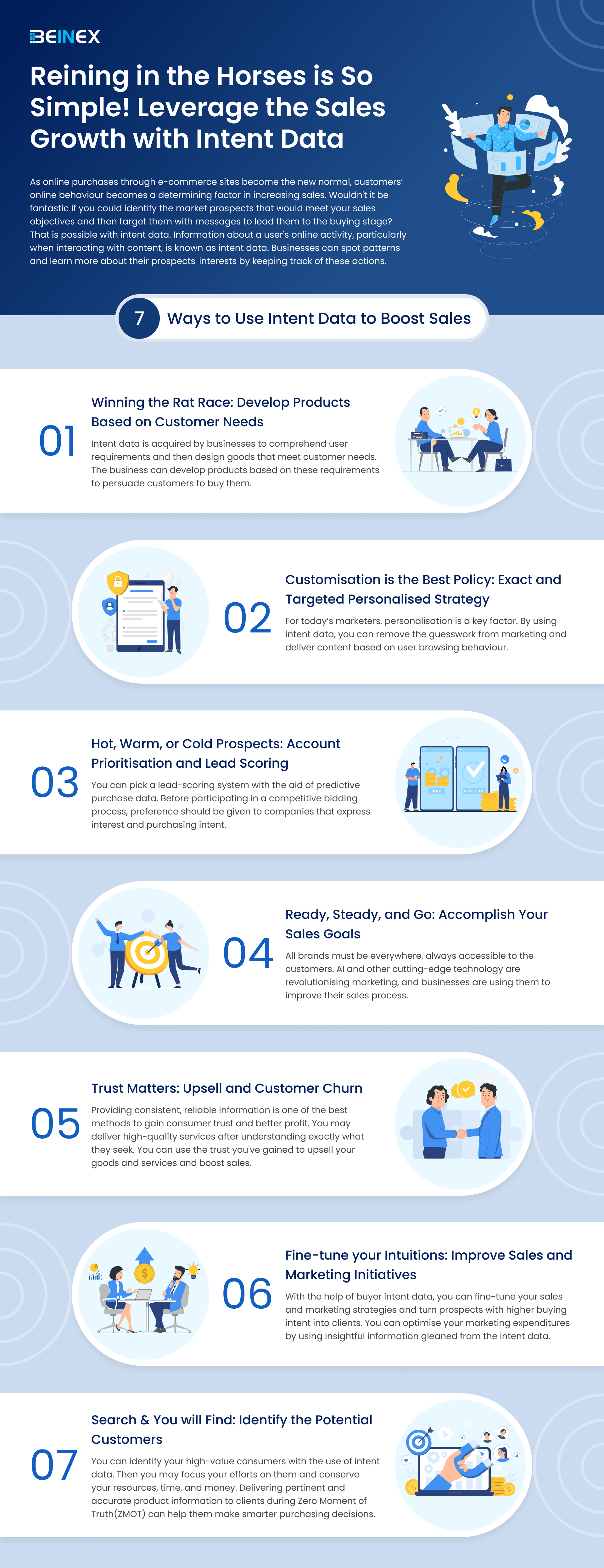
Reining in the Horses is So Simple! Leverage the Sales Growth with Intent Data(Infographic)
NEW FEATURES OF TABLEAU 2020.1 (BETA)
Soon after Tableau launched the 2019.4 update, they have released a list of super interesting features as part of their path into 2020.1. Despite it being in Beta stage, we have been able to try out some of these and they do change the way we think about visualizations and the way we interact with them.
Let’s go through a sample of the most coveted features, which many of us in the world of BI have probably been dying to have (or at least would be great to have!)


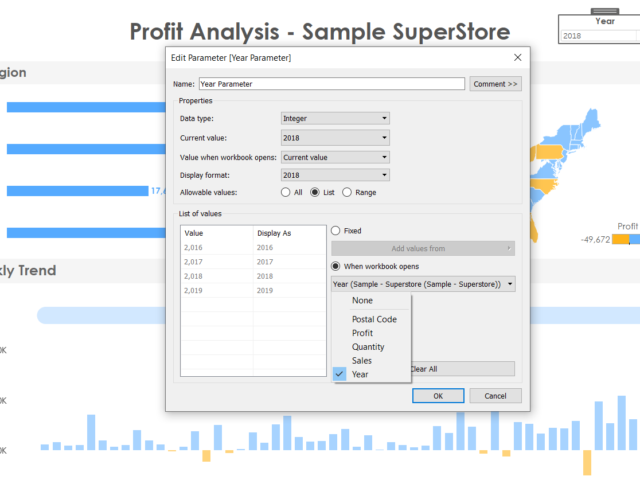
1. Dynamic Parameters
1. This one deserves a whole lot of excitement from the entire Tableau community since parameters are used in just about any viz and the biggest complaint (major pain!) was that if the data gets refreshed, the updated values in the parameter field do not get reflected. A user would have to manually go about refreshing and adding the new fields in the parameter. It was honestly astounding that such a simple thing would be the source of unnecessary emotions soaring. 2. But with the latest update, Tableau has provided. Now it can automatically update its parameters as soon as the data is refreshed and the new values will populate by itself! This saves a ton of time and effort and monitoring headaches for every dashboard created hereon! 3. To us, this would be among the most coveted and REQUIRED updates in this version
2. Viz Animations
In this new day and era, we are used to smooth rendering of just about anything we work on (from an app on our phone to the way an electric car feels on the road). This concept has now been delivered to us by Tableau in their new viz animation capability. Now all our charts can have a smooth flow whenever changed by another filter. This not only enables the user to spot the exact points of change in the chart, but also looks cool beyond measures. On click of an action, we can set up the amount of time it will take for the change to take place in the other charts (and this change is animated smoothly). This beautiful feature can be perfectly explained using an example visualization, rather than any more words. So here goes..
Video Player
As you can see, it looks beautiful. This is an exciting time for the creators, since this feature will definitely make the viz functionality immensely more appealing to an end user.
00:00
00:30
3. Improvements in Explain Data
For those unfamiliar to this feature, explain data is an intelligent tool built in tableau which gives a statistical inference to any singular data point on a chart. It gives us an idea of the why and the general direction of the how of the value. 2020.1 promises to be smarter with Explain Data digging deeper with more refined statistical models in the background. This is a feature which never fails to astonish a new user and Tableau promises to keep improving and building upon this as time goes by.
4. Export the dashboard to formats wanted
This is a simpler feature amidst all the fancy ones, however, may prove to a crucial addition for end user experience. Now we can directly export the dashboard in any format, on click of a button which can take the form of a text or an image and put as part of the dashboard. No more explaining to users to find click the tiny download option on the bottom of the screen and then export, now we can directly do it at the click of a button! We can export to formats like PDF, PowerPoint etc. which is honestly, great.
5. Buffer calculations
Buffer calculation enhances the interactivity when it comes it spatial scenarios. It is a boundary created with respect to any point on the map or location. A buffer calculation should contain three parameters such as location, distance, and a unit of measure like ‘kilometer’, and ‘miles’. Simple use case like, when you wanna know how many restaurants are present near my hotel, say around 1km, the buffer boundary highlights the number of restaurants near a specific location. Here is how the buffer calculation works….
[video width="1296" height="1080" mp4="https://www.beinex.com/wp-content/uploads/Video-2-Buffer-Calculation.mp4"][/video]
So restricting to only the Desktop version of Tableau, we can foresee happier times for all viz lovers. Though these features are just part of the BETA version and may not all be released in the very next update, but these are good to look ahead to.