How AI Decision-Making is Improving Enterprise Outcomes
Blog
Share 
Dynamic highlight bar chart with slicer
 28 April 2021
  Salman M
 But this does not apply to a slicer visual, which only has cross-filtering and no interaction feature. This made me wonder if we can achieve cross-highlight with a slicer visual through some work-around that allows me to compare one category with other easily through cross-highlight.
After some research, I may have found a way to do this. Below are the steps in detail to achieve this.
Normal filtering of data with slicer:
The below example shows normal slicing of data where only the selected value will be reflected in the bar chart. This does not allow me to compare other values easily or focus in on the selected value through highlighting.
 Dynamic highlighting with Slicer:
The below example shows the dynamic highlighting where I can choose the categories in the slicer to highlight for comparison with the other categories. I can easily focus on the selected categories and compare the measure values with other categories.
Dynamic highlighting with Slicer:
The below example shows the dynamic highlighting where I can choose the categories in the slicer to highlight for comparison with the other categories. I can easily focus on the selected categories and compare the measure values with other categories.
 Solution:
First, I have created a disconnected table with the categories. This can be easily done with the following dax formula.
Solution:
First, I have created a disconnected table with the categories. This can be easily done with the following dax formula.
 Added the measure in the field value section.
 Added category slicer from the Selected Category table
 Finally arranged them and saw the magic happen.
 Conclusion:
This goes to show the hidden features of Power BI one can explore with a little bit of tinkering with a dash of DAX. This blog is a first in a series of many nifty blogs. Hope you like it and looking forward to your feedback.
Conclusion:
This goes to show the hidden features of Power BI one can explore with a little bit of tinkering with a dash of DAX. This blog is a first in a series of many nifty blogs. Hope you like it and looking forward to your feedback.
Dynamic highlighting with Slicer:
The below example shows the dynamic highlighting where I can choose the categories in the slicer to highlight for comparison with the other categories. I can easily focus on the selected categories and compare the measure values with other categories.
Solution:
First, I have created a disconnected table with the categories. This can be easily done with the following dax formula.
Selected Category = VALUES(Orders[Category])Had made sure there is no relationship in the model view between the source table and new category table. Created a measure which will be added to the conditional formatting in data colour section in the format pane.
Selected Colour bar =
var selected_category = VALUES ('Selected Category'[Category])
var category_to_highlight = SELECTEDVALUE (Orders [Category])
var filtered = ISFILTERED ('Selected Category'[Category])
var result =
    SWITCH(TRUE(),NOT(filtered),"#0055cc", category_to_highlight in selected_category && filtered,"#0055cc","#9cd0ed")
return result
Explanation:
Selected Colour bar =
var selected_category = VALUES ('Selected Category'[Category]) // taking values from category table
var category_to_highlight = SELECTEDVALUE (Orders [Category]) // Using selected value function
var filtered = ISFILTERED ('Selected Category'[Category]) // checks if the column is filtered and will return true or false
var result =
SWITCH(TRUE(),NOT(filtered),"#0055cc", category_to_highlight in selected_category && filtered,"#0055cc","#9cd0ed")
/* The first condition checks if the there is no filtration will return all values, Then will be checking if the selected set of values is contained in the category column. The selected value will be returning a specific dark colour while the unselected value will be giving a lighter colour. */
return resultCreated a bar chart with total sales given in the value section and the category column from the source data will be given as axis. Gave the highlight effect by adding a measure in the field value section of the data colour conditional formatting.
Added the measure in the field value section.
Added category slicer from the Selected Category table
Finally arranged them and saw the magic happen.
Conclusion:
This goes to show the hidden features of Power BI one can explore with a little bit of tinkering with a dash of DAX. This blog is a first in a series of many nifty blogs. Hope you like it and looking forward to your feedback.Power BI is one of the best BI tools available in the market. If you have used it, you will realise that it is a user-friendly tool which offers drag and drop features and has self service capabilities built into it.
We can filter down the data according to the selected category or item using the slicer visual or selecting other visuals. In Power BI, there is an ‘Edit Interaction feature' where you can toggle the filtration of data between cross-highlight, cross- filtering or no interaction between each visual.
Related Articles

Preparing for AGI: What Leaders and Executives Need to Know
What is AGI (Artificial General Intelligence)?
Artificial General Intelligence (AGI) refers to an AI that, in theory, can think, learn, and understand more like a human. It is designed to perform any intellectual task a human can do. However, AGI remains a theoretical concept, and current AI systems have not yet achieved true cognitive abilities, reasoning skills, or emotional intelligence comparable to humans. Rapid advancements suggest that reaching a form of AGI is not beyond possibility. Given the unprecedented growth of AI in recent years, it's wise to stay informed and prepared.Generative AI vs. AGI vs. ASI: Understanding the Difference
Generative AI is a subset of deep learning that predicts responses based on extensive training data. These models, including ChatGPT and Midjourney, are powerful but still fundamentally narrow AI systems. They lack true understanding, common-sense reasoning, and emotional intelligence. Conversely, Artificial General Intelligence (AGI) is regarded as a strong form of AI. Like human intelligence, it would be self-aware, flexible, and capable of solving problems in various fields. AGI might learn, reason, and apply knowledge across domains without explicit training, in contrast to GenAI, which works within predetermined tasks. Even if AGI is yet theoretical, it has enormous potential to change society and industry. Beyond human intelligence, Artificial Super Intelligence (ASI) can tackle issues beyond human comprehension. For example, an ASI system might be able to create novel medicinal treatments or extremely efficient energy systems. Nonetheless, ASI is still primarily theoretical and a subject of discussion and assumption.GenAI vs. AGI vs. ASI: Key Differences
Here are the main differences between GenAI, AGI, and ASI:| Generative AI (GenAI) | Artificial General Intelligence (AGI) | Artificial Super Intelligence (ASI) |
|---|---|---|
| AI that generates text, images, audio, and code based on training data | AI with human-like reasoning, learning, and problem-solving across all domains. | AI that surpasses human intelligence and capabilities |
| Generates content, predicts patterns, and automates tasks | Understands, learns, and adapts like a human across multiple fields. | Thinks, learns, and innovates beyond human intelligence |
| Examples: ChatGPT, Midjourney, DALL-E, Bard | A self-learning AI that can pass human-level exams and perform diverse tasks. | An AI that can autonomously innovate, research, and make better decisions than humans. |
| Mimics creativity but lacks true understanding | Matches human cognitive abilities. | Beyond human intellectual capacity |
| Fully functional and widely adopted | Estimated timeframe is 2030–2050 (speculative). | Not yet possible with current technology |
AGI and Businesses: How Executives Can Prepare for AGI
The best way to keep up with new technology isn’t to wait until it arrives; it’s to prepare before it changes everything. Here are a few simple ways to get ready for Artificial General Intelligence (AGI):1. Stay Informed and Monitor AI Advancements
The first step in getting ready is to comprehend how quickly AI is advancing. Executives should keep an eye on new advancements in AGI, legal reforms, and AI research. Keeping tabs on start-ups, business leaders, and research organizations can yield insightful information.2. Invest in AI Skills
But there's no point in waiting for AGI to happen; smart leaders should be ready now. Leading businesses should invest in automation and artificial intelligence to gain a competitive edge. Developing AI expertise within your organization, whether through employing AI experts, educating employees, or implementing AI-powered technologies, will lay a strong foundation for future AGI integration.3. Develop a Robust Data Infrastructure
High-quality data is essential for AI to flourish. Businesses should ensure their data ecosystems are safe, organized, and ready for AI-driven insights. Adopting the retrieval-augmented generation (RAG) models and cloud-based AI solutions improves AI applications and prepares for more complex systems like artificial general intelligence.4. Adopt a Human-centric AI Approach
Even with AI's expanding capabilities, human monitoring is still crucial. "Human-in-the-loop" models, in which AI complements human decision-making rather than replaces it, should be given top priority by executives. Employee resistance to automation can be decreased, and productivity can be increased by teaching them how to work with AI tools.5. Address Ethical and Security Considerations
Ethical issues like bias, security, and data privacy are becoming increasingly urgent as AI develops. Executives must implement governance structures to ensure accountability and transparency in AI deployments. AGI readiness will also depend on how well cybersecurity threats and compliance laws are handled.6. Organize Teams for AI-driven Workflows
An AI-driven world may require adaptability that traditional organizational structures may not be able to provide. Employers should consider flexible workforce models in which staff members switch between projects regularly. AI literacy upskilling programs can facilitate employees' hassle-free transition into AI-augmented roles.7. Experiment with AI Investments
While AGI is still a way off, companies should start making calculated investments in AI research, automation driven by AI, and cognitive computing. When artificial intelligence (AGI) becomes economically viable, companies that invest in AI-driven innovation can become early adopters.The Business Impact of GenAI: Current Trends and ROI
While Generative AI (GenAI) is already revolutionizing industries with quantifiable return on investment, Artificial General Intelligence (AGI) is still a vision for the future. A 2024 Deloitte survey identified key sectors where organizations are experiencing notable advances: • Text Generation (83%) – Automating reports, document summarization, and marketing content. • Code Assistance (62%) – Helping developers write code efficiently with fewer errors. • AI-Powered Call Centers (56%) – Reducing customer service costs by up to 90%. • Image & Video Generation (55%) – Creating product simulations and marketing materials. Additionally, enterprises are increasingly adopting multi-model AI approaches, using a mix of open-source and proprietary models to tailor-made solutions and avoid vendor lock-in.The Future of Leadership in an AGI-Driven World
AGI might still be years away, possibly emerging between 2030 and 2050, but its impact will be massive. Proactive leaders can get ahead by using today’s AI, building flexible systems, and creating a culture of continuous learning. Companies that embrace AI now won’t just keep up; they’ll lead the way when machines start thinking more like humans. So, leaders, now’s the time to act.
How Alghanim standardized collaborative workflow creation by implementing the “Alteryx Sandbox Server” platform on AWS that paved the way for 20% better business predictions
Challenge
- The IT infrastructure of Alghanim where the Alteryx Sandbox Server platform was hosted was in an on-premise datacenter which was designed to be scalable and robust with multi node physical clusters including the server, storage and network components. However, most of the physical hardware was quite old and not equipped with the latest generation of physical servers.
- Frequent hardware crashes and portal downtime kept troubling the availability of the Alteryx Sandbox Server application. Assigning a touch hand support person to power on the hardware that was down seemed quite impossible due the restrictions during covid period. Hence, Alghanim wanted to look for another viable solution.
- Though the hardware setup at Alghanim was well equipped to meet the occasional spikes in the traffic, it was observed that over a course of 6-month time, most of the IT infra was underutilized than predicted. It was realized that spending huge amount of money on an old hardware plus software maintenance, license costs, internet bandwidth, datacenter cooling and maintenance, touch support personnel and electricity costs – were keeping the business operations challenging.
- There was an attempt by Alghanim to select a cost-effective solution that can host Alteryx Sandbox Server application servers, web servers and archival data. This way IT infra can be re-provisioned to host sensitive data on-premise and the rest on the cloud, thereby reducing the overall physical hardware costs spent on a yearly basis.
Why AWS
- Alghanim decided to migrate Alteryx Sandbox Server, database servers and archival data to AWS.
- The Alteryx Sandbox Server’s AWS architecture includes Amazon Elastic Compute Cloud (Amazon EC2), that provides complete control of its computing resources, updates to tables in Amazon Relational Database Service (Amazon RDS) and AWS Elastic Load Balancer was used to distribute the traffic to the underlying EC2 instances based on the load.
Benefits
- Alghanim uses AWS services to provision infrastructure and deploy the Alteryx Sandbox Server platform to other departments within it. In addition, the Alteryx Sandbox Server resources that are no longer required to be run all the time are made to auto shutdown thus saving cost. Alghanim reported a 30% cost reduction after implementation of AWS for the Alteryx Sandbox Server platform.
- The implementation of Alteryx Sandbox Server on AWS made Alghanim confident in the security of its data, and its accreditation team is enthusiastic about the monitoring and auditing capabilities provided by AWS tools. With the implementation of IAM roles, Alghanim IT team was able to isolate systems and tightly control user accesses. These capabilities were harder to achieve within the existing infra but were available out of the box with AWS
- By adopting AWS to host the Alteryx Sandbox Server platform, Alghanim has been able to innovate and experiment to a degree previously impossible. For example, Alghanim compared the performance and cost-effectiveness of three different cloud solutions. Without moving to the AWS, the costs associated with running an outdated on-premise hardware would have creeped up and the alternative way of upgrading the existing on-prem infrastructure to the latest hardware models and then hosting the Alteryx Sandbox Server application on top of it would have taken months.

Agentic AI and Enterprise Intelligence: Leading Trends, Challenges, and Opportunities in 2026 and Beyond
For a long time, enterprise intelligence relied on dashboards, reports, and predictive systems. These tools helped leaders see what happened and predict what could happen next. However, the users still had to interpret the results and act on them themselves.
Now, that approach is changing with the adoption of Agentic AI. According to Gartner research, 40% of enterprise applications are expected to include task-specific AI agents by 2026, up from less than 5% in 2025.

Accelerate Your Digital Transformation: Tableau + AWS for Modern Cloud Analytics
AWS + Tableau: Together, a Match Made in Data Heaven
By embracing the synergy between Tableau and AWS, you're not just investing in tools; you're investing in a future fueled by data-driven insights. This powerful combination paves the way for a more agile, data-centric organization ready to thrive in the ever-evolving digital landscape. The digital landscape is evolving rapidly, and businesses are increasingly turning to the cloud for their analytics needs. This shift is driven by the cloud's ability to:
- Faster Time to Insights: The seamless integration between Tableau and AWS allows you to quickly get up and running with your analytics, enabling you to make data-driven decisions sooner.
- Effortless Data Management: Leverage the power of AWS data warehousing and management services to ensure your data is clean, organized, and readily accessible for analysis in Tableau.
- Advanced Analytics Capabilities: Tap into the power of AWS machine learning and artificial intelligence services to uncover hidden patterns and gain deeper insights from your data within the Tableau environment.
- Handle complex data integration: Seamlessly connect and analyze data from various sources, regardless of size or location.
- Empower self-service analytics: Enable users to explore and gain insights from data independently, fostering data-driven decision-making across the organization.
- Support digital transformation: Meet the growing demands of digital transformation with scalability, flexibility, and cost-efficiency.
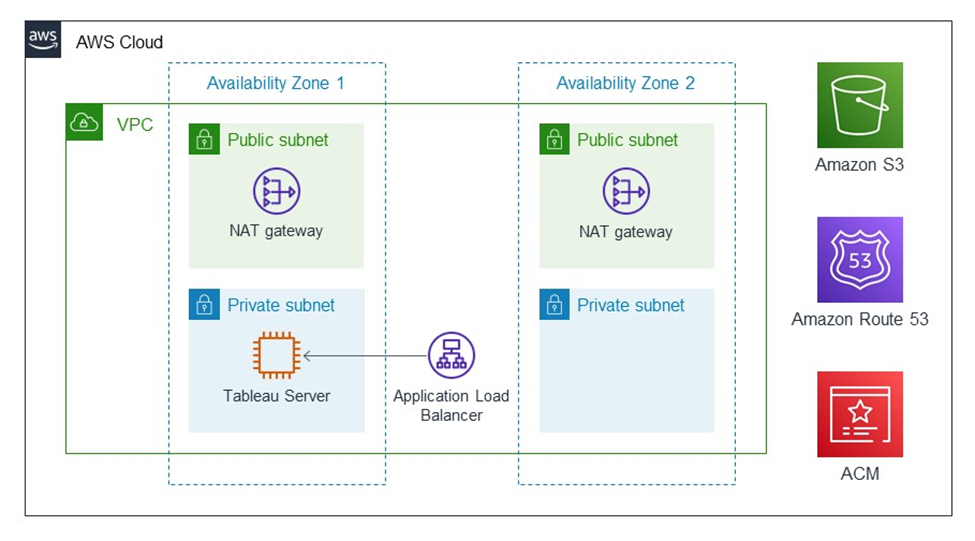
Image source: https://aws.amazon.com/solutions/partners/tableau-server/
Tableau: The Master of Data Visualization
Imagine transforming raw data into captivating, interactive visualizations that tell a clear story. Tableau is a game-changer in the world of data visualization. It empowers users of all technical backgrounds to:
- Connect to Diverse Data Sources: Tableau seamlessly connects to a wide range of data sources, both on-premise and in the cloud. This includes databases, spreadsheets, cloud applications, and even big data platforms.
- Effortlessly Drag-and-Drop Analysis: The user-friendly interface allows users to drag and drop data fields, explore trends, and create stunning visualizations without writing a single line of code.
- Craft Interactive Dashboards & Reports: Go beyond static reports. Tableau empowers you to create dynamic dashboards that users can interact with, filter data, and gain deeper insights on the fly.
- Foster Data-Driven Culture: Tableau democratizes data by making it accessible and understandable to everyone in the organization, fostering a data-driven culture where decisions are based on evidence, not intuition.
AWS: The Cloud Powerhouse for Scalability and Security
While Tableau excels at data visualization, the underlying infrastructure needs to be robust and scalable. This is where AWS, the world's leading cloud computing platform, comes into play. Here's how AWS empowers your Tableau deployment:
- Unmatched Scalability: AWS offers virtually limitless scalability to accommodate your growing data volumes and user base. As your data needs evolve, your cloud infrastructure can easily scale up or down to meet those demands.
- Enhanced Security: Security is paramount when dealing with sensitive data. AWS offers robust security features and compliance certifications, ensuring your data remains protected throughout its lifecycle.
- Cost-Effectiveness: The pay-as-you-go model of AWS allows you to optimize your costs. You only pay for the resources you use, eliminating the need for upfront investments in expensive hardware infrastructure.
- Wide Range of Services: AWS offers a comprehensive suite of services beyond just compute power. These services include data warehousing, machine learning, and data management tools, giving you a complete cloud ecosystem to manage your entire data pipeline.
Modern Cloud Analytics: A Collaborative Powerhouse
Modern Cloud Analytics is a collaborative initiative leveraging the expertise and resources of Tableau, AWS, and their extensive partner networks. Its objective is to maximize the value you extract from your data and analytics investments throughout your entire digital transformation journey, encompassing:
- Data Strategy and Migration: Develop a comprehensive plan to securely and efficiently migrate your data and analytics operations to the cloud.
- Optimization: Fine-tune your cloud analytics environment for peak performance and cost-effectiveness.
- Deployment and Scaling: Securely deploy and seamlessly scale your Tableau environment on AWS to adapt to your evolving needs.
Benefits of Modern Cloud Analytics:
- Faster Time to Value: Get up and running with cloud analytics quickly, enabling data-driven decisions sooner.
- Reduced Costs: Leverage the cloud's inherent cost-efficiency and scalability to optimize your analytics spending.
- Minimized Risks: Mitigate potential risks associated with cloud adoption by utilizing validated migration processes and expert guidance.
Unified Integration for Unparalleled Insights
Tableau and AWS offer a comprehensive solution for cloud-powered organizations. Both Tableau Server and Tableau Cloud operate flawlessly on AWS infrastructure, providing you with:
- Effortless Data Access: Streamlined workflows and effortless access to data stored within various AWS sources directly within the AWS ecosystem.
- Market-Leading Connectivity: Tableau serves as the ideal platform for analyzing data residing in diverse AWS data sources like:
- Amazon Redshift: A blazing-fast data warehouse designed to handle large datasets with efficiency.
- Amazon RDS: A managed relational database service offering high availability and scalability.
- Amazon EMR: A managed Hadoop framework for processing and analyzing massive datasets.
Enhanced Security and Broader Connectivity
Tableau's commitment to continuous improvement extends to its AWS integrations. Here's a glimpse into the exciting advancements:
- Enhanced Security: The updated Amazon Athena connector now supports secure authentication using third-party identity providers like Azure AD and Okta, adding an extra layer of security with multi-factor authentication options.
- Expanded Connectivity: The Tableau Exchange offers a plethora of new connectors, further extending your connection options within the AWS ecosystem.
- Amazon OpenSearch Connector: Effortlessly visualize and analyze data residing in Amazon OpenSearch.
- Amazon DocumentDB Connector: Gain valuable insights from your DocumentDB data through seamless interaction.
- Amazon Neptune Connector: Explore connections within your data by directly connecting to your Neptune graph database.
By embracing the synergy between Tableau and AWS, you're not just investing in tools, you're investing in a future fueled by data-driven insights. This powerful combination paves the way for a more agile, data-centric organization ready to thrive in the ever-evolving digital landscape.
How Beinex Can Assist You
Beinex is a premier Tableau partner and AWS consulting partner providing sustainable analytics solutions to organizations. Our Tableau and AWS-certified consultants help organizations build superior data visual analytics capabilities through bespoke training programs. We empower customers to host their BI solutions on the cloud with AWS infrastructure as a service. Get in touch with us for free trials and experience our expertise in providing analytics and cloud solutions.

RUNNING THE MIGHTY SMALL LANGUAGE MODEL PHI-3 ON SNOWFLAKE
What is an SLM?
A Small Language Model (SLM) is tailored to excel in simpler tasks, offering boosted accessibility and user-friendliness for organizations operating with limited resources. Besides, they can be readily fine-tuned to align with specific requirements. Small language models are particularly well-suited for organizations aiming to develop applications capable of operating local devices instead of relying on cloud infrastructure. They are especially beneficial for tasks that do not necessitate extensive reasoning or immediate responses.
Reasons to use SLMs
Given the growing popularity and applicability of SLMs across various domains, particularly in areas like sustainability and the volume of data required for training, there are multiple reasons for employing them.
What is Phi-3?
Microsoft has a suite of small language models (SLMs) known as 'Phi,' demonstrating outstanding performance across various benchmarks. Microsoft's recent release is Phi-3, a series of open AI models. The Phi-3 models represent a prototype of capability and cost-effectiveness among small language models (SLMs), exceeding models of equivalent and larger sizes across the spectrum of coding, language, reasoning, and mathematical standards. This launch broadens the array of high-calibre models accessible to customers, providing them with more practical options as they craft and construct generative AI applications.
Phi-3-mini, a 3.8B language model, is accessible through Microsoft Azure AI Studio, Hugging Face, and Ollama. It is offered in two context-length variations—4K and 128K tokens. Notably, it is the first model within its category to support a context window of up to 128K tokens with minimal impact on quality. Furthermore, it is instruction-tuned, implying that it has been trained to comprehend and adhere to diverse instructions, mirroring natural human communication patterns. This ensures that the model is readily deployable straight out of the box. Phi-3-mini is available on Azure AI to leverage the deploy-eval-finetune toolchain, and it is also accessible on Ollama for developers to execute locally on their laptops.
Features of Phi-3
Phi-3 models exhibit distinctive superiority over language models of comparable and larger dimensions on key benchmarks, showcasing the following features:
Snowflake meets Phi-3: Advantages
The key pain point about LLMs is the computing required to host and run them. Setting up a dozen GPUs to run models can be expensive and complex. There's where Snowflake steps up. Snowflake's compute pool option enables users to easily and quickly set up and manage compute clusters. Phi-3 comes into the picture because of its cost-effective GPU utilization.
Can you imagine a situation where your language model only requires less than 3GB of GPU memory for inference? Well, now it's possible, all thanks to Phi-3. It's a state-of-the-art SLM that produces excellent results over GP3.5 and Mistral 8x7B, which are much bigger models. This opens the door for more cost-effective solutions to be brought up in the AI space. Add Snowflake for hosting; you have an excellent setup to host, test, and build AI applications. Read below how Beinex managed to run Phi-3 on Day 0 in Snowflake.
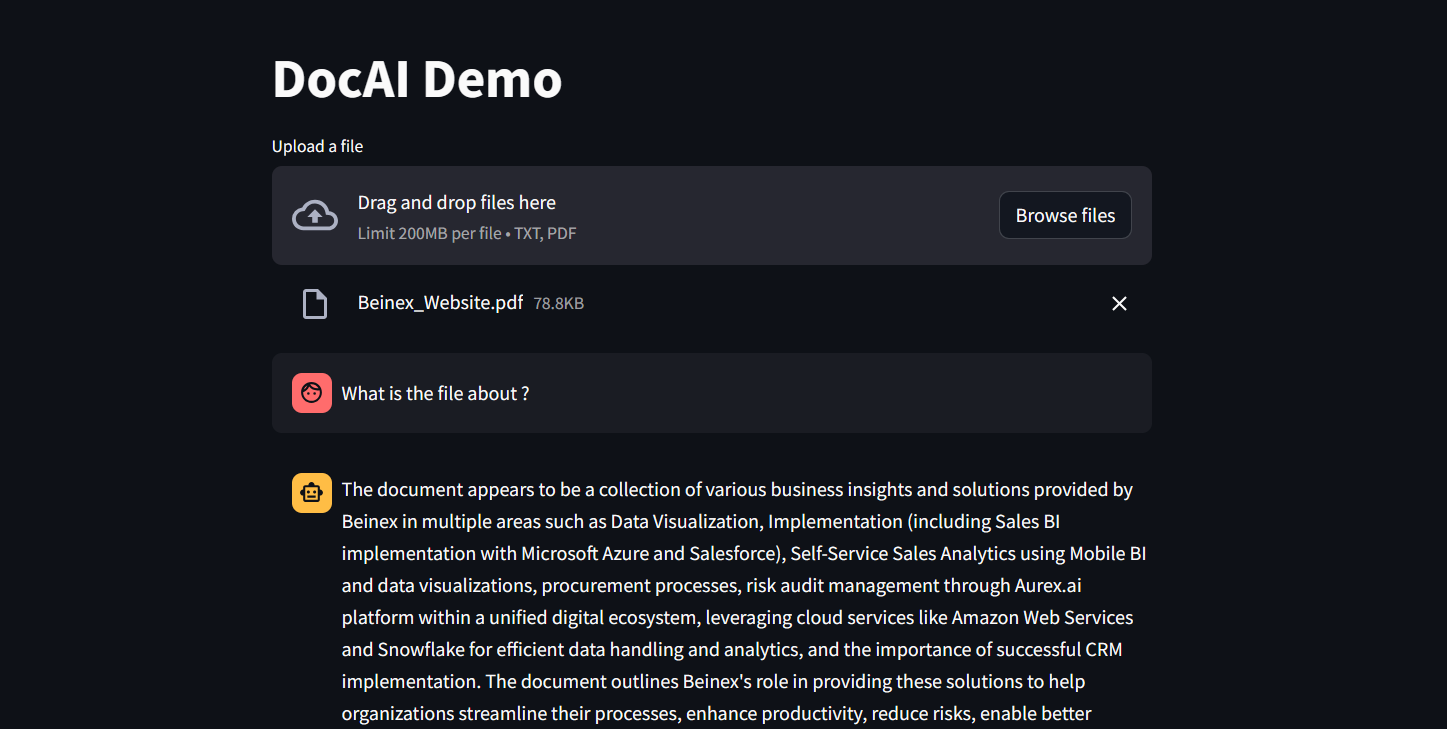 Figure 1: DocAI running on Phi-3
Implementing Phi-3 on Snowflake: What Beinex Did and How Beinex Did it?
Beinex has seamlessly integrated Phi-3 into Snowflake to help enterprises unlock their data's full potential through advanced language processing capabilities and enhance decision-making with deeper insights. The integration facilitates Snowflake users to:
Here's a detailed guide on implementing Phi-3 on Snowflake:
Step 1: Create Necessary Objects
-- Run by ACCOUNTADMIN to allow connecting to Hugging Face to download the model
-- Stage to store LLM models
CREATE STAGE <stagename> IF NOT EXISTS models
DIRECTORY = (ENABLE = TRUE)
ENCRYPTION = (TYPE='SNOWFLAKE_SSE');
-- Stage to store YAML specs
CREATE STAGE <stagename> IF NOT EXISTS specs
DIRECTORY = (ENABLE = TRUE)
ENCRYPTION = (TYPE='SNOWFLAKE_SSE');
-- Image repository
CREATE OR REPLACE IMAGE REPOSITORY images;
-- Compute pool to run containers
CREATE COMPUTE POOL GPU_NV_S
MIN_NODES = 1
MAX_NODES = 1
INSTANCE_FAMILY = GPU_NV_S;
Step 2: Docker Image Code - ollama
FROM ollama/ollama
RUN $(ollama serve > output.log 2>&1 &) && sleep 10 && ollama pull phi3 && pkill ollama && rm output.log
ENTRYPOINT ["ollama"]
CMD ["serve"]
Step 3: Tag and Push the Docker Image
docker tag ollama <SNOW_ORG-SNOW_ACCOUNT>.registry.snowflakecomputing.com/db/schema/image respository /ollama
docker push <SNOW_ORG-SNOW_ACCOUNT>.registry.snowflakecomputing.com db/schema/image repository /ollama
Step 4: Docker Image - UDF
FROM python:3.11
WORKDIR /app
ADD ./requirements.txt /app/
RUN pip install --no-cache-dir -r requirements.txt
ADD ./ /app
EXPOSE 5000
ENV FLASK_APP=app
CMD ["flask", "run", "--host=0.0.0.0"]
App.py content is given below :
from flask import Flask, request, Response, jsonify
import logging
import re
import os
from openai import OpenAI
client = OpenAI(
base_url='http://ollama:11434/v1',
api_key="EMPTY",
)
model = "phi3"
app = Flask(__name__)
app.logger.setLevel(logging.ERROR)
def extract_json_from_string(s):
logging.info(f"Extracting JSON from string: {s}")
# Use a regular expression to find a JSON-like string
matches = re.findall(r"\{[^{}]*\}", s)
if matches:
# Return the first match (assuming there's only one JSON object embedded)
return matches[0]
# Return the original string if no JSON object is found
return s
@app.route("/", methods=["POST"])
def udf():
try:
request_data: dict = request.get_json(force=True) # type: ignore
return_data = []
for index, col1 in request_data["data"]:
completion = client.chat.completions.create(
model=model,
messages=[
{
"role": "system",
"content": "You are a bot to help extract data and should give professional responses",
},
{"role": "user", "content": col1},
],
)
return_data.append(
[index, extract_json_from_string(completion.choices[0].message.content)]
)
return jsonify({"data": return_data})
except Exception as e:
app.logger.exception(e)
return jsonify(str(e)), 500
Step 6: YAML File
spec:
containers:
- name: ollama
image: <SNOW_ORG-SNOW_ACCOUNT>.registry.snowflakecomputing.com/ db/schema/image respository /Phi3
resources:
requests:
nvidia.com/gpu: 1
limits:
nvidia.com/gpu: 1
env:
NUM_GPU: 1
MAX_GPU_MEMORY: 24Gib
volumeMounts:
- name: llm-workspace
mountPath: /<stage name>
- name: udf
image: <SNOW_ORG-SNOW_ACCOUNT>.registry.snowflakecomputing.com/ db/schema/image respository /ollama_udf
endpoints:
- name: chat
port: 5000
public: false
- name: llm
port: 11434
public: false
volumes:
- name: llm-workspace
source: "@<llm stage_name>"
Step 7: Upload YAML File and Create Service
Upload the YAML file to the created stage, where the stage name in the YAML file should match the stage created in Step 2.
-- Create service
create service phi3
IN COMPUTE POOL <name of compute pool created>
FROM @dash_stage
SPECIFICATION_FILE = '<name of yaml file uploaded>';
Step 8: Create Service Function
Create a service function on the service (after it starts).
create or replace function phi3chat(prompt text)
returns text
service= phi3
endpoint=chat;
Check Service Status
Use the following command to check the status of the service:
SELECT
v.value:containerName::varchar container_name,
v.value:status::varchar status,
v.value:message::varchar message
FROM (
SELECT parse_json(system$get_service_status('<service name>'))
) t,
LATERAL FLATTEN(input => t.$1) v;
Benefits of Running Phi-3 on Snowflake
1. Cost-Effectiveness and Efficiency:
2. Compatibility with Smaller GPUs:
3. Exceptional Performance:
4. Faster Response Times:
SLM vs LLM
The choice between small and large language models hinges on organizational needs, task complexity, and resource availability.
LLMs excel in applications requiring the orchestration of intricate tasks, encompassing advanced reasoning, data analysis, and contextual comprehension.
On the other hand, SLMs present viable options for regulated industries and sectors facing scenarios necessitating top-tier results while maintaining data within their premises.
Both large and small language models possess distinct strengths and applications. While large language models thrive in managing complex workflows, small language models deliver impressive performance despite their compact size.
While some customers may exclusively require small models, others may favour larger models, with many seeking to integrate both types in various configurations. Ultimately, the optimal selection depends on the unique context and objectives of the organization. Besides transitioning from large to small models, the trend is evolving towards a diversified portfolio of models. This means that instead of relying on a single model, customers can choose from various models with different sizes, capabilities, and resource requirements. This empowers customers to decide the best model for their scenario, balancing performance and resource constraints.