How AI Decision-Making is Improving Enterprise Outcomes
Blog
Share 
Data Sharing Best Practices in Snowflake
 13 February 2024
  Sumi S
 Snowflake Data Sharing
Data sharing in Snowflake equips you to share specific objects with another Snowflake account or a designated reader account. The beauty of this process lies in the fact that the data isn't duplicated or moved between accounts.
Now, why is this a game-changer for organisations? When constructing data pipelines and developing data products, it's a common practice to shuttle data between databases and diverse systems to blend different datasets.
Consider this scenario: You have transactional data within your online transactional processing (OLTP) database, and you wish to integrate it with external data for a machine learning model. Traditionally, organizations would export data into a data lake, import external data, and then employ tools like Apache Spark for analysis.
But what if, instead, you could simply deposit your data into Snowflake, and the external data source could seamlessly share its data with your organisation, eliminating the need to load it separately? This eradicates the challenge of keeping data copies synchronised, resulting in savings on storage, computing costs, and maintenance efforts.
Imagine your company possesses valuable information that can guide other companies in making informed decisions. For instance, let's say your company can provide precise estimates for product delivery times based on proprietary data, and you want to offer this information for sale to your customers.
Enter Snowflake data sharing—it empowers you to precisely do that.
Case Studies: Snowflake Data Sharing
Citing two instances where leading organisations use Snowflake to improve actionable data sharing, collaboration and reporting capabilities.
1. A Pioneering Technology Leader
A well-known Swedish-Swiss multinational corporation successfully implemented a streamlined data strategy using the Snowflake Data Cloud, adopting an "extract once, use everywhere" approach that simplified data consolidation and enablement. By transitioning from nightly extracts, which caused significant system overhead, to a single, near real-time Change Data Capture (CDC) process, the company achieved efficient replication of information to Snowflake with minimal impact. The utilisation of Snowflake Secure Data Sharing facilitated secure and governed data collaboration across the four business areas.
2. A Leading fast-food Restaurant Chain
Snowflake's data-sharing capabilities have revolutionised decision-making for a fast-food restaurant chain. They can effortlessly share crucial sales, inventory, and operational data with external entities, expanding from three to over 30 parties.
With a high-performance database platform hosting over 2 million transaction records, the restaurant chain has established a robust data management and analysis infrastructure through Snowflake, empowering its operational and marketing endeavours.
Moreover, by consolidating all data onto Snowflake, the organisation has achieved a remarkable 70% reduction in operational IT costs, demonstrating the platform's efficiency and cost-effectiveness.
Centralising and sharing data with Snowflake significantly eased the development of data products for various purposes, including marketing campaign analytics, quotation success metrics, production line tools, and supply chain dashboards. These data products are utilised by thousands of users globally, including internal stakeholders and external vendors, enhancing collaboration and efficiency across the organisation.
What are the best practices for Snowflake data sharing?
Optimize your Snowflake data sharing experience with these essential practices. Ensure data security by utilizing secure views to filter and mask sensitive information. Enhance clarity and understanding by employing descriptive names and comments for your shares. Monitor and fine-tune your sharing activities using Snowflake Information Schema or Account Usage views. Foster communication and collaboration with your consumers to create a seamless workflow.
Take command of your data sharing environment by setting quotas and limits with the ALTER SHARE command. Keep your consumers informed about any changes or updates to your shares, and actively seek feedback to refine your data-sharing strategy. Explore additional data sources through Snowflake Data Exchange or Data Marketplace to enrich your analytics.
These best practices safeguard sensitive data, ensure compliance with data privacy regulations, clarify the purpose of each share, and provide insights into usage and performance, ultimately enhancing your data analysis capabilities. Below are some best practices for data sharing with Snowflake:
- Understand Snowflake Data Sharing Familiarize yourself with Snowflake's data sharing features, such as Secure Data Sharing (SDS) and Sharehouse, to leverage the platform effectively.
- Role-Based Access Control (RBAC) Implement strong RBAC policies to control who can share data and who can access shared data. Define roles and permissions to ensure data security and compliance.
- Secure Data Sharing Use Secure Data Sharing (SDS) to securely share data with external parties without copying or moving the data. Implement encryption and access controls to protect sensitive information.
- Sharehouse Best Practices If using Sharehouse, follow best practices for creating and managing share objects. This includes defining share schemas, tables, and using the appropriate share options for your use case.
- Data Masking and Redaction Apply data masking or redaction policies to shared data to protect sensitive information. Ensure that shared data complies with privacy regulations and internal data governance policies.
- Query Performance Optimization Optimize query performance for shared data by using clustering keys, partitioning, and indexing. This helps enhance the efficiency of queries on large datasets.
- Versioning and Change Tracking Implement versioning and change tracking mechanisms to keep track of updates and changes in shared data. This ensures data lineage and helps with auditing and troubleshooting.
- Documentation and Metadata Maintain comprehensive documentation and metadata for shared datasets. Include information about the source, purpose, and any transformations applied. This helps users understand the shared data context.
- Governance and Monitoring Establish governance practices for data sharing, including regular reviews of shared data objects and access logs. Monitor data-sharing activities to identify any anomalies or potential security issues.
- Educate Users Provide training and documentation for users involved in data-sharing activities. Ensure they understand the best practices, security protocols, and the impact of data sharing on performance.
- Regular Audits and Reviews Conduct regular audits and reviews of shared data objects, permissions, and access controls. This helps maintain data integrity, security, and compliance with organizational policies.
- Cost Monitoring
By adhering to these best practices, you can:
1. Shield Sensitive Data: Employ secure views to fortify sensitive information.
2. Navigate Data Privacy Regulations: Ensure compliance with data privacy regulations by controlling access and usage.
3. Illuminate the Purpose of Each Share: Maintain transparency regarding the intended purpose and content of each shared dataset.
4. Efficiently Monitor Usage and Performance: Keep a finger on the pulse of usage patterns and optimize performance for streamlined data sharing.
5. Elevate Your Data Analysis Journey: Enrich your analytics by exploring diverse data sources and unlocking fresh perspectives.
What’s Next
1. Enhanced Data Collaboration Tools:
Best Way to Share Data for Your Business
For secure collaboration, old ways of copying data are no longer the best. If you're working with trusted partners and it's privacy-compliant, Snowflake Secure Data Sharing is a quick and secure option. But, if you're dealing with sensitive or regulated data, especially when the risk is high, consider using a data clean room for an extra layer of security and compliance.
Beinex + Snowflake Offerings
Beinex’s partnership with Snowflake enables us to offer you advanced features like automated tuning and elastic compute, along with analytics modernisation services, to help your organisation realise exponential Return on Investment.
Imagine a world where sharing data is easy, secure, and efficient. No more struggling with complicated transfers and synchronisation issues. Thanks to Snowflake, organisations can enter a new era of possibilities, using advanced data-sharing features to boost their analytics and insights like never before.
For example, put yourself in the shoes of a data engineer or analyst dealing with complex data integration challenges. How can you streamline your workflow and enhance collaboration with external partners? Snowflake has the answer.
Related Articles
A DEEP DIVE INTO TABLEAU 2019.3
TABLEAU CATALOG
What could be better than a feature that could provide better visibility and better data management at the same time, and also ensure that the right data is always used for analysis. This is possible with the new feature -Tableau Catalog.
 This feature provides a complete picture of the data and how each data is connected.
Another use of Tableau Catalog is linear and impact analysis. This not only shows which assets will change but also who will be affected by it, which makes work easier for many and avoids wastage of time.
EXPLAIN DATA
Tableau 2019.3 is up with a new Al-driven feature called the “Explain Data”, which helps people go from the “what” of the data to the “how” of it. With explain data, we can get an explanation for each unexpected value in the data by just a single click. On selecting the desired data point, the ‘explain data’(lightbulb) icon appears.
For each value there might be a number of explanations. Each of these explanations are checked and only the most likely ones are provided as visualizations.
This feature provides a complete picture of the data and how each data is connected.
Another use of Tableau Catalog is linear and impact analysis. This not only shows which assets will change but also who will be affected by it, which makes work easier for many and avoids wastage of time.
EXPLAIN DATA
Tableau 2019.3 is up with a new Al-driven feature called the “Explain Data”, which helps people go from the “what” of the data to the “how” of it. With explain data, we can get an explanation for each unexpected value in the data by just a single click. On selecting the desired data point, the ‘explain data’(lightbulb) icon appears.
For each value there might be a number of explanations. Each of these explanations are checked and only the most likely ones are provided as visualizations.
 Now these visualizations can be used for further explorations.
TABLEAU SERVER MANAGEMENT ADD-ON
Organizations that run critical deployment of Tableau Server at a large scale, have mentioned concerns over manageability and scalability. They have been in search for tools that could organize the management process in an efficient way, which could save a lot of time. Tableau solved this problem by introducing the Tableau Server Management Add-on – a new feature designed to help organizations manage the deployment of Tableau Server. With this, they can quickly react to the changing needs of the business as well as save time by organizing the management process in the most efficient way. Tableau Server Management Add-on, which makes running the critical deployment of tableau at a large-scale server much simpler.
Now these visualizations can be used for further explorations.
TABLEAU SERVER MANAGEMENT ADD-ON
Organizations that run critical deployment of Tableau Server at a large scale, have mentioned concerns over manageability and scalability. They have been in search for tools that could organize the management process in an efficient way, which could save a lot of time. Tableau solved this problem by introducing the Tableau Server Management Add-on – a new feature designed to help organizations manage the deployment of Tableau Server. With this, they can quickly react to the changing needs of the business as well as save time by organizing the management process in the most efficient way. Tableau Server Management Add-on, which makes running the critical deployment of tableau at a large-scale server much simpler.
 The server management add-on feature can help in optimising the performance of deployment by customizing which nodes process background jobs such as extract refreshes and subscriptions and isolating these workloads, to specific nodes. This makes it easier to scale deployments to the needs of their organization.
This feature has a few tools, including two for better reliability and scalability and one for content migration, all of which helps the organizations to govern their data effectively.
If you are interested in learning more about the latest Tableau release and use cases, please contact us at training@beinex.com/ info@beinex.com and we would be happy to schedule a Tableau demo or training for you and your company.
The server management add-on feature can help in optimising the performance of deployment by customizing which nodes process background jobs such as extract refreshes and subscriptions and isolating these workloads, to specific nodes. This makes it easier to scale deployments to the needs of their organization.
This feature has a few tools, including two for better reliability and scalability and one for content migration, all of which helps the organizations to govern their data effectively.
If you are interested in learning more about the latest Tableau release and use cases, please contact us at training@beinex.com/ info@beinex.com and we would be happy to schedule a Tableau demo or training for you and your company.
This feature provides a complete picture of the data and how each data is connected.
Another use of Tableau Catalog is linear and impact analysis. This not only shows which assets will change but also who will be affected by it, which makes work easier for many and avoids wastage of time.
EXPLAIN DATA
Tableau 2019.3 is up with a new Al-driven feature called the “Explain Data”, which helps people go from the “what” of the data to the “how” of it. With explain data, we can get an explanation for each unexpected value in the data by just a single click. On selecting the desired data point, the ‘explain data’(lightbulb) icon appears.
For each value there might be a number of explanations. Each of these explanations are checked and only the most likely ones are provided as visualizations.
Now these visualizations can be used for further explorations.
TABLEAU SERVER MANAGEMENT ADD-ON
Organizations that run critical deployment of Tableau Server at a large scale, have mentioned concerns over manageability and scalability. They have been in search for tools that could organize the management process in an efficient way, which could save a lot of time. Tableau solved this problem by introducing the Tableau Server Management Add-on – a new feature designed to help organizations manage the deployment of Tableau Server. With this, they can quickly react to the changing needs of the business as well as save time by organizing the management process in the most efficient way. Tableau Server Management Add-on, which makes running the critical deployment of tableau at a large-scale server much simpler.
The server management add-on feature can help in optimising the performance of deployment by customizing which nodes process background jobs such as extract refreshes and subscriptions and isolating these workloads, to specific nodes. This makes it easier to scale deployments to the needs of their organization.
This feature has a few tools, including two for better reliability and scalability and one for content migration, all of which helps the organizations to govern their data effectively.
If you are interested in learning more about the latest Tableau release and use cases, please contact us at training@beinex.com/ info@beinex.com and we would be happy to schedule a Tableau demo or training for you and your company.
Note: The Server Management Add-on is not available for Tableau Online, as they manage everything from scaling, performance, and security on behalf of their Tableau Online customers. The Tableau Server Management Add-on can be separately purchased from the Tableau Server deployment.

AWS Security Hub: Master Cloud Security with a Unified Approach
What is AWS Security Hub?
AWS Security Hub offers a unified, organized, and prioritized view of the compliance status and security posture of your AWS accounts in a standardized format. It automates the security best practice checks of single and multiple AWS accounts. It centralizes the security alerts into one format and place, helping you comprehend the security framework of your AWS environment. It offers a pre-built dashboard that helps manage and prioritize any alerts or issues in your AWS environment found from security checks. Security Hub assesses security controls, performs compliance checks, and generates control findings to gauge your organization's adherence to security best practices. By automating security best practice checks, Security Hub streamlines the understanding and enhancing of the security posture of your AWS accounts. It offers multiple security standards to handle your organization's security position, including Foundational Security Best Practices developed by AWS and external compliance frameworks like Center for Internet Security (CIS) and Payment Card Industry Data Security Standard (PCI DSS). These standards have various security controls, each defining a security best practice. Besides generating control findings, Security Hub acquires findings from AWS services like Amazon Inspector and Amazon GuardDuty and also supports third-party products, offering a centralized view of several security-related issues. Also, the automation capabilities of the Security Hub simplified the triage and remediation of security issues. For example, by setting automation rules, critical discoveries get updated automatically in case of a security check failure.Features of AWS Security Hub
Centralized Cloud Security Management: It offers a unified dashboard that tracks security findings from AWS services like AWS Config and third-party tools, enhancing and prioritizing them in a single place. Third-Party Integration: AWS Security Hub seamlessly integrates with third-party tools like Splunk, consolidating data from multiple sources into a unified view. Tailored Security Insights: It enables the customization of security insights and alerts, allowing organizations to adapt their security posture to specific needs. Automated Compliance and Security Checks: By automating compliance and security checks on AWS accounts, resources, and services, AWS Security Hub enables the detection of security issues, continuous monitoring, and evaluation while ensuring they adhere to industry best practices and standards.Top Benefits of AWS Security Hub
• Streamlines managing cloud security by centralizing all security data in a single place, offering a consolidated view that helps detect possible threats. • Enhances real-time threat detection by facilitating integration with AWS services like Amazon GuardDuty. • Ensures regulatory compliance by fulfilling the industry security criteria and standards • Conducts constant security checks by following industry standards and practices to identify and monitor AWS accounts and resources that need attention, flagging any misconfigurations in security. • Enables automated remediation for specific findings and customized actions triggered upon detection. In short, AWS Security Hub enhances cloud security by centralizing monitoring of accounts, services, and resources, performing automated security assessments, enabling businesses to comply with security standards, and integrating with AWS services for real-time threat detection. It can be quite difficult to manage security in complex cloud environments, but AWS Security Hub streamlines the process by delivering real-time security insights into your AWS environment, consolidating security alerts from different tools into a unified view, and automating security checks to enhance protection and efficiency. As an AWS consulting partner, Beinex offers AWS-managed services to our customers to host their BI solutions and more on the cloud. Our cloud migration experts ensure top-tier stability and reliability by aligning with your business strategy and collaborating closely with you to deploy AWS infrastructure as a service seamlessly. Connect with us for a free demo: https://beinex.com/beinex-amazon-web-services/
All You Need to Know About Tableau Filters: Types of Filters in Tableau
Tableau filters allow their users to perform simple filtering using available metrics, as well as perform advanced filtering using complex calculations. While developing dashboards, Tableau offers the flexibility to view different types of filters such as drop-down filters, wildcard filters, list filters and many more. To enhance dashboard interactivity, Tableau has provided “Filter Actions” which allow users to filter an entire dashboard as per the value selected by the user in a particular visualization.
To create a filter that suits the user's requirements, Tableau engages several filtering techniques which also enhance data processing efficiency Each filter is designed for a specific function, and the order in which they are run can significantly impact performance.
6 Types of Filters in Tableau
Tableau employs six different types of filters, which are listed in the sequence of execution:
- Extract Filters
- Data Source Filters
- Context Filters
- Dimension Filters
- Measure Filters
- Table Calculation Filters
1. Extract Filters
Extract filters are utilised during the initial stage of data filtering. When datasets are uploaded to Tableau, we can utilise the extract filter to minimize the number of Tableau queries for the data source. By applying filters to the extract, we can further decrease the size of the data.
2. Data Source Filters
Data Source filters sort out any crucial or sensitive information while putting data into Tableau. It is compatible with both the Live and Extract connections.
We can add the data source filter to any column by selecting the ADD option. After selecting the ADD option, the ADD Filter dialogue box will appear, displaying all the fields. We can then select the field to which we wish to apply the filter and it is possible to change or delete data source filters as needed.
3. Context Filters
A context filter is generally used when we require this filter to be applied before any other filter. It has the potential to enhance the performance of massive data sources. They are made by dragging the dimension to the filter section box and selecting the Add to context option. This will make the dimension pill change its colour to “Grey”, indicating it is a context filter. Similarly, by clicking "Remove from Context", the filter becomes a simple dimension filter. A common use case for this filter would be when a user would like to find the top N products in any category.
4. Dimension Filters
Dimension fields include discrete categorical data, and we can remove or add the values we want to investigate. The process is simple as outlined below:
Step 1: Drag the dimensions from the dimension list to the filter section box.Step 2: From the Filter Dialog box, select the values that we want to analyze.
The Filter dialogue box contains four tabs:
- General: To select the members present in the dimension to either include or exclude
- Wildcard: To filter the result based on a particular pattern
- Condition: To filter the result based on a particular condition
- Top: To filter the Top N products belonging to a particular category.
5. Measure Filters
Measure filters are applied to the measure fields, which have quantitative data. It can be used as follows:- Drag the measured field from the Measure box to the Filter area
- Filter dialogue box with several functions will appear.
- Select the operation that needs to be performed and click Next.
In the subsequent dialog box, there are 4 types of filters:
- Range: To select the range of values to include in the result.
- At least: Select the minimum value of a measure to filter the data.
- At most: To select the maximum value of a measure to filter the data.
- Special: To select null or non-null values.
6. Table Calculation Filter
Table Calculation Filters, being the last type of filters to be executed in the sequence of execution, do not filter out the underlying data. It is mostly used to filter out contents in the current view. Table Calculations are functions that are utilised for building Calculated Fields like LOOKUP, WINDOW SUM, WINDOW AVG, and so on.Summing Up
Tableau Filters are the most commonly used feature by many organizations. It allows the clients to filter out confidential data and allows them to provide controlled view access to different internal users so that only data relevant to the user is accessed. Filtering out data means data processing becomes more efficient, which in turn makes the report generation process faster which in turn helps the organization arrive at quick and insightful business decisions.Use Cases Addendum
Let’s find out how Tableau filters work to solve various tasks :Use Case 1:
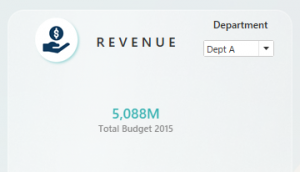

A simple drop-down filter can be used to filter the view of our requirements as shown in the visualization above.
In this example, Dept A has been selected such that the Total Budget is shown only for Dept A. Once we select Dept B, the Total Budget shows the respective value for Dept B
Use Case 2:

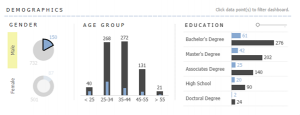
In the visualizations above, we can see the customer demographics related to gender, age group and educational status. With the help of Tableau’s Filter Actions, one can click on a particular segment and filter the rest of the visualizations as per the requirement.
For example, if we require to find how many customers in the age group of 35-44 are males, all we have to do is to click on the doughnut chart for “Male”, and the visualizations will show only the data for males. Now, we can find that the number of male customers in the age group of 35-44 is 272.
Use Case 3:
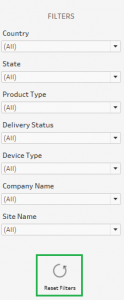
The Filter Action feature in Tableau can be leveraged to develop several creative solutions for customers. One such solution is the “Reset Filter” as shown in the above visualization.
With a combination of filters and filter actions, one can develop a reset filter that, on clicking, would reset all the currently applied filters on the dashboard and bring it back to its original unfiltered view. This comes in handy if the dashboard consists of multiple visualizations and contains heavy data.
What’s New in Tableau's 2024.1 Release: Tableau Pulse, Metrics Layer, Viz Navigation, and More
Tableau's 2024.1 Release: What’s in it for you
Do your employees struggle to understand complex data visualizations? Does your organization lack a consistent approach to defining metrics? Are you looking for ways to make data more accessible for everyone? If you answered yes to any of these questions, then the new features in Tableau 2024.1 are for you! This release addresses these common challenges head-on, offering solutions like Viz Navigation for Text Tables, the Metrics Layer in Tableau Pulse, and more. Keep reading to learn more about these innovations and how they can revolutionize your data analysis workflows:
1. Tableau Pulse: Personalized Insights Delivered
Tableau Pulse is a real lifesaver, transforming how your organization interacts with data. Here's how it empowers your workforce:
To learn more about Tableau Pulse, click here: https://beinex.com/topics/tableau-ai-and-tableau-pulse-tableaus-dynamic-duo/
2. The Metrics Layer: Building a Unified Language for Data
Achieving consistency and clarity in data analysis is key to making informed decisions. The Metrics Layer within Tableau Pulse tackles this challenge by providing a central hub for defining and managing metrics.
Here's how it works:
By creating a unified language for data, the Metrics Layer empowers collaboration and drives data-driven decision making throughout your organization.
3. Tableau Pulse on Mobile: Stay on Top of Your Data Anywhere
Monitor key metrics and gain actionable insights, even when you're on the go. Tableau Pulse seamlessly integrates with Tableau Mobile, allowing you to access your personalized AI-powered insights directly from your smartphone or tablet.
Get a quick snapshot of your metrics:
Dive deeper for a comprehensive analysis:
This one-click access empowers everyone in your organization to make data-driven decisions, regardless of location. Tableau Pulse is available on both iOS and Android versions of Tableau Mobile.
4. Tableau Available Through AWS Marketplace: Streamlined Procurement and Deployment
For organizations leveraging the power of AWS cloud infrastructure, Tableau Cloud is now available on the AWS Marketplace. This integration offers several benefits:
5. Viz Navigation for Text Tables: Enhanced Accessibility
Tableau 2024.1 introduces a groundbreaking feature for exploring data visualizations: Viz Navigation for Text Tables. This innovative capability empowers users to navigate and interact with text tables using their keyboard or assistive technologies, removing the need for a mouse.
Benefits for all users:
This new feature signifies Tableau's commitment to making data accessible to everyone, regardless of their ability or preferred method of interaction.
6. Tableau Prep: Identify Duplicate Rows
Tableau Prep enables you to take control of your data quality. By removing or correcting duplicates, you can build trust in your data and generate reliable insights that drive better business decisions.
Effortlessly Spot Duplicates:- Remove identified duplicates to ensure a clean and accurate dataset.
- Fix the underlying issues causing the duplication, preserving valuable data points.
A New Era of Data-Driven Decision Making
With Tableau 2024.1 and Tableau Pulse, you have everything you need to democratize data across your organization. Empower your employees to leverage insights and make data-driven decisions that drive real business impact.
How Beinex Can Assist You
Beinex, a premier Tableau partner, provides sustainable analytics solutions to organizations and help to build superior data visual analytics capabilities internally through our bespoke training programs. Our team of Tableau-certified consultants are real-life Tableau business users who are passionate about Tableau and delivering a world-class experience. Connect with us for a Tableau free trial.

Making your Business Smart and Sustainable for the digital age A Guide for Thought Leaders