How AI Decision-Making is Improving Enterprise Outcomes
Blog
Share 
Data Calculations in Tableau: Sum and Running Sum
 5 December 2022
  Team Beinex
 [sc name="quote" quote="“The functions, even as they may look simple, are pretty useful for any Tableau Consultant especially if they are working on finance-related projects,”" author="Joseph John, Senior Consultant, Analytics, Beinex"][/sc]

What is Tableau Sum and Running Sum?
Sum
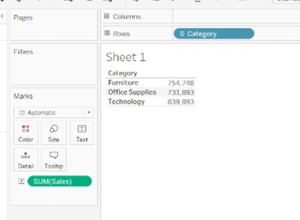
SUM is one of the commonly performed functions in Tableau. The Tableau Sum function seeks out the Sum of records under consideration. It is the total of the values present in a field. The screenshot provided below exhibits the total sum of sales for each of the three categories as given in Sheet 1.
In the sample dataset shown below, the sum of sales is shown corresponding to each of the corresponding values in the dimension "Category". For example, "Furniture" has a total sale of 754,748, which could be comprising of furniture related products such as Tables, Chairs etc.
Running Sum
A RUNNING SUM is a cumulative total in a row or column from the first value to the final value in the respective row or column. For instance, in the example given below, the cumulative values of Furniture and Office Supplies stand at 1,486,641 and that value when added to Technology’s value of 839,893 gives 2,326,534.
You can summarise or modify the granularity of your data using aggregate functions. An aggregate part combines the values of multiple lines to provide a single value. Examples of aggregate functions apart from sum are measurements based on Count, Count Distinct, Fixed Calculations, and other standard integration functions.
Every time you include a measure in your view, an aggregate is automatically applied to that measure. Depending on the context of the view, different aggregation techniques are used. Analysts can well utilise these features to simplify the whole complex process of data analysis, and organisations can harness them for insightful decisions.
One of the most common table calculations in Tableau is the running total. It is employed to determine the cumulative sum of a measure across a table structure or dimension. It can be done by adding up values, averaging values, or computing using minimum or maximum values, among other methods.
Related Articles

Top 6 AMS Best Practices to Boost AWS Cloud Security in 2025
What is AWS Managed Services (AMS)?
AWS Managed Services (AMS) is a fully managed service that helps businesses run AWS environments at scale. It adheres to industry best practices for operational excellence, security, and compliance.
• Key Benefit of AWS: AMS enables your company to spend less time managing the complexities of cloud operations and more time focusing on business outcomes.
AMS handles:
• Infrastructure Management: Includes continuous monitoring, patching, and lifecycle management of your AWS resources.
• Security & Compliance: Generates automated compliance checks against NIST, PCI-DSS, GDPR, and HIPAA frameworks.
• Operational Support: 24×7 incident response, backup, disaster recovery, and governance.
• Automation & Optimization: Uses custom runbooks and built-in AWS features to reduce manual labor.
Why AMS Matters in 2025
Cloud adoption is growing, but so is the risk associated with it. Even though many businesses:
• Lack 24/7 monitoring.
• Struggle with regulatory audits.
• Depend on manual vulnerability patching.
AMS offers solutions to mitigate the risks associated with cloud adoption. It resolves the issue by utilizing automation, continuous monitoring, and best practices from AWS. You can implement AMS at scale, without overloading internal teams.
Top 6 AMS Cloud Security Best Practices
1. Prevention: Stop Threats Before They Happen
• Identity & Access Management (IAM): AMS provides real-time validation of modifications, enforces least-privilege policies, and automatically corrects deviations.
• Network Security: AMS configures AWS WAF, Firewall Manager, and Network Firewall to block malicious traffic.
• Patch & Vulnerability Management: AMS automates scanning and patching, including zero-day threats, with Systems Manager + Inspector.
• Backup & Disaster Recovery: With recovery testing and ransomware prevention, AMS fortifies AWS Backup & DRS.
2. Detection: Spot Threats in Real Time
• GuardDuty & Macie: Sensitive data is protected, and anomalous activity is detected.
• Security Hub: Assists with noise reduction, alert aggregation, and issue prioritization.
3. Monitoring & Incident Response
• 24×7 global monitoring with NIST-aligned runbooks.
• Automated incident response using Systems Manager + CloudWatch.
• Integrations with ServiceNow, Jira, Slack, and Teams for faster collaboration.
4. Compliance Made Simple
Adhering to compliance frameworks such as HIPAA, PCI-DSS, SOC, GDPR, and NIST is complex for all companies. AMS embeds compliance controls from day one.
• Continuous Compliance Monitoring: Automated checks via AWS Config rules.
• Audit Trails: CloudTrail & Athena queries for reporting.
• Certified Services: AMS itself is compliant with major frameworks.
5. Governance & Reporting
• Resource Tagging: For governance, cost allocation, and reporting.
• Self-Service Dashboards: Patch compliance, backup coverage, and incident stats.
• Monthly Business Reviews: Joint sessions with Beinex + AWS experts.
6. Security On-Demand: Flexibility When You Need It
AMS Operations on Demand (OOD) lets you scale support instantly for:
• Emergency vulnerability remediation.
• Legacy OS upgrades.
• Firewall operations.
Why You Should Opt for AMS Security?
AWS provides the platform. AMS provides the tools. It ensures:
• Faster ROI → measurable security improvements within 6–12 months.
• Local + Global Expertise → deep knowledge of GCC regulations + AWS global best practices.
• End-to-End Ownership → from planning to monitoring, audits, and response.
Secure Your AWS Cloud with Beinex
Beinex’s Cloud Engineering Services help organizations maximize their AWS investments through robust security frameworks and modernization strategies.
Our Core Offerings Include:
• Cloud Security
• Security Assessment
• Strategy & Implementation
• Well-Architected Review
• Migration & Modernization
• Cloud Migration
• Cloud Automation & DevOps
• Infrastructure Modernization
Whether you are in the early stages of cloud adoption or looking to optimize your existing AWS, we help you achieve your cloud goals.
Connect with us: https://beinex.com/cloud-engineering

Best Cloud Data Management Tools Fit for Businesses of All Sizes
What is Cloud Data Management?
Cloud data management refers to the framework that allows businesses to store, manage, and access their data using cloud-based services and applications. It encompasses the entire data lifecycle, from collection and storage to processing and analysis, while ensuring that data remains secure and compliant with regulatory standards. The flexibility of cloud data management allows organizations to scale up or down based on their needs and optimize data operations, which in turn leads to better decision-making and actionable business insights.
The Importance and Benefits of Cloud Data Management
Cloud data management has become a necessity in the data-centric world. Organizations are immersed with vast amounts of data, which must be efficiently stored, processed, and analyzed. Here are the key benefits:
- Scalability and Flexibility: One of the biggest advantages of cloud data management is its ability to scale as needed. Traditional data management systems often require substantial infrastructure investment, but cloud solutions allow businesses to pay only for the resources they use, making it cost-effective.
- Enhanced Data Security: With stricter regulations on data privacy (such as GDPR and HIPAA), cloud data management ensures that data is securely stored and compliant with global standards. Cloud service providers offer tools to protect data from unauthorized access and breaches.
- Improved Collaboration and Accessibility: Cloud data management allows users to access data from anywhere at any time, enabling remote work and collaboration across geographically dispersed teams.
- Disaster Recovery and Business Continuity: Cloud-based data management systems offer advanced disaster recovery options. By replicating data across multiple locations, organizations can ensure that their data is safe and accessible, even in the event of hardware failure or a catastrophe.
Cloud Data Management vs. Traditional Data Management
In contrast to traditional on-premises data management (TDM), cloud data management (CDM) provides enhanced flexibility and scalability. Traditional data management systems require a significant upfront investment in physical servers, storage, and IT staff, whereas CDM enables rapid scaling with minimal financial and physical overhead.
CDM also offers superior disaster recovery by distributing data across multiple locations, a benefit that is difficult to achieve with TDM’s centralized approach. Furthermore, CDM allows team members to access data remotely, enhancing collaboration—something that traditional systems often struggle to provide.
A Hybrid Approach to Data Management
For businesses looking to maintain control over sensitive data while leveraging cloud-based tools, a hybrid approach to data management combines the strengths of both cloud and traditional systems. A hybrid model allows organizations to store sensitive data on-premise while utilizing cloud resources for dynamic, less sensitive data. This approach offers scalability, cost-efficiency, and disaster recovery while keeping critical data secure and compliant with industry regulations.
Top Cloud Data Management Tools
Several leading cloud data management tools dominate the market, offering comprehensive solutions for businesses with various data needs. Here are the top three tools:
1. Amazon Web Services (AWS)
Amazon Web Services offers an extensive range of cloud-based tools and services that allow businesses to manage their data effectively. Notable AWS services include:
• Amazon S3: A scalable storage service designed for temporary and intermediate data storage.
• Amazon S3 Glacier: A low-cost cloud storage service ideal for long-term data archiving.
• Amazon Redshift: A fully managed data warehouse that makes analyzing large datasets using SQL simple.
• Amazon Athena: An interactive query service that allows users to analyze data in Amazon S3 using SQL.
• Amazon QuickSight: A scalable, serverless business intelligence service for building interactive dashboards.
AWS Pricing: AWS follows a pay-as-you-go pricing model, making it highly flexible for businesses of all sizes.
2. Microsoft Azure
Microsoft Azure provides a wide range of cloud-based tools for data management, making it a popular choice for enterprises. Key Azure services include:
• Azure Blob Storage: A massively scalable object storage solution for unstructured data.
• SQL Databases: Managed SQL database services that simplify data management without the need for complex infrastructure.
• Azure Data Explorer: A real-time data analytics service that can handle large datasets with minimal preprocessing.
• Private Cloud Deployments: For businesses looking for more control over their infrastructure.
Azure Pricing: Like AWS, Microsoft Azure also offers flexible pricing based on the services and resources used.
3. Google Cloud Platform (GCP)
Google Cloud Platform offers a range of cloud-based data management services, known for their strong integration with Google’s ecosystem and ease of use. Prominent services include:
• Google Cloud Storage: A fully managed service for storing unstructured data.
• Google BigQuery: A fully managed data warehouse that allows users to run SQL queries on large datasets.
• Cloud BigTable: A NoSQL database service designed for large-scale workloads.
• Google Data Studio: A business intelligence platform for building intuitive dashboards and visualizing data.
• Cloud Datalab: A powerful tool for machine learning and data science projects.
• Cloud Pub/Sub: A messaging service designed for real-time data ingestion and processing.
GCP Pricing: Google Cloud Platform offers competitive pricing with a flexible pay-as-you-go model that caters to various business needs.
Conclusion
Cloud data management is essential for modern businesses looking to stay competitive in the digital era. By offering scalability, enhanced security, improved collaboration, and disaster recovery, cloud data management tools like AWS, Microsoft Azure, and Google Cloud Platform provide a comprehensive solution to managing data efficiently and effectively. As data grows in volume and complexity, leveraging these tools will be key to driving innovation and maintaining a competitive edge.
PARAMETER ACTION + SHEET ACTION
Parameter Action + Sheet Action: Extended Tableau Interactivity
Tableau has included lots of sought-after features into its latest release, Tableau 2019.2. If you’ve been eagerly looking forward to the release of the latest Tableau version to try out the whole new Parameter Actions, well – the wait is over!
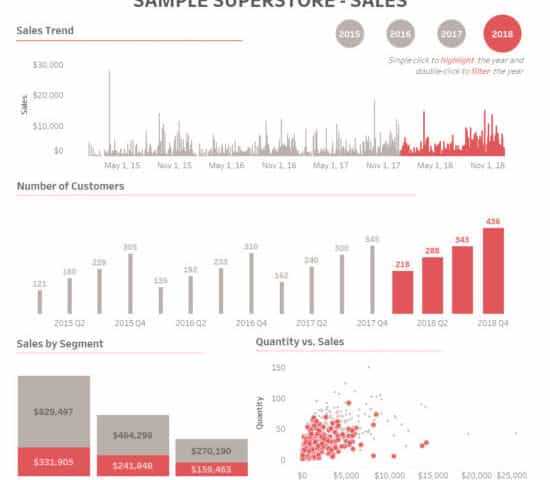
In our previous blog post about Tableau 2019.2, we had already covered some of the major features of the release. In this blog, we will be diving deep into ‘parameter action’ and the combination of Parameter Action + Sheet Action with a simple example using Sample-Superstore dataset.
What are Parameter Actions?
Parameters are constant values created by a user to perform certain functions in Tableau and can be used in calculations, reference lines and some other analytic scenarios. A parameter can be a set of strings, numbers, etc. With parameter, the user can able to select only one value at a time.
With parameter actions, users have the option to control the parameter values dynamically when clicking or hovering on certain elements on a viz. We can use parameter actions in a worksheet or a dashboard which extends the interactive ability of Tableau. This enables the users to visually change the parameter value with few interactions, which is cool. Parameter action can unleash the possibilities for designers to come up with new levels of interactivity to the dashboards.
Steps to achieve Parameter Action + Sheet Action:
1. First, create the sheets of required KPIs. We have created 4 sheets;
- Sales Trend
- Number of Customers
- Sales by Segment
- Quantity Vs. Sales


2. Create a Year calc from ‘Order Date’ field.

3. Create a parameter using ‘Year’ calculated field. (This parameter is used in Parameter Action)

4. Create a calculated field ‘Parameter Calc’ which is used to color/highlight the selected year.

5. Drag the ‘Parameter Calc’ to Color and Size in marks shelf.

6. If you apply ‘Parameter Calc’ to the created sheet, it will look something like this. The selected year in ‘Year Parameter’ will be highlighted with the color and size.

7. Now, we need a toggle to switch between years. So, we have to create a sheet like below,
(Like before, drag the ‘Parameter Calc’ to color and size in marks shelf)

8. Arrange the sheets in a dashboard. Give a header and format the texts, fonts, colors if required.

9. How to create ‘Parameter Action’
- Select Dashboard > Actions.
- In the Actions dialog box, click Add Action and then select Change Parameter.

- Select ‘Year Toggle’ as Source sheet and choose ‘Select’ in Run action on:
- Select ‘Year Parameter’ as Target Parameter.

- Now, if you select a year, the parts in the sheet corresponding to the selected year will get highlighted in color and other parts are grayed out.
10. How to create ‘Sheet Action’
- Select Dashboard > Actions.
- In the Actions dialog box, click Add Action and then select Filter.
- Select ‘Year Toggle’ as Source sheet and all the sheets in the dashboard as Target Sheets
- Choose ‘Select’ in Run action on and choose ‘Show all values’ in Clearing the selection will

Now, we have set both Parameter Action and Sheet Action for ‘Year Toggle’ sheet.
If we single click on the year, it will highlight (Parameter Action) the year throughout the dashboard and if we double click on the year, it will filter out (Sheet Action) that particular year throughout the dashboard.

Beinex is a digital transformation organization en-rooted with ideas, innovation and unparalleled customer service. Our mission is to transform the way individuals and the organizations work with the data through innovation and experience.
If you are interested in learning more about the latest Tableau parameter actions and use cases, please contact us at training@beinex.com/ info@beinex.com
and we would be happy to schedule a Tableau demo or training for you and your company.



Snowflake Cloud Services Layer: The Silent Workhorse in Architecture and its Five Key Functions
These services link together all the Snowflake components to handle user requests, from login to query dispatch. The compute commands that Snowflake procured from the cloud provider is also used by the cloud services layer. Every day, Snowflake processes petabytes of data and thousands of customer accounts.
The cloud service layer enables the management of a customer’s account, and it includes:
Authentication
Snowflake allows flexible authentication methodologies like Local, Active Directory, Multifactor and SAML Authentications. It permits the use and maintenance of Snowflake user credentials like login name and password. In short, account and security managers can create users with passwords stored in Snowflake or other authenticators and users can access Snowflake using their login credentials.
Infrastructure Management
With the capacity to immediately spin up and down an almost infinite number of concurrent workloads against the same, single copy of data, the users need not be concerned about the size of the data or the details about how a cluster is powered up instantly, with a few clicks on the corresponding interface. Behind the scenes, the infrastructure manager communicates and provides instructions to the corresponding cloud provider to immediately spin up the resources required by the users.
Metadata Management
Snowflake metadata management is a part of the data governance discipline which involves processes, policies, workflows, and technology to identify, and organise Snowflake metadata for data consumers. Metadata management is the key to adding actionable context to the assets in the Snowflake data warehouse.
Metadata management in Snowflake makes it easy to search, filter, and find data assets by various criteria. Metadata gives you complete visibility into the lifecycle of a data asset. Snowflake stores all the metadata in a centralized component called Cloud Services.
Snowflake automatically creates metadata for data residing both externally (S3, Azure, GCP) and internally (within Snowflake), stores it as a key-value pair (dictionary), and makes it available via the Information Schema.
Query Parsing and Optimisation
Users need not be much concerned regarding query performance. It is handled automatically via a dynamic query optimization engine in the cloud services layer. It can model, load, and query the data.
The cloud services layer does all the query planning and query optimization based on data profiles that are collected automatically as the data is loaded. It automatically collects and maintains the required statistics to determine how to distribute the data and queries most effectively across the available compute nodes.
Snowflake's query caching retains the outcomes of all queries run during the previous 24 hours. The query results returned to one user are accessible to any other user on the system who conducts the same query. It helps to save time by drastically reducing retrieval time when data is pulled from cache memory. The cost is also saved by not spinning up the compute clusters.
Access Control
Access to Snowflake depends on Access Control privileges which determine who can access and operate on Snowflake. According to the Snowflake model, users or other roles with rights allocated to them can gain access to secure items. Every secure object also has an owner who can provide access to other roles. Unlike user-based access control models, which provide rights and privileges to individual users or groups of users, this model does not do it. The Snowflake approach is intended to offer a sizable level of flexibility and control. It enables Snowflake to provide row-level security and protect PII through dynamic data masking.

Amazon S3 Case Study with Solutions: How Amazon S3 Glacier Instant Retrieval Transformed the BBC’s Archival Strategy
AWS BBC Case Study: Challenges Faced by BBC
The BBC Archives Technology and Services division is responsible for preserving over 16 million assets, including films, radio broadcasts, news, sports, and digital material. However, managing this vast repository came with significant challenges: • Fragmentation: Content was dispersed across multiple legacy storage systems, making data retrieval complex and inefficient. • High Costs: Maintaining outdated physical infrastructure demanded heavy financial and resource investments. • Limited Accessibility: Lack of a centralized system led to time-consuming content retrieval processes. Many global enterprises face similar struggles in balancing data accessibility with cost efficiency. To address these challenges, the BBC implemented a five-year plan to consolidate its storage using modern cloud technologies.
Key Benefits of Amazon S3 Glacier Instant Retrieval
Building on years of successful collaboration with Amazon Web Services (AWS), the BBC adopted Amazon S3 Glacier Instant Retrieval to modernize its archival strategy. Key benefits of Amazon S3 solution include: • Cost-effectiveness: Amazon S3 Glacier Instant Retrieval offers some of the lowest-cost storage for petabytes of archival data. • Instant Access: Unlike traditional archival storage, this AWS solution provides rapid retrieval speeds, making it ideal for time-sensitive content. • Scalability: AWS’s robust cloud infrastructure ensures seamless expansion as data volumes grow, future-proofing the BBC’s archives. This transition solved immediate storage challenges and laid the groundwork for a scalable, digitized archive that will serve future generations.
The Migration Journey: 25 PB in 10 Months
Over a span of 10 months, the BBC successfully migrated 25 petabytes (PB) of archival data to AWS. Legacy System Retirement: Enabled decommissioning legacy tape-based storage, freeing up space and IT resources at its London HQ. Enhanced Cost Efficiency: Reduced operational costs by integrating Amazon S3 Glacier Instant Retrieval and Amazon S3 Intelligent-Tiering. Optimized Storage Management: Automated data tiering based on access patterns to balance cost and performance. Improved Data Accessibility: Ensured seamless access to historical media archives for future content innovation.
Building a Future-Ready Data Lake
The BBC’s cloud migration is not just about cost savings and accessibility—it’s about innovation. With its archival content securely stored on AWS, the broadcaster now focuses on developing a comprehensive data lake. This centralized repository will power advanced analytics and machine learning (ML) applications, unlocking new capabilities such as: • Speech-to-text processing for historical broadcasts • Facial recognition for identifying individuals in archival footage • Automated metadata tagging to enhance searchability and categorization By embracing Amazon S3 Glacier Instant Retrieval, the BBC is building an infrastructure that will preserve its media legacy and revolutionize how historical content is accessed and utilized in the digital age.
Amazon S3 Case Study Examples: Lessons for Organizations Everywhere
The BBC’s experience provides a valuable blueprint for organizations looking to modernize their data management strategies. Key takeaways of this BBC Amazon S3 Case Study include: • Modernization is Essential: Cloud-based solutions like Amazon S3 Glacier Instant Retrieval significantly reduce operating costs and enhance data accessibility. • Scalability Matters: AWS storage solutions offer seamless expansion, ensuring long-term sustainability. • Future-Proofing Archives: A centralized data lake paves the way for leveraging machine learning, AI, and advanced analytics, unlocking new insights from historical data. Adopting AWS archive storage solutions can benefit organizations across industries, including media, government, and education, by ensuring efficient, cost-effective, and future-ready data management.
Summing Up
The BBC’s successful migration of 100 years of archival content to Amazon S3 Glacier Instant Retrieval is a testament to the transformative power of cloud-based archival storage. By overcoming high costs, fragmented data storage, and limited accessibility, the BBC has preserved its invaluable media heritage and set a new industry standard for digital archiving.