How AI Decision-Making is Improving Enterprise Outcomes
Blog
Share 
Coming Soon: Tableau 2022.1 – What Does It Offer New
 21 March 2022
  Shashwat Goyal
 - List the unused data sources: Data sources imported in a workbook but not used are highlighted by the new feature. The developer can remove these data sources from the data source list to make the workbook faster.
- List of unused fields or data columns: Just like the data sources, workbook optimizer also highlights the data columns not used across the workbook. Removing these at the data source level can help improve the overall performance of the workbook.
- List of sheets not used in the dashboard: It is a common practise that developers tend to create sheets not used in the final dashboard. This creates unnecessary clutter and makes the dashboard slower. The workbook optimiser feature gives a list of such sheets which the user can delete to optimise the performance of the workbook further.
- Highlights lengthy calculations: The feature provides a list of calculations which are too complex and in turn reduce the performance of the dashboard. Simplifying a few of these can improve performance to a great extent.
 Ask Data Phrase Builder: This feature is available on Tableau Server and Tableau Online
Add field would look like as shown in the below screenshot:
Ask Data Phrase Builder: This feature is available on Tableau Server and Tableau Online
Add field would look like as shown in the below screenshot:
 Customize View Data: This feature is available on Tableau Server, Desktop and Tableau Online
This feature enables to reshape the tabular data behind your visualisation in the View data interface. One can create new columns, remove columns from the default view, change the order and sort the data using this feature. This reshaped data can also be exported as csv file to be shared with the team.
Change the root table: This feature is available on Tableau Server, Desktop and Tableau Online
Managing multiple data tables becomes easier and flexible with this new feature. One can swap any table to be the root table with a single click. This allows one to change the layout of the table quickly, reshape the data with a different root table and delete a specific table without deleting child nodes. For e.g., let us assume a user had to create a data source for an analysis using 3 tables namely ‘customers’, ‘orders’ and ‘returns’. The user creates the data model such that ‘customers’ is the root table followed by ‘orders’ and ‘returns’. But after performing some analysis the user realises that ‘orders’ should be the main root table. In such cases the user would have to re-create the data again from scratch but with the new ‘Swap with root table’ feature user can do the changes with a few clicks.
Parameter Enhancements in Tableau Prep
In version 2022.1 Tableau Prep is adding even more places where one can use parameters in the flow as well as user enhancements. Now, one can:
Customize View Data: This feature is available on Tableau Server, Desktop and Tableau Online
This feature enables to reshape the tabular data behind your visualisation in the View data interface. One can create new columns, remove columns from the default view, change the order and sort the data using this feature. This reshaped data can also be exported as csv file to be shared with the team.
Change the root table: This feature is available on Tableau Server, Desktop and Tableau Online
Managing multiple data tables becomes easier and flexible with this new feature. One can swap any table to be the root table with a single click. This allows one to change the layout of the table quickly, reshape the data with a different root table and delete a specific table without deleting child nodes. For e.g., let us assume a user had to create a data source for an analysis using 3 tables namely ‘customers’, ‘orders’ and ‘returns’. The user creates the data model such that ‘customers’ is the root table followed by ‘orders’ and ‘returns’. But after performing some analysis the user realises that ‘orders’ should be the main root table. In such cases the user would have to re-create the data again from scratch but with the new ‘Swap with root table’ feature user can do the changes with a few clicks.
Parameter Enhancements in Tableau Prep
In version 2022.1 Tableau Prep is adding even more places where one can use parameters in the flow as well as user enhancements. Now, one can:
- Get a list of all the parameters in one place rather than finding them in the flow. One can delete these parameters directly from the parameter window rather than to find it in the flow first.
- Include parameter names in exported output files.
- Include parameters in SQL scripts that you run before or after writing the flow output to a database. Include parameters in worksheet names when writing the flow output to Microsoft Excel.
- 1. Improvements in Esri Data Connector
- 2. Addition of new Accelerators
- 3. Added connectors to connect to more data sources
Tableau 2022.1 is coming soon and includes new functionality and capabilities that will help IT admins, developers, analysts, and business users alike. Let us deep dive into some of the useful new features it has to offer across various Tableau products.
Workbook optimizer: This feature is available on Tableau Server, Online and Desktop
It provides insights on making the Tableau workbook efficient. Some of the suggestions provided by the new feature include:
Related Articles

Budgeting Made Easy: Beinex Budget Allocation Accelerator (Infographic)

 Model Accuracy Explained Why It Doesn’t Guarantee Business Success.png)
Artificial Intelligence (AI) Model Accuracy Explained: Why It Doesn’t Guarantee Business Success
Artificial intelligence has moved from experimentation to enterprise-wide adoption. Today, organizations across industries are investing heavily in AI. Yet many still misunderstand one critical reality: high AI model accuracy does not automatically translate into measurable results.
AI models can achieve impressive technical scores during model accuracy testing and still fail to generate measurable outcomes after deployment. This paradox is becoming increasingly common. Enterprises should evaluate AI success beyond traditional model accuracy metrics. Understanding why this happens and how to address it is now a foundational competency for any entrepreneur serious about AI adoption.
Explore further: https://www.beinex.ai/generative-ai

AWS Serverless Evolution: What's New in the World of Cloud Innovation
Serverless Computing
Serverless computing, often referred to as "serverless," is a cloud computing model where developers can build and deploy applications without having to manage the underlying server infrastructure. In a traditional server-based architecture, developers need to provision, configure, and manage servers to run their applications, which can be complex and time-consuming.
In a serverless architecture, the cloud provider (such as Amazon Web Services with AWS Lambda, Microsoft Azure with Azure Functions, or Google Cloud with Google Cloud Functions) abstracts away the server management aspect. Developers can focus solely on writing code for the specific functions or tasks their application needs to perform without worrying about server provisioning, scaling, or maintenance.
Serverless services offer several significant benefits that can have a positive impact on application development, deployment, and management. Some of the key significances of serverless services include:
- Simplified Infrastructure Management
- Auto-Scaling
- Rapid Development and Deployment
- Event-Driven Architecture
- Reduced Administrative Overhead
- Global Scalability
- Resource Optimization
- Improved Fault Tolerance
Amazon Web Services (AWS) continuously introduces new capabilities and features to their serverless services for several reasons aimed at improving the developer experience, expanding use cases, and meeting evolving customer needs.
Latest buzz in AWS serverless services
1. General availability of AWS Database Migration Service Serverless
On June 2nd, 2023, AWS unveiled the widespread availability of AWS Database Migration Service (AWS DMS) Serverless. This release simplifies database migrations by automating the provisioning and scalability of migration resources. With AWS DMS Serverless, users gain the ability to seamlessly replicate data across a diverse range of widely used databases, analytics engines, and services—think PostgreSQL, MySQL, Oracle, Amazon Redshift, Amazon DynamoDB, Amazon Aurora, and more. By handling the often-cumbersome work of database migration, AWS DMS Serverless minimises the need for manual resource estimation, provisioning, monitoring, and scaling. This advancement translates to migration timeframes measured in hours, and cost savings realised through payment solely for consumed data migration resources.
2. Provisioned Concurrency for Amazon SageMaker Serverless Inference
As of May 10th, 2023, AWS has introduced the general availability of Provisioned Concurrency support for Amazon SageMaker Serverless Inference. This innovative feature ensures that models deployed on serverless endpoints offer consistent performance and impressive scalability. Through the integration of provisioned concurrency, users can infuse their serverless endpoints with a predetermined volume of concurrency, effectively maintaining the readiness and responsiveness of SageMaker endpoints. This offering particularly suits scenarios where traffic is predictable, yet throughput remains relatively low.
3. Amazon Aurora Serverless v2 is now available in 4 additional regions
The footprint of Amazon Aurora Serverless v2 has now expanded to include four additional regions. Aurora Serverless v2, an adaptive, automatic scaling configuration for Amazon Aurora, has the remarkable ability to instantaneously scale to accommodate even the most resource-intensive applications. By making precise capacity adjustments, Aurora Serverless v2 ensures that an application always receives the optimal database resources it demands. This dynamic resource allocation extends to encompass an impressive range of Amazon Aurora features, spanning read replicas, multi-AZ support, Performance Insights, and Global Database functionality. This powerful suite is ideally positioned to serve a diverse spectrum of applications. Enterprises dealing with an extensive array of applications or Software as a Service (SaaS) providers managing multi-tenant environments replete with numerous databases can harness the capabilities of Aurora Serverless v2 to deftly manage database capacity across their entire infrastructure.
4. AWS Lambda introduces response payload streaming
AWS Lambda, the bedrock of serverless computing, has ushered in an exceptional enhancement: response payload streaming. This capability enables AWS Lambda functions to gradually stream response payloads back to clients, even accommodating payloads that surpass the 6MB threshold. A monumental leap forward for web and mobile applications, this feature marks a departure from the conventional request-response model. Previously, applications built on Lambda necessitated the complete generation and buffering of responses before they could be sent to clients—an approach that often resulted in delayed first-byte transmission times. With response payload streaming, Lambda functions can transmit partial responses to clients as they are ready, substantially improving the all-important first-byte transmission time, a facet crucial for web and mobile applications alike. This innovation stands to elevate the performance of AWS Lambda-powered applications to new heights.
As AWS continues to introduce new capabilities, it's evident that the serverless paradigm is here to stay. This shift isn't just a technological trend; it's a fundamental change in how we architect, deploy, and scale applications. With each enhancement, AWS reinforces its commitment to providing customers with the tools they need to succeed. With AWS's ongoing dedication to pushing boundaries, the future of cloud computing holds the promise of even more remarkable advancements.
Beinex+ AWS Offerings
AWS provides security services such as AWS Shield and AWS WAF to help protect against phishing attacks. Strengthen your defences by integrating robust security software from the AWS Marketplace and embracing Two-Factor Authentication (2FA). Safeguard against evolving threats like homograph phishing for a safer online experience.
Beinex is an AWS consulting partner, and we empower customers to host their BI solutions, provide security services and much more on the cloud. Our cloud migration experts bring in best-in-class stability and reliability by understanding your business strategy and working closely with you to deploy AWS infrastructure as a service.

Business Intelligence Throws a Bash for Entrepreneurs
Businesses use BI for a multitude of purposes. Many people use it to assist with hiring, compliance, production, and marketing. When it comes to BI, it's impossible to find a department that doesn't benefit from more data to work with.
Faster and accurate reporting and data analysis, better data quality, improved employee satisfaction, lower expenses, increased revenue, and the ability to make insightful business decisions are just a few of the many benefits that businesses may gain by adopting BI into their business models. Many more benefits follow:
1.Rapid and precise reporting
Using templates or customised reports, employees can monitor KPIs using various data sources, including financial, operational, and sales. The pieces are created in real-time and use the most up-to-date data, allowing businesses to act quickly. Most reports include straightforward visualisations such as graphs, tables, and charts. Some BI software reports are dynamic, allowing users to experiment with various variables or quickly access data.
2.Data integration
Most businesses keep data in a variety of formats and across multiple solutions. Data processing and reporting become complicated and time-consuming as a result. Using a business intelligence solution, you can reduce data storage complications in various tools and spreadsheets.
BI tools connect all the data in your workplace in various forms with your existing software solution and use real-time data to create robust business decisions. Numbers do not deceive. A fully integrated BI solution can help you achieve total company success.
3.Making timely decisions
BI assists your company in growing. Businesses that use BI can quickly extract facts from massive amounts of disorganised data. With instant access to business data, you can analyse internal data and create better business decisions. BI teams ensure that the organisation receives real-time advanced business reports to better utilise the data.
Tasks like data collection, entry, analysis, control and use require substantial human time and effort. With the assistance of an automated BI tool, data can be collected, analysed, managed, and used more quickly and effectively. Reports can be generated soon because the data is already right behind the scenes.
4.Revenue growth
Revenue growth is an important goal for any business. Through comparisons across multiple dimensions and recognising sales weaknesses, data from BI tools can help companies to ask insightful questions about why things happened. Revenue is more likely to increase when enterprises listen to their customers, track their competitors, and enhance operations.
5.Recognising market trends
Discovering great possibilities and implementing the strategy with supporting data can provide organisations with a competitive advantage, long-term profitability, and a complete picture. Employees can combine external market data with internal data to identify new sales trends and business challenges by studying consumer data and market conditions.
6.Improving customer satisfaction
Business Intelligence tools can assist firms in better understanding customer behavioural patterns. Most organisations collect customer feedback in real-time, and this data can aid in client retention and acquisition. These techniques may also help identify buying patterns, allowing customer service representatives to anticipate demands and provide better assistance.
7.Improved operational efficiency
BI solutions consolidate disparate data sources, assisting with a company's overall organisation so that managers and employees can focus on delivering accurate and timely reports rather than hunting for information. Employees can focus on their short and long-term goals and examine the impact of their decisions when they have up to date and correct information.
8.Bigger profit margins
Most businesses are concerned about their profit margins. Fortunately, Business Intelligence technologies can identify inefficiencies and aid in margin expansion. Aggregated sales data assists firms in better understanding their clients and enables sales teams to establish more effective methods for allocating resources.
9.Reduce the risks
Business Intelligence solutions help you to reduce risks by inputting data into action. By tracking customer activity, you may quickly uncover fraudulent activities. You can also monitor employee behaviour to abide by industry regulations.
Using the data and knowledge about the current economic situation, you can examine credit portfolios and identify potential delinquency cases. Business Intelligence solutions offer a proactive approach to risk management in any financial industry.
10.Evaluate and improve inputs
Employees can improve the process of arriving at insights using fully integrated BI by implementing well-known accessible technologies. Individuals can successfully analyse and investigate information when data is received quickly. Personnel can engage with one another without barriers, and clever business plans can be developed.
11.Reduced training requirements
Business Intelligence can let employees access a variety of information. Implementing business tools that are widely available, common, and well-supported can considerably minimise an organisation's training costs.
12.Gain a competitive advantage
Personalisation is a hot topic in every industry, and the banking and finance sectors are no exception. As a result, having a competitive advantage is essential. You may quickly modify consumer experiences with business intelligence technology based on your data. Market trends can be used to strategise new investment opportunities, analytics can predict customer behaviour, and products can be tailored to each client's individual needs.
13.Employee authorisation
Suppose users are given direct access to simple data that can be comprehended and analysed quickly. In that case, performance may be considerably enhanced, and all company plans can be promoted if employees can process the data in various ways. Business Intelligence includes a variety of healthy, lively business score registering, investigation, and reporting equipment to assist quick and better decision making by practically every employee of the organisation.
Final Thoughts
To cite from Information Week, it is predicted that a third of large-scale organisations will adopt decision intelligence by 2023 (Source: Information Week). Business intelligence software has several advantages. It's a burgeoning sector with numerous demonstrated benefits when correctly handled. Users can obtain specific insight into your company's past, present, and future to make informed business decisions. BI software collects, organises, compiles, and visualises critical KPIs. It reduces waste and guesswork while also improving inventory management and sales intelligence. This potent combination of business intelligence software capabilities and benefits provides customers with a core competency that can make a huge difference.
Top Picks: Tableau 2020.4
As a frequent user of Tableau Desktop and Server, check out my top picks from the list.
• Improved dynamic parameter
• Multiple marks layer support for maps
• Block comments in calculations
• Web authoring enhancements
• Offline map support for Tableau Server
• Tableau Server Management (TSM) improvements
• Multiple key activation on Tableau Server prior to TSM initialization
• Analytics Extension for Tableau Online
• Merge duplicate external assets
• Tableau Prep Builder in the browser
Tableau Desktop
Improved Dynamic Parameter
The dynamic parameter was one of the features which I used extensively starting from 2020.1. The feature allows us to populate parameter values based on a specified field whenever the workbook is opened. We will be able to select only the field with matching data types.
The feature update announced in Tableau 2020.4 gives me more privilege to customize the Dynamic Parameter. I can now set a parameter’s range to a field’s min and max value upon opening the workbook, or when the field’s data source is refreshed.
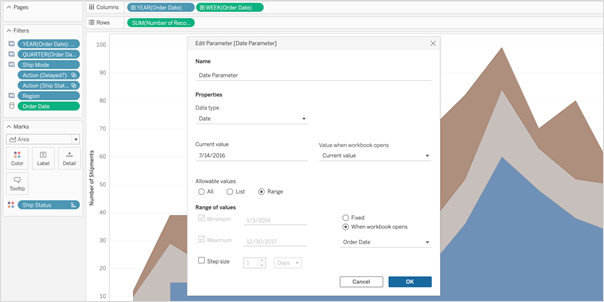 So, whenever I open the workbook or the extract is refreshed, Tableau displays the unique values within the range specified, giving more control over the parameter values displayed.
Multiple Marks Layer Support for Maps
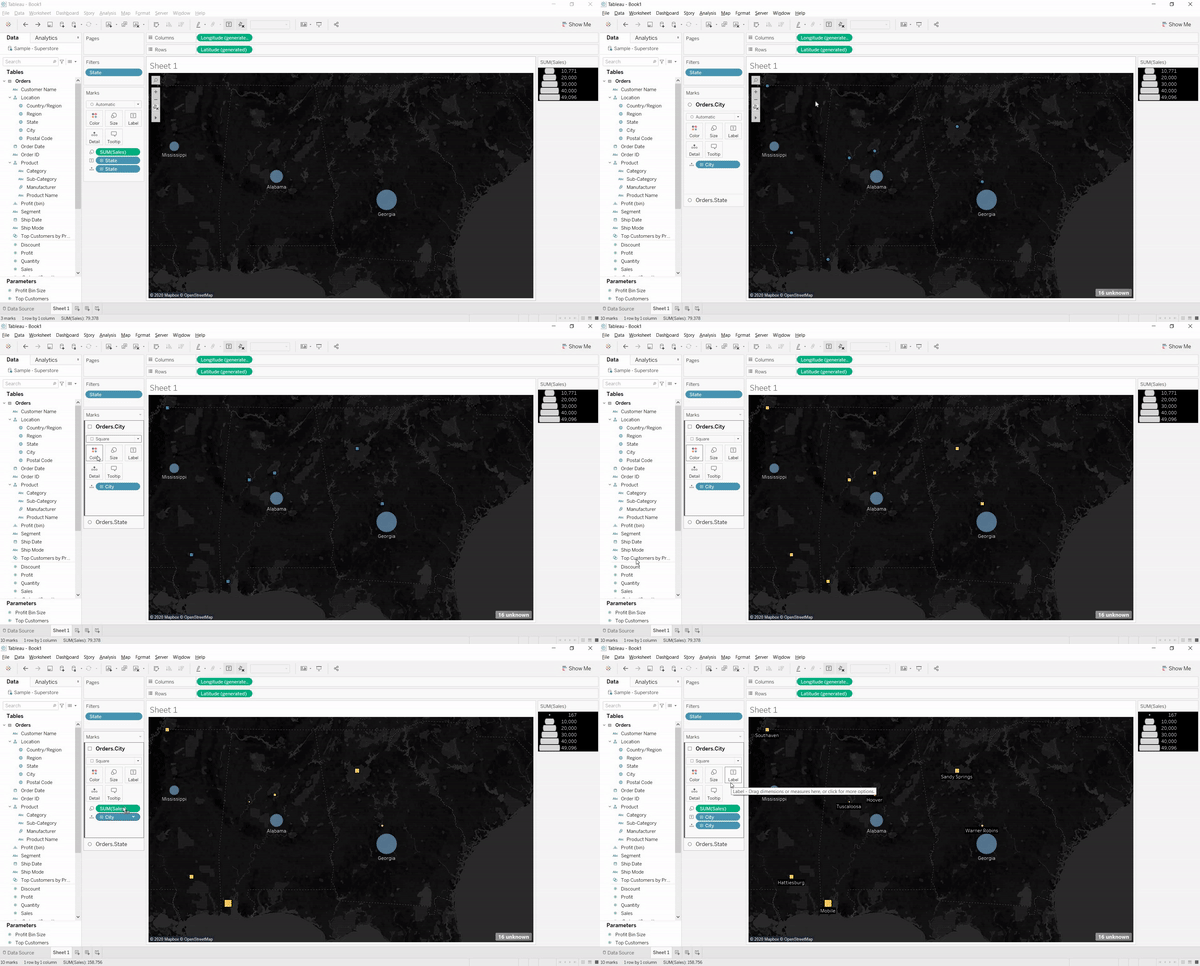
This is an exceptional feature to bring multiple spatial layers and context together to better understand and analyze geospatial data and map views. I will be able to include multiple marks layers from a data source to map visualizations and enhance the geospatial analysis. I can present more context in a single map view and perform further analysis with this feature.
So, whenever I open the workbook or the extract is refreshed, Tableau displays the unique values within the range specified, giving more control over the parameter values displayed.
Multiple Marks Layer Support for Maps
This is an exceptional feature to bring multiple spatial layers and context together to better understand and analyze geospatial data and map views. I will be able to include multiple marks layers from a data source to map visualizations and enhance the geospatial analysis. I can present more context in a single map view and perform further analysis with this feature.
 Block Comments in Calculations
Block comments is a simple yet one of the most useful features for me, which Tableau has announced in 2020.4. I often used to add comments in complex calculations for easy understanding in future references. Earlier, only single-line comments were possible, limiting the description I could add. But from now on, I can add comments of any length to calculation windows with block comments by simply starting the comment with /* and ending with */.
What makes it unique is that the new multi-line block comment feature is consistent with other popular programming languages. This feature is an example of Tableau’s on-going effort to provide its customers with an intuitive user experience.
Block Comments in Calculations
Block comments is a simple yet one of the most useful features for me, which Tableau has announced in 2020.4. I often used to add comments in complex calculations for easy understanding in future references. Earlier, only single-line comments were possible, limiting the description I could add. But from now on, I can add comments of any length to calculation windows with block comments by simply starting the comment with /* and ending with */.
What makes it unique is that the new multi-line block comment feature is consistent with other popular programming languages. This feature is an example of Tableau’s on-going effort to provide its customers with an intuitive user experience.
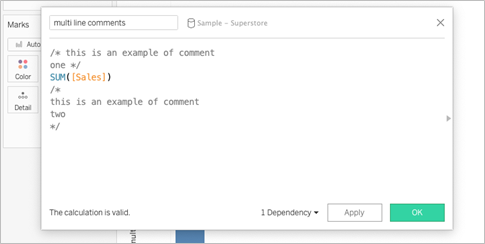 Tableau Server
Web Authoring Enhancements
Starting from Tableau 2020.4, it is possible to author dashboards from the browser just like how we design it in Tableau Desktop. With this web authoring enhancements, I can include Highlight actions, Format Mark Labels, apply filters to worksheets, create fixed sets, and even create extract in my workbooks from the browser itself. I no longer have to make changes from Tableau Desktop and publish it to the server. I can directly do it from the browser itself.
Tableau Server
Web Authoring Enhancements
Starting from Tableau 2020.4, it is possible to author dashboards from the browser just like how we design it in Tableau Desktop. With this web authoring enhancements, I can include Highlight actions, Format Mark Labels, apply filters to worksheets, create fixed sets, and even create extract in my workbooks from the browser itself. I no longer have to make changes from Tableau Desktop and publish it to the server. I can directly do it from the browser itself.
 Offline Map Support for Tableau Server
Rendering dashboards with maps is now faster compared to previous versions. Now, I can create maps using the offline map style in web authoring, ensuring the performance of map views in Tableau Server. Offline map support is a great deal for organizations with strict internet access restrictions, assuring that map view access to all its users.
Tableau Server Management (TSM) Improvements
Tableau Server Administration activities like installation, upgrade and backup are now easy like never before. I can retry installation or upgrade from the last checkpoint in case of an unexpected issue or error during installation or upgrade, saving my efforts to obliterate tableau server.
Backups can be performed twice as fast as previous versions, and I can monitor the progress with the new progress bar giving visibility into what step the backup is on and how much time is remaining.
Backups can also be scheduled using TSM command starting from 2020.4 and that is awesome. I no longer need to prepare batch script and depend on the windows task scheduler to schedule the backups on regular intervals; instead, I can schedule it with just a single command.
Multiple Key Activation on Tableau Server Prior to TSM Initialization
During Tableau Server installation, it is now possible to activate multiple license keys prior to TSM initialization. I will be able to save a lot of time by eliminating the need to restart after the installation is completed to activate multiple licenses and experience a smoother installation.
Analytics Extension for Tableau Online
The power of the Analytics extension is now unlocked in Tableau Online too. The feature was already available in Tableau Server, and it helped us dynamically perform advanced analysis with models and functions in R, Python and other platforms.
Analytics extension in Tableau Online significantly enhances the scope of using Advanced Analytics by the common users.
Merge Duplicate External Assets
Earlier, the Database or Table with similar names used to appear as multiple assets within Tableau Catalog. But, the new feature helps me to merge those multiple assets into a single one. I can manage assets easily and keep an organized view of External assets by merging the common ones.
Offline Map Support for Tableau Server
Rendering dashboards with maps is now faster compared to previous versions. Now, I can create maps using the offline map style in web authoring, ensuring the performance of map views in Tableau Server. Offline map support is a great deal for organizations with strict internet access restrictions, assuring that map view access to all its users.
Tableau Server Management (TSM) Improvements
Tableau Server Administration activities like installation, upgrade and backup are now easy like never before. I can retry installation or upgrade from the last checkpoint in case of an unexpected issue or error during installation or upgrade, saving my efforts to obliterate tableau server.
Backups can be performed twice as fast as previous versions, and I can monitor the progress with the new progress bar giving visibility into what step the backup is on and how much time is remaining.
Backups can also be scheduled using TSM command starting from 2020.4 and that is awesome. I no longer need to prepare batch script and depend on the windows task scheduler to schedule the backups on regular intervals; instead, I can schedule it with just a single command.
Multiple Key Activation on Tableau Server Prior to TSM Initialization
During Tableau Server installation, it is now possible to activate multiple license keys prior to TSM initialization. I will be able to save a lot of time by eliminating the need to restart after the installation is completed to activate multiple licenses and experience a smoother installation.
Analytics Extension for Tableau Online
The power of the Analytics extension is now unlocked in Tableau Online too. The feature was already available in Tableau Server, and it helped us dynamically perform advanced analysis with models and functions in R, Python and other platforms.
Analytics extension in Tableau Online significantly enhances the scope of using Advanced Analytics by the common users.
Merge Duplicate External Assets
Earlier, the Database or Table with similar names used to appear as multiple assets within Tableau Catalog. But, the new feature helps me to merge those multiple assets into a single one. I can manage assets easily and keep an organized view of External assets by merging the common ones.
 Tableau Prep
 Builder in the Browser
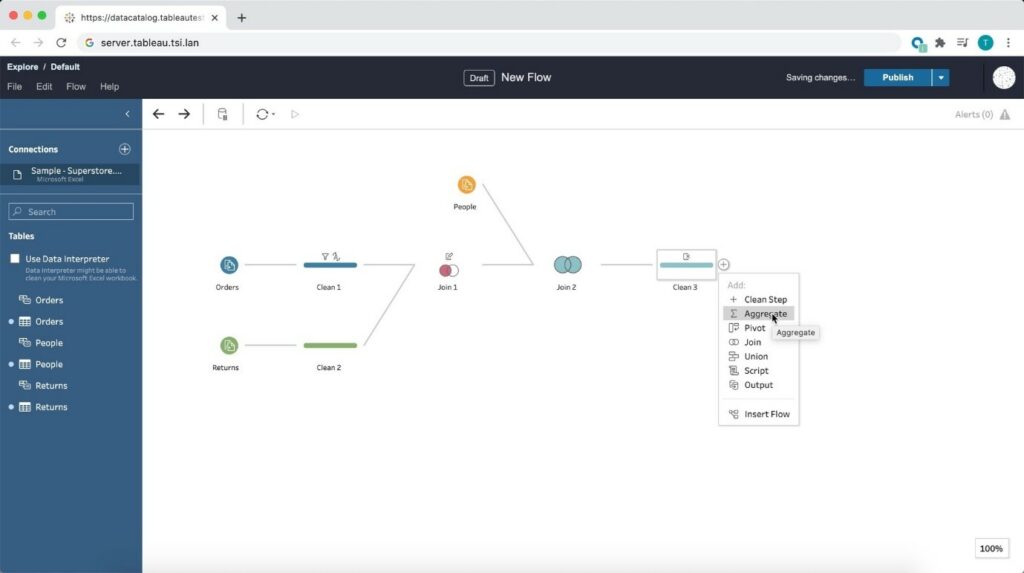
Prepare the data for visualizations from anywhere using a browser! Starting from 2020.4, Tableau is bringing the data prep process into one integrated platform on the web. Now I can easily prepare and manage prep flows from anywhere using a browser.
Tableau Prep
Tableau Prep Builder in the Browser
Prepare the data for visualizations from anywhere using a browser! Starting from 2020.4, Tableau is bringing the data prep process into one integrated platform on the web. Now I can easily prepare and manage prep flows from anywhere using a browser.
 Conclusion
Tableau is progressively evolving as a single platform for data preparations, visualization, and collaboration with every update and version release.
Author : Firdous Maqbool
Images Courtesy : Tableau
Conclusion
Tableau is progressively evolving as a single platform for data preparations, visualization, and collaboration with every update and version release.
Author : Firdous Maqbool
Images Courtesy : Tableau
So, whenever I open the workbook or the extract is refreshed, Tableau displays the unique values within the range specified, giving more control over the parameter values displayed.
Multiple Marks Layer Support for Maps
This is an exceptional feature to bring multiple spatial layers and context together to better understand and analyze geospatial data and map views. I will be able to include multiple marks layers from a data source to map visualizations and enhance the geospatial analysis. I can present more context in a single map view and perform further analysis with this feature.
Block Comments in Calculations
Block comments is a simple yet one of the most useful features for me, which Tableau has announced in 2020.4. I often used to add comments in complex calculations for easy understanding in future references. Earlier, only single-line comments were possible, limiting the description I could add. But from now on, I can add comments of any length to calculation windows with block comments by simply starting the comment with /* and ending with */.
What makes it unique is that the new multi-line block comment feature is consistent with other popular programming languages. This feature is an example of Tableau’s on-going effort to provide its customers with an intuitive user experience.
Tableau Server
Web Authoring Enhancements
Starting from Tableau 2020.4, it is possible to author dashboards from the browser just like how we design it in Tableau Desktop. With this web authoring enhancements, I can include Highlight actions, Format Mark Labels, apply filters to worksheets, create fixed sets, and even create extract in my workbooks from the browser itself. I no longer have to make changes from Tableau Desktop and publish it to the server. I can directly do it from the browser itself.
Offline Map Support for Tableau Server
Rendering dashboards with maps is now faster compared to previous versions. Now, I can create maps using the offline map style in web authoring, ensuring the performance of map views in Tableau Server. Offline map support is a great deal for organizations with strict internet access restrictions, assuring that map view access to all its users.
Tableau Server Management (TSM) Improvements
Tableau Server Administration activities like installation, upgrade and backup are now easy like never before. I can retry installation or upgrade from the last checkpoint in case of an unexpected issue or error during installation or upgrade, saving my efforts to obliterate tableau server.
Backups can be performed twice as fast as previous versions, and I can monitor the progress with the new progress bar giving visibility into what step the backup is on and how much time is remaining.
Backups can also be scheduled using TSM command starting from 2020.4 and that is awesome. I no longer need to prepare batch script and depend on the windows task scheduler to schedule the backups on regular intervals; instead, I can schedule it with just a single command.
Multiple Key Activation on Tableau Server Prior to TSM Initialization
During Tableau Server installation, it is now possible to activate multiple license keys prior to TSM initialization. I will be able to save a lot of time by eliminating the need to restart after the installation is completed to activate multiple licenses and experience a smoother installation.
Analytics Extension for Tableau Online
The power of the Analytics extension is now unlocked in Tableau Online too. The feature was already available in Tableau Server, and it helped us dynamically perform advanced analysis with models and functions in R, Python and other platforms.
Analytics extension in Tableau Online significantly enhances the scope of using Advanced Analytics by the common users.
Merge Duplicate External Assets
Earlier, the Database or Table with similar names used to appear as multiple assets within Tableau Catalog. But, the new feature helps me to merge those multiple assets into a single one. I can manage assets easily and keep an organized view of External assets by merging the common ones.
Tableau Prep
Tableau Prep Builder in the Browser
Prepare the data for visualizations from anywhere using a browser! Starting from 2020.4, Tableau is bringing the data prep process into one integrated platform on the web. Now I can easily prepare and manage prep flows from anywhere using a browser.
Conclusion
Tableau is progressively evolving as a single platform for data preparations, visualization, and collaboration with every update and version release.
Author : Firdous Maqbool
Images Courtesy : Tableau