How AI Decision-Making is Improving Enterprise Outcomes
Blog
Share 
Classify your Data to Guarantee Data Governance(Infographics)
 27 December 2022
  Sumi S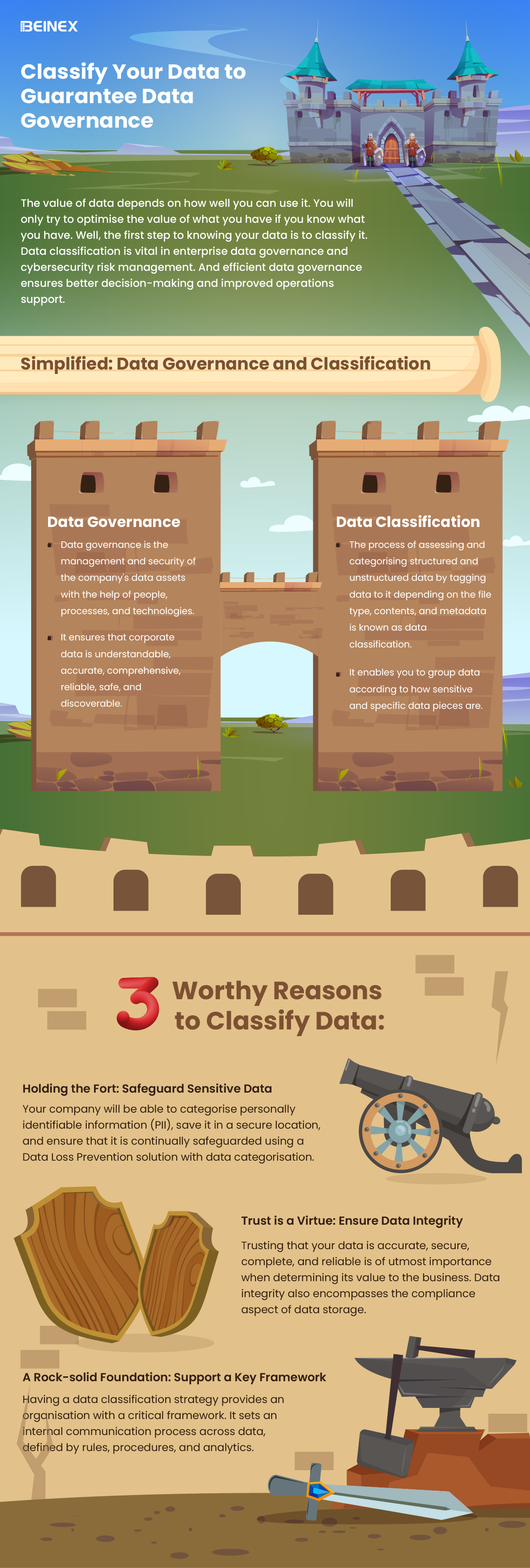
-
Related Articles

The Agentic-AI-First Global Capability Centers: From Decision Support to Decision Execution
Fewer than 10% of enterprises have successfully scaled agentic AI; yet Global Capability Centers (GCCs) may be the one structural environment built to change that. According to McKinsey, nearly two-thirds of enterprises have already experimented with agentic AI, but the gap between experimentation and scale remains wide.
Time-series Analysis in Tableau and 6 Real-world Success Stories
What is Time Series Analysis?
Time series analysis involves examining data that changes over time or where time is a variable in the outcomes. Time isn't just a data point; it's the primary axis on which the data is based.
The main difference with time series analysis is that data is collected at regular time intervals. This helps identify patterns in the data, forming trends, cycles, or seasonal variations. With a consistent time frame of historical data, time series forecasting becomes a valuable tool for predicting future data. Time's crucial role as a variable in data across industries makes time series analysis widely applicable. Explore a few examples outlined below.
6 Real-world Examples of Time Series Analysis in Various Industries
Example 1: Health Authority Enhances Patient Care
Problem: Inefficient resource use and rising costs of care and operations over time.
Solution: Utilizing data analytics, a prominent health authority conducted a comprehensive analysis of patient data. Examining historical data on patient stays, treatments, and conditions, they identified optimal times for administering medication, resulting in reduced average length of stay and cost savings for both patients and the system.
Insight: Time series analysis in healthcare extends beyond patient care to chronic disease research and epidemic-scale studies. Tracking chronic diseases over time and analyzing patient data using time series methods contribute to advancements in the field.
Example 2: Retail Giant Identifies Sales Opportunities
Problem: Slow data analysis affecting decision-making days before events.
Solution: A leading retail giant's front-office team integrated all data sources to gain a comprehensive view. Implementing time series analysis dashboards, they swiftly identified sales opportunities by forecasting against seasonal trends. Proactive measures were taken to increase ticket sales for upcoming events based on real-time insights.
Insight: Time series analysis aids retail giants in making data-driven decisions, predicting consumer trends, and strategizing marketing efforts, ensuring maximum impact.
Example 3: Manufacturing Company Improves Forecasting Accuracy
Problem: Inaccurate and time-consuming operations, manufacturing, and sales forecasting.
Solution: A manufacturing company revamped its forecasting process using time series analysis and modeling. By leveraging better data and faster analysis, they reduced analysis time from one day to one hour. Accurate forecasts in supply chain and manufacturing processes led to significant cost reductions in inventory, supply chain, labor, and capital equipment.
Insight: Time series analysis proves invaluable in optimizing forecasting models, enhancing accuracy, and streamlining operations in manufacturing.
Example 4: Marketing Analytics Scaling for Media Clients
Problem: Evolving marketing technologies making it challenging to quickly analyze information for media clients.
Solution: An analytics firm centralizes over 100 data sources using Tableau, allowing quick data retrieval and the creation of custom dashboards. Time series analysis aids in media forecasting, enabling the firm to develop insightful "what if" analyses. This empowers clients to make informed decisions about marketing investments.
Insight: Time series analysis combined with data centralization is crucial for scaling marketing analytics, providing clients with actionable insights.
Example 5: Streamlining IT Costs Through Self-Service Analytics
Problem: Business decisions based on static reports, consuming time and resources.
Solution: A retail group enables department staff with self-service analytics in Tableau, reducing IT costs by 20%. Time series analysis is applied for accurate forecasting of retail and IT trends, optimizing product orders and resource allocation.
Insight: Time series analysis aids in accurate forecasting for retail and IT trends, optimizing resource allocation, and reducing IT costs.
Example 6: Innovative Use of Data Analytics in Auditing Processes
Problem: Traditional audits were time-consuming and lacked value addition.
Solution: An organization in the energy sector used Tableau to analyze a year's worth of data, uncovering trends in financial processes. This data-driven approach revolutionized their auditing processes, providing deeper insights into the financial health of the organization.
Insight: Time series analysis proves instrumental in data-driven audits, providing a comprehensive view of historical data and uncovering trends for better decision-making.
These real-world examples showcase the versatility and impact of time series analysis across different industries, emphasizing its crucial role in data-driven decision-making and business optimization.

BI Tools: Decision-making is Now at Your Fingertips!
Here is a list of a few popular business intelligence tools companies use to gain insights:
1.Sisense: Leading Cloud Analytics Platform
Sisense is one of those data analytics and business intelligence tools known for its efficiency and easy-to-use quality. It enables anyone within an organisation to manage massive and intricate datasets and analyse and visualise data without any outsourcing. It also combines data from various sources, such as Adwords, Google Analytics, and Salesforce. The in-chip technology helps it to process data faster than any other tool. Gartner, G2, and Dresner have recognised Sisense as a leading cloud analytics platform.
2.SAP Business Intelligence: Price to the Upside
SAP Business Intelligence offers advanced analytics solutions such as machine learning, BI predictive analytics, and planning and analysis. This enterprise-level client/ server system application provides data visualisation and analytics applications, reporting and analysis, mobile analytics, and office integration.
The platform focuses heavily on Customer Experience (CX) and CRM, digital supply chain, ERP, etc. What's particularly appealing about this platform is the self-service, role-based dashboards, which allow users to create unique dashboards and applications. SAP is a robust software designed for all roles that provide many functionalities on a single platform. However, the product's complexity raises the price, so be equipped for it.
3.Datapine: Accessible to non-technical users
Datapine is a comprehensive business intelligence platform that makes the intricate process of data analytics accessible to non-technical users. Datapine's solution allows data analysts and business users to blend different data sources, perform advanced data analysis, build interactive business dashboards, and create actionable business insights by adopting a comprehensive self-service analytics approach.
4.Dundas BI: Access Multiple Data Sources in Real Time
Dundas BI is a browser-based business intelligence tool that enables users to access multiple data sources in real-time. It offers excellent visualisations in the form of tables, graphs, and charts that can be personalised and viewed on mobile devices and desktop computers. Users can easily create reports and extract specific performance metrics for analysis. Dundas aids all types of businesses and industries.
5.MicroStrategy: Fast Dashboarding in Action
MicroStrategy is a business intelligence tool for enterprises that provides powerful and fast dashboarding and data analytics, cloud solutions, and hyperintelligence. Users can use this solution to identify trends, and new possibilities, increase productivity, etc. It can be accessed via desktop or mobile and can be connected to one or more sources.
6.Yellowfin BI: No-co-Low-co Approach
Yellowfin BI is a business intelligence and analytics platform that combines visualisation, machine learning, and collaboration. It can quickly sort through massive amounts of data using intuitive filtering, and it is accessible from anywhere. This BI tool takes dashboards and visualisations to the next level by utilising a no-code/low code development environment.
7.Qlik Sense: Search & Conversational Analytics
A product of Qlik, QlikSense is a complete data analytics platform and business intelligence tool. QlikSense can be accessed from any device at any time. The user interface of QlikSense is optimised for touchscreen, which makes it a prevalent BI tool. It offers a one-of-a-kind associative analytics engine, sophisticated AI and a high-performance cloud platform, making it more attractive. An exciting feature of this platform is its Search & Conversational Analytics, enabling a faster and easier way to ask questions and discover new insights through natural language.
8.Zoho Analytics: Blend and Merge Data
Zoho Analytics is an excellent BI tool for detailed reporting and data analysis. It supports automatic data syncing and can be scheduled regularly. It quickly creates a connector and formulates meaningful reports by blending and merging data from various sources using the integration APIs. It helps to quickly identify the essential details by creating ersonalized reports and dashboards with an easy editor. It also includes a distinct commenting section in the sharing options, ideal for collaboration.
9.Microsoft Power BI: Identify Trends in Real Time
Microsoft Power BI is a web-based tool that is one of the best for data visualisation. It enables users to identify trends in real-time and includes brand new connectors that allow businesses to step up marketing campaigns. Microsoft Power BI is accessible virtually from any location as it is web-based. This tool is designed to integrate apps and deliver reports in real-time dashboards.
10.Looker: Ideal for SMEs
Looker, a data discovery app, is another business intelligence tool to watch for! This unique platform is now part of Google Cloud and integrates with any SQL database or warehouse and is ideal for startups, midsize businesses, and enterprise-grade businesses. This tool's advantages include its ease of use, useful visualisations, powerful collaboration features such as easy integration with apps, flexible sharing of data and reports via email or USL, and a dependable support system.
11.Clear Analytics: Just Need Essential Excel Skills to Use
Clear Analytics is an easy-to-use Excel-based software that can be utilised even by employees with just the essential Excel skills. It is a self-service Business Intelligence system with BI features like data creation, automation, analysis, and visualisation. Clear Analytics also functions with Microsoft Power BI, cleaning and modelling various datasets with Power Query and Power Pivot.
12.Tableau: Needs No Introduction
Tableau is a powerful BI tool that specialises in data discovery and visualisation. The software allows to quickly analyse, visualise, and share data without IT intervention. Tableau works with various data sources, including Microsoft Excel, Oracle, MS SQL, Google Analytics, and SalesForce. Users will have access to well-designed, user-friendly dashboards. Tableau also provides several products, such as Tableau Desktop (for anyone) and Tableau Server (analytics for organisations), both of which can be run locally, as well as Tableau Online (hosted analytics for organisations) and others.
13.Oracle BI: Proactive Intelligence Power
Oracle BI is a business intelligence technology and application portfolio for enterprises. This technology provides nearly all business intelligence capabilities, including dashboards, proactive intelligence, ad hoc reporting, etc. Oracle is a reliable choice ideal for businesses that need to analyse large amounts of data from Oracle and non-Oracle sources. Data archiving, versioning, a self-service portal, and alerts/notifications are also essential features.
14.Domo: Predictive Analysis on the Go
Domo is a fully cloud-based business intelligence platform that integrates spreadsheets, databases, and social media data. The platform provides visibility and analysis at the micro and macro levels, including predictive analysis powered by Mr Roboto, their AI engine. From cash balances and lists of your best-selling products by region to marketing ROI calculations for each channel, Domo has got you covered.
15.IBM Cognos Analytics: Hidden Patterns in Data Discovered
Cognos Analytics is a business intelligence platform powered by AI that supports the entire analytics cycle. It helps to visualise, analyse, and share actionable insights, from data discovery to data operationalisation. The data is interpreted and presented in a visually appealing report, and AI allows the discovery of hidden patterns in the data.
The use of advanced business intelligence reporting tools makes tasks simple and manageable. Business intelligence platforms are subject to change based on business needs and the advancement of technologies. Still, they have proven to be a great way to accomplish strategic goals effectively and efficiently.

LOD (Level of Detail) Expressions in Tableau
Types of LOD Expressions in Tableau
- FIXED
- INCLUDE
- EXCLUDE
There are three types of LOD expressions in Tableau:
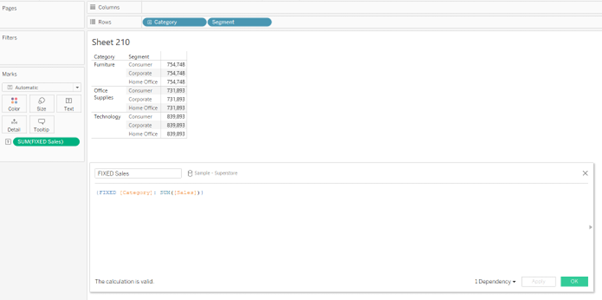
FIXED: The FIXED LOD expression calculates values based on specific dimensions, regardless of the dimensions present in the visualisation. It creates a virtual level of detail for the calculation. For example, {FIXED [Category]: SUM([Sales])} would calculate the total sales for each category, irrespective of other dimensions used in the visualisation.
INCLUDE: The INCLUDE LOD expression calculates values at the specified level while incorporating the dimension(s) used in the visualisation. It allows you to aggregate data for a specific dimension while considering other dimensions in the visualisation. For example, {INCLUDE [Region]: AVG([Profit])} would calculate the average profit for each region, considering all other dimensions in the visualisation.

EXCLUDE: The EXCLUDE LOD expression calculates values at the specified level while excluding the dimension(s) used in the visualisation. It enables you to aggregate data for a specific dimension while ignoring other dimensions in the visualisation. For example, {EXCLUDE [Product]: SUM([Revenue])} would calculate the total revenue for each product, excluding any other dimensions present.
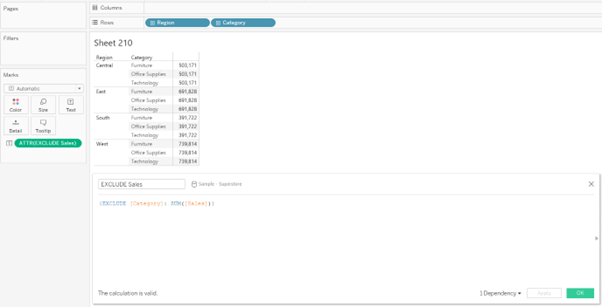
FIXED LOD Tableau Function
In Tableau, the FIXED Level of Detail (LOD) is the widely used function that allows you to perform calculations using specific dimensions, irrespective of the dimensions present in the visualisation. It creates a virtual level of detail for the calculation, providing precise control over your analysis's granularity.
Steps to Create a FIXED Level of Detail Tableau Function
In Tableau, the FIXED Level of Detail (LOD) function allows you to perform calculations using specific dimensions, irrespective of the dimensions present in the visualisation. It creates a virtual level of detail for the calculation, providing precise control over your analysis's granularity.
The steps to create the FIXED LOD function are as follows:
- • Create a calculated field. (This can be done by clicking on the drop-down next to the “Search” bar in the dimension pane or by selecting “Analysis” and selecting “Create Calculated Field”)
- • Type in the FIXED LOD Formula in the calculated field and drop the field into the view.
- • We can obtain the syntax of the FIXED expressions when we search for “Aggregate” functions in the calculated field.

Example
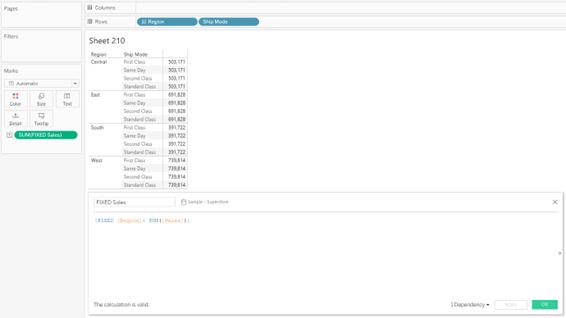
The following FIXED level of detail expression computes the sum of sales per region:
Beinex+ Tableau Offerings
Beinex has 100 years of combined experience in Tableau and is led by professionals who have successfully delivered Tableau projects in the region for large private and public sector organisations. Our team of Tableau-certified consultants are real-life Tableau business users passionate about Tableau and providing a world-class experience. In addition to providing sustainable analytics solutions, Beinex will help organisations to build superior data visual analytics capabilities internally through our bespoke training programs.

Revolutionize Your Data Science with Snowflake's ML Platform
Snowflake's ML platform empowers data scientists to build, train, and deploy sophisticated models with unprecedented ease and efficiency. By seamlessly integrating with your existing data infrastructure, Snowflake eliminates the need for data movement and ETL processes, accelerating time-to-insight. Advanced model analysis tools provide deep insights into model performance, enabling data scientists to identify areas for improvement and optimize models for optimal results. Granular model customization and efficient workflow automation streamline the entire ML lifecycle, empowering data scientists to focus on innovation rather than mundane tasks.
ML Model Management
• Accelerated Development: Streamline model development with intuitive tools for versioning, tracking, and deployment. • Advanced Analysis: Gain deep insights into model performance through comprehensive metrics and visualizations. • Seamless Integration: Leverage Snowflake's power within your existing data infrastructure. • Granular Customization: Fine-tune models for optimal performance. • Efficient Automation: Reduce manual tasks and accelerate time-to-value.
Check out the Snowflake MLOps: https://app.snowflake.com/marketplace/listing/GZT8Z14W95X/beinex-consulting-llc-mlops


Beinex, as a premier Snowflake partner, is committed to helping organizations unlock the full potential of their data. By leveraging Snowflake's ML capabilities, Beinex offers a comprehensive suite of services, including data engineering, model development, and deployment. Our team of experienced data scientists and engineers can help you build robust and scalable ML solutions that drive business value.