How AI Decision-Making is Improving Enterprise Outcomes
Blog
Share 
Beinex Wins 2021 AWS Rising Star Consulting Partner of the Year – MENA Award
 1 December 2021
  Rakesh Neelakandan
 The AWS Partner Awards recognise a wide range of Partners, whose business models have embraced specialisation and collaboration over the past year. The AWS Partner Awards also recognise AWS Partners whose business models continue to evolve and thrive on the AWS Cloud as they work with customers to conceive, build and migrate cloud-native solutions on AWS.
Receiving the Award, Indumon Das, the Founder and Managing Director of Beinex, remarked, "We leverage the capabilities of AWS and combine that with the Analytics Consulting power of Beinex to bring unmatched success to our customers. We look forward to the launch of the AWS data centers in the UAE in the first half of 2022. The launch will have a big impact on the growth and acceleration of cloud adoption in the Middle East and we are excited to support organizations to take advantage of what it has to offer."
 The AWS Partner Network (APN) is the global community of businesses using AWS to build solutions and services for customers. AWS helps partners build, market, and sell their offerings by providing valuable business, marketing, and technical support on top of our proven, global, and secure infrastructure. AWS partners are uniquely positioned to help customers take full advantage of all that AWS has to offer and accelerate their journey to the cloud. AWS has millions of active customers and a dynamic community of over 100,000 partners globally.
"AWS Partners add value to customers across a wide range of industries around the world and are critical to their success. We are pleased to recognise a variety of partners through the APN Partner Awards EMEA 2021. I look forward to working together to a great 2022," said Antonio Alonzo Lopez, EMEA Director Partner Success at AWS.
About Beinex
Beinex, Dubai, is a multinational firm exploring the endless possibilities of data for Cloud, Analytics, Artificial Intelligence, Machine Learning, and Automation.
The AWS Partner Network (APN) is the global community of businesses using AWS to build solutions and services for customers. AWS helps partners build, market, and sell their offerings by providing valuable business, marketing, and technical support on top of our proven, global, and secure infrastructure. AWS partners are uniquely positioned to help customers take full advantage of all that AWS has to offer and accelerate their journey to the cloud. AWS has millions of active customers and a dynamic community of over 100,000 partners globally.
"AWS Partners add value to customers across a wide range of industries around the world and are critical to their success. We are pleased to recognise a variety of partners through the APN Partner Awards EMEA 2021. I look forward to working together to a great 2022," said Antonio Alonzo Lopez, EMEA Director Partner Success at AWS.
About Beinex
Beinex, Dubai, is a multinational firm exploring the endless possibilities of data for Cloud, Analytics, Artificial Intelligence, Machine Learning, and Automation.
Beinex Consulting has won an Amazon Web Services 2021 Rising Star Consulting Partner of the Year – in the Middle East and North Africa. AWS Partner Awards recognise leaders playing a key role in helping customers drive innovation and build solutions on the AWS Cloud.
Related Articles

Tableau with AWS: Business Intelligence and Data Analysis of a Higher Order
The cloud-based approach delivers:
1. Better performance2. More flexibility
3. Enhanced cost savings
4. Improved security
5. Facilitates excellent teamwork opportunities
Specifically, Tableau on AWS lets you process data more quickly and scale up or down resources as needed. Plus, you can access a range of AWS services to optimise your Tableau setup. AWS also provides tools to help you save money and a secure environment to protect against cyber threats and data breaches. Ultimately, Tableau on AWS enables teams to collaborate more efficiently, taking their data analysis and business intelligence to the next level.
There are several other benefits to using Tableau on AWS beyond scalability, cost, and security. Here are some additional insights:
1. Faster Deployment: With Tableau on AWS, you can deploy new instances of Tableau in minutes rather than days or weeks as you would with on-premises infrastructure. This is because AWS has pre-configured templates for Tableau that make it easy to spin up new instances quickly. 2. Better Performance: Tableau on AWS is designed to exploit AWS's high-performance infrastructure. Tableau runs faster and more efficiently on AWS than on traditional on-premises infrastructure. 3. Integration with Other AWS Services: Tableau on AWS integrates seamlessly with other AWS services, such as Amazon S3 for data storage, Amazon Redshift for data warehousing, and Amazon EMR for big data processing. This makes building a complete analytics solution easier by using Tableau and other AWS services. 4. Improved Disaster Recovery: With Tableau on AWS, disaster recovery is built. AWS provides automated backup and recovery services to quickly recover your Tableau environment and data if there is a disaster or outage. 5. Global Reach: AWS has data centres worldwide, meaning you can deploy Tableau in the region closest to your users for better performance. This is especially important for organisations with a global presence.Overall, Tableau on AWS offers several advantages over on-premises infrastructure. By leveraging AWS's scalability, cost-effectiveness, and security, organisations can run Tableau more efficiently and with better performance. Additionally, AWS's integration with other services and global reach make it an attractive option for organisations looking to build a comprehensive analytics solution.
Tableau Server on AWS deployment options
The following list outlines the available options for deploying Tableau Server on AWS:
1. Self-Deployment on EC2 Instance: This option involves users provisioning and configuring an EC2 instance and deploying Tableau Server. This provides the most significant control over the deployment process and can be customised to specific needs. However, it also requires more expertise and effort from the user.
2. Quick Start Deployment: The Tableau Server on AWS Quick Start provides an automated deployment process using AWS CloudFormation templates. This simplifies the deployment process and ensures that best practices are followed. However, it may be less customisable than self-deployment.
3. AWS Marketplace Deployment: Tableau Server is also available on the AWS Marketplace with pre-built AWS CloudFormation templates. This provides a quick and easy way to deploy Tableau Server, with different pricing and instance options public. However, users may have less control over the deployment process than over self-deployment.
Users should evaluate their specific needs and expertise when selecting a deployment option. Self-deployment provides the most significant control and customisation, while Quick Start and AWS Marketplace deployment offer simplified and quick deployment options.
DATA MONETIZATION USING SNOWFLAKE
Most of the companies operating today are data-driven as they have started identifying the value of data. The value of data and data marketplaces are evolving with the growth of big data and data requirements of companies.
Understand your Data Offerings - What types of data or data services are you producing that would be valuable to other organizations?
Decide How to Price Data Products - What should be the pricing strategy followed, and how easy would it be to put into action?
Know About Data Sharing Methods - Which distribution channel should be selected for data sharing that adheres to GDPR and data governance policies?
Once you have decided on the data offerings and priced the data products, the key to successfully monetize your data is by sharing the data with the clients/ prospects. The customers and business partners would be eager to get data from you, especially if you can make the process easy and secure. Traditional data sharing technologies often use FTP, Cloud Storage, or API. These methods generally do have few disadvantages.
Data Marketplace
In simple terms, these are online marketplaces where we can buy and sell data of any sort. Data marketplaces offer several kinds of data from a wide range of different data sources. These data include Business Intelligence, demographics, research, and marketing data. Data types are structured and offered to clients by data providers. Providing buyers with more choice of high-quality data generates more engagement and encourages fair pricing between the sellers. Every company has the potential to earn revenue from the information it generates. In a recent study of more than 400 organizations, only 1 in 12 were monetizing their data to its fullest extent. Modern data monetization strategies can help you open brand new revenue streams. There are 3 key steps to monetize your data and drive new revenue streams.- Storage costs for both vendors and buyers
- ETL costs and effort
- Security vulnerabilities
- Service and support costs
- Latency and potential errors leading to poor customer experience
Snowflake & Data Monetization
Snowflake is an analytic data warehouse provided as Software-as-a-Service (SaaS). It provides a data warehouse that is faster, easier to use, and far more flexible than traditional data warehouse offerings. Snowflake allows companies to easily publish a variety of data sets that become immediately available for use or purchase for clients. Snowflake Data Exchange, a modern data sharing method, reduces the time to market and significantly influences customer success. Data Exchange is your own data hub for securely collaborating around data between a selected group of members that you invite. It enables providers to publish data that can then be discovered by consumers. The benefits of Snowflake Data Exchange over Traditional Data sharing Methods are:- Secure Data Sharing
- Exchange data within your organization between different business units. Collaborate with external parties such as vendors, suppliers, partners, and customers.
- Reduce Time to Market
- Break down data silos and reduce time to market.
- Interchange data with third-party vendors to help augment internal datasets.
- Break down data silos by scaling multiple data sets from different sources within your organization.
- Find and consume data on other Data Exchanges to get business insights.
- Speed of Processing
- Snowflake’s multi-cluster shared data architecture is designed to process enormous quantities of data with maximum speed and efficiency.
- All data processing horsepower within Snowflake is performed by one or more clusters of computing resources.
- Data is cached locally within computing resources, along with the caching of query results, to improve the performance of future queries.
- Cost Benefits
- The costs for sharing data with Snowflake are minimal and straightforward.
- Simply pay for the data you store, i.e., you only pay for what you use.
- Reduce extract, transform, load (ETL), and data pipeline maintenance costs.
- Control and Govern Access
- Managing membership
- Granting and revoking access to data through standard and personalized listings
- Auditing data usage
- Applying security controls to your data
Real-life Implementation
A famous telecom organization in Europe was sitting on large silos of data that they could not monetize properly because of the complex architecture of the data warehouse operations and data security challenges involved in the data sharing process. The company has Customer Daily Records (CDR) of its subscribers that contains location data of the users. This data can be used to identify the places people visit and help with building consumer profiles. The gathered data allows advertisers to target messages to specific users while tracking whether they visited a retail store after seeing a mobile ad. This helps them plan personalized marketing strategies and business goals based on demography profiles for targeted users. However, due to the data privacy policies of the European Union like GDPR, organizations were struggling to share data with their potential clients. The GDPR policy makes it mandatory for organizations to ensure that the customer's personal information is not shared with third parties without the customer's consent and involves hefty fines and penalties for the data breach. Even the data sharing process was a source of concern as the data was often shared in text/excel files because of the different database architecture of the clients. With growing data privacy concerns and challenges in creating datasets adhering to the GDPR policies, organizations are strictly asked not to share customer data with third parties. The current system architecture forced the organizations to employ a large number of resources to extract the data from the database system and ensure that customer data is not compromised at any point. The companies were evaluating the possibilities of a potential system that would help them monetize the data they currently hold. The introduction of Snowflake into the organizational architecture solved the data monetization problem and improved the overall data culture in the organization. The unique architecture of Snowflake separates the data storage and computation layer to enhance organizational productivity. The pay as you use policy of the Snowflake and the zero maintenance of infrastructure helped the organization phase out the complex on-premise solutions required to handle the huge data volume. Easy connectivity with the existing solutions used for data analytics practice and on the fly scalability of the computation layer helped the organization increase productivity. It also paves the way for seamless integration to the organization's architecture. The Data Marketplace of Snowflake ensured secure data sharing with third parties adhering to the GDPR policies. The in-built data security policies and features minimize the role of organizations to provide data privacy as well. This enables the organizations to make only those data points visible to end-users that they seemed apt for sharing. It also ensures that the data always resides in the organizational Snowflake database rather than on third-party databases. Moreover, the organizations could reach out to thousands of potential clients through Snowflake Data Marketplace without relying on any intermediatory sources. All this ultimately brings out the scope of using the existing data to drive revenue to the organization and highlights the importance of having a complete environment like Snowflake to capture, preserve, access, and transform data. Authors: Rahul Vijayan, Firdous Maqbool
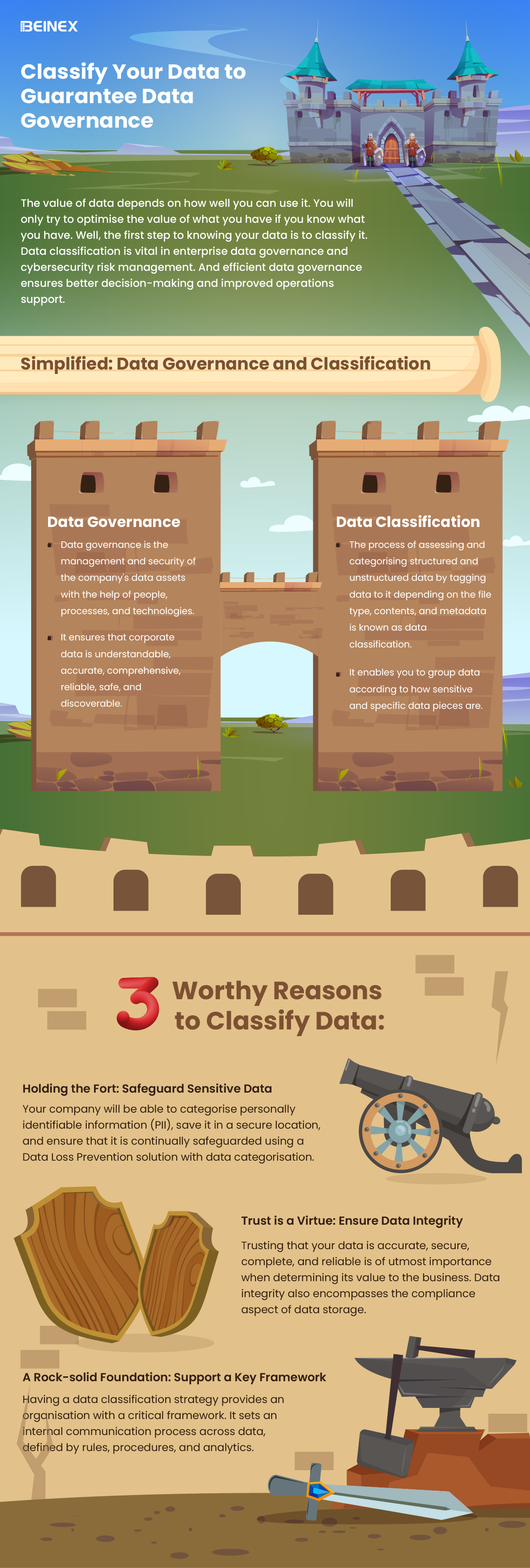
Classify your Data to Guarantee Data Governance(Infographics)

Data Ethics: Principles, Characteristics and Regulatory Aspects
The Principles of Data Ethics
And there are five of these principles:
- Ownership: The individual, himself/ herself/ themself, possesses the ownership of the data related to the person. A firm cannot take that data without the consent of the person lest it be deemed stealing.
- Transparency: The individual, aka data subject, has the right to know how a particular enterprise intends to collect, store and utilise the data concerned with the person.
- Privacy: Any bit of Personally Identifiable Information (PII) should not be made publicly available unless otherwise consented to. This includes the name, address, phone number etc.
- Intention: If the firm is collecting data on the individuals to fulfill unstated malicious intentions, it goes against the spirit of ethics.
- Outcome: If the collected data, despite the right intentions, come to have an unwanted outcome vis-a-vis the owner of the data, thanks to an algorithmic bias or any other reason, then the data ethics stand violated.
Characteristics of Data Ethics
Largely there are four characteristics that portray data ethics.
- Vouching for and ensuring data security and protecting customer info: When you handle customer data, as an enterprise, you are bound to protect it, prevent breaches, and ensure data never gets compromised. This is easier said than done. IBM India, in a report, outlines that “data breach average cost increased 2.6% from USD 4.24 million in 2021 to USD 4.35 million in 2022.”
- Offering clear benefits: It is a kind of social contract clause. You give your consumers greater speed, convenience, value and savings, and they (users, patients, clients, employees, customers and partners) will not be hesitant to part with their data as long as they are guaranteed and followed on the guarantee of data in safe hands not prone to misuse.
- Provision for consumer agency: Look at this scenario from a McKinsey report: “If a customer receives an offer and says, ‘I think I got this because of how you’re using my data, and that makes me uncomfortable. I don’t think I ever agreed to this,’ another company might say, ‘On page 41, down in the footnote in the four-point font, you did actually agree to this.’ Here, the customer has no agency. Worse than that, he feels he has been duped by the company. Game over! Remember, your reputation as an enterprise and the trust that you painstakingly cultivated over the years with customers can vanish in as much time as it takes for the customer to hit the post button on social media.
- Doing what you promise: The company should do what it has promised it will do or risk credibility and reputation.
In short, companies that adhere to the principles of fairness, privacy, transparency, and accountability in data matters can earn and retain the trust of their customers or clients. Trust is one power of attorney. It empowers a firm to not only ensure better customer service and experience by exercising the power of data it has been granted but also preserve and enhance its reputation.
Regulations and Data Ethics
Regulatory requirements and ethical obligations are mutually related and complementing. The European Union’s General Data Protection Regulation (GDPR) went into effect (only) in May 2018. But the Internet and data collection using the Internet predate it. Does it mean that companies could have done whatever they wanted to do with data prior to GDPR? Negative.
Ethics is your enterprise’s shadow. It is born with it as its twin. Regulation or law is the caretaker that comes afterwards.
“The bar here is not regulation. The bar here is setting an expectation with consumers and then meeting that expectation—and doing it in a way that’s additive to your brand,” an expert noted.
No wonder you are obliged to build company-specific data usage rules rather than await the regulators and legislators to chip in with guidelines and laws which could be too late or sometimes too little. Ascertain what are the no-go areas; areas where you cannot take the data to.
Once it is done, it is important that you communicate the data values internally and externally so that everyone is on the same page. You also need to set up an agency (e.g. Data Ethics Board) and institutionalise and propagate the values that you designed. C-suite should also be made a part of this ethics board or should be kept posted on the developments in the board.

Measuring Data Culture Maturity: How to Evaluate and Maximize the Benefits of a Mature Data Culture
What is the Data Culture Maturity Model?
The Data Culture Maturity Model by Alation is a framework designed to guide organizations through various levels of data proficiency. It categorizes data culture maturity into distinct stages, allowing organizations to understand their current position, set achievable goals, and implement strategies to progress further. This model addresses data discovery, data governance, data literacy, and data leadership elements that collectively foster a robust data culture. Each phase in the model encourages organizations to embed data at the core of their operations, transforming it into a valuable resource for decision-making and competitive advantage.
Why is Data Culture Maturity Important?
Data culture maturity is crucial for leaders who recognize that a data-driven approach can be a differentiator in today's competitive market. For CDOs, CIOs, BI professionals, and business leaders, fostering a mature data culture means establishing a strong foundation for data-enabled innovation and agile decision-making. As data culture evolves, organizations can explore the benefits of data self-service, increase trust in data, and leverage data literacy to make decisions backed by concrete insights.
Empowering a Data Culture: Key Tenets
The Alation Data Culture Maturity Model comprises four core tenets that organizations should focus on to elevate their data culture: Data Search & Discovery, Data Governance, Data Literacy, and Data Leadership. Let’s explore each tenet and its role in building a mature data culture.
1. Data Search & Discovery
Data Search & Discovery is the foundation of any data culture. It focuses on enabling users to quickly and easily find, understand, and trust the data they need. Organizations with mature data search capabilities invest in technologies like data catalogs, which streamline data search through features like intuitive search, contextual data, and cross-platform integration. These tools reduce the time users spend searching for data, empowering analysts to focus on value-added tasks instead of answering repetitive data queries. Alation pioneered the data catalog concept, which has evolved into a comprehensive data intelligence platform. The modern data catalog supports not only data search and discovery but also functions like data governance and cloud migration. These capabilities create a data culture that encourages self-service and fosters a deeper understanding of the data available to all employees. Measuring Value: Data search maturity can be measured by the time saved on data searches, the frequency of data queries, and the volume of self-service analytics. Organizations can leverage these metrics to assess their return on investment (ROI) and the efficiency of their data catalog.2. Data Governance
Data Governance establishes the rules and policies that ensure data is managed responsibly and is readily accessible and secure. In a mature data culture, governance extends beyond compliance, enhancing data search and data literacy. Organizations with strong governance frameworks reduce the risk of regulatory fines, establish data trustworthiness, and improve data quality. Defining Data Governance: Data governance can be seen as the “authority and control” over data assets. This entails organizing policies, procedures, roles, and responsibilities to align with the company’s data goals. Alation emphasizes that governance must go beyond traditional definitions to include active governance, which fosters collaboration, defines common data language, and establishes shared processes. Measuring Value: Effective governance can be measured by the percentage of data assets that meet governance standards, the number of governance-related issues resolved, and regulatory compliance rates. This not only assures data quality but builds trust in data for decision-making.3. Data Literacy
Data Literacy is about ensuring that individuals at all levels can read, work with, analyze, and argue with data. This element focuses on equipping employees with the skills to understand and utilize data effectively, bridging the gap between raw data and actionable insights. Building data literacy involves training, creating a framework for collaboration, and promoting data-driven thinking. Building Data Literacy: Successful data literacy programs generally follow a step-by-step approach, starting with assessments, followed by targeted training, and promoting an internal culture of data use. Organizations can embed literacy initiatives in data catalogs, where employees can access learning resources, engage in discussions, and collaborate with subject-matter experts. Measuring Value: Data literacy maturity can be assessed by monitoring the percentage of catalog contributions from a broad base of users, showing a shift from “gut-based” to data-driven decision-making. Additionally, organizations can track the frequency of cross-departmental data collaborations as an indicator of a well-integrated data culture.4. Data Leadership
Data Leadership is the most vital element, acting as the catalyst that drives data culture maturity forward. Effective data leaders champion data initiatives, implement change management programs, and consistently highlight the connection between data and business outcomes. They focus on aligning data objectives with strategic goals, ensuring that data initiatives generate tangible business value. The Role of Data Leadership: Mature data leaders embed data in strategic planning, empower departments to utilize data in decision-making, and foster a data-driven mindset throughout the organization. They work to make data initiatives visible, promoting metrics and KPIs that reflect the value added by data maturity. Measuring Value: Organizations can measure data leadership through the number of data stewards and subject matter experts identified, the impact of data on key business outcomes, and the frequency of data-driven initiatives across departments. When leadership drives data culture, the organization benefits from enhanced innovation, agility, and competitive advantage.Articulating Business Value Through Data Maturity
One of the primary objectives of the Data Culture Maturity Model is to showcase how advanced data culture drives business outcomes. To demonstrate this, data leaders can tie maturity metrics to specific business cases, such as self-service analytics, regulatory compliance, and data democratization.
Self-Service Analytics
In organizations with high data culture maturity, self-service analytics is a practical application. With accessible data catalogs and robust data literacy programs, employees can independently search, analyze, and interpret data. This capability speeds up decision-making and fosters a sense of ownership in data-driven outcomes. Measuring Success: Key metrics include time saved in data discovery, the reuse of existing data reports, and improved analytics turnaround. Organizations with a mature self-service model also report a higher degree of cross-departmental data sharing, indicating a well-established data culture.Active Data Governance
Active data governance ensures that data is handled in a structured and compliant manner. This framework allows organizations to confidently share data, meet regulatory standards, and promote accountability. Cataloging data assets facilitates governance, giving leaders insight into who accesses data, where it’s used, and how it complies with policies. Measuring Success: Metrics such as compliance rates, the reduction of data-related risks, and the number of governance-compliant assets serve as valuable indicators. Strong governance fosters trust in data, enhancing organizational agility and data-driven decision-making.Cloud Data Migration
Cloud data migration initiatives also benefit from a mature data culture. When data is cataloged and governed effectively, migrating to the cloud becomes a streamlined process. Migrating to cloud-based platforms not only reduces infrastructure costs but enables scalable data access and faster analytics. Measuring Success: Metrics to gauge the success of cloud migration include the speed of migration, the reduction in storage costs, and the increased accessibility of data post-migration. A data-mature organization can better leverage cloud capabilities for innovation and resilience.Conclusion: Tying It All Together
The Alation Data Culture Maturity Model provides a comprehensive framework for organizations looking to elevate their data culture. By focusing on data search & discovery, governance, literacy, and leadership, companies can foster a data-centric environment where data is trusted, accessible, and utilized effectively. Measuring the maturity of these components helps organizations quantify their data culture and demonstrate the business value added at each stage. In partnership with Alation, Beinex delivers comprehensive data governance solutions that enhance discoverability, enforce robust access controls, and streamline data auditing processes. By leveraging Alation's industry-leading data intelligence platform, Beinex helps organizations optimize their data strategies, driving business growth and operational efficiency. Connect with us for the transformation you seek: https://beinex.com/data-governance/