How AI Decision-Making is Improving Enterprise Outcomes
Blog
Share 
Beinex Shines as a Gold-Level Data Science Consulting Firm in the Middle East 2024
 10 December 2024
  Sumi S
 What Sets Us Apart?
Our ranking is based on: • Client & Consultant Reviews: Over 900 client reviews and 2,800+ consultant evaluations. • Industry Expertise: Our deep knowledge of data-driven solutions across sectors. • Reputation & Thought Leadership: Consistent delivery of impactful business solutions. Out of 500+ consulting firms evaluated, only 47 made it to the top, and Beinex stands tall among them.
A Heartfelt Thank You
We owe this milestone to our clients, partners, and team members whose trust and collaboration have been instrumental in our journey. This achievement inspires us to push boundaries and set new benchmarks in Data Science.
About Consultancy-me
Consultancy-me.com is a leading platform for staying updated on the advisory and consulting industry. Their website is dedicated to delivering the latest news and trends across 60+ industries and functional areas within the consultancy sector. As part of the Consultancy.org family, their international network of consulting platforms draws in 4 million visitors per year. Globally, they partner with over 150 leading consulting firms and select companies. The platform serves as a comprehensive resource for professionals interested in consultancy careers, offering insights into job opportunities, graduate schemes, apprenticeships, and internships within the consulting industry.
About Beinex
Beinex is a global firm with businesses on 5 continents specializing in Data, AI, and Digital Transformation. A pioneering enterprise, Beinex has established a powerful presence in the regions it serves by delivering comprehensive solutions to address diverse business challenges in the spheres of Advisory, Technology & Software Development, and Systems Integration. Beinex Consulting caters to a broad spectrum of industries and departments, offering tailored solutions to meet their specific requirements. Beinex excels in a multitude of domains, including Enterprise Data Ecosystem Installation, Data Strategy, Data Roadmap Creation, Technology Roadmap Generation, Data Governance, Data Science Consulting, Data Engineering, Analytics Transformation, Data Monetisation, GRC, as well as other government and business enablement solutions. Feel free to schedule a call with us to explore more about our Data Science services: https://beinex.com/contact-us/
We’re proud that Beinex has earned a prestigious spot at the Gold Level in Consultancy-me.com’s 2024 ranking of Top Data Science Consulting Firms in the Middle East. This recognition reflects our relentless pursuit of innovation and excellence in Data Science, AI, and Digital Transformation services.
Related Articles

Know Your Options Before You Become One da Vinci of Tableau
The Primary Means to Narrate Stories in Tableau
We can represent the visuals using the following three formats on Tableau:
1. Sheets: Spaces where we can build individual visuals are called sheets. A worksheet has a single view in its sidebar, as well as shelves, cards, legends, and the Data and Analytics panes. A workbook is a sheet file structure along the lines of Microsoft Excel. It includes sheets that can function as a worksheet, a dashboard, or even a story
 Source: https://help.tableau.com/current/pro/desktop/en-us/inspectdata_describe.htm
2. Dashboards: Most commonly used reporting format, a dashboard is a layout where sheets are arranged in a meaningful manner. It is a collection of views that helps you to compare a variety of data at the same time. If you have a set of views that should be reviewed every day, then you can create a dashboard that displays all of the views at once rather than navigating to separate worksheets. Think of the efficiency gains that this can bring about.
 Source: https://www.tableau.com/about/blog/2020/5/6-dashboards-tableau-partners-help-you-mitigate-covid-19
3. Story:Sheets or dashboards arranged in a sequence to convey information. A story is a collection of visuals that work together to convey information. Stories can be created to tell a data narrative, provide context, show how decisions affect outcomes, or simply make a compelling case.
 Source: https://help.tableau.com/current/pro/desktop/en-us/stories
Default Charts in Tableau
Through a set of default charts created with Tableau, data sets can be displayed in a comprehensible way. Let's have a look at a few types of charts:
1. Area Chart:An area chart is a line chart with a colour shaded area between the line and the axis. These charts constitute the most common approach to illustrate stacked lines and are often used to represent accumulated totals over time.
 Source: https://help.tableau.com/current/pro/desktop/en-us/qs_area_charts.htm
2. Bar Chart:Place a dimension on the Rows shelf and a measure on the Columns shelf to make a bar chart or vice versa. We may compare numerical data such as integers and percentages using bar charts. Each variable's value is represented by the length of each bar. Bar charts, for example, might demonstrate how much money a small business spends on various expenses.
 Source: https://www.tableau.com/data-insights/reference-library/visual-analytics/charts/bar-charts
3. Box-and-whisker Plots:When demonstrating the distribution of data points across a specified metric, box-and-whisker plots, also known as box plots, are an excellent chart to employ. The ranges within the variables measured are represented in these graphs. These graphics are useful for comparing the distributions of multiple variables.
 Source: https://help.tableau.com/current/pro/desktop/en-us/buildexamples_boxplot.htm
4. Bubble cloud: In bubble clouds, data is displayed in a cluster of circles. Individual bubbles are defined by dimensions, while individual circles are defined by measures. A bubble chart's design allows it to display multiple variables. Individual bubbles represent dimension field values, while measure field values define the size and colour of the bubble. As a result, we can examine a plot with at least three variables, one dimension and two measure fields.
 Source: https://help.tableau.com/current/pro/desktop/en-us/buildexamples_bubbles.htm
5. Bullet Graph:Bullet graphs are a type of bar graph that was created to replace dashboard gauges and metres. When comparing the performance of a major metric to one or more other measures, a bullet graph is beneficial. A bullet graph can help you visualise your objective, the current data set, and past data sets; all in one visualisation if you have a target goal that you need to meet on a regular basis
 Source: https://www.tableau.com/data-insights/reference-library/visual-analytics/charts/bullet-graph
6. Cartogram:Choropleth Maps, also known as Filled Maps, are a powerful tool for studying geographic data, especially for maps with a lot of detail (e.g., US by counties or ZIP codes). They make it simple to detect geographical hotspots and then drill down into these areas using several visualisation options.
 Source: https://www.pluralsight.com/guides/build-filled-maps-in-tableau
7. Click View:The circle view is a useful representation for comparative analysis. It's the same as using the circle marker on a scatter plot. Every mark is in the shape of a circle and can be used for subsequent actions.
 Source:https://interworks.com/blog/ccapitula/2014/10/17/tableau-essentials-chart-types-circle-view/
8. Gantt Chart:Gantt charts are used in project management to depict the length of time between events or activities. As a project management tool, it highlights the interdependencies between activities and illuminates the workflow timeline.
 Source:https://help.tableau.com/current/pro/desktop/en-us/buildexamples_gantt.htm
9. Heat Map:In a heat map, data is displayed along with colours. Using one or more Dimensions members and the Measure value, a heat map can be created. Heat Map helps to compare data by colour. For example, how many products have failed to meet the company's expectations, and how many products have exceeded expectations, and so on.
 Source:https://help.tableau.com/current/pro/desktop/en-us/buildexamples_highlight.htm
10. Histogram:A histogram is a graph that depicts a distribution's form. It divides values for a continuous metric into bins and segregates a set of data points into user-specified ranges. The histogram, which resembles a bar graph in appearance, condenses a data series into an easily interpreted visual by grouping many data points into logical ranges or bins.
 Source: https://help.tableau.com/current/pro/desktop/en-us/buildexamples_histogram.htm
11. Scatter Plot (2D or 3D):Scatter plots are a type of graph that is used to show the correlations between numerical data. They are used to depict the link between three variables by plotting data points on three axes. Each column on the X, Y, and Z axes is represented by a marker, whose position is determined by the values in the columns.
 Source: https://www.dataplusscience.com/TabCharts/scatterplotsize.html
12. Streamgraph:Streamgraph shows how a number value (Y-axis) changes in response to another numeric value (X-axis). It is a sort of stacked area chart. The relative proportions of the entire can be studied using a stream chart.
 Source: https://greatified.com/2018/09/17/how-to-build-a-stream-graph-in-tableau-software/
13. Text Tables:Text tables (also called cross-tabs or pivot tables) are created by placing one dimension on the Rows shelf and another dimension on the Columns shelf. Then, on the Marks card, slide one or more measures to Text to complete the view.
 Source: https://help.tableau.com/current/pro/desktop/en-us/buildexamples_text.htm#:~:text
14. Treemap:Treemaps are used to show data in the form of nested rectangles. Dimensions define the structure of the treemap, while measures define the size or colour of the individual rectangles. It is a simple data visualisation that can provide information in a visually appealing format.
 Source: https://help.tableau.com/current/pro/desktop/en-us/buildexamples_treemap.htm
15. Word Cloud:The word cloud is an excellent visual for representing the frequency of words in a given volume of Text. In a word cloud, the most important or unique words from the data are arranged in groups. The main goal of making a word cloud is to provide the viewer with a quick understanding of the important and unique words in the data.
 Source: https://www.edupristine.com/blog/creating-word-cloud-tableau
Custom Visuals in Tableau
Tableau also provides a range of custom visuals. Creating them is just a question of one's expertise in Tableau.
1. Dot Distribution Map: Maps that help to spot visual clusters are known as point or dot distribution maps. Dot distribution maps are excellent for displaying how data points are dispersed.
 Source: https://help.tableau.com/current/pro/desktop/en-us/maps_howto_pointdistribution.htm
2. Network:Nodes and edges make up a network graph. By connecting nodes with similar features, network visualisations show relationships between items. A network graph is a type of data visualisation that allows consumers to quickly grasp data relationships. Nodes are single data points with edges connecting them to other nodes. The relationship between two or more nodes is represented by edges. This enables the user to easily visualise clusters and establish linkages.
 Source: https://ladataviz.com/2019/12/15/build-a-network-graph-in-tableau-in-three-steps/
3. Polar Area:The Polar Area Chart, also known as the Coxcomb chart, resembles a pie chart except that all of the slices have the same angle and the length of the slice that extends spirally from the centre represents quantity.
 Source: https://tableau.toanhoang.com/creating-a-polar-chart-in-tableau/
4. Radial Tree:A radial bar chart is a type of pie chart. Like a pie chart, it depicts the relationship of parts to the whole, but it can also include subcategories for each part of the total. Each category in the data series plotted in a radial bar chart is assigned a different colour, whereas all subcategories are assigned the same colour.
 Source:https://boraberan.wordpress.com/2014/12/31/radial-treemaps-bar-charts-in-tableau/
5. Timeline:The timeline chart, as the name implies, depicts the significant events that occur in the month, year, or even day. The timeline can also be used as a calendar to display forthcoming events.
 Source: https://playfairdata.com/how-to-make-a-timeline-in-tableau/
Accelerating Digital Transformation with Data and Design: Manufacturing Transformation
The impact of digital manufacturing transformation on businesses, their suppliers, customers, and other third parties is enormous. Whether you're selling precision machinery or building materials online, technology can help you in various ways. Digital technologies assist manufacturers in improving operational efficiencies and optimising multiple business areas, from product development to supply chain management.
Advanced manufacturing technologies provide numerous benefits, such as assisting companies in unlocking digital business models, adapting to changes faster, and even anticipating changes before they occur - all of which are critical to manufacturing. It's not surprising that IDC predicts that by the end of 2022, half of all manufacturers will have invested in intelligent manufacturing through improved resilience, data analytics, and artificial intelligence.
A few of the benefits are given below:
- Increased operational efficiency, reduced costs, and enhanced revenue
- Improved standard of manufactured goods
- Enhanced customer experience (e.g., streamline the ordering process)
- Improved decision-making abilities
- Ability to rapidly respond to changes in customer demands and the market.
Because of uncertainty in the global, economic, and policy landscapes, the state of manufacturing is constantly changing. The wide range of technological advances also potentially disrupts the industry. Five G (5G) network capabilities, a push for IoT, Industry 4.0, machine learning, and data-driven predictive analytics—all these aspects impact manufacturing.
The Advantages of Manufacturing Digitization
As digital technologies evolve around us, manufacturing companies are increasingly faced with a choice: increase their digitisation efforts or stick with tried-and-true methods.
Digital manufacturing transformation adds a lot of value to the manufacturing sector in the long run by reactivating many benefits, such as:
Improved data utilisation
Manufacturing digitisation is about optimising data usage in operations, and manufacturers can use data more effectively by feeding it into their B2B eCommerce, ERP, CRM, finance, warehousing, and other systems.
Process enhancements
Manufacturing operations could be revolutionised by digital transformation. Real-time insights, for example, can help monitor, resolve, and even predict situations to optimise machinery lifecycles—these aid in maintaining error-free operations and avoiding costly rework and disruptions.
Increased creativity
Because innovation breeds innovation, a digital transformation strategy in manufacturing lays the groundwork for a comprehensive optimisation approach. Deploying automated innovative factory capabilities in your ERP, for example, can help you improve business performance and the supply chain.
Better outsourcing
Manufacturers can avoid disruptions and risks associated with rushed solutions by implementing remote monitoring, troubleshooting, proactive maintenance, and data at their fingertips.
Customer-centricity
Manufacturers can provide more value to customers by launching a B2B eCommerce platform with separate portals for regions, brands, or clients. Furthermore, manufacturers can use sales data to accurately predict customer demand cycles and adjust production accordingly.
Manufacturing in the cloud
While the production of physical goods appears to be restricted to the realm of the tangible, expanding the use of cloud-based architecture has several benefits for businesses. Agile development is made possible by software that is cloud agnostic, which eliminates the requirement for massive legacy systems.
The demand for data has increased as the Internet of Things (IoT) is used more often. For enterprises to function effectively, systems must be able to store enormous volumes of data and process it fast without any downtime or risk of data loss.
Well-researched and executed, cloud-based systems provide manufacturers with special advantages. Production can go on with or without workers thanks to remote operations. Every stage of production is automated in a holistically planned system, eliminating the possibility of error.
Cloud manufacturing and manufacturing-as-a-service (MaaS)
Manufacturing-as-a-service (MaaS) companies work as independent contractors, producing goods for the companies who hire them while splitting the cost of software, equipment, maintenance, and repairs. It improves efficiency and increases capacity utilisation; a facility that is open around-the-clock is much more productive and effective. A MaaS company might benefit from day-to-day operations by taking on production for a variety of businesses.
For the companies using MaaS organisations, automated digital processes are also an excellent instrument for growth into larger product volumes and new product lines without spending more money on infrastructure and facilities.
Resilience
Resilience is essential to succeeding in challenging business situations. Although operations are resilient, adaptation is essential for long-term success. To stay ahead of the competition, manufacturers need to be able to foresee problems and find solutions.
By utilising adaptable automation, executing remotely, and tying the supply chain together with a cloud-based infrastructure, digital technologies support manufacturers.
Green Thinking
As consumers' demands for eco-friendly activities grow, technology advances to supply solutions. Machines that are controlled by AI are more efficient and use less energy. Increasing efficiency frequently encourages less material consumption as well. The ecosystem benefits greatly from less resource use.
Lower Costs, Higher Margins
Costs for manufacturers are reduced by digital transformation. With the help of the Internet of Things (IoT), manufacturers can more quickly identify and fix problems. Manufacturers can gain from connected machinery's range of advantages, including the ability to diagnose issues before they develop and schedule maintenance for increases in output.
To overcome current obstacles, switch to cloud-based digital manufacturing, and take advantage of the many benefits that are accessible, a platform ecosystem that adapts to demands rather than existing software is required.

Predictive Analytics in Tableau: A Crystal Ball for Business Success
What is Predictive Analytics?
Predictive analytics is a branch of advanced analytics that uses historical data, statistical algorithms, and machine learning techniques to identify the likelihood of future outcomes based on historical data. The primary goal is to go beyond knowing what has happened to provide the best assessment of what will happen in the future.
Benefits of Predictive Analytics
- Enhanced Decision Making: Make informed decisions based on data-driven insights rather than gut feelings.
- Cost Savings: Optimize resources and reduce waste by predicting demand and managing inventory effectively.
- Risk Management: Identify potential risks and take preventive measures to mitigate them.
- Improved Customer Satisfaction: Anticipate customer needs and preferences, leading to better products and services.
Predictive Analytics Techniques
Predictive analytics techniques offer a wide range of applications powered by various types of models that generate valuable insights. To determine the best predictive analytics techniques for your organization, start with a clearly defined objective. Once you know the specific question you want to answer, you can select the most suitable model.
List of Predictive Analytics Models
- Regression Models: Used to predict continuous outcomes.
- Classification Models: These models categorize data into predefined classes.
- Clustering Models: Group similar data points together based on defined criteria.
- Time Series Models: Analyze data points collected or recorded at specific time intervals to forecast future values.
1. Regression Models in Predictive Analytics
Regression models estimate the relationship between variables, tracking how independent variables impact dependent variables to predict future outcomes. These models range from simple (one independent and one dependent variable) to multiple linear regression (multiple independent variables). Various regression techniques can be applied based on the specific use case.
By defining variable relationships, organizations can conduct scenario or 'what-if' analysis, testing how changes in independent variables affect outcomes.
Application of Regression Models
For example, a company might use a regression model to analyze how product qualities influence purchase likelihood, such as identifying a correlation between blue shirts and higher sales. These insights help refine marketing strategies and product development, optimizing future performance.
2. Classification Models in Predictive Analytics
Classification models categorize data based on historical knowledge. Using a labeled training dataset, the classification algorithm learns correlations between data and labels and then categorizes new data. Popular techniques include decision trees, random forests, and text analytics.
These models are highly adaptable and can be retrained with new data, making them useful across various industries.
Application of Classification Models
For example, banks use classification models to detect fraudulent transactions. By analyzing millions of past transactions, the algorithm identifies patterns indicative of fraud and alerts customers to suspicious activity.
3. Clustering Models in Predictive Analytics
Clustering models group data based on similar attributes. Using a data matrix that associates items with relevant features, the algorithm clusters items with shared features, uncovering hidden patterns. Organizations use clustering models to group customers for personalized targeting strategies.
Application of Clustering Models
A restaurant might cluster customers by location and mail flyers only to those within a certain driving distance of a new location.
4. Time-series Models in Predictive Analytics
Time series models analyze data points in relation to time, making time one of the most common variables in predictive analytics. These models use historical data to predict future metrics. For example, analyzing data from the past year can help forecast the upcoming weeks.
Time series analyses are versatile, used for applications like seasonality analysis (predicting how assets are affected by certain times of the year) and trend analysis (determining asset movements over time).
Application of Time-series Models
Forecasting sales for the next quarter, predicting store visitor numbers, or even determining peak flu seasons.
Predictive Analytics with Tableau
Tableau empowers users to not only visualize their data but also to gain actionable insights through advanced predictive capabilities. Whether you're looking to forecast sales, predict customer behavior, or optimize business operations, Tableau is the right choice.
3 Ways to do Predictive Analytics in Tableau
1. Forecasting in Tableau Desktop
Tableau Desktop offers robust forecasting features that allow users to make data-driven predictions effortlessly. Using exponential smoothing models, Tableau enables you to forecast future data points based on historical trends. Here’s what you can do: Let’s explore the ways to forecast data in Tableau Desktop: • Creating a Forecast: Users can add a forecast to a view by simply dragging a time dimension to the Columns shelf and a measure to the Rows shelf. By right-clicking on the view and selecting "Show Forecast," Tableau generates a forecast based on the selected model. • Customizing Forecasts: Forecast settings can be customized to adjust the prediction length, forecast model, and season length. Users can access these settings through the "Forecast Options" dialog box. • Evaluating Forecasts: Tableau provides a forecast description that includes details about the model, prediction intervals, and underlying statistics. This helps users understand the reliability and accuracy of their forecasts. • Visualizing Forecasts: Forecasts are visualized as shaded areas or lines on the chart, making it easy to compare predicted values with actual data.
2. Bringing R/Python Calculations into Tableau
Integrating R and Python into Tableau Desktop enhances its analytical capabilities, allowing users to perform complex statistical analysis and machine learning tasks. Users can create calculated fields using MODEL calculations, or by using SCRIPT functions that include R or Python scripts to perform custom calculations. These scripts can be used for various purposes, such as regression analysis, clustering, and predictive modeling. Tableau connects to R using Rserve and to Python using TabPy.
3. How to Do Predictive Analytics with Tableau Prep
Tableau Prep enhances your data preparation process by integrating with Einstein Discovery, Salesforce's AI-powered analytics tool. This integration allows you to infuse your data workflows with advanced predictive capabilities. • Einstein Discovery in Tableau Einstein Discovery, part of Salesforce's suite of AI (Artificial Intelligence) tools, is integrated into Tableau to provide advanced predictive analytics capabilities. In Tableau Prep, Einstein Discovery can be used to build and integrate predictive models directly within the data preparation workflow. This feature is available in Tableau Desktop as well. • Generate predicted values by integrating R/Python in Tableau Prep Tableau Prep allows for the integration of R and Python to perform advanced data transformations and generate predicted values.
Here's how you can do it: • Script Steps:
- Tableau Prep includes a "Script" step that lets users run R or Python scripts as part of their data flow.
- This step can be used to perform complex transformations, calculations, and predictions.
- Similar to Tableau Desktop, Tableau Prep connects to R using Rserve and to Python using TabPy.
- Users need to set up these servers and connect them to Tableau Prep to execute scripts.
- Users can import trained models from R or Python into Tableau Prep.
- The "Script" step allows these models to be applied to the data, generating predicted values as part of the data preparation process.
- Using R and Python, users can create dynamic and flexible data preparation workflows that include predictive analytics.
- This enhances the overall data preparation process by integrating advanced analytical techniques.
Real-life Scenarios/ Use cases of Predictive Analytics
Predictive analytics can be applied in numerous business scenarios to enhance decision-making, efficiency, and customer satisfaction. Here are some real-life examples:
- Customer Churn Prediction: • Scenario: A telecom company wants to reduce the number of customers leaving for competitors. • Application: By analyzing customer usage patterns, support interactions, and billing history, the company can predict which customers are at risk of churning and take proactive measures, such as targeted promotions or personalized outreach.
- Fraud Detection: • Scenario: A financial institution wants to identify fraudulent transactions. • Application: By examining transaction histories, user behavior, and other data points, predictive models can flag suspicious activities in real-time, allowing for immediate investigation and action.
- Sales Forecasting: • Scenario: A manufacturing company needs to predict future sales to plan production and manage resources. • Application: Leveraging past sales data, market trends, and economic indicators, the company can generate accurate sales forecasts to inform production schedules and supply chain management.
- Marketing Campaign Optimization: • Scenario: A marketing team wants to improve the effectiveness of their campaigns. • Application: Predictive analytics can help segment customers based on their likelihood to respond to different types of campaigns, enabling more targeted and effective marketing efforts.
- Risk Management: • Scenario: An insurance company needs to assess risk for new policy applicants. • Application: By analyzing historical claims data and applicant information, the company can predict the likelihood of future claims and set premiums accordingly.
Tableau offers a powerful platform for integrating predictive analytics into your data strategy. With its robust forecasting capabilities, seamless integration with R and Python, and advanced features in both Tableau Desktop and Tableau Prep, you can transform raw data into actionable insights. Whether you are aiming to predict future trends, optimize operations, or make data-driven decisions, Tableau equips you with the tools needed to gain the full potential of your data. To know more, connect with us: https://www.beinex.com/tableau-beinex

How Mywhoosh Standardized Collaborative Workflow Creation by Implementing the “Alteryx Server” Platform on AWS that Paved the Way for 20% Better Business Predictions
Once a workflow is built, users want to share, secure, schedule, and monitor the assets that have been built. Alteryx Server allows users to publish their workflows to a central location where the workflows can be stored, shared, and controlled in a safe and “enterprise-grade” solution.
Challenge
- The IT infrastructure of MyWhoosh where the Alteryx Server platform was hosted was in an on-premise datacenter which was designed to be scalable and robust with multi node physical clusters including the server, storage and network components. However, most of the physical hardware was quite old and not equipped with the latest generation of physical servers.
- Frequent hardware crashes and portal downtime kept troubling the availability of the Alteryx Server application. Assigning a touch hand support person to power on the hardware that was down seemed quite impossible due the restrictions during covid period. Hence, MyWhoosh wanted to look for another viable solution.
- Though the hardware setup at MyWhoosh was well equipped to meet the occasional spikes in the traffic, it was observed that over a course of 6-month time, most of the IT infra was underutilized than predicted. It was realized that spending huge amount of money on an old hardware plus software maintenance, license costs, internet bandwidth, datacenter cooling and maintenance, touch support personnel and electricity costs – were keeping the business operations challenging.
- There was an attempt by MyWhoosh to select a cost-effective solution that can host Alteryx Server application servers, web servers and archival data. This way IT infra can be re-provisioned to host sensitive data on-premise and the rest on the cloud, thereby reducing the overall physical hardware costs spent on a yearly basis.
Why AWS
- MyWhoosh decided to migrate Alteryx Server, database servers and archival data to AWS.
- The Alteryx Server’s AWS architecture includes Amazon Elastic Compute Cloud (Amazon EC2), that provides complete control of its computing resources, updates to tables in Amazon Relational Database Service (Amazon RDS) and AWS Elastic Load Balancer was used to distribute the traffic to the underlying EC2 instances based on the load.
Benefits
- MyWhoosh uses AWS services to provision infrastructure and deploy the Alteryx Server platform to other departments within it. In addition, the Alteryx Server resources that are no longer required to be run all the time are made to auto shutdown thus saving cost. MyWhoosh reported a 30% cost reduction after implementation of AWS for the Alteryx Server platform.
- The implementation of Alteryx Server on AWS made MyWhoosh confident in the security of its data, and its accreditation team is enthusiastic about the monitoring and auditing capabilities provided by AWS tools. With the implementation of IAM roles, MyWhoosh IT team was able to isolate systems and tightly control user accesses. These capabilities were harder to achieve within the existing infra but were available out of the box with AWS
- By adopting AWS to host the Alteryx Server platform, MyWhoosh has been able to innovate and experiment to a degree previously impossible. For example, MyWhoosh compared the performance and cost-effectiveness of three different cloud solutions. Without moving to the AWS, the costs associated with running an outdated on-premise hardware would have creeped up and the alternative way of upgrading the existing on-prem infrastructure to the latest hardware models and then hosting the Alteryx Server application on top of it would have taken months.
A DEEP DIVE INTO TABLEAU 2019.3
TABLEAU CATALOG
What could be better than a feature that could provide better visibility and better data management at the same time, and also ensure that the right data is always used for analysis. This is possible with the new feature -Tableau Catalog.
 This feature provides a complete picture of the data and how each data is connected.
Another use of Tableau Catalog is linear and impact analysis. This not only shows which assets will change but also who will be affected by it, which makes work easier for many and avoids wastage of time.
EXPLAIN DATA
Tableau 2019.3 is up with a new Al-driven feature called the “Explain Data”, which helps people go from the “what” of the data to the “how” of it. With explain data, we can get an explanation for each unexpected value in the data by just a single click. On selecting the desired data point, the ‘explain data’(lightbulb) icon appears.
For each value there might be a number of explanations. Each of these explanations are checked and only the most likely ones are provided as visualizations.
This feature provides a complete picture of the data and how each data is connected.
Another use of Tableau Catalog is linear and impact analysis. This not only shows which assets will change but also who will be affected by it, which makes work easier for many and avoids wastage of time.
EXPLAIN DATA
Tableau 2019.3 is up with a new Al-driven feature called the “Explain Data”, which helps people go from the “what” of the data to the “how” of it. With explain data, we can get an explanation for each unexpected value in the data by just a single click. On selecting the desired data point, the ‘explain data’(lightbulb) icon appears.
For each value there might be a number of explanations. Each of these explanations are checked and only the most likely ones are provided as visualizations.
 Now these visualizations can be used for further explorations.
TABLEAU SERVER MANAGEMENT ADD-ON
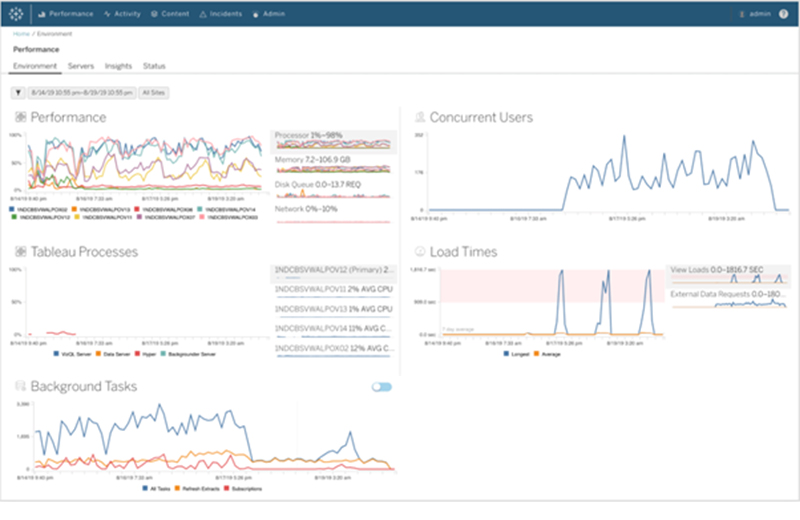
Organizations that run critical deployment of Tableau Server at a large scale, have mentioned concerns over manageability and scalability. They have been in search for tools that could organize the management process in an efficient way, which could save a lot of time. Tableau solved this problem by introducing the Tableau Server Management Add-on – a new feature designed to help organizations manage the deployment of Tableau Server. With this, they can quickly react to the changing needs of the business as well as save time by organizing the management process in the most efficient way. Tableau Server Management Add-on, which makes running the critical deployment of tableau at a large-scale server much simpler.
Now these visualizations can be used for further explorations.
TABLEAU SERVER MANAGEMENT ADD-ON
Organizations that run critical deployment of Tableau Server at a large scale, have mentioned concerns over manageability and scalability. They have been in search for tools that could organize the management process in an efficient way, which could save a lot of time. Tableau solved this problem by introducing the Tableau Server Management Add-on – a new feature designed to help organizations manage the deployment of Tableau Server. With this, they can quickly react to the changing needs of the business as well as save time by organizing the management process in the most efficient way. Tableau Server Management Add-on, which makes running the critical deployment of tableau at a large-scale server much simpler.
 The server management add-on feature can help in optimising the performance of deployment by customizing which nodes process background jobs such as extract refreshes and subscriptions and isolating these workloads, to specific nodes. This makes it easier to scale deployments to the needs of their organization.
This feature has a few tools, including two for better reliability and scalability and one for content migration, all of which helps the organizations to govern their data effectively.
If you are interested in learning more about the latest Tableau release and use cases, please contact us at training@beinex.com/ info@beinex.com and we would be happy to schedule a Tableau demo or training for you and your company.
The server management add-on feature can help in optimising the performance of deployment by customizing which nodes process background jobs such as extract refreshes and subscriptions and isolating these workloads, to specific nodes. This makes it easier to scale deployments to the needs of their organization.
This feature has a few tools, including two for better reliability and scalability and one for content migration, all of which helps the organizations to govern their data effectively.
If you are interested in learning more about the latest Tableau release and use cases, please contact us at training@beinex.com/ info@beinex.com and we would be happy to schedule a Tableau demo or training for you and your company.
This feature provides a complete picture of the data and how each data is connected.
Another use of Tableau Catalog is linear and impact analysis. This not only shows which assets will change but also who will be affected by it, which makes work easier for many and avoids wastage of time.
EXPLAIN DATA
Tableau 2019.3 is up with a new Al-driven feature called the “Explain Data”, which helps people go from the “what” of the data to the “how” of it. With explain data, we can get an explanation for each unexpected value in the data by just a single click. On selecting the desired data point, the ‘explain data’(lightbulb) icon appears.
For each value there might be a number of explanations. Each of these explanations are checked and only the most likely ones are provided as visualizations.
Now these visualizations can be used for further explorations.
TABLEAU SERVER MANAGEMENT ADD-ON
Organizations that run critical deployment of Tableau Server at a large scale, have mentioned concerns over manageability and scalability. They have been in search for tools that could organize the management process in an efficient way, which could save a lot of time. Tableau solved this problem by introducing the Tableau Server Management Add-on – a new feature designed to help organizations manage the deployment of Tableau Server. With this, they can quickly react to the changing needs of the business as well as save time by organizing the management process in the most efficient way. Tableau Server Management Add-on, which makes running the critical deployment of tableau at a large-scale server much simpler.
The server management add-on feature can help in optimising the performance of deployment by customizing which nodes process background jobs such as extract refreshes and subscriptions and isolating these workloads, to specific nodes. This makes it easier to scale deployments to the needs of their organization.
This feature has a few tools, including two for better reliability and scalability and one for content migration, all of which helps the organizations to govern their data effectively.
If you are interested in learning more about the latest Tableau release and use cases, please contact us at training@beinex.com/ info@beinex.com and we would be happy to schedule a Tableau demo or training for you and your company.
Note: The Server Management Add-on is not available for Tableau Online, as they manage everything from scaling, performance, and security on behalf of their Tableau Online customers. The Tableau Server Management Add-on can be separately purchased from the Tableau Server deployment.