How AI Decision-Making is Improving Enterprise Outcomes
Blog
Share 
Beinex Recognized as a Leading Consulting Firm in the Middle East by Consultancy-me
 12 December 2024
  Sumi S
 Accolades We Are Proud Of
Beinex earned top rankings across multiple domains: • Platinum in Business Intelligence • Gold in Data Science • Gold in Cloud Services
Industry-Specific Excellence
Our industry-focused consulting capabilities have also been recognized, and our ranking level is as follows: • Government Industry: Gold • Oil & Gas Industry: Gold • Public Sector Industry: Gold • Technology Industry: Gold • Banking Industry: Silver
A Milestone of Achievement
These accolades reaffirm our position as a trusted consulting partner for businesses and government entities across the Middle East. Our success is driven by a team of passionate professionals, innovative technologies, and strategic partnerships. Looking Ahead As we celebrate this achievement, we remain committed to delivering transformative solutions that empower businesses worldwide. Thank you to our clients, partners, and team members for making this success possible. If you are interested in our services, feel free to connect: https://beinex.com/contact-us/
Read More About Our Achievements
Beinex Among Top BI Consulting Firms in the Middle East Beinex Ranked as Top Data Science Consulting Firms in the Middle East Beinex Makes to the League of Top Consulting Firms for Cloud Services in the Middle East 2024Beinex has emerged as one of the top consulting firms in the Middle East for 2024, based on the prestigious Consultancy-me rankings. Based on the client and consultant reviews about our services, we are leading in multiple domains.
Related Articles

Data Blending for Spatial Analytics in Just 6 Steps Using Alteryx
What is Spatial Analysis?
Spatial analysis is the art and science of extracting insights from data that has a geographic component. Think of it as giving your data a physical address! Traditionally, this involved complex Geographic Information Systems (GIS) software. But today, spatial analysis is more accessible than ever, thanks to data science and machine learning.
Pinpointing locations on a map is just the first step. Spatial analytics goes far beyond that, offering a powerful lens to understand how relative location impacts your business. It allows you to see the bigger picture: how customers, stores, services, and other factors interact with each other geographically.
This magic happens by blending spatial data (think zip codes, store addresses) with your existing data sets (sales figures, customer demographics). By analyzing these combined datasets, you gain a wealth of insights that can transform your decision-making process.
What Spatial Analytics Can Do for You
Here's how spatial analytics can help you understand and optimize key areas:
- • Customer Behavior and Inventory: Analyze nearby consumer buying habits for specific products and services. This allows you to customize inventory and service experiences at each location based on local demand.
- • Strategic Location Planning: Optimize your location strategyby determining how the proximity of competitors or existing locations impacts new site expansion. You can also understand how far customers are typically willing to travel for your product or service.
- • Improved Customer Experiences: Ensure service availabilityand minimize service gaps by strategically locating key hubs within an appropriate distance from each other. This translates to a smoother and more efficient experience for your customers.
- • Targeted Marketing: Drive efficiencies in your marketing programs by customizing your offerings to match demographic purchasing preferences in specific locations. This targeted approach allows you to reach the right audience with the right message.
- • Import and Unify: Easily bring in various datasets, regardless of format.
- • Effortless Geocoding: Transform addresses and other location data into usable geographic coordinates with a few clicks.
- • Spatial Blending: Combine your location data seamlessly with traditional datasets for a holistic view.
- • Advanced Analytics Made Simple: Perform complex spatial analyses without needing specialized coding skills.
- • Data Enrichment: Boost your insights by adding demographic, firmographic, or industry-specific data to your spatial datasets.
- • Visualize and Explore: Discover hidden patterns and relationships through interactive maps and visualizations.
- • Gather Data: Gather all the data sets you need for your analysis, from customer information to market demographics.
- • Translate Your Addresses: Use Alteryx's geocoding tools to transform addresses and other location data into usable geographic coordinates.
- • Define Your Trade Zone: Create a virtual boundary to analyze specific locations based on radius
- • Blend Datasets Together: Seamlessly combine your spatial data with traditional datasets to create a comprehensive picture of customer-location relationships.
- • Use Advanced Spatial Analytics for Additional Insights: Perform complex spatial analyses within Alteryx's user-friendly interface, unlocking hidden insights without needing specialized coding skills.
- • Visualize and Share Your Findings: Prepare your data for reports and interactive visualizations that effectively communicate your insights. Alternatively, export the data for further analysis or integration with downstream processes.
How Alteryx Enables Data Blending for Spatial Analytics
Forget complex GIS! Alteryx's no-code tools make spatial analysis a breeze, unlocking location intelligence for all data users. Optimize resources, plan assets, manage logistics, and more - all in a user-friendly platform.
Alteryx offers an intuitive workflow that streamlines the entire process:
A 6-Step Recipe for Blending Spatial Data in Alteryx
Alteryx makes blending spatial data with your existing information a breeze. Here's a step-by-step guide to get you started:
Find a detailed 6-step guide for blending spatial data using Alteryx:
1. Gather Data
Alteryx's Input tool lets you grab data from anywhere – spreadsheets, databases, even social media! Just connect to your desired sources, and Alteryx will get your data ready for spatial exploration.

2. Turn Addresses into Locations:
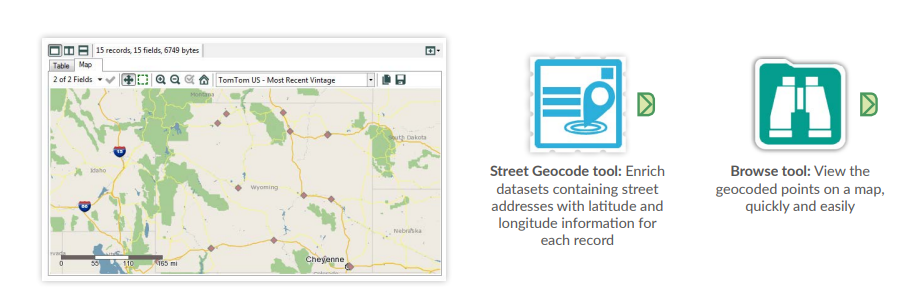
The Street Geocode tool in Alteryx quickly transforms your standard addresses (like customer locations or branch sites) into geographic coordinates (latitude and longitude). This "spatializes" your data, adding a new data point for each location.
In this example, we'll use it to geocode both customer and site data.
3. Define Your Trade Zone:
The Trade Area tool lets you see what's happening within a specific area around each location. For example, you can create a 10-minute drive time polygon. This "draws" a zone around each location, encompassing all areas reachable within a 10-minute drive using the road network.

4. Blend Datasets Together:
The Spatial Match tool lets you see how different sets of locations relate to each other. For instance, you can use it to find out how many customers live within (or outside) the 10-minute drive time zone you created for each location. It essentially compares your customer data points (spatial points) with the trade area polygons (spatial objects) to identify matches based on spatial relationships (like "contains" or "intersects").

5. Use Advanced Spatial Analytics for Additional Insights
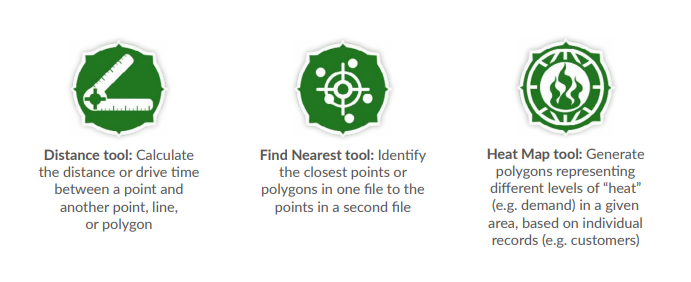
Alteryx offers a range of additional tools for advanced spatial analysis, making it accessible to users beyond data specialists. Additional tools include:
6. Visualise and Share Your Findings:
Alteryx doesn't just help you crunch data - it enables you to share your insights clearly.
Visualize Your Success: Overlay data on detailed maps or satellite imagery using advanced mapping tools.
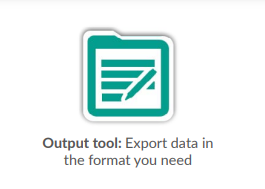
Spread the Knowledge: Export your analysis in various formats like Excel, ESRI, or even Tableau and Qlik for seamless integration with other data workflows and presentations.
Beinex + Alteryx Offerings
As a Premier Alteryx partner, we have extensive experience and a proven track record of success. Our team is highly skilled in Alteryx solutions and can help you unlock the full potential of this powerful platform.
Contact us today to learn more about how Alteryx and our partnership can take your business to the next level.
Image Source: https://community.alteryx.com/pvsmt99345/attachments/pvsmt99345/general-discussions/2303/2/Spatial_Cookbook_Victa.pdf

Highlights from Snowflake Data Cloud Summit 2024: A Leap Forward
1. Snowflake Iceberg Tables Now Generally Available
Snowflake Iceberg Tables have moved to general availability, offering full storage interoperability with the Apache Iceberg open table format. This feature facilitates easier governance and collaboration on Iceberg data stored externally, enhancing the flexibility of data lakehouses, data lakes, and data meshes. Over 300 customers have already adopted Iceberg in its public preview, highlighting its potential to broaden Snowflake's data footprint.
2. Advancements in Snowflake Cortex AI
Snowflake introduced several enhancements to Cortex AI, including:
- • Cortex Analyst: Built with Meta's Llama 3 and Mistral Large models, this tool allows businesses to build applications securely on top of Snowflake's analytical data.
- • Cortex Search: Leveraging Neeva's retrieval and ranking technology, it facilitates the development of apps against documents and text-based datasets.
- • Cortex Guard: Aiming to ensure model safety, it filters and flags harmful content, including violence and hate speech.
- • Document AI: This feature, powered by Snowflake Arctic-TILT multimodal LLM, will soon allow users to extract data from documents such as invoices and contracts.
- • Snowflake AI & ML Studio: A no-code interactive interface for AI development, now in private preview.
- • Cortex Fine-Tuning: In public preview, allowing customization of pre-trained models for specialized tasks.
- • ML Lineage: In private preview, offering traceability across ML life cycles.
- • Feature Store: Now in public preview, for creating, managing, and serving ML features.
- • Snowflake Notebooks: Snowflake Notebooks is now in preview, offering an interactive, cell-based programming environment for Python and SQL within Snowsight. It enables exploratory data analysis, machine learning model development, and other data science tasks all in one place.
- • Snowpark pandas API: Allows the use of pandas syntax for AI and pipeline development within Snowflake. The Snowpark pandas API is now in preview, allowing you to run pandas code directly on Snowflake data. This API offers a pandas-native experience with Snowflake's scalability and security, handling larger datasets without rewriting pandas pipelines.
- • Database Change Management: A public preview feature for DevOps, including Git integration.
- • Python API and CLI: Soon to be generally available, facilitating CI/CD practices.
- • H3_TRY_COVERAGE: A special version of H3_COVERAGE that returns NULL if an error occurs when attempting to return an array of IDs (INTEGER values) identifying the minimal set of H3 cells that completely cover a shape.
- • H3_TRY_COVERAGE_STRINGS: Similar to H3_TRY_COVERAGE but returns hexadecimal IDs (VARCHAR values).
- • H3_TRY_POLYGON_TO_CELLS: Returns an array of INTEGER values of the IDs of H3 cells with centroids contained by a Polygon, returning NULL if an error occurs.
- • H3_TRY_POLYGON_TO_CELLS_STRINGS: Similar to H3_TRY_POLYGON_TO_CELLS but returns VARCHAR values. With innovations in AI, data governance, and developer tools, Snowflake continues to drive forward the capabilities of its platform, ensuring customers can leverage data more effectively and securely. The future looks promising as Snowflake expands its offerings and strengthens its ecosystem, providing powerful solutions.
3. Introduction of Polaris Catalog
The Polaris Catalog is a vendor-neutral, open catalog implementation for Apache Iceberg, providing cross-engine interoperability and greater flexibility. It will become open-sourced within 90 days, supporting a variety of engines, including Apache Flink, Apache Spark, and Trino.
4. Private Preview of Snowflake Horizon Updates
Snowflake launched a private preview of an internal model marketplace within Snowflake Horizon. This marketplace enables users to publish and curate models, applications, and data products for internal use ensuring controlled access and preventing unintended external sharing. Other upcoming features include AI model sharing and AI-powered object descriptions.
5. AI & ML Improvements
6. Snowflake Native Apps with Snowpark Container Services — Preview
Snowflake introduced the integration of the Native App Framework with Snowpark Container Services on AWS. This integration provides developers with configurable GPU and CPU instances for various applications, from computer vision to geospatial data analysis. Over 160 Snowflake Native Apps are now available in the marketplace.
7. Developer Tool Enhancements
Several updates aimed at developers include:
8. Expanded Cloud Footprint and Governance
Snowflake announced a new data boundary for the EU, ensuring regional data residency and compliance. Additionally, a Department of Defense (DoD) environment meeting IL4 security controls will be available, highlighting Snowflake's commitment to robust data governance and security.
9. Snowflake Trail
The new Trail set of observability capabilities was unveiled, providing developers with tools to monitor, troubleshoot, and optimize workflows. Trail integrates with platforms like Grafana, Metaplane, and Slack, adhering to OpenTelemetry standards.
10. Snowflake Cortex Fine-Tuning — Preview
Cortex Fine-Tuning, now in preview, lets users adapt pre-trained models for specialized tasks. This managed service fine-tunes popular large language models using your data within Snowflake, enhancing model performance for specific use cases.
The preview of Snowpark Native Apps with Snowpark Container Services enables running containerized services within Snowflake Native Apps. This feature supports provider IP protection, security, data sharing, monetization, and integration with compute resources.
11. Snowpark Python Local Testing Framework — General Availability
The Snowpark Python local testing framework is now generally available. This emulator allows you to test Python code locally with Snowpark Python DataFrames, facilitating development and CI pipeline integration without needing a Snowflake account connection.
12. Universal Search and Snowsight Updates
Universal Search, now generally available, allows users to search for content across Snowflake storage, external Iceberg storage, and third-party providers. Snowsight also received a dark mode feature, enhancing user experience in low-light conditions.
13. New Geospatial Functions in Preview
Four new functions for GEOGRAPHY objects are now available in preview:

Beinex is Now Great Place to Work-Certified™!
This is a remarkable achievement. Yes, something which we have been living is now officially recognised, and it adds to our commitment to keeping Beinex a Great Place to Work, always!
Snapshots from the Survey
- Our Trust Index is 84! The Trust Index© score is the percentage of employees that shared a positive response (rated 4 or 5 on a 5-point scale) to the 59 statements of the survey.
- Trust Index© Feedback Credibility of Management stands at 87.
- Respect for people – 80
- Fairness at the Workplace - 84
- Pride – 86
- Camaraderie between People - 86
What our accomplishment means
The Great Place to Work® Certification Program is the initial step for an organisation on its journey of building a High-Trust, High-Performance Culture™ and our organisation has successfully reached this milestone.
Yes, the word that should be borne in mind is ‘milestone’. We still have a long way to go! And we will, with confidence, sustain our victories on all fronts.
We will not rest on our laurels
As the next step to our Certification, we have various opportunities to learn, develop & grow our talent with the help of Great Place to Work® Events. They are characterised by an exciting range of engagement measures and large-scale events from where we would be able to learn and contribute to the richness of our culture.
About Great Place to Work Institute
Great Place to Work® Institute is a global management research and consulting firm dedicated towards enabling organizations to achieve business objectives by building better workplaces. They work with over 10,000 organizations globally every year to help them create and sustain High-Trust, High-PerformanceTM cultures.
As part of the assessment, they measured the perceptions of Beinex’s employees using Great Place to Work® Trust Index© Employee Survey and understood our organization’s differentiating culture through the Culture Brief© and Culture Audit©.

What’s New in Tableau 2025.1: AI-Powered Insights, Multilingual Support, Private Connectivity, and More
Tableau 2025.1 at a Glance
- • Converse with Tableau Agent in six new languages using conversational AI.
- • Connect Tableau Cloud to AWS data securely with Private Connect.
- • Track KPIs on the go with a redesigned Pulse mobile homepage.
- • Programmatically access published data sources using VizQL Data Service.
- • Explore new features early with Tableau Cloud preview websites.
Let’s dive into the new updates in Tableau 2025.1:
1. Tableau Agent Multilingual Support
Perform multilingual data analysis. It is now possible for users to converse with Tableau Agent (and Tableau Pulse!) in French, Italian, German, Spanish, Japanese, and Portuguese. More people can now access conversational analytics in their native language.
With conversational AI, the Tableau Agent helps users navigate from data curation to exploration and accelerates all phases of analysis with generative AI. Additionally, because it is based on the Einstein Trust Layer, businesses can be assured that their data will remain safe, secure, and accessible only as intended.
2. Private Connect for Tableau Cloud
Use a dedicated, private connection to safely link Tableau Cloud to AWS data. Private Connect establishes a secure connection between Tableau Cloud and AWS data, ensuring your data remains private and is not made publicly available.
3. Revamped Tableau Pulse Homepage on Mobile
The redesigned Tableau Pulse mobile homepage enhances users' ability to engage with data on the go. With a side-by-side view of at least three key metrics, it allows for instant comparison and faster insight generation.
The clean, intuitive interface enables users to easily spot patterns, track trends over time, and take action quickly, without needing to dig through dashboards. Whether you're monitoring sales, operations, or customer engagement, Pulse ensures your most important KPIs are always within reach.
4. API for VizQL Data Services
VizQL Data Service is an innovative API that allows you to access published data sources in Tableau through programmatic queries rather than visualizations. Designed to maximize the versatility of your Tableau assets beyond traditional visualization, VizQL Data Service helps you tap into the analytic power of your data model anywhere.
It facilitates automating data processes by allowing you to run programmed queries directly on your data sources. By utilizing pre-existing Tableau connectivity and data models, you may more effectively design sophisticated, data-driven apps. You can now utilize your data models in any context, breaking free from the confines of visual tools.
5. Tableau Cloud Preview Websites
Tableau administrators can stay ahead of the curve by gaining early access to upcoming updates through release preview sites. This allows teams to test new features in advance, understand functional changes in a hands-on environment, and evaluate how updates will affect their organization’s unique dashboards and workflows—ensuring a smooth transition when the full release goes live.
In a Nutshell
The Tableau 2025.1 release brings a bunch of exciting updates to make working with data easier, smarter, and more secure. Now you can chat with Tableau Agent in multiple languages, get help with data prep and analysis using natural language, and connect securely to your AWS data using Private Connect. The refreshed Pulse homepage on mobile lets you track and compare key metrics at a glance, helping you make faster decisions wherever you are. Plus, with the new VizQL Data Service, developers can now access and use data directly, without relying on traditional dashboards. And if you're a Tableau admin, you get early access to test new features before they go live, so your team is always ready for what’s next.
Source: https://www.tableau.com/en-gb/2025-1-features

Supercharge Your Tableau: Benefits of Tableau Accelerators
