How AI Decision-Making is Improving Enterprise Outcomes
Blog
Share 
Beinex is Now Great Place to Work-Certified™!
 3 November 2022
  Manikandan Baskaran
 This is a remarkable achievement. Yes, something which we have been living is now officially recognised, and it adds to our commitment to keeping Beinex a Great Place to Work, always!
Snapshots from the Survey
- Our Trust Index is 84! The Trust Index© score is the percentage of employees that shared a positive response (rated 4 or 5 on a 5-point scale) to the 59 statements of the survey.
- Trust Index© Feedback Credibility of Management stands at 87.
- Respect for people – 80
- Fairness at the Workplace - 84
- Pride – 86
- Camaraderie between People - 86
What our accomplishment means
The Great Place to Work® Certification Program is the initial step for an organisation on its journey of building a High-Trust, High-Performance Culture™ and our organisation has successfully reached this milestone.
Yes, the word that should be borne in mind is ‘milestone’. We still have a long way to go! And we will, with confidence, sustain our victories on all fronts.
We will not rest on our laurels
As the next step to our Certification, we have various opportunities to learn, develop & grow our talent with the help of Great Place to Work® Events. They are characterised by an exciting range of engagement measures and large-scale events from where we would be able to learn and contribute to the richness of our culture.
About Great Place to Work Institute
Great Place to Work® Institute is a global management research and consulting firm dedicated towards enabling organizations to achieve business objectives by building better workplaces. They work with over 10,000 organizations globally every year to help them create and sustain High-Trust, High-PerformanceTM cultures.
As part of the assessment, they measured the perceptions of Beinex’s employees using Great Place to Work® Trust Index© Employee Survey and understood our organization’s differentiating culture through the Culture Brief© and Culture Audit©.
As an organisation, Beinex cannot conceive of any other way to work: for us to work, it should be a great place to work! There is simply no other way.
Beinex Consulting Pvt. Ltd is now Great Place to Work-Certified™! Congratulations to all of us! And thank you for the trust and commitment that you, Beinexians have shown all along the way!
Related Articles

13 Key Snowflake Features: Traits that Take It to the Top
A Compact List of Snowflake Features
- Decoupling of storage and compute in Snowflake
- Auto-Resume, Auto-Suspend, Auto-Scale
- Workload Separation and Concurrency
- Snowflake Administration
- Cloud Agnostic
- Semi-structured Data Storage
- Data Exchange
- Time Travel
- Cloning
- Snowpark
- Snowsight
- Security Features
- Snowflake Pricing
Let’s deep-dive:
1. Decoupling of storage and compute in Snowflake
Snowflake's decoupling of storage and compute features facilitates virtual warehouses and storage as separate entities. Leveraging this functionality of Snowflake, businesses can achieve greater flexibility in choosing the compute of their choice and incrementally pay for what they store and compute. Users can scale up / down or in/out based on the business SLA requirement. Scale up – Scale-out features do not require downtime and are almost instant.
2. Auto-Resume, Auto-Suspend, Auto-Scale
Snowflake's auto-resume and auto-suspend features provide minimal administration. Using auto-resume, Snowflake starts a compute cluster when a query is triggered and suspends compute clusters after a set time of inactivity. These two features ensure performance optimisation, cost management, and flexibility.
In business circumstances where more users are querying heterogeneous queries, setting up auto-scaling can help automatically expand the number of clusters from 1 to 10 at an increment of 1 based on the volume of queries sent to a compute simultaneously.
3. Workload Separation and Concurrency
Concurrency is no longer a problem for Snowflake, unlike traditional data warehouses with concurrency issues where users and processes must compete for resources. Because of Snowflake's multi-cluster architecture, concurrency is not an issue anymore.
This architecture also helps to divide workloads into their virtual warehouse and channel the traffic to each virtual warehouse (compute) by functions or departments.
4. Snowflake Administration
A data cloud as a service is provided by Snowflake (DWaas). Businesses can set up and administer a system without significant assistance from DBA or IT teams. Unlike the on-premise platforms, neither hardware commissioning nor software installation patch-update is s necessary. Snowflake manages software updates and introduces new functions and patches without downtime.
Snowflake automatically creates micro-partitioning. This feature reduces the requirement of manually indexing and clustering tables though these are available features in Snowflake.
5. Cloud Agnostic
Being a cloud-agnostic platform, Snowflake can migrate its workloads with other cloud providers. So, Snowflake is accessible on all three cloud providers: AWS, Azure, and GCP. Customers can easily integrate Snowflake into their existing cloud architecture and choose to deploy in locations preferred by their companies.
6. Semi-structured Data Storage
The requirement to manage semi-structured data, often in JSON format, gave rise to NoSQL database solutions. Data pipelines are created to extract attributes from JSON and mix them with structured data. By leveraging VARIANT, a schema on read data type, Snowflake's design enables storing structured and semi-structured data in the exact location. Both organised and semi-structured data can be stored using the VARIANT data type. Snowflake eliminates the need for data extraction pipelines by automatically analysing data, extracting properties, and saving it in a columnar format.
Snowflake can connect to staging areas like s3 bucket, Azure blob or GCP blob storage to retrieve and transform files stored in these platforms. This is regardless of the cloud Snowflake is hosted. A snowflake-managed staging area is also available. Tasks/ Streams or Snowpipe can be set to retrieve data at a scheduled time or almost instantly, respectively. Snowflake can work with CSV, JSON, XML, Avro, ORC, and Parquet file formats. Snowflake can also store metadata of unstructured data stored in the staging area.
7. Data Exchange
A wide range of data, data services, and applications are available on the Marketplace. From some of the world's top data and solution suppliers, you can find, assess, and buy data, data services, and apps through Marketplace. Direct access to data ready for querying and pre-built SaaS connections virtually eliminates the expenses and delays associated with conventional ETL operations and integration. The risk and hassle of duplicating and relocating outdated material should be avoided. Instead, you can receive automatic updates that are close to real-time and have secure access to shared, controlled, and live data.
8. Time Travel
One of the distinctive Snowflake elements is time travel. You may follow the evolution of data through time by using time travel. All accounts have access to this Snowflake feature, free and enabled by default for everyone. Additionally, this Snowflake feature allows you to retrieve a Table's historical data. At any moment throughout the previous 90 days, one can access the table's appearance.
Time travel encompasses the undrop feature. If an object has not been removed yet by the system, a dropped object can be recovered using the undrop command in Snowflake. When an object is undropped, it returns to its original condition. The option to undrop schemas or tables is also available.
9. Cloning
The clone capability allows us to quickly duplicate anything, including databases, schemas, tables, and other Snowflake objects, in almost real time. Therefore, cloning an object involves editing its metadata rather than duplicating its storage contents. You can quickly produce a clone of the whole production database for testing purposes.
10. Snowpark
With the help of the Snowpark feature, data scientists and data engineers proficient in Python, Scala, R, and Java may create and manage their codes in Snowflake. Snowpark helps to employ the computing capabilities of Snowflake to retrieve, transform, train and apply data science models on the data stored in Snowflake, which has a more apparent performance advantage,
11. Snowsight
The new Snowflake web user interface, Snowsight, replaces the traditional Snowflake SQL Worksheet and enables you to easily construct basic charts and dashboards that can be shared or explored by many users, do data validation while loading data and conduct ad-hoc data analysis. The Snowflake dashboards tool is an excellent option because it works well for individuals or small group users in an organisation who wish to generate straightforward visualisations and share information among themselves.
12. Security Features
Snowflake assures security for its users through the following methods:
- • By adding IP addresses to a whitelist, you may control network policies and limit who can access your account.
- • By supporting several authentication techniques, including federated authentication and two-factor authentication for SSO.
- • Using a hybrid approach of role-based access control and discretionary access control. In role-based access control, privileges are assigned to roles which are then transferred to users. Still, in discretionary access control, each object in the account has an owner who controls access to the object. This hybrid strategy offers a substantial level of flexibility and control.
AES 256 strong encryption is used to automatically encrypt all data, both in transit and at rest.
13. Snowflake Pricing
The advantages of Snowflake pricing are:
- • Pay for actual consumption only.
- • We can cut back on resource use to save costs.
- • Flexible payment. We can either pay on-demand or in advance (pre-purchased).
- • Scale up or down the use of cloud services, computing, and data storage automatically based on your needs.
- • There are no chances of overbuying or overprovisioning.
Optimisation of Snowflake spending through integration with innovative cost-monitoring platforms.
Snowflake stands as an ideal and popular choice because of its unique and updated features. It is also available across many data cloud providers and regions, making it accessible and suitable for all organisations. Why wait? Let’s experience Snowflake. Try now: https://beinex.com/snowflake/.

Master Data Visualization with Tableau Public: A Guide to Success
Tableau Public Login
1. Sign Up for an Account Head over to Tableau Public and create a free account. After signing in, you’ll have access to your profile hub, where you can manage and create new visualizations, also known as vizzes in the Tableau Community. 2. Create a Visualization Click on “Create a Viz” from your profile hub, and you’ll be taken to Tableau’s interface, where you can connect to data sources, build your visualizations, and customize them as needed. 3. Publish Your Work Once your visualization is ready, click “Publish As” to share it. This step ensures that your work is stored in the Tableau Public free data visualization software, making it accessible to a global audience.
How to Download Tableau Public: Free & User-friendly
If you’re eager to start, Tableau Public download is free. Here’s how to get started: • Visit the official Tableau Public download page. • Click on the “Download” button to get the latest version. • Install the software and sign in using your Tableau Public login credentials. • Start exploring data visualization with Tableau Public free download. With Tableau Public tutorial resources available online, you can quickly learn how to leverage its features for impactful storytelling.Master Data Visualization: Best Practices for Creating Visualizations on Tableau Public
1. Craft Clear and Informative Titles A well-thought-out title is crucial for any visualization. It should succinctly describe the content while giving viewers a clear understanding of what to expect. A good title helps set the context for your data story. 2. Choose the Right Visual Encodings The effectiveness of your visualization relies heavily on selecting appropriate chart types and encodings. Whether it’s position, length, or color, choosing the right visual elements ensures that your data is represented accurately and clearly. 3. Ensure Effective Labeling Labels make your visualization easier to interpret. Be sure to label axes clearly and add data labels where necessary, so your audience doesn’t need to guess or spend extra time understanding the data. 4. Select the Most Suitable Chart Types Not all charts are created equal—each has its strengths for different types of data. Bar charts are ideal for category comparisons, while scatter plots are great for showing relationships between variables. Picking the right chart type is crucial for delivering your message effectively. 5. Use Reader-Friendly Formatting Well-formatted visualizations are more likely to resonate with viewers. Use appropriate font sizes, colors, and layout elements to ensure that your visualization is not only aesthetically pleasing but also easy to read and comprehend. 6. Incorporate Filters and Parameters Tableau Public’s interactive features, such as filters and parameters, allow users to engage more deeply with your visualization by customizing their view. Thoughtful use of these tools can enhance the user experience. 7. Limit Annotations Annotations can add helpful context or clarification, but they should be used sparingly to avoid overcrowding your visualization. Only include annotations when they provide meaningful insights or explanations. 8. Utilize Tableau’s Built-in Formatting Tools Tableau Public provides a variety of formatting options that help polish your visualizations. Take advantage of these tools to make your work look professional and visually appealing. 9. Share Your Visualizations Publicly Once you’ve completed your work, sharing it on Tableau Public allows you to contribute to the larger data community. You can also embed your visualizations on websites or blogs, helping you build your personal portfolio.
Building a Strong Tableau Public Portfolio
To stand out in the Tableau Public community, it’s important to curate a portfolio that reflects your skills and versatility. Here are a few tips: 1. Highlight Your Best Work Showcase the visualizations that demonstrate your strongest skills and align with your career interests. These projects should reflect the kind of work you excel at and wish to pursue. 2. Maintain a Clean, Organized Layout A well-organized portfolio enhances the viewing experience. Ensure that your visualizations are easy to navigate, and avoid cluttered or confusing layouts. 3. Use High-Quality Visuals Always use high-resolution images or graphics when showcasing your work. Poor-quality visuals can give a negative impression and may not reflect your actual abilities. 4. Provide Clear Descriptions Accompany your visualizations with concise descriptions. Explain the purpose of each project, the data source, the analytical methods used, and any challenges you encountered. 5. Show a Variety of Work Include a diverse range of projects in your portfolio to highlight your versatility. This demonstrates your ability to adapt to different data sets and visualization types. 6. Keep Your Portfolio Updated Regularly update your portfolio with your latest work to show your ongoing development and progress in data visualization. 7. Seek Constructive Feedback Asking for feedback from peers or mentors can help you identify areas for improvement and refine your portfolio for better presentation. 8. Engage with the Tableau Community Tableau Public isn’t just a tool—it's a thriving community. Engage with other users by liking, commenting, and participating in forums and challenges. It’s a great way to learn, share, and grow alongside other data enthusiasts.
Conclusion
Tableau Public is a powerful platform that offers more than just free data visualization tools, it’s a gateway to learning, growth, and professional opportunities. By following these best practices, you can create compelling and impactful visualizations while engaging with a vibrant community of data professionals. Whether you’re looking to advance your career or simply improve your data skills, Tableau Public provides the perfect platform to explore, create, and share. Connect with us a for a free demo: https://beinex.com/free-tableau-software/
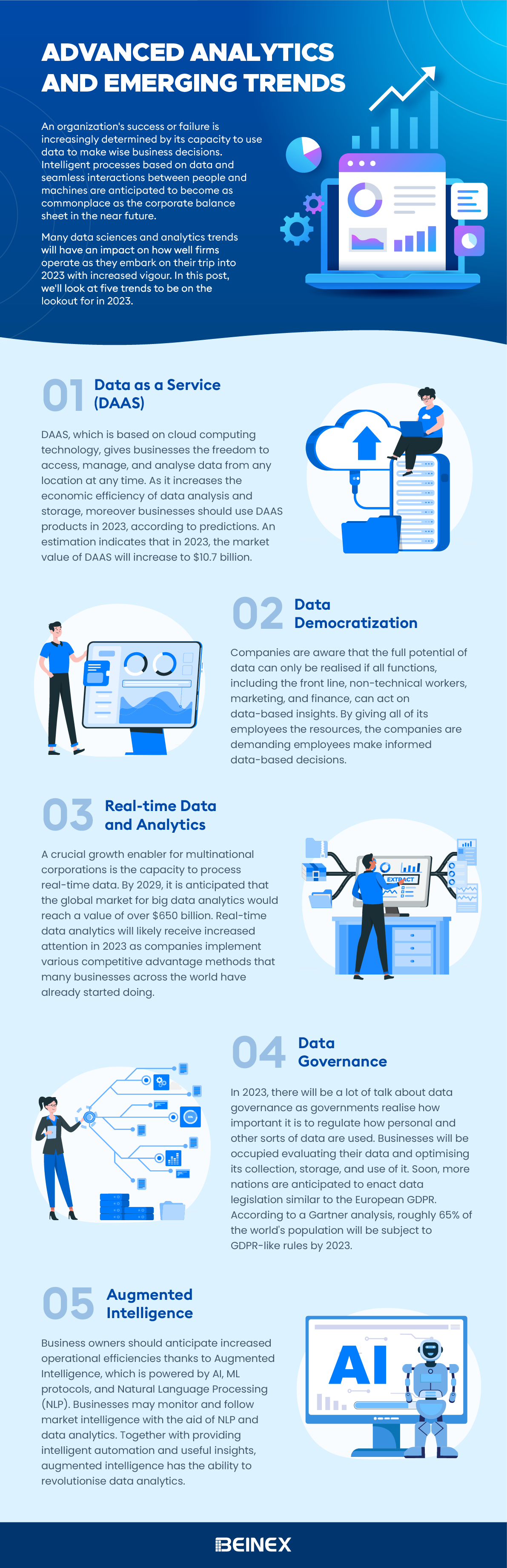
Advanced Analytics and Emerging Trends(Infographic)

AWS and GRC Framework: A Comprehensive Approach to Secure and Compliant Data Management
Top Five Benefits of AWS GRC Solutions
Implementing AWS’s GRC solutions offers several advantages that go beyond compliance. Here are the top benefits: • Data-Driven Decision Making: Real-time monitoring and analytics enable organizations to make informed decisions that align with both strategic goals and compliance objectives. • Fostering Responsible Operations: By promoting a culture of governance and ethical practices, AWS helps organizations operate responsibly and build trust. • Advanced Security Measures: Features like encryption, identity management, and continuous threat detection provide robust protection for sensitive data. • Scalability and Flexibility: AWS solutions scale with your business, ensuring that governance and compliance measures grow alongside your operations. • Cost-Effective Operations: AWS’s pay-as-you-go model allows organizations to optimize their IT budgets while maintaining governance and compliance standards.
AWS and GRC Tools
Amazon Web Services (AWS) provides a comprehensive set of GRC tools and practices that can be integrated into the Governance, Risk Management, and Compliance (GRC) framework that empower businesses to effectively manage their data while adhering to industry standards and regulations. Below are some examples of AWS and GRC (Governance, Risk, and Compliance) tools and practices:
Governance: Establishing a Solid Framework
In the AWS ecosystem, governance refers to setting up policies, guidelines, and processes to ensure effective data and resource management. This framework supports business objectives while promoting ethical practices, transparency, and adherence to regulatory requirements. AWS provides several GRC tools and practices that centralize governance and enhance control over accounts, resources, and configurations. • AWS Organizations: This tool helps organizations manage multiple AWS accounts in one place, allowing for the easy implementation and enforcement of policies across the enterprise. Through Service Control Policies (SCPs), organizations can control permissions and ensure only authorized actions occur. • AWS Config: AWS Config is essential for governance as it tracks changes in AWS resource configurations. By providing detailed insights into the state and relationships of these resources over time, AWS Config ensures compliance with internal and external standards. • AWS Service Catalog: The AWS Service Catalog allows organizations to maintain oversight of their IT environment by managing catalogs of approved services. This guarantees that only pre-approved and compliant software, databases, and configurations are deployed. • AWS Control Tower: AWS Control Tower simplifies setting up and managing a secure, multi-account AWS environment. It automates governance best practices and continuously monitors compliance with pre-configured guardrails.
Risk Management: Safeguarding Against Threats
Identifying and managing risks is crucial in today's digital landscape. AWS offers a range of services to help organizations monitor their infrastructure, detect potential vulnerabilities, and respond to security threats swiftly. • AWS CloudTrail: CloudTrail logs and monitors API activity within AWS, allowing organizations to trace user actions and conduct investigations after security incidents. It’s also useful for forensic analysis to determine the cause of issues. • AWS Security Hub: As a centralized security dashboard, AWS Security Hub aggregates findings from multiple AWS services, helping businesses streamline incident response and maintain compliance. • Amazon GuardDuty: GuardDuty is a security service that detects suspicious activities and unauthorized behavior in AWS accounts. By leveraging machine learning and threat intelligence, it helps organizations preemptively address potential risks. • AWS Config Rules: These customizable rules automatically check resource configurations for compliance. If a resource deviates from the expected settings, alerts are triggered, enabling proactive issue resolution.
Compliance: Ensuring Adherence to Regulations
Compliance is vital for any organization handling sensitive data. AWS simplifies the process with a variety of tools to help organizations meet regulatory requirements and reduce audit burdens. • AWS Artifact: AWS Artifact offers on-demand access to important compliance documents, such as SOC reports and certifications like ISO and PCI DSS. This is especially helpful during audits, providing immediate access to evidence of AWS's adherence to standards. • AWS Shield & AWS Web Application Firewall (WAF): These services protect against DDoS attacks and unauthorized access attempts, ensuring web application availability and data integrity. Shield and WAF work together to filter out malicious traffic and ensure the security of incoming requests. • AWS Key Management Service (KMS) & AWS Certificate Manager (ACM): Data encryption is critical for compliance, and AWS KMS helps manage encryption keys securely. ACM automates the deployment of SSL/TLS certificates, protecting data both in transit and at rest. • AWS Audit Manager: AWS Audit Manager automates evidence collection for audits, continuously assessing your environment against industry standards. This reduces manual effort and ensures that organizations remain consistently compliant. AWS’s robust GRC framework empowers organizations to effectively manage data, mitigate risks, and ensure regulatory compliance. Leveraging AWS’s advanced tools not only supports meeting industry standards but also fosters innovation, resilience, and future-readiness within businesses.
Beinex: AWS Partner for the Middle East
Beinex is an AWS consulting partner, and we empower customers with AWS managed services to host their BI solutions and much more on the cloud. Our cloud migration experts bring in best-in-class stability and reliability by understanding your business strategy and working closely with you to deploy AWS infrastructure as a service. Connect with Us for a Free Demo Interested in our services? Try AWS for free: https://beinex.com/beinex-amazon-web-services/

AI Adoption in HR: Top Five Benefits Powering the Future Workforce
