How AI Decision-Making is Improving Enterprise Outcomes
Blog
Share 
Beinex Bags the Title: Best in Data & Analytics at the 12th Edition of Digital Transformation Summit, UAE
 23 June 2022
  Rakesh Neelakandan
 Under the thematic area of “Decoding Barriers to Pave the Way for UAE’s Digital Future”, Digital Transformation Summit brings together UAE’s 200+ CTOs, CIOs, CISOs, heads of digital transformation, IT infrastructure, cyber security, information and communication technologies and other experts in the domain.
Beinex is a multinational firm exploring the endless possibilities of data for Cloud, Analytics, Artificial Intelligence, Machine Learning, and Automation.
Partnerships are what make Beinex stronger. The company has solid partnerships with some of the leading technology firms, research labs, and universities around the globe. Beinex has robust, substantive business alliances at multiple levels with Microsoft, Salesforce, AWS, Tableau, Alteryx, Snowflake and other leading techno-ecosystems.
By virtue of these partnerships and its constant urge to drive past excellence benchmarks, Beinex became a deserving candidate to win this prestigious award.
And the Award Goes to Beinex
In effect, Beinex architects, guides, leads, and implements solutions in Analytics, AI, and ML for the spheres of Digital Transformation, GRC, and Risk & Audit Transformation. Present in three continents, Beinex enables its clients to analyze data, mitigate risks, identify opportunities and automate processes.
The award recognizes the relentless pursuit of excellence by Team Beinex in the domains it is into.
“It is a moment of pride and happiness for Beinex. The award secured in the Best in Data & Analytics category at the Digital Transformation Summit, UAE, 2022, is a testimony to the fact that Beinex has continuously and without fail pursued business excellence powered by innovation and experience. We acknowledge and understand that with great recognition comes responsibilities of a greater degree, a calling of a higher order. And we will continue to honor and live up to them. On this joyous occasion, I would love to thank Team Beinex for what they have achieved! This award belongs to them”, noted Indumon Das, the Founder & Managing Director, Beinex.
Beinex Holdings is a group of six companies. As an organization, Beinex believes in the power of ideas, innovation, and unparalleled customer service to change the world for good. Beinex Digital, a part of Beinex Holdings, is a digital transformation entity with a comprehensive suite of independent products focused on addressing specific business gaps, use cases, and needs.
It incorporates a spectrum of solutions related to employee health and safety, enterprise product management, performance management, and audit & risk management.
Another feather in the cap! Another milestone achieved! Beinex has done it again!
We are proud to announce that Beinex has bagged the title of ‘Best in Data & Analytics’ at the 12th edition of the Digital Transformation Summit, organized by Exito in UAE for June 22-23, 2022.Related Articles

Tableau 2024.3: Advanced Features Redefining Data Analytics and Collaboration
Tableau Cloud Manager
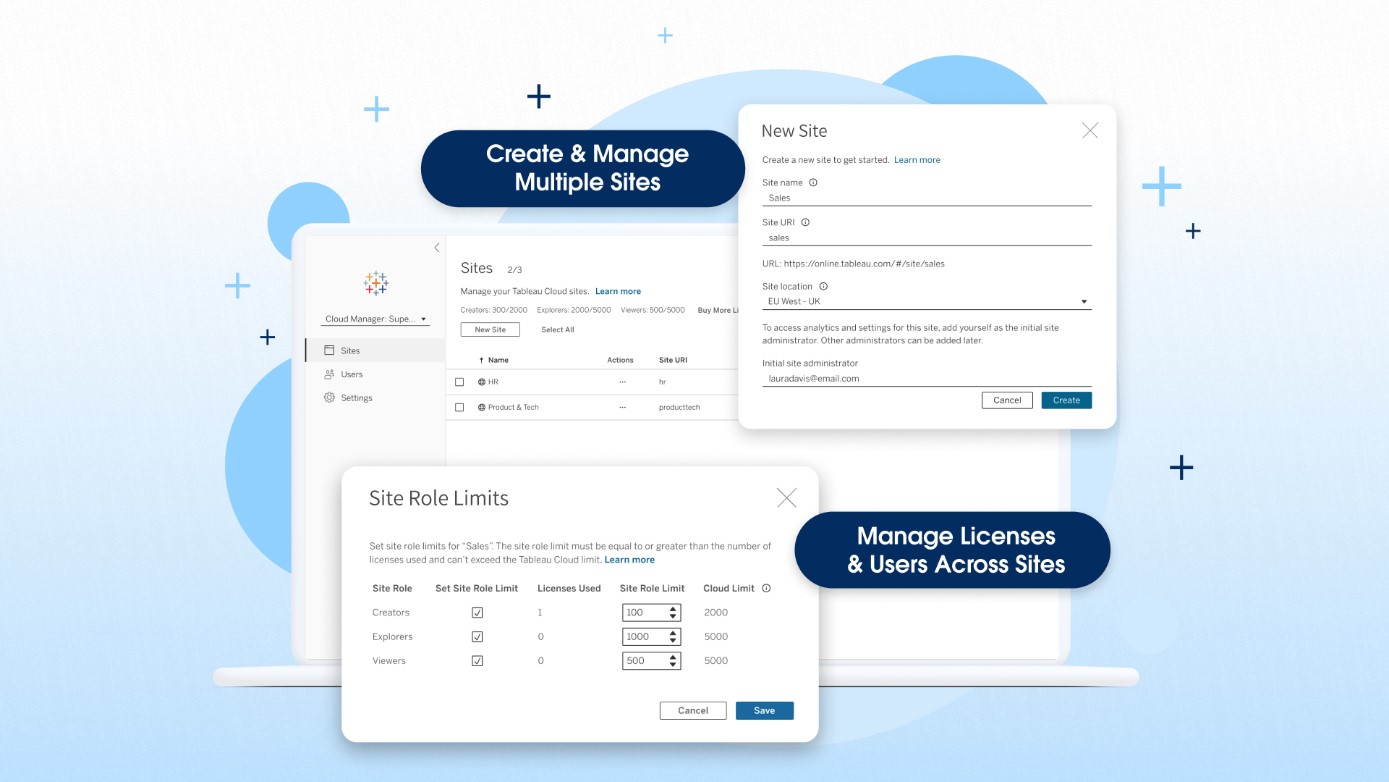
Tableau Cloud Manager is an enhancement to Tableau Cloud that allows customers to create and manage multiple Tableau sites with centralized management of licenses and users. Tableau Cloud Manager simplifies the expansion and administration of your cloud analytics environment, helps ensure you meet governance and data residency requirements and introduces new administrative efficiencies. The highlights of Tableau Cloud Manager are: 1. Expand analytics across your organization with multiple Tableau Cloud sites Tableau Cloud Manager enables Tableau Cloud customers to create and manage multiple sites in a single deployment. Additionally, Tableau Cloud Admins can deploy these sites in the regions of their choice. This functionality is particularly beneficial for global organizations with geographically dispersed teams. By allowing for the establishment of region-specific sites, Tableau Cloud Manager enables tailored analytics experiences that cater to the unique needs and compliance requirements of every team in your organization. Your Tableau Cloud edition determines site limits: • Tableau Cloud (standard): up to 3 sites • Tableau Cloud Enterprise: up to 10 sites • Tableau+: up to 50 sites 2. Effectively manage multi-site deployments Tableau Cloud Manager acts as a layer atop your Tableau Cloud sites, offering centralized management features that help you scale your analytics operations. Customers who deploy multiple sites can manage sites and license users in one place, including granting users access to multiple sites without requiring distinct licenses for each site. 3. Enhance governance with a new Cloud Admin role Tableau Cloud Manager also introduces a new Cloud Admin role, a level above the traditional Site Admin. This allows for more flexibility in how your organization manages and governs your analytics environment based on your unique needs. A smaller organization may employ the same person as a Cloud Admin and a Site Admin. For larger organizations, your Cloud Admin could be someone in IT using higher-level administrative capabilities to implement more control and coordination across your Tableau Cloud sites.
Multiple External Identity Providers on a Site
You can now enable up to 20 identity providers on a single Tableau Cloud site. This feature allows administrators to offer secure access to external users, internal users, and partners. By using multiple identity providers, you can achieve site consolidation and simplify access for both internal and external users throughout the organization.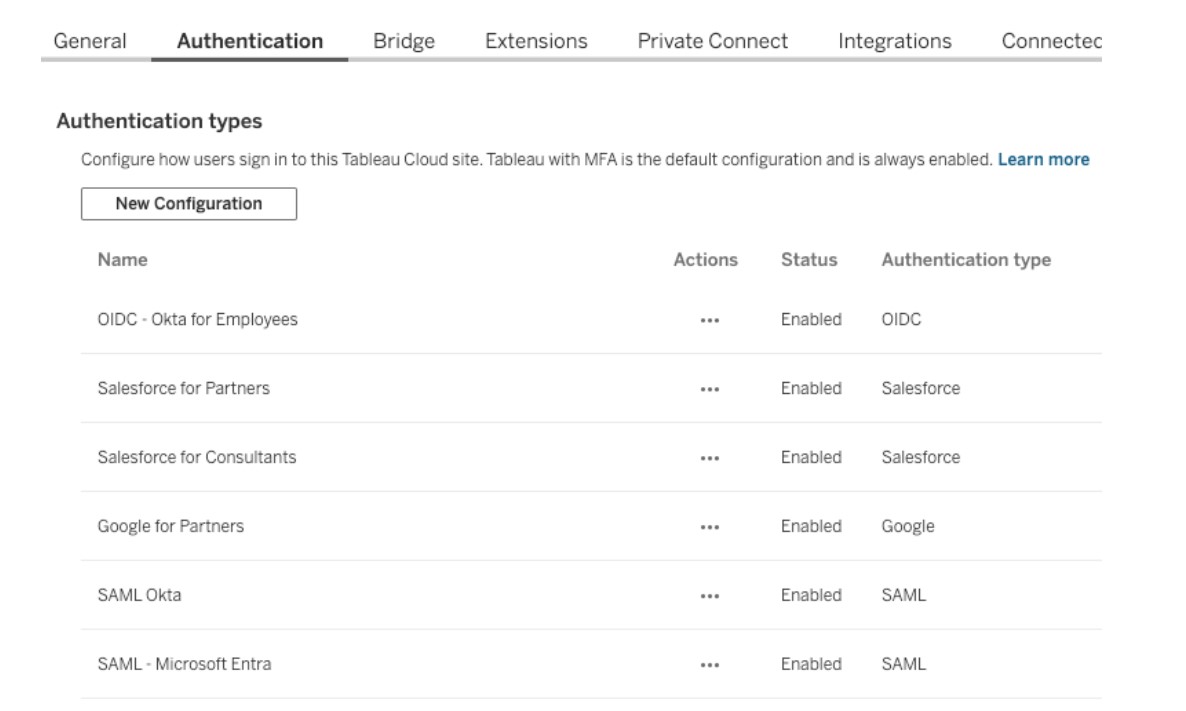
Table Viz Extension
Transform traditional reporting into visual analytics while addressing your users' needs. Tables are essential visualizations for analysts, allowing them to examine data as text and convey detailed information at a granular level. The Table Viz Extension, developed and maintained by Tableau, enables you to incorporate detailed tables and grid views into your dashboards for users who favor traditional reporting formats. You can load this new visualization type into your marks card, configure new columns by dragging fields onto the card, and interact with the table directly for customization.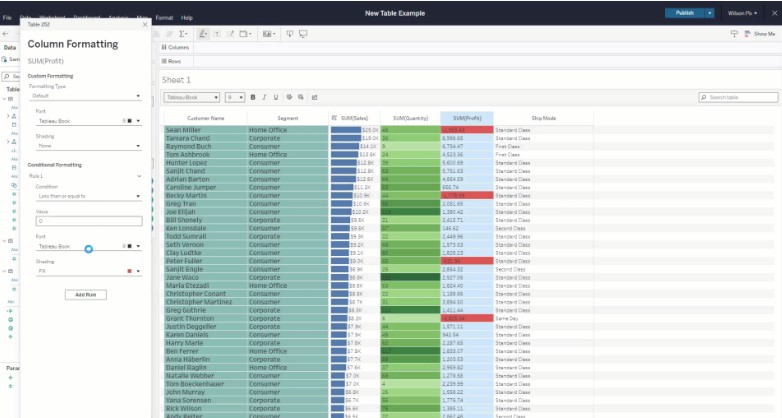
Spatial Parameters
Tableau 2024.3 introduces the full Tableau experience for geospatial data with the support of Spatial Parameters. In addition to the standard parameter types (such as string and integer), authors can now choose a “Spatial” type. These parameters create rich, interactive dashboards that allow you to ask and answer questions about geospatial information. The Spatial type enables the parameter to capture spatial geometries—points, lines, and polygons representing locations, paths, and regions. With Spatial Parameters, end users can select individual points, which are then passed as input into calculations, facilitating dynamic behavior based on their selections. This functionality is similar to existing parameter behavior but is now extended to include spatial objects. Read more about spatial parameters: https://beinex.com/topics/spatial-parameters-enhancing-geospatial-analysis-and-adding-interactivity-to-your-maps/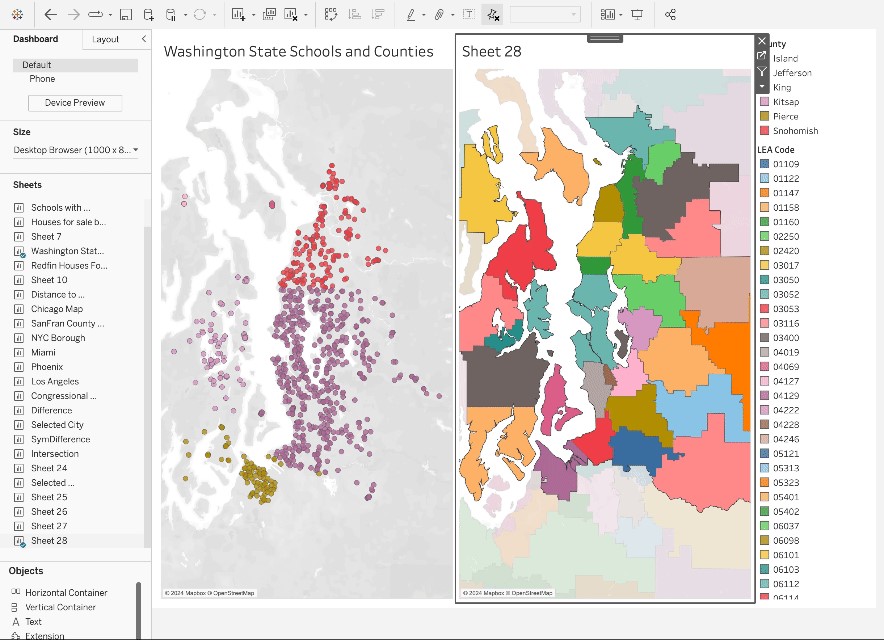
Display Data Model for Published Data Sources
Gain a visual understanding of how tables within your data model are related to Published Data Sources. You can view the relationships between tables and fields in Tableau by simply clicking on the Data Source pane in a Tableau workbook. By enabling analysts to see and comprehend how tables in the data model are interconnected in Published Data Sources, they can confidently create accurate visualizations with a clear understanding of the data model's semantics.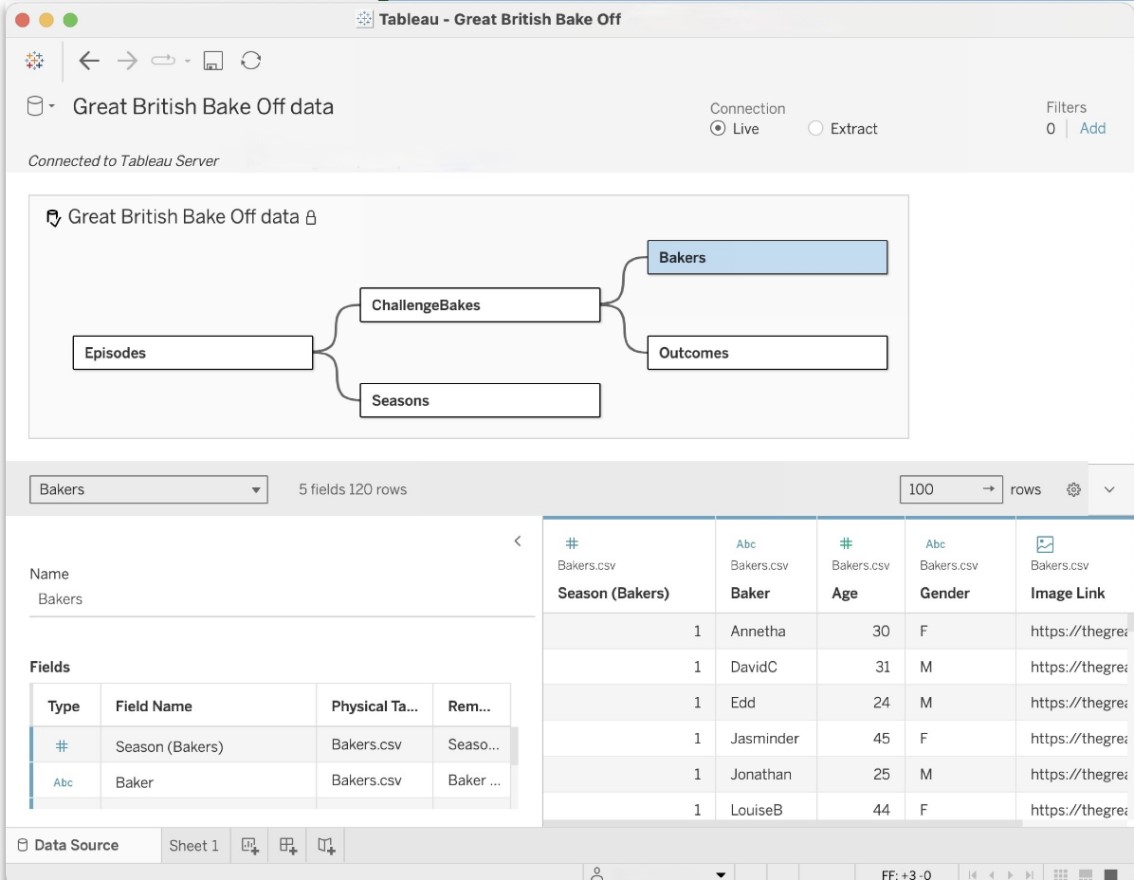
Tableau Cloud App for Microsoft Teams
The new Tableau Cloud App for Microsoft Teams allows users to seamlessly integrate data-driven insights into their daily workflows, resulting in faster and more efficient decision-making. This integration enables real-time data sharing, making it easy for users to share their favorite Tableau dashboards and Pulse metrics without leaving Teams—in personal apps, messages, channels, and meetings. From there, they can analyze and share their insights in a message or channel. Pinned channel content is also available to explore in Teams meetings, providing a fully interactive experience. This promotes a more data-driven culture by ensuring everyone can collaborate effectively with access to the same data and analytics.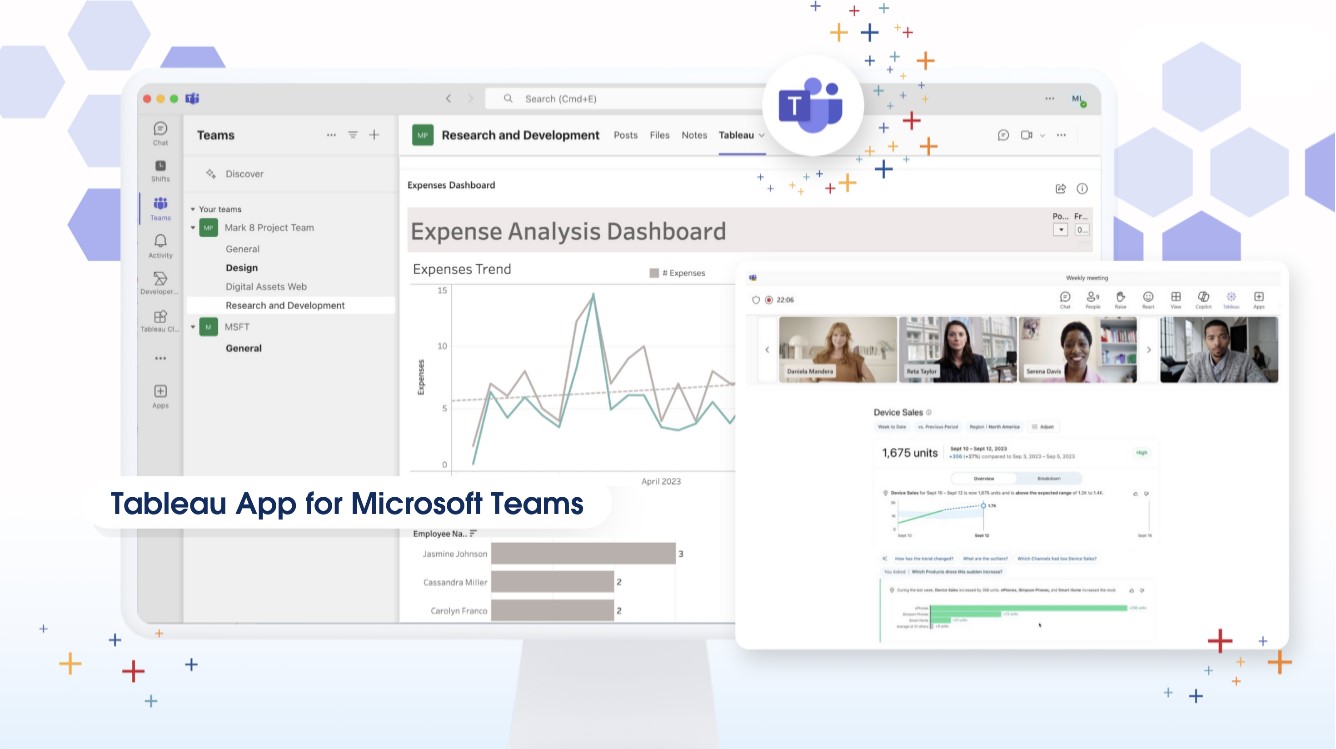 Image source: https://www.tableau.com/products/new-features
How Beinex Can Assist You
Beinex, a premier Tableau partner, offers sustainable analytics solutions to organizations and enhances their internal data visualization capabilities through customized training programs. Our team of Tableau-certified consultants consists of experienced Tableau business users who are passionate about the platform and committed to delivering an exceptional experience. Connect with us to embrace transformation: https://www.beinex.com/free-tableau-software/
TABLEAU 2020.2 – A NEW LOOK AT VISUAL ANALYTICS
Tableau has been one of the most popular data visualization and analytics tools among the business users in the last decade. With the new features it is even simpler to see and understand data. It is evident that Tableau is made with the intention of appealing to everyone, even those with very limited technical know-how.
As always, the new version of Tableau is also packed with a punch. There are over 25 new features over the Desktop, Online, Prep and Mobile versions of the tool. Here are a few of them, that would significantly change the way you use this incredible platform.
I have been using this tool since the release on 6th May 2020. After a week of using it, I am convinced that the changes are significant and extremely useful. This new version seems a lot smoother (yes, that is the feeling you get when you use it), even compared to 2020.1, which was released last quarter. I will be focussing on some of the changes in the first blog, that would give you an overview and help you get started with this.
1. Relationships
As a trainer on Data Analytics for the last three years, I have experienced one struggle. It is about explaining the concepts of ‘Joins’ to business users. They find it confusing to know when to use ‘left join’ and when to use ‘full join’. (IT users and students had very limited issues since they have learned these concepts). Challenges like duplicate / repeating records in one of the tables (one to many mapping) is definitely hard to tackle unless you master the concepts and other techniques. However, in Tableau 2020.2, it uses ‘Relationships’ which is a much simpler and easier concept to understand, and Tableau does the heavy lifting if you are unsure
In this version, you can create logical relationship with data, visually. Relationship creates aggregations when you build the visualizations, rather than joining them in the database. This means that you can forget worrying about having to keep the data in the same level of details and the complications that would arise if it is not. For those who are familiar with the tool, the visual difference itself is quite significant. As soon as you drag and drop the second and subsequent tables, a relationship line (‘Noodle’ is what Tableau named these lines) appears and makes it easy to define the connection.
Once you add the table, a pop-up box suggests the best connection, where you can define further details (Cardinality and Referential Integrity) if needed. You can also view each of the tables independently even after defining the relationship. All you need to do, is just click on the table. You can also use the existing concepts of Union and Joins as well. Below is a simple example using Sample Superstore data.
2. Metrics
Metrics is a concept that would appeal to the higher management and executives. This is an option where you can track all metrices of your interest in one place, despite of it being included in multiple Tableau workbooks. Instead of creating a ‘Master Workbook’ with all the metrics, which involved development and maintenance effort, we can now do it with a simple click. It will add the Metrics or KPIs to the main Project folder itself. In addition, you can also see the trend of that particular metric over the period when the data refreshes.
In the example below, I have one Project in Tableau Online, which has got multiple dashboards catering to different business areas. I am adding two metrics: the number of male employees in the organization, and the YTD Sales. Since the data is not refreshed, the timeline will be empty. Just check out how easy it is to add the Metrics to monitor it continuously and effectively.
3. Set Controls and Set Action Updates
While this might be described as a new feature, it, in fact, opens a whole new set of opportunities to interact with your visualizations. If I try to describe set Controls in Tableau 2020.2, it can be simplified as an option in which we can include or exclude elements in a set in a simple drop-down (similar to ‘Filters’). The addition or deletion or new values in a set can significantly change the way we see the data.
This means that the end user can perform a variety of analysis in the front end. Check out the video below.
Set actions also has got two new selection modes as well in the new version. Tableau 2020.2. Instead of only assigning the set values, Set Action can now add or remove values incrementally, by interacting with the marks.
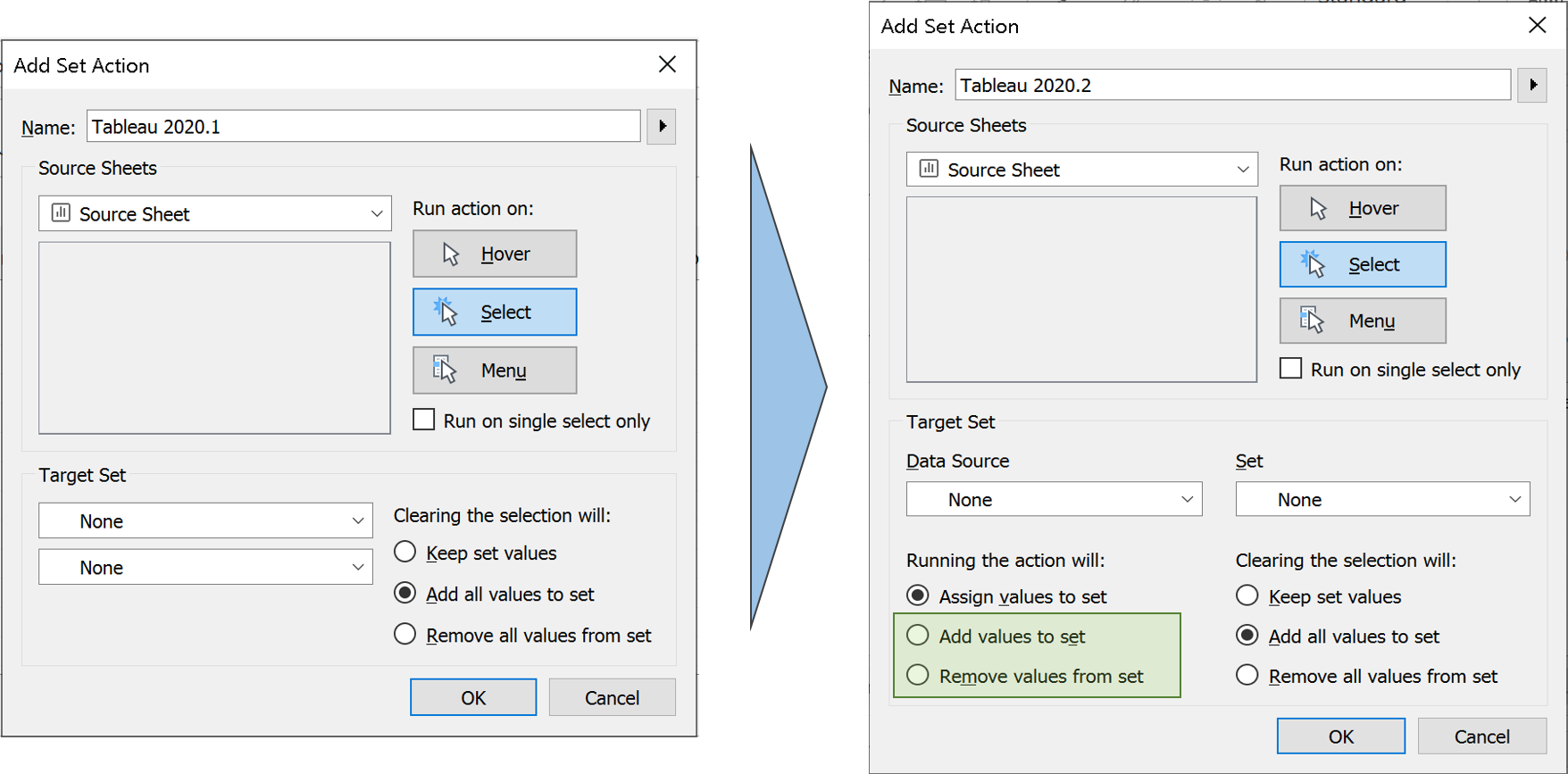 Zen Masters ‘The Flerlage Twins’ have a blog that explains all the features in details about this new set action option. You can check it out.:
4. Other Changes
No Dimensions or Measures:
One of the noticeable differences compared to the previous version, is the absence of sections for Dimensions and Measures. While there is separation line, it is less distracting than the previous versions. It is not only the Dimensions and Measure that got combined, but also the section for Sets. In this version, when you add a Set it will be added as another field in the table, just like a calculated field. This also makes complete sense, since the Sets already have a separate icon to denote them, and it can be clearly understood before using it for any analysis. However, there is a separate section for Parameters.
Always on Search Bar:
Also, the Search bar is now always visible and cannot be hidden, unlike the previous version. I prefer this option since I almost always enable the search and never hides it afterwards. The Search bar sits comfortably in the space that is created when the titles for Dimensions and Measures are removed. In addition, when you type a field name after selecting any field, it automatically goes to that field despite of whether it is Measure or a Dimension. This is similar to us typing a folder or filename to find it in a Windows Folder Explorer.
No more ‘Number of Records’:
Another difference is the absence of ‘Number of Records’ field. This is now replaced with a non-editable and non-removable field: ‘Tablename (Count)’. Since the data is defined by relationship and not joined, there will be multiple such fields if you use multiple data sources. Similarly, when we choose ‘View Data’, there will be multiple tabs based on the number of data sources we use.
I have tried to show these in the image below.
Zen Masters ‘The Flerlage Twins’ have a blog that explains all the features in details about this new set action option. You can check it out.:
4. Other Changes
No Dimensions or Measures:
One of the noticeable differences compared to the previous version, is the absence of sections for Dimensions and Measures. While there is separation line, it is less distracting than the previous versions. It is not only the Dimensions and Measure that got combined, but also the section for Sets. In this version, when you add a Set it will be added as another field in the table, just like a calculated field. This also makes complete sense, since the Sets already have a separate icon to denote them, and it can be clearly understood before using it for any analysis. However, there is a separate section for Parameters.
Always on Search Bar:
Also, the Search bar is now always visible and cannot be hidden, unlike the previous version. I prefer this option since I almost always enable the search and never hides it afterwards. The Search bar sits comfortably in the space that is created when the titles for Dimensions and Measures are removed. In addition, when you type a field name after selecting any field, it automatically goes to that field despite of whether it is Measure or a Dimension. This is similar to us typing a folder or filename to find it in a Windows Folder Explorer.
No more ‘Number of Records’:
Another difference is the absence of ‘Number of Records’ field. This is now replaced with a non-editable and non-removable field: ‘Tablename (Count)’. Since the data is defined by relationship and not joined, there will be multiple such fields if you use multiple data sources. Similarly, when we choose ‘View Data’, there will be multiple tabs based on the number of data sources we use.
I have tried to show these in the image below.
 5. Explain Data and Ask Data Improvements
There are significant improvements in these features in every version and this time is no different. Even with all the AI capabilities, there would be times when we want to take control. Explain Data in the new version gives you that extra control that was missing in the earlier version. Authors can now choose which fields to be included in modelling Explain data, giving you the option to input your business logic to it. Explain data also allows you analyse more than just one outlier in the latest version. However, this option seems to be missing for relational databases.
5. Explain Data and Ask Data Improvements
There are significant improvements in these features in every version and this time is no different. Even with all the AI capabilities, there would be times when we want to take control. Explain Data in the new version gives you that extra control that was missing in the earlier version. Authors can now choose which fields to be included in modelling Explain data, giving you the option to input your business logic to it. Explain data also allows you analyse more than just one outlier in the latest version. However, this option seems to be missing for relational databases.
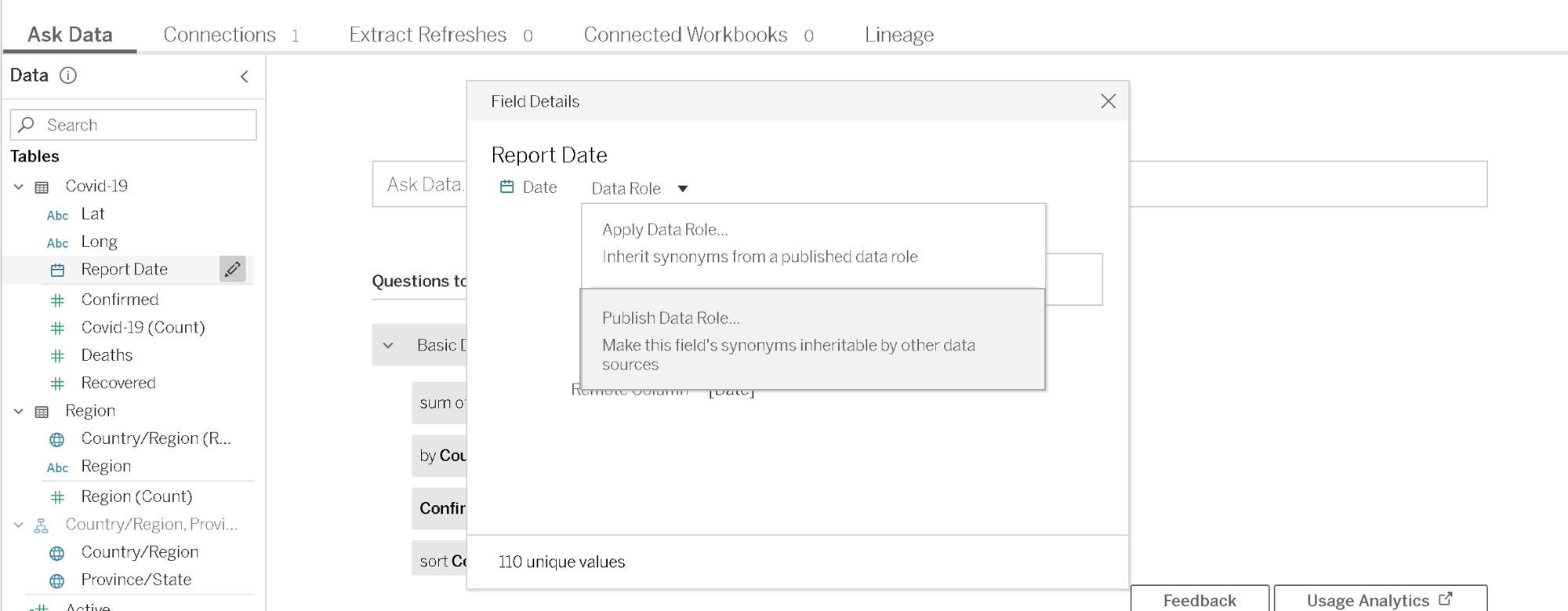
 When it comes to Ask Data, you can now provide custom suggestions based on data roles. In addition, the synonyms applied for one field can be published to use across data sources. It also supports scripted data sources in the new version and has some improvements on enterprise controls.
As mentioned at the beginning, there are several other features in Tableau 2020.2. It would be extremely difficult to include all those in just one post. There are other changes like Recommendations on Mobile, Manual sorting of Favourites, publishing directly from the browser without having to open the dashboard on Tableau Desktop etc. and so on.
I hope you got an overview to some of the new features and want to explore more. Let us know your thoughts and how these features were beneficial to you.
When it comes to Ask Data, you can now provide custom suggestions based on data roles. In addition, the synonyms applied for one field can be published to use across data sources. It also supports scripted data sources in the new version and has some improvements on enterprise controls.
As mentioned at the beginning, there are several other features in Tableau 2020.2. It would be extremely difficult to include all those in just one post. There are other changes like Recommendations on Mobile, Manual sorting of Favourites, publishing directly from the browser without having to open the dashboard on Tableau Desktop etc. and so on.
I hope you got an overview to some of the new features and want to explore more. Let us know your thoughts and how these features were beneficial to you.
 As mentioned at the beginning, there are several other features in Tableau 2020.2. It would be extremely difficult to include all those in just one post. There are other changes like Recommendations on Mobile, Manual sorting of Favourites, publishing directly from the browser without having to open the dashboard on Tableau Desktop etc. and so on.
I hope you got an overview to some of the new features and want to explore more. Let us know your thoughts and how these features were beneficial to you.
As mentioned at the beginning, there are several other features in Tableau 2020.2. It would be extremely difficult to include all those in just one post. There are other changes like Recommendations on Mobile, Manual sorting of Favourites, publishing directly from the browser without having to open the dashboard on Tableau Desktop etc. and so on.
I hope you got an overview to some of the new features and want to explore more. Let us know your thoughts and how these features were beneficial to you.
Zen Masters ‘The Flerlage Twins’ have a blog that explains all the features in details about this new set action option. You can check it out.:
4. Other Changes
No Dimensions or Measures:
One of the noticeable differences compared to the previous version, is the absence of sections for Dimensions and Measures. While there is separation line, it is less distracting than the previous versions. It is not only the Dimensions and Measure that got combined, but also the section for Sets. In this version, when you add a Set it will be added as another field in the table, just like a calculated field. This also makes complete sense, since the Sets already have a separate icon to denote them, and it can be clearly understood before using it for any analysis. However, there is a separate section for Parameters.
Always on Search Bar:
Also, the Search bar is now always visible and cannot be hidden, unlike the previous version. I prefer this option since I almost always enable the search and never hides it afterwards. The Search bar sits comfortably in the space that is created when the titles for Dimensions and Measures are removed. In addition, when you type a field name after selecting any field, it automatically goes to that field despite of whether it is Measure or a Dimension. This is similar to us typing a folder or filename to find it in a Windows Folder Explorer.
No more ‘Number of Records’:
Another difference is the absence of ‘Number of Records’ field. This is now replaced with a non-editable and non-removable field: ‘Tablename (Count)’. Since the data is defined by relationship and not joined, there will be multiple such fields if you use multiple data sources. Similarly, when we choose ‘View Data’, there will be multiple tabs based on the number of data sources we use.
I have tried to show these in the image below.
5. Explain Data and Ask Data Improvements
There are significant improvements in these features in every version and this time is no different. Even with all the AI capabilities, there would be times when we want to take control. Explain Data in the new version gives you that extra control that was missing in the earlier version. Authors can now choose which fields to be included in modelling Explain data, giving you the option to input your business logic to it. Explain data also allows you analyse more than just one outlier in the latest version. However, this option seems to be missing for relational databases.
When it comes to Ask Data, you can now provide custom suggestions based on data roles. In addition, the synonyms applied for one field can be published to use across data sources. It also supports scripted data sources in the new version and has some improvements on enterprise controls.
As mentioned at the beginning, there are several other features in Tableau 2020.2. It would be extremely difficult to include all those in just one post. There are other changes like Recommendations on Mobile, Manual sorting of Favourites, publishing directly from the browser without having to open the dashboard on Tableau Desktop etc. and so on.
I hope you got an overview to some of the new features and want to explore more. Let us know your thoughts and how these features were beneficial to you.
As mentioned at the beginning, there are several other features in Tableau 2020.2. It would be extremely difficult to include all those in just one post. There are other changes like Recommendations on Mobile, Manual sorting of Favourites, publishing directly from the browser without having to open the dashboard on Tableau Desktop etc. and so on.
I hope you got an overview to some of the new features and want to explore more. Let us know your thoughts and how these features were beneficial to you.
Data Calculations in Tableau: Sum and Running Sum
[sc name="quote" quote="“The functions, even as they may look simple, are pretty useful for any Tableau Consultant especially if they are working on finance-related projects,”" author="Joseph John, Senior Consultant, Analytics, Beinex"][/sc]

What is Tableau Sum and Running Sum?
Sum
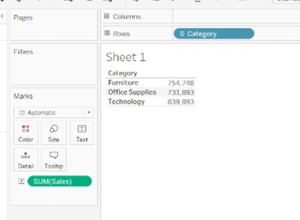
SUM is one of the commonly performed functions in Tableau. The Tableau Sum function seeks out the Sum of records under consideration. It is the total of the values present in a field. The screenshot provided below exhibits the total sum of sales for each of the three categories as given in Sheet 1.
In the sample dataset shown below, the sum of sales is shown corresponding to each of the corresponding values in the dimension "Category". For example, "Furniture" has a total sale of 754,748, which could be comprising of furniture related products such as Tables, Chairs etc.
Running Sum
A RUNNING SUM is a cumulative total in a row or column from the first value to the final value in the respective row or column. For instance, in the example given below, the cumulative values of Furniture and Office Supplies stand at 1,486,641 and that value when added to Technology’s value of 839,893 gives 2,326,534.
You can summarise or modify the granularity of your data using aggregate functions. An aggregate part combines the values of multiple lines to provide a single value. Examples of aggregate functions apart from sum are measurements based on Count, Count Distinct, Fixed Calculations, and other standard integration functions.
Every time you include a measure in your view, an aggregate is automatically applied to that measure. Depending on the context of the view, different aggregation techniques are used. Analysts can well utilise these features to simplify the whole complex process of data analysis, and organisations can harness them for insightful decisions.

DUBAI’S REAL ESTATE TRANSACTION
Dubai real estate market shows continues growth, driven by general optimism and confidence in the sector. The Dubai Land Department, DLD, has revealed that real estate transactions in Dubai for the first three months of 2018 totaled AED58 billion through 13,759 sales.
[subscribelocker]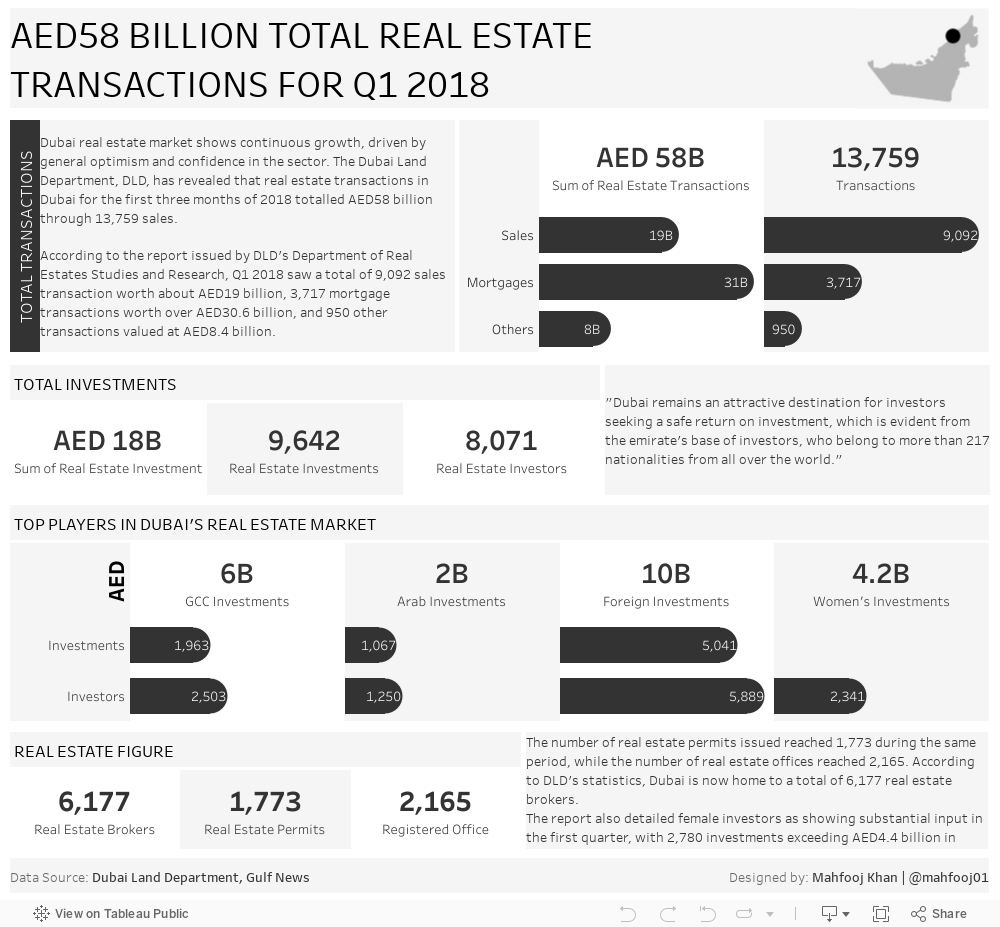

Mastering AWS Key Management Service (KMS) for Secure Data Management: Protect, Encrypt, Comply
What is AWS KMS?
AWS KMS is a managed service that enables you to create, control, and use encryption keys to protect data across your applications. By leveraging AWS KMS, businesses can confidently manage data encryption with a variety of flexible tools and practices. Here’s a breakdown of the key components and functionalities of AWS KMS.
What are KMS Keys?
KMS keys are central to AWS KMS’s operations. They are cryptographic keys used for data encryption and decryption. Each KMS key has its own unique characteristics:
• Symmetric KMS Keys: These are 256-bit Advanced Encryption Standard (AES) keys, used for both encrypting and decrypting data and cannot be exported from AWS KMS.
• Data Keys: Data keys can encrypt larger volumes of data. AWS KMS can generate and encrypt these keys, though it doesn’t store or manage them directly.
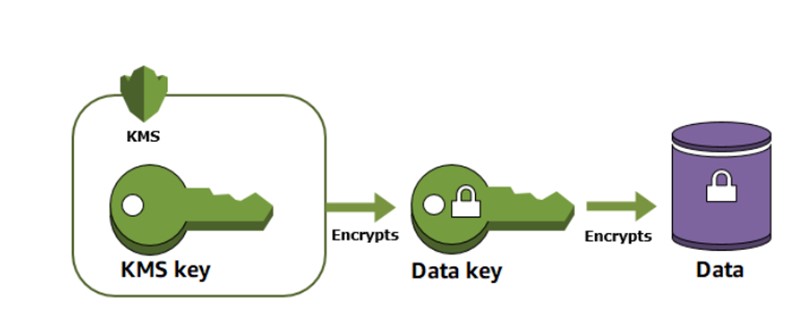 Source: https://docs.aws.amazon.com/kms/latest/developerguide/overview.html
Why Use AWS KMS?
When you encrypt data, you need to protect your encryption key. If you encrypt your key, you need to protect its encryption key. Eventually, you must protect the highest-level encryption key (known as a root key) in the hierarchy that protects your data. That's where AWS KMS comes in. AWS KMS protects your root keys. KMS keys are created, managed, used, and deleted entirely within AWS KMS. They never leave the service unencrypted. Additionally, you can create and manage key policies in AWS KMS, ensuring that only trusted users have access to KMS keys.
Key Features of AWS KMS:
• Key Creation and Management: You can easily create and manage various types of cryptographic keys, including symmetric keys and asymmetric key pairs. • Key Rotation: KMS supports automatic key rotation, which helps to enhance security by minimizing the lifetime of keys. • Key Usage Restrictions: You can define specific usage restrictions for your keys, such as limiting them to certain AWS services or requiring additional authentication factors. • Centralized Key Management: KMS allows you to manage all of your cryptographic keys from a single location, simplifying key management tasks. • Integration with AWS Services: KMS integrates seamlessly with many AWS services, such as Amazon S3, Amazon RDS, and Amazon EBS, making it easy to encrypt data at rest. • Compliance and Auditing: KMS helps you meet compliance requirements by providing features such as key audit logs and access controls. • HSM-Based Key Protection: KMS offers HSM-based key protection, which provides an additional layer of security for sensitive data.Key Benefits of Using AWS KMS:
• Enhanced Security: KMS helps to protect your data by providing strong encryption and key management capabilities. • Simplified Key Management: KMS streamlines the process of creating, managing, and controlling access to cryptographic keys. • Improved Compliance: KMS can help you meet compliance requirements by providing features such as key audit logs and access controls. • Cost-Effective: KMS is a cost-effective solution for managing cryptographic keys. • Scalability: KMS can scale to meet the needs of your growing business.
Types of KMS Keys
AWS KMS provides three types of KMS keys to suit different security needs: • Customer Managed Keys: You create and control these keys, customizing policies and permissions. This control extends to managing key rotations, setting up aliases, and even scheduling deletions. • AWS Managed Keys: These are managed by AWS on behalf of a specific AWS service, though they cannot be directly managed or used outside that service. • AWS Owned Keys: AWS owns and manages these keys across multiple accounts, making them inaccessible for direct management or auditing by customers.
How Does AWS KMS Encrypt Data?
AWS KMS employs several methods for data encryption:Data Keys and Envelope Encryption
In envelope encryption, data is first encrypted with a data key, which is then encrypted by a KMS key known as the root key. This two-layer encryption ensures an additional level of security.Encryption Context
KMS operations accept an optional encryption context, a set of key-value pairs providing additional information about the data being encrypted. This helps add context to the encrypted data, making it easier to identify and validate in future processes.Managing AWS KMS Keys and Access
Managing access to KMS keys is critical for security, especially when multiple teams or departments are involved. Here are some key components for effective key management: • Key Policies and Grants: Permissions to access KMS keys are managed through key policies. Alternatively, temporary access can be granted using grants, which can be applied, utilized, and revoked as needed without affecting long-term permissions. • Grant Tokens: To mitigate delays in grant permissions due to eventual consistency, grant tokens can be used for faster access rights activation.
Custom Key Stores and VPC Integration
For highly sensitive data, AWS KMS allows integration with AWS CloudHSM (Hardware Security Module) clusters through custom key stores. A custom key store provides a dedicated, secure storage location for cryptographic keys. Additionally, KMS allows you to connect directly through a private VPC endpoint, ensuring that all communication between your Virtual Private Cloud (VPC) and AWS KMS remains within the AWS network, bypassing the public internet for added security.
Rotating, Importing, and Deleting KMS Keys
Managing the lifecycle of encryption keys is a vital aspect of data security. AWS KMS provides several features to handle key management effectively: • Key Rotation: AWS KMS can automatically rotate customer-managed KMS keys annually, maintaining historical key material for decryption purposes. • Importing Keys: Businesses can import their own key material to AWS KMS, with options to set expiration dates or delete key material on demand. • Deleting Keys: When a KMS key is deleted, all associated metadata and key material are removed, making it impossible to decrypt any data previously encrypted with that key. AWS KMS also offers the ability to disable keys temporarily if access restrictions are needed.
Monitoring Key Usage with CloudWatch
To ensure robust monitoring, AWS KMS integrates with CloudWatch to track key usage and send notifications when certain actions are taken. For instance, you can create a CloudWatch alarm that triggers an alert if someone tries to use a key that’s pending deletion. AWS KMS is an indispensable tool for organizations needing to secure sensitive data efficiently. By understanding KMS keys, managing access, and leveraging encryption best practices, companies can create a reliable data protection framework that scales with their needs.
AWS + Beinex Partnership: How Can We Help You
Beinex is proud to be an AWS consulting partner dedicated to empowering our customers with AWS-managed services to host their BI solutions and beyond in the cloud. Our cloud migration experts deliver top-tier stability and reliability by aligning with your business strategy and collaborating closely to implement AWS infrastructure as a service. Experience AWS for free: https://beinex.com/beinex-amazon-web-services/