How AI Decision-Making is Improving Enterprise Outcomes
Blog
Share 
AWS Security Hub: Master Cloud Security with a Unified Approach
 3 March 2025
  Subbayya
 What is AWS Security Hub?
AWS Security Hub offers a unified, organized, and prioritized view of the compliance status and security posture of your AWS accounts in a standardized format. It automates the security best practice checks of single and multiple AWS accounts. It centralizes the security alerts into one format and place, helping you comprehend the security framework of your AWS environment. It offers a pre-built dashboard that helps manage and prioritize any alerts or issues in your AWS environment found from security checks. Security Hub assesses security controls, performs compliance checks, and generates control findings to gauge your organization's adherence to security best practices. By automating security best practice checks, Security Hub streamlines the understanding and enhancing of the security posture of your AWS accounts. It offers multiple security standards to handle your organization's security position, including Foundational Security Best Practices developed by AWS and external compliance frameworks like Center for Internet Security (CIS) and Payment Card Industry Data Security Standard (PCI DSS). These standards have various security controls, each defining a security best practice. Besides generating control findings, Security Hub acquires findings from AWS services like Amazon Inspector and Amazon GuardDuty and also supports third-party products, offering a centralized view of several security-related issues. Also, the automation capabilities of the Security Hub simplified the triage and remediation of security issues. For example, by setting automation rules, critical discoveries get updated automatically in case of a security check failure.Features of AWS Security Hub
Centralized Cloud Security Management: It offers a unified dashboard that tracks security findings from AWS services like AWS Config and third-party tools, enhancing and prioritizing them in a single place. Third-Party Integration: AWS Security Hub seamlessly integrates with third-party tools like Splunk, consolidating data from multiple sources into a unified view. Tailored Security Insights: It enables the customization of security insights and alerts, allowing organizations to adapt their security posture to specific needs. Automated Compliance and Security Checks: By automating compliance and security checks on AWS accounts, resources, and services, AWS Security Hub enables the detection of security issues, continuous monitoring, and evaluation while ensuring they adhere to industry best practices and standards.Top Benefits of AWS Security Hub
• Streamlines managing cloud security by centralizing all security data in a single place, offering a consolidated view that helps detect possible threats. • Enhances real-time threat detection by facilitating integration with AWS services like Amazon GuardDuty. • Ensures regulatory compliance by fulfilling the industry security criteria and standards • Conducts constant security checks by following industry standards and practices to identify and monitor AWS accounts and resources that need attention, flagging any misconfigurations in security. • Enables automated remediation for specific findings and customized actions triggered upon detection. In short, AWS Security Hub enhances cloud security by centralizing monitoring of accounts, services, and resources, performing automated security assessments, enabling businesses to comply with security standards, and integrating with AWS services for real-time threat detection. It can be quite difficult to manage security in complex cloud environments, but AWS Security Hub streamlines the process by delivering real-time security insights into your AWS environment, consolidating security alerts from different tools into a unified view, and automating security checks to enhance protection and efficiency. As an AWS consulting partner, Beinex offers AWS-managed services to our customers to host their BI solutions and more on the cloud. Our cloud migration experts ensure top-tier stability and reliability by aligning with your business strategy and collaborating closely with you to deploy AWS infrastructure as a service seamlessly. Connect with us for a free demo: https://beinex.com/beinex-amazon-web-services/As businesses move to the cloud, security and compliance have become paramount for enterprises, given the rising risks of security threats. Most organizations use Amazon Web Services (AWS), one of the leading cloud platforms, to store data, scale up operations, and run applications. AWS provides a suite of security services to help secure cloud environments, including AWS Security Hub, which stands out due to its centralized security management.
The blog walks you through a detailed overview of AWS Security Hub, its features, and benefits that help businesses acquire a comprehensive perspective of their security position in AWS and ensure their AWS environment aligns with security best practices and industry standards.
The blog walks you through a detailed overview of AWS Security Hub, its features, and benefits that help businesses acquire a comprehensive perspective of their security position in AWS and ensure their AWS environment aligns with security best practices and industry standards.
Related Articles

RUNNING THE MIGHTY SMALL LANGUAGE MODEL PHI-3 ON SNOWFLAKE
What is an SLM?
A Small Language Model (SLM) is tailored to excel in simpler tasks, offering boosted accessibility and user-friendliness for organizations operating with limited resources. Besides, they can be readily fine-tuned to align with specific requirements. Small language models are particularly well-suited for organizations aiming to develop applications capable of operating local devices instead of relying on cloud infrastructure. They are especially beneficial for tasks that do not necessitate extensive reasoning or immediate responses.
Reasons to use SLMs
Given the growing popularity and applicability of SLMs across various domains, particularly in areas like sustainability and the volume of data required for training, there are multiple reasons for employing them.
What is Phi-3?
Microsoft has a suite of small language models (SLMs) known as 'Phi,' demonstrating outstanding performance across various benchmarks. Microsoft's recent release is Phi-3, a series of open AI models. The Phi-3 models represent a prototype of capability and cost-effectiveness among small language models (SLMs), exceeding models of equivalent and larger sizes across the spectrum of coding, language, reasoning, and mathematical standards. This launch broadens the array of high-calibre models accessible to customers, providing them with more practical options as they craft and construct generative AI applications.
Phi-3-mini, a 3.8B language model, is accessible through Microsoft Azure AI Studio, Hugging Face, and Ollama. It is offered in two context-length variations—4K and 128K tokens. Notably, it is the first model within its category to support a context window of up to 128K tokens with minimal impact on quality. Furthermore, it is instruction-tuned, implying that it has been trained to comprehend and adhere to diverse instructions, mirroring natural human communication patterns. This ensures that the model is readily deployable straight out of the box. Phi-3-mini is available on Azure AI to leverage the deploy-eval-finetune toolchain, and it is also accessible on Ollama for developers to execute locally on their laptops.
Features of Phi-3
Phi-3 models exhibit distinctive superiority over language models of comparable and larger dimensions on key benchmarks, showcasing the following features:
Snowflake meets Phi-3: Advantages
The key pain point about LLMs is the computing required to host and run them. Setting up a dozen GPUs to run models can be expensive and complex. There's where Snowflake steps up. Snowflake's compute pool option enables users to easily and quickly set up and manage compute clusters. Phi-3 comes into the picture because of its cost-effective GPU utilization.
Can you imagine a situation where your language model only requires less than 3GB of GPU memory for inference? Well, now it's possible, all thanks to Phi-3. It's a state-of-the-art SLM that produces excellent results over GP3.5 and Mistral 8x7B, which are much bigger models. This opens the door for more cost-effective solutions to be brought up in the AI space. Add Snowflake for hosting; you have an excellent setup to host, test, and build AI applications. Read below how Beinex managed to run Phi-3 on Day 0 in Snowflake.
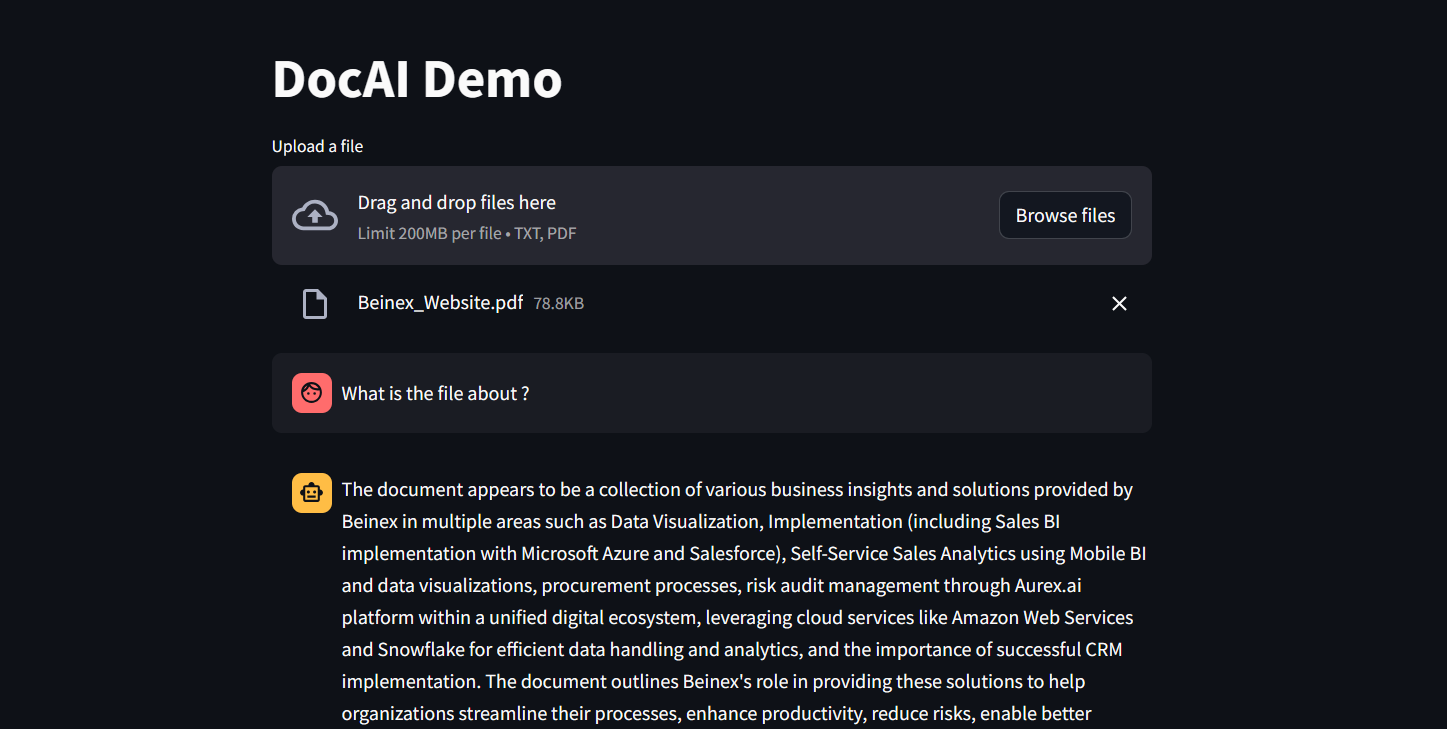 Figure 1: DocAI running on Phi-3
Implementing Phi-3 on Snowflake: What Beinex Did and How Beinex Did it?
Beinex has seamlessly integrated Phi-3 into Snowflake to help enterprises unlock their data's full potential through advanced language processing capabilities and enhance decision-making with deeper insights. The integration facilitates Snowflake users to:
Here's a detailed guide on implementing Phi-3 on Snowflake:
Step 1: Create Necessary Objects
-- Run by ACCOUNTADMIN to allow connecting to Hugging Face to download the model
-- Stage to store LLM models
CREATE STAGE <stagename> IF NOT EXISTS models
DIRECTORY = (ENABLE = TRUE)
ENCRYPTION = (TYPE='SNOWFLAKE_SSE');
-- Stage to store YAML specs
CREATE STAGE <stagename> IF NOT EXISTS specs
DIRECTORY = (ENABLE = TRUE)
ENCRYPTION = (TYPE='SNOWFLAKE_SSE');
-- Image repository
CREATE OR REPLACE IMAGE REPOSITORY images;
-- Compute pool to run containers
CREATE COMPUTE POOL GPU_NV_S
MIN_NODES = 1
MAX_NODES = 1
INSTANCE_FAMILY = GPU_NV_S;
Step 2: Docker Image Code - ollama
FROM ollama/ollama
RUN $(ollama serve > output.log 2>&1 &) && sleep 10 && ollama pull phi3 && pkill ollama && rm output.log
ENTRYPOINT ["ollama"]
CMD ["serve"]
Step 3: Tag and Push the Docker Image
docker tag ollama <SNOW_ORG-SNOW_ACCOUNT>.registry.snowflakecomputing.com/db/schema/image respository /ollama
docker push <SNOW_ORG-SNOW_ACCOUNT>.registry.snowflakecomputing.com db/schema/image repository /ollama
Step 4: Docker Image - UDF
FROM python:3.11
WORKDIR /app
ADD ./requirements.txt /app/
RUN pip install --no-cache-dir -r requirements.txt
ADD ./ /app
EXPOSE 5000
ENV FLASK_APP=app
CMD ["flask", "run", "--host=0.0.0.0"]
App.py content is given below :
from flask import Flask, request, Response, jsonify
import logging
import re
import os
from openai import OpenAI
client = OpenAI(
base_url='http://ollama:11434/v1',
api_key="EMPTY",
)
model = "phi3"
app = Flask(__name__)
app.logger.setLevel(logging.ERROR)
def extract_json_from_string(s):
logging.info(f"Extracting JSON from string: {s}")
# Use a regular expression to find a JSON-like string
matches = re.findall(r"\{[^{}]*\}", s)
if matches:
# Return the first match (assuming there's only one JSON object embedded)
return matches[0]
# Return the original string if no JSON object is found
return s
@app.route("/", methods=["POST"])
def udf():
try:
request_data: dict = request.get_json(force=True) # type: ignore
return_data = []
for index, col1 in request_data["data"]:
completion = client.chat.completions.create(
model=model,
messages=[
{
"role": "system",
"content": "You are a bot to help extract data and should give professional responses",
},
{"role": "user", "content": col1},
],
)
return_data.append(
[index, extract_json_from_string(completion.choices[0].message.content)]
)
return jsonify({"data": return_data})
except Exception as e:
app.logger.exception(e)
return jsonify(str(e)), 500
Step 6: YAML File
spec:
containers:
- name: ollama
image: <SNOW_ORG-SNOW_ACCOUNT>.registry.snowflakecomputing.com/ db/schema/image respository /Phi3
resources:
requests:
nvidia.com/gpu: 1
limits:
nvidia.com/gpu: 1
env:
NUM_GPU: 1
MAX_GPU_MEMORY: 24Gib
volumeMounts:
- name: llm-workspace
mountPath: /<stage name>
- name: udf
image: <SNOW_ORG-SNOW_ACCOUNT>.registry.snowflakecomputing.com/ db/schema/image respository /ollama_udf
endpoints:
- name: chat
port: 5000
public: false
- name: llm
port: 11434
public: false
volumes:
- name: llm-workspace
source: "@<llm stage_name>"
Step 7: Upload YAML File and Create Service
Upload the YAML file to the created stage, where the stage name in the YAML file should match the stage created in Step 2.
-- Create service
create service phi3
IN COMPUTE POOL <name of compute pool created>
FROM @dash_stage
SPECIFICATION_FILE = '<name of yaml file uploaded>';
Step 8: Create Service Function
Create a service function on the service (after it starts).
create or replace function phi3chat(prompt text)
returns text
service= phi3
endpoint=chat;
Check Service Status
Use the following command to check the status of the service:
SELECT
v.value:containerName::varchar container_name,
v.value:status::varchar status,
v.value:message::varchar message
FROM (
SELECT parse_json(system$get_service_status('<service name>'))
) t,
LATERAL FLATTEN(input => t.$1) v;
Benefits of Running Phi-3 on Snowflake
1. Cost-Effectiveness and Efficiency:
2. Compatibility with Smaller GPUs:
3. Exceptional Performance:
4. Faster Response Times:
SLM vs LLM
The choice between small and large language models hinges on organizational needs, task complexity, and resource availability.
LLMs excel in applications requiring the orchestration of intricate tasks, encompassing advanced reasoning, data analysis, and contextual comprehension.
On the other hand, SLMs present viable options for regulated industries and sectors facing scenarios necessitating top-tier results while maintaining data within their premises.
Both large and small language models possess distinct strengths and applications. While large language models thrive in managing complex workflows, small language models deliver impressive performance despite their compact size.
While some customers may exclusively require small models, others may favour larger models, with many seeking to integrate both types in various configurations. Ultimately, the optimal selection depends on the unique context and objectives of the organization. Besides transitioning from large to small models, the trend is evolving towards a diversified portfolio of models. This means that instead of relying on a single model, customers can choose from various models with different sizes, capabilities, and resource requirements. This empowers customers to decide the best model for their scenario, balancing performance and resource constraints.

Seamless Integration: Maximise the Benefits of Blockchain in Cloud Computing
5 Top Ways Blockchain Improves Cloud Computing
Blockchain technology can enhance cloud computing in several ways:
- Improved Security: Security and privacy are major concerns in cloud computing. Blockchain technology offers enhanced security by enabling data encryption and advanced database protection. The decentralised nature of blockchain ensures that data is not stored in a single location, reducing the risk of unauthorised access or data breaches.
- Increased Visibility: Transparency and visibility are crucial in cloud computing. Blockchain enables the creation of a decentralised and shared trust model, allowing for increased transparency. Public blockchains provide visibility into every action taken, reducing opacity and enhancing trust in the cloud environment.
- Data Integrity and Immutability: Once information is recorded on a blockchain, it becomes immutable and cannot be altered by any individual or entity without consensus from the network. This feature ensures the integrity of data stored in the cloud, reducing the risk of unauthorised modifications or tampering.
- Traceability: Blockchain ensures that data stored on its network remains intact and authentic. The information stored on one device within the blockchain network does not affect the data on other devices, guaranteeing data integrity. Additionally, blockchain enables easy data traceability, allowing users to track where, when, and how it is used.
- Exclusion of Third Parties: In cloud computing, relying on third-party providers can result in significant data loss if these providers experience failures. In contrast, blockchain is managed by code and does not involve third parties. This makes blockchain integration with cloud computing an attractive option, as it reduces the risk of data loss and dependency on external service providers.
4 Top Benefits of Blockchain in Cloud Computing
Integrating blockchain technology into cloud computing offers many benefits, including enhanced data security, seamless traceability, improved system interoperability, and more. Let's explore how organisations can leverage the power of blockchain in their cloud computing strategies.
Enhanced Data Security
By implementing point-to-point encryption, blockchain ensures data security during transfer and storage. Using blockchain for transaction recording establishes a reliable method for maintaining the integrity and sequence of transactions. Furthermore, the decentralised nature of blockchain, combined with peer-to-peer distribution across cloud computing systems, adds an extra layer of security beyond traditional centralised storage approaches.
Permanent Audit Trail
An additional benefit of integrating blockchain technology into cloud computing is creating a permanent audit trail. Blockchains ensure the establishment of a lasting record of transactions. Notably, blockchain technology incorporates a feature known as proof of history (POH), which supports a verifiable delay function. This function timestamps the transactions within the cloud computing network without requiring user validation. By implementing blockchain, organisations can maintain a proper order of transactions and establish a permanent timeframe for transactional data by including the POH function.
Decentralisation
An emerging trend in the technology landscape involves the shift towards edge computing, where data processing occurs at the network's periphery, near the data source. This decentralisation approach offers various advantages. For instance, Internet of Things (IoT) devices no longer need to rely on a centralised server for data processing. Instead, they can handle data independently. Similarly, facial recognition nodes may store encrypted data of authorised users and only require server interaction if a facial match is not detected. These nodes can operate autonomously until an upgrade check is necessary.
Efficient Disaster Recovery
By leveraging blockchain technology, the record of transactions is distributed widely, offering valuable benefits in terms of disaster recovery. The public or shared blockchain among authorised users ensures that a failure within one network node does not impact the remaining blockchain copies. Other nodes within the network continue to operate and update the blockchain even if one node experiences a crash.
With the transactional records embedded within the blockchain, especially those with specific timeframes, any failed network node can easily synchronise with the current state of the blockchain database once it is back online. This capability allows for a swift recovery and ensures that the node can quickly regain access to the most up-to-date version of the blockchain. Consequently, faster disaster recovery is facilitated through the inherent resilience and redundancy of blockchain technology.
Blockchain Technology: An Ultimate Solution to Business Problems
Blockchain technology offers solutions to various business problems across different industries. Let's explore how blockchain can address challenges in specific sectors, starting with healthcare:
Healthcare
In the healthcare industry, sensitive information such as credit card data, patient records, and test results are often stored in centralised systems, which can be prone to data breaches and security risks. By adopting blockchain technology, healthcare establishments can mitigate the risk of data loss. Blockchain enables the creation of a decentralised and tamper-proof log for storing private data. This decentralised approach and unique secure codes enhance data security and privacy, reducing the likelihood of unauthorised access or data leakage.
Supply Chain
Supply chains rely on vast data to ensure smooth operations at each transportation stage. By implementing blockchain technology in logistics management, you can enhance revenue and mitigate security concerns through real-time visibility and control. Furthermore, blockchain solutions improve interoperability, transparent data sharing, and more accurate product tracking within the supply chain ecosystem.
Banking
The current process of international payments often involves numerous verification steps, resulting in a cumbersome procedure. However, blockchain can potentially expedite money transfers while ensuring robust transaction security. This is achieved using distributed ledgers, where payments are processed once the transaction is registered. By leveraging the blockchain in banking, transactions can be streamlined, reducing delays and providing higher security.
Real Estate
Buying and selling real estate properties can be cumbersome and time-consuming, involving extensive paperwork, multiple intermediaries, susceptibility to fraud, and challenges in property search. However, intelligent solutions leveraging blockchain technology can effectively address these significant problems in the real estate industry.
Blockchain in real estate can enhance the due diligence process for property purchases and sales, reducing the reliance on intermediaries and streamlining the transaction process. Using blockchain can reduce the need for traditional agents, offering more direct interactions between buyers and sellers. Additionally, blockchain-powered smart contracts enable secure and seamless transactions, eliminating the need for manual contract handling and reducing the potential for errors or disputes.
How can Beinex Assist You
By leveraging blockchain technology, cloud computing solutions can benefit from enhanced security measures, increased transparency, and the assurance of data integrity. These advantages contribute to a more trustworthy and reliable cloud environment, addressing decentralisation, data privacy, and network security challenges.
Beinex, a pioneer in the Middle East in modern cloud functions and analytics, can change how you see, perceive and analyse cloud data, and take it to a superior, advantageous position.

The Future of Business Intelligence: AI-Augmented Analytics
The Struggles of Traditional Business Intelligence
Traditional BI platforms, while valuable, suffer from several limitations:
These limitations force businesses to make a tough choice: sacrifice the quality of insights by limiting analysis or invest significant time and resources into data preparation and model building.
The Rise of Augmented Analytics
Augmented analytics emerges as a powerful solution, addressing the shortcomings of traditional BI. It leverages the power of Artificial Intelligence (AI), Machine Learning (ML), and Natural Language Processing (NLP) to revolutionize data analysis:
How Does Augmented Analytics Work?
Augmented analytics enhances the four core stages of data analysis:
- Data Preparation: Traditionally, data preparation involves manual tasks like data cleaning and integration. Augmented analytics automates these processes, allowing data scientists to focus on more strategic tasks.
- Insight Discovery: Traditional BI requires pre-defined models to uncover insights. Augmented analytics utilizes ML algorithms to analyze all available data, regardless of size or complexity, to deliver targeted and nuanced insights in response to user queries.
- Insights Sharing: Sharing insights often involves generating reports and charts, a time-consuming task. Augmented analytics utilizes Natural Language Generation (NLG) to present insights in real time through online dashboards. These dashboards explain the "why" behind the data, giving decision-makers the context they need.
The Benefits of Augmented Analytics
By implementing augmented analytics, businesses can unlock a multitude of benefits:
Augmented Analytics Use Cases
Let's explore how augmented analytics is transforming various industries:
- Pharmaceutical Companies: Analyze vast datasets to optimize go-to-market strategies and uncover hidden patterns in market share data.
- Financial Lenders: Assess credit risk with greater accuracy by analyzing all relevant data points in real-time, leading to faster loan approvals and better risk management.
- Consumer Goods Companies: Gain real-time insights into product sales, customer churn, and satisfaction, allowing for proactive customer engagement strategies.

Top 6 Benefits of Social Media Listening plus Top 6 Tools to Aid You
What is Social Media Listening?
Social media listening is the practice of constantly scanning social media channels for comments and feedback regarding your brand, product, and services and using that data to take appropriate action. Searching for specific terms and subjects related to a business or sector and competitor remarks is a common aspect of social listening.
Two processes were engaged in social media listening: monitoring and action. Both processes analyse online interactions and conversations and act on the results. Social media listening becomes effective only when a concrete action follows information collection.
Including social media listening in your overall social media strategy has many advantages. Major benefits are:
1. Increased Customer Engagement
One of the main advantages of social media listening is the ability to monitor social media users’ conversations about your business or brand, whether they specifically mention you in the chat. This allows you to directly answer queries or comments or write posts dealing with recurring issues or questions. When businesses try to communicate with their customers, it fosters trust, boosts engagement, and strengthens brand loyalty.
Follow-up action is a vital component of social media listening. One fantastic start approach is leveraging the information you gather to develop a social media plan that responds to frequent comments or directly engages your audience.
2. Opportunities to Observe and Monitor Trends
You can gain a broad understanding of people’s opinions about your company and its sector through social media listening, enabling you to identify emerging trends or hot topics. This is very helpful for social media purposes and your research and design department and public relations team to explore potential partnerships or new avenues for your brand, depending on your product or service.
3. Conflict Resolution
For business, crises might happen at any time. In that case, customer reactions will be crucial to resolving the issue effectively. Social media listening can assist you in keeping track of client mood and guiding your decision-making if your business experiences a customer fallout or crisis. Assessing the actual responses of your customers can help you to move forward. Proper social media listening and subsequent action based on that can directly impact the development of your business.
4. Monitoring the Competition
You can follow the discussions involving your competitor by using keywords. This can assist you in locating any weaknesses in their business strategies or products that you can later exploit. Similarly, you can use this information to strengthen your brand in areas where you believe they are stronger than you.
5. Leveraging Influencers to Promote Marketing
With social listening, you can locate influencers who are already talking about your company and influencing your customers. Similarly, if influencers disparage your company, you can connect with them and see if there are any chances to change their opinions. You can also monitor their concerns and work to improve on suggestions. It's crucial to take these creators' comments seriously because they have sizable fan bases that can impact the thoughts of millions of consumers.
6. Tracking Events
Social listening will be beneficial to better understand how participants feel before, during, and after an event. Utilise social listening to learn about your participants' experiences and identify areas where the event may be improved or continued. This is particularly useful because it enables you to deal with potential roadblocks as they arise or keep doing what's working.
List of Social Media Listening Tools
You can use various social listening tools to communicate information, raise brand awareness, provide service and support, and more. Let’s discuss a few such tools:
1. Hootsuite
Hootsuite allows you to create social media streams that keep an eye on conversations, hashtags, mentions, and keywords. Instead of signing in and out of numerous social platforms, you may monitor conversations and comments directly from your social media dashboard. By keeping an eye on the competition, networking with influencers on social media, and identifying prospective brand champions, Hootsuite lets you stay on top of developments in your sector.
2. Adview
Adview is used exclusively for social listening on Facebook and Instagram ads. It can monitor up to three Facebook Ad Accounts across unlimited pages. Using Adview, you can respond to comments on all of your Facebook and Instagram advertising from one location. Furthermore, you receive data on the ads receiving the most comments so that you may adjust your campaigns accordingly.
3. Talkwalker
Talkwalker provides powerful social listening software features that monitor blogs, forums, videos, news websites, reviews, and social networks in one dashboard. Advanced filters enable you to segregate your data so that you may concentrate on the messages and audience that are most important to you. You may also set up alerts to inform you of any mentions or keyword usage increases. With Talkwalker, it's simple to keep an eye on conversations involving your brand and analyse their mood, engagement, reach, and comments.
4. Synthesio
Synthesio monitors talks on incredibly niche subjects in carefully selected communities. You may segment your social listening data using various criteria, including language, geography, demographics, sentiment, gender, and more. A valid social reputation score is also included in the reports to see how you compare to your rivals.
5. Mentionlytics
Mentionlytics tracks mentions, keywords, and sentiment across several languages on blogs, news websites, and social media platforms. Additionally, it makes it easy to locate influencers across social media platforms and other internet sources. You can quickly monitor terms in several languages, keep track of your top influencers, and even identify the sentiment behind each mention.
6. Brand 24
Brand 24 uses automated sentimental analysis to separate positive, negative, and neutral mentions by monitoring online reviews, mentions on social media, blogs, message boards, news websites etc. It helps to find out about your online mentions, boost client happiness, and increase lead generation for your company.
Final Words
It is high time for companies to get out of their bubbles and accept the masses' opinions, remarks, compliments, complaints, and inquiries on social media. In all sense, social media listening has excellent benefits and tools that can guide you in building your market presence by paying heed to social media.
Beinex Digital Offerings
Our bespoke digital solutions with a comprehensive suite of independent products are focused on addressing specific business gaps, use cases, and needs. No matter where your digital maturity currently stands, we can provide you with a Quantum Leap by deploying the unique business-consulting-technology model. Reach out to us: https://beinex.com/beinex-digital/

Accelerating Digital Transformation with Data and Design: Manufacturing Transformation
The impact of digital manufacturing transformation on businesses, their suppliers, customers, and other third parties is enormous. Whether you're selling precision machinery or building materials online, technology can help you in various ways. Digital technologies assist manufacturers in improving operational efficiencies and optimising multiple business areas, from product development to supply chain management.
Advanced manufacturing technologies provide numerous benefits, such as assisting companies in unlocking digital business models, adapting to changes faster, and even anticipating changes before they occur - all of which are critical to manufacturing. It's not surprising that IDC predicts that by the end of 2022, half of all manufacturers will have invested in intelligent manufacturing through improved resilience, data analytics, and artificial intelligence.
A few of the benefits are given below:
- Increased operational efficiency, reduced costs, and enhanced revenue
- Improved standard of manufactured goods
- Enhanced customer experience (e.g., streamline the ordering process)
- Improved decision-making abilities
- Ability to rapidly respond to changes in customer demands and the market.
Because of uncertainty in the global, economic, and policy landscapes, the state of manufacturing is constantly changing. The wide range of technological advances also potentially disrupts the industry. Five G (5G) network capabilities, a push for IoT, Industry 4.0, machine learning, and data-driven predictive analytics—all these aspects impact manufacturing.
The Advantages of Manufacturing Digitization
As digital technologies evolve around us, manufacturing companies are increasingly faced with a choice: increase their digitisation efforts or stick with tried-and-true methods.
Digital manufacturing transformation adds a lot of value to the manufacturing sector in the long run by reactivating many benefits, such as:
Improved data utilisation
Manufacturing digitisation is about optimising data usage in operations, and manufacturers can use data more effectively by feeding it into their B2B eCommerce, ERP, CRM, finance, warehousing, and other systems.
Process enhancements
Manufacturing operations could be revolutionised by digital transformation. Real-time insights, for example, can help monitor, resolve, and even predict situations to optimise machinery lifecycles—these aid in maintaining error-free operations and avoiding costly rework and disruptions.
Increased creativity
Because innovation breeds innovation, a digital transformation strategy in manufacturing lays the groundwork for a comprehensive optimisation approach. Deploying automated innovative factory capabilities in your ERP, for example, can help you improve business performance and the supply chain.
Better outsourcing
Manufacturers can avoid disruptions and risks associated with rushed solutions by implementing remote monitoring, troubleshooting, proactive maintenance, and data at their fingertips.
Customer-centricity
Manufacturers can provide more value to customers by launching a B2B eCommerce platform with separate portals for regions, brands, or clients. Furthermore, manufacturers can use sales data to accurately predict customer demand cycles and adjust production accordingly.
Manufacturing in the cloud
While the production of physical goods appears to be restricted to the realm of the tangible, expanding the use of cloud-based architecture has several benefits for businesses. Agile development is made possible by software that is cloud agnostic, which eliminates the requirement for massive legacy systems.
The demand for data has increased as the Internet of Things (IoT) is used more often. For enterprises to function effectively, systems must be able to store enormous volumes of data and process it fast without any downtime or risk of data loss.
Well-researched and executed, cloud-based systems provide manufacturers with special advantages. Production can go on with or without workers thanks to remote operations. Every stage of production is automated in a holistically planned system, eliminating the possibility of error.
Cloud manufacturing and manufacturing-as-a-service (MaaS)
Manufacturing-as-a-service (MaaS) companies work as independent contractors, producing goods for the companies who hire them while splitting the cost of software, equipment, maintenance, and repairs. It improves efficiency and increases capacity utilisation; a facility that is open around-the-clock is much more productive and effective. A MaaS company might benefit from day-to-day operations by taking on production for a variety of businesses.
For the companies using MaaS organisations, automated digital processes are also an excellent instrument for growth into larger product volumes and new product lines without spending more money on infrastructure and facilities.
Resilience
Resilience is essential to succeeding in challenging business situations. Although operations are resilient, adaptation is essential for long-term success. To stay ahead of the competition, manufacturers need to be able to foresee problems and find solutions.
By utilising adaptable automation, executing remotely, and tying the supply chain together with a cloud-based infrastructure, digital technologies support manufacturers.
Green Thinking
As consumers' demands for eco-friendly activities grow, technology advances to supply solutions. Machines that are controlled by AI are more efficient and use less energy. Increasing efficiency frequently encourages less material consumption as well. The ecosystem benefits greatly from less resource use.
Lower Costs, Higher Margins
Costs for manufacturers are reduced by digital transformation. With the help of the Internet of Things (IoT), manufacturers can more quickly identify and fix problems. Manufacturers can gain from connected machinery's range of advantages, including the ability to diagnose issues before they develop and schedule maintenance for increases in output.
To overcome current obstacles, switch to cloud-based digital manufacturing, and take advantage of the many benefits that are accessible, a platform ecosystem that adapts to demands rather than existing software is required.