How AI Decision-Making is Improving Enterprise Outcomes
Blog
Share 
Automating Compliance Checks with AWS Systems Manager
 30 December 2024
  Subbayya
 The Need for Automating Compliance
As business environments today are rapidly changing and highly regulated, it is important to automate compliance to boost accuracy, efficiency, and scalability. The following aspects emphasize why automating compliance is highly significant. • Amplifies security by complying with data privacy and safety regulations. • Saving time and effort by automating recurring tasks like monitoring, reporting, and audits. • Deploying the required infrastructure faster and in a standardized format. • Boosting accuracy by reducing the risks of human error and consistently adhering to industry standards.
What is an AWS Systems Manager?
A unified management system, an AWS Systems Manager, streamlines infrastructure management by improving visibility and giving you control over your AWS infrastructure. It delivers a suite of tools for managing configurations, automating repetitive tasks, patching systems, maintaining consistent configurations, and securely managing secrets and configurations. The primary features of AWS Systems Manager associated with compliance are: • Compliance Dashboards: They offer a centralized visualization of your compliance status, emphasizing resources that are non-compliant to facilitate faster remediation. • Patch Manager: It automates the deployment and monitoring of patches across your instances. • State Manager: It ensures that your systems are configured to a specific desired state.
Compliance Made Effortless: Automation with AWS Systems Manager
A comprehensive management service, AWS Systems Manager, allows you to automatically accumulate and aggregate data from your AWS resources. It provides a unified view of your AWS environment, making managing and monitoring your resources easier. Compliance, an AWS Systems Manager capability, enables the scanning for inconsistencies in compliance and configuration and offers real-time compliance insights. This capability facilitates drilling down into certain non-compliant resources from the data aggregated from multiple AWS accounts. The additional features and benefits Compliance provides are as follows: • Utilizing AWS Config to see compliance history and monitor changes. • Exporting data to Amazon Athena and Amazon QuickSight to generate organization-wise reports. • Using Amazon EventBridge, State Manager or Run Command to fix issues. • Customizing compliance to develop compliance types to fit your business needs. • Employing AWS Systems Manager for seamless integration of third-party compliance tools and automation of configuration management and vulnerability scanning. AWS Systems Manager facilitates the automation of intricate and recurring tasks associated with configuration, patching, and software installation. It allows businesses to run these tasks across systems simultaneously while minimizing the time needed to effect the changes and ensuring consistency in the process. This execution enables software compliance, including maintaining antivirus definitions up to date, implementing firewall policies, and setting patch baselines. The automation capability of AWS Systems Manager entails streamlining the deployment, maintenance, and remediations of AWS services like Amazon EC2, Amazon S3, and more.
Let’s explore how AWS Systems Manager automates compliance checks:
• Centralizing compliance management: AWS Systems Manager offers a unified compliance dashboard that lets users see the compliance status across different AWS accounts and regions in real-time. The dashboard consolidates data from the state manager and patch manager to centralize compliance management, enabling easy detection and addressing of specific non-compliant resources. • Enforcing configuration: Users can define and implement preferred states for the resources with the State Manager. It ensures consistency in configurations and compliance in setting permissions, configuring firewall rules, or installing software. • Patch Management: It automates the processes of patching applications and operating systems on your instances, allowing users to select authorized patches and schedules for automatic deployment. It makes sure that your systems are up-to-date and stay compliant with the safety standards. • Automating Remediation: AWS Systems Manager allows the automated remediation of non-compliant resources. For example, if a system falls out of compliance due to a missing patch, Patch Manager can trigger an automatic patch deployment to resolve the issue. • Facilitating integration with AWS Config: AWS Systems Manager integrates seamlessly with AWS Config, which helps assess and monitor configuration modifications against compliance rules. This integration facilitates continuous monitoring and automated reporting, ensuring a robust compliance posture.Some of the benefits of using AWS Systems Manager for compliance include:
• Saving time and expediting remediation as automation of compliance processes checks reduces manual effort. • Streamlines the audit processes and ensures audit readiness through meticulous logging and documentation of compliance actions. • Fortifies security by detecting and addressing vulnerabilities on time and ensures your enterprise aligns with the standard security practices. • Leverages existing AWS infrastructure to reduce the requirement for reliable compliance tools, saving costs. • Offers real-time insights into the compliance status across your AWS environment, facilitating proactive management. AWS Systems Manager can be a game changer for businesses looking forward to ensuring compliance with complex regulations and industry standards across a dynamic IT environment. Automating compliance checks boosts accuracy, efficiency, and security, transforming compliance management into a streamlined workflow. Beinex is an AWS consulting partner that lets you navigate the AWS landscape and leverage it for unprecedented business benefits. Connect with us for a free demo: Beinex - Beinex - Your Reliable AWS Partner for Cloud Computing ServicesThe dynamic cloud landscape necessitates complying with the complex and changing industry standards and regulatory requirements for enterprises to stay ahead with a competitive edge. However, ensuring compliance with various standards can be challenging as they change constantly, varying across countries. AWS offers various resources that assist customers in adhering to compliance requirements and focusing on primary business goals. The blog gives you a walkthrough of how AWS Systems Manager, a service offered by Amazon Web Services (AWS), helps automate and secure compliance and offers real-time insights, outsmarting the traditional way of time-consuming and error-prone manual compliance checks.
Related Articles
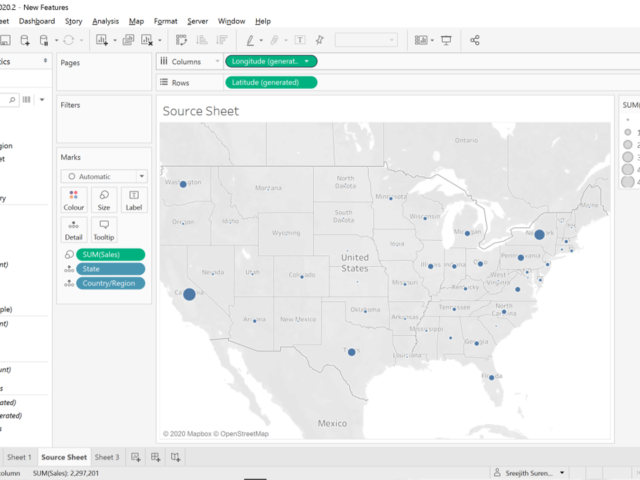
TABLEAU 2020.2 – A NEW LOOK AT VISUAL ANALYTICS
Tableau has been one of the most popular data visualization and analytics tools among the business users in the last decade. With the new features it is even simpler to see and understand data. It is evident that Tableau is made with the intention of appealing to everyone, even those with very limited technical know-how.
As always, the new version of Tableau is also packed with a punch. There are over 25 new features over the Desktop, Online, Prep and Mobile versions of the tool. Here are a few of them, that would significantly change the way you use this incredible platform.
I have been using this tool since the release on 6th May 2020. After a week of using it, I am convinced that the changes are significant and extremely useful. This new version seems a lot smoother (yes, that is the feeling you get when you use it), even compared to 2020.1, which was released last quarter. I will be focussing on some of the changes in the first blog, that would give you an overview and help you get started with this.
1. Relationships
As a trainer on Data Analytics for the last three years, I have experienced one struggle. It is about explaining the concepts of ‘Joins’ to business users. They find it confusing to know when to use ‘left join’ and when to use ‘full join’. (IT users and students had very limited issues since they have learned these concepts). Challenges like duplicate / repeating records in one of the tables (one to many mapping) is definitely hard to tackle unless you master the concepts and other techniques. However, in Tableau 2020.2, it uses ‘Relationships’ which is a much simpler and easier concept to understand, and Tableau does the heavy lifting if you are unsure
In this version, you can create logical relationship with data, visually. Relationship creates aggregations when you build the visualizations, rather than joining them in the database. This means that you can forget worrying about having to keep the data in the same level of details and the complications that would arise if it is not. For those who are familiar with the tool, the visual difference itself is quite significant. As soon as you drag and drop the second and subsequent tables, a relationship line (‘Noodle’ is what Tableau named these lines) appears and makes it easy to define the connection.
Once you add the table, a pop-up box suggests the best connection, where you can define further details (Cardinality and Referential Integrity) if needed. You can also view each of the tables independently even after defining the relationship. All you need to do, is just click on the table. You can also use the existing concepts of Union and Joins as well. Below is a simple example using Sample Superstore data.
2. Metrics
Metrics is a concept that would appeal to the higher management and executives. This is an option where you can track all metrices of your interest in one place, despite of it being included in multiple Tableau workbooks. Instead of creating a ‘Master Workbook’ with all the metrics, which involved development and maintenance effort, we can now do it with a simple click. It will add the Metrics or KPIs to the main Project folder itself. In addition, you can also see the trend of that particular metric over the period when the data refreshes.
In the example below, I have one Project in Tableau Online, which has got multiple dashboards catering to different business areas. I am adding two metrics: the number of male employees in the organization, and the YTD Sales. Since the data is not refreshed, the timeline will be empty. Just check out how easy it is to add the Metrics to monitor it continuously and effectively.
3. Set Controls and Set Action Updates
While this might be described as a new feature, it, in fact, opens a whole new set of opportunities to interact with your visualizations. If I try to describe set Controls in Tableau 2020.2, it can be simplified as an option in which we can include or exclude elements in a set in a simple drop-down (similar to ‘Filters’). The addition or deletion or new values in a set can significantly change the way we see the data.
This means that the end user can perform a variety of analysis in the front end. Check out the video below.
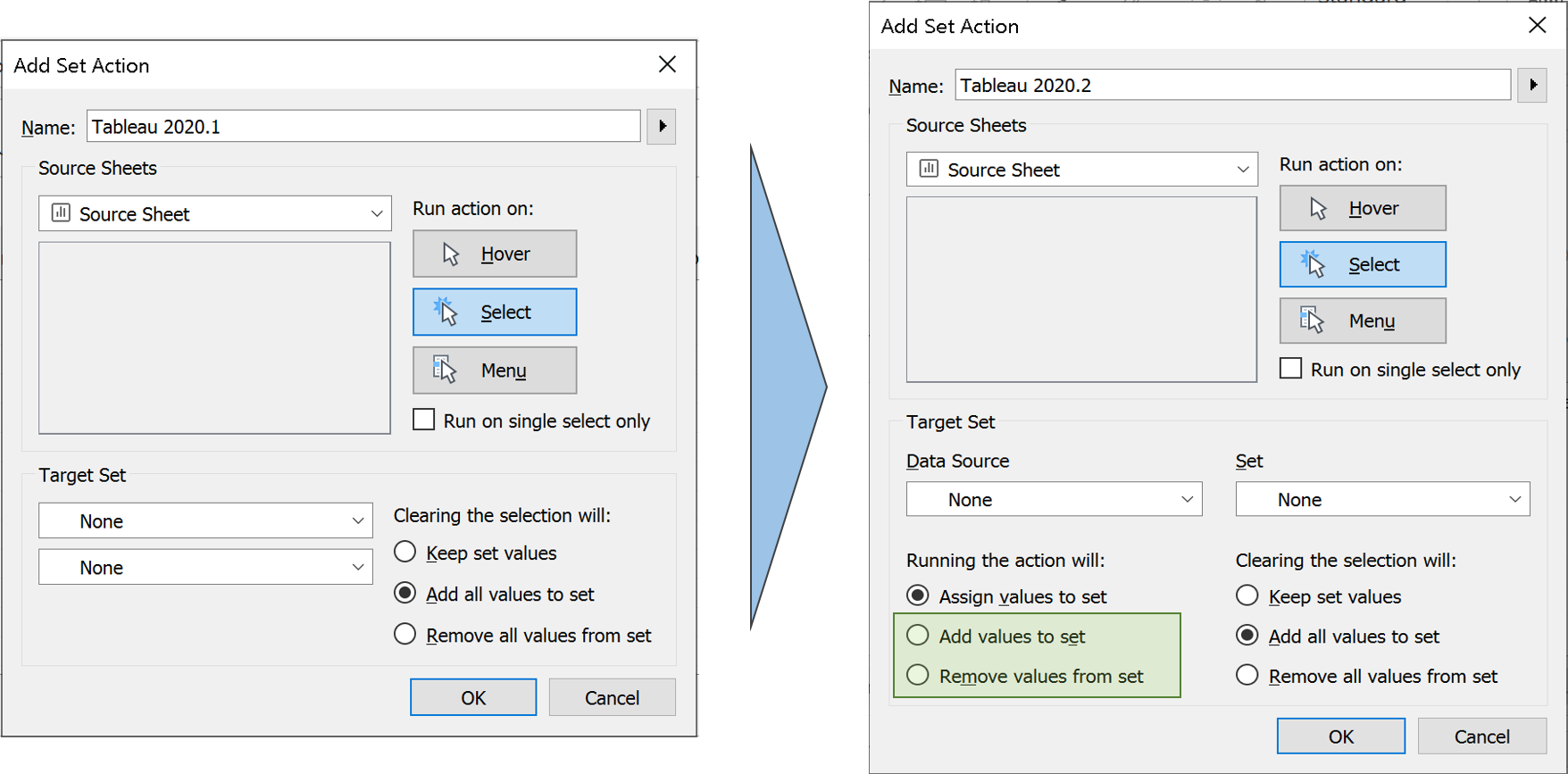
Set actions also has got two new selection modes as well in the new version. Tableau 2020.2. Instead of only assigning the set values, Set Action can now add or remove values incrementally, by interacting with the marks.
 Zen Masters ‘The Flerlage Twins’ have a blog that explains all the features in details about this new set action option. You can check it out.:
4. Other Changes
No Dimensions or Measures:
One of the noticeable differences compared to the previous version, is the absence of sections for Dimensions and Measures. While there is separation line, it is less distracting than the previous versions. It is not only the Dimensions and Measure that got combined, but also the section for Sets. In this version, when you add a Set it will be added as another field in the table, just like a calculated field. This also makes complete sense, since the Sets already have a separate icon to denote them, and it can be clearly understood before using it for any analysis. However, there is a separate section for Parameters.
Always on Search Bar:
Also, the Search bar is now always visible and cannot be hidden, unlike the previous version. I prefer this option since I almost always enable the search and never hides it afterwards. The Search bar sits comfortably in the space that is created when the titles for Dimensions and Measures are removed. In addition, when you type a field name after selecting any field, it automatically goes to that field despite of whether it is Measure or a Dimension. This is similar to us typing a folder or filename to find it in a Windows Folder Explorer.
No more ‘Number of Records’:
Another difference is the absence of ‘Number of Records’ field. This is now replaced with a non-editable and non-removable field: ‘Tablename (Count)’. Since the data is defined by relationship and not joined, there will be multiple such fields if you use multiple data sources. Similarly, when we choose ‘View Data’, there will be multiple tabs based on the number of data sources we use.
I have tried to show these in the image below.
Zen Masters ‘The Flerlage Twins’ have a blog that explains all the features in details about this new set action option. You can check it out.:
4. Other Changes
No Dimensions or Measures:
One of the noticeable differences compared to the previous version, is the absence of sections for Dimensions and Measures. While there is separation line, it is less distracting than the previous versions. It is not only the Dimensions and Measure that got combined, but also the section for Sets. In this version, when you add a Set it will be added as another field in the table, just like a calculated field. This also makes complete sense, since the Sets already have a separate icon to denote them, and it can be clearly understood before using it for any analysis. However, there is a separate section for Parameters.
Always on Search Bar:
Also, the Search bar is now always visible and cannot be hidden, unlike the previous version. I prefer this option since I almost always enable the search and never hides it afterwards. The Search bar sits comfortably in the space that is created when the titles for Dimensions and Measures are removed. In addition, when you type a field name after selecting any field, it automatically goes to that field despite of whether it is Measure or a Dimension. This is similar to us typing a folder or filename to find it in a Windows Folder Explorer.
No more ‘Number of Records’:
Another difference is the absence of ‘Number of Records’ field. This is now replaced with a non-editable and non-removable field: ‘Tablename (Count)’. Since the data is defined by relationship and not joined, there will be multiple such fields if you use multiple data sources. Similarly, when we choose ‘View Data’, there will be multiple tabs based on the number of data sources we use.
I have tried to show these in the image below.
 5. Explain Data and Ask Data Improvements
There are significant improvements in these features in every version and this time is no different. Even with all the AI capabilities, there would be times when we want to take control. Explain Data in the new version gives you that extra control that was missing in the earlier version. Authors can now choose which fields to be included in modelling Explain data, giving you the option to input your business logic to it. Explain data also allows you analyse more than just one outlier in the latest version. However, this option seems to be missing for relational databases.
5. Explain Data and Ask Data Improvements
There are significant improvements in these features in every version and this time is no different. Even with all the AI capabilities, there would be times when we want to take control. Explain Data in the new version gives you that extra control that was missing in the earlier version. Authors can now choose which fields to be included in modelling Explain data, giving you the option to input your business logic to it. Explain data also allows you analyse more than just one outlier in the latest version. However, this option seems to be missing for relational databases.
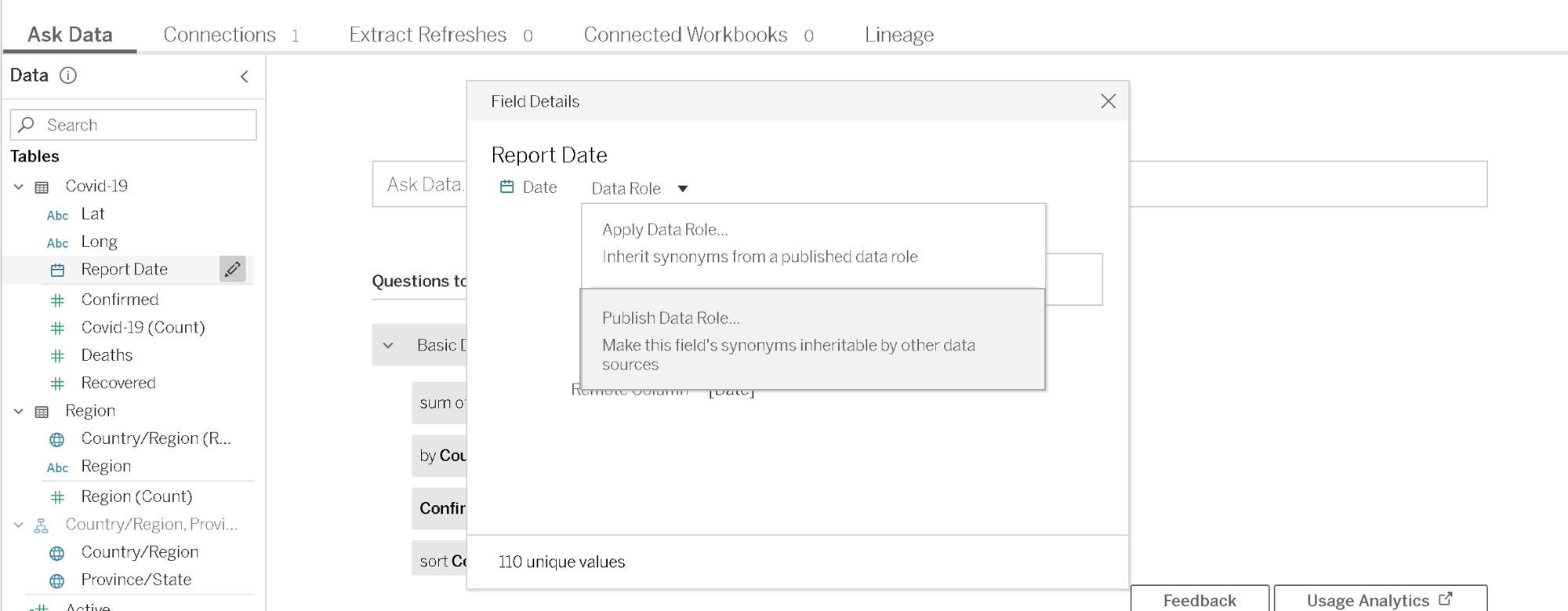
 When it comes to Ask Data, you can now provide custom suggestions based on data roles. In addition, the synonyms applied for one field can be published to use across data sources. It also supports scripted data sources in the new version and has some improvements on enterprise controls.
As mentioned at the beginning, there are several other features in Tableau 2020.2. It would be extremely difficult to include all those in just one post. There are other changes like Recommendations on Mobile, Manual sorting of Favourites, publishing directly from the browser without having to open the dashboard on Tableau Desktop etc. and so on.
I hope you got an overview to some of the new features and want to explore more. Let us know your thoughts and how these features were beneficial to you.
When it comes to Ask Data, you can now provide custom suggestions based on data roles. In addition, the synonyms applied for one field can be published to use across data sources. It also supports scripted data sources in the new version and has some improvements on enterprise controls.
As mentioned at the beginning, there are several other features in Tableau 2020.2. It would be extremely difficult to include all those in just one post. There are other changes like Recommendations on Mobile, Manual sorting of Favourites, publishing directly from the browser without having to open the dashboard on Tableau Desktop etc. and so on.
I hope you got an overview to some of the new features and want to explore more. Let us know your thoughts and how these features were beneficial to you.
 As mentioned at the beginning, there are several other features in Tableau 2020.2. It would be extremely difficult to include all those in just one post. There are other changes like Recommendations on Mobile, Manual sorting of Favourites, publishing directly from the browser without having to open the dashboard on Tableau Desktop etc. and so on.
I hope you got an overview to some of the new features and want to explore more. Let us know your thoughts and how these features were beneficial to you.
As mentioned at the beginning, there are several other features in Tableau 2020.2. It would be extremely difficult to include all those in just one post. There are other changes like Recommendations on Mobile, Manual sorting of Favourites, publishing directly from the browser without having to open the dashboard on Tableau Desktop etc. and so on.
I hope you got an overview to some of the new features and want to explore more. Let us know your thoughts and how these features were beneficial to you.
Zen Masters ‘The Flerlage Twins’ have a blog that explains all the features in details about this new set action option. You can check it out.:
4. Other Changes
No Dimensions or Measures:
One of the noticeable differences compared to the previous version, is the absence of sections for Dimensions and Measures. While there is separation line, it is less distracting than the previous versions. It is not only the Dimensions and Measure that got combined, but also the section for Sets. In this version, when you add a Set it will be added as another field in the table, just like a calculated field. This also makes complete sense, since the Sets already have a separate icon to denote them, and it can be clearly understood before using it for any analysis. However, there is a separate section for Parameters.
Always on Search Bar:
Also, the Search bar is now always visible and cannot be hidden, unlike the previous version. I prefer this option since I almost always enable the search and never hides it afterwards. The Search bar sits comfortably in the space that is created when the titles for Dimensions and Measures are removed. In addition, when you type a field name after selecting any field, it automatically goes to that field despite of whether it is Measure or a Dimension. This is similar to us typing a folder or filename to find it in a Windows Folder Explorer.
No more ‘Number of Records’:
Another difference is the absence of ‘Number of Records’ field. This is now replaced with a non-editable and non-removable field: ‘Tablename (Count)’. Since the data is defined by relationship and not joined, there will be multiple such fields if you use multiple data sources. Similarly, when we choose ‘View Data’, there will be multiple tabs based on the number of data sources we use.
I have tried to show these in the image below.
5. Explain Data and Ask Data Improvements
There are significant improvements in these features in every version and this time is no different. Even with all the AI capabilities, there would be times when we want to take control. Explain Data in the new version gives you that extra control that was missing in the earlier version. Authors can now choose which fields to be included in modelling Explain data, giving you the option to input your business logic to it. Explain data also allows you analyse more than just one outlier in the latest version. However, this option seems to be missing for relational databases.
When it comes to Ask Data, you can now provide custom suggestions based on data roles. In addition, the synonyms applied for one field can be published to use across data sources. It also supports scripted data sources in the new version and has some improvements on enterprise controls.
As mentioned at the beginning, there are several other features in Tableau 2020.2. It would be extremely difficult to include all those in just one post. There are other changes like Recommendations on Mobile, Manual sorting of Favourites, publishing directly from the browser without having to open the dashboard on Tableau Desktop etc. and so on.
I hope you got an overview to some of the new features and want to explore more. Let us know your thoughts and how these features were beneficial to you.
As mentioned at the beginning, there are several other features in Tableau 2020.2. It would be extremely difficult to include all those in just one post. There are other changes like Recommendations on Mobile, Manual sorting of Favourites, publishing directly from the browser without having to open the dashboard on Tableau Desktop etc. and so on.
I hope you got an overview to some of the new features and want to explore more. Let us know your thoughts and how these features were beneficial to you.
ALTERYX RELEASES 2018.3
Visualytics at every step
The Interactive Chart tool replaces the existing Charting tool, which has been deprecated. Now, the interactive charting tool instantly creates and customizes popular chart types and output in both static and interactive formats.
The Insight Tool brings your insights to life through interactive dashboards you can share across your organization via the Alteryx Gallery to gain deeper insights into your data. You can create and arrange multiple charts and text elements on the dashboard, create filters for viewing specific data, and create drilldowns to let you change the detail level of data displayed.
Deliver answers faster
Caching feature in Alteryx Designer allows for a workflow process to be stopped and then restarted from the caching point without starting over which can drastically reduce processing time.
Alteryx Server becomes more enterprise-friendly with job prioritization and worker node assignment that enables admins and users to prioritize the most critical jobs to the top of the queue.
Alteryx Connect gets smarter by recommending related assets to help you discover other available analytic assets to use in your analysis.
Next level analytics
The new Python tool with Jupyter Notebook integration is an embedded IDE that allows you to run Python code directly in Alteryx Designer.
Adding the big data capabilities – Apache Spark Code tool support – Spark Direct for Databricks on Azure and HDInsight – which allows you to quickly leverage the power of Spark right within a workflow.
We encourage you to experience the new capabilities in Alteryx Analytic 2018.3 during our live webinar on September 18th

Thrive in Synergy: Leveraging the Confluence of Business Intelligence & Advanced Analytics
In this data-driven world, enterprises are dependent on humongous quantities of data that are subsequently analysed to uncover trends previously hidden and to carry out business functions. New tools, techniques, and technologies like those of Business Intelligence, Advanced Analytics, Machine Learning are used to analyse data and devise insights-informed strategies.
Also, they help entrepreneurs by guiding them to plan day-to-day operations, ensure fast and accurate reporting, increase revenue, identify new revenue streams, identify revenue leakage…the list is virtually endless.
Advanced Analytics
Gartner explains Advanced Analytics as an autonomous or semi-autonomous examination of data or content using sophisticated techniques and tools to discover deeper insights, make predictions, or generate recommendations. It uses Machine Learning, Artificial Intelligence, Predictive Analytics, Data Visualisations, and Text Mining to examine large data sets.
In fact, Advanced Analytics is generally comprised of two divisions:
- Predictive Analytics
- Prescriptive Analytics
Predictive Analytics: What might happen in the future
Predictive Analysis is the third and most critical process of Advanced Analytics. It uses techniques like artificial intelligence, data mining, machine learning, modelling, and statistics to make predictions. Predictive modelling helps businesses like healthcare, marketing, sales, supply chain etc. to optimize operations, improve customer satisfaction, manage budgets, identify new markets, anticipate the impact of external events, develop new products and set business, marketing and pricing strategies.
Prescriptive Analytics: What should be done
Prescriptive analytics is a vital tool used in creating data-driven decisions. optimizing operations, growing sales, managing risks formulating strategies, and reaching organizational goals. It uses statistics and modelling to recommend future actions by applying data to the decision-making process.
Advanced Analytics and Business Intelligence Market Size
The Advanced Analytics market is showing continual progress as enterprises embrace these tools to effectively manage complex business processes. Reportlinker.com predicts that the global Advanced Analytics market size may grow from USD 33.8 billion in 2021 to USD 89.8 billion by 2026, at a Compound Annual Growth Rate (CAGR) of 21.6%.
A similar trend can be noticed in the case of the Business Intelligence market too. To quote Fortune Business Insights, “the Business Intelligence market is set to reach USD 43.03 Billion by 2028 in connection with rapid digitisation and robust demand for data personalisation to foster market development”.
Business Intelligence
Advanced Analytics is all about predicting future strategies, whereas Business Intelligence is focused on past performance, relying on methods such as querying, reporting, and dashboards. It uncovers trends and presents findings through visualization tools. The results show that companies adopt new approaches to increase operational efficiency and improve sales and customer relations through real-time analysis.
Functions of Business Intelligence are listed below:
Data Mining
Data mining is the process of unearthing information and patterns from massive datasets to visualizing in dashboards to generate inferences to assist the decision-making process. By adopting various techniques and procedures, knowledge is extracted to solve business problems to promote sales and marketing.
Process Mining
Powered by Data Mining and Power Analytics, Process Mining extracts insights from the existing data and helps to find the bottlenecks that hinder efficiency and compliance. It ensures a better customer experience, loT process improvement, identifies and analyses supply chain management weak links, optimises procurement and speed-up payment collection.
Complex Event Processing
CEP employs a set of techniques to analyse Big Data for real-time benefits. Opportunities and threats in business operations are identified and monitored to pave the way to success. Companies adopt CEP for fraud prevention and detection, real-time marketing, stock market trading and allied areas.
Business Performance Management
Widely known as Corporate Performance Management (CPM), BPM implies all processes or methodologies that optimise business performance. It also initiates the achievement of business goals like budgeting, planning, and forecasting and helps to improve employee performance. It identifies risks, selection of goals for progressive development, and streamlines financial processes.
Benchmarking
Benchmarking process is evaluating the management practices of one company with its best counterpart. Comparing the organisational processes in relation to the best performances allows companies to evolve by developing plans to improve their tactics.
Top 5 Advanced Analytics Tools
Alteryx: A self-service platform that can help users extract, clean and analyse data through an automated process.
Anaconda: It is an open-source Python and R-focussed platform to analyse and visualise data.
Google Cloud Platform: Known to be one of the enormous machine learning stacks, Google Cloud AI offers many products to analyse and manage data in real-time.
Knime: An open-source software that visualises data flows and helps discover new insights with minimal or no programming.
MS Azure: It is a platform (PaaS) that combines data from various sources, then stores and finally transforms it for different purposes.
Top 5 Business Intelligence Tools
Tableau: Tableau supports multiple data sources to easily analyse and visualise data in handy dashboards.
Power BI: This business analytics tool which can be accessed from anywhere helps in identifying real-time trends and delivering reports via real-time dashboards.
Qlik sense: It is a popular and complete Business Intelligence tool with its unique search and conversational analytics platform that discover new observations using natural language.
Micro strategy: It offers high speed and powerful dashboarding, cloud solutions and hyper-intelligence that can be accessed from a laptop or mobile.
IBM Cognos Analytics: Designed to discover even hidden patterns, Cognos Analytics interprets and presents data in a visualised pattern.
Conclusion
Business Intelligence and Advanced Analytics go hand in hand, from assisting business operations to improving customer satisfaction. Yet they are distinct from each other in their own ways. The amalgamation of these two technologies – Advanced Analytics and BI – improves the efficiency of business operations, delivering predictions based on historical and present data and enhancing performance in sales, maintenance, and customer satisfaction.

Tableau AI and Tableau Pulse: Tableau's Dynamic Duo
Enter Tableau AI—the next evolutionary leap, simplifying data analysis to the point of asking a question. Powered by Einstein, Salesforce's AI, Tableau AI heralds a new frontier in effortless data exploration. Alongside this innovation comes Tableau Pulse, revolutionizing the data experience for all users within your organization, irrespective of their familiarity with data analytics.
Tableau AI
Tableau AI stands as a groundbreaking innovation, harnessing the advanced capabilities of generative AI to revolutionize and democratize the data analysis process. This next evolution of Tableau is grounded in the trusted and ethical foundations of Einstein, ensuring its reliability and safety for all users.
The true power of Tableau AI lies in its capacity to elevate every facet of the Tableau platform, driving performance, efficiency, and scalability to new heights.
Tableau AI empowers data analysts by automating analysis, preparation, and governance processes. It streamlines workflows, reduces technical barriers, and eliminates repetitive tasks. Using AI, it facilitates natural language calculations, suggests suitable visualizations, and generates data source descriptions.
Focused on aiding decision-making, Tableau AI distills meaningful insights from datasets, presenting them in plain language. It anticipates follow-up questions and helps break down data silos for effortless access to vital insights. Its conversational interface swiftly delivers essential insights, designed for both experts and non-experts in data analysis.
Tableau Pulse
Tableau Pulse introduces a transformative era in data interaction, making analytics accessible to everyone. Enabled by Tableau AI, this reimagined data experience is tailored for analytics consumers, delivering smart, personalized, and contextual insights seamlessly integrated into their workflow. It's a paradigm shift empowering every employee with the tools to make data-driven decisions effortlessly.
This evolution reshapes how individuals connect with data, fostering deeper, more meaningful engagements. Its goal? To elevate the entire organization, transcending the limitations of the 29% currently leveraging data for decision-making. Tableau Pulse is a game-changer, especially benefiting those pressed for time, seeking instant access to data for swift decisions, and desiring a deeper comprehension of the 'why' behind data, not just the 'how' and 'what.'
Experience the future of data interaction with Tableau Pulse, where insights become an inherent part of everyday workflows, empowering individuals across the organization to harness the full potential of their data effortlessly.
Streamline Your Focus with Metrics that Matter
Businesses grapple with vast volumes of information, often presenting reports in a standardized manner to accommodate entire teams. While this aids time-strapped analysts by minimizing the need for bespoke reports, it leaves end-users sifting through data to locate their relevant metrics—an arduous and time-consuming task.
Tableau Pulse revolutionizes this paradigm by seamlessly delivering personalized data summaries directly within your workflow. It introduces an intuitive, customized metrics homepage, allowing you to curate metrics aligned with your specific requirements. Say goodbye to the cumbersome process of filtering through multiple dashboards to find pertinent figures.
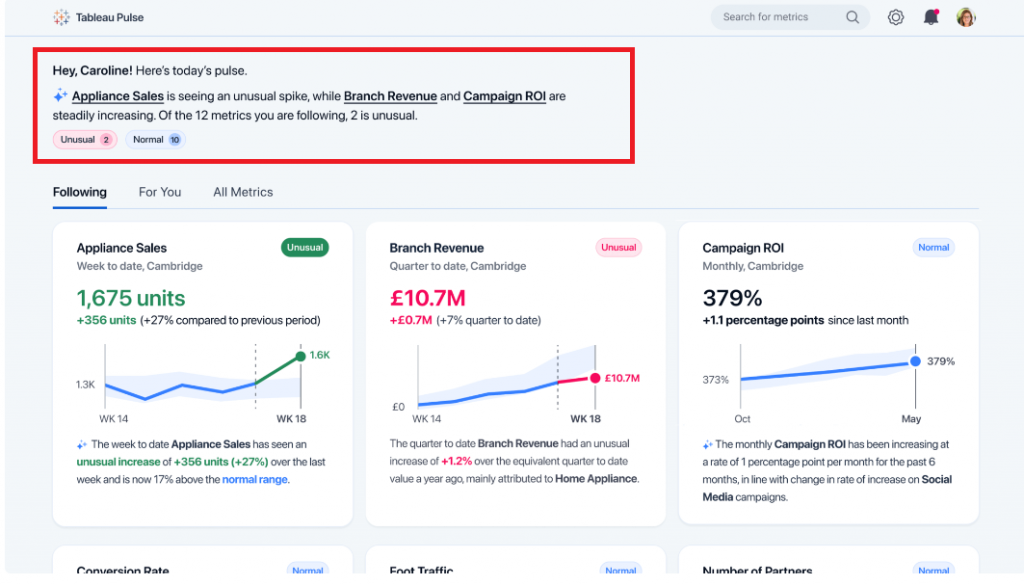
At the start of this example, Tableau Pulse presents a select set of metrics fitted to this specific user's focus.
These metrics are curated based on recent data trends identified by Tableau AI:
 Source: https://www.tableau.com/blog/tableau-pulse-and-tableau-ai
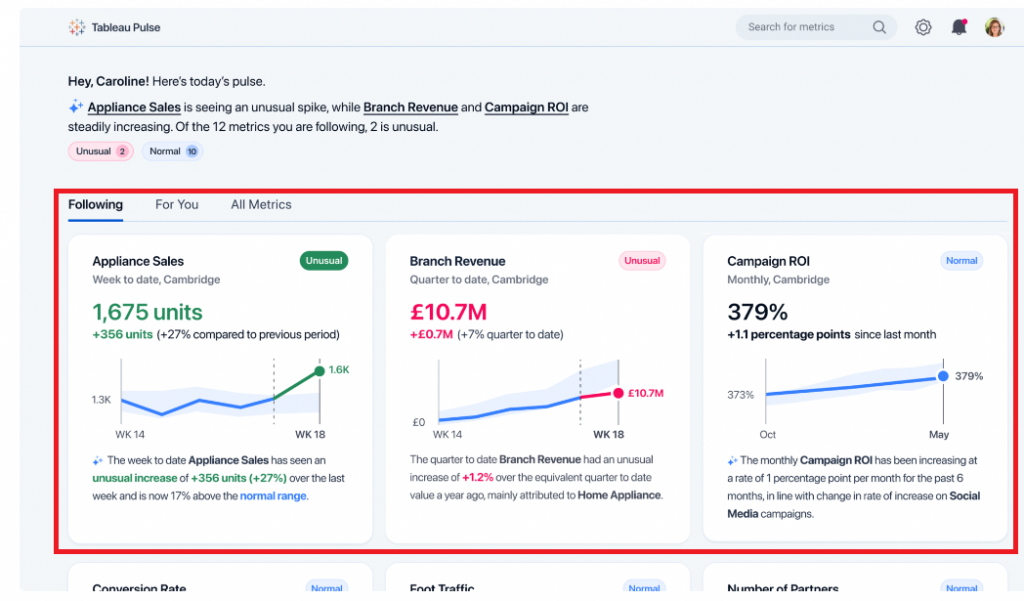
Towards the bottom of this example, Tableau Pulse showcases the KPIs that this user has actively tracked. Within this section, Tableau Pulse provides the most recent metric value, a brief visual representation of the trend, and an AI-generated insight specifically pertaining to that metric:
 Source: https://www.tableau.com/blog/tableau-pulse-and-tableau-ai
Embed Relevant Data into Your Workflow
These days, professionals juggle various applications, which poses a challenge when tracking crucial KPIs. The continual shift between disparate tools not only consumes time but also disrupts workflow continuity.
Tableau Pulse heralds a transformative shift by integrating pertinent data directly into users' existing tools. This breakthrough ensures data detachment from specific dashboards, guaranteeing access to essential metrics without workflow interruptions. Insights are seamlessly captured within the tools where users spend the most time, eradicating the risk of missing critical information due to platform discrepancies. Additionally, this integration streamlines the scalability of insights across the organization, simplifying the process of visualizing, sharing, and collaborating on data by utilizing tools already familiar to everyone within the company.

Effortless Data Interpretation
Today's data interpretation can often entail a laborious and manual process. Users invest significant time analyzing data to unveil trends and insights while navigating the labyrinth of questions to pose to their datasets. This complexity invariably impedes decision-making speed and hampers overall productivity.
Tableau Pulse redefines data utilization by automating analysis and communicating insights in easily comprehensible, natural language formats. Initially, Tableau Pulse assumes the burden of uncovering the 'why' behind the 'what.' It autonomously identifies and generates insights, predicting the queries you might raise and even suggesting questions that may not have crossed your mind. Subsequently, Tableau AI succinctly summarizes these insights conversationally. This streamlined approach facilitates faster, informed decision-making, eliminating the need for extensive manual data analysis.
In the example below, Tableau Pulse extends its capabilities to address your data inquiries using natural language. Upon delving deeper into the "Appliance Sales" metric, Tableau Pulse was queried, "What is driving change in Appliance Sales?" In response, Tableau Pulse swiftly provided a concise answer along with a visual representation elucidating the factors influencing this change.

With the introduction of Tableau AI and Tableau Pulse, Tableau is set to revolutionize the industry once more, unveiling a fresh experience tailored for analytics consumers. This innovation aims to empower every individual to embrace a truly data-driven approach. Tableau AI and Pulse are reshaping how organizations engage with data, empowering decision-making, and fostering a more data-driven future.

Cloud Sovereignty as a Strategic Concern: Addressing from an Enterprise POV
The concept of a sovereign cloud is not novel at all. Due to shifts in the geopolitical landscape and new legislations that have affected data control, it has recently become a hot topic. In a sense, the sovereign cloud offers a clever answer to a global conflict over digital sovereignty. Let’s delve a little further into it
The need for cloud sovereignty has, in turn, initiated the idea of digital sovereignty. This is all about data: who controls it, where it resides, and where it flows to. These inquiries are crucial in the modern data economy, where data is the new currency. Cloud services inevitably receive attention. They serve as the data economy's driving force.
The rules set for data sovereignty have been in place for several years in many nations, and new privacy laws like the General Data Protection Regulation (GDPR) emphasise their importance. For instance, countries like Russia, China, Germany, France, Indonesia, and Vietnam demand that citizen data be kept on servers within the country. The justification is that protecting citizens' personal information from misuse is in their best interests, especially outside a country's jurisdiction.
According to reports, global spending on cloud services is anticipated to reach $1.3 trillion by 2025, representing a growth rate of almost 17% annually. The pandemic's push to move more operations to the cloud to accommodate an increase in the demand for remote work is undoubtedly accelerating this growth.
But lately, cloud sovereignty is under closer scrutiny as enterprises and governments work to reduce their external exposure and maintain control over crucial resources in the light of escalating international conflicts, evolving data protection laws, and the dominance of certain cloud operators.
What can decision-makers do to manage this complex issue? Reports suggest a four-point plan; define, assess, align, and develop: 1. Define: Examine cloud service providers from the perspective of sovereignty, considering data sovereignty (for data residency, controls, transparency, storage, backups, etc.), operational sovereignty (for security, compliance, and operational resilience), and technical sovereignty (to evaluate integration, migration features, and a straightforward exit policy/ process). 2. Assess: Set up your cloud infrastructure to be flexible: choose the most practical of use cases and sensitive workloads; think about crucial management solutions and end-to-end encryption. 3. Align: Analyse hybrid options simultaneously and prepare for a multi-cloud architecture by being aware of its advantages and disadvantages. 4. Develop: Explore the value proposition of sovereign cloud in terms of trust, security, and cooperation through ecosystem engagement to maximise its potential.Data sovereignty in the cloud reveals a complex environment; thus, it is wise for businesses to be informed and compliant. Here are three strategies or approaches for doing this.
1.Focus on the cloudMaybe the answer to data sovereignty is in the cloud itself! Data sovereignty is an essential factor, even while the major cloud providers, such as AWS, Microsoft, and others, credit adoption rates based on customers' focus on price, availability, and flexibility. Most IaaS providers have local data centres, allowing for the fulfilment of the first condition. Additionally, crucial features like encryption and other available security-as-a-service choices enable users to adhere to regional laws.
One critical note of caution: It is crucial that the appropriate enterprise stakeholder comprehends the data protection laws of each country and evaluates and applies the required management tools provided by each supplier to comply with these laws.With the rise of the Chief Data Officer (CDO), the company now has a responsible individual who must make sure the cloud provider has responses to the following questions in the contract:
- Regulations governing privacy compliance being followed
- Optionality for data location and recommendations based on performance, cost, and compliance; and
- Methods for data encryption, key management, backups, and recovery
Businesses should consistently follow even the most burdensome of regulations. Maintaining compliance with the data sovereignty regulations of each region in which an organisation conducts business is a constant problem for organisations with a worldwide presence.
The strongest of these regulations should be applied uniformly throughout all regions, regardless of what other areas require, as this will help to decrease complexity. In this, the cloud can be helpful. Choose a cloud provider that offers these features; often, the more prominent providers and those that concentrate on specific business verticals are the best.
Even the tightest restrictions cannot guarantee data security due to the growing instances of data incursions caused by breaches by third parties, such as partners, contractors, and software libraries.
Governing systems adhering to legal requirements and open to continuous policy modifications are crucial.
3.Use the cloud to implement data governanceAlthough the cloud provider might offer capabilities for data sovereignty, applying and updating policies on top of the tightest laws help limit risk. A thorough data governance strategy ensures adherence, ongoing risk assessment, and risk mitigation are always maintained. To do that, follow these five steps:
Discoverability: Define and control your cloud data. Quality control: Make sure domain and data sharing are followed. Compliance: Update policies on top of stringent regulations to help limit risk. Access: Access to administrators is monitored, automated, and managed; prompt customer, partner, and compliance responses are given. Lifecycle administration: Control the generation, distribution, storage, and deletion of data.Laws and regulations governing data sovereignty are expanding in scope and complexity daily. The use of cloud infrastructure is multiplying, and the data deluge remains unabated. Together, these three provide some significant obstacles. However, businesses can advance and maintain their lead with a small initial investment and continual process implementations.
In the future, the CDO's responsibilities will continue to change and converge with those of the CIO, CISO, chief privacy officer, legal, and other roles. The organisation will be less vulnerable to risks if it can adapt by staying ahead of the data sovereignty regulations and developing robust data governance frameworks for the cloud.