How AI Decision-Making is Improving Enterprise Outcomes
Blog
Share 
Alteryx Data Preparation: A Key to Successful Data Analytics
 4 April 2024
  Sumi S
 Why is Data Preparation Important?
Imagine building a house on a foundation of sand. No matter how impressive the blueprints or construction materials, the structure will be unstable. The same principle applies to data analysis. Inaccurate or incomplete data leads to flawed insights and potentially disastrous business decisions.
Here's how meticulous data preparation benefits organizations:
The Data Preparation Journey: A Step-by-Step Guide
While the specific steps may vary depending on the project, a typical data preparation process involves:
- Acquiring Data: This involves identifying the necessary data, gathering it from various sources (databases, spreadsheets, etc.), and establishing secure, consistent access.
- Exploring Data: Understanding the data's structure and quality is crucial. Analysts use data profiling techniques and visual analytics to analyze data distribution, identify missing values, and uncover potential anomalies.
- Cleansing Data: This is where the magic happens – correcting errors, removing duplicates and outliers, and filling in missing data points to ensure data integrity.
- Transforming Data: Data may need formatting, restructuring, or aggregation to be suitable for the intended analysis. This could involve converting date formats, pivoting tables, or calculating new variables.
Data Preparation for the Age of Big Data and Machine Learning
The rise of Big Data and machine learning has further amplified the significance of data preparation. Machine learning algorithms rely heavily on vast amounts of clean, structured data to learn and make accurate predictions.
The Challenge: Extracting value from Big Data often involves integrating data from diverse sources, each with its own structure and quality issues. Traditional data preparation methods become time-consuming and inefficient when dealing with such massive datasets.
The Solution: Modern data preparation tools like Alteryx offer a solution.
The Power of Alteryx Data Preparation
The Alteryx Analytics Automation Platform streamlines the entire data preparation process, empowering a wide range of users – data analysts, data scientists, and even citizen data scientists – to transform raw data into actionable insights. Here's how Alteryx tackles the data preparation challenge:
Key Alteryx Features for Data Preparation:
Ready to Experience the Beinex -Alteryx Advantage?
Beinex’s premier partnership with Alteryx helps us enable business users to perform mundane tasks of manual data cleansing and transformation in just minutes by automating the process in a simple visual workflow that also covers advanced and predictive analytics. Thousands of organizations globally use Alteryx to deliver quick wins and high-impact business outcomes. Beinex's Alteryx consulting services amplify the transformative potential, providing tailored expertise to ensure maximum value extraction from Alteryx's powerful capabilities.
In today's data-driven world, the quality of your data directly impacts the quality of your decisions. Raw data, however, is rarely analysis-ready. This is where data preparation comes in – the crucial, yet often under-appreciated, stage of transforming raw data into a clean, usable format for powerful business insights and machine learning.
This blog explores the world of data preparation, highlighting its importance and the various steps involved. We'll then delve into how Alteryx, a leading data analytics platform, empowers organizations to streamline this process.
Related Articles
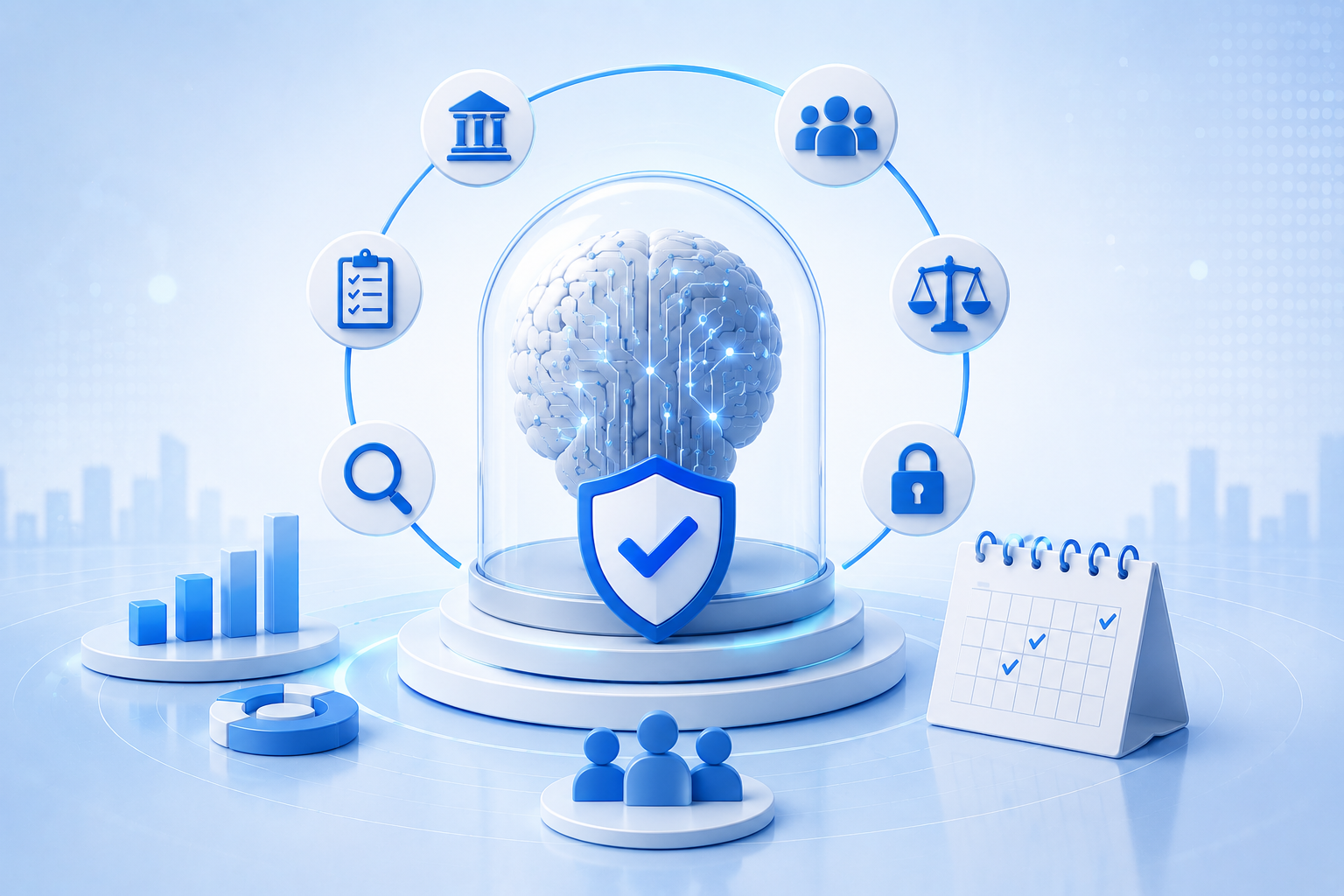
Artificial Intelligence Governance: Why Enterprises Must Move Beyond Reactive Compliance
Enterprise AI adoption has crossed a tipping point. From automating customer service and accelerating drug discovery to supply chain optimization, artificial intelligence is no longer experimental; it is operational. Yet as AI becomes deeply embedded across enterprise functions, many organizations remain underprepared for the governance challenges that accompany it.
Artificial intelligence governance has evolved into a strategic boardroom priority rather than a simple compliance obligation. However, many enterprises still rely on a reactive approach: waiting for regulations to emerge and then rushing to comply. While that strategy may have worked for traditional data privacy requirements, it is insufficient for AI. With 13% of organizations already reporting breaches involving AI applications or models, reactive governance can expose organizations to operational disruption, reputational damage, and financial risk.
Know More: AI Governance & Ethics
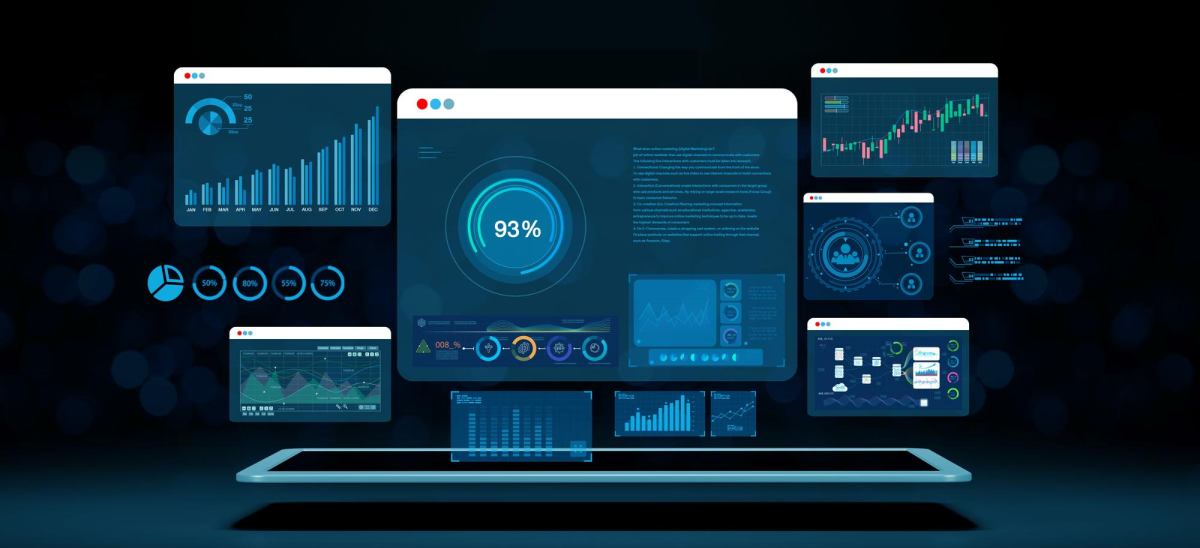
Strategic Insights with Tableau Pulse: Real-Time Insights for Every Team
Setting Up Metrics Is a Breeze
Configuring metrics in Tableau Pulse takes just minutes. Whether it’s setting up your own custom metrics or utilizing pre-defined ones, the process is straightforward and user-friendly. And once set up, the visuals, descriptions, and insights are generated automatically, enabling team members to stay updated on performance with ease.
Pro Tip: You can also customize existing metrics to meet specific goals. For example, a custom metric was developed to track interactions generated by teams in the field, with a target of reaching a high engagement level within a set timeframe. This tailored approach has streamlined the process of monitoring performance and recognizing accomplishments.
Integrating Data into the Flow of Work
Tableau Pulse effortlessly integrates data into the tools you use daily, like Slack or email, allowing you to stay informed without disrupting your workflow. Each morning, you can start your day by reviewing the Pulse Digest in Slack, which provides a snapshot of key metrics, trends, and insights.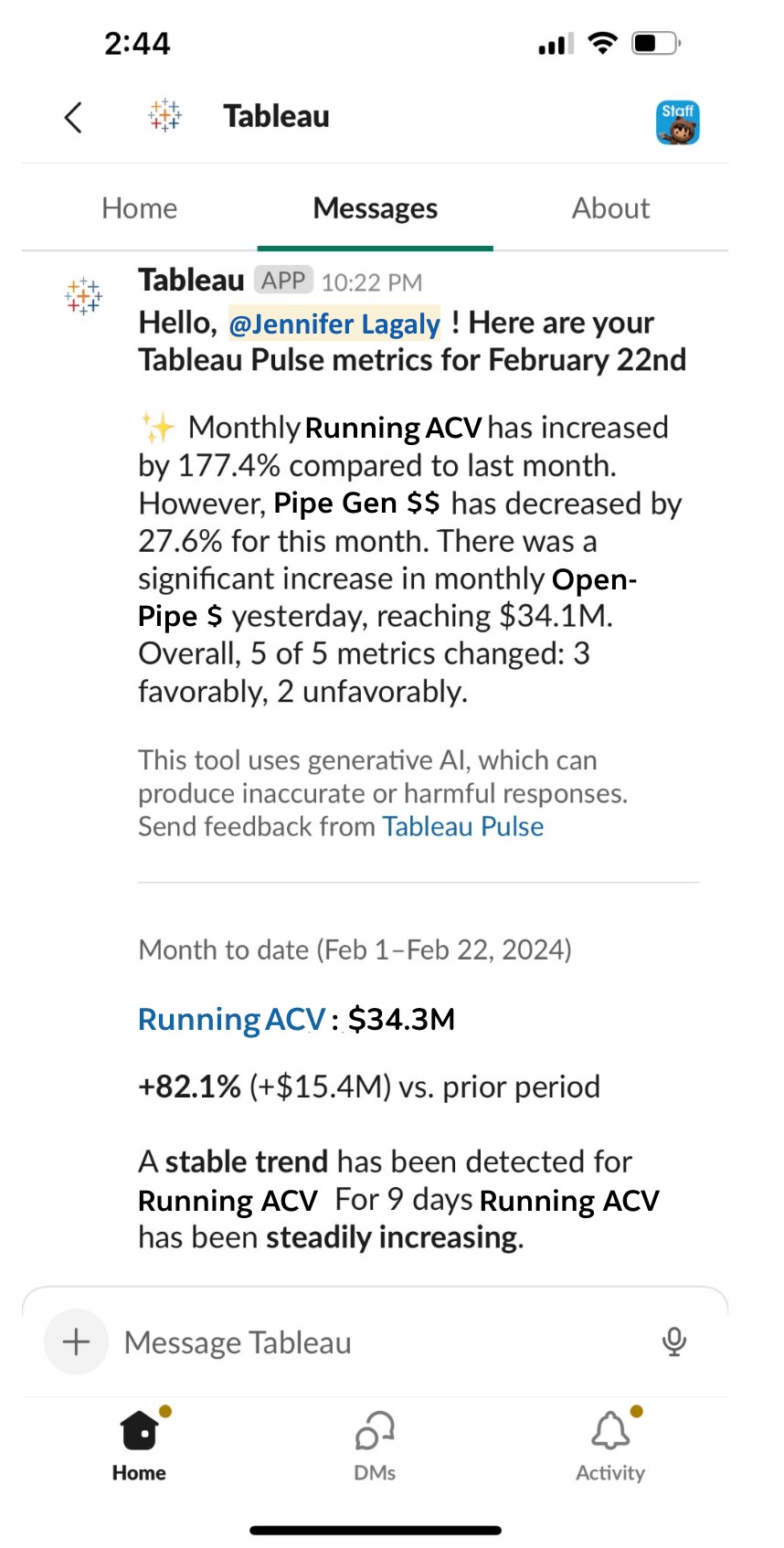 Source:https://www.tableau.com/blog/how-tableau-chief-revenue-officer-uses-tableau-pulse
Decipher Trends with Intelligent Metrics
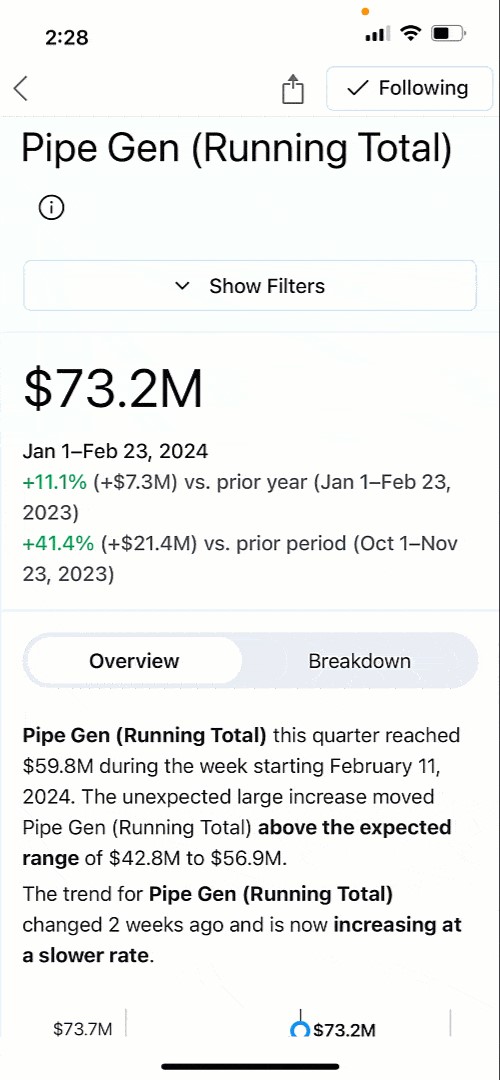
Monitoring metrics is not solely focused on tracking numbers; it also involves identifying opportunities and addressing challenges. With AI-generated summaries of key metrics like Annual Contract Value (ACV) and Pipeline Generation, Tableau Pulse helps you understand the context behind the data. The live updates ensure that any changes are reflected immediately, providing real-time insights that are always up-to-date.
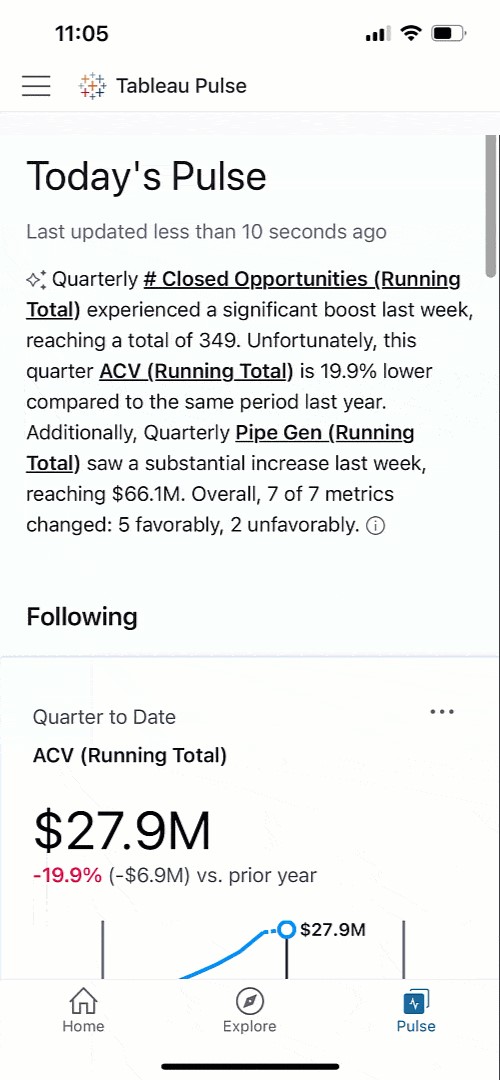
Get a Clear View of Business Performance
Tableau Pulse’s intuitive visualizations and natural language summaries make it easy to compare current and past performance, helping you identify areas that may need closer attention. For instance, if Pipeline Generation is up 10.9% year over year but showing signs of slowing, Pulse allows you to dig deeper, understand the cause, and take timely action to keep growth on track.
Tableau Pulse is available on mobile, and these insights are accessible wherever you are, making it easy to stay connected to your data on the go.
Analyze Business Segments with Precision
Tableau Pulse enables detailed analysis of various business segments, offering a clear view of how different teams and departments contribute to overall success. With just a click, you can explore revenue trends, track team performance, and understand the impact of different strategies across the organization.This level of analysis, which once required hours of manual work, is now at your fingertips. You can easily filter by segment, product, or deal size to gain nuanced insights that drive better decision-making.
Ask Smart, Data-Driven Questions
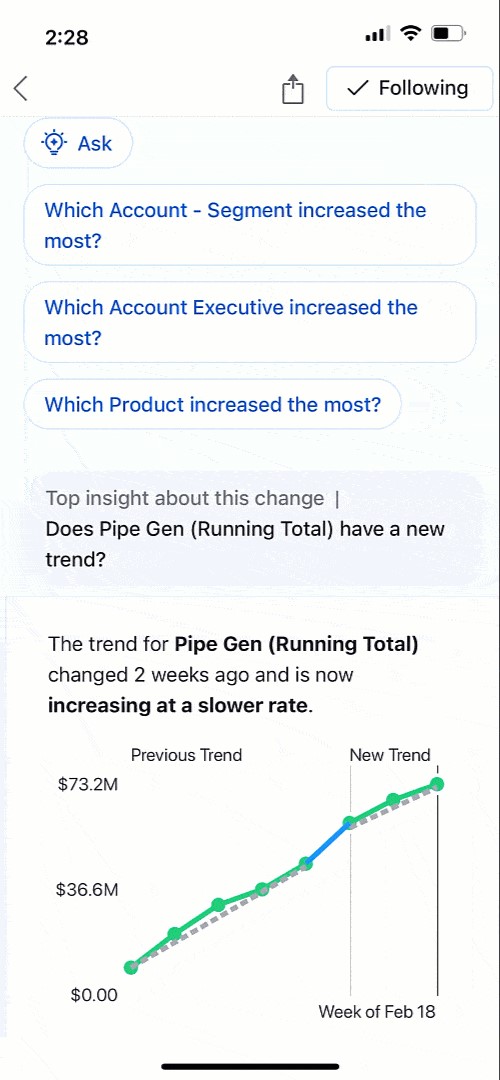
Powered by AI, Tableau Pulse does more than just report numbers. It actively helps you explore trends by suggesting relevant questions and providing insights in clear, understandable language. Whether it’s identifying which sales regions are thriving or where potential issues may arise, Pulse empowers you to make data-driven decisions with confidence.
Foster a Data-Driven Culture
Tableau Pulse is designed to be accessible to everyone, regardless of their level of data expertise. By integrating insights into tools like Slack, Pulse ensures that critical information is always at hand, promoting a culture of informed decision-making across the organization. This democratization of data means that every team member can contribute meaningfully to achieving our shared goals.
Tableau Pulse has truly transformed how we approach strategic decisions, placing personalized, contextually relevant insights directly in our workflow. It empowers everyone to be data-driven, aligning efforts towards achieving your company objectives and navigating the dynamic challenges of business with agility and insight.
Want to Transform Your Business?
Watch our demo to see how Tableau Pulse, powered by Tableau AI, can elevate your business strategy, and start your free Tableau Pulse trial today: https://www.beinex.com/free-tableau-software/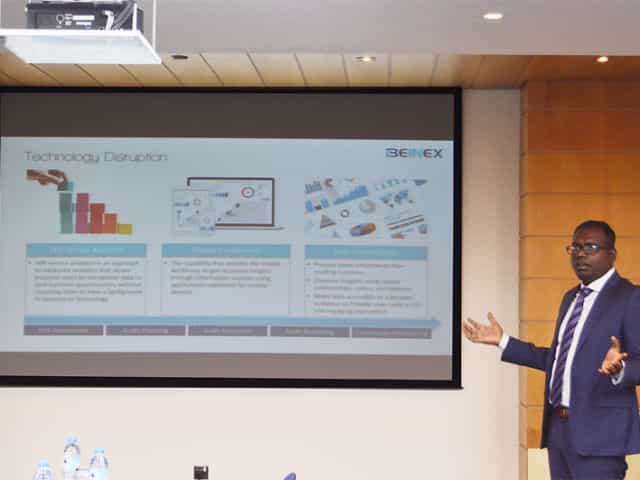
SELF SERVICE AUDIT ANALYTICS
TRANSFORM THE WAY YOU AND YOUR ORGANIZATION WORK WITH DATA –SELF SERVICE AUDIT ANALYTICS
Increasing complexities of risks and incessant emergence of disruptive technologies are demanding substantial change in internal audit processes. In today’s world of constant disruption, internal audit should evolve into a dynamic and future-oriented function. Businesses need broad-spectrum audit processes that extend beyond reviewing the obvious. Auditors should adopt forward-looking IA approaches, and should be able to provide deeper and valuable insights on strategy, execution, emerging risks, and hidden opportunities.
The 2016 Deloitte Global Chief Audit Executive Survey that polled more than 1200 CAEs from 29 countries and a diverse range of industries, reaffirms the growing need to conduct analytics-based auditing. More than a three quarter of the CAEs (79%) recommend the need for digital disruption and innovation to transform internal audit and enhance its value. The survey also cited the increasing relevance of cutting-edge technologies such as artificial intelligence, cognitive computing, and visual analytics.
Is skill-gap a concern?
More than half of CAEs (57%) who participated in the survey expressed their intense dissatisfaction about inadequate skills and insufficient expertise of audit teams.
When left unaddressed, these skill gaps will weaken auditors’ capabilities to deliver on changing stakeholder expectations. Stakeholders expect more forward-looking analysis to uncover risks and hidden opportunities. Or, gone are the days of static audit reports and analysis of sample data.
The Deloitte survey also cites risk anticipation (39%) and data analytics (34%) as the two groundbreaking innovations that are most likely to impact internal audit within the next five years. Changing business landscapes, technological advancements, and proliferation of data have brought forth the imminent need to leverage analytics and data visualization to increase the impact, influence, and effectiveness of internal
audit
Analytics Adoption Challenges
Even after 30 years of inception of data analytics, many auditors continue to adopt conventional internal audit methods and lag in technology adoption. Wondering why? Here are some of the reasons:
Can technology disruption be a savior?
Advancements in technology are fundamentally changing the nature of the audit and improving its effectiveness and relevance. Here are a few game-changing technology solutions that auditors can harness effectively to enhance the way they work with data:
1.Self-service analytics – Smart analytics for all
Self-service analytics is no more a buzzword. It’s the new norm. Self-service analytics empowers auditors to access data, perform queries, and create interactive reports that add richness and granularity to the insights derived. Anyone and everyone, with or without technical expertise, can harness the power of self-service analytics to work seamlessly with large data sets of any size or type, and discover savvy insights without having to write codes or learn programming languages.
Key advantages of using self-service analytics tools: Explore your data and create ad-hoc reports without IT skills
2.Mobile Analytics – Audit insights on the go
Regardless of the size of an organization or availability of data, it takes weeks to prepare and present comprehensive audit reports. The numbers are usually saved offline as large files or copied to multiple slides for boardroom meetings.
Mobile data analytics enables a concise and easily accessible digital avatar of audit reports and dynamic dashboards that can be accessed on mobile devices to interact and proactively monitor the business information on the go.
3.Data Visualization
When it comes to presenting audit data, reports and findings, one gets a single view of the entire raw data, all at once. This makes it difficult to decipher what is important and what isn’t, the reason why the point of sharing information gets defeated. Data visualization helps get a flexible and reliable way to identify and share pertinent information in a manner that everyone can easily understand.
There are many reasons why auditing is ripe for self-service analytics and visualization driven transformation. There is more data to examine within limited time span. Most financial and operational transactions are moving online, and the number of variables, outliers, trends, and patterns to identify and analyze continue to increase each day.
Visual analytics is the fastest way to analyze and understand structured or unstructured data of any size, without IT assistance. Visual technologies help speed up and improve decision making with heat maps, bubble charts, and interactive dashboards that are easy for C-suite executive, non-technical business users, and stakeholders to understand.
Everything gets better when you can do it yourself, right? Self-service audit analytics and visualization too are not different.
Benefits of self-service analytics in Internal Audit
Skills gap
Insufficient IT support
Difficulty to manage and manipulate data
Increasing requests for ad-hoc analysis and one-off reports
Difficulty in dealing with the basic aspects of data management and governance
Easy access to any source data
Guided analysis – Faster answers to complex questions
Intuitive drag-and-drop interface to create and share interactive reports.
Natural language processing to respond to complex queries
Interactive visualizations and personalized dashboards to identify patterns and trends
Fast to deploy and easy to manage
All-encompassing data analysis anywhere, at anytime
Process more information than reading numbers
Discover insights using spatial relationships, colors, and textures
Make data accessible to a broader audience and provide users with a rich and engaging experience

Automating Compliance Checks with AWS Systems Manager
The Need for Automating Compliance
As business environments today are rapidly changing and highly regulated, it is important to automate compliance to boost accuracy, efficiency, and scalability. The following aspects emphasize why automating compliance is highly significant. • Amplifies security by complying with data privacy and safety regulations. • Saving time and effort by automating recurring tasks like monitoring, reporting, and audits. • Deploying the required infrastructure faster and in a standardized format. • Boosting accuracy by reducing the risks of human error and consistently adhering to industry standards.
What is an AWS Systems Manager?
A unified management system, an AWS Systems Manager, streamlines infrastructure management by improving visibility and giving you control over your AWS infrastructure. It delivers a suite of tools for managing configurations, automating repetitive tasks, patching systems, maintaining consistent configurations, and securely managing secrets and configurations. The primary features of AWS Systems Manager associated with compliance are: • Compliance Dashboards: They offer a centralized visualization of your compliance status, emphasizing resources that are non-compliant to facilitate faster remediation. • Patch Manager: It automates the deployment and monitoring of patches across your instances. • State Manager: It ensures that your systems are configured to a specific desired state.
Compliance Made Effortless: Automation with AWS Systems Manager
A comprehensive management service, AWS Systems Manager, allows you to automatically accumulate and aggregate data from your AWS resources. It provides a unified view of your AWS environment, making managing and monitoring your resources easier. Compliance, an AWS Systems Manager capability, enables the scanning for inconsistencies in compliance and configuration and offers real-time compliance insights. This capability facilitates drilling down into certain non-compliant resources from the data aggregated from multiple AWS accounts. The additional features and benefits Compliance provides are as follows: • Utilizing AWS Config to see compliance history and monitor changes. • Exporting data to Amazon Athena and Amazon QuickSight to generate organization-wise reports. • Using Amazon EventBridge, State Manager or Run Command to fix issues. • Customizing compliance to develop compliance types to fit your business needs. • Employing AWS Systems Manager for seamless integration of third-party compliance tools and automation of configuration management and vulnerability scanning. AWS Systems Manager facilitates the automation of intricate and recurring tasks associated with configuration, patching, and software installation. It allows businesses to run these tasks across systems simultaneously while minimizing the time needed to effect the changes and ensuring consistency in the process. This execution enables software compliance, including maintaining antivirus definitions up to date, implementing firewall policies, and setting patch baselines. The automation capability of AWS Systems Manager entails streamlining the deployment, maintenance, and remediations of AWS services like Amazon EC2, Amazon S3, and more.
Let’s explore how AWS Systems Manager automates compliance checks:
• Centralizing compliance management: AWS Systems Manager offers a unified compliance dashboard that lets users see the compliance status across different AWS accounts and regions in real-time. The dashboard consolidates data from the state manager and patch manager to centralize compliance management, enabling easy detection and addressing of specific non-compliant resources. • Enforcing configuration: Users can define and implement preferred states for the resources with the State Manager. It ensures consistency in configurations and compliance in setting permissions, configuring firewall rules, or installing software. • Patch Management: It automates the processes of patching applications and operating systems on your instances, allowing users to select authorized patches and schedules for automatic deployment. It makes sure that your systems are up-to-date and stay compliant with the safety standards. • Automating Remediation: AWS Systems Manager allows the automated remediation of non-compliant resources. For example, if a system falls out of compliance due to a missing patch, Patch Manager can trigger an automatic patch deployment to resolve the issue. • Facilitating integration with AWS Config: AWS Systems Manager integrates seamlessly with AWS Config, which helps assess and monitor configuration modifications against compliance rules. This integration facilitates continuous monitoring and automated reporting, ensuring a robust compliance posture.Some of the benefits of using AWS Systems Manager for compliance include:
• Saving time and expediting remediation as automation of compliance processes checks reduces manual effort. • Streamlines the audit processes and ensures audit readiness through meticulous logging and documentation of compliance actions. • Fortifies security by detecting and addressing vulnerabilities on time and ensures your enterprise aligns with the standard security practices. • Leverages existing AWS infrastructure to reduce the requirement for reliable compliance tools, saving costs. • Offers real-time insights into the compliance status across your AWS environment, facilitating proactive management. AWS Systems Manager can be a game changer for businesses looking forward to ensuring compliance with complex regulations and industry standards across a dynamic IT environment. Automating compliance checks boosts accuracy, efficiency, and security, transforming compliance management into a streamlined workflow. Beinex is an AWS consulting partner that lets you navigate the AWS landscape and leverage it for unprecedented business benefits. Connect with us for a free demo: Beinex - Beinex - Your Reliable AWS Partner for Cloud Computing Services
Grow Your Business with Competitive Intelligence (CI)
What is Competitive Intelligence (CI)?
Competitive Intelligence (CI) is a systematic process for gathering, analyzing, and applying information about the competitive landscape in which a business operates. It equips organizations with valuable insights, helping them make strategic decisions, mitigate risks, and gain a competitive edge.
Competitive Intelligence services play a vital role in helping businesses gain a strategic advantage through the smart utilization of data and information. By gathering, analyzing, and applying information about the competitive landscape, CI equips organizations with valuable insights, enabling them to make data-driven decisions, mitigate risks, and ultimately outperform their competitors.
To learn more about the benefits of Competitive Intelligence, click here
Why Competitive Intelligence (CI) Matters in Business
In today's fast-paced business world, staying ahead is crucial, and Competitive Intelligence services can be the game-changer your business needs. Here's why Competitive Intelligence matters:
Informed Decision-Making
In the modern business landscape, decisions need to be grounded in data, not guesswork. CI services equip decision-makers with valuable insights that help them make well-informed choices. By analyzing competitor behavior, market trends, and consumer preferences, businesses can develop strategies that are not based on hunches but on hard evidence.
For example, consider a scenario where a tech startup is contemplating the launch of a new product. CI can provide insights into the competitive landscape, revealing what similar products are in development, their features, and their projected market reception. Armed with this data, the startup can make crucial decisions about product design, pricing, and marketing with a higher degree of certainty.
Anticipating Market Changes
The business world is in a constant state of flux. Markets evolve, consumer preferences shift, and disruptive technologies emerge. In this environment, businesses that can anticipate and adapt to change gain a significant advantage. CI allows organizations to do just that.
By monitoring industry trends, tracking competitor movements, and analyzing consumer behavior, businesses can identify early indicators of change. This insight provides a head start in adjusting strategies, launching new products, and capitalizing on emerging opportunities. It's the difference between reacting to change and proactively shaping the market.
For instance, an established retail chain with a robust CI process may spot the growing consumer interest in sustainable and eco-friendly products. Armed with this knowledge, the chain can pivot its product selection and marketing to cater to this demand, staying ahead of competitors who are slower to adapt.
Outsmarting the Rivals
Competition in business is not just a matter of survival; it's a race to outperform rivals. In this race, CI is the secret weapon that enables organizations to outmaneuver their competitors.
By gaining insights into competitors' strategies, strengths, and weaknesses, businesses can develop tactics to gain an edge. For example, a restaurant chain can analyze a competitor's menu changes, pricing strategies, and customer reviews to refine its own offerings and marketing approach. This allows for not only maintaining market share but also expanding it.
Moreover, CI is not just about reacting to competitors; it's also about predicting their moves. By understanding the future direction of the market and the strategies competitors are likely to employ, businesses can position themselves strategically. This foresight is a cornerstone of successful long-term planning.
Examples of Competitive Intelligence (CI) in Action
Competitive Intelligence services are used in various business aspects:
Market Research: Imagine a tech company that monitors competitors' product launches, pricing strategies, and customer reviews to refine its own offerings.
Competitor Analysis:A restaurant chain may analyze its competitors' menu changes, customer reviews, and marketing strategies to refine its own offerings.
Supplier and Vendor Insights:By employing CI, companies can assess their suppliers' performance, ensuring a streamlined supply chain.
Types of Competitive Intelligence
CI comes in various flavors, each with its own focus and strategic horizon:
Tactical CI:This short-term focus involves addressing immediate competitive threats and challenges. For example, a retailer may use tactical CI to respond to a competitor's sudden price drop.
Strategic CI:With a long-term view, strategic CI aims to identify trends, market shifts, and opportunities. An example is a global tech corporation analyzing market trends to position itself as a leader in a specific technology sector.
Product CI: This type focuses on tracking competitors' product development and launches, ensuring companies are aware of what's in the pipeline and can adjust their product roadmaps accordingly.
Pricing CI:It involves tracking competitors' pricing strategies and understanding how they position themselves in the market. Companies can then make informed pricing decisions.
The Role of Competitive Intelligence (CI) in Marketing
Incorporating CI into your marketing strategy is a game-changer. It allows you to align your marketing efforts with the competitive landscape and customer preferences, optimizing your strategies for success. Here's how to do it:
CI is more than a buzzword; it's a strategic imperative for businesses. By incorporating CI into your strategies, you can gain a competitive edge, make data-driven decisions, and secure your position in the market. Whether through market research, competitor analysis, or innovative marketing strategies, CI can be the key to success in today's fast-paced business world.
How Beinex Can Help You
Robust Competitive Intelligence is essential in strategising for your next move, enabling you to anticipate your competitors’ direction and future performance. Our data harvesting team validates the entire data manually before the CI application consumes it. Our clients can easily integrate our CI database with their actual transactional data.
Efficient, Competitive Intelligence analysis can give a significant boost to your strategy. Beinex provides comprehensive competitive intelligence solutions that help businesses gain a competitive edge in their industry. Supercharge your competitive strategy with Beinex!