How AI Decision-Making is Improving Enterprise Outcomes
Blog
Share 
Accelerate Your Digital Transformation: Tableau + AWS for Modern Cloud Analytics
 15 March 2024
  Sumi S
 AWS + Tableau: Together, a Match Made in Data Heaven
By embracing the synergy between Tableau and AWS, you're not just investing in tools; you're investing in a future fueled by data-driven insights. This powerful combination paves the way for a more agile, data-centric organization ready to thrive in the ever-evolving digital landscape. The digital landscape is evolving rapidly, and businesses are increasingly turning to the cloud for their analytics needs. This shift is driven by the cloud's ability to:
- Faster Time to Insights: The seamless integration between Tableau and AWS allows you to quickly get up and running with your analytics, enabling you to make data-driven decisions sooner.
- Effortless Data Management: Leverage the power of AWS data warehousing and management services to ensure your data is clean, organized, and readily accessible for analysis in Tableau.
- Advanced Analytics Capabilities: Tap into the power of AWS machine learning and artificial intelligence services to uncover hidden patterns and gain deeper insights from your data within the Tableau environment.
- Handle complex data integration: Seamlessly connect and analyze data from various sources, regardless of size or location.
- Empower self-service analytics: Enable users to explore and gain insights from data independently, fostering data-driven decision-making across the organization.
- Support digital transformation: Meet the growing demands of digital transformation with scalability, flexibility, and cost-efficiency.
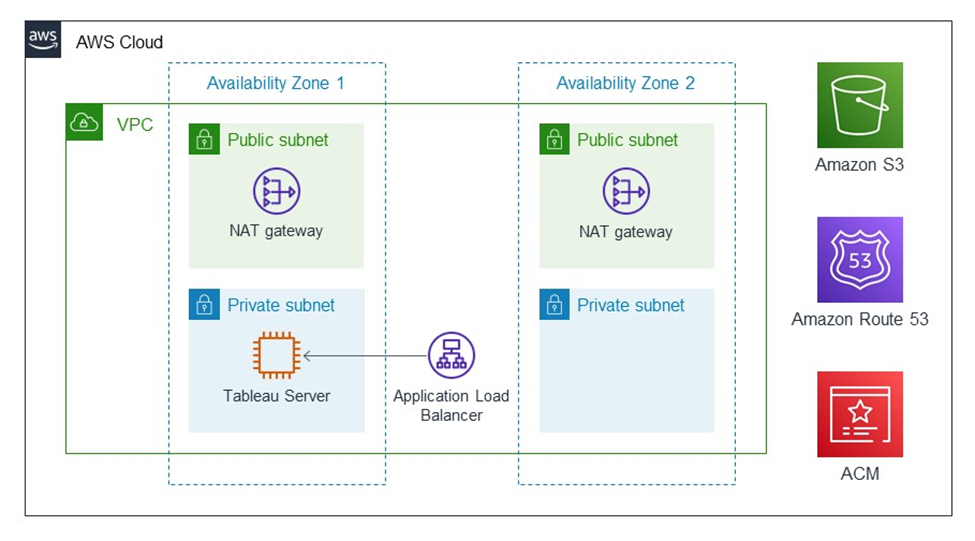
Image source: https://aws.amazon.com/solutions/partners/tableau-server/
Tableau: The Master of Data Visualization
Imagine transforming raw data into captivating, interactive visualizations that tell a clear story. Tableau is a game-changer in the world of data visualization. It empowers users of all technical backgrounds to:
- Connect to Diverse Data Sources: Tableau seamlessly connects to a wide range of data sources, both on-premise and in the cloud. This includes databases, spreadsheets, cloud applications, and even big data platforms.
- Effortlessly Drag-and-Drop Analysis: The user-friendly interface allows users to drag and drop data fields, explore trends, and create stunning visualizations without writing a single line of code.
- Craft Interactive Dashboards & Reports: Go beyond static reports. Tableau empowers you to create dynamic dashboards that users can interact with, filter data, and gain deeper insights on the fly.
- Foster Data-Driven Culture: Tableau democratizes data by making it accessible and understandable to everyone in the organization, fostering a data-driven culture where decisions are based on evidence, not intuition.
AWS: The Cloud Powerhouse for Scalability and Security
While Tableau excels at data visualization, the underlying infrastructure needs to be robust and scalable. This is where AWS, the world's leading cloud computing platform, comes into play. Here's how AWS empowers your Tableau deployment:
- Unmatched Scalability: AWS offers virtually limitless scalability to accommodate your growing data volumes and user base. As your data needs evolve, your cloud infrastructure can easily scale up or down to meet those demands.
- Enhanced Security: Security is paramount when dealing with sensitive data. AWS offers robust security features and compliance certifications, ensuring your data remains protected throughout its lifecycle.
- Cost-Effectiveness: The pay-as-you-go model of AWS allows you to optimize your costs. You only pay for the resources you use, eliminating the need for upfront investments in expensive hardware infrastructure.
- Wide Range of Services: AWS offers a comprehensive suite of services beyond just compute power. These services include data warehousing, machine learning, and data management tools, giving you a complete cloud ecosystem to manage your entire data pipeline.
Modern Cloud Analytics: A Collaborative Powerhouse
Modern Cloud Analytics is a collaborative initiative leveraging the expertise and resources of Tableau, AWS, and their extensive partner networks. Its objective is to maximize the value you extract from your data and analytics investments throughout your entire digital transformation journey, encompassing:
- Data Strategy and Migration: Develop a comprehensive plan to securely and efficiently migrate your data and analytics operations to the cloud.
- Optimization: Fine-tune your cloud analytics environment for peak performance and cost-effectiveness.
- Deployment and Scaling: Securely deploy and seamlessly scale your Tableau environment on AWS to adapt to your evolving needs.
Benefits of Modern Cloud Analytics:
- Faster Time to Value: Get up and running with cloud analytics quickly, enabling data-driven decisions sooner.
- Reduced Costs: Leverage the cloud's inherent cost-efficiency and scalability to optimize your analytics spending.
- Minimized Risks: Mitigate potential risks associated with cloud adoption by utilizing validated migration processes and expert guidance.
Unified Integration for Unparalleled Insights
Tableau and AWS offer a comprehensive solution for cloud-powered organizations. Both Tableau Server and Tableau Cloud operate flawlessly on AWS infrastructure, providing you with:
- Effortless Data Access: Streamlined workflows and effortless access to data stored within various AWS sources directly within the AWS ecosystem.
- Market-Leading Connectivity: Tableau serves as the ideal platform for analyzing data residing in diverse AWS data sources like:
- Amazon Redshift: A blazing-fast data warehouse designed to handle large datasets with efficiency.
- Amazon RDS: A managed relational database service offering high availability and scalability.
- Amazon EMR: A managed Hadoop framework for processing and analyzing massive datasets.
Enhanced Security and Broader Connectivity
Tableau's commitment to continuous improvement extends to its AWS integrations. Here's a glimpse into the exciting advancements:
- Enhanced Security: The updated Amazon Athena connector now supports secure authentication using third-party identity providers like Azure AD and Okta, adding an extra layer of security with multi-factor authentication options.
- Expanded Connectivity: The Tableau Exchange offers a plethora of new connectors, further extending your connection options within the AWS ecosystem.
- Amazon OpenSearch Connector: Effortlessly visualize and analyze data residing in Amazon OpenSearch.
- Amazon DocumentDB Connector: Gain valuable insights from your DocumentDB data through seamless interaction.
- Amazon Neptune Connector: Explore connections within your data by directly connecting to your Neptune graph database.
By embracing the synergy between Tableau and AWS, you're not just investing in tools, you're investing in a future fueled by data-driven insights. This powerful combination paves the way for a more agile, data-centric organization ready to thrive in the ever-evolving digital landscape.
How Beinex Can Assist You
Beinex is a premier Tableau partner and AWS consulting partner providing sustainable analytics solutions to organizations. Our Tableau and AWS-certified consultants help organizations build superior data visual analytics capabilities through bespoke training programs. We empower customers to host their BI solutions on the cloud with AWS infrastructure as a service. Get in touch with us for free trials and experience our expertise in providing analytics and cloud solutions.
Data has become a valuable asset in the modern world, and organizations gather vast amounts of it from different sources. However, the real challenge lies in extracting valuable insights from this data to make informed decisions. This is where the combination of Tableau and AWS comes in handy, providing a powerful solution for unlocking the full potential of your data and accelerating your digital transformation journey. By leveraging the combined strengths of Tableau's intuitive data visualization platform and AWS's scalable cloud infrastructure, organizations can gain a sharper competitive edge through:
Related Articles
To Faster Insights and Beyond With Tableau 2021.1
Recognized as a leader in analytics and business intelligence platform for 9 consecutive years in Gartner Magic Quadrant, Tableau has a variety of options when it comes to analytics and visualizations and according to me, it keeps getting better and better with every update. The latest 2021.1 update comes packed with some impressive features and these are some of them that caught my eye:

 Quick LODs
LOD calculations are frequently used in Tableau to perform calculations on a fixed dimension. Where previously I had to mention the dimension to be fixed and the measures to be aggregated in a calculated field, now all I must do is select the dimension and measure in the data pane and right click to create an LOD calculation. Or even better, hold “Ctrl” to drag and drop the required measure field onto the dimension to be fixed. As simple as that.
I can modify the calculation with more dimensions or change the type of aggregation later, if required.
This feature is most beneficial as it reduces the chance of errors while creating complex LOD calculations, like misplacing a bracket, or adding any unnecessary characters by mistake.
Quick LODs
LOD calculations are frequently used in Tableau to perform calculations on a fixed dimension. Where previously I had to mention the dimension to be fixed and the measures to be aggregated in a calculated field, now all I must do is select the dimension and measure in the data pane and right click to create an LOD calculation. Or even better, hold “Ctrl” to drag and drop the required measure field onto the dimension to be fixed. As simple as that.
I can modify the calculation with more dimensions or change the type of aggregation later, if required.
This feature is most beneficial as it reduces the chance of errors while creating complex LOD calculations, like misplacing a bracket, or adding any unnecessary characters by mistake.
 More Data Connections
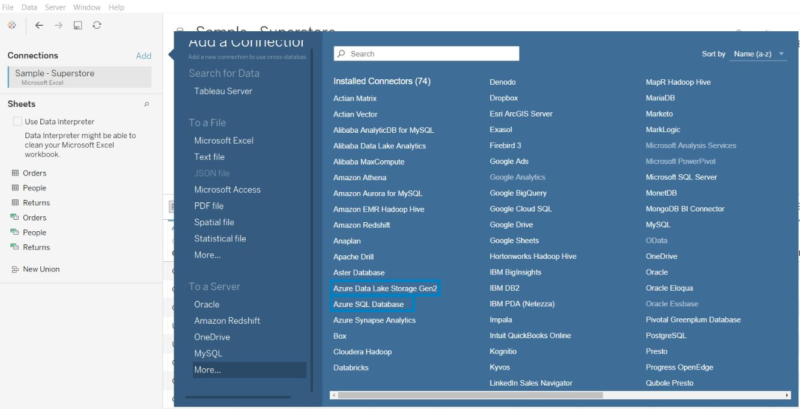
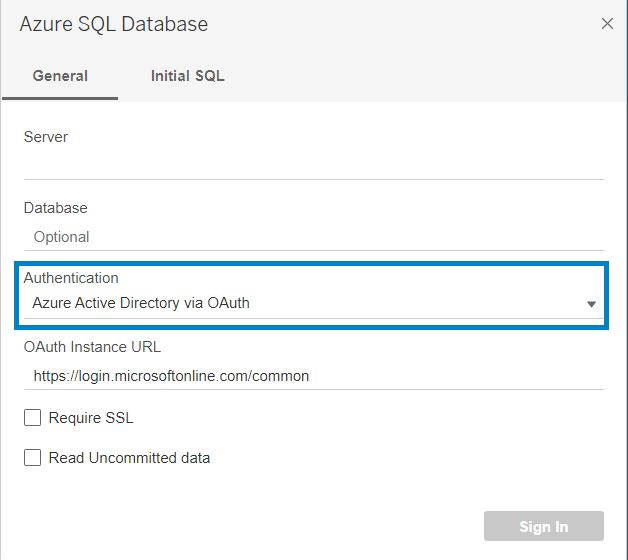
With the increase in popularity of Microsoft Azure services among users, Tableau has added multiple Azure connectors including Azure SQL Database and Azure Data Lake Gen 2 along with the existing Azure Synapse Analytics and Databricks. I can now connect to data that is stored in Azure’s SQL Database and Data Lake using the native Tableau connectors. Tableau has also introduced authentication to Azure services using the Azure Active Directory, making the connection more secure.
In addition to this, four new data connectors have been added to Tableau Online and Tableau Server. They are Amazon Athena, Apache Drill, OData and SharePoint Lists.
More Data Connections
With the increase in popularity of Microsoft Azure services among users, Tableau has added multiple Azure connectors including Azure SQL Database and Azure Data Lake Gen 2 along with the existing Azure Synapse Analytics and Databricks. I can now connect to data that is stored in Azure’s SQL Database and Data Lake using the native Tableau connectors. Tableau has also introduced authentication to Azure services using the Azure Active Directory, making the connection more secure.
In addition to this, four new data connectors have been added to Tableau Online and Tableau Server. They are Amazon Athena, Apache Drill, OData and SharePoint Lists.
 View Metrics
A difficulty that I had faced with the metric feature was that I was not able to know the other metrics that were created in the same dashboard. With this update I can see all the metrics associated with a particular dashboard and modify these metrics if required or create new ones within the metrics pane.
And previously, only if my site role were “Creator” or “Explorer”, I could see the metrics. But in this update, I can see all metrics connected to a dashboard irrespective of my site role.
View Metrics
A difficulty that I had faced with the metric feature was that I was not able to know the other metrics that were created in the same dashboard. With this update I can see all the metrics associated with a particular dashboard and modify these metrics if required or create new ones within the metrics pane.
And previously, only if my site role were “Creator” or “Explorer”, I could see the metrics. But in this update, I can see all metrics connected to a dashboard irrespective of my site role.
 Dashboard Extensions in Tableau
Earlier, to use an extension in a Tableau Dashboard, I had to drag and drop the extension object on the dashboard which would take me to its extension gallery web page and then I had to download it and then locate the downloaded extension on Tableau. Sounds tiring right?
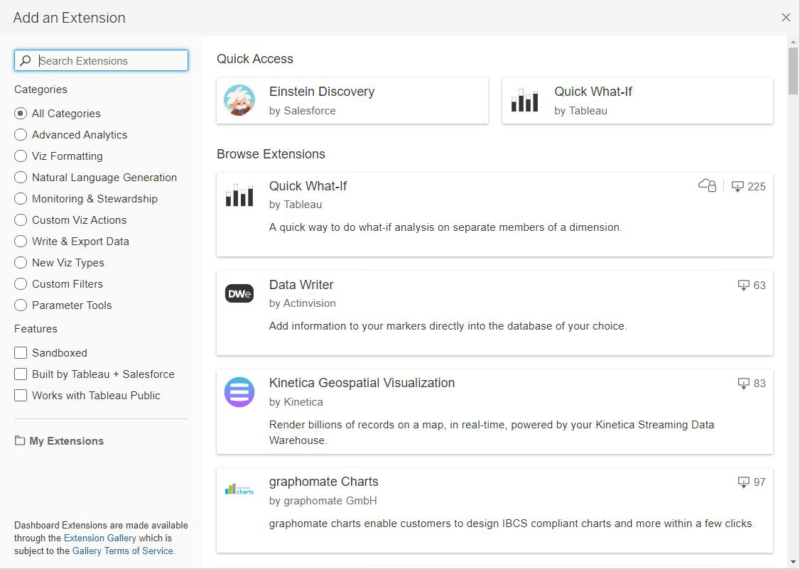
Not anymore! With this update, all I have to do is drag and drop the extension object onto the dashboard to select the required extension. I can now see all extensions and filter the list based on categories within the “Add an Extension” window in the Tableau screen.
Dashboard Extensions in Tableau
Earlier, to use an extension in a Tableau Dashboard, I had to drag and drop the extension object on the dashboard which would take me to its extension gallery web page and then I had to download it and then locate the downloaded extension on Tableau. Sounds tiring right?
Not anymore! With this update, all I have to do is drag and drop the extension object onto the dashboard to select the required extension. I can now see all extensions and filter the list based on categories within the “Add an Extension” window in the Tableau screen.
 Write to Excel in Tableau Prep
This is one feature that will prove useful to any regular Tableau Prep user. The days of exporting an output to csv and then converting it manually to an xlsx file are finally over.
Using the latest version of Tableau Prep, I can directly export the output of a workflow into an xlsx file.
Write to Excel in Tableau Prep
This is one feature that will prove useful to any regular Tableau Prep user. The days of exporting an output to csv and then converting it manually to an xlsx file are finally over.
Using the latest version of Tableau Prep, I can directly export the output of a workflow into an xlsx file.
 Device Designer for Web Authoring
Where before I could only generate device specific layouts in Tableau Desktop, now I can create custom phone or tablet views within the web itself. I no longer have to modify the device layout in Tableau Desktop and re-publish whenever a change in device layout is required.
Device Designer for Web Authoring
Where before I could only generate device specific layouts in Tableau Desktop, now I can create custom phone or tablet views within the web itself. I no longer have to modify the device layout in Tableau Desktop and re-publish whenever a change in device layout is required.
 Licensing Improvements
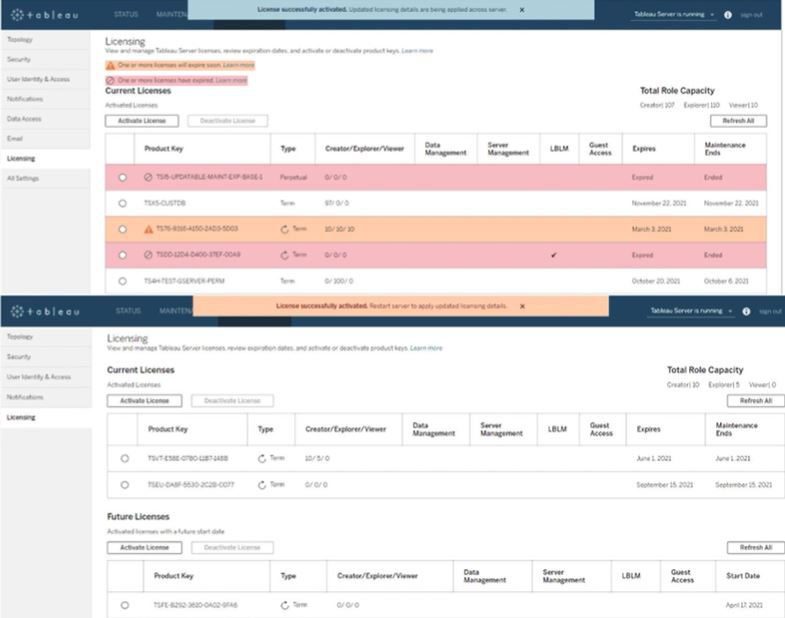
With this update, Tableau has introduced zero downtime licensing for the Tableau Server. Now for most of the tasks, whether it is the activation of a license or updating a feature that got added or applying some changes to user capacity, I no longer need to perform a server restart.
Licensing Improvements
With this update, Tableau has introduced zero downtime licensing for the Tableau Server. Now for most of the tasks, whether it is the activation of a license or updating a feature that got added or applying some changes to user capacity, I no longer need to perform a server restart.
 So, these are some features that have been helpful to me and these are just a few of the lot. To view all the new features in 2021.1, you can view it at Tableau 2021.1 New Features
In my view, Tableau has done a great job with its timely and inventive updates and seeing the rapid growth of AI and the increase of its application in numerous industries, I can predict for sure that Tableau will surprise the data science community with more innovative updates.
Images Courtesy: Tableau
So, these are some features that have been helpful to me and these are just a few of the lot. To view all the new features in 2021.1, you can view it at Tableau 2021.1 New Features
In my view, Tableau has done a great job with its timely and inventive updates and seeing the rapid growth of AI and the increase of its application in numerous industries, I can predict for sure that Tableau will surprise the data science community with more innovative updates.
Images Courtesy: Tableau
- Einstein Discovery
- Quick LODs
- More Data Connections
- View Metrics
- Dashboard Extensions in Tableau
- Write to Excel in Tableau Prep
- Device Designer for Web Authoring
- License Improvements
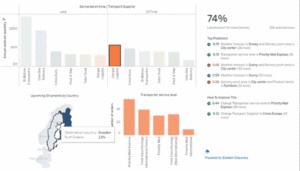
- Through Dashboard Extensions: To use “Einstein Discovery” in dashboards, I can just add an extension object on the dashboard and select Einstein Discovery. It will analyse the selected data and build predictive models. It shows me the top predictors in the view along with metrics that can be improved, and thus helping business decisions. This feature is available in Tableau Desktop, Tableau Server and Tableau Online.
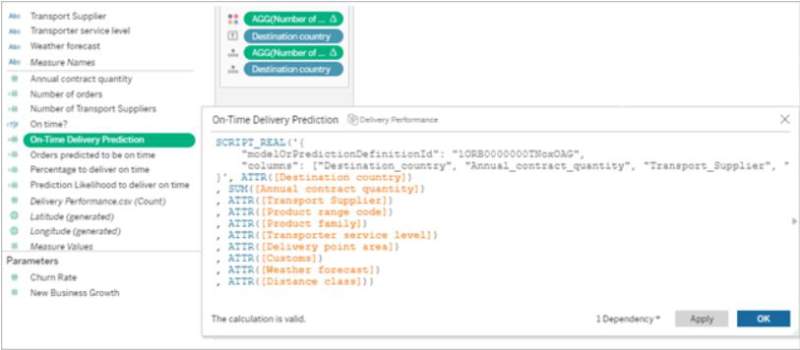
- Through Analytics Extension: With this feature, I can directly embed predictions into Tableau calculated fields. All I have to do is go to Salesforce, use Model Manager to generate a Tableau table calculation script and paste the script into the calculated field in Tableau. This script then accesses predictive models in Salesforce by passing the data required for the model. This saves my time since I don’t need to create a code for the model. This feature is only available in Tableau Desktop and Tableau Server.
- Through Tableau Prep: This feature was released in 2021.1.3 and its ingenuity is worth mentioning. With “Einstein Discovery” in Tableau Prep, I can now use predictions while preparing data. I can bulk score my data and create fields to show prediction outcomes, to show top predictors and to show recommendations for improvement of the output.
Quick LODs
LOD calculations are frequently used in Tableau to perform calculations on a fixed dimension. Where previously I had to mention the dimension to be fixed and the measures to be aggregated in a calculated field, now all I must do is select the dimension and measure in the data pane and right click to create an LOD calculation. Or even better, hold “Ctrl” to drag and drop the required measure field onto the dimension to be fixed. As simple as that.
I can modify the calculation with more dimensions or change the type of aggregation later, if required.
This feature is most beneficial as it reduces the chance of errors while creating complex LOD calculations, like misplacing a bracket, or adding any unnecessary characters by mistake.
More Data Connections
With the increase in popularity of Microsoft Azure services among users, Tableau has added multiple Azure connectors including Azure SQL Database and Azure Data Lake Gen 2 along with the existing Azure Synapse Analytics and Databricks. I can now connect to data that is stored in Azure’s SQL Database and Data Lake using the native Tableau connectors. Tableau has also introduced authentication to Azure services using the Azure Active Directory, making the connection more secure.
In addition to this, four new data connectors have been added to Tableau Online and Tableau Server. They are Amazon Athena, Apache Drill, OData and SharePoint Lists.
View Metrics
A difficulty that I had faced with the metric feature was that I was not able to know the other metrics that were created in the same dashboard. With this update I can see all the metrics associated with a particular dashboard and modify these metrics if required or create new ones within the metrics pane.
And previously, only if my site role were “Creator” or “Explorer”, I could see the metrics. But in this update, I can see all metrics connected to a dashboard irrespective of my site role.
Dashboard Extensions in Tableau
Earlier, to use an extension in a Tableau Dashboard, I had to drag and drop the extension object on the dashboard which would take me to its extension gallery web page and then I had to download it and then locate the downloaded extension on Tableau. Sounds tiring right?
Not anymore! With this update, all I have to do is drag and drop the extension object onto the dashboard to select the required extension. I can now see all extensions and filter the list based on categories within the “Add an Extension” window in the Tableau screen.
Write to Excel in Tableau Prep
This is one feature that will prove useful to any regular Tableau Prep user. The days of exporting an output to csv and then converting it manually to an xlsx file are finally over.
Using the latest version of Tableau Prep, I can directly export the output of a workflow into an xlsx file.
Device Designer for Web Authoring
Where before I could only generate device specific layouts in Tableau Desktop, now I can create custom phone or tablet views within the web itself. I no longer have to modify the device layout in Tableau Desktop and re-publish whenever a change in device layout is required.
Licensing Improvements
With this update, Tableau has introduced zero downtime licensing for the Tableau Server. Now for most of the tasks, whether it is the activation of a license or updating a feature that got added or applying some changes to user capacity, I no longer need to perform a server restart.
So, these are some features that have been helpful to me and these are just a few of the lot. To view all the new features in 2021.1, you can view it at Tableau 2021.1 New Features
In my view, Tableau has done a great job with its timely and inventive updates and seeing the rapid growth of AI and the increase of its application in numerous industries, I can predict for sure that Tableau will surprise the data science community with more innovative updates.
Images Courtesy: Tableau
Agriculture and the Internet of Things: The Present and the Future
. A farmer must be knowledgeable about soil, climate, and market. If something goes wrong with any of these areas the result will be devastating. This is where one of mankind’s biggest inventions, the Internet, offers the most reliable assistance. The Internet of Things has a plethora of devices that can make the work of a farmer far easier and more productive.
Smart Sensors
Smart sensors are the number one in a huge list of IoT devices being used in agriculture. These devices can be used to gather data about various aspects of agriculture like the humidity, acidity or mineral contents of the soil. Earlier these kinds of knowledge were something that farmers were supposed to gain after many years of experiences of both gain and loss. Or they had to depend on time taking and distant laboratories. But even a lab test had a limited chance of being hundred percent accurate as the soil’s quality could change in the blink of an eye. Smart sensors can provide the farmer with accurate data in real time. The data collected can precisely calculate and predict many changing or evolving aspects like the humidity content of the soil. These data can help decide:
- The crops to be planted
- The manures to be used
- The amount and timing of watering
- The market price for the final product
Drones
Next in the line is the use of drones. These can be used to:
- Observe vast areas and collect important information that can help decide the most efficient methods of cultivation.
- Provide the farmer with a bird’s eye view, thereby reducing the time and effort wasted in surveying the land personally.
- Assist in remote application of pesticides and herbicides.
- Track the cattle or scrutinize their health.
The data collected by sensors and drones can be used to create a plan through which the farmers can guarantee a good output with minimum input and loss. This will reduce a great percentage of both financial and manual investment. Besides, instead of depending on one’s gut feelings, a farmer can take a multitude of important decisions with scientifically backed technology. IoT devices can be easily operated by the farmers by connecting it to a laptop or mobile phone. There are various apps that are already very popular for providing agricultural data. There are also various government backed projects aimed at collection of data, providing online solutions and even arranging financial support for the smart framer.
Smart Greenhouses
Another IoT contribution is Smart Greenhouses. Greenhouses always contain plants which are out of their natural habitat and therefore need extra care. IoT enabled greenhouses can help:
- Monitor the procedures of watering
- Adjust the humidity inside
- Analyse and provide proper lighting
- Ensure proper balance in delicate matters like the level of carbon dioxide, temperature, etc.
- In disease control by providing a close watch on all the plants’ vitals.
Such precise and high level of attention makes sure that there is no contamination in the greenhouse environment that could lead to spread of diseases. It can also help in detection or prevention of theft, which is a big risk especially if the plants are of rare or protected species.
Livestock Management
IoT in livestock management is bringing about revolutionary changes. With the spread of COVID-19, it is now a very crucial requirement that the livestock are healthy throughout their life. Even a small disease in the animal could turn out to be dangerous for the human who finally consumes it. Also spread of diseases in small animals like poultry can lead to devastatingly large loss for the farmer. Smart devices can help:
- Track the vitals of each animal or bird through devices which are wearable.
- Alert the farmer of even slight variations in the vitals via SMS, notifications, etc.
- Administer medicines at the correct time, to any number of animals without having to keep manual tabs
All these crucial routines help in keeping diseases in check and thus reduce livestock loss.
There are many more IoT powered devices that are revolutionizing the field of livestock management like Geo-tagging and Geo-fencing.
- Geo-tagging: It is used to locate the cattle that has strayed away from the herd or gone missing. Geo-tags are especially useful in case of natural calamities like flood, tsunami, landslide, etc. For example, the farmers of Kerala in South India used geo-tags to locate their animals that had either gone missing or died in the flood of 2018.
- Geo-fencing: It is another popular method and it uses GPS to monitor and keep the cattle within a boundary without actual fencing. This can help in detecting cattle theft or even wild animal attacks on the livestock.
The Limitations and Solutions
IoT is already here to stay in the fields of agriculture, and there is more to come. But like anything else IoT in agriculture has certain cons. These limitations can thankfully be eliminated.
| Limitations | Solutions |
|---|---|
| The data that is being collected by the various devices is stored on cloud. So the farmers are required to have a basic know-how of data analyzing and even device maintenance. |
|
| IoT devices need a lot of investment and the farmers might find it difficult to find funds for them. |
|
| Another area that requires improvement is the availability of fast internet connectivity. Internet is still something expensive or even unavailable in many parts of the world. There are places too remote to have net access. | These limitations are being dealt with and hopefully can be improved with the help of technologies like space-based internet systems. |
The Future
The agriculture IoT market is estimated to grow from USD 11.4 billion in 2021 to USD 18.1 billion by 2026 at a CAGR of 9.8% during 2021-2026, as per ResearchAndMarkets.com.
A few insights can be:
- Precision Aquaculture: The agriculture IoT market for the precision aquaculture application segment is projected to register the higher CAGR during the forecast period, by application. Increasing demand for real-time tracking of fishing activity is the major reason behind the high growth of the agriculture IoT market in aquaculture farm monitoring applications.
- Production Planning: The production planning stage segment of the agriculture IoT market is estimated to register the largest market share in 2026, by the farm production planning stage.
- Small Farm Segment: The agriculture IoT market for small farm segment is projected to register the higher CAGR during the forecast period, by farm size. Small farms are expected to adopt automation and other advanced technologies at the highest rate in the coming years due to the reducing cost of farm automation equipment and advancements in technology that make it more feasible to deploy automation tools even on smaller farms to achieve high returns on investments.
- Automation & Control Systems: The automation and control systems for the precision farming hardware segment of the agriculture IoT market is estimated to register the largest market share in 2026, by hardware type. The increasing demand for drones/unmanned aerial vehicles (UAVs) is a major reason behind the high growth of the market for automation and control systems.
APAC is likely to be the fastest-growing agriculture IoT market during the forecast period. Agriculture IoT techniques are expected to be adopted at a high rate in the region. This region consists of emerging countries such as India, China, and countries in Southeast Asia. Rapidly growing population, availability of arable land, and strong government support for farmers through subsidies in these regions are the major factors driving the adoption of agriculture IoT technologies in APAC.
These projections show that IoT based agriculture is here to make a big splash and is a boon of science.

Transform Your Snowflake Operations with Beinex: Achieve Cost Efficiency, Real-Time Insights, and Accelerated Innovation
Cost Optimization
- • Real-time and Historical Cost Analysis: Leverage granular cost insights to identify and mitigate resource inefficiencies.
- • Precision Cost Attribution: Accurately pinpoint the root causes of cost deviations within your Snowflake environment.
- • Optimized Resource Utilization: Receive data-driven recommendations to optimize resource allocation and minimize unnecessary expenditures.
- • Proactive Cost Management: Implement preventative measures to avoid unexpected cost spikes and ensure adherence to budget constraints.
Learn more: https://app.snowflake.com/marketplace/listing/GZT8Z14W95T/beinex-consulting-llc-cost-optimizer
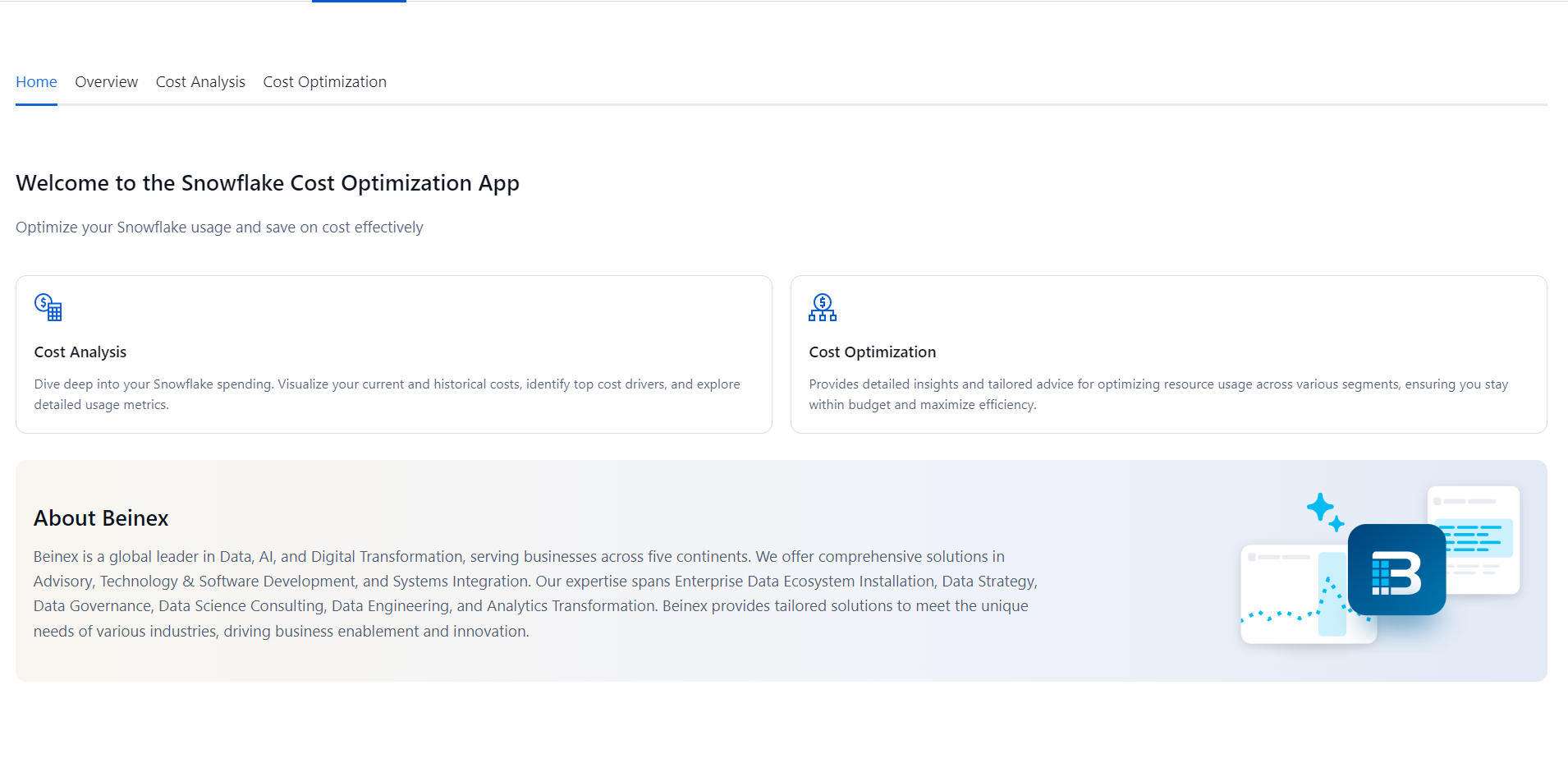
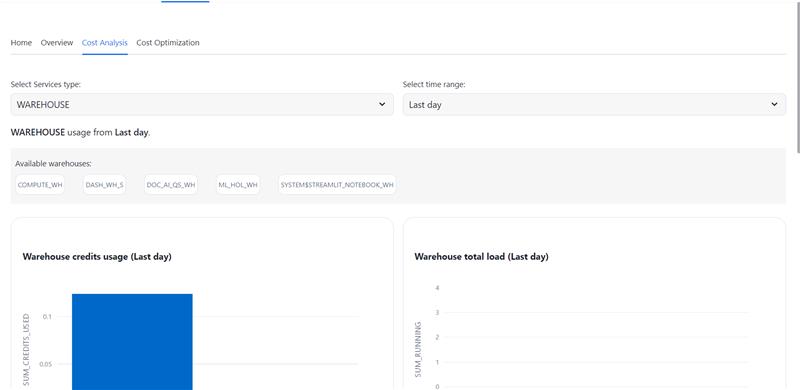
Beinex's strategic partnership with Snowflake empowers organizations to harness the full potential of their data. By leveraging Snowflake's powerful data cloud platform, Beinex offers comprehensive solutions for data management, analytics, and machine learning. This partnership enables organizations to accelerate their data-driven initiatives, reduce costs, and gain a competitive edge. Together, Beinex and Snowflake deliver innovative solutions that drive business growth and innovation.
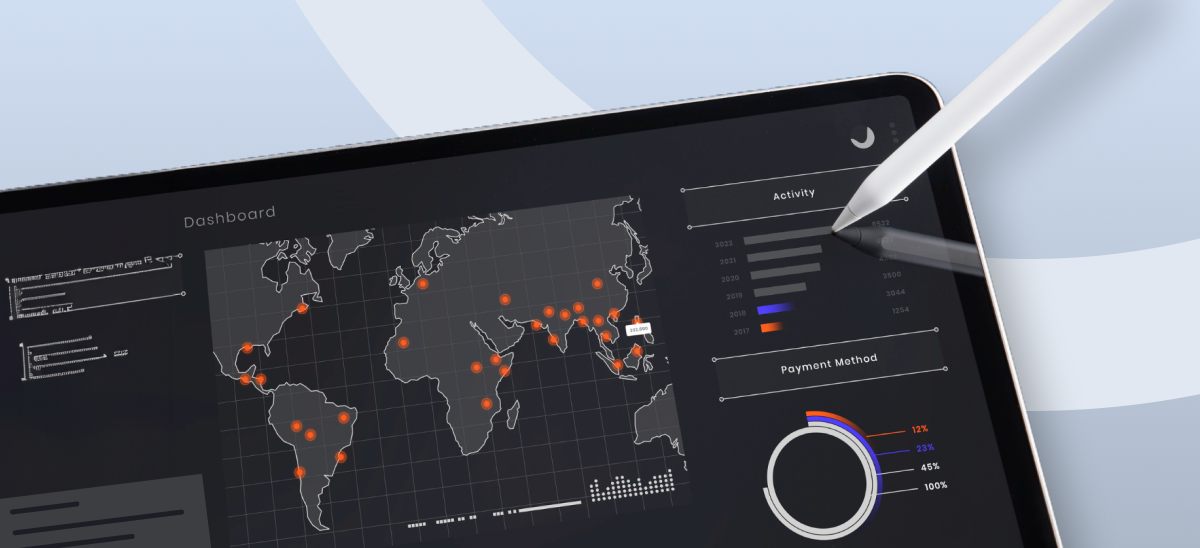
Top 4 Enterprise Data Visualization Tools: A Complete Guide
What is Data Visualization?
Data visualization is the process of representing data in a graphical or spatial format, allowing for easy visual analysis without technical jargon. Unlike raw numerical data, visual representations like charts, graphs, and maps help quickly identify patterns, trends, and anomalies, facilitating faster and more accurate insights.
Benefits of Data Visualization
Understanding raw data can be challenging due to its complexity. Data visualization addresses this by:
- Simplify Data Interpretation: Converting raw data into charts and graphs makes it easier to understand underlying patterns and relationships.
- Identify Trends and Anomalies: Visual formats highlight trends and anomalies that might be missed in numerical data.
- Improve Accessibility: Data visualization makes information accessible to a broader audience, including those without strong analytical skills, thus improving data-driven decision-making across departments.
- Advanced Data Storytelling: Effective visualization techniques turn data into compelling stories that facilitate better communication and understanding.
What Are Data Visualization Tools?
Data visualization tools provide designers with an efficient way to create visual representations of large data sets. When dealing with data sets that include hundreds of thousands or millions of data points, automating the visualization process simplifies the designer's job considerably.
Key Benefits of Data Visualisation Tools
- Dashboards: To monitor and analyze key performance indicators (KPIs) and metrics in real-time.
- Annual Reports: To present data-driven insights to stakeholders in a clear and engaging manner.
- Sales and Marketing Materials: To showcase trends, performance, and forecasts to potential clients and customers.
- Investor Slide Decks: To communicate financial health and growth prospects effectively.
- General Information Interpretation: To make complex data understandable for decision-making processes in virtually any context where quick interpretation of information is necessary.
A Compact List of Top Data Visualization Tools
Here are the top enterprise data visualization tools for creating compelling visualizations:
- Tableau
- Google Charts
- Zoho Analytics
- Data Wrapper
Tableau
Tableau is a top-tier platform recognized for its user-friendly interface. It adeptly integrates data from multiple sources to create dynamic and visualisations.
Its comprehensive suite of products spans desktop applications, robust server solutions, and flexible web-hosted environments, empowering organizations to drive informed decision-making and achieve actionable insights across their operations.
Connect with us for a free demo: https://www.beinex.com/free-tableau-software
Who Should Use Tableau?
Data scientists and analysts who need to create custom dashboards and advanced visualizations will benefit from Tableau.Key Features of Tableau
• User-Friendly Interface: Easy to learn and navigate, making it accessible for all skill levels. • Mobile-Friendly: Create reports and dashboards optimised for mobile devices, allowing you to access and analyse data on the go. • High Performance: Efficiently handles large datasets, ensuring seamless analysis without performance issues. • Interactive Visualizations: Build interactive and dynamic visualisations, allowing deeper data exploration. • Integration Capabilities: Integrates well with various data sources and other business applications, enhancing data connectivity. • Real-Time Data Updates: Provides real-time data updates, ensuring you have the most current insights. • Collaboration Tools: Facilitates easy sharing and collaboration on reports and dashboards within teams. • Customizable Dashboards: Offers highly customisable dashboards to meet specific business needs and preferences. • Advanced Analytics: Supports advanced analytics features, including trend analysis, forecasting, and statistical summaries. • Security: Ensures data security with robust access controls and permissions.
Learn more: https://www.beinex.com/tableau-partnership-and-consulting-services/Google Charts
Google Charts is a free tool for creating interactive data visualisations, accessible through most web browsers. It supports various data sources, including spreadsheets and databases.
Who Should Use Google Charts?
Students, universities, and businesses needing fundamental charts will find Google Charts useful.Key Features of Google Charts
• User-Friendly Interface: Easy to use with a straightforward setup process. • Wide Range of Chart Types: Supports various chart types, including line, bar, pie, scatter, and more. • Customizable: Offers extensive customization options to tailor charts to specific needs, including colors, fonts, and annotations. • Interactive Charts: Allows for interactive elements such as tooltips, zooming, and panning. • Cross-Platform Compatibility: Ensures charts work seamlessly across different browsers and devices. • Dynamic Data Updates: Supports real-time data updates, keeping charts current with live data feeds. • Integration with Google Services: Easily integrates with other Google services such as Google Sheets and Google Analytics. • Embedding Capabilities: Simple embedding in websites and applications with a few lines of code. • Data Export Options: Provides options to export charts in various formats, including PNG, SVG, and PDF. • Open Source: Free and open source, allowing for extensive customization and community support. • Support for Multiple Data Formats: Works with various data formats, including JSON, CSV, and Google Spreadsheets. • Accessibility Features: These include features to make charts accessible to all users, including screen reader support. • Responsive Design: Ensures charts are responsive and adapt to different screen sizes and resolutions. • Powerful API: Provides a robust API for developers to create complex visualisations and integrate them into applications.
Zoho Analytics
Zoho Analytics combines business intelligence and reporting services, allowing for swift data visualisation. It is user-friendly and integrates well with other Zoho products.Who Should Use Zoho Analytics?
Analytics and sales teams, marketing teams, project managers, and more can benefit from Zoho Analytics.Key Features of Zoho Analytics
• User-Friendly Interface: Intuitive design that simplifies data analysis and visualisation. • Wide Range of Data Sources: Connects to various data sources, including databases, cloud storage, spreadsheets, and other business applications. • Advanced Analytics: Offers features such as predictive analytics, AI-powered insights, and what-if analysis. • Interactive Dashboards: Create and customise interactive dashboards with drag-and-drop ease. • Collaboration Tools: Facilitate sharing and collaboration on reports and dashboards within teams. • Embedded Analytics: Embed reports and dashboards into websites, applications, and portals. • Automated Data Sync: Schedule data imports and synchronise data regularly. • Customizable Visualizations: Provides a variety of chart types and extensive customisation options for data visualisations. • Data Blending: Combine data from multiple sources for comprehensive analysis. • AI-Driven Insights: Leverages AI to offer advanced analytical insights and pattern detection. • Real-Time Data Access: Supports real-time data integration and live dashboards. • Mobile Access: Access and interact with reports and dashboards on mobile devices. • Data Security: Ensures robust security features, including role-based access control, encryption, and compliance with industry standards. • Report Scheduling: Automate the distribution of reports through scheduled emails. • Integrations with Other Zoho Apps: Seamlessly integrate with other Zoho applications for enhanced functionality. • API Support: Provides APIs for developers to integrate analytics capabilities into custom applications. • Data Preparation Tools: These include tools for data cleaning, transformation, and enrichment.
Data Wrapper
Data Wrapper is ideal for media enterprises and allows for the quick creation of charts, maps, and plots. It is completely web-based and easy to use.Who Should Use Data Wrapper?
Data Wrapper can benefit media, news publications, government institutions and finance companies. It is especially useful for creating visually appealing and easily understandable visualisations.Key Features of Data Wrapper
• User-Friendly Interface: Intuitive and easy to use, requiring no coding skills to create professional charts and maps. • Wide Range of Chart Types: Supports a variety of chart types, including bar, line, pie, scatter plots, and maps. • Customisable Visualizations: Offers extensive customisation options for colors, labels, and annotations to match branding and presentation needs. • Responsive Design: Ensures charts and maps are responsive and adapt to different screen sizes and devices. • Interactive Elements: Allows for adding interactive elements like tooltips, hover effects, and clickable legends. • Real-Time Data Integration: Supports live data updates, enabling real-time visualisation. • Embedding Capabilities: Easily embed charts and maps into websites and blogs with simple code snippets. • Export Options: This option lets users download visualisations in various formats, including PNG, PDF, and SVG. • Accessibility: Committed to creating accessible visualisations with features that support screen readers and keyboard navigation. • Data Security: Ensures data security with robust privacy policies and compliance with industry standards. • Collaboration Tools: Allows for team collaboration with shared projects and editing capabilities. • Support for Multiple Languages: Offers multi-language support for creating visualisations in different languages. • Easy Data Import: Supports importing data from various sources, including CSV files, spreadsheets, and web links. • API Integration: Provides APIs for integrating Data wrapper with other applications and services. • Customizable Templates: Use and modify templates to maintain consistency in visualisations. • Annotation Features: Add rich text annotations directly to charts and maps to provide additional context and information.
Always Go for the Best Tool
By choosing the right data visualisation tool, organizations can discover the full potential of their data, making complex information accessible and actionable for everyone. This empowers businesses to make data-driven decisions that drive growth and innovation.
Don’t Miss Out on These 6 New Features of Tableau 2023.2
List of Key Features in Tableau 2023.2
- Enhanced Multi-row calculations in Tableau Prep
- Line Patterns
- Personal Access Token Admin Control
- Editable Viz Alt Text
- Salesforce Data Cloud Connector
- Effortless Tracking of Known Issues
1. Enhanced Multi-row calculations in Tableau Prep
Gone are the days of complex formulas and tedious coding. With just a few clicks, Tableau Prep empowers you to perform multiple-row calculations, making your data preparation process a breeze. Calculate the difference from, percent difference from, or even execute moving calculations effortlessly without breaking a sweat.
Tableau Prep's enhanced calculation capabilities are like a magic wand in your hands, eliminating the need for intricate calculations or diving into complicated code. You're now equipped with the tools to effortlessly transform your raw data into actionable insights, paving the way for smarter decision-making and unlocking the true potential of your analytics journey.
Get ready to unleash the full potential of your data with LOOKUP calculations. Seamlessly compose complex expressions that enable you to access and analyse data across multiple rows, empowering you to unveil hidden insights and patterns.
2. Introducing Line Patterns
The next game-changing feature in Tableau 2023.2 is Line Patterns. This exciting addition provides a whole new level of flexibility and customisation when it comes to creating visually stunning data visualisations.
With Line Patterns, you now have the power to choose from a variety of line styles, including solid, dashed, or dotted lines. These patterns allow you to effortlessly highlight specific areas of interest within your visualisations, making it easier than ever to convey complex information with clarity and impact.
Imagine comparing actual data against modelled values with striking visual cues or effortlessly differentiating lines in dynamic or crowded visualisations. Line Patterns give you the ability to create eye-catching visuals that captivate your audience and make your data come to life. No longer will you be limited to static, monotonous lines. Line Patterns empower you to add a touch of creativity and personalisation to your visualisations.
3. Personal Access Token Admin Control
Gone are the days of compromising on security compliance. With this latest release, Site Admins are granted an array of tools to manage PAT creation privileges, tailor their validity periods to organisational needs, and wield their data protection prowess like never before. You hold the keys From a single dashboard to determine who can create PATs and fine-tune their lifespans, ranging from a day to a full year.
But the excitement doesn't stop there! We've taken proactive security measures to the next level. For Tableau Cloud sites created after version 2023.2, PATs come disabled by default, providing an additional layer of protection. Moreover, we've listened to your feedback, and the default expiration period has been thoughtfully shortened to 180 days, aligning with best practices and ensuring optimal data security.
4. Editable Viz Alt Text
With the latest feature, content authors have the power to edit the automatically generated alt text, opening the doors to endless possibilities. Whether through the Data Guide panel or the Accessibility option in the Worksheet drop-down menu, you can now add up to 2,500 characters of detailed alt text to craft captivating descriptions that bring your visualisations to life. Step into a realm of creativity and inclusivity, ensuring that everyone can fully comprehend and appreciate the story behind your data.
5. Salesforce Data Cloud Connector
With Tableau's enhanced Salesforce Data Cloud connector, say goodbye to complex installations as this driverless connector effortlessly connects your data sources. Use Data Spaces, where you can create customised visualisations tailored to specific contexts, organising metadata, data, and processes to empower stakeholders. Enjoy a user-friendly interface that replaces object API names with object labels, making table selection a breeze. With support for 11 additional functions, including datetime capabilities, supercharge your content creation and data analysis processes.
6. Effortless Tracking of Known Issues
We've streamlined the process of tracking known issues, making it effortless to stay in the loop. Discover the centralised Known Issues page, where you can effortlessly monitor the status of experiences, from working as expected to be in review, in progress, scheduled, or deployed. With intuitive drop-down filters, you can easily navigate through Tableau components and subscribe to specific issues for automatic email updates.
Additionally, our revamped Tableau Help now includes comprehensive "Release Notes" documentation, offering insights into new features and updates across Tableau Cloud, Tableau Server, Tableau Desktop, and Tableau Prep. Stay informed, empowered, and ahead of the curve with our enhanced status tracking and knowledge resources.
Upgrade to Tableau 2023.2
The release of Tableau 2023.2 brings a host of exciting features and enhancements that empower users to unlock the full potential of their data. With each release, Tableau continues to evolve and revolutionise the data analytics landscape, empowering users to discover insights, tell compelling stories, and easily make data-driven decisions. Upgrade to Tableau 2023.2 and embark on a data exploration and innovation journey like never before.
If you are interested in learning more about earlier versions of Tableau, click the links below:
Tableau New Features Unveiled: Tableau 2023.1 Release
Tableau Version 2021.4: Bringing Automation to Data Management
How Beinex Can Assist You
Beinex, a premier Tableau partner, provide sustainable analytics solutions to organisations and help to build superior data visual analytics capabilities internally through our bespoke training programs. Our team of Tableau-certified consultants are real-life Tableau business users who are passionate about Tableau and delivering a world-class experience. Connect with us for a Tableau free trial.