How AI Decision-Making is Improving Enterprise Outcomes
Blog
Share 
A Complete Guide on 360 Advanced Analytics with Tableau and Alteryx
 31 May 2023
  Sumi S
 How can You Use Alteryx and Tableau for Advanced Analytics
1. Data Preparation with Alteryx
Alteryx provides powerful data preparation capabilities, including data cleaning, data integration, and data transformation. You can make use of it for:
- Importing data from various sources such as databases, spreadsheets, or APIs.
- Creating data preparation workflows, connecting different tools to cleanse, filter, aggregate, and manipulate your data. Use Alteryx's visual workflow interface.
- Deriving additional insights from your data to leverage Alteryx's advanced analytics tools like predictive modelling, time series analysis, or clustering.
2. Advanced Analytics with Alteryx
Alteryx offers a list of advanced analytics tools, such as predictive analytics, spatial analytics, and text analytics, that can be utilised for:
- Building machine learning models and performing regression analysis or classification tasks.
- Analysing geographic patterns, performing spatial clustering, or conducting network analysis.
- Performing sentiment analysis or topic modelling and extracting insights from unstructured text data by using Alteryx's text mining tools
3. Data Visualization and Reporting with Tableau
Once your data is prepared and enriched in Alteryx, you can connect Tableau to the output data and create interactive visualisations, and perform the following:
- Use Tableau's drag-and-drop interface to create charts, graphs, dashboards, and reports to visualise your data.
- Leverage Tableau's advanced visualisation features like calculated fields, table calculations, or trend lines to enhance your analysis.
- Combine multiple data sources, including the output from Alteryx, to create comprehensive dashboards that provide a holistic view of your data and insights.
4. Integrating Alteryx and Tableau
When it comes to pushing data from Alteryx to Tableau, there are indeed a couple of approaches you can consider ensuring a smooth integration between the Alteryx and Tableau platforms. Alteryx allows you to export the prepared and enriched data as a Tableau Data Extract (.tde) or Tableau Hyper Extract (. hyper) file. You can make use of it for the following functions:
Publishing Data Source Directly to Tableau Server:
Writing Data in Tableau’s hyper Format:
To integrate Alteryx with Tableau, you can:
Beinex partnership with Tableau & Alteryx
As the premium partner of Alteryx and Tableau, Beinex offers a unique advantage in leveraging the combined power of these two tools for your business. Our experts can help you unlock the full potential of your data through sophisticated data preparation, advanced analytics, and compelling visualisations that provide deeper insights into your business operations.
With our expertise, you can effectively make data-driven decisions and communicate complex analytics. Whether you need help with implementation, training, or ongoing support, Beinex is your go-to partner for all your data analysis needs. Get in touch with us today and see how we can help you transform your business with the combined power of Alteryx and Tableau.
Do you want to unlock the full potential of your data and gain valuable insights to drive business decisions? Look no further than the powerful combination of Tableau and Alteryx for 360 Advanced Analytics! By combining Tableau's data visualisation and reporting strengths with Alteryx's advanced analytics capabilities, you can take your data analysis to the next level.
With sophisticated data preparation and compelling visualisations, you can confidently make data-driven decisions and effectively communicate your insights to others.
Related Articles

AWS vs AZURE vs GCP: THE LEADING CSPs FROM A COMPARATIVE LENS
Benefits of Cloud Computing
Worldwide Vendor Market Share
 Sourced from: Cloud Market Share Q2 2023: AWS, Microsoft, Google Battle | CRN
AMAZON WEB SERVICES (AWS)
Amazon Web Services is the most extensive and widely adopted cloud platform worldwide, offering over 200 fully featured services across global data centres. AWS is used by millions of customers, including fast-growing startups, major enterprises, and prominent government agencies, to reduce costs, enhance agility, and accelerate innovation.
The USPs of AWS
Popular Customers of AWS
Netflix:Netflix relies on AWS for most of its computing and storage requirements, including analytics, databases, recommendation engines, video transcoding and numerous functions utilizing over 100,000 server instances on the AWS platform.BMW Group: BMW Group leverages AWS to acquire the agility and flexibility necessary for democratizing data usage and expediting innovation.
Philips: Philips is an early adopter of AWS that utilizes AWS services to manage the Philips HealthSuite Platform, ensuring scalability, cost-effectiveness, and regulatory-compliant solutions.
Salesforce: Salesforce shares a global strategic relationship with AWS, utilizing AWS compute, storage and AI solutions to create and deploy innovative business applications.
Pinterest: The exabyte data platform of Pinterest is hosted exclusively on AWS, managing log search and analytics that surpass 1.7TB. This implementation has led to a 30% reduction in operational costs.
Coca-Cola: After its migration to AWS, Coca-Cola has reduced operational costs by 40% and IT ticket volume by 80%.
Regions & Availability
AWS boasts the most expansive global cloud infrastructure. Gartner has acknowledged the AWS Region and Availability Zone framework as the endorsed strategy for operating enterprise applications demanding high availability.
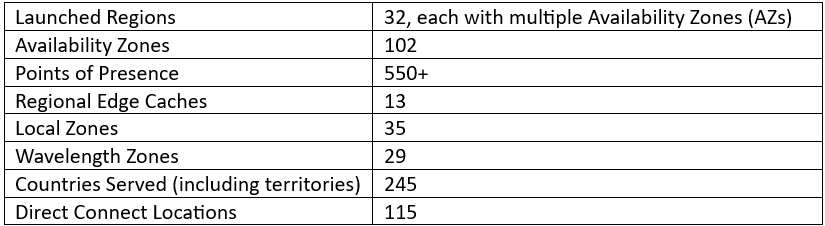
The AWS Cloud covers 102 Availability Zones across 32 geographic regions worldwide, with disclosed intentions to introduce an additional 15 Availability Zones and 5 AWS Regions in Germany, Canada, Thailand, Malaysia and New Zealand.
MICROSOFT AZURE
The Azure cloud platform encompasses over 200 products and services crafted to empower you to bring innovative solutions to fruition, addressing current challenges while shaping the future. It offers the flexibility to build, run, and manage applications across various clouds, on-premises, and at the edge, utilizing the tools and frameworks as per your preferences.
The USPs of Microsoft Azure
Popular Customers of Microsoft Azure
New York City Department of Environmental Protection (DEP): DEP uses a Microsoft infrastructure specifically designed with modern security considerations. With the solution in the cloud, Microsoft manages disaster recovery, reducing the necessity for maintaining certain skill sets in-house. CCC Group: CCC Group utilizes Azure Data Lake and Data Warehouse to collect, store, and segment data. Panasonic Connect Co: Panasonic Connect Co maximizes the benefits of PaaS services such as Azure IoT Hub, Synapse Analytics, and Azure Kubernetes Services. Hamburg Commercial Bank: Hamburg Commercial Bank opted for Microsoft Azure Virtual Desktop to achieve improved performance, reliability, and enhanced interoperability with other Microsoft technologies previously invested in. Barnsley Hospital NHS Foundation Trust: Barnsley Hospital NHS Foundation Trust adopted a new, integrated platform using Power Platform and Microsoft Teams for video consultations. During the COVID-19 pandemic lockdowns, the Trust rapidly deployed Microsoft Teams to facilitate remote work and staff collaboration.Regions & Availability:
Microsoft operates highly secure data centre facilities globally, forming a distributed infrastructure that sustains thousands of online services. This expansive, globally distributed infrastructure prioritizes sustainability, bringing applications closer to users, ensuring data residency, and providing customers with comprehensive compliance and resiliency options.
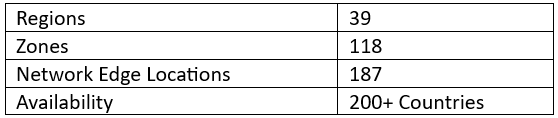
As of March 2023, Microsoft Azure boasts 160 active data centres spread across 60 regions worldwide. These Azure regions, defined by geographical areas, house one or more physical Azure data centres. Operating within a latency-defined perimeter, these data centres are strategically positioned to deliver optimal performance and security to users.
Azure leads with over 60 announced regions, surpassing all other cloud providers. It is accessible in 140 countries, showcasing a global presence that sets it apart in cloud computing.
GOOGLE CLOUD PLATFORM (GCP)
Google Cloud, also called Google Cloud Platform, offers computing resources dedicated to developing, deploying, and operating web applications. While its cloud infrastructure supports applications like Google Workplace, GCP primarily serves as a platform for constructing and managing custom applications. These applications can subsequently be published on the web, leveraging the extensive capabilities of its hyperscale data centre facilities.
The USPs of the Google Cloud Platform
Popular Customers of the Google Cloud Platform
Etsy: Utilizing the collaborative tools offered in Google Workspace, Etsy meets the evolving needs of sellers and buyers innovatively, fostering continued growth and enhancing the sustainability of its operations. X (formerly Twitter): Twitter's complete shifting of its ad analytics data platform to Google Cloud granted developers increased agility, allowing them to configure existing data pipelines more easily and build new features acceleratedly. Airbus Defence and Space: Airbus Defence and Space's Intelligence business line employs Google Cloud to construct a scalable online platform, enabling customers to access petabytes of satellite imagery in real-time.Regions & Availability
Google Cloud provides global coverage through regions distributed worldwide, ensuring low cost, minimal latency, and optimal application availability for customers.
Follow the link to have a look into a tabular comparison of the solutions provided by the CSPs: AWS, Azure and GCP. https://cloud.google.com/docs/get-started/aws-azure-gcp-service-comparison

Digital Transformation in Banking: The Golden Touch of RPA
The brick-and-mortar banking model faced an existential threat with the emergence of Fintech (financial technology), or new technology that aims to enhance and automate the delivery and use of financial services. And later, new-gen technology companies started to deliver these services on secure digital platforms at a lower cost, resulting in traditional banks adopting advanced technology too.
Most banks were apprehensive about adopting automation to the finance function. This concern is frequently centered on whether it is possible to replace existing systems entirely with automation. The core banking system is perhaps the best example. Automating ‘untouchable’ core functions is not necessary. Instead, it can deal with the issues that surround them. But rooting your digital transformation in all other banking processes in intelligent, digital workflows is feasible.
What is digital banking?
Digital banking involves digitising all traditional banking products, procedures, and activities to serve customers through online channels. Examples include obtaining bank statements, cash withdrawals, funds’ transfers, accounts management and checking opening deposit accounts, loan management, bill payment, cheque management, and transaction records monitoring.
With digital banking, all banking services are accessible round-the-clock on mobile phones, PCs, and other intelligent devices. Thanks to digital banking software, all traditional services are now easier to obtain, comprehend, and manage.
Leading banks in the UAE make significant financial investments in the digital transformation of their banking operations and launch digital-only banks in the country.
Pros of digital banking
Here are some of the most known benefits of digital banking:1. Scalability
Numerous functions provided by digital banks are just absent from traditional banks. This includes investing directly in stock markets and acquiring cryptocurrency and gold using the banking app. The user of digital banking can modify their security preferences, transaction caps, and even whether they wish to enable NFC or magnetic stripe transactions.
2. Personalisation
In digital banking, sophisticated personalisation tactics are powered by artificial intelligence (AI) and machine learning (ML). Customers can get timely financial solutions, interactive tools, and instructional resources from banks. Automatic budgeting, expenditure analytics, and savings reminders are a few technologies that can inform and engage customers.
3. Cost savings
Traditional banks spend a lot of time and expense on the checking and accounting processes. The elimination of unnecessary operations is what makes digital banking software's operational costs less expensive. With digital banking systems, banks may take on less labour by automating the procedures related to routine transactions. Because fewer persons and stages are required for transactions when technology is used, there is a lower chance of financial mistakes, and money transfers are more straightforward.
The touch of automation
Let’s also look at the most automated processes in the banking industry that have undergone complete digitization with the touch of automation.
1. Loan processing
RPA or Robotic Process Automation can reduce lengthy procedures that typically take months to as little as 10–15 minutes. Automation enables essential data extracted from customer-submitted documents to validate all details. Systems employ Machine Learning to make better-informed judgments based on data analytics supported by more straightforward statistical methods. Intermediary bots infer business logic and ask the user to correct any inaccurate entries to ensure safer loan judgments and automatic confirmation letter creation
2. Know Your Customer (KYC)
Not only is Know Your Customer (KYC) a necessary compliance procedure for any bank, but it is also the trickiest. To execute the customer checks, this process requires at least 150 and maybe thousands of FTEs.
According to Thomson Reuters, a small number of banks annually invest at least $500 million in KYC compliance. Banks have recently begun utilising RPA to gather and flawlessly check consumer information to cut costs and resources. Because of this, banks can now complete the KYC procedure with fewer resources and mistakes.
3. Anti-Money Laundering (AML)
One of the most data-intensive processes, AML, can be made simpler with some help from Robotic Process Automation (RPA). Implementing RPA has proven more efficient than labour-intensive traditional banking solutions in identifying suspicious banking transactions or automating repetitive operations.
4. Fraud Detection
Banks are concerned about enhancing their fraud detection system due to the rising banking fraud scenario. Banking fraud has increased since the introduction of cutting-edge technologies. Considering this, it is virtually hard for banks to manually review each transaction to spot fraud trends in real-time. RPA cleverly uses the "if-then" principle to spot any potential fraud and report it for prompt resolution with the relevant department.
5. Mortgage processing
Both banks and their clients find mortgage processing extremely labour-intensive and cumbersome. Before processing each loan request, banks manage their mortgage procedure for more than a month, going through several unnerving stages like job verification, credit checks, and inspection. The processing of mortgage loans could be severely delayed by even the slightest mistake made by either the customer or the bank.
But RPA has accelerated this process for banks. Robotics goes through a defined set of rules to eliminate potential bottlenecks and speed up mortgage processing.
Customer acceptance of digital banking services has rapidly increased throughout the UAE. According to bankers, the older generation, initially apprehensive, is now quickly adjusting, whereas younger clients are quick to accept digital offerings and digital-only platforms. Digital banks are drawing a lot of new consumers due to lower account maintenance expenses and improved deposit returns.
How Beinex can help you
Beinex is a Dubai-based digital transformation organisation anchored in innovation, creativity, and unrivalled customer service. Our extensive analytics modernisation and training services will empower you to construct an intelligent and dynamic banking enterprise. Our extensively experienced consultants enable a seamless digital experience for the banking industry.

How Mywhoosh Standardized Collaborative Workflow Creation by Implementing the “Alteryx Server” Platform on AWS that Paved the Way for 20% Better Business Predictions
Once a workflow is built, users want to share, secure, schedule, and monitor the assets that have been built. Alteryx Server allows users to publish their workflows to a central location where the workflows can be stored, shared, and controlled in a safe and “enterprise-grade” solution.
Challenge
- The IT infrastructure of MyWhoosh where the Alteryx Server platform was hosted was in an on-premise datacenter which was designed to be scalable and robust with multi node physical clusters including the server, storage and network components. However, most of the physical hardware was quite old and not equipped with the latest generation of physical servers.
- Frequent hardware crashes and portal downtime kept troubling the availability of the Alteryx Server application. Assigning a touch hand support person to power on the hardware that was down seemed quite impossible due the restrictions during covid period. Hence, MyWhoosh wanted to look for another viable solution.
- Though the hardware setup at MyWhoosh was well equipped to meet the occasional spikes in the traffic, it was observed that over a course of 6-month time, most of the IT infra was underutilized than predicted. It was realized that spending huge amount of money on an old hardware plus software maintenance, license costs, internet bandwidth, datacenter cooling and maintenance, touch support personnel and electricity costs – were keeping the business operations challenging.
- There was an attempt by MyWhoosh to select a cost-effective solution that can host Alteryx Server application servers, web servers and archival data. This way IT infra can be re-provisioned to host sensitive data on-premise and the rest on the cloud, thereby reducing the overall physical hardware costs spent on a yearly basis.
Why AWS
- MyWhoosh decided to migrate Alteryx Server, database servers and archival data to AWS.
- The Alteryx Server’s AWS architecture includes Amazon Elastic Compute Cloud (Amazon EC2), that provides complete control of its computing resources, updates to tables in Amazon Relational Database Service (Amazon RDS) and AWS Elastic Load Balancer was used to distribute the traffic to the underlying EC2 instances based on the load.
Benefits
- MyWhoosh uses AWS services to provision infrastructure and deploy the Alteryx Server platform to other departments within it. In addition, the Alteryx Server resources that are no longer required to be run all the time are made to auto shutdown thus saving cost. MyWhoosh reported a 30% cost reduction after implementation of AWS for the Alteryx Server platform.
- The implementation of Alteryx Server on AWS made MyWhoosh confident in the security of its data, and its accreditation team is enthusiastic about the monitoring and auditing capabilities provided by AWS tools. With the implementation of IAM roles, MyWhoosh IT team was able to isolate systems and tightly control user accesses. These capabilities were harder to achieve within the existing infra but were available out of the box with AWS
- By adopting AWS to host the Alteryx Server platform, MyWhoosh has been able to innovate and experiment to a degree previously impossible. For example, MyWhoosh compared the performance and cost-effectiveness of three different cloud solutions. Without moving to the AWS, the costs associated with running an outdated on-premise hardware would have creeped up and the alternative way of upgrading the existing on-prem infrastructure to the latest hardware models and then hosting the Alteryx Server application on top of it would have taken months.

Tableau Server Health Check: Ensure Peak Performance for Your Tableau Environment
What is Tableau Server Health Check?
Tableau Server Health Check comprehensively evaluates the server's performance, configuration, and overall health. It aims to ensure that the server operates optimally, providing a seamless and efficient user experience. Regular health checks can prevent performance degradation, identify potential issues before they become critical, and ensure that the server environment is configured according to best practices.Critical Components of a Tableau Server Health Check • Server Performance • Server Configuration • Resource Utilization • Content and Workbook
When Should You Perform a Tableau Server Health Check?
- Regular Maintenance • Quarterly or Bi-Annually: Conducting a health check every three to six months helps identify potential issues early and maintain optimal performance over time.
- Performance Issues • Slow Load Times: If users experience slow load times for dashboards and reports, it clearly indicates that a health check is needed to diagnose and resolve performance bottlenecks. • Frequent Server Crashes: Regular crashes or downtime are signs of underlying issues that need immediate attention.
- Major Updates or Upgrades • Before and After Upgrades: Perform a health check before upgrading to a new version of Tableau Server to ensure the current environment is stable. Conduct another check after the upgrade to verify everything is working correctly and optimize new features.
- Changes in Usage Patterns • Increase in User Base: A health check ensures the server can handle the new load effectively if the number of users or the volume of data being processed significantly increases significantly.
- User Feedback • Negative User Feedback: If users report consistent issues with dashboard performance, accessibility, or other aspects of Tableau Server, it’s crucial to perform a health check to address these concerns.
- System Configuration Changes • Infrastructure Changes: Changes to the underlying infrastructure, such as hardware upgrades or network configuration changes, should be followed by a health check to ensure everything is configured optimally.
What are the Benefits of Tableau Server Health?
• Improved Performance • Better User Experience • Improving allocation of server resources and license management. • Increasing server stability, reliability, and uptime. • Scalability and Future Planning
How Does Beinex Conduct Tableau Health Check?
Our certified Tableau experts will evaluate your server environment and deliver a comprehensive report to help you identify and mitigate risks. Our process is structured into three main phases: Evaluation, Diagnosis, and Recommendation. Each phase focuses on different aspects of the server's operation to ensure that it meets your organization's needs and performs optimally. • Evaluation - We assess the size and configuration of your server, the performance of all data extracts and dashboards, server security, and more • Diagnose - We parse through server logs and review usage metrics to diagnose the root cause of any issues • Recommend - We present findings, best practices, and recommendations that you can act on immediately
Why Choose Beinex?
• Certified Team of Server Experts At Beinex, we pride ourselves on having a team of certified Tableau experts who bring extensive knowledge and experience to every project. Our specialists have the latest certifications and are continually updated with the newest Tableau features and best practices. • 300+ Tableau Deployments & Upgrades With over 300 successful Tableau deployments and upgrades under our belt, Beinex has a proven track record of delivering exceptional results. Our extensive experience spans various industries and business sizes, allowing us to understand and address the unique challenges different organizations face. • Tableau Premier Partner As a Tableau Premier Partner, Beinex stands among a select group of top-tier Tableau partners worldwide. This prestigious partnership recognizes our commitment to excellence and ability to deliver high-quality Tableau solutions.
How Beinex Can Assist You
Beinex, a premier Tableau partner, provides sustainable analytics solutions to organizations and helps to build superior data visual analytics capabilities internally through our bespoke training programs. Our team of Tableau-certified consultants are real-life Tableau business users passionate about Tableau and delivering a world-class experience. Connect with us: https://www.beinex.com/tableau-beinex/
ALTERYX RELEASES 2018.3
Visualytics at every step
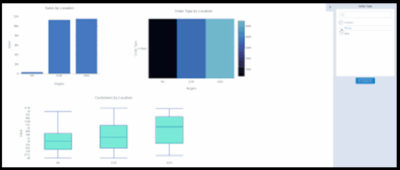
The Interactive Chart tool replaces the existing Charting tool, which has been deprecated. Now, the interactive charting tool instantly creates and customizes popular chart types and output in both static and interactive formats.
The Insight Tool brings your insights to life through interactive dashboards you can share across your organization via the Alteryx Gallery to gain deeper insights into your data. You can create and arrange multiple charts and text elements on the dashboard, create filters for viewing specific data, and create drilldowns to let you change the detail level of data displayed.
Deliver answers faster
Caching feature in Alteryx Designer allows for a workflow process to be stopped and then restarted from the caching point without starting over which can drastically reduce processing time.
Alteryx Server becomes more enterprise-friendly with job prioritization and worker node assignment that enables admins and users to prioritize the most critical jobs to the top of the queue.
Alteryx Connect gets smarter by recommending related assets to help you discover other available analytic assets to use in your analysis.
Next level analytics
The new Python tool with Jupyter Notebook integration is an embedded IDE that allows you to run Python code directly in Alteryx Designer.
Adding the big data capabilities – Apache Spark Code tool support – Spark Direct for Databricks on Azure and HDInsight – which allows you to quickly leverage the power of Spark right within a workflow.
We encourage you to experience the new capabilities in Alteryx Analytic 2018.3 during our live webinar on September 18th