How AI Decision-Making is Improving Enterprise Outcomes
Blog
Share 
A Complete Guide on 360 Advanced Analytics with Tableau and Alteryx
 31 May 2023
  Sumi S
 How can You Use Alteryx and Tableau for Advanced Analytics
1. Data Preparation with Alteryx
Alteryx provides powerful data preparation capabilities, including data cleaning, data integration, and data transformation. You can make use of it for:
- Importing data from various sources such as databases, spreadsheets, or APIs.
- Creating data preparation workflows, connecting different tools to cleanse, filter, aggregate, and manipulate your data. Use Alteryx's visual workflow interface.
- Deriving additional insights from your data to leverage Alteryx's advanced analytics tools like predictive modelling, time series analysis, or clustering.
2. Advanced Analytics with Alteryx
Alteryx offers a list of advanced analytics tools, such as predictive analytics, spatial analytics, and text analytics, that can be utilised for:
- Building machine learning models and performing regression analysis or classification tasks.
- Analysing geographic patterns, performing spatial clustering, or conducting network analysis.
- Performing sentiment analysis or topic modelling and extracting insights from unstructured text data by using Alteryx's text mining tools
3. Data Visualization and Reporting with Tableau
Once your data is prepared and enriched in Alteryx, you can connect Tableau to the output data and create interactive visualisations, and perform the following:
- Use Tableau's drag-and-drop interface to create charts, graphs, dashboards, and reports to visualise your data.
- Leverage Tableau's advanced visualisation features like calculated fields, table calculations, or trend lines to enhance your analysis.
- Combine multiple data sources, including the output from Alteryx, to create comprehensive dashboards that provide a holistic view of your data and insights.
4. Integrating Alteryx and Tableau
When it comes to pushing data from Alteryx to Tableau, there are indeed a couple of approaches you can consider ensuring a smooth integration between the Alteryx and Tableau platforms. Alteryx allows you to export the prepared and enriched data as a Tableau Data Extract (.tde) or Tableau Hyper Extract (. hyper) file. You can make use of it for the following functions:
Publishing Data Source Directly to Tableau Server:
Writing Data in Tableau’s hyper Format:
To integrate Alteryx with Tableau, you can:
Beinex partnership with Tableau & Alteryx
As the premium partner of Alteryx and Tableau, Beinex offers a unique advantage in leveraging the combined power of these two tools for your business. Our experts can help you unlock the full potential of your data through sophisticated data preparation, advanced analytics, and compelling visualisations that provide deeper insights into your business operations.
With our expertise, you can effectively make data-driven decisions and communicate complex analytics. Whether you need help with implementation, training, or ongoing support, Beinex is your go-to partner for all your data analysis needs. Get in touch with us today and see how we can help you transform your business with the combined power of Alteryx and Tableau.
Do you want to unlock the full potential of your data and gain valuable insights to drive business decisions? Look no further than the powerful combination of Tableau and Alteryx for 360 Advanced Analytics! By combining Tableau's data visualisation and reporting strengths with Alteryx's advanced analytics capabilities, you can take your data analysis to the next level.
With sophisticated data preparation and compelling visualisations, you can confidently make data-driven decisions and effectively communicate your insights to others.
Related Articles
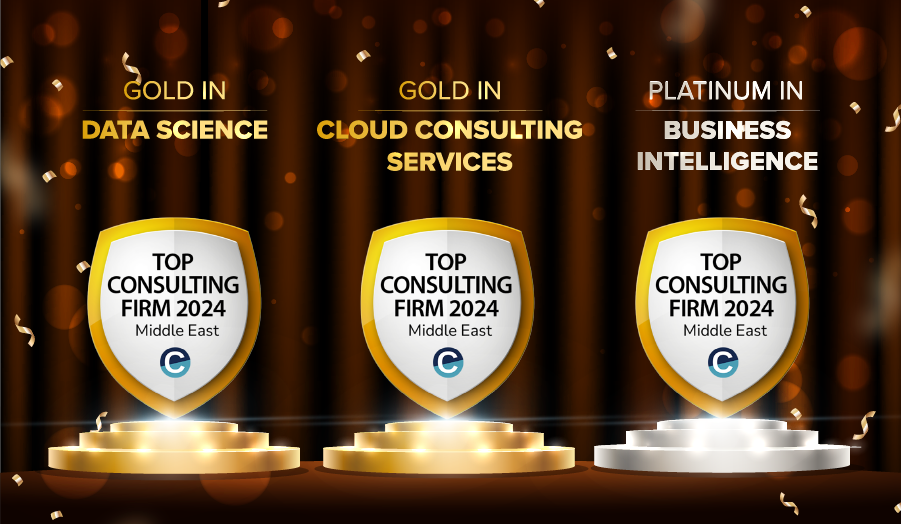
Beinex Recognized as a Leading Consulting Firm in the Middle East by Consultancy-me
Accolades We Are Proud Of
Beinex earned top rankings across multiple domains: • Platinum in Business Intelligence • Gold in Data Science • Gold in Cloud Services
Industry-Specific Excellence
Our industry-focused consulting capabilities have also been recognized, and our ranking level is as follows: • Government Industry: Gold • Oil & Gas Industry: Gold • Public Sector Industry: Gold • Technology Industry: Gold • Banking Industry: Silver
A Milestone of Achievement
These accolades reaffirm our position as a trusted consulting partner for businesses and government entities across the Middle East. Our success is driven by a team of passionate professionals, innovative technologies, and strategic partnerships. Looking Ahead As we celebrate this achievement, we remain committed to delivering transformative solutions that empower businesses worldwide. Thank you to our clients, partners, and team members for making this success possible. If you are interested in our services, feel free to connect: https://beinex.com/contact-us/
Read More About Our Achievements
Beinex Among Top BI Consulting Firms in the Middle East Beinex Ranked as Top Data Science Consulting Firms in the Middle East Beinex Makes to the League of Top Consulting Firms for Cloud Services in the Middle East 2024
Four Ways to Enhance Customer Experience in the Metaverse
These days we are into the 2-D screen of our mobile phones and watch videos and shows and engage in many more activities. But we are not carried away to that place or get immersed in it. Through the metaverse, that is possible. Here you can have an avatar which can act as a replica of your physical self. You can indulge in anything from hanging out with pals, participating in sports or workout sessions, learning new courses or activities, attending events, or shopping.
What are the possibilities Metaverse offers?
Using the limitless opportunities, you can virtually own digital clothing, buy land, construct buildings, start businesses, visit nightclubs and shopping centres, and even buy digital artworks. Non-fungible Tokens (NFTs) are used in the metaverse to digitally represent physical assets like art, music, in-game goods, and videos. They can be purchased and sold online. An evolving business strategy called "Direct-to-avatar" (D2A) makes it possible to sell and buy goods directly to avatars or other digital identities in virtual environments. Here, the possibilities are just boundless. Considering the future prospects, many brands like Adidas, Nike and Gucci, to name a few, have invested in the metaverse. As Gen Z and millennials are already spending a considerable amount of time in the virtual world, it is anticipated that by the end of 2022, the global VR sector will generate over $6.71 billion in revenue, and by 2024, it will be around $12.19 billion.
Metaverse generates value in customer experience by providing real-life interactions and can revolutionise user experience. Let’s see how it can be done:
1. Providing Unique Customised Experiences
Customisation plays a crucial part in today’s business world, as does in the metaverse. Businesses struggle to tailor the experience for each consumer, whether they prefer to purchase online or go to a physical store. Thankfully, the metaverse can guarantee that each customer's experience in an online store is distinctive. Customers can browse products geared toward their unique needs rather than browsing products that are of no interest to them. Additionally, the metaverse encourages connectedness, so consumers may share their experiences with other metaverse users and read reviews of goods and services before making a purchase.
Sports gear giant Adidas is one step ahead of the game by providing virtual gear for the virtual world and metaverse. Major apparel retailers like Macy's, Adidas, and Modcloth have already adopted virtual dressing rooms to enable customers to visualise a garment on their body without actually trying it on. The Swedish furniture retailer IKEA has already released an augmented reality catalogue app that lets you view how various pieces of furniture would look in your home. Nike owns Nikeland, a virtual world which is a free immersive sports space where you participate in sporting events from your computer or phone through your unique avatar.
2. Trials Using Virtual and Augmented Reality
Earlier trials were provided only for digital products, but with the help of the metaverse, we can experience every product virtually. For instance, we can choose a hotel to stay in after virtually experiencing the facilities provided by it. That’s cool, isn’t it? The metaverse uses augmented and virtual reality to give users a fully immersive experience. Customers who engage in immersive experiences may be able to do things that they otherwise might not have been able to do or uniquely do things. From buying lipstick after a virtual trial to buying a car after a virtual drive allows customers to explore and experience more realistically. Customers can currently utilise augmented reality through apps in a limited way, but the metaverse will allow them to experience the product from a close-up and personal perspective. For instance, Hyundai’s mobility adventure enables a vivid virtual experience.
BMW's augmented reality experiences enable automobile buyers to modify their desired vehicles in showrooms with the help of their tablets or smartphones. Alternatively, consumers can don virtual reality goggles to experience what it's like to drive cars, which will help them comprehend their options and select the best option available for their new car.
3. Accessible from Anywhere
The metaverse offers businesses plenty of advertising opportunities, but it also enables customers to interact with the people, places, and brands that interest them. Businesses can provide customers with experiences that let them explore their interests in greater detail without leaving the comfort of their homes and provide free samples of real-world events.
For people for whom it is not always feasible or economical to attend events in real life, the metaverse is the ideal replacement. Through 3D virtual worlds and avatars, users can enjoy affordable front-row access to various events with a level of immersion that must be experienced. Thanks to simple navigation, which places them in a metaverse tailored to their interests.
If you want to go shopping and there is no time for that, you can access it virtually from anywhere. To cite an example, for interior designing of your house, you can try different pieces or types of furniture from a virtual shop by arranging those in a digital representation of your house. Customers could quickly see whether the sofa would go with the colour scheme of their floor or wall or whether a wardrobe would fit in the available area. Ikea, the furniture brand, has already provided virtual experiences for customers. Buying land without the help of an agent is possible through Upland, a virtual real estate software that lets users browse and buy virtual property connected to actual towns and cities.
4. Strengthen Customer Experience
Companies now offer advice and assistance in addition to goods and services. Metaverse enables businesses to develop natural relationships with clients that weren't feasible with earlier forms of technology. Through virtual reality, customers experience ‘story-living’ rather than just ‘story-telling’. Shoppers can have a distinctive customer experience as they can purchase through experiencing it, have opinions about it, interact with other users and ask questions in the metaverse itself.
The businesses are testing out virtual and augmented retail on various platforms. Within the Roblox online multiplayer game, Gucci and Nike have unveiled fashion shows. In Fortnite, Balenciaga has begun offering high-end clothing. Additionally, the South Korean social avatar app Zepeto, Ralph Lauren, and Adidas have introduced interactive experiences. In the meantime, Charlotte Tilbury has established a virtual cosmetic store.
The journey doesn't end with how companies interact with customers in the metaverse. Businesses that use the metaverse's advantages ensure their clients have a customised experience that develops at the same rate as the metaverse. It's time for businesses to be prepared to adopt the impending metaverse and become early adopters before it is too late. Even though the metaverse is the next frontier of internet technology and consumer experience enhancement, massive adoption and accessibility are crucial. It's vital for business owners to begin learning about how these virtual worlds function, what opportunities and problems there are, and how to take advantage as soon as possible.

Budgeting Made Easy: Beinex Budget Allocation Accelerator (Infographic)


An Ultimate Guide to All the Tableau Certifications
Top 4 Benefits of Tableau Certification
Tableau certification offers numerous benefits. It is a valuable investment for professionals looking to excel in the field of data visualisation and analysis.
Here are the four ways Tableau certification can help you:
Let’s deep-dive:
1. Enhanced Professional Credibility
Achieving Tableau certification demonstrates your expertise and proficiency in using the Tableau platform. It enhances your professional credibility and sets you apart from others in the BI realm. Employers and clients value certified professionals as they have proven their competence in leveraging Tableau for data visualisation and analysis.
2. Expanded Career Opportunities
Tableau certification opens doors to a wide range of career opportunities. Many organisations seek professionals with Tableau skills to help them effectively analyse and visualise their data.
With Tableau certification, you become a desirable candidate for job roles such as:
3. Improved Skills and Knowledge
The process of preparing for Tableau certification equips you with in-depth knowledge of Tableau's features, functionalities, and best practices. You gain hands-on experience in creating interactive dashboards, working with various data sources, and leveraging advanced analytics capabilities. This knowledge enhances your ability to leverage Tableau effectively in real-world scenarios.
4. Increased Efficiency and Productivity
Tableau certification equips you with the skills to efficiently utilise Tableau's tools and techniques. You learn how to quickly analyse and visualise data, identify insights, and communicate findings effectively. This improves your productivity, allowing you to quickly deliver impactful data visualisations and insights.
List of Tableau Certifications
By pursuing Tableau certifications, individuals can showcase their proficiency and specialisation in various Tableau-related roles, from desktop usage to server administration, data analysis, consulting, and architecture. Each Tableau certification offers a unique opportunity to advance one's career and make significant contributions in the field of data visualisation and analytics using Tableau.
Tableau offers five certifications:- Tableau Desktop Specialist Certification
- Tableau Server Certified Associate Certification
- Tableau Certified Data Analyst Certification
- Tableau Consultant Certification
- Tableau Architect Certification
Let's dive deep into more details:
1. Tableau Desktop Specialist Certification: This certification validates foundational knowledge and skills in using Tableau Desktop. It demonstrates proficiency in tasks such as connecting to data sources, creating basic visualisations, and implementing best data organisation and formatting practices.
2. Tableau Server Certified Associate Certification: It focuses on Tableau Server, a platform for publishing, sharing, and collaborating on Tableau visualisations. It confirms expertise in tasks like managing user access, publishing dashboards, and administering Tableau Server to ensure optimal performance and security.
3. Tableau Certified Data Analyst Certification: It is designed for individuals specialising in data analysis using Tableau. It certifies advanced skills in data exploration, applying statistical techniques, and creating insightful visualisations to uncover valuable insights and drive data-driven decision-making.
Popular Tableau Partner Certifications
1. Tableau Consultant Certification: The Tableau Consultant certification is for professionals who provide consulting services and guidance on Tableau implementation and utilisation. It demonstrates expertise in understanding business requirements, designing compelling data visualisations, and offering strategic recommendations to optimise Tableau deployments.
2. Tableau Architect Certification: The Tableau Architect certification is aimed at individuals responsible for designing and architecting Tableau solutions for organisations. It validates skills in data modelling, performance optimisation, and scalable Tableau infrastructure design to ensure efficient and robust implementations.
Tableau Certification Cost
Source: Tableau
List of Job roles for Tableau Professionals
- Tableau Consultant
- Data Analyst
- Business Analyst
- Business Intelligence Analyst
- Business Intelligence Developer
- Business Intelligence Manager
Why Beinex
If you are searching for the right place to start your Tableau training, Beinex can be your perfect choice. Our globally trained subject matter experts can assist you in catering customised training that suits your schedule. So, wait not! Get in touch with us!
Supercharge Your Tableau: Benefits of Tableau Accelerators
