How AI Decision-Making is Improving Enterprise Outcomes
Blog
Share 
11 Key Alteryx Designer Features You Should Know About
 9 January 2023
  Sumi S
 How Alteryx Designer Can Help You
A handy drag-and-drop, code-friendly tool, users of data analytics can easily extract, transform, and load data from virtually any source using Alteryx Designer. Using repeatable workflows, it facilitates predictive, statistical, and geospatial analysis, enabling the generation and sharing of insights within hours.
Key Features of Alteryx Designer
The platform is incredibly reliable and suitable for employing in almost any sector or industry. Major features of Alteryx Designer that you should be in the know of:1. Go Code- free or Code- friendly
You can use a code-free or code-based interface regardless of your level of coding expertise. Use C++, Python, or R languages to write code in this interface.
2. Lesser Time, Greater Efficiency
Alteryx Designer rapidly extracts and integrates data from many sources producing faster insights that help to make smarter decisions.
3. Automated Workflows
It is possible to automate repetitive workflows or update them as needed to save time by enabling analytics scaling.
4. Easy Integration
Alteryx Designer provides a wide range of software for companies to select according to their requirements. It directly integrates with Alteryx Analytics Gallery, Alteryx Analytics Server, Alteryx Connect, and Alteryx Promote. Integration with R, Python, Tableau, Power BI, SAP, Sharepoint, Salesforce, Github, and Microsoft Azure tools is also made possible.
5. Spatial Analytics
Data analysis based on demographic, firmographic, and geospatial intelligence helps to produce insightful business decisions.
6. Predictive Analytics
Predictive analytics is provided across the entire analytics workflow, and by employing Alteryx Designer, accessing, preparing, and modelling data can be done in a single platform. Sharing the results can be done using the same.
7. Macro
A macro is a group of tools that help to save repeated analytic processes. It saves time by automating repetitive tasks.
8. Assisted Modelling
As a new feature in Alteryx Designer, it enables users to create ML pipelines and make predictions based on historical data.
9. Reporting
With the help of the user-friendly reporting tools in Alteryx, users can produce high-quality data-driven reports. The user can create top-notch reports with text, data, charts, maps, and images using various designs. A variety of output formats, including HTML, PDF, RTF, DOCX, XLSX, and PCXML, are supported by the reporting engine.
10. Alteryx Community
One of the main advantages is Alteryx community support. Let's say you cannot design a workflow or be unsure about how to perform some tasks. The Alteryx community will then be of great assistance to you in providing instant and informative replies.
11. Intelligence Suite
It is quite easy to extract concepts and insights from structured and unstructured data using Alteryx’s Intelligence Suite. Using the sentiment analysis tool, it is easier to identify the emotion hidden in the data and share the insights. The computer vision tool quickly processes huge data sets automatically, and it is possible to play with Data Science with automated Machine Learning tool.
Click here to Download Alteryx Designer Opting for a Free Trial
Alteryx Designer is a dynamic software application from Alteryx to create workflow and process automation.
Related Articles

The Agentic-AI-First Global Capability Centers: From Decision Support to Decision Execution
Fewer than 10% of enterprises have successfully scaled agentic AI; yet Global Capability Centers (GCCs) may be the one structural environment built to change that. According to McKinsey, nearly two-thirds of enterprises have already experimented with agentic AI, but the gap between experimentation and scale remains wide.
A DEEP DIVE INTO TABLEAU 2019.3
TABLEAU CATALOG
What could be better than a feature that could provide better visibility and better data management at the same time, and also ensure that the right data is always used for analysis. This is possible with the new feature -Tableau Catalog.
 This feature provides a complete picture of the data and how each data is connected.
Another use of Tableau Catalog is linear and impact analysis. This not only shows which assets will change but also who will be affected by it, which makes work easier for many and avoids wastage of time.
EXPLAIN DATA
Tableau 2019.3 is up with a new Al-driven feature called the “Explain Data”, which helps people go from the “what” of the data to the “how” of it. With explain data, we can get an explanation for each unexpected value in the data by just a single click. On selecting the desired data point, the ‘explain data’(lightbulb) icon appears.
For each value there might be a number of explanations. Each of these explanations are checked and only the most likely ones are provided as visualizations.
This feature provides a complete picture of the data and how each data is connected.
Another use of Tableau Catalog is linear and impact analysis. This not only shows which assets will change but also who will be affected by it, which makes work easier for many and avoids wastage of time.
EXPLAIN DATA
Tableau 2019.3 is up with a new Al-driven feature called the “Explain Data”, which helps people go from the “what” of the data to the “how” of it. With explain data, we can get an explanation for each unexpected value in the data by just a single click. On selecting the desired data point, the ‘explain data’(lightbulb) icon appears.
For each value there might be a number of explanations. Each of these explanations are checked and only the most likely ones are provided as visualizations.
 Now these visualizations can be used for further explorations.
TABLEAU SERVER MANAGEMENT ADD-ON
Organizations that run critical deployment of Tableau Server at a large scale, have mentioned concerns over manageability and scalability. They have been in search for tools that could organize the management process in an efficient way, which could save a lot of time. Tableau solved this problem by introducing the Tableau Server Management Add-on – a new feature designed to help organizations manage the deployment of Tableau Server. With this, they can quickly react to the changing needs of the business as well as save time by organizing the management process in the most efficient way. Tableau Server Management Add-on, which makes running the critical deployment of tableau at a large-scale server much simpler.
Now these visualizations can be used for further explorations.
TABLEAU SERVER MANAGEMENT ADD-ON
Organizations that run critical deployment of Tableau Server at a large scale, have mentioned concerns over manageability and scalability. They have been in search for tools that could organize the management process in an efficient way, which could save a lot of time. Tableau solved this problem by introducing the Tableau Server Management Add-on – a new feature designed to help organizations manage the deployment of Tableau Server. With this, they can quickly react to the changing needs of the business as well as save time by organizing the management process in the most efficient way. Tableau Server Management Add-on, which makes running the critical deployment of tableau at a large-scale server much simpler.
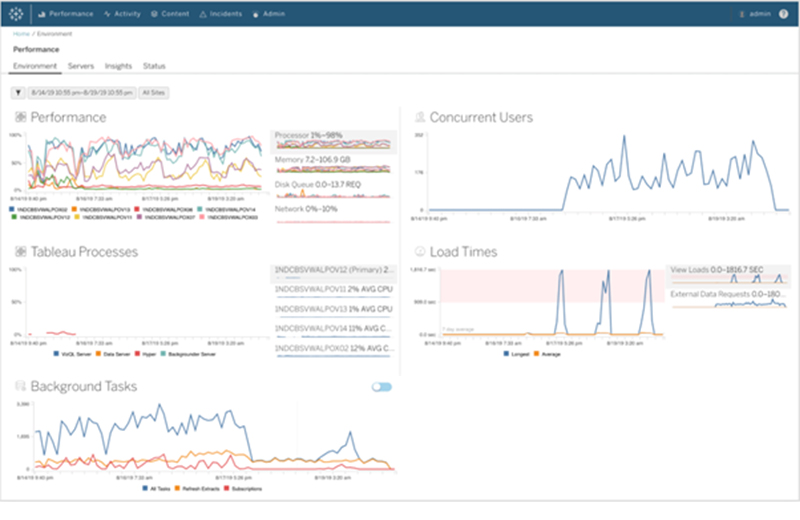
 The server management add-on feature can help in optimising the performance of deployment by customizing which nodes process background jobs such as extract refreshes and subscriptions and isolating these workloads, to specific nodes. This makes it easier to scale deployments to the needs of their organization.
This feature has a few tools, including two for better reliability and scalability and one for content migration, all of which helps the organizations to govern their data effectively.
If you are interested in learning more about the latest Tableau release and use cases, please contact us at training@beinex.com/ info@beinex.com and we would be happy to schedule a Tableau demo or training for you and your company.
The server management add-on feature can help in optimising the performance of deployment by customizing which nodes process background jobs such as extract refreshes and subscriptions and isolating these workloads, to specific nodes. This makes it easier to scale deployments to the needs of their organization.
This feature has a few tools, including two for better reliability and scalability and one for content migration, all of which helps the organizations to govern their data effectively.
If you are interested in learning more about the latest Tableau release and use cases, please contact us at training@beinex.com/ info@beinex.com and we would be happy to schedule a Tableau demo or training for you and your company.
This feature provides a complete picture of the data and how each data is connected.
Another use of Tableau Catalog is linear and impact analysis. This not only shows which assets will change but also who will be affected by it, which makes work easier for many and avoids wastage of time.
EXPLAIN DATA
Tableau 2019.3 is up with a new Al-driven feature called the “Explain Data”, which helps people go from the “what” of the data to the “how” of it. With explain data, we can get an explanation for each unexpected value in the data by just a single click. On selecting the desired data point, the ‘explain data’(lightbulb) icon appears.
For each value there might be a number of explanations. Each of these explanations are checked and only the most likely ones are provided as visualizations.
Now these visualizations can be used for further explorations.
TABLEAU SERVER MANAGEMENT ADD-ON
Organizations that run critical deployment of Tableau Server at a large scale, have mentioned concerns over manageability and scalability. They have been in search for tools that could organize the management process in an efficient way, which could save a lot of time. Tableau solved this problem by introducing the Tableau Server Management Add-on – a new feature designed to help organizations manage the deployment of Tableau Server. With this, they can quickly react to the changing needs of the business as well as save time by organizing the management process in the most efficient way. Tableau Server Management Add-on, which makes running the critical deployment of tableau at a large-scale server much simpler.
The server management add-on feature can help in optimising the performance of deployment by customizing which nodes process background jobs such as extract refreshes and subscriptions and isolating these workloads, to specific nodes. This makes it easier to scale deployments to the needs of their organization.
This feature has a few tools, including two for better reliability and scalability and one for content migration, all of which helps the organizations to govern their data effectively.
If you are interested in learning more about the latest Tableau release and use cases, please contact us at training@beinex.com/ info@beinex.com and we would be happy to schedule a Tableau demo or training for you and your company.
Note: The Server Management Add-on is not available for Tableau Online, as they manage everything from scaling, performance, and security on behalf of their Tableau Online customers. The Tableau Server Management Add-on can be separately purchased from the Tableau Server deployment.

The Future of Business Intelligence: AI-Augmented Analytics
The Struggles of Traditional Business Intelligence
Traditional BI platforms, while valuable, suffer from several limitations:
These limitations force businesses to make a tough choice: sacrifice the quality of insights by limiting analysis or invest significant time and resources into data preparation and model building.
The Rise of Augmented Analytics
Augmented analytics emerges as a powerful solution, addressing the shortcomings of traditional BI. It leverages the power of Artificial Intelligence (AI), Machine Learning (ML), and Natural Language Processing (NLP) to revolutionize data analysis:
How Does Augmented Analytics Work?
Augmented analytics enhances the four core stages of data analysis:
- Data Preparation: Traditionally, data preparation involves manual tasks like data cleaning and integration. Augmented analytics automates these processes, allowing data scientists to focus on more strategic tasks.
- Insight Discovery: Traditional BI requires pre-defined models to uncover insights. Augmented analytics utilizes ML algorithms to analyze all available data, regardless of size or complexity, to deliver targeted and nuanced insights in response to user queries.
- Insights Sharing: Sharing insights often involves generating reports and charts, a time-consuming task. Augmented analytics utilizes Natural Language Generation (NLG) to present insights in real time through online dashboards. These dashboards explain the "why" behind the data, giving decision-makers the context they need.
The Benefits of Augmented Analytics
By implementing augmented analytics, businesses can unlock a multitude of benefits:
Augmented Analytics Use Cases
Let's explore how augmented analytics is transforming various industries:
- Pharmaceutical Companies: Analyze vast datasets to optimize go-to-market strategies and uncover hidden patterns in market share data.
- Financial Lenders: Assess credit risk with greater accuracy by analyzing all relevant data points in real-time, leading to faster loan approvals and better risk management.
- Consumer Goods Companies: Gain real-time insights into product sales, customer churn, and satisfaction, allowing for proactive customer engagement strategies.

The AI Powered Surge in Corporate Performance Management
We need to do more than what corporate performance management has traditionally enabled to move from strategy to strategic actions while forecasting, monitoring, and managing performance.
What is Corporate Performance Management?
Undoubtedly not a new concept, corporate performance management is often referred to as business or enterprise performance management. Gartner defines corporate performance management or CPM as “an umbrella term that describes the methodologies, metrics, processes and systems used to monitor and manage the business performance of an enterprise”. And that is indeed a broad scope as business performance does touch several areas.
Corporate performance management isn't a matter of technologies or solutions or an isolated activity or strategy—the holistic perspective is crucial. Getting strategic, financial, analytical, and business knowledge is just one aspect of the equation that will help you make better business decisions.
The four crucial techniques linked to effective performance management are listed below:
- Analysis of the chance and choose the high-impact use cases to benefit from artificial intelligence
- Automation of tasks and establishing a long-term strategy to find quick wins for an all-encompassing change with automation
- Capturing of the value by streamlining jobs to manage organisational transformation and adopt an end-to-end process view.
- Integrating Artificial Intelligence (AI) into an operational model to make a transformational impact, analyse data to make wise decisions, and develop the capacity for ongoing improvement
- The past corporate performance management only partially made it possible to foresee the future. But the present AI advancements help in real-time analysis, predictions, and future-oriented decision-making.
- With the help of artificial intelligence, pattern recognition, statistical forecasting, the analysis of vast amounts of market intelligence, decision-making can be made outside the traditional realm of historical information. When AI tracks KPIs and makes more data-based decisions, performance management can improve significantly.
- Immediate feedback Intelligent dashboards built into performance management software offer all the quantifiable metrics a management team could need to make decisions. The benefit, though, is not in the variety. It lies in the capacity to interpret and use data as changes occur in real-time throughout the entire organisation.
- Data consolidation for easy management The tools have the intelligence to gather, group, and combine data from multiple sources, be it departments, spreadsheets, or even companies.
- Make risk management simple The incorporation of tools like what-if models is a crucial benefit of CPM. By simulating the best- and worst-case situations, for example, the model equips managers to reduce risks and make wise decisions.
- Offer primary data access and feedback Managers may easily access information through performance management systems, promoting accuracy and quality.
- Ease of collaboration CPM tools are locally integrated and cloud-connected for all users to keep in sync across all departments.
- Boost the standard of talent management Recruiters and business leaders are now concentrating on employing AI-driven performance management to enhance the caliber of their hiring. It assists them in finding the appropriate talent pool and selecting the best candidates.
- Effective data analytics for problem-solving AI is a real game-changer in performance management systems and helps leaders and stakeholders make data-driven decisions and solve current challenges.
- Developing a collaborative environment Finally, businesses succeed when they concentrate on developing a collaborative environment where there is no place for hierarchy, bias, or inconsistent behaviour. AI in performance management systems will enable executives to spend more time on their employees and provide brilliant ideas.
How has AI impacted CPM?
The face of corporate performance management is changing due to artificial intelligence, among other things, in monitoring, reporting, analysis, forecasting, and analytical intelligence (as provided by analytical applications).
Historically speaking, leveraging data has improved over time, opening more opportunities to learn from the past and present and, most importantly, to comprehend and plan using the proper KPIs. This is true within the broader context of strategy and planning in a corporate performance monitoring, reporting, and analysis environment.
To enable analysis, produce measurements, and changes, AI is integrated into the performance management process. Better performance management procedures can be sped up with artificial intelligence, increasing transparency and sustaining employee interest. Furthermore, corporate performance management enables better leverage of all data in the organisation’s ecosystem and helps to achieve its strategic objectives.
Advantages of a CPM Software
Corporations must adopt process automation in the age of business management intelligence. Here are a few advantages of using a CPM system.
What does Beinex offer?
STRACT by Beinex is an indisputably efficient tool that helps it deliver optimised business performance. It allows businesses to forecast, track, assess, and identify areas for improvement across all operations. Companies can thoroughly and comprehensively analyse all relevant financial and operational metrics across various levels of the business by consolidating data and performance metrics into one centralised database and then measuring this against their strategic goals.
STRACT is a comprehensive solution with features that allow you to create much more accurate and flexible budgets, enhancing your current business and resource planning and forecasting.

Five Ways to Overcome Data Trust Challenges (Infographics)
